
What is Sakutto?
Sakutto is a free, open-source browser extension for Chrome and Firefox that translates web pages on the user's own device. Translation is done by PLaMo 3 Translate, a translation model published by Preferred Networks, which the extension runs locally through a pinned build of wllama, the WebAssembly binding for llama.cpp. The model runs on the GPU through WebGPU when the browser exposes it and on the CPU otherwise. The project describes itself as unofficial: it is not affiliated with Preferred Networks, Inc., and the interface carries the "Built with PLaMo" notice that the model license requires.
The extension is developed by jammaru and published under the MIT license in the jammaru/sakutto repository, written in TypeScript. The first public source release, 0.1.1, and version 1.0.0 both appeared on November 6, 2026. It is distributed through the Chrome Web Store and as a listed add-on on addons.mozilla.org for desktop Firefox 153 or later. Each GitHub release also attaches a Chrome package zip, and the README documents how to build and load the extension unpacked. The model weights are not part of the repository or the extension package: on first use the extension downloads them from Hugging Face and keeps them on the device. The standard 0.8B model is about 573 MB, and a 2B "High accuracy" model of about 1.81 GB can be selected instead.
PLaMo 3 Translate supports 53 languages in either direction. On Chrome, Chrome's built-in Translator API is used only for eleven further languages that PLaMo does not cover (Czech, Danish, Greek, Finnish, Kannada, Norwegian, Portuguese, Romanian, Swedish, Turkish and Ukrainian); Firefox uses PLaMo only and hides those targets. Every line that PLaMo translates is written by PLaMo, and text waiting for the model keeps its source wording rather than showing a draft from another engine. The interface itself is localized into 14 languages.
The latest release is v1.4.1, published November 13, 2026. It fixes hidden characters in page text that could break a translation, gives regional flag emoji enough space, keeps the original text when a translation is cut off for lack of room, and makes the Local server engine choice take effect on Firefox. Version 1.4.0 added on-device translation of YouTube (including live streams) and X video captions, version 1.3.0 added an experimental route to a local OpenAI-compatible server, and version 1.2.0 added translation of text being typed into a field, together with the Firefox build target. The full history is in the changelog.
The project code is MIT-licensed, but the model is not: PLaMo 3 Translate is covered by the PLaMo Community License, whose texts are packed into the extension. According to the README, personal and academic use need no registration, while commercial use requires prior registration with Preferred Networks and is limited to users or affiliates with income or sales of no more than 1 billion yen in the most recent fiscal year; beyond that a separate commercial license from Preferred Networks is needed. pdf.js is included under Apache-2.0, and llama.cpp, wllama, the Emscripten runtime, the Dawn WebGPU library and Svelte are listed in the third-party notices.
Sakutto has no account, no advertising, no analytics and no paid features. The developer accepts optional support through GitHub Sponsors ($5 or $10 a month, or a one-time amount), and the README states that sponsoring unlocks no features or priority support. The data handling is described in the privacy policy. Related projects on iThub include Browser Operator and WebBrain, which also bring local or user-chosen language models into the browser.
Key capabilities
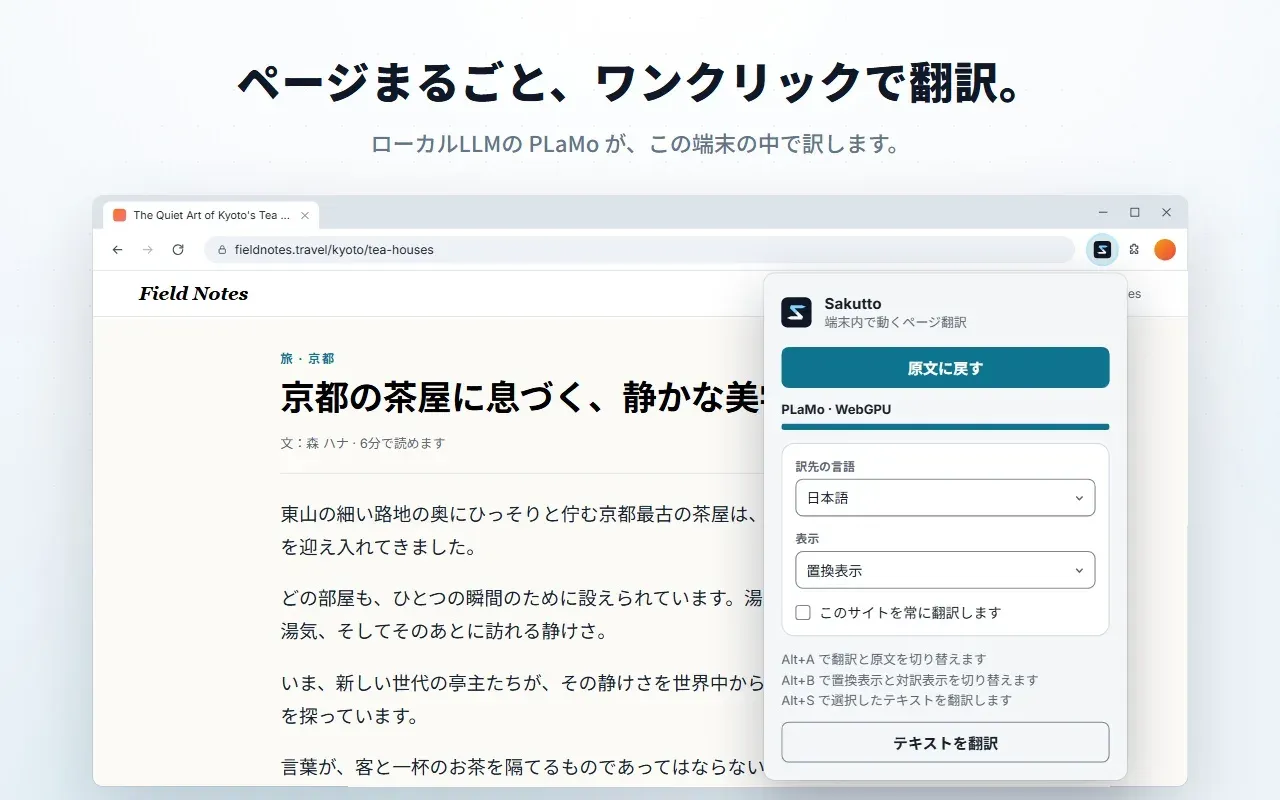
- Whole-page translation on the device Alt+A (Option+A on a Mac, Alt+Shift+A on Firefox), the toolbar popup or the right-click menu translates the current page, and the same command restores the original. Each paragraph is sent to PLaMo as its own prompt, with the headline first, and the page is filled in progressively. Text that PLaMo has not reached yet stays in the source language.
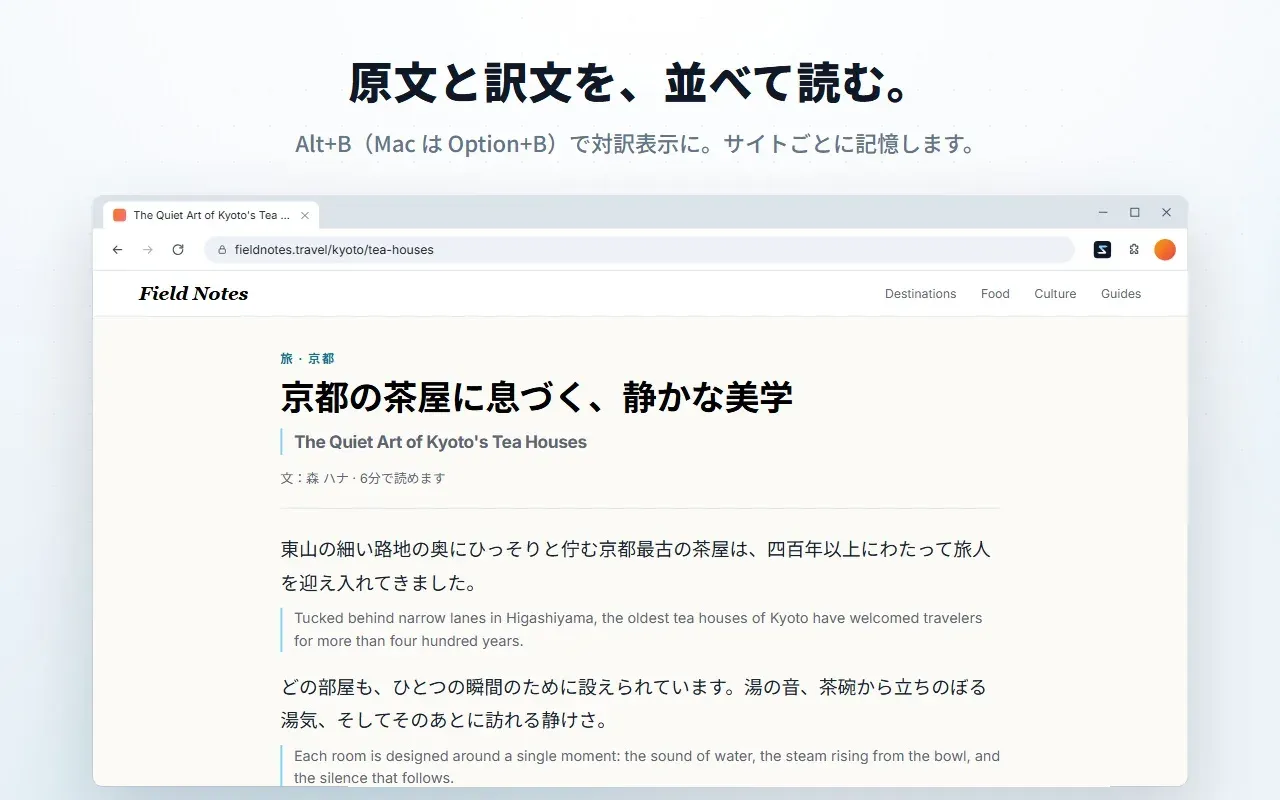
- Replacement and bilingual reading styles The translation can replace the original text or appear under each source paragraph in a bilingual view. Alt+B (Option+B, or Alt+Shift+B on Firefox) switches between the two, and the choice is remembered per site. Target language and reading style can be kept per site, with global defaults in the options page.
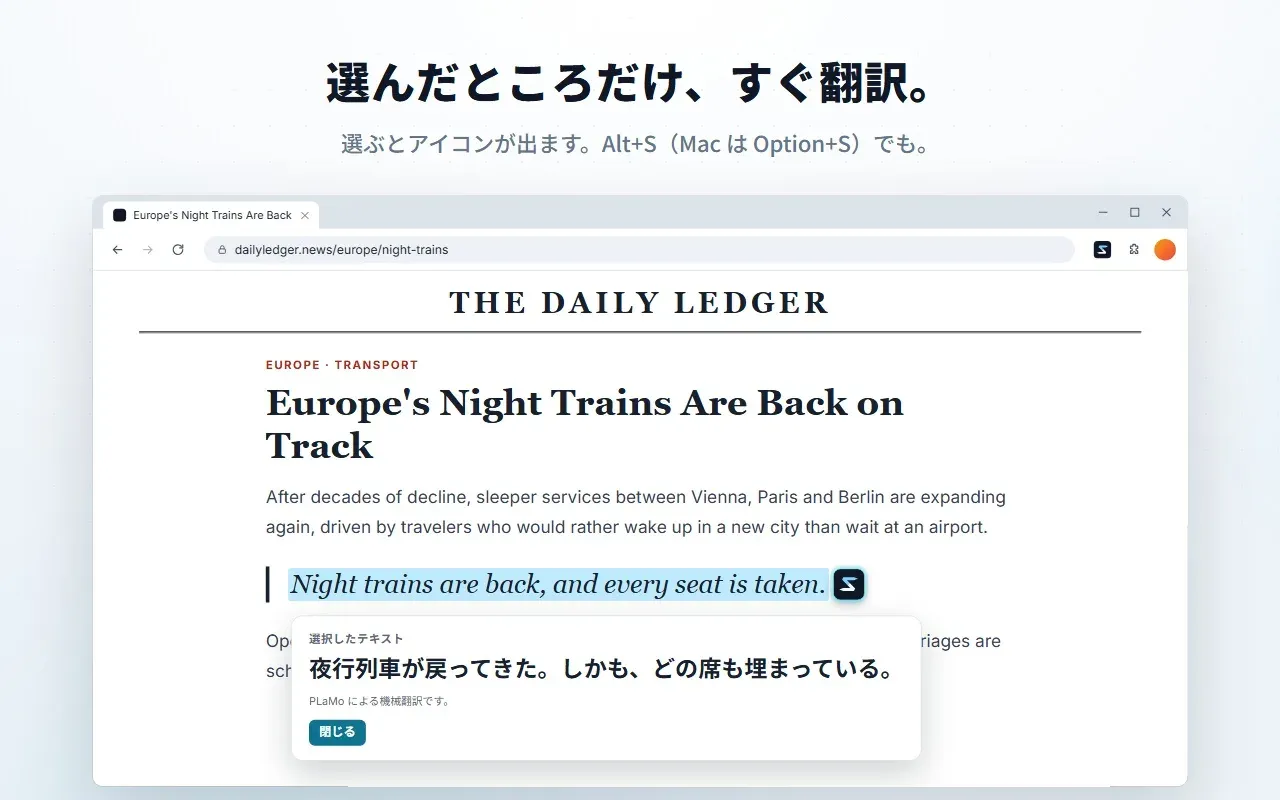
- Selection translation Selecting text shows a small Sakutto icon next to the highlight, and clicking it translates the selection in a pop-over card. Alt+S (Option+S, or Alt+Shift+S on Firefox) and the context menu do the same. The card labels the result as a machine translation by PLaMo.
- Translating text while typing With a message box, textarea or other editable field focused, Alt+T (Option+T, or Alt+Shift+T on Firefox) or the "あA" button beside the field opens a live preview of the translation above the field. Pressing the shortcut again or Ctrl+Enter (Command+Enter on a Mac) replaces the draft, and Restore original puts it back. Password fields, card numbers and sites set to never translate are skipped, and the button can be hidden in settings.
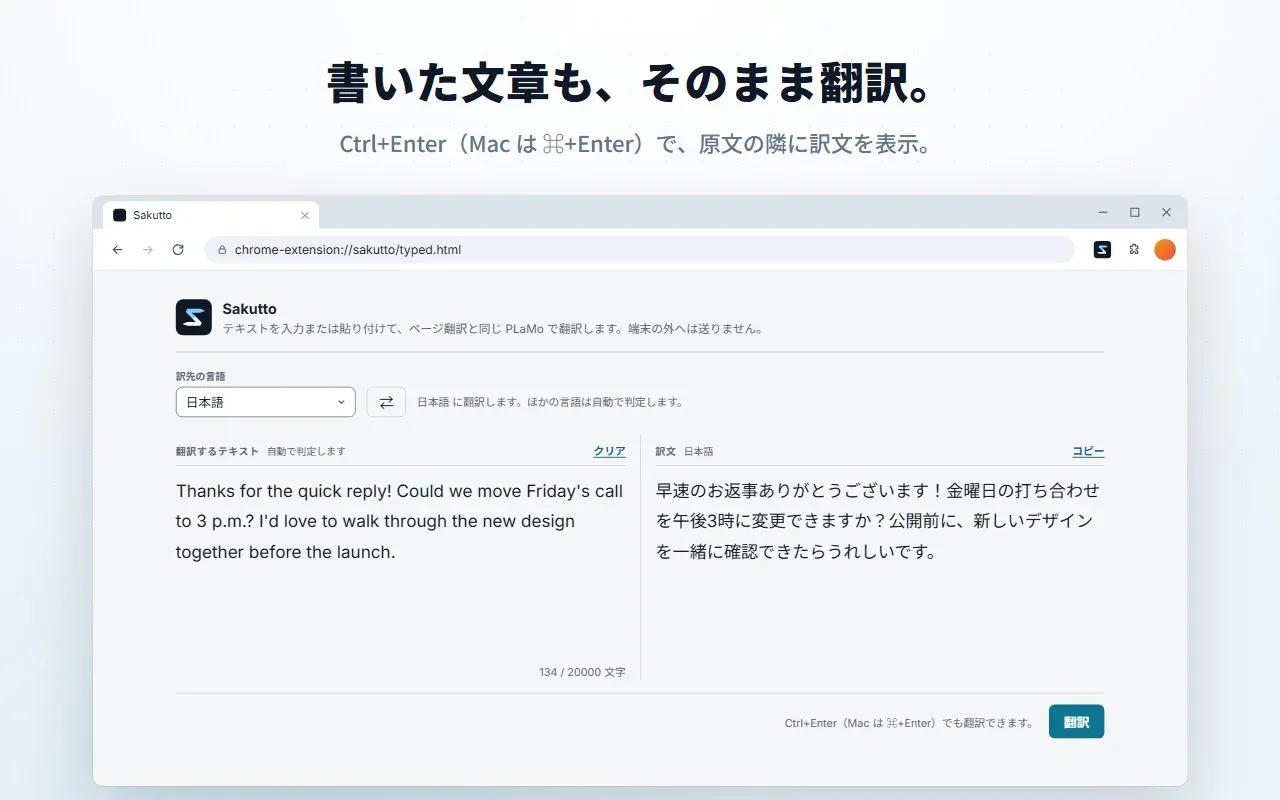
- Typed text page A separate extension page, opened from the popup or the options page, has a source box and a result box for typing or pasting text and translating it without touching a web page. It uses the same PLaMo model, license consent and target-language setting as page translation, and has a Copy button. Since version 1.0.1 up to 100,000 characters can be pasted at once; long text is split for the model.
- PDF reader with layout-preserving translation Because no extension can read Chrome's built-in PDF viewer, Sakutto offers "Translate this PDF" in the popup and context menu, fetches the same file and opens it in its own pdf.js reader. Each translated block is placed in the box its source text occupied, so columns, tables and figure captions stay in place, and type shrinks to no less than about 67% of the source size. Pages are translated as they come into view, scanned pages without a text layer are marked as having nothing to translate, and the reader opens documents up to 200 MB.
- Video caption translation Added in version 1.4.0 and off by default, this setting translates existing captions on YouTube (including live streams) and X as the video plays and shows them as an overlay on the player. Captions can be resized with a slider and dragged, with positions remembered per site, and the original captions can be hidden. Further caption sites can be added in settings, and Chrome asks for access to those sites when the feature is turned on.
- 53 PLaMo languages plus Chrome fallbacks PLaMo 3 Translate covers 53 languages in either direction, with the source detected from the page. The default target is the browser's UI language, or English when that language is not supported. On Chrome only, eleven extra languages are handled by Chrome's built-in on-device translator; Firefox offers PLaMo languages only.
- Two model sizes The default model is PLaMo 3 Translate 0.8B, a download of about 573 MB that resumes if interrupted and is kept only when its hash matches the pinned file. Settings also offer a 2B "High accuracy" model of about 1.81 GB, whose speed the extension notes depends on the device. Since version 1.3.0 the selected model is saved across restarts, and switching models releases the previous one.
- WebGPU acceleration with CPU fallback The bundled wllama runtime uses WebGPU where the browser provides it and falls back to the CPU otherwise. Release 1.2.0 made the fallback on AMD and Intel GPUs more reliable and added a correctness check that disables a faulty GPU setup, and release 1.3.0 detects garbled GPU output and redoes that part on the CPU. The changelog adds that this change does not make WebGPU work on AMD Radeon GPUs.
- Glossary and per-site rules A glossary can hold up to 5,000 terms per stored list, global or per site, and a translation run can carry merged lists of up to 10,000 terms. Only terms that occur in the current text are added to the model prompt. Per-site rules cover the target language, reading style, automatic translation and sites that are never translated.
- Experimental local server engine Settings can route PLaMo requests to an OpenAI-compatible server on the same computer instead of the built-in engine, with documented recipes for mlx_lm.server (default http://127.0.0.1:8080/v1) and LM Studio (default http://127.0.0.1:1234/v1). It uses raw /v1/completions with Sakutto's own prompt format and supports PLaMo models only. The project labels it experimental and states that accuracy is not guaranteed; a non-local URL is blocked until the user confirms a warning.
- Configurable keyboard shortcuts Four commands have default keys: translate or restore the page, switch reading style, translate the selection and translate typed text. The PDF reader command ships without a key and can be bound in the browser's shortcut editor. Firefox defaults to Alt+Shift combinations so the Windows menu bar is not taken, and the popup and settings link to each browser's shortcut page.
- Narrow permissions The manifest requests storage, unlimitedStorage (for the model and translation cache), offscreen, activeTab, scripting and contextMenus. Host permissions for all http and https sites are optional and requested only when automatic translation is turned on for a site; nothing is requested for every site at install time. The PDF reader adds no permission.
- Local data and privacy Page text, selections, the glossary and translations are not sent to the developer, and there is no account, telemetry or crash reporting. The only third-party download for the built-in engine is the model from Hugging Face; a PDF is fetched once from the site the tab already shows and deleted when the reader tab closes. The model and the translation cache can be removed from the settings, as described in the privacy policy.
- Chrome Web Store installation The Chrome build is installed from the Chrome Web Store under the name "Sakutto - Local AI translation". The extension downloads the model after the first-run screen, which explains the PLaMo Community License and records the user's agreement. Each GitHub release also carries a Chrome zip of the same version.
- Firefox add-on The Firefox add-on requires Firefox 153 or later on desktop Windows, macOS or Linux and is not built for Firefox for Android. The add-on listing states that it was tested on Windows and that the model runs on the CPU, possibly more slowly, where WebGPU is unavailable. Chrome's built-in Translator API is not used on Firefox.
- Building from source Building needs Node.js 24 and pnpm 12, plus Docker for the one-time wllama build, which compiles the pinned commit inside the emscripten/emsdk 4.0.20 container. pnpm build and pnpm build:firefox produce Manifest V3 output for Chrome and Firefox, and the zip step checks that the package contains the runtime and license texts but no model weights, source maps or install-time host permissions. Details are in docs/BUILDING.md.
Where Sakutto fits
Reading foreign-language articles in place
A reader opens an article, presses Alt+A or uses the popup, and the page is translated paragraph by paragraph on the device, headline first. The bilingual view keeps each source paragraph with its translation underneath, and the same shortcut restores the page. Ticking "always translate this site" asks for that site's host permission and translates it automatically on later visits, with the language and reading style stored for that site.
Translating a single passage
For a quote, a table cell or one paragraph, selecting the text and clicking the icon beside the highlight, or pressing Alt+S, shows the translation in a card on the page without changing the rest of the document. This also covers pages where whole-page translation is not wanted, such as a mostly native-language page with a short foreign section.
Writing replies in another language
In a webmail, chat or form field, Alt+T or the "あA" button shows a live translation preview of the draft above the field. A second press or Ctrl+Enter replaces the draft with the translation, and Restore original returns to the text as typed. Japanese drafts go to English by default and other drafts go to the saved target language, with a language menu in the preview; the separate typed text page serves the same purpose for longer text without a web page.
Reading translated PDF papers and reports
With a PDF open in Chrome, "Translate this PDF" fetches the file from the same site and opens it in Sakutto's reader in a new tab. Two-column papers, tables and figure captions keep their positions, names and affiliations on the first page stay in their original spelling, and blocks that do not fit are left in the original typesetting with a marker that opens the full translation. The copy lives inside the extension and is deleted when the reader tab closes.
Following videos with translated captions
After the caption setting is turned on in Settings or the popup, YouTube videos and live streams and X videos that already have captions show a translated overlay while they play. Auto-generated Japanese captions are translated to English. The overlay can be resized and dragged, the original captions can be hidden, and after about four seconds of silence the translation clears and the original captions return.
Using a local MLX or LM Studio server
On a computer that already runs mlx_lm.server or LM Studio with PLaMo 3 Translate weights, the Local server option in Settings sends PLaMo requests to that address instead of the in-browser engine. The README notes that a Mac check of MLX 4bit, 8bit and bf16 builds showed translation errors that the built-in engine did not, and the project marks this path as experimental; the design note records the model pins and what was measured.
Reviews of Sakutto
Be the first to share your experience with Sakutto.
Write a review
Loading review form…
Found Sakutto useful? Upvote it todayYour vote helps other IT teams find it in the daily ranking.