
What is tapflow?
tapflow is an open-source system for testing mobile app builds in a browser. iOS Simulators and Android emulators keep running on Macs the team already owns, and tapflow streams them to a web dashboard where backend developers, product managers, designers and QA staff can tap, swipe and type without installing Xcode or Android Studio. The project describes itself as a self-hosted alternative to Appetize and BrowserStack for mobile QA: builds, device streams and recordings stay on infrastructure the team controls.
The system has three parts. A relay server, which needs Node.js 22 or later on Linux or macOS and about 512 MB of RAM, serves the dashboard and the API on the same port (4000 by default) and keeps accounts and team data in SQLite. A macOS agent drives the iOS Simulator and the Android emulator and connects outbound to the relay over WebSocket, so the Mac needs no inbound firewall rules. iOS touch input is injected directly without WebDriverAgent, and Android streaming uses a bundled copy of scrcpy-server under Apache-2.0. The browser dashboard decodes H.264 with WebCodecs on secure contexts and with a WebAssembly decoder on plain HTTP.
tapflow is distributed as the npm package tapflow, which provides the CLI, relay and agent, and as a relay-only Docker image published as tapflow/tapflow on Docker Hub and ghcr.io/jo-duchan/tapflow on GitHub Container Registry. The MCP server ships separately as @tapflowio/mcp-server. The source is on GitHub under the MIT license (copyright tapflow contributors), the repository was created in May 2026, and the documentation is available in English and Korean. iOS agents need macOS 26 or 27 with Xcode 26 or 27, and Android agents need Java and the Android SDK with an AVD; agents run only on macOS.
The current release is v0.32.0, published on October 31, 2026. It lets a viewer return to a QA session after a dropped connection without losing the app under test, allows one app to have a different bundle ID per platform and to merge or split apps in Settings, refreshes the device list without an agent restart, and makes a build's label, version and build number editable. Release v0.31.0 added the iPhone Duo simulator on Xcode 27.1 with Apple silicon, quarter-turn rotation on iOS and Android, and lower CPU use for iOS streaming. The project labels itself v0.x and actively developed, backward compatible by default, with breaking changes noted in the changelog.
The manual QA dashboard is described as the most mature part; the flow runner and the MCP server are marked experimental. tapflow does not replace Xcode, Android Studio or build tooling, is not a device farm, and wiring in external frameworks such as WebDriverAgent or Appium is out of scope. The project received the Gold Prize (NIPA President's Award) in the Open Track of the 2026 Open Source Developer Contest in Korea. Related listings on iThub: scrcpy, whose server component tapflow bundles for Android, and ARTEMIS, an agent that runs Android UI tasks from natural-language instructions.
Key capabilities
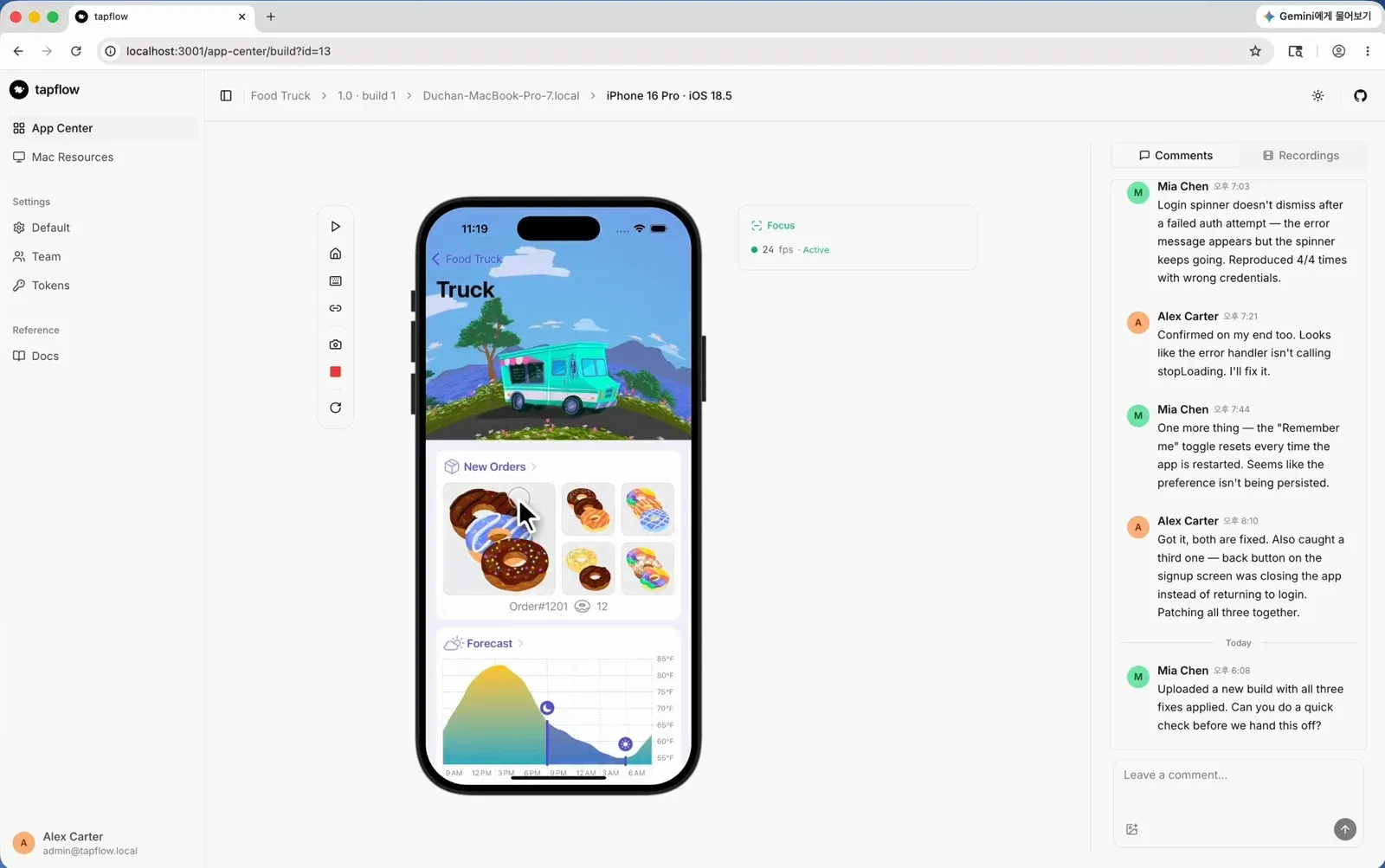
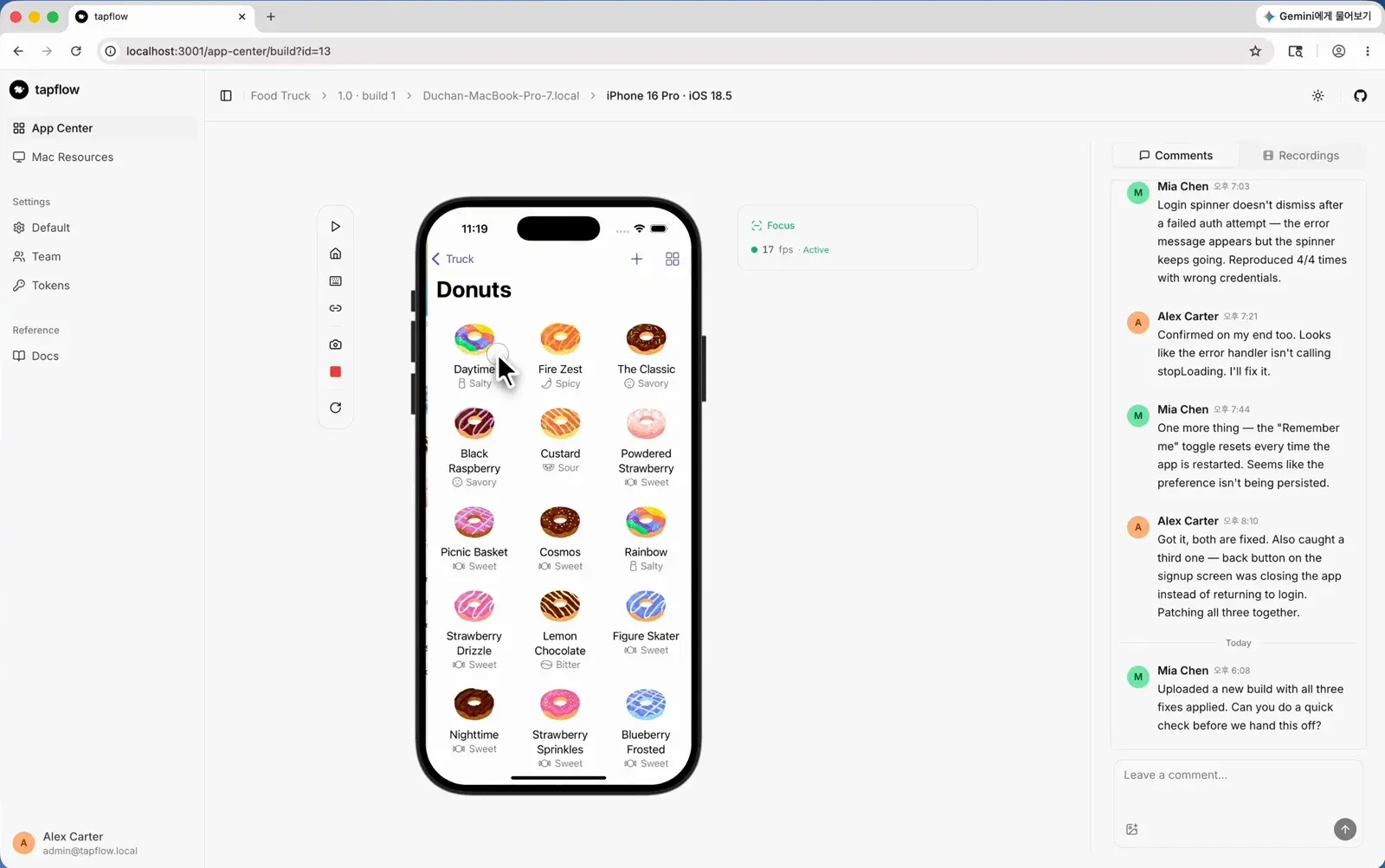
- Browser streaming of simulators and emulators IOS and Android devices stream at about 30 frames per second as H.264 through a two-tier decoder: WebCodecs on HTTPS or localhost, and WASM tinyh264 on plain HTTP. Resolution adapts to the connection, native on a secure context and downscaled on plain-HTTP LAN access. The project's latency log reports decode-to-present times of roughly 11 to 17 ms at p50 with the software decoder, with network round trip added on top.
- Codec fallback The stream negotiates the codec per client and falls back to JPEG frames when neither a hardware nor a WASM decoder is available, so older browsers can still view a device.
- Touch, gestures and keyboard Taps, swipes and pinches are forwarded to the simulator or emulator in real time, and keyboard shortcuts trigger simulator toolbar actions. A deeplink toolbar opens supported deeplinks directly in the app under test.
- Clipboard sync and device audio Text can be copied between the Mac and the device in both directions; copying from the device requires the dashboard on HTTPS or localhost. The app's sound is played back in the browser tab.
- Network control A device can be taken off the network and put back to test offline behaviour. On iOS this requires a network filter that is installed once; Android needs no extra setup, according to the network control guide.
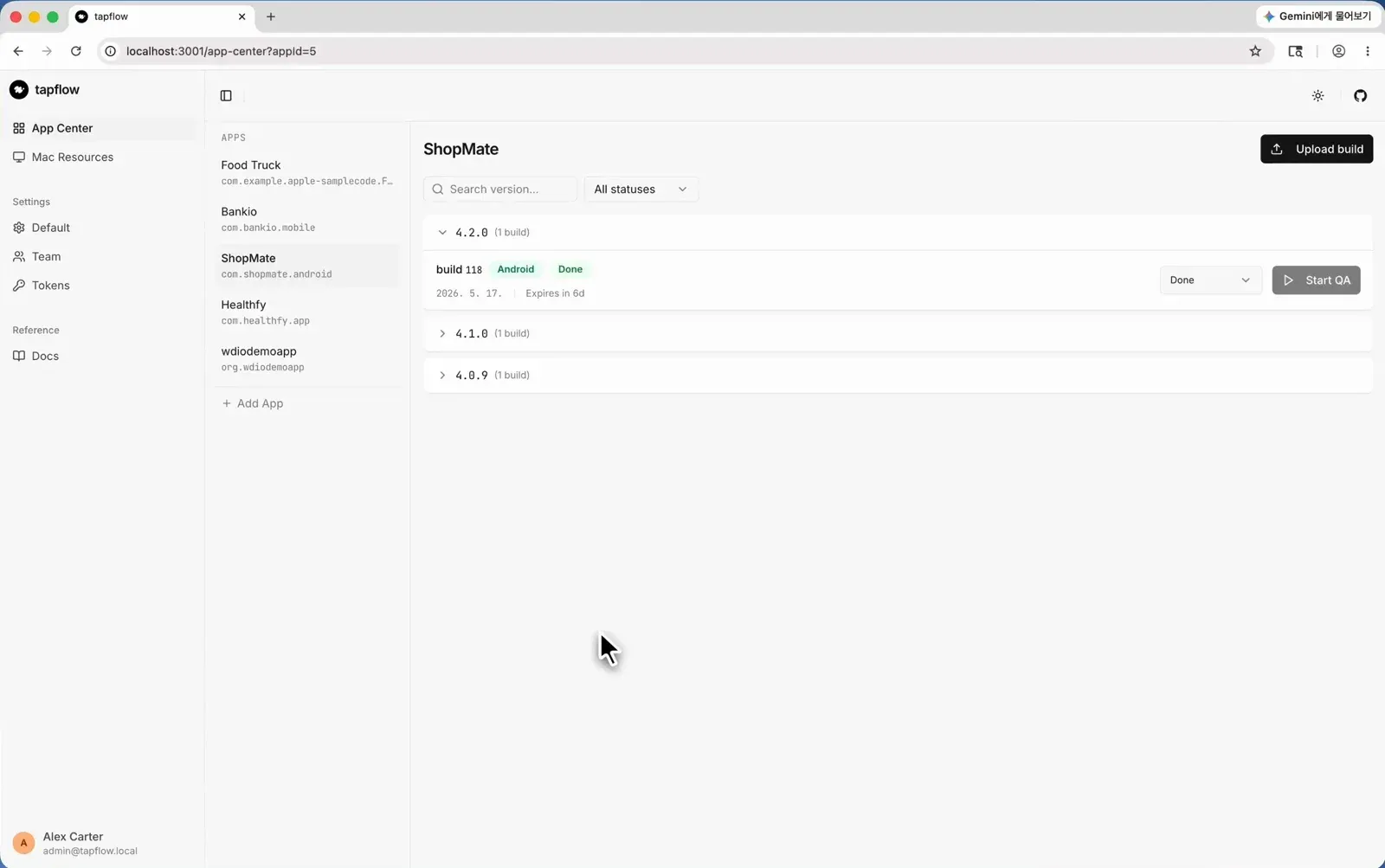
- App Center for builds Teams upload
.app.zipand.apkfiles and track each build through Backlog, In Progress, Done and Rejected. Since v0.32.0 a build's label, version and build number can be edited, and one app can hold different bundle IDs for iOS and Android. The App Center documentation covers uploads from CI with abuilds:writetoken. - Comments on builds Every role can leave notes with PNG, JPG or WebP images up to 5 MB on a build, in one flat list visible to everyone who opens it. Links to individual comments can be copied over HTTPS; editing and deleting go through the REST API.
- Session recordings and screenshots QA sessions can be recorded and shared; recordings are kept on the relay for about 72 hours and then purged. Screenshots are also available from the REST endpoint
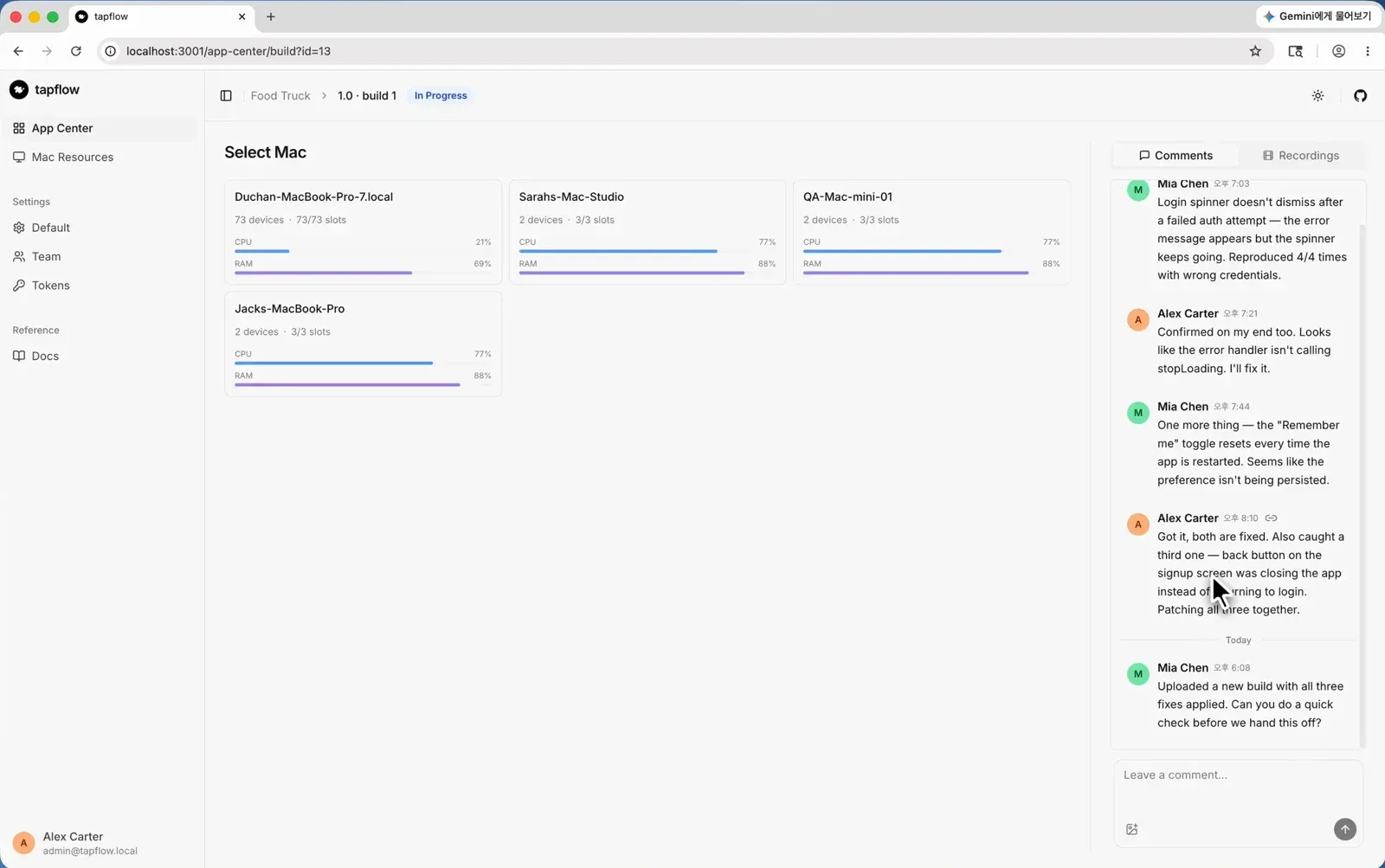
GET /api/v1/sessions/:sessionId/screenshotfor CI jobs and AI agents. - Mac resource monitoring The dashboard shows CPU and RAM per agent Mac, along with how many devices and slots each one has, so a session can be started on a host that is not overloaded.
- Team management and tokens Admins invite teammates with links and assign the roles Admin, Developer, QA or Viewer. Personal Access Tokens carry scopes, for example
builds:writefor CI uploads andagentfor agents on other machines. - Authentication model The relay accepts unauthenticated connections only from its own machine. Browsers from elsewhere sign in, remote agents present an
agent-scope token, and traffic arriving through a tunnel is treated as off-host. The security page names the relay as the trust boundary, since it holds accounts, builds and live device control. - REST API Sessions, builds, screenshots and UI-tree queries are exposed over a documented REST API authenticated with Personal Access Tokens, intended for CI/CD pipelines and agent workflows.
- Flow runner (experimental)
tapflow flow runreplays a YAML flow with condition-based waits, writes a JUnit report and calls no LLM at replay time. Flows can launch apps with arguments and environment variables and tap elements by selector. - MCP server (experimental)
@tapflowio/mcp-serverexposes tapflow as a Model Context Protocol server, so Claude Code, Codex and other MCP clients can boot devices, install builds, tap, type and capture screenshots as native tools. It runs as a local stdio process that talks to the self-hosted relay with a token. - CLI for setup and operation
tapflow setupinstalls simulator and emulator prerequisites on an agent Mac,tapflow doctorre-checks them, andtapflow startruns relay and agent together in local mode. Further commands start the relay or agent separately, list and boot devices, show status, reset all simulators and print relay logs. - Relay deployment with npm, PM2 or Docker The relay can run under PM2 from the npm package or as a container with a mounted data volume, which holds the sign-in secret. With Docker,
TAPFLOW_RELAY_URLmust be set so invite links point at the right address, and the first admin can be created fromTAPFLOW_ADMIN_EMAILandTAPFLOW_ADMIN_PASSWORD. Reverse proxy setups with nginx or Caddy are covered under external access.
Where tapflow fits
Checking a build without a mobile toolchain
The scenario the project starts from is a backend developer, product manager or designer who needs to see a sandbox build. A teammate uploads the build to App Center, and the viewer opens the dashboard, picks a free simulator or emulator on one of the Macs and installs and runs the build there. Layout checks across screen sizes use whichever device models the agents have installed.
Running tapflow on a single Mac
The Quick Start installs the CLI with npm install -g tapflow, prepares the Mac with tapflow setup and starts relay and agent together with tapflow start. The first visit to http://localhost:4000 redirects to /setup to create the admin account, or tapflow admin init does it from a headless shell.
Serving a whole team from a central relay
For a team, the relay runs on a Linux server or a dedicated Mac, under PM2 or as the Docker image, and each agent Mac connects with tapflow agent start --relay wss://... --token ... using an agent-scope token created by an Admin. Resource monitoring shows how loaded each Mac is, and access from outside the LAN goes through a reverse proxy with HTTPS.
Delivering builds from CI
A CI pipeline uploads each new .app.zip or .apk to the relay with a builds:write token, and the build appears in App Center with its version and build number. QA moves it through the status columns, records sessions and leaves comments with screenshots on the build.
Agent-driven and scripted checks
With the MCP server registered in Claude Code or Codex, a coding agent can drive a simulator through a scenario described in plain text and capture screenshots. The documented pattern is that an agent authors a YAML flow once and CI replays it deterministically with tapflow flow run, which produces a JUnit report. Both parts are marked experimental, with rough edges noted in selector matching and in timing right after app launch.
Install
npm install -g tapflowReviews of tapflow
Be the first to share your experience with tapflow.
Write a review
Loading review form…
Found tapflow useful? Upvote it todayYour vote helps other IT teams find it in the daily ranking.