

What is Hoppscotch?
Hoppscotch is an open-source API development platform for building, sending, testing and documenting HTTP requests. It covers REST, GraphQL, WebSocket, Server-Sent Events, Socket.IO and MQTT in one interface, with collections, environments, pre-request scripts and post-request tests. The project started in 2019 under the hoppscotch/hoppscotch repository and is now developed by Hoppscotch Limited together with outside contributors. The official documentation covers every client and edition.
The same application is distributed in several forms. The web app runs at hoppscotch.io and can be installed as a progressive web app. Desktop builds for Windows, macOS and Linux are built with Tauri on top of the web client. The @hoppscotch/cli npm package runs collections from a terminal or a CI job. A Community Edition can be self-hosted with Docker, either as one all-in-one container or as separate frontend, backend and admin images. A separate MCP server, also MIT-licensed, lets AI coding agents work with Hoppscotch workspaces.
Releases use calendar-style version numbers. The current release is 2026.10.1, published November 5, 2026: it grants bundle origins correctly on Windows desktop builds and opens chat reply links in the browser. Version 2026.10.0 added support for the operating system trust store in the desktop app, so corporate and custom certificate authorities work without extra configuration, hardened the default secrets of self-hosted deployments and made Insomnia imports more tolerant. Version 2026.9.0 introduced the Enterprise Cloud tier and an experimental AI Assistant for Enterprise editions, and 2026.8.0 merged REST and GraphQL into one workspace and added data-driven collection runs from CSV or JSON files.
The repository is a TypeScript monorepo. The interface is written in Vue 3 and built with Vite, the backend uses NestJS with a GraphQL API, Prisma and PostgreSQL, and the desktop app and the Hoppscotch Agent use Tauri. Self-hosted instances are served behind Caddy, and authentication supports email sign-in plus GitHub, Google and Microsoft OAuth. The code is released under the MIT License; Enterprise Edition features such as SAML SSO, SCIM provisioning and audit logs require a commercial license key.
Hoppscotch is a client and collaboration tool, not an API gateway, load tester or production monitoring service. It does not host your APIs, and its mock servers and published documentation are meant for development and sharing rather than production traffic. In a browser, cross-origin requests are subject to CORS rules, which is why the project provides the desktop app, a local agent, a browser extension and a proxy as alternative request paths, as described in the interceptor documentation.
Hoppscotch screenshots
Explore the interface. Open a screenshot to view it at full size.
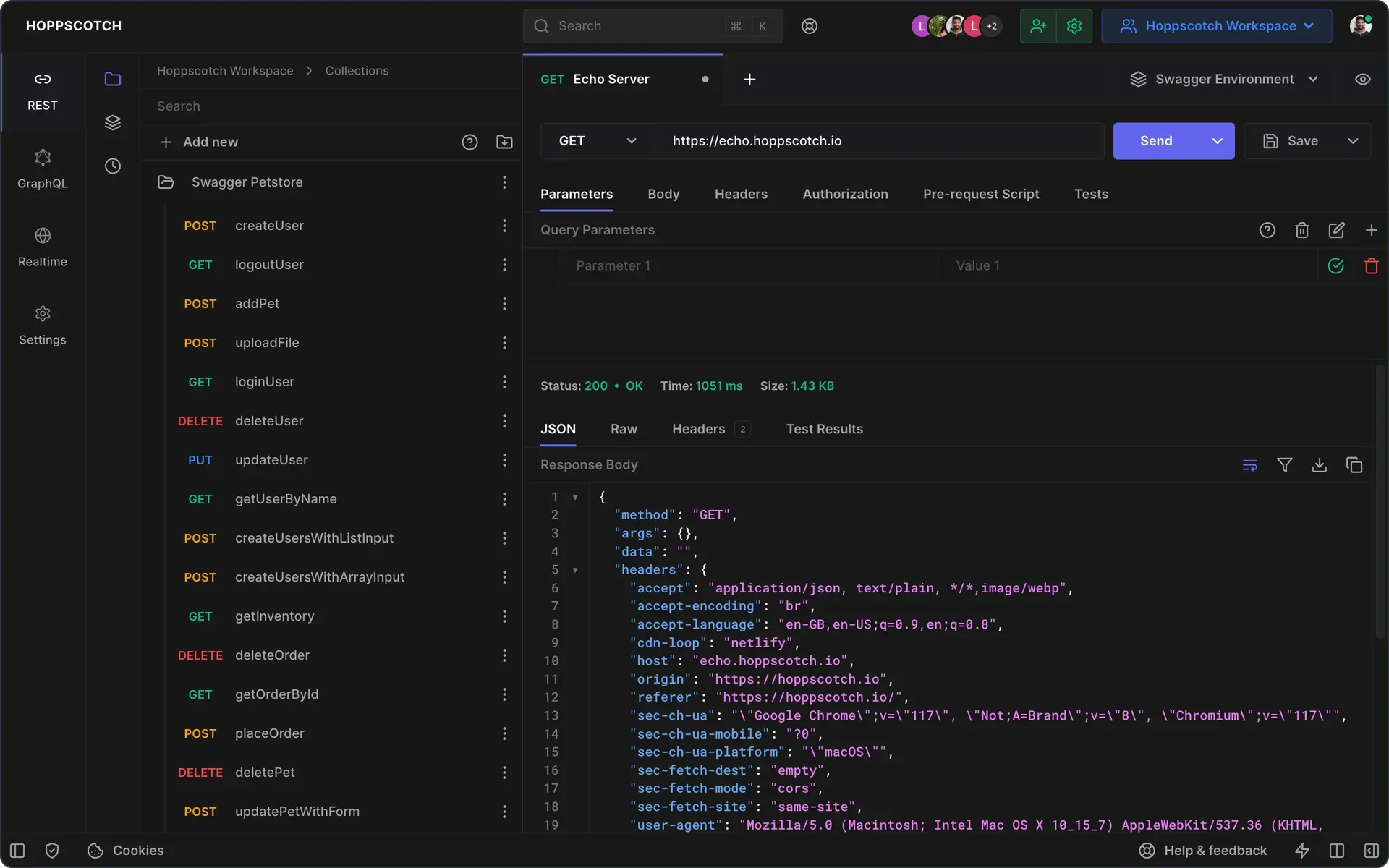
Official repository screenshot: REST workspace with a collection sidebar, request tabs and a 200 OK JSON response.
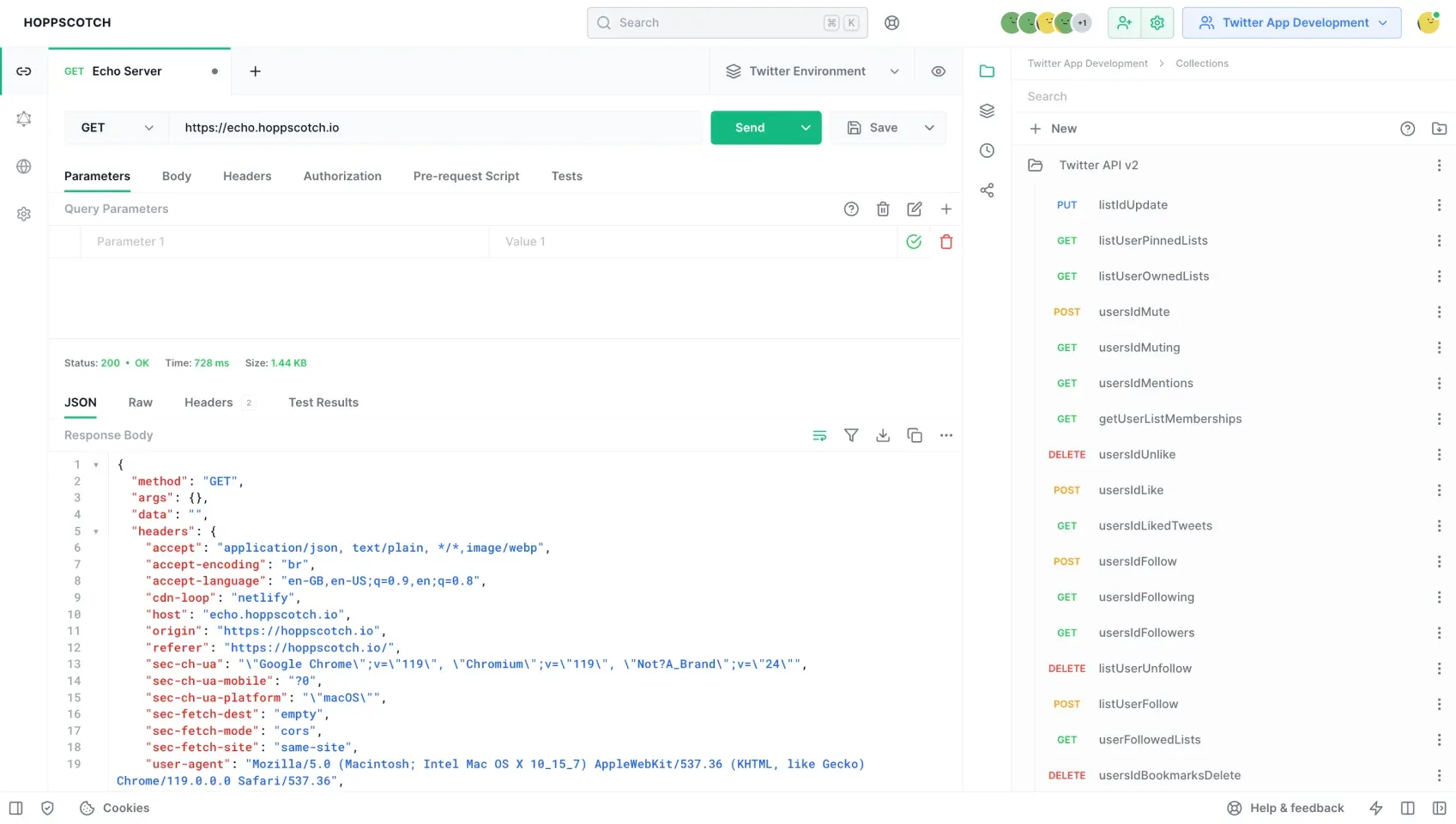
Light theme in a team workspace: request editor and response on the left, a shared Twitter API v2 collection in the right sidebar.
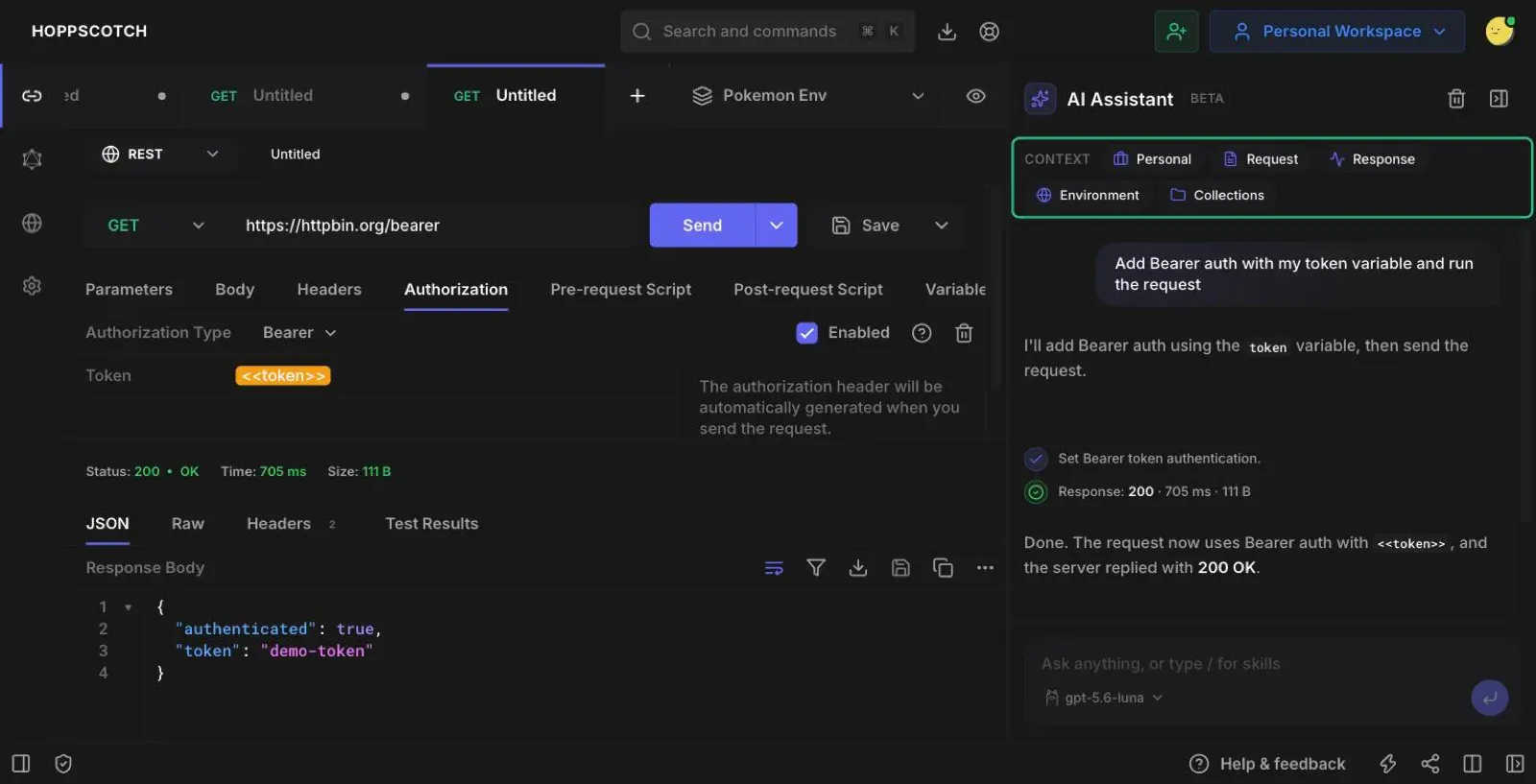
Experimental AI Assistant from the Enterprise documentation: it sets Bearer auth from a token variable, runs the request and reports the 200 OK result.
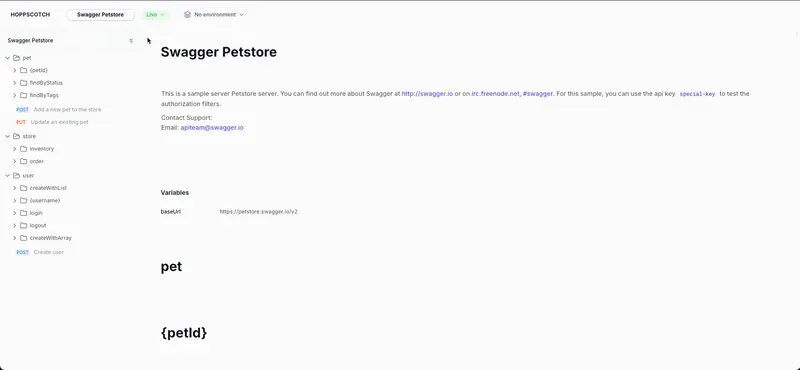
Frame from the official documentation animation: a published, live documentation page generated from the Swagger Petstore collection.
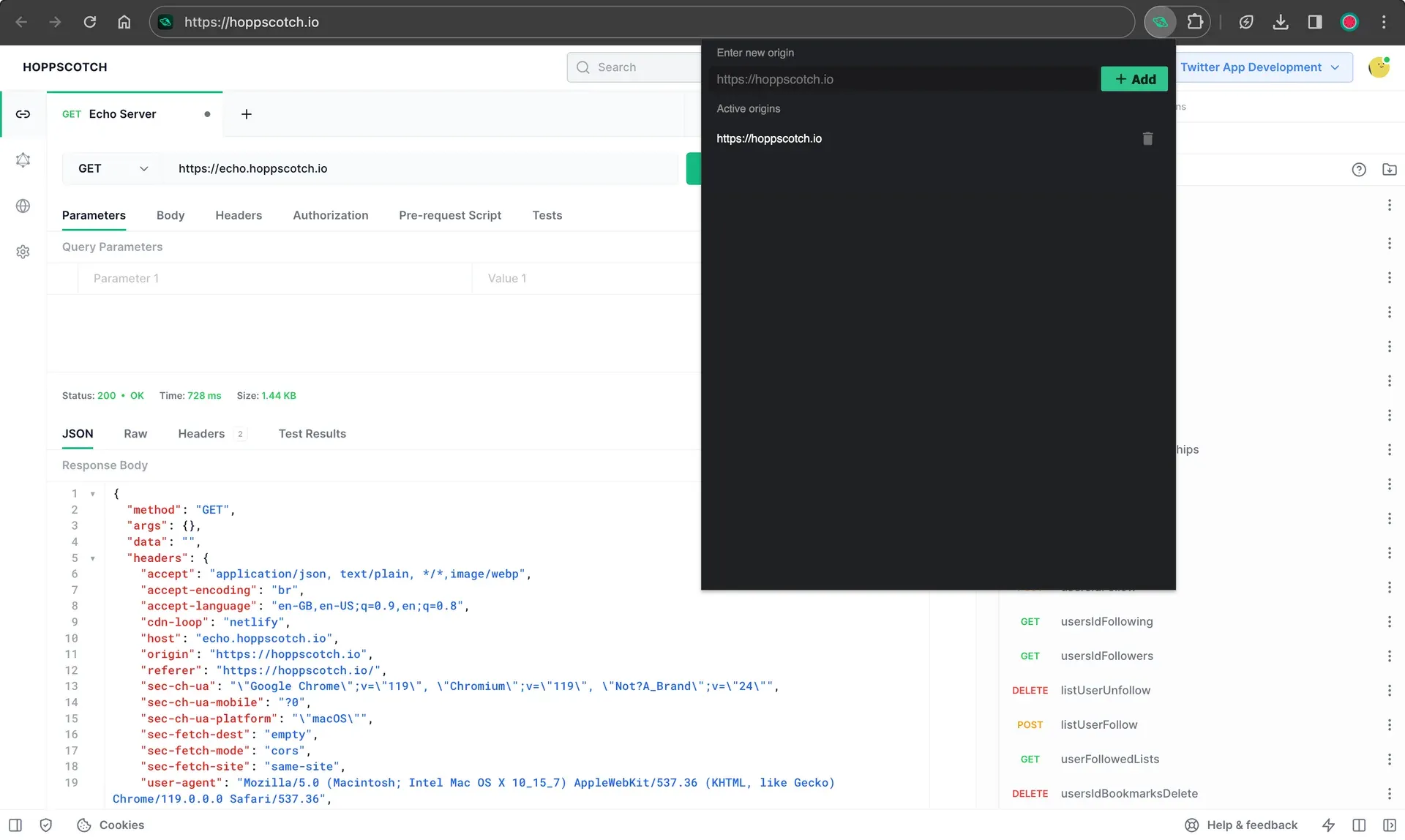
Browser extension interceptor: the origin list where self-hosted domains are added so the extension can send requests for the web app.
Source: official Hoppscotch project page.
Key capabilities
- Web app and progressive web app The hosted client at hoppscotch.io runs in any modern browser and can be installed as a PWA with offline loading through service workers. Without an account, history, collections and settings stay in local browser storage. Signing in with email, GitHub, Google or Microsoft syncs workspaces, history, collections, environments and settings across devices. Browser requests are limited by CORS unless an interceptor is selected.
- Download Hoppscotch for Windows Windows 64-bit builds are offered as an MSI installer and as a portable package from the desktop app page. The desktop client is built with Tauri and sends requests natively, so CORS does not apply. Desktop builds use a shortened version number: 26.6.0 corresponds to the 2026.6.0 platform release.
- Download Hoppscotch for macOS and Linux MacOS builds are available as separate DMG files for Apple Silicon and Intel. Linux builds are distributed as a Debian package and as an AppImage. The desktop app can connect to Hoppscotch Cloud, an organization instance or a self-hosted instance; self-hosted servers must add the desktop app origins to
WHITELISTED_ORIGINS, as explained in the connection guide. - REST requests Requests support the standard HTTP methods plus custom methods, query and path parameters, headers, and bodies such as JSON and form data, with a bulk editor for key-value pairs. Responses can be viewed as JSON, raw text, HTML, images or XML, downloaded or copied. Inspections flag likely mistakes, such as missing headers or authorization settings, before a request is sent.
- GraphQL in the same workspace Since 2026.8.0, REST and GraphQL requests share one tabbed workspace and a single collection can mix both. GraphQL tools include schema fetching, a schema explorer with documentation, variables and subscriptions with a live log, including servers that use the
graphql-transport-wsprotocol. The unified workspace is on by default and can be switched off under Experiments in Settings. - Realtime protocols Separate realtime tools connect to WebSocket endpoints, Server-Sent Events streams, Socket.IO servers and MQTT brokers. Each shows a live message log, and MQTT supports publishing and subscribing to topics.
- Authorization types Requests and whole collections can use Basic, Bearer token, OAuth 2.0 and OIDC access token flows with PKCE, among other options. Authorization can be set on a single request or on a whole collection. Client certificates in PEM or PFX/PKCS12 format can be attached per domain in the desktop app, or in the web app when the Hoppscotch Agent is the interceptor; a certificate cannot be edited after it is added.
- Collections, environments and variables Requests are organized into collections with nested folders, saved response examples and Markdown descriptions. Global, environment, collection and request variables are available, and secret variable values are not stored server-side, so they must be entered again after an import. Collections and environments can be exported to files.
- Importers for Postman, Insomnia and OpenAPI The importer reads Hoppscotch, Postman and Insomnia collections and environments, OpenAPI definitions and HTTP Archive files. Imports are limited to 10 MB on Hoppscotch Cloud and 50 MB on self-hosted editions. Postman v2.0 and v2.1 scripts can be imported as an experimental option, using a
pmnamespace compatibility layer; advanced Postman authorization and collection-level settings are not imported. - Pre-request scripts and tests JavaScript runs before a request to set variables, compute timestamps or generate values, and after the response to assert status codes, headers and body content. Scripts run in a sandboxed JavaScript environment. The same tests run in the collection runner and the CLI.
- Collection runner with data files The runner sends every request in a collection in order, with configurable delay, iteration count and environment. Since 2026.8.0, a CSV or JSON data file can drive the run: each row becomes one iteration and its columns override variables only for that run. A subset of requests can be selected and results exported as JSON.
- Hoppscotch CLI for CI pipelines Install it with
npm i -g @hoppscotch/cli; the current CLI requires Node.js 22 or later.hopp testruns a collection file, or a collection stored on Hoppscotch Cloud or a self-hosted server using a personal access token, and exits with a non-zero code when an assertion fails. Flags cover environments, delays, iteration count, CSV iteration data and JUnit XML reports, as listed in the CLI documentation. - Interceptors for CORS and local networks In the browser, requests can go through the Hoppscotch Agent, a small local Tauri application for Windows, macOS and Linux, through the Chrome or Firefox extension, or through a proxy such as the official Proxyscotch server. The agent uses your machine's network configuration, which helps with localhost and internal APIs.
- Team workspaces and real-time collaboration Team workspaces share collections and environments with role-based access. Changes sync in real time between members and devices. Team workspaces are part of the Business plan on Hoppscotch Cloud and are available in self-hosted editions, where the admin dashboard manages users, invitations and teams.
- Published API documentation Documentation is generated from a collection, with code samples, Markdown descriptions and example responses, and can be published to a public URL. Published docs support version labels such as v1.0 and v2.0 and environment switching for readers. Edits to a collection must be published again to update the public page, according to the documentation guide.
- Mock servers A mock server can be created from scratch or from a collection, where each request or saved example becomes a route. Routes match method, path, and optional headers and queries, and return a configured status, headers, body and artificial delay. Variables such as
{{uuid}}and{{timestamp}}make responses dynamic. The mocking guide covers setup; the pricing page lists API mocking under the Business plan. - Code snippets and sharing Any request can be turned into a code snippet for languages and tools such as JavaScript, Python and shell. Requests can be shared through a public link or embedded on a website as a widget, link or button.
- AI features and the MCP server Experimental AI helpers on Hoppscotch Cloud and the desktop app can rename requests and generate request bodies, pre-request scripts and tests; they are not supported in the self-hosted Community Edition. The separate AI Assistant, introduced in 2026.9.0, is available only on Enterprise Cloud and Enterprise Self-Host and connects to Anthropic, OpenAI, Amazon Bedrock, Azure or a compatible local runtime. The MCP server, started with
npx -y @hoppscotch/mcp-server, exposes up to 53 tools for collections, environments, teams and request execution and requires Node.js 22. - Self-hosted Community Edition The all-in-one image
hoppscotch/hoppscotchruns the app, admin dashboard and backend; separatehoppscotch-frontend,hoppscotch-backendandhoppscotch-adminimages are also published. It needs PostgreSQL, a 32-characterDATA_ENCRYPTION_KEY, at least one auth provider and, for email sign-in, SMTP. Database migrations run withpnpm exec prisma migrate deploy, and subpath mode serves the app at/, the admin at/adminand the backend at/backend. - Enterprise Edition controls The commercial edition, self-hosted or as Enterprise Cloud, adds SAML SSO and OpenID Connect, SCIM user and group provisioning, user groups, audit and activity logs, domain allow-listing and OpenTelemetry observability. Self-hosted Enterprise requires a license key.
Where Hoppscotch fits
Exploring and debugging an API by hand
Paste the endpoint URL or a cURL command, choose the method and authorization, then send the request and inspect status, timing, size, headers and body. Store hostnames and tokens in an environment rather than in each request, and mark tokens as secret variables so they are not synced to the server. If a request works in another tool but fails in the browser app, check the selected interceptor first: CORS, localhost access and client certificates usually need the desktop app or the Hoppscotch Agent.
Migrating collections from Postman or Insomnia
Export collections and environments from the old tool as JSON and import them through the importer. Check file sizes against the 10 MB Cloud and 50 MB self-hosted limits. After import, compare authorization settings, path variables and collection-level settings against the source, because advanced Postman authorization is not carried over. Enable script import only after reviewing the experimental pm compatibility notes, then run the collection once to confirm that tests still pass.
Running API tests in CI
Export the collection and an environment file into the repository, or reference a stored collection with a personal access token and the --server option for a self-hosted instance. Run hopp test with --env and --reporter-junit so the CI system can read results, and use --iteration-data with a CSV file for data-driven runs. Pin the CLI version and the Node.js 22 runtime in the pipeline, because CLI releases can raise the minimum Node.js version, as happened when Node.js 20 support ended after CLI 0.26.0.
Sharing a workspace with a team
Create a team workspace, invite members and assign roles before moving shared collections into it. Decide where the data should live: Hoppscotch Cloud on the Business plan, or a self-hosted instance where the admin dashboard manages users and teams. Publish API documentation from a collection when consumers outside the team need reference pages, and remember that each change must be published again. Mock servers built from saved examples let frontend work start before the backend is ready.
Self-hosting Hoppscotch on internal infrastructure
Follow the Community Edition prerequisites: Docker 20 or later, a PostgreSQL database, OAuth credentials or SMTP for sign-in and, as a guide, 4 CPU cores and 4 GB of RAM to build images or 1 core and 2 GB to host the output. Start the all-in-one container with an .env file, run the Prisma migration, then sign in to the admin dashboard and complete setup. Serve it over HTTPS, because authentication uses secure cookies, and add desktop app origins to WHITELISTED_ORIGINS if staff will connect from the desktop client.
Connecting AI coding agents to API collections
Install the MCP server in a host such as Claude Code, Codex or Claude Desktop and authenticate through the device-login flow or a HOPPSCOTCH_ACCESS_TOKEN. Set HOPPSCOTCH_SERVER_URL for a self-hosted instance. Start with the minimal or core tool profile and review which actions the agent can take, since the full profile includes team administration and request execution against real endpoints.
Install
docker run -p 3000:3000 -p 3100:3100 -p 3170:3170 --env-file .env --restart unless-stopped hoppscotch/hoppscotchReviews of Hoppscotch
Be the first to share your experience with Hoppscotch.
Write a review
Loading review form…
Alternatives to Hoppscotch
 PostmanPostman is an API platform with a request client, shared collections, test scripts, mock servers and a CLI, available as a desktop app and on the web.
 InsomniaInsomnia is a free, open-source desktop API client from Kong for designing, testing and debugging REST, GraphQL, gRPC and WebSocket APIs, with optional paid team collaboration plans.
 RapidAPIRapidAPI is a public API marketplace where developers find, test and subscribe to APIs with one account and key, plus a private Enterprise Hub. Nokia acquired the Rapid technology and R&D unit in November 2024 and runs it as Nokia API Hub.