

What is AWS Emulator?
AWS Emulator is a local emulator of the AWS APIs published by Amazon Web Services. It serves an AWS API endpoint on the user's own machine, a development server or a continuous integration runner, so code that calls AWS through the AWS CLI or an AWS SDK can run against emulated resources instead of a real account. No AWS account is needed to download or run it, and requests, responses and resource data are not sent to AWS. The emulator has no graphical interface: after it starts, environment variables point the CLI or SDK at its endpoint and the code runs unchanged. The AWS Emulator User Guide states that it has no additional service fee and that charges apply only to AWS resources when an application is deployed on AWS.
Service coverage is defined by AWS's published API models. According to the fidelity page, the emulator supports the APIs of AWS services that have a model in the AWS API models repository, and the product page says each service is generated from that model, the same models behind the AWS SDKs. The repository is a Rust workspace with one crate per service; the About Amazon announcement says the initial server could route requests for 438 AWS API models. How closely each service matches AWS is published as fidelity scores with every release: the scores file attached to v1.0.338 lists 43,548 fidelity test results across 355 service models, of which 26,001 passed. Operations that are not implemented yet return HTTP 501 with the error code NotImplemented.
The emulator is distributed in three forms. On Linux it installs from signed RPM or Debian packages for x86_64 and aarch64 that need glibc 2.17 or newer. On macOS and Windows it runs in Docker from an image that the user builds with a short Dockerfile from the AWS documentation; AWS does not publish a prebuilt image. Rust projects can also add the aws-emulator-embedded crate as a dev-dependency and run one emulator inside each test process. An aws-emulator skill for AI coding agents such as Kiro, Cursor and Claude Code is installed with AWS CLI 2.35.0 or later and sets the emulator up through the same Linux or Docker steps.
The latest release is v1.0.338, published on November 12, 2026, one of several releases that day. Its notes list fidelity fixes across services including Amazon DynamoDB resource-based policies, Amazon Cognito user migration triggers, Amazon RDS cluster snapshots, Amazon ElastiCache, API Gateway with AWS CloudFormation and Lambda, Amazon EC2 and Bedrock AgentCore. Versions follow MAJOR.MINOR.PATCH, where patch releases carry bug and fidelity fixes, and security fixes are published only in the latest release. The About Amazon announcement of November 11, 2026 states that the code was written by teams of autonomous AI agents that write fidelity tests, file issues and fix them through a merge gate, and the repository does not accept pull requests.
The source is released under the CC0 1.0 Universal public domain dedication, except the vendor/ directory, which is under the Apache License 2.0. AWS lists several limits: the emulator is for building and testing, not production; it does not evaluate IAM and resource-based policies the way AWS does and is not meant for security testing; it does not separate resources by Region or account; behavior is verified against AWS in us-west-2 only, plus us-east-1 for global services; all resources live in memory and disappear when it stops; and it has not been tested for long-running use or load testing. Other local AWS emulators listed on iThub include Floci and MiniStack.
AWS Emulator screenshots
Explore the interface. Open a screenshot to view it at full size.
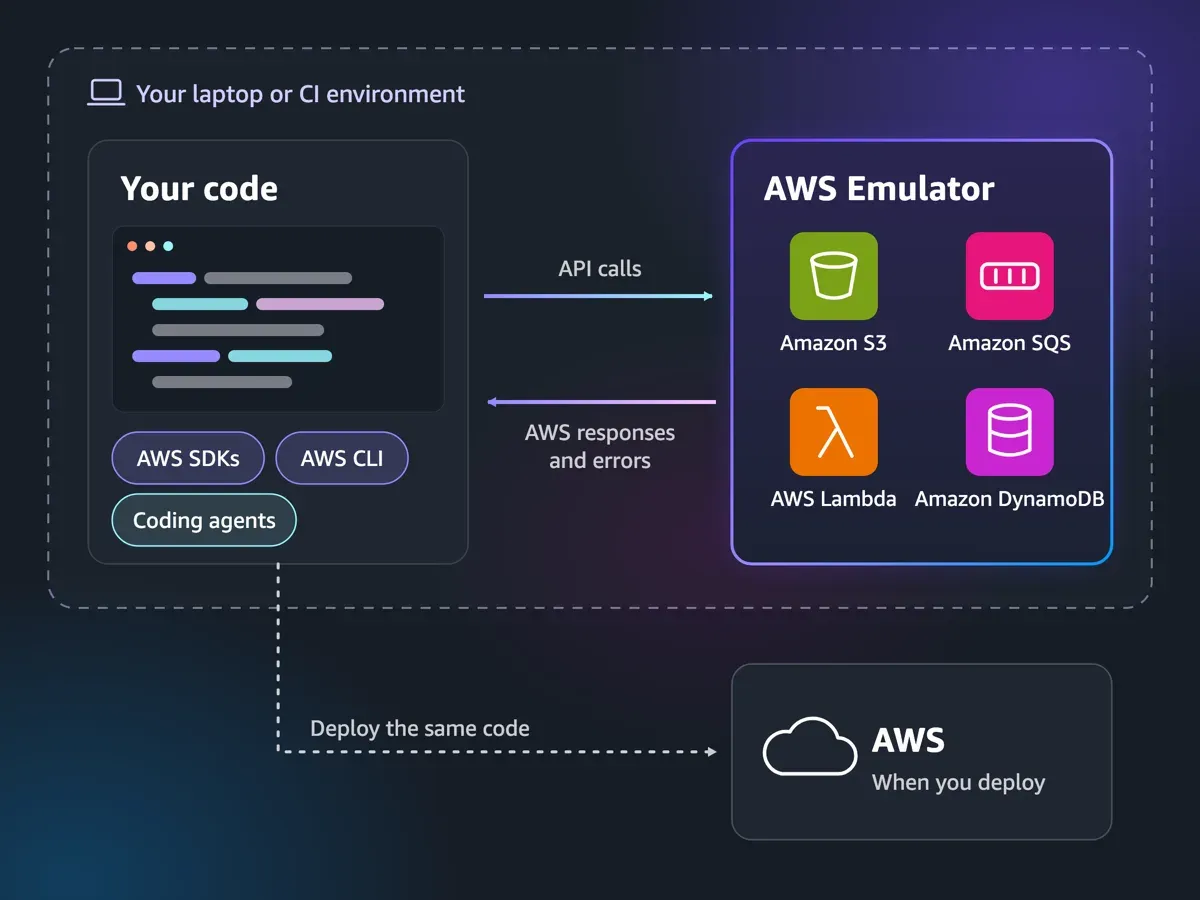
Official AWS diagram: API calls go to the local emulator, and the same code is later deployed to AWS.
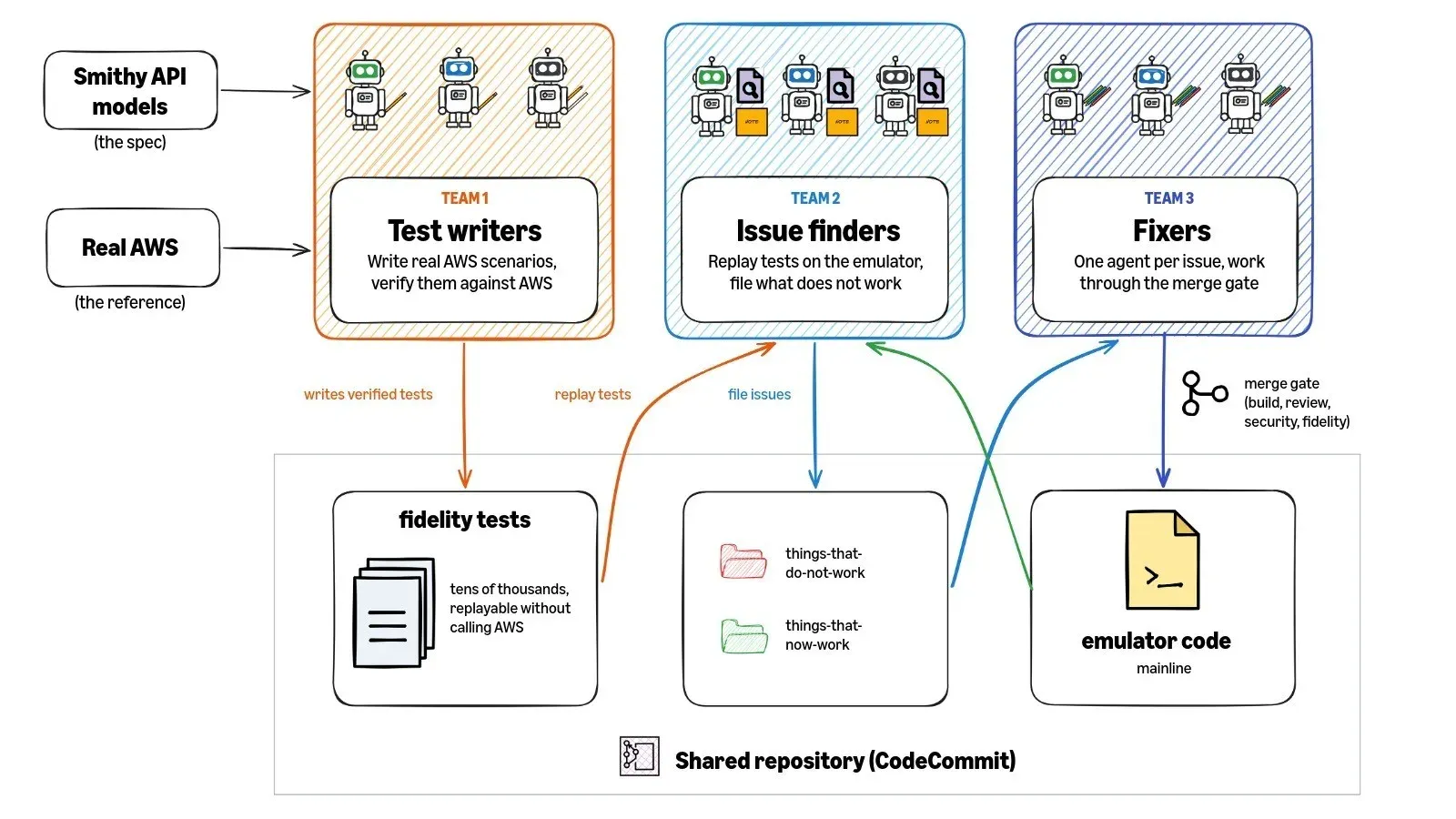
Official figure of the three agent teams that write fidelity tests, file issues and fix the emulator code.
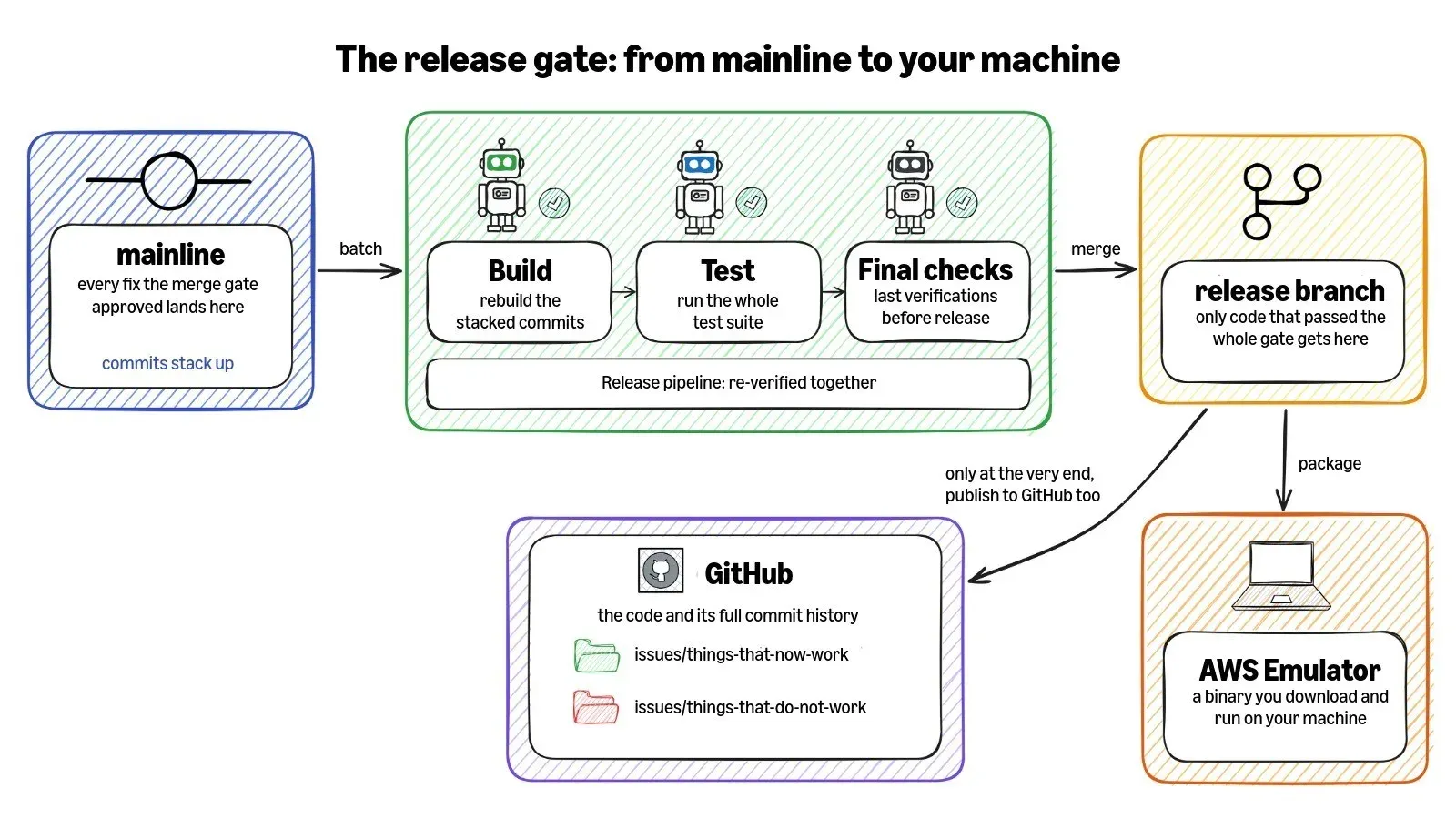
Official figure of the release pipeline that packages the binary and publishes the code to GitHub.
Source: official AWS Emulator project page.
Key capabilities
- Single local AWS endpoint The
aws-emulatorcommand serves every emulated service and a health route on one HTTPS port,127.0.0.1:9297by default, with a self-signed certificate generated at each start.-pselects another port and-p 0lets the operating system pick one, which the JSON startup line then reports inendpoint_url. Some resources, such as databases, get an endpoint of their own on another port of 127.0.0.1. - Service coverage from AWS API models Services are generated from the API models AWS publishes for its SDKs, so the emulator accepts the APIs of services that have such a model. Where an operation is implemented, the stated goal is the same result as AWS for valid calls and the same error for invalid ones. Unimplemented operations answer HTTP 501
NotImplemented. - Published fidelity scores Each release on GitHub carries per-service fidelity scores: the number of fidelity tests the emulator passes out of the total for that service, measured against a named version of the test suite. The tests and a Python runner,
fidelity_tests_runner, are public in the aws-emulator-evaluation-suite repository. AWS states that control plane APIs currently match most closely, while data plane fidelity and support for CloudFormation, Terraform and the AWS CDK vary by service. - AWS CLI and SDK support The CLI and SDKs reach the emulator through
AWS_ENDPOINT_URL,AWS_SHARED_CREDENTIALS_FILE,AWS_CONFIG_FILE,AWS_CA_BUNDLEand Region variables, with no code changes. The documentation adds per-SDK settings for trusting the certificate, including a PKCS12 trust store for Java, and for turning off host prefix injection. Amazon S3 Control requests cannot reach the emulator because the SDK always puts the account ID into the host name. - Generated credentials and SigV4 checks At each start the emulator writes a new access key ID beginning with
EMULATOR, a secret key, an SDK config file and its certificate to~/.aws/emulator/<port>/with mode 0600. By default requests must be signed with Signature Version 4 using these keys or keys created through the emulator's own IAM or STS; other signatures getAccessDeniedorSignatureDoesNotMatch.--auth offdisables signature checks, and the files are deleted on a clean stop. - One account, in-memory state All requests run in a single account,
000000000000, andaws sts get-caller-identityreturnsarn:aws:iam::000000000000:user/emulator. Resources persist across calls but only in memory, so stopping or restarting the emulator gives an empty state; there is no reset route. Idle memory use is about 160 MiB according to the Linux guide. - Linux packages RPM packages for x86_64 and aarch64 and Debian packages for amd64 and arm64 are served from
downloads.aws.com, with alatest/folder, versioned file names and aversions.jsonlist. Each package has a detached.sigsignature that can be checked with GnuPG against the AWS publishing key. The package installs to/opt/aws-emulator/and addsaws-emulatorto/usr/bin/. - Docker on macOS and Windows The Docker guide gives a Dockerfile based on Amazon Linux 2023 minimal that installs the RPM, runs as user 1000 and binds to 0.0.0.0 inside the container. The documented
docker runpublishes the port on 127.0.0.1 only, caps memory at 2 GiB without swap and mounts~/.aws/emulatorso the host SDK can read the credentials and certificate. Apple silicon and other Arm hosts use the aarch64 package. - Embedded mode for Rust tests The
aws-emulator-embeddedcrate runs an emulator inside the test process with the AWS SDK for Rust, passingemulator.http_client()andemulator.aws_credentials_provider()to the SDK config. EachAwsEmulatorEmbeddedinstance has its own state, so tests can run in parallel. Authentication is off by default in this mode, and the crate is pinned to a release commit from GitHub; building it compiles every service crate and the README budgets at least 100 GB of disk fortarget/. - aws-emulator skill for coding agents The skill installs with
aws agent-toolkit add-skill --skill-name aws-emulator --region us-east-1for every agent the AWS CLI finds, such as Kiro, Cursor and Claude Code. It installs and starts the emulator, points the CLI or SDK at it, fixes connection, certificate and signing errors and checks a project against the fidelity tests. The documentation states that the agent asks before writing outside its working folders, for example before runningsudo. - Project compatibility check The check-project guide describes listing the AWS operations a workflow calls, finding their tests in
manifest.jsonlof the evaluation suite and reading the fidelity scores for the release in use. The skill automates this and can draft a GitHub issue for a difference, showing the draft before posting. Behavior without a covering test is described as unconfirmed rather than broken. - Command options The command takes only options:
-bbind address,-pport,-aauthentication,-ttelemetry,--idle-timeoutin seconds up to one year,-vversion and-hhelp. Unknown options exit with code 2. The log is written to standard output as JSON lines, and only the startup line withendpoint_url,health_check_url,config_file,ca_fileandjava_truststore_fileis a stable interface. - Health route and parallel instances
GET /__admin/healthon the API port returns HTTP 200 with the bodyok, and the documentation gives a shell loop that waits up to 30 seconds for it. Several emulators can run side by side, each with its own port, keys, files and resources. To test more than one Region, AWS documents one emulator per Region on separate ports. - Telemetry with opt-out Telemetry is on by default and sends random installation and run IDs, runtime environment, per-operation call counts and outcome categories, response time aggregates, performance figures and crash types every five minutes over TLS. AWS states that it never includes request or response content, resource names, ARNs, file paths, credentials, account IDs or personal data, keeps it for up to 90 days and does not share it with third parties. It is turned off with
--telemetry off,EMULATOR_TELEMETRY=off,[telemetry] enabled = falseinconfig.tomlor the embedded options. - Version and compatibility policy
aws-emulator -vprints the version, release date and source commit. Within a major version the command, its options and defaults, the documented environment variables, control routes, package URLs and startup line stay compatible. Passing fidelity tests do not regress, but a release can change an uncovered response to match AWS, so the documentation describes installing a specific version from the versioned package URLs. - Security boundaries The security page states that IAM policies, permissions boundaries, bucket policies, KMS key policies and cross-account or cross-Region access must not be tested with the emulator, and that it never denies a request signed with its own key. Code the emulator runs, such as Lambda function code, is not isolated from the host and runs with the user's permissions. Vulnerabilities are reported through the AWS Vulnerability Disclosure Program on HackerOne or aws-security@amazon.com.
- Public issue tracking Known gaps are kept as files in the repository: open ones under
issues/things-that-do-not-work/and fixed ones moved toissues/things-that-now-work/. Differences from AWS are reported through GitHub Issues with the service, operation, SDK version, request and response. Pull requests are not accepted.
Where AWS Emulator fits
Local development without an AWS account
A developer starts aws-emulator, exports the endpoint, credentials, config and certificate variables for port 9297, unsets any real AWS credential variables and runs the application as usual. The user guide's examples create an Amazon S3 bucket and list it again, and send a DynamoDB CreateTable call with a two-character table name that is rejected with the same ValidationException AWS returns. aws sts get-caller-identity showing account 000000000000 confirms that requests reach the emulator and not AWS.
Integration tests in CI pipelines
In a CI job the emulator is installed from the Linux package or a Docker image, started with --idle-timeout so a forgotten instance stops by itself, and polled on /__admin/health before tests run. AWS's product page describes this as testing AWS calls on pull requests without per-branch accounts, stored credentials or leftover resources. The documentation stresses setting AWS_ENDPOINT_URL in the same script that runs the tests, because without it the code calls real AWS.
Isolated test loops for coding agents
With the aws-emulator skill installed, an agent such as Kiro, Cursor or Claude Code can install and start the emulator, create resources, read the AWS errors it returns and adjust code. The product page describes running one emulator per agent, each on its own port with its own keys and in-memory state, so parallel agents do not see each other's buckets, tables or queues, and nothing they create reaches an AWS account.
Per-test emulators in Rust
Rust projects using the AWS SDK for Rust add aws-emulator-embedded under [dev-dependencies], pinned to the commit named on a release, and create an AwsEmulatorEmbedded in each test. The embedded mode guide shows a test that creates an S3 bucket, writes an object and reads it back, with no endpoint URL or certificate to configure. Signature checking can be enabled with Authentication::On when a test needs it.
Checking a project against fidelity data
Before relying on the emulator, a team can list the AWS operations its workflow uses, look them up in the evaluation suite manifest and compare the per-service scores published with the release in use, or ask the skill to do this. Operations without a covering test can be run against both the emulator and AWS to compare results, and differences are filed as GitHub issues. The versioning page describes pinning a specific package version so a new release changes test results only after an upgrade.
Workshops and onboarding
The product page lists workshops as a use case: each participant runs the emulator on a laptop and practices AWS SDK and CLI calls without an AWS account, with nothing to clean up afterwards because state disappears when the emulator stops. AWS's FAQ also names students practicing AWS calls as an audience. Production traffic, production data and security testing remain outside the documented scope.
Install
sudo dnf install -y https://downloads.aws.com/aws-emulator/packages/aws-emulator/LTS/latest/aws-emulator-x86_64.rpmReviews of AWS Emulator
Be the first to share your experience with AWS Emulator.
Write a review
Loading review form…
Alternatives to AWS Emulator
 MiniStackMiniStack is an MIT-licensed local AWS emulator that serves more than 60 services on port 4566, runs real PostgreSQL, MySQL and Redis containers, and works with the AWS CLI, SDKs, Terraform and CDK.
 MCP AWS ServerAWS Labs publishes open source MCP servers that give AI applications AWS documentation, best practices and tools for EKS, serverless and IaC.