

What is Bruno?
Bruno is an API client for exploring and testing APIs, built around one design decision: collections are folders of plain-text files on the local filesystem rather than records in a vendor cloud. Each request is a file, either in Bruno's own .bru markup or, since Bruno 3.0.0, in OpenCollection YAML, an open specification that the Bruno team publishes at spec.opencollection.com. Because the files are text, collections can live in the same repository as the service they describe and be reviewed, branched and merged with Git or any other version control system.
The project was started by Anoop M D, who holds the Bruno trademark, and is developed in the open on GitHub under the MIT license. The README states that Bruno is offline-only and that there are no plans to add cloud sync; the manifesto explains the reasoning: API details, requests and responses should not be synced to a third-party cloud. The logo is the OpenMoji dog emoji, licensed CC BY-SA 4.0. Commercial Pro, Ultimate and Enterprise editions add team features on top of the free open-source edition.
Bruno ships as an Electron desktop application for Windows, macOS and Linux, a Node.js command-line runner published on npm as @usebruno/cli, official CLI Docker images on Docker Hub and GHCR, and a Visual Studio Code extension. The repository is a JavaScript monorepo with separate packages for the app, the Electron shell, the CLI, the Bru language parser, the JavaScript runtime, format converters and a SQLite layer used for caching. Release builds cover x64 and ARM64 on all three desktop platforms, including MSI and PKG installers intended for managed deployment.
The current release is version 4.3.0, published October 22, 2026. It added folder-level tags with inheritance, a reworked dialog for creating OpenAPI specifications, a "Try" action for saved response examples, just-in-time fetching of external secrets that are now held in memory instead of on disk, branch selection when cloning a workspace from Git, and new Dracula, Gruvbox and Cyberdream themes. Version 4.2.0 brought collection and workspace environment inheritance, gRPC scripting and HTML documentation generation from the CLI; 4.1.0 introduced local mock servers; 4.0.0, released July 23, 2026, added Bruno AI, Apps, Akamai EdgeGrid authentication and separate tabs for secret variables.
Bruno is a client, not an API gateway, monitoring service or hosted API catalogue. It does not host collections, run scheduled monitors or provide a public workspace directory. Mock servers run only while the desktop app is open, and generated HTML documentation is a static site the user deploys elsewhere.
Bruno screenshots
Explore the interface. Open a screenshot to view it at full size.
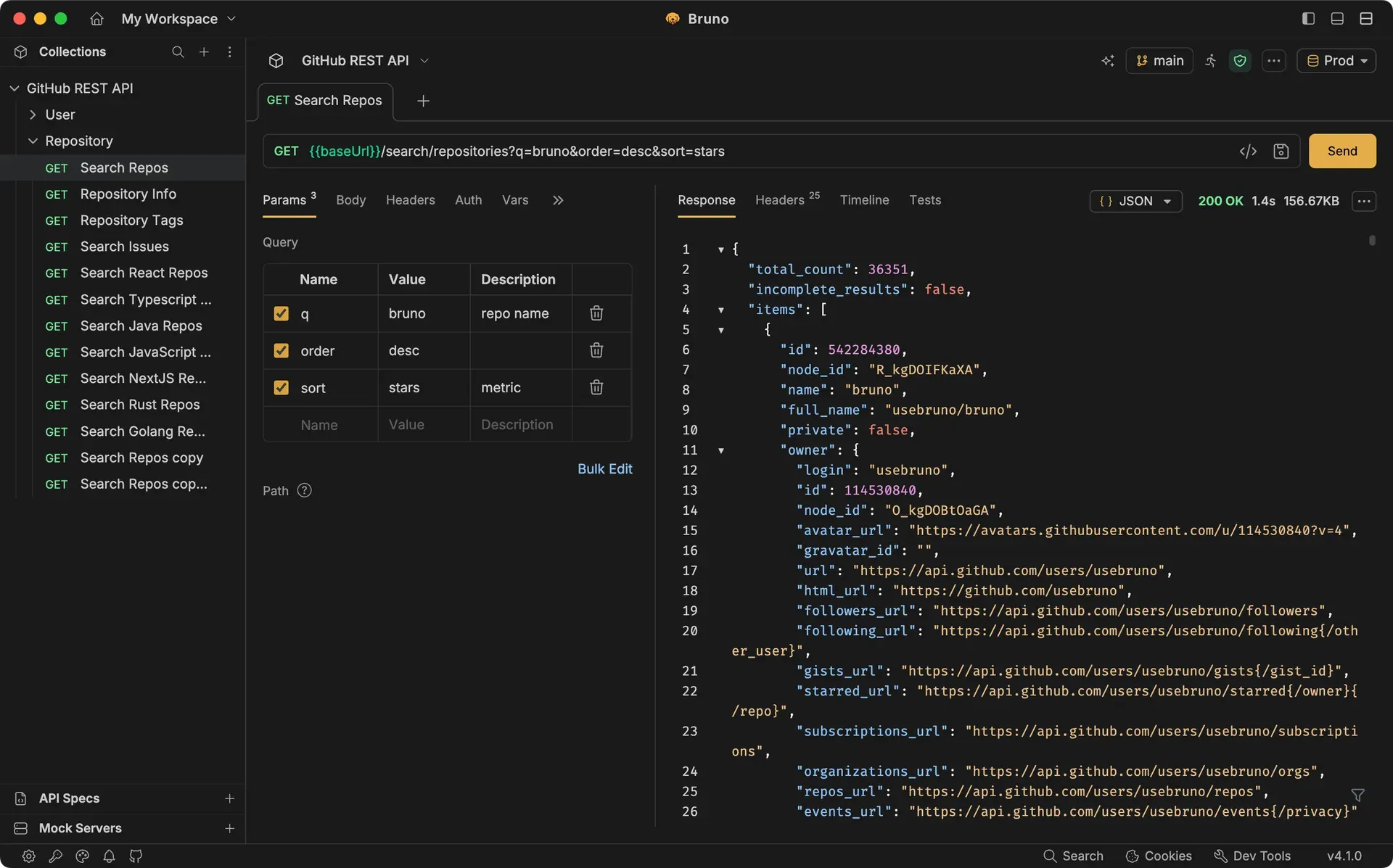
Official screenshot from usebruno.com: a GitHub REST API collection in the sidebar, query parameters for a repository search and the JSON response pane, with Git branch and environment selectors in the toolbar.
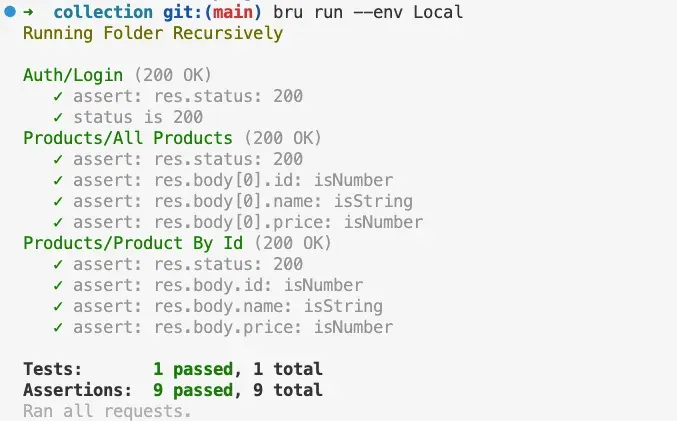
Official README image: the bru CLI running a collection folder recursively against the Local environment, reporting 9 of 9 assertions passed.
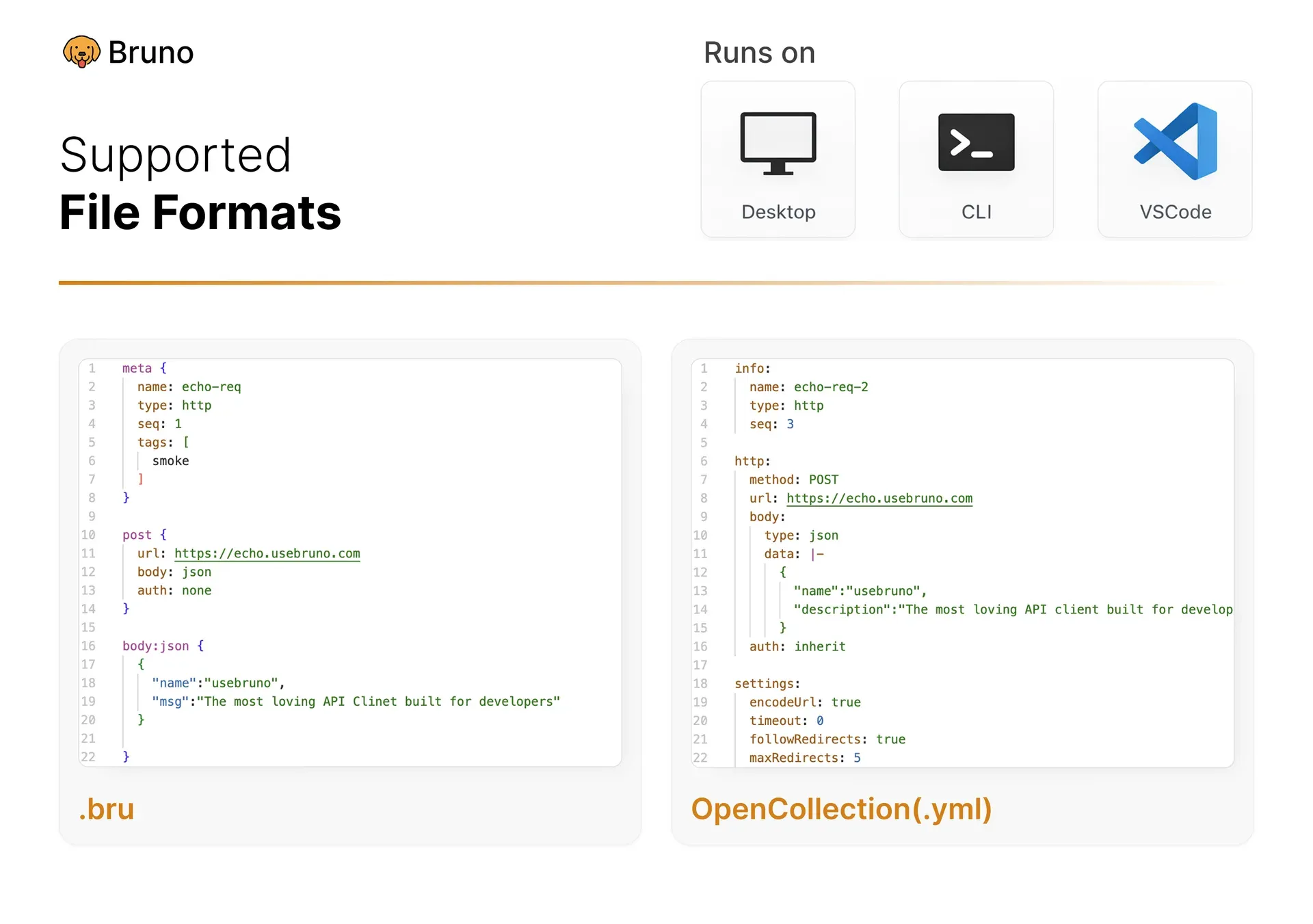
Official README figure comparing the same kind of request in the .bru format and in OpenCollection YAML, and the three places collections run: desktop, CLI and VS Code.
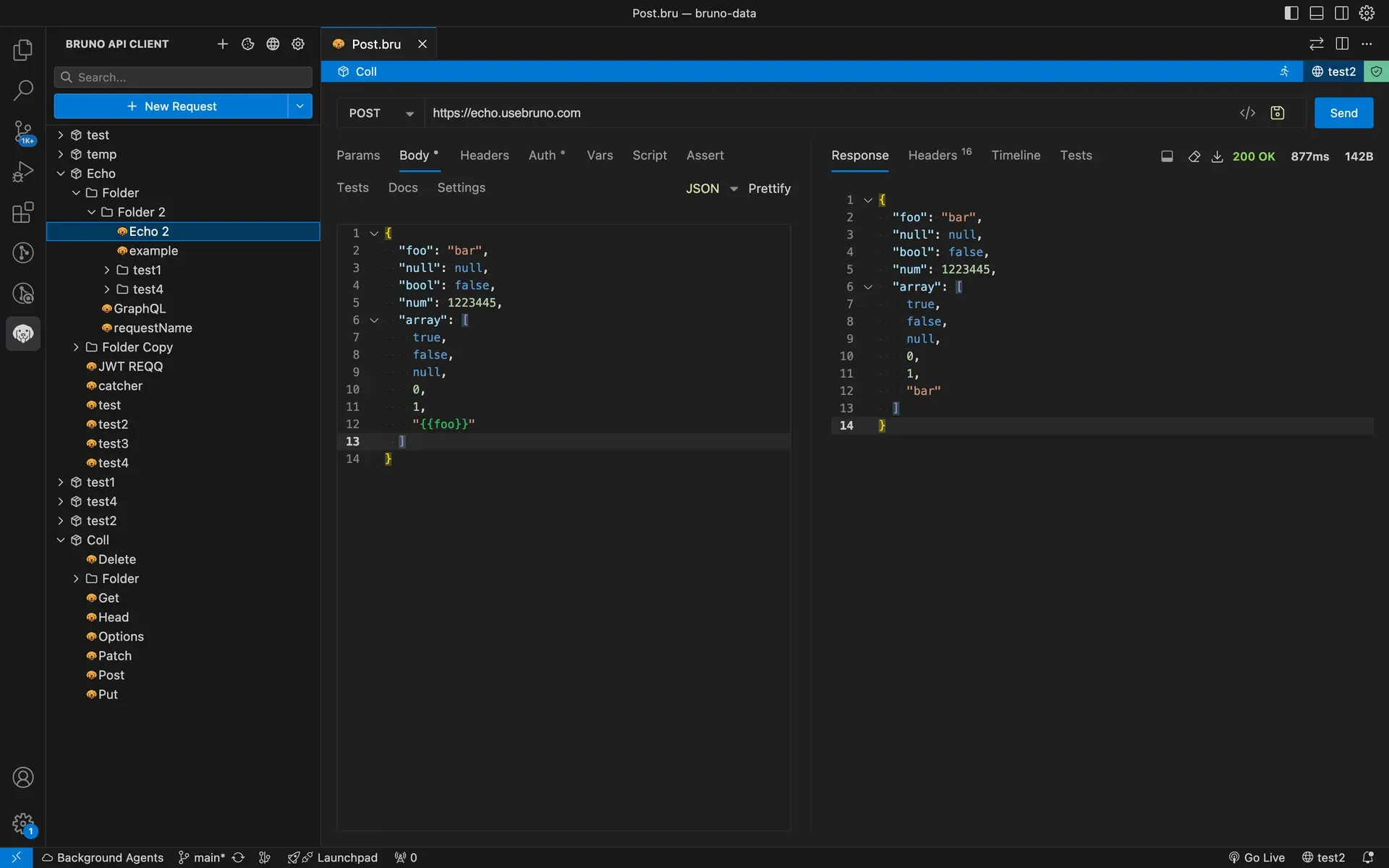
Official README screenshot of the VS Code extension: collection tree in the Bruno panel, a JSON request body and the response pane inside the editor.
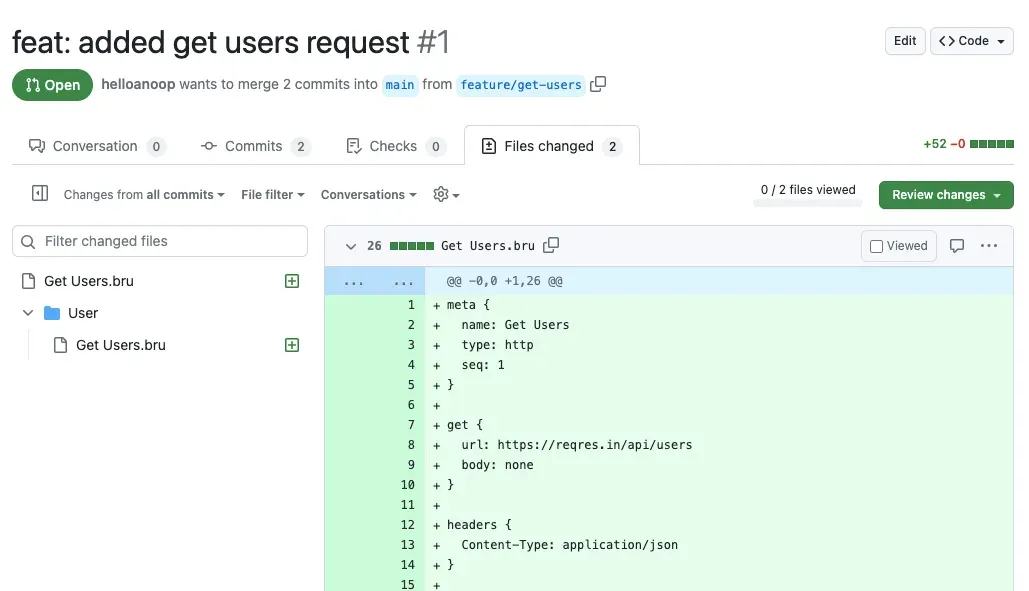
Official README image: a Bruno request file added in a GitHub pull request, illustrating review of collections as ordinary code changes.
Source: official Bruno project page.
Key capabilities
- Collections as files Every request, folder and environment is saved as a text file inside a collection folder on disk. New collections can use OpenCollection YAML (
.yml) or the older.bruformat, and a migration tool converts existing.brucollections to YAML. Nothing is stored in a Bruno account, so backups, access control and retention follow whatever applies to that folder or repository. - Protocols beyond REST The desktop app sends HTTP requests with JSON, XML, form, multipart and binary bodies, plus Server-Sent Events. It also covers GraphQL with a schema explorer and visual query builder, gRPC with proto files and streaming, WebSocket connections and SOAP requests, with WSDL import resolving external XSD schema references since 4.3.0. See the request documentation for per-protocol limits.
- Authentication modes Requests, folders and collections can use Basic, Bearer, Digest, API key, AWS Signature v4, NTLM, WSSE, OAuth 1.0, Akamai EdgeGrid and OAuth 2.0 with authorization code, client credentials and password grants. OAuth 2.0 can open the system browser for the authorization step. Client certificates can be configured per collection or globally, and individual certificates can be disabled.
- Layered variables and environments Variables resolve from global, workspace, collection, folder, request and runtime scopes, plus prompt variables that ask for a value at send time and process environment variables read from the shell or a
.envfile. Since 4.2.0, collection environments can inherit from workspace environments. The variable panel flags unresolved references before a request is sent. - Secret handling Variables marked as secret keep only their name in the environment file; the value stays in a local encrypted store that uses OS-level encryption where available and falls back to AES-256. Exports omit secret values. Integrations with HashiCorp Vault, AWS Secrets Manager, Azure Key Vault and Google Cloud Secret Manager fetch values at run time, and CLI reports can mask secrets.
- Scripts, tests and assertions Pre-request, post-response and test scripts are written in JavaScript with a
bruAPI, Chai-style assertions, inbuilt libraries and request chaining. Declarative assertions can be added without code. The JavaScript sandbox runs in Safe Mode by default, which blocks filesystem and system command access; Developer Mode allows npm packages and Node built-ins and should be reserved for trusted collections. - Collection runner and data-driven tests The runner executes a collection or folder in sequence and shows per-request results, timings and an iteration summary. Iterations can be driven from CSV or JSON data files. Run payloads are stored in a local file store since 4.3.0, and reports are built from those stored results.
- Bruno CLI The
brucommand, installed withnpm install -g @usebruno/clion Node.js 18 or later, runs a request, folder or whole collection against a chosen environment withbru run --env. It writes JSON, JUnit and HTML reports, can skip headers or bodies in reports, and runs in Safe Mode unless--sandbox=developeris passed. Version 4 changed the JUnitclassnamefrom the request URL to the collection path, which matters for existing CI mappings. - Docker images and CI recipes Official CLI images are published as
usebruno/clion Docker Hub andghcr.io/usebruno/cliwith Alpine (default) and Debian variants for amd64 and arm64, so pipelines do not need Node.js on the host. The documentation includes an official GitHub Action plus setups for GitLab CI, Jenkins and Azure DevOps Pipelines. - Git inside the app Collections can be initialized as repositories, diffed, pulled and cloned from the graphical Git panel in the free edition. Commit, push, branching and merge conflict resolution in the GUI require Pro or Ultimate, according to the collaboration guide. Any edition can use plain Git on the command line instead, since the collection is just a folder.
- OpenAPI import, export and sync OpenAPI specifications can be imported into a collection, generated from a collection, created in the app and kept in sync when the spec changes. The open-source edition allows five OpenAPI syncs per month; paid plans have no limit. The CLI command
bru importcreates a collection from an OpenAPI or WSDL file. - Postman, Insomnia and other imports Postman collections (v2 and v2.1) and environments import directly, and common
pm.*script calls are translated to Bruno equivalents. After import, Bruno lists npm packages the scripts need, libraries that require Developer Mode and Postman-specific packages such asnewmanthat have no equivalent. Bulk import of a full Postman data dump is an Ultimate feature. - Local mock servers Since 4.1.0 (beta), Bruno can serve mock HTTP responses on
localhostfrom a collection's saved response examples, from an OpenAPI spec or from manual definitions, with method and path matching, optional rules on headers, query or body, a global delay and CORS on by default. Mocks are stored with the collection, stop when Bruno closes and are not auto-started; the request log keeps only the last 500 entries in memory. - Documentation and HTML export Workspaces, collections, folders and requests carry Markdown documentation with a rich-text editor. A collection can be exported as a standalone HTML site with search, environment selection and an interactive playground, either from the app or with
bru docssince 4.2.0. - Bruno AI (beta) From 4.0.0, inline autocomplete and generation of scripts, tests and documentation use a bring-your-own-key model with OpenAI, Anthropic or any OpenAI-compatible endpoint, including self-hosted models. Requests go directly to the chosen provider, not through Bruno servers. Ultimate administrators can restrict allowed providers and models with an AI policy.
- Bruno Apps Since 4.0.0, a request or collection can carry a custom interface written in HTML, CSS and JavaScript or React. A request App replaces the response pane, while a collection App can chain several requests and render the results, for example a login form that stores a token and then loads dependent data.
- VS Code extension The Bruno extension opens the same collection files inside Visual Studio Code, with a GUI mode similar to the desktop app and a text mode with syntax highlighting. It supports environments, scripts, common authentication methods, GraphQL and file uploads.
- Desktop downloads for Windows Windows builds are offered for x64 and ARM64 as EXE installer, portable ZIP and MSI. The MSI accepts
AUTOUPDATE_ENABLED=falseso administrators can disable auto-updates for all users. Package manager installs are available through winget (Bruno.Bruno), Chocolatey and Scoop. - Desktop downloads for macOS and Linux MacOS builds are offered as DMG, ZIP and, since 4.0.0, a signed and notarized PKG installer for MDM tools, for both Apple silicon and Intel, plus Homebrew. Linux builds cover AppImage, deb and rpm for x86_64 and ARM64, an APT repository, Flatpak (
com.usebruno.Bruno), Snap and the AUR, as listed on the download guide.
Where Bruno fits
Keeping API examples next to the service code
Create a collection inside the service repository, for example in a bruno/ or api/ folder, and choose OpenCollection YAML so that request changes show up as readable diffs in pull requests. Store base URLs and non-sensitive values in environment files and mark tokens as secret variables, which keeps their values out of the repository. Before the first commit, open the files in a text editor to confirm that no secret value was written to disk, and add a .env file to .gitignore if process environment variables are used.
Running API tests in CI pipelines
Write assertions or test scripts on each request, then run the collection with bru run --env ci --reporter-junit results.xml using the npm package or the usebruno/cli Docker image. Pass secrets as pipeline variables and read them through process environment variables or a supported secret manager instead of committing them. Check that the CI job fails on a broken assertion, that the JUnit file is picked up by the test report view, and that Developer Mode is enabled with --sandbox=developer only when the collection genuinely needs filesystem access or npm packages.
Migrating a team off Postman
Export individual collections as Postman Collection v2.1 and environments as JSON, then import them into Bruno; Ultimate adds bulk import of a whole data dump. Review the post-import prompt for npm packages, libraries that need Developer Mode and unsupported packages such as postman-collection, and rewrite those scripts by hand. Compare a few requests side by side, especially OAuth 2.0 flows, pre-request scripts and cookie handling, before retiring the old workspace. The migration guide lists the translated pm.* calls.
Working against OpenAPI contracts
Import an OpenAPI file to generate the collection, then enable OpenAPI sync so that new or changed operations are reflected when the spec moves on. On the free edition, plan around the limit of five syncs per month. Save representative responses as examples on each request, and use them to start a local mock server that frontend developers can call on localhost before the backend exists. Confirm that the mock's port is free and that the routes listed in the dashboard match the contract.
Debugging authentication and protocol behaviour
Use the Timeline and Dev Tools to inspect the main request, script-triggered calls and console output in order, including redirects and headers. Test OAuth 2.0 flows with the system browser option if the identity provider blocks embedded browsers, and attach client certificates for mTLS endpoints. For gRPC, load the proto files and check streaming behaviour; for WebSocket and SSE, confirm that long-lived connections close as expected.
Publishing internal API documentation
Write Markdown docs at collection, folder and request level, then generate a static HTML site with bru docs or from the app. Review which environments are included in the export, since generated pages show resolved non-secret variable values while secret variables stay masked, and deploy the output to an internal static host. Regenerate the site in the same pipeline that runs the tests so that documentation and verified behaviour stay aligned.
Install
npm install -g @usebruno/cliReviews of Bruno
Be the first to share your experience with Bruno.
Write a review
Loading review form…
Alternatives to Bruno
 PostmanPostman is an API platform with a request client, shared collections, test scripts, mock servers and a CLI, available as a desktop app and on the web.
 InsomniaInsomnia is a free, open-source desktop API client from Kong for designing, testing and debugging REST, GraphQL, gRPC and WebSocket APIs, with optional paid team collaboration plans.
 HoppscotchMIT-licensed API development platform with a browser app, Tauri desktop clients, a CLI test runner and a Docker-based self-hosted edition. Hoppscotch Cloud is free for individuals; Business and Enterprise plans add team features, SSO and audit logs.