
What is ARTEMIS?
ARTEMIS is an open-source Android automation agent published by Google in the google/artemis repository under the Apache License 2.0. It takes a task written in natural language, such as opening Settings and reading the battery level, and carries it out on a connected Android phone or emulator by observing the screen and sending taps, swipes and text input. The README describes its purpose as letting AI assistants and test suites use real phones the way a person would, for testing workflows as well as everyday cross-app tasks.
The software runs on a device host: a macOS, Linux or Windows computer with the Android device attached over USB debugging, or an emulator. The startup scripts start.sh and start.bat detect and install the required toolchain (ADB, scrcpy, FFmpeg and Python dependencies through uv) and open a web console on http://localhost:8000. The project requires Python 3.12 or later and is built on LangGraph. A multimodal model provides the reasoning: the .env.example file accepts API keys for Gemini, OpenAI, Anthropic, OpenRouter and xAI, and the README names Gemini, Claude, GPT-4o and Qwen-VL as supported model families. Google Cloud Vision OCR is optional.
Four interfaces are provided: the web console, a developer CLI (artemis run), a native Model Context Protocol server for AI coding assistants, and artemis-client, a Python SDK with no runtime dependencies that talks to the device host over HTTP. Execution comes in two profiles. Flash is a single-model observe-and-act loop at roughly 3 to 5 seconds per step; Pro is a multi-agent graph with a Planner, an Operator and a read-only Checker at roughly 15 to 40 seconds per step, with plans, checkpoint verification, ADB diagnostics and an optional written report.
On the device, the first task installs the Artemis Accessibility Helper, a small accessibility service that reads the screen layout; the README states that it listens only on the phone and sends nothing elsewhere. If the helper fails, ARTEMIS falls back to UIAutomator2. The project reports a task completion rate above 99 percent on AndroidWorld, Google Research's benchmark of more than 100 multi-step tasks across 20+ apps.
The repository was created in August 2026 and has no tagged releases; it is installed from source. Parts of the code come from the Apache-2.0 project mobile-use by Minitap, kept under third_party/. The roadmap lists an Android Studio plugin, iOS support, on-device vision models and voice control as planned, not available. The device-host API has no built-in remote authentication, and the client documentation says not to expose its port to the internet. Related tools on iThub include scrcpy, which ARTEMIS installs for screen mirroring, and the Android agent Mika.
ARTEMIS screenshots
Explore the interface. Open a screenshot to view it at full size.
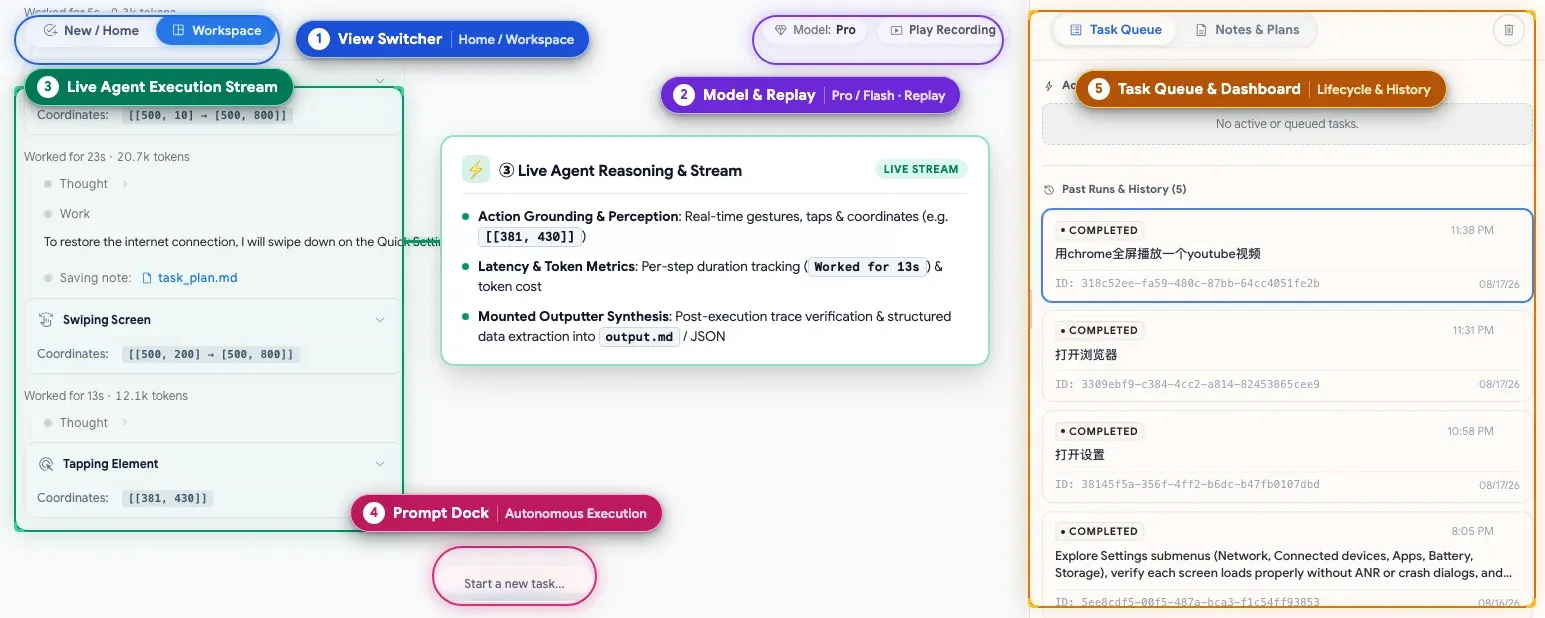
Annotated overview of the ARTEMIS web console, from the project README.
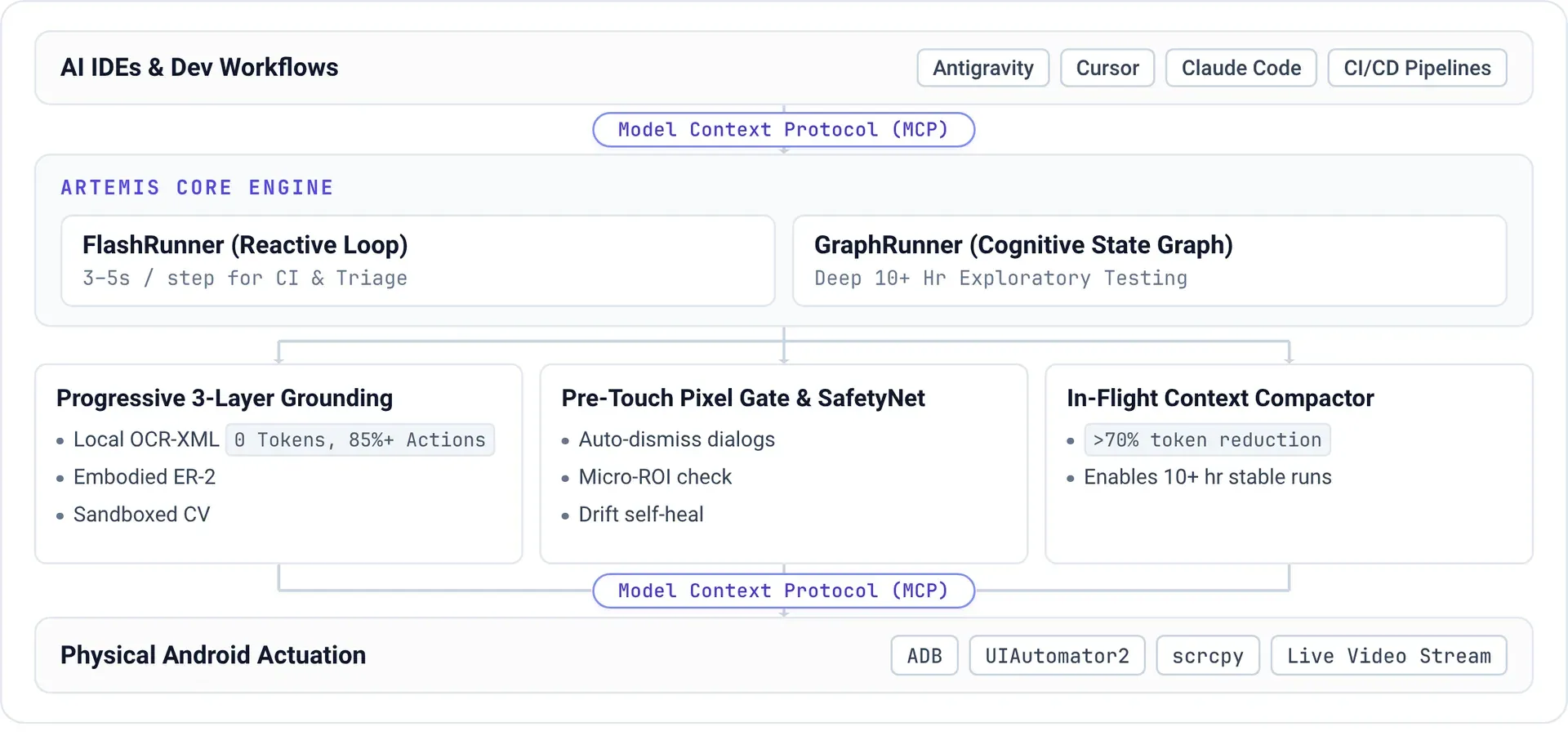
Architecture diagram: AI IDEs connect over MCP to the FlashRunner and GraphRunner, grounding and safety layers, and ADB, UIAutomator2 and scrcpy on the device.
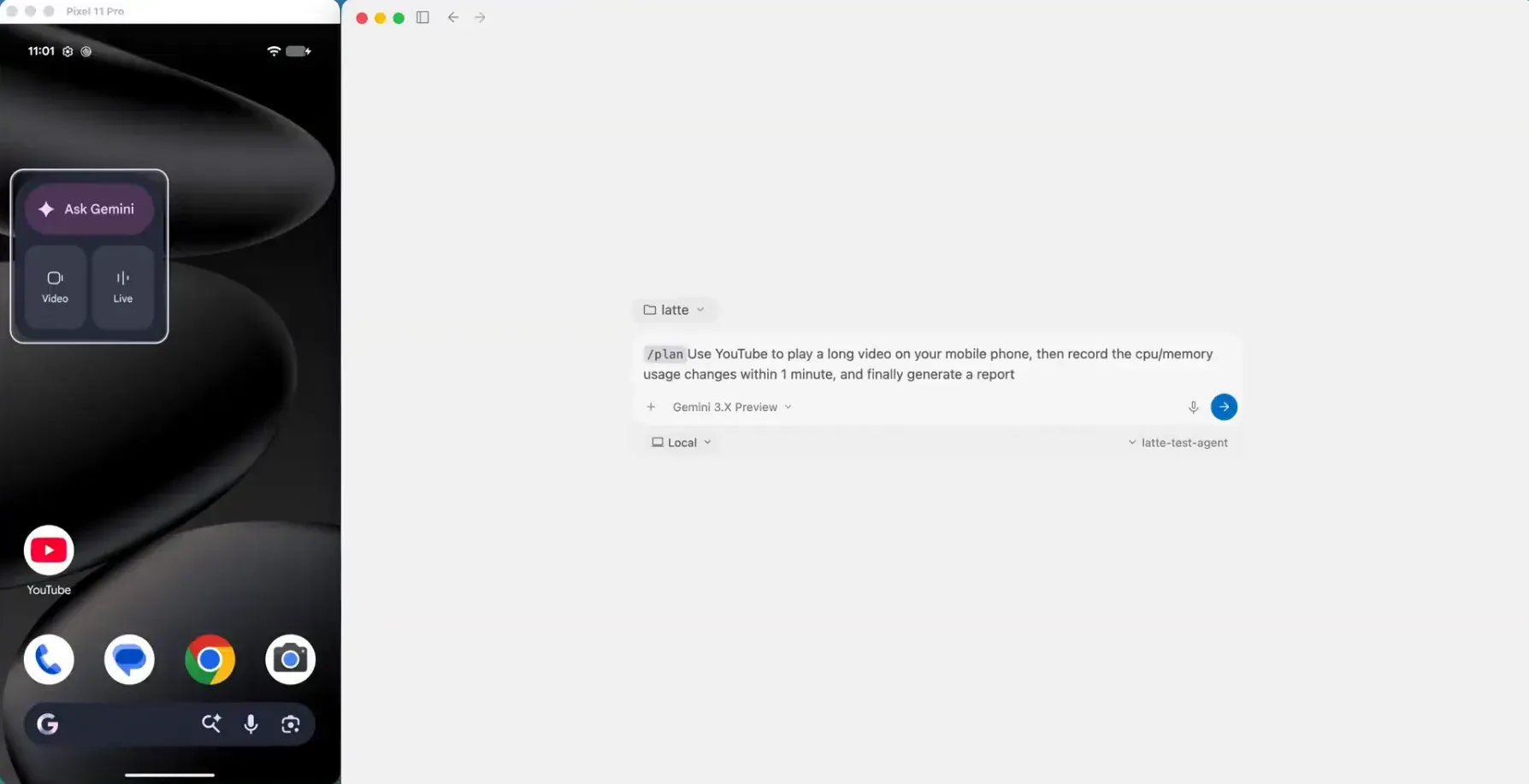
Workflow step 1: a test request typed into Antigravity, with the connected Pixel phone mirrored on the left.
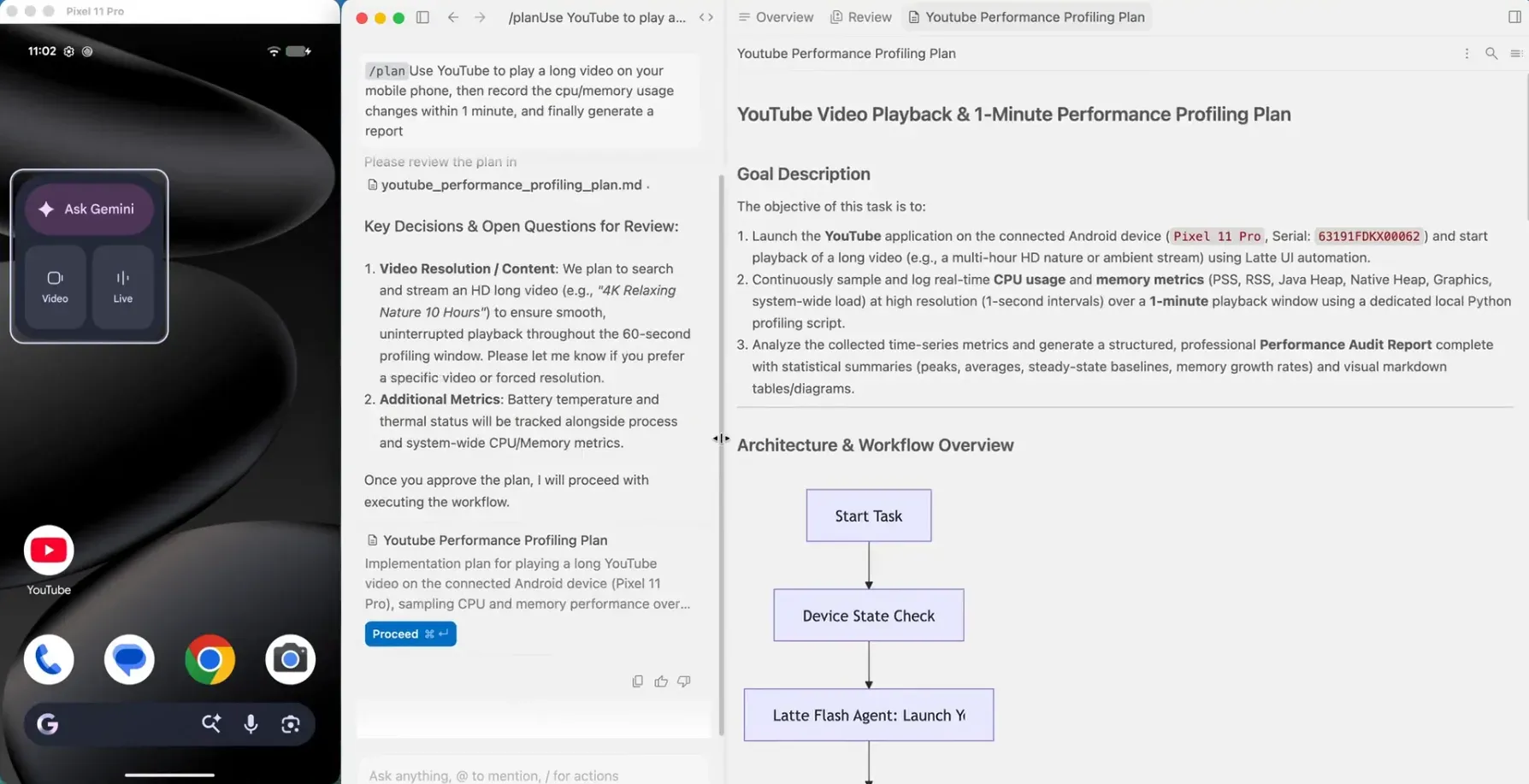
Workflow step 2: the generated test plan with goal description and workflow chart, waiting for approval before execution.
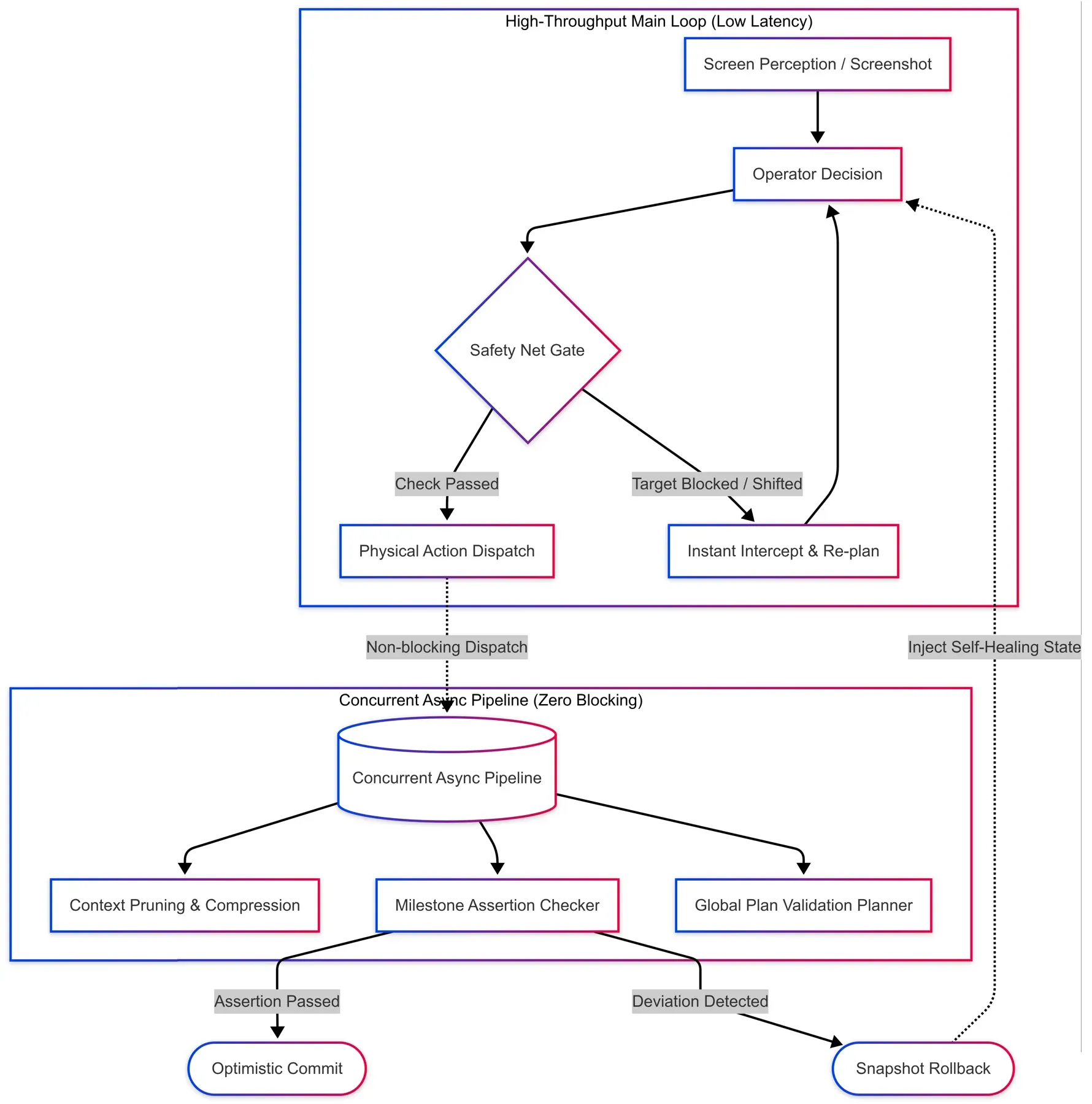
Execution pipeline: perception, operator decision and safety net gate in the main loop, with context compression, milestone checking and plan validation running concurrently.
Source: official ARTEMIS project page.
Key capabilities
- Natural-language Android automation Tasks are written as plain instructions and executed on a real phone or emulator, including flows that cross several apps. The README demo sets up driving routes in Google Maps, sums the durations and then plays a song in YouTube. Instructions can be in other languages; the console history shows tasks written in Chinese.
- Multimodal element targeting ARTEMIS locates UI elements through accessibility hierarchies and element indices when they exist, and falls back to OCR, coordinates and visual models for custom interfaces drawn with Canvas, Jetpack Compose or Flutter. The architecture diagram describes local OCR and XML grounding as the first layer, which needs no model tokens.
- Flash execution profile Flash runs one model in a reactive observe, think and act loop at about 3 to 5 seconds per step. Its loop has no step cap by default because older screenshots are folded into visual summaries and earlier steps are compressed into searchable history. Flash has no task plan, no pre-execution safety check, no checkpoint verification or final report and no ADB shell access.
- Pro execution profile Pro is a multi-agent graph: a Planner keeps a Markdown task plan with milestones and verify or assert items, the Operator executes it with the full toolset, and a read-only Checker verifies checkpoints and reviews the final result. Verification levels are off, final (default), checkpoints and strict. The README states that Pro handles workflows of more than 100 steps and continuous monitoring loops.
- Pre-execution safety net In Pro, every single action is checked against the live UI tree and pixels before it is dispatched, XML first with a pixel fallback. A blocked or failed action opens an execution incident that stays in the Operator's context until a later action succeeds, so recovery happens without a separate repair agent.
- Web test console
artemis uiopens a browser console with a device connection wizard, live screen mirroring, a prompt dock, live reasoning and action telemetry with target coordinates, a task queue with history, notes and plans, and video replay of each run. The server is controlled withartemis restart,stopandstatus. - Developer CLI
uv run artemis run "..." --profile flashruns a task directly in the terminal with structured output. The CLI also runs AndroidWorld benchmarks, manages the helper app, configures MCP clients and runsartemis doctorfor environment checks. - MCP server for coding assistants The native MCP server exposes five tools:
mobile_run_task,mobile_manage_task,mobile_get_device_state,mobile_inspect_traceandmobile_diagnose. Tasks run as detached background processes, and the server returns screenshots, OCR and XML hierarchies and Logcat output. The MCP server README documents each tool. - One-command MCP installation
artemis mcp --install allwrites MCP configuration and a testing rules file for Antigravity, Cursor, Claude Code and Claude Desktop, Codex, Windsurf, VS Code, Cline, Roo Code and OpenClaw.--generate-configprints the TOML or JSON snippet for manual setup. - Agent rules file
mcp_server/rules.mdis a guideline for AI assistants that use ARTEMIS. It covers exploring the live app before writing test code, choosing Flash or Pro, timing differences between exploration and final test code, a dynamic-locator-first pattern with coordinate fallbacks, and callingmobile_diagnosewhen a tool fails. - Completion notifications When a background task finishes, the MCP server notifies through several channels: a wake-up message for Antigravity, native desktop notifications on macOS, Linux and Windows, a JSONL audit log, HTTP webhooks for Slack, Discord, OpenClaw or CI, and a custom script hook.
- Environment diagnosis
mobile_diagnosechecks the Python runtime, configuration, LLM credentials, ADB, device authorization and RSA keys, emulators and the video toolchain, then returns a ready, degraded or blocked verdict with an ordered fix list. Optional deep checks validate API keys live, probe a device end to end or boot an installed emulator image, and a safe self-heal mode restarts ADB and clears stale locks. - Python SDK
artemis-clientis installed withuv addfrom the repository subdirectory and has zero runtime dependencies. It submits tasks to a device host, waits for results and returns typed Pydantic results with a trace ID, so assertions can run inside pytest or CI pipelines. ADB, agents, models and image processing stay on the device host. - Multi-device execution Several phones and emulators can run tasks in parallel through per-device locks. A task targets a specific
device_serialor lets ARTEMIS pick an available ready device from the pool. - Accessibility Helper on the device The helper APK reads the screen layout without taking the UiAutomation connection and shows a notification while running. It can be pre-installed, inspected or removed with
artemis helpercommands. SettingARTEMIS_HELPER_AUTO_INSTALL=falseprevents automatic installation, andARTEMIS_HIERARCHY_BACKEND=uiautomatoruses UIAutomator2 instead. - Session recording and history tools Runs are recorded as video. Agents can search earlier steps with
search_historyandreplay_stepsand query the recording through a video analyzer, and traces can be inspected with visual action overlays after the run.
Where ARTEMIS fits
End-to-end Android app testing
A test scenario is described in natural language and executed on a real device or emulator, either from the CLI, the web console or a Python test. With the Python SDK, a pytest case submits a task, waits for the result and asserts on its success flag, while the device host keeps ADB and the models. Pro adds a plan with verify and assert checkpoints and a final review against the original goal.
Test planning and execution from an AI coding assistant
The README shows Antigravity calling ARTEMIS through MCP in four steps: a prompt describing the test and metrics, a generated test plan for review, autonomous execution on a Pixel phone and a final report with metric tables and raw data files. The same MCP tools are available in Claude Code, Codex, Cursor, Windsurf and other MCP clients, for example to build an APK, install it, log in with a test account and return screenshots of the final screen.
Bug reproduction and diagnostics
Through MCP, an assistant can reproduce a reported bug on a connected device and collect screenshots, UI hierarchies and Logcat output. In the Pro profile the Operator also has ADB diagnostics, log analysis and video analysis of the session recording, and mobile_inspect_trace shows the agent's reasoning and action overlays for each step.
Exploratory and stability testing
Pro supports long-running exploratory and stability runs of more than 100 steps and continuous monitoring tasks marked [Loop:continuous], which end only when an explicit release signal is sent through mobile_manage_task. The architecture diagram describes the graph runner as intended for exploratory testing sessions of ten hours or more, using context compression to keep runs within model limits.
Benchmarking Android agents
The CLI can run the AndroidWorld benchmark from Google Research. The project reports a completion rate above 99 percent on its more than 100 multi-step tasks and publishes a leaderboard comparison image in the repository.
Everyday cross-app tasks
Beyond testing, the same agent performs ordinary tasks across apps, such as planning routes in Google Maps and then opening YouTube, as shown in the README demo. Flash is the profile meant for routine, deterministic UI tasks where speed matters. Device mirroring itself relies on scrcpy.
Install
git clone https://github.com/google/artemis.git && cd artemis && ./start.shReviews of ARTEMIS
Be the first to share your experience with ARTEMIS.
Write a review
Loading review form…
