
What is PinchTab?
PinchTab is an open-source browser control server for AI agents. It is a single Go binary that launches and manages Chrome or Chromium, and exposes the browser through an HTTP API, a command line interface and a built-in Model Context Protocol (MCP) server. Agents read pages through accessibility-tree snapshots and text extraction instead of raw HTML or screenshots, and act on elements through short references such as e5. The project describes itself as browser control for AI agents and is maintained in the pinchtab GitHub organization under the MIT license.
The process model is server first. pinchtab server, or the background daemon installed with pinchtab daemon install, runs the control plane on 127.0.0.1:9867: it manages profiles, instances, routing and a web dashboard. Each managed browser runs behind a lightweight pinchtab bridge runtime, and an advanced attach mode registers Chrome instances that were started elsewhere. The core concepts guide defines the server, instance, profile, tab and bridge terms used across the documentation.
PinchTab is distributed as release binaries for macOS, Linux and Windows on amd64 and arm64, through an install script for macOS and Linux, a Homebrew tap, the pinchtab npm package (Node.js 18 or later) and the pinchtab/pinchtab Docker image. Building from source requires Go 1.26 or later. The README states that the primary tested workflow is local macOS and Linux, and that Windows binaries are published with limited, best-effort support; on Windows the project points to running pinchtab server or pinchtab bridge directly instead of the daemon. Raspberry Pi and other ARM64 systems are documented with automatic Chromium detection.
The latest GitHub release is v0.15.2, published on August 26, 2026. It added a Grok Build plugin, refused mutating tab requests while a tab is paused for human handoff, and merged the MCP wait, keyboard and record tool families into one tool each. Version 0.15.0 (July 18, 2026) introduced the audit, compare and scrape commands, an accessibility score endpoint, Core Web Vitals timing and the annotate overlay; version 0.15.1 (August 3, 2026) made snapshot references denote DOM nodes so they survive a change of filter, selector or depth.
The project positions PinchTab for local, single-user control on a machine the operator manages. Remote, container and distributed layouts are supported as operator-managed deployments, but the security guide states that the dashboard, HTTP API, MCP server and remote CLI form one privileged control plane that is not designed for untrusted users, multi-tenant use or direct public internet exposure. According to the README there is no telemetry, no analytics and no required outbound service. The browser itself is not bundled: PinchTab drives a locally installed Chrome or Chromium, or an optional user-supplied CloakBrowser binary. Similar projects on iThub include agent-browser, Browser Use and Chrome DevTools MCP.
Key capabilities
- HTTP API for browser control The server exposes JSON endpoints for profiles, instances, tabs, navigation, snapshots, actions, text, screenshots and PDF export, with read-only GET requests and POST requests for changes. Every request needs the server token generated on first run, which
pinchtab config token --stdoutprints. The reference section documents each endpoint family with curl and CLI equivalents. - Command line interface The
pinchtabCLI wraps the API with commands such asnav,snap,click,fill,pressandtext, and auto-starts the local server when needed. Shell completion is generated for zsh, bash and fish.pinchtab doctorchecks the config file, the browser binary and version, and whether a headless launch exposes the Chrome DevTools Protocol, with a JSON output mode. - Accessibility-tree snapshots with stable references Snapshots return a structured accessibility tree in which each element carries a reference such as
e0ore5. Since v0.15.1 a reference denotes a DOM node rather than a row, so the same reference survives a change of filter, selector or depth and expires only when the tab navigates to a new document. Interactive and compact filters reduce the snapshot to clickable elements. - Token-efficient text extraction Text extraction offers a readability mode that strips navigation and ads, a raw mode with full text, and a markdown mode that keeps links and tables. The README cites about 800 tokens per page for text extraction and publishes a benchmark against agent-browser measured with the Anthropic API. Benchmark numbers come from the project and depend on the workload and model.
- Built-in MCP server
pinchtab mcpstarts an MCP server over stdio that connects to a running server or bridge. The MCP documentation lists 47 tools across navigation, interaction, content, tab management, human handoff, network and diagnostics, and gives configuration snippets for Claude Desktop, VS Code with GitHub Copilot, Cursor and Grok Build. The project describes snapshot and text output from untrusted sites as data that can contain prompt-injection content. - Agent skill and plugins The npm package ships a
pinchtabagent skill and copies it into detected agent homes for Claude, Cursor, Windsurf, Codex and OpenClaw, recording the release version and a content hash.pinchtab skill statusreports stale copies andpinchtab skill updaterefreshes them. Separate plugins exist for Grok Build and OpenClaw; neither installs the PinchTab binary itself. - Headless and headed instances Instances run Chrome headless by default or headed with a visible window. The headless vs headed guide describes headless mode for agents, CI, containers and remote servers, and headed mode for development, debugging and human-in-the-loop work, which requires a display environment and uses more CPU and memory.
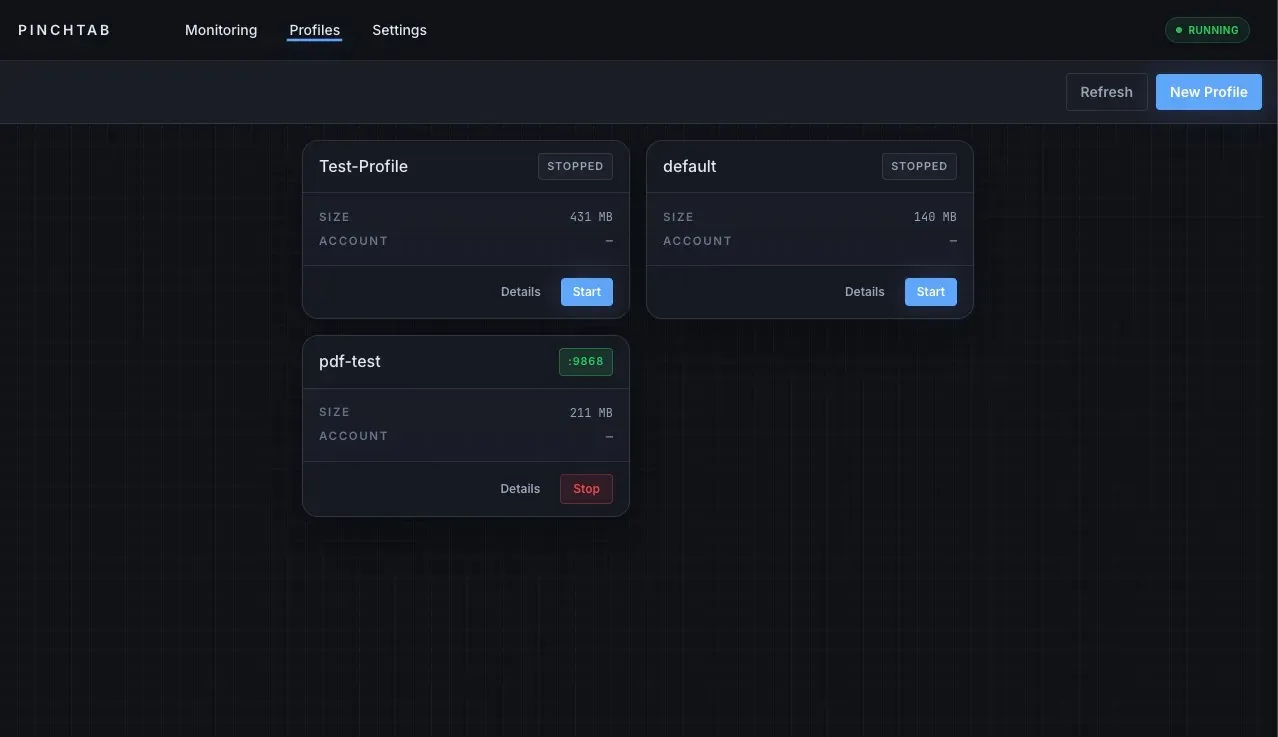
- Persistent profiles A profile stores Chrome user data such as cookies, history and local storage, so a login survives restarts. Profiles carry a name and an optional description of when to use them, which lets an agent choose the right one. Each instance runs one profile, and the documentation describes how separate user data directories isolate parallel instances.
- Multi-instance orchestration One server can run several Chrome processes in parallel, each with its own profile and port, and route requests to them. Remote bridges and attached Chrome instances extend this across containers or machines, including documented Tailscale and remote-bridge layouts. The project labels these distributed setups as advanced, operator-secured deployments.
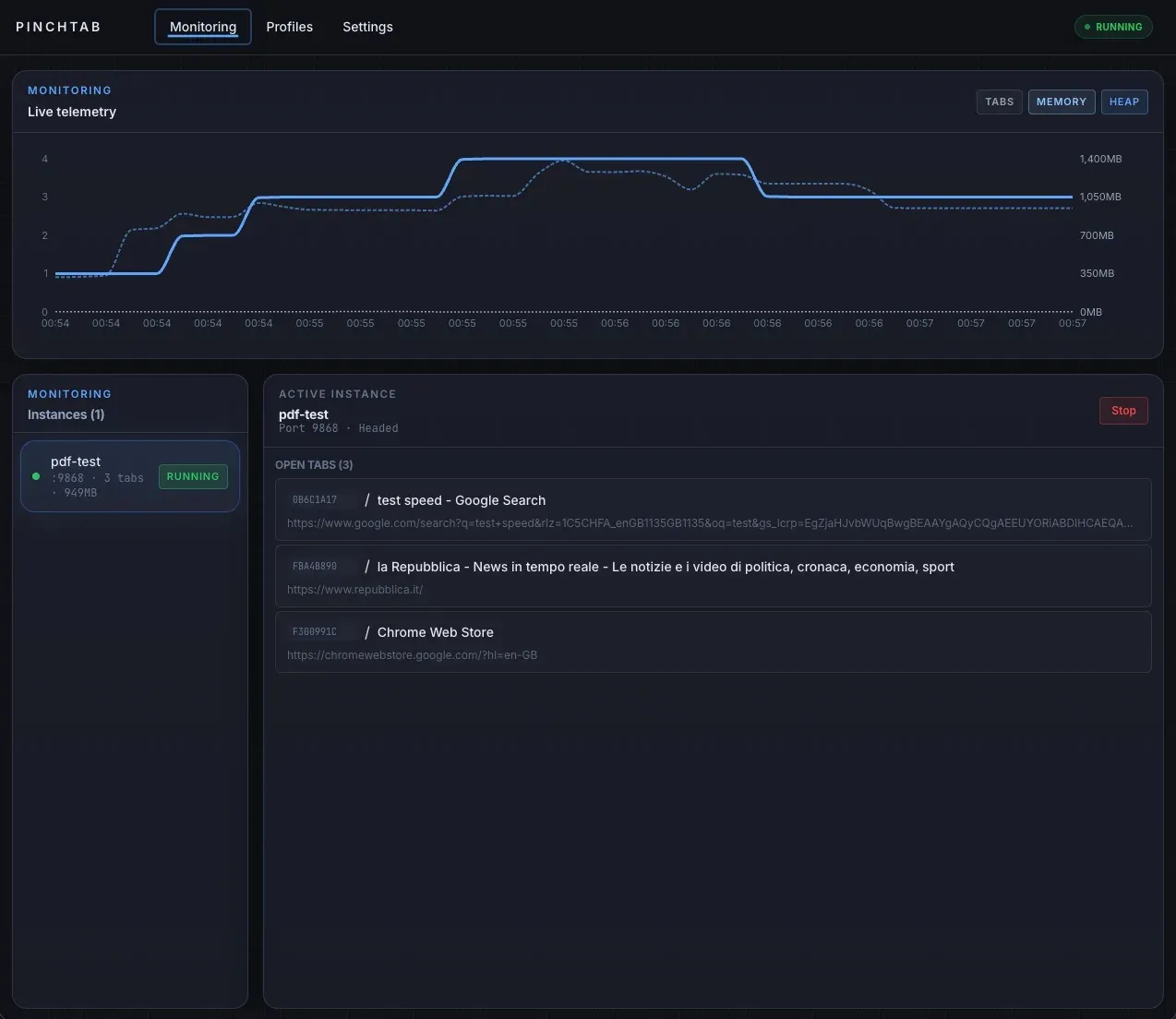
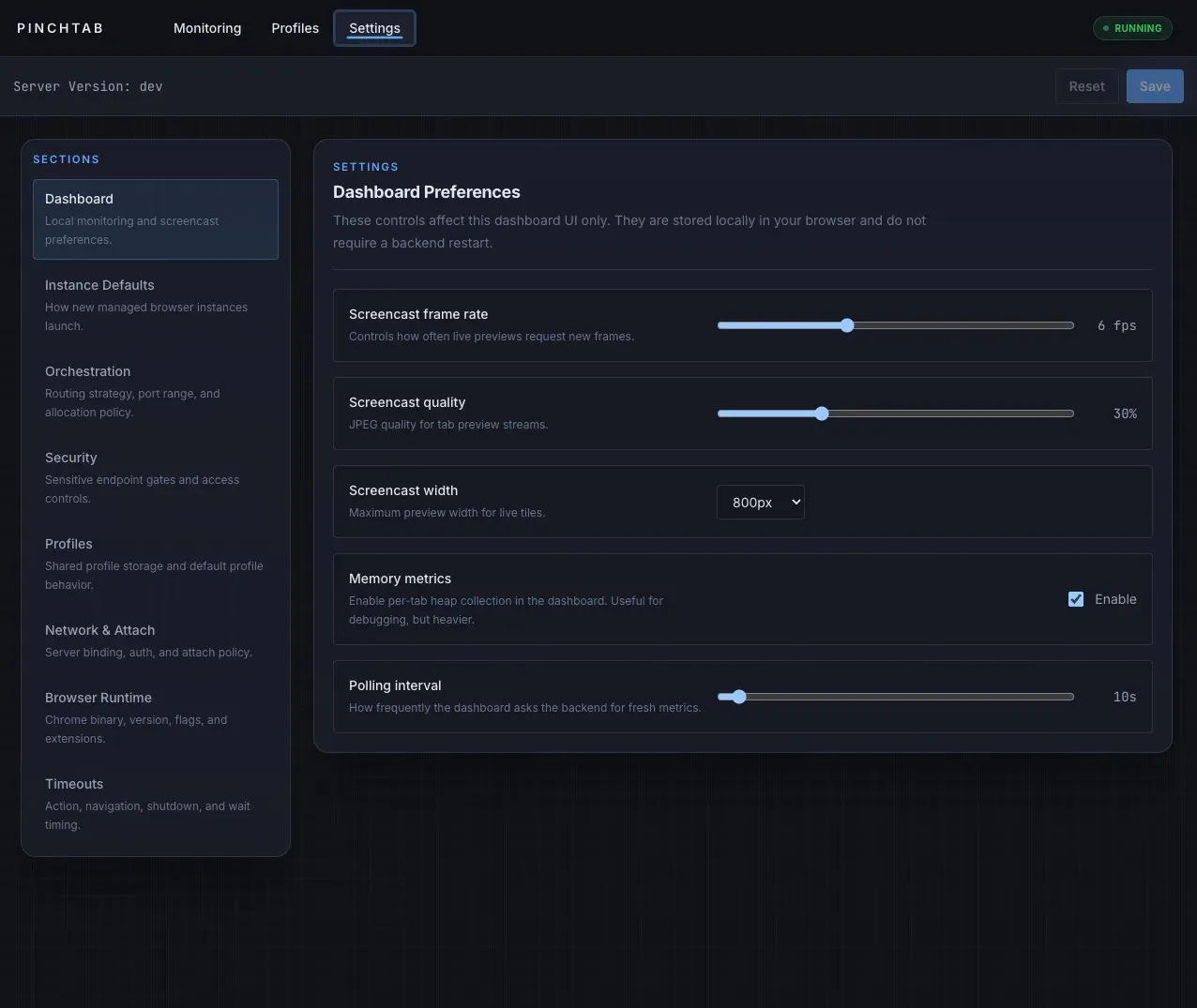
- Web dashboard The full server serves a React dashboard at
http://localhost:9867with Monitoring, Agents, Profiles and Settings pages. It shows instances, open tabs, live telemetry and optional memory metrics, and edits configuration sections such as instance defaults, orchestration, security, network and timeouts. The dashboard guide notes that it is an operator control surface and thatpinchtab bridgedoes not serve it. - Site audit and visual compare
pinchtab auditproduces a versioned report with screenshots, console logs, network requests and broken assets, an accessibility score, Core Web Vitals timing and rule-based security findings, for one page or a sitemap sample.pinchtab compareaudits two site versions and reports visual and data differences, and--fail-on-diffturns it into a CI gate. Details are in the audit reference. - Site scrape to markdown
pinchtab scrapeturns a site into a page tree of markdown. Pages are discovered and extracted over plain HTTP first, and only pages with thin, blocked or failed results are re-rendered in the browser. A preview mode returns the page tree with character counts and snippets, and--onlyexpands selected URLs. Defaults include 50 pages per site, as listed in the scrape reference. - Annotate overlay for element references The annotate overlay draws a labelled box over every interactive element of a live page; clicking a label copies its reference so it can be pasted into an LLM chat. The annotate guide describes this workflow for fixing websites with an LLM.
- Human handoff A tab can be marked for human intervention with
pinchtab tab handoff, for example during a login step. While the tab is paused, mutating routes such as action, navigate, evaluate and upload return a 409 error until the tab is resumed or the optional timeout expires. MCP exposes the same functions as three tools. - Local-first security defaults The default configuration binds to
127.0.0.1, generates a server token, disables sensitive endpoint families such as JavaScript evaluation, macros, screencast and downloads, and disables attach. IDPI restricts browsing to locally hosted websites until the operator widens the allowlist. The security guide lists every switch. - Stealth and CloakBrowser support The website lists a stealth mode that patches
navigator.webdriver, spoofs the user agent and hides automation flags. CloakBrowser can be used as an optional browser provider for sites that fingerprint stock Chromium; PinchTab launches a user-supplied CloakBrowser binary and does not bundle one, as the CloakBrowser guide explains. - Installation on macOS and Linux The install script
curl -fsSL https://pinchtab.com/install.sh | bashinstalls the binary and the control plane;brew install pinchtab/tap/pinchtabandnpm install -g pinchtabare alternatives. On macOS the README describes preferring Chrome for Testing or Chromium over the daily Chrome profile, andpinchtab doctor browserswarns when automation would fall back to the primary Chrome. - Docker image and Windows binaries The
pinchtab/pinchtabimage publishes port 9867 on localhost, stores its managed config under/data/.config/pinchtab/config.jsonand accepts a mounted config throughPINCHTAB_CONFIG; the Docker guide lists the options. Windows amd64 and arm64 executables are attached to each release with the limited support described above.
Where PinchTab fits
Giving a coding agent a browser
The documented primary journey installs PinchTab, starts the daemon with pinchtab daemon install, and points an agent or tool at http://localhost:9867. Agents then call the CLI, the HTTP API or the MCP tools to navigate, take a snapshot, click references and extract text. The README example asks an agent for news on a site, which PinchTab answers through snapshots and text rather than raw HTML or images. The getting started guide walks through server, instance, navigation and actions.
Running logged-in tasks with headed profiles
The project describes creating headed Chrome profiles that already hold authentication, cookies, extensions or a specific environment, each with a name and description. An agent request such as downloading a weekly report from a work account can then select the matching profile. The website notes that such sessions persist and that any authenticated client that reaches PinchTab can act with them, and the data storage guide lists where profile data lives on disk.
Auditing a site and comparing releases
For QA and release checks, pinchtab audit collects screenshots, console errors, broken assets, accessibility findings, Core Web Vitals and security findings into report.json. A sitemap mode samples pages per template. pinchtab compare runs the same audit against a live and a staging URL, writes annotated visual diffs and can fail a CI job when differences appear.
Scraping documentation or content into markdown
The scrape command crawls a site over HTTP through SeaPortal, using the sitemap or links, and sends only JavaScript-dependent or blocked pages to the browser. Each page records whether its content came from HTTP or the browser. The preview then expand pattern documented by the project first lists pages with their size and then renders only selected URLs, which limits token and browser cost on large sites.
Running isolated browsers in Docker or across machines
The Docker image runs PinchTab and Chrome inside a container with a persistent data volume and a 2 GB shared memory setting in the documented example. For larger setups the server can manage instances on other machines through remote bridges, attach to Chrome started in remote debug mode, or connect several PinchTab servers; the README lists QA automation, test environments and distributed browsing as typical uses. The project leaves network boundaries, tokens and TLS to the operator.
Fixing a page with an LLM through annotations
The annotate workflow, introduced in v0.15.0, overlays reference labels on a live page. A developer clicks the element in question, the label turns into a checkmark, and the copied reference is pasted into an LLM chat so the model knows exactly which element is meant. The same references work with the CLI and API for follow-up actions.
Install
curl -fsSL https://pinchtab.com/install.sh | bashReviews of PinchTab
Be the first to share your experience with PinchTab.
Write a review
Loading review form…
Found PinchTab useful? Upvote it todayYour vote helps other IT teams find it in the daily ranking.