

What is Mailrise?
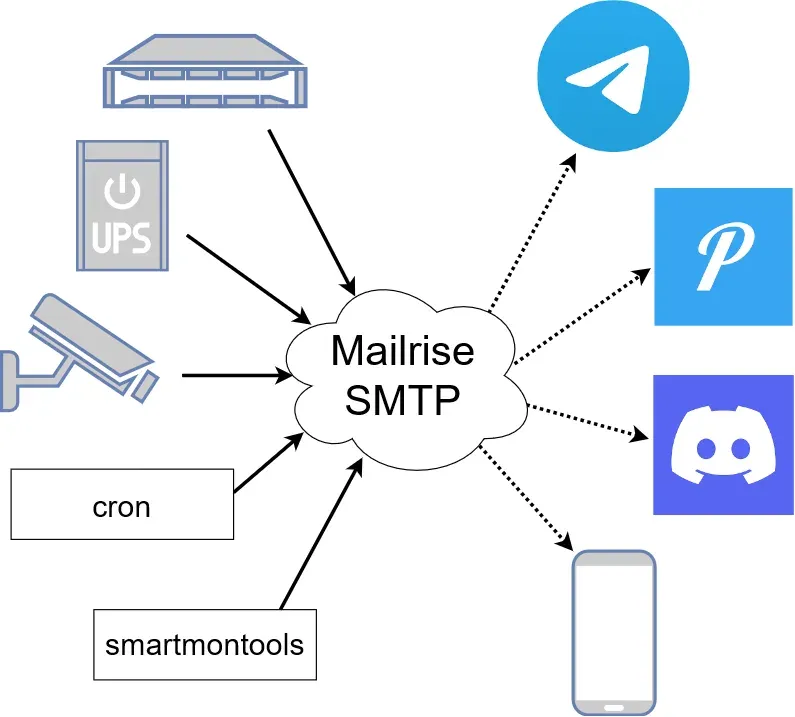
Mailrise is an SMTP server that converts the emails it receives into notifications sent through Apprise. It is written in Python by Ryan Young, published as the mailrise package under the MIT license and hosted at YoRyan/mailrise on GitHub. The README describes the intended use as an email relay for a home lab or network: Linux servers, Internet of Things devices, surveillance systems and older software that can only send email alerts are pointed at Mailrise, which forwards each message to notification services such as Matrix, Nextcloud, Telegram, Discord or Pushover. Mailrise is the successor to the author's earlier SMTP Translator, which applied the same idea to Pushover only.
The daemon reads a single YAML file, by convention /etc/mailrise.conf. Its configs section maps recipient addresses to Apprise configurations written in the Apprise YAML format. A sender chooses a configuration through the recipient address, for example pushover@mailrise.xyz, where mailrise.xyz is the default domain added to bare names. Mailrise keeps no mailboxes and does not pass mail on to other mail servers: each accepted message becomes one Apprise notification per matching recipient, with attachments passed through when the target service supports them. The SMTP side is built on aiosmtpd and listens on port 8025 by default.
The project distributes an official container image, yoryan/mailrise on Docker Hub, with a copy at ghcr.io/yoryan/mailrise on GitHub Packages. Both are built by the repository's workflows for linux/amd64 and linux/arm64; the latest tag follows the main branch, while stable, 1 and 1.4.0 come from the release tag. The Python package is on PyPI and requires Python 3.8 or later, and the README includes a systemd unit for running it as a service.
The current version is 1.4.0, published to PyPI and tagged on July 21, 2023; the project does not create GitHub release entries. According to the changelog, 1.4.0 made Mailrise run on Windows, moved to Apprise 1.4.5 and added custom routers and authenticators, while 1.3.0 of December 2022 added basic authentication, wildcard recipients, the !env_var directive, verbose logging, support for multipart messages produced by Blue Iris and a fix for STARTTLS. Later commits on the main branch, without a new version number, raise the SMTP line length limit, extend message logging, and in November 2025 remove the exact dependency pins and fix logging of unknown configuration keys. The PyPI 1.4.0 package pins apprise==1.4.5, whereas the main branch only sets minimum versions. The Docker latest image was last rebuilt on November 8, 2025, and the most recent push to the repository was on November 24, 2025.
Mailrise has no web interface and no HTTP API; it is configured through the YAML file and, optionally, Python code loaded at start. The list of supported notification services and their URL formats comes from Apprise, so service support follows the Apprise version installed alongside it. Questions are handled in GitHub Discussions and issues. Related projects on iThub are Apprise, the notification library Mailrise is built on, and ntfy, an HTTP publish-subscribe notification service.
Key capabilities
- SMTP listener for alert emails Mailrise runs an SMTP server on all interfaces and port 8025 unless
listen.hostandlisten.portsay otherwise.smtp.hostnamesets the name used in the EHLO response and defaults to the system FQDN. Messages addressed to an unknown or malformed recipient are logged as errors, and on the main branch the SMTP line length limit is raised to 65,536 bytes. - One Apprise configuration per recipient Each key under
configsholds an Apprise YAML configuration exactly as it would appear in a standalone Apprise file. Theurlsentry must be a YAML list even for a single service, and one configuration can list several services, such as a Telegram bot and a Discord webhook that receive the same message. - Addresses and custom domains A configuration name can be a bare username such as
notify, which becomesnotify@mailrise.xyz, or a full address such asnotify@mydomain.com. The period is reserved for sender flags, so it cannot appear in the username part of a configured address. - Wildcard recipients Configuration names accept fnmatch patterns, which must be quoted in YAML. Patterns are evaluated in file order and the first match wins, so
"*@*"at the end acts as a catch-all. A bare"*"expands to*@mailrise.xyzbecause the default domain still applies. - Notification types from the address Appending
.info,.success,.warningor.failureto the username, as indiscord.failure@mailrise.xyz, selects one of the four Apprise message types. Services that support it change the icon colour; Mailrise passes its own Apprise asset with the app ID Mailrise and its own envelope icon and colour for each of the four types. - Title and body templates
mailrise.title_templateandmailrise.body_templateuse Python template strings with the variables$subject,$from,$body,$to,$configand$type. The defaults are$subject ($from)for the title and$bodyfor the body. - Body format
mailrise.body_formatcan betext,htmlormarkdown, which Apprise uses to decide how to render content for each service. Without it, the format is taken from the email: an HTML body part is passed as HTML, otherwise as text. - Attachments Email attachments are handed to Apprise for services that accept files. Mailrise writes each attachment to a temporary file for the send and deletes it afterwards, and the log line for an accepted message lists attachment names and sizes.
- Delivery status back to the sender Mailrise answers
250 OKonly after the Apprise notifications have been sent. If a notification fails, or a custom router raises an error, the SMTP session receives a450temporary failure code instead, which the sending device can treat as a delivery error. - TLS modes
tls.modeacceptsoff,onconnect,starttlsandstarttlsrequire, withtls.certfileandtls.keyfilepointing to unencrypted PEM files. When a STARTTLS mode is active, authentication is only accepted after the connection has been upgraded. - SMTP authentication
smtp.auth.basicholds a static list of usernames and passwords; once it is set, clients have to log in. The README notes that these credentials travel in plaintext unless TLS is enabled. - Secrets from environment variables The
!env_varYAML tag, modelled on Home Assistant, inserts an environment variable into the configuration, for example an Apprise URL with a token supplied by a container orchestrator. A default value can follow the variable name; without one, a missing variable stops the daemon at start. - Custom routers and authenticators
import_codeloads a Python file whose module-levelrouterandauthenticatorreplace the built-in routing and login logic. A custom router ignores theconfigssection, a custom authenticator ignoressmtp.auth, and the router API plus a test sample document the interface. - Official Docker image The image runs as a non-root
mailriseuser, exposes port 8025 and startsmailrise /etc/mailrise.conf. The configuration must be bind-mounted as a file, not a directory. The README adds NAS notes: on Unraid the command can be overridden to read the file from another directory, and on TrueNAS SCALE the container has to run as user and group 999. - PyPI package and systemd
pip install mailriseinstalls themailrisecommand, which takes the path of the configuration file. The README provides a systemd unit that runs/usr/local/bin/mailrise /etc/mailrise.conf, and the package metadata lists Linux and Windows as supported systems. - Logging
-vsets the log level to INFO and-vvto DEBUG, with output on standard output. In current main-branch builds, the INFO level logs each accepted message with sender, recipients, subject, the first characters of the body and attachment sizes, and DEBUG adds the aiosmtpd TLS and authentication settings.
Where Mailrise fits
Alerts from devices that only speak email
NAS systems, UPS units, routers and printers often offer email as their only alert channel. In their SMTP settings the server is set to the Mailrise host and port, and the recipient to a configured address such as nas@mailrise.xyz. Mailrise then turns the subject and body into a push message on the services listed in that Apprise configuration, so no real mailbox or mail provider account is involved. The README presents this as an alternative to copying a Gmail password onto every machine that sends alerts.
Camera and surveillance notifications
Surveillance systems are among the senders named in the README, and version 1.3.0 added support for the multipart messages produced by Blue Iris. Snapshot images attached to an alert email are passed through to services that accept attachments, so a motion alert can arrive with its picture on Telegram or Discord, while services without attachment support receive the text only.
Server jobs and disk health warnings
The project's diagram shows cron and smartmontools next to network hardware as typical sources. These tools report by email, and Mailrise receives those messages over SMTP. Separate addresses, or wildcard patterns such as "backup*@*", send different kinds of reports to different Apprise configurations, and the .failure or .warning suffix marks severity on services that colour notifications by type.
Routing by domain and catch-all targets
Full addresses and fnmatch patterns let one Mailrise instance serve several domains or device groups: "my_cool_name@*.net" matches by domain, and a final "*@*" entry collects anything not matched earlier. Because the first matching pattern wins, the order of entries in mailrise.conf decides which configuration a message reaches.
TLS through a reverse proxy
For automatic Let's Encrypt certificates the README shows Mailrise running in plaintext mode behind Traefik. A Traefik TCP router on port 465 terminates TLS with its certificate resolver and forwards the connection to the container, and SMTP clients then connect to the public hostname on port 465 in TLS-on-connect mode. The built-in tls options remain available for setups that manage certificate files directly.
Programmable routing and login
Where the YAML format is not enough, import_code loads a Python router that receives the parsed email and the authentication data and yields the Apprise notifications to send, for example based on the sender or the message content. An authenticator callback written against the aiosmtpd authenticator interface can replace the static password list with another credential check.
Install
pip install mailriseReviews of Mailrise
Be the first to share your experience with Mailrise.
Write a review
Loading review form…
Found Mailrise useful? Upvote it todayYour vote helps other IT teams find it in the daily ranking.


