

What is Paragon?
Paragon is an integration infrastructure platform for SaaS and AI products. It lets a software vendor offer native integrations between its own product and its customers' third-party applications, such as Salesforce, HubSpot, Slack, Jira, Google Drive or SharePoint, without building and maintaining every connector itself. The documentation overview describes three primitives for integration logic (ActionKit, Managed Sync and Workflows) on top of a shared authentication layer, monitoring and flexible hosting.
The company is Forge Technology, Inc., a Delaware corporation doing business as Paragon, according to the customer terms, which give a notice address in Los Angeles, California. The careers page states that Paragon took part in Y Combinator's Winter 2020 batch and is based in West Los Angeles.
The platform is distributed as a hosted multi-tenant cloud in US and EU regions, and as an on-premise deployment in a customer's own AWS, Azure or GCP account. On-premise is limited to the Enterprise plan, can be managed by Paragon or run by the customer, and can also be forward-deployed into the environment of the vendor's own customers. On-premise instances ship as Docker images, run best on Kubernetes and require a Paragon license that is checked against Paragon's cloud at boot and periodically. End users connect their accounts through the embedded Connect Portal, a React component loaded from the @useparagon/connect npm package, or through a headless SDK with the vendor's own UI.
The pricing page lists a platform tier with a free start and Pro and Enterprise plans quoted by sales. Every plan includes unlimited integrations and access to Managed Sync, ActionKit and Workflows; cost scales with the number of Connected Users, meaning tenants (usually customer organisations) with at least one connected integration. Enterprise adds self-hosting and forward deployment, dynamic field mapping, SAML SSO, priority support with SLAs and professional services. Paid plans carry a 99.9% quarterly uptime commitment with service credits, per the SLA page.
The security page lists SOC 2 Type II, HIPAA and GDPR compliance, with ISO 27001 marked as coming soon, AES-256 encryption at rest and TLS 1.2 or later in transit, and a separate credential vault. Paragon is closed source; its GitHub organisation hosts sample code such as a Next.js example app. Comparable listings on iThub include Nango, an open-source integrations platform, and Merge, which provides unified APIs by category.
Paragon screenshots
Explore the interface. Open a screenshot to view it at full size.
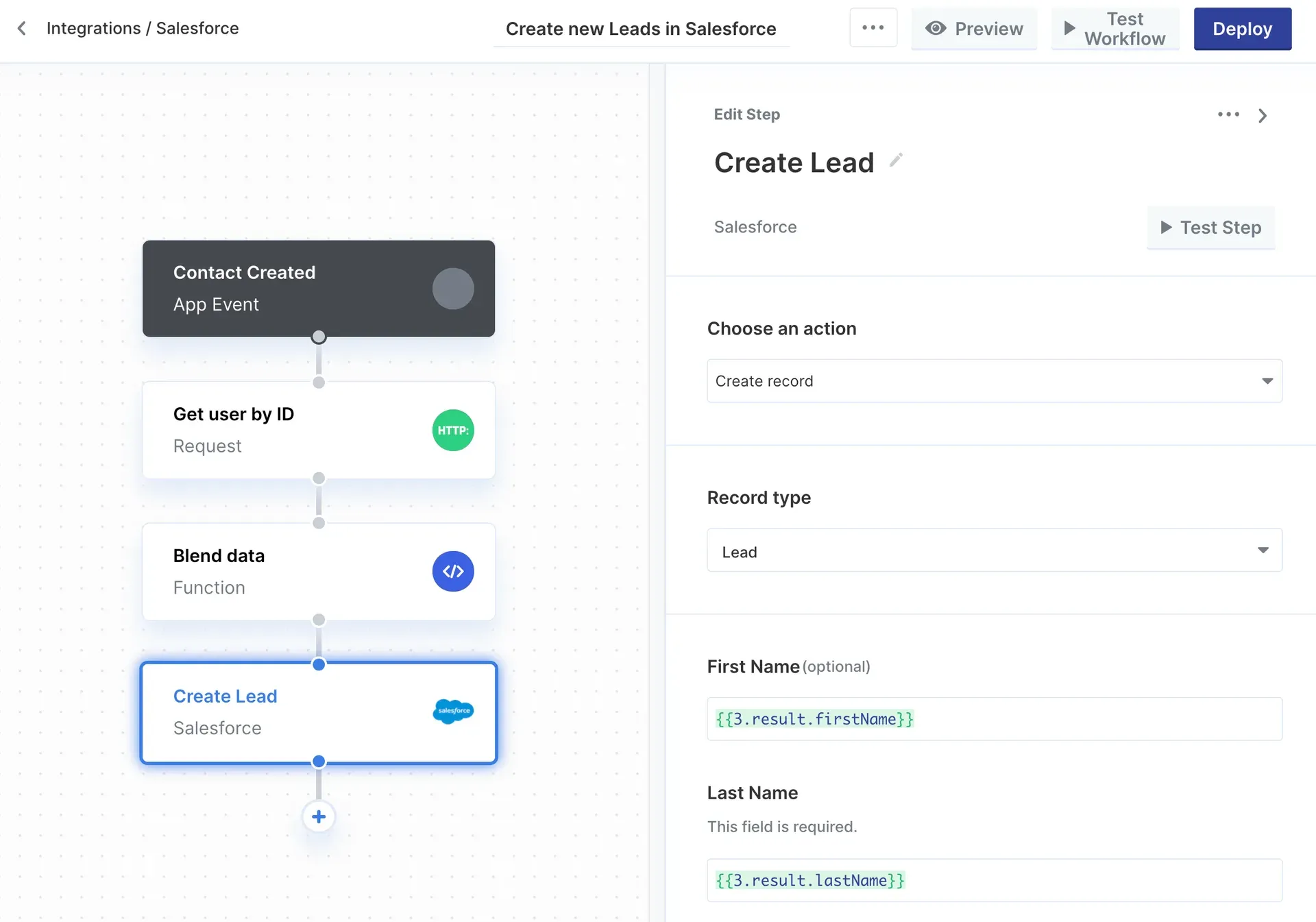
Workflow editor from the Paragon documentation: a workflow that creates Salesforce leads from an app event.
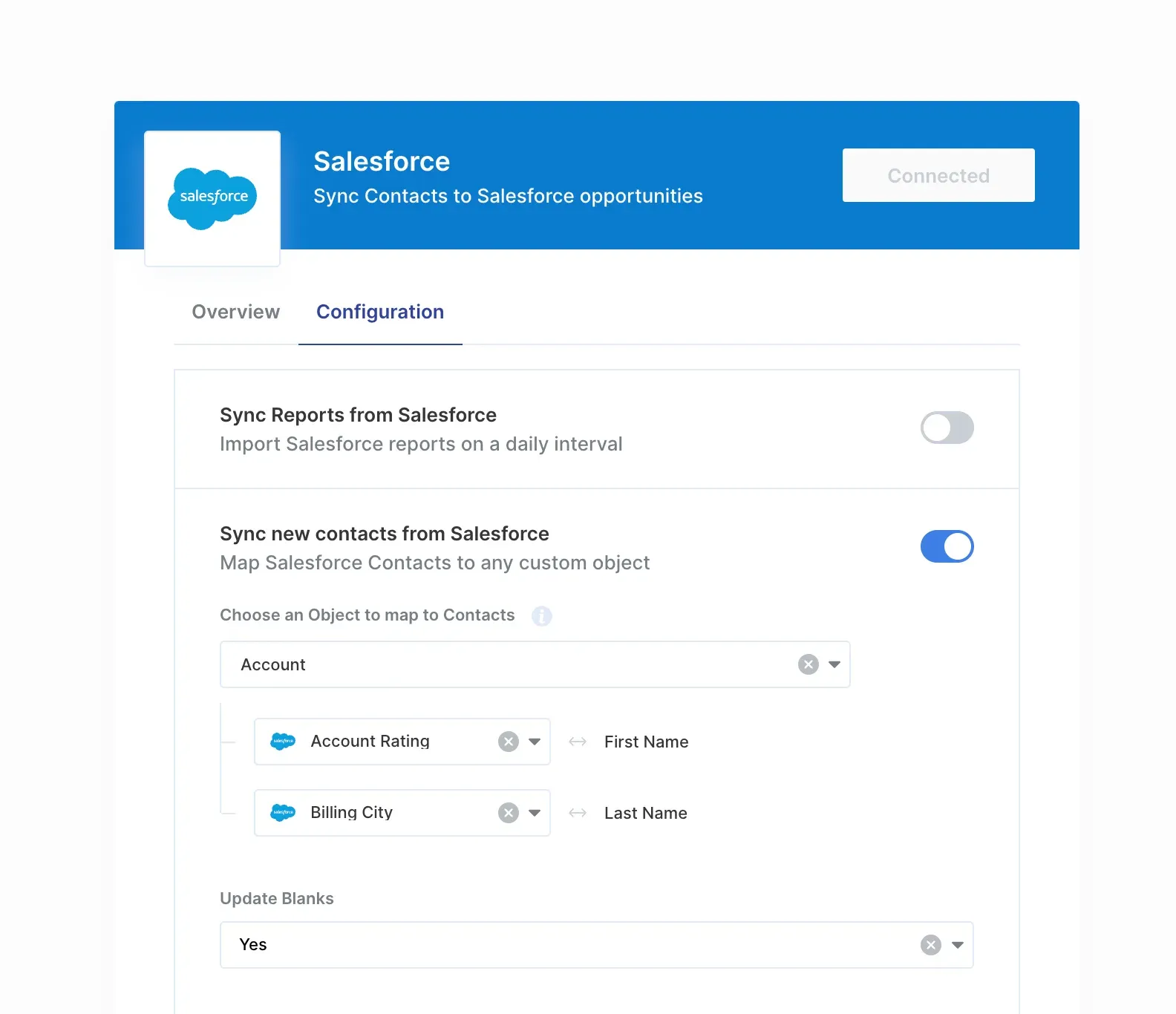
The out-of-the-box Connect Portal, showing user settings and field mapping for a Salesforce integration.
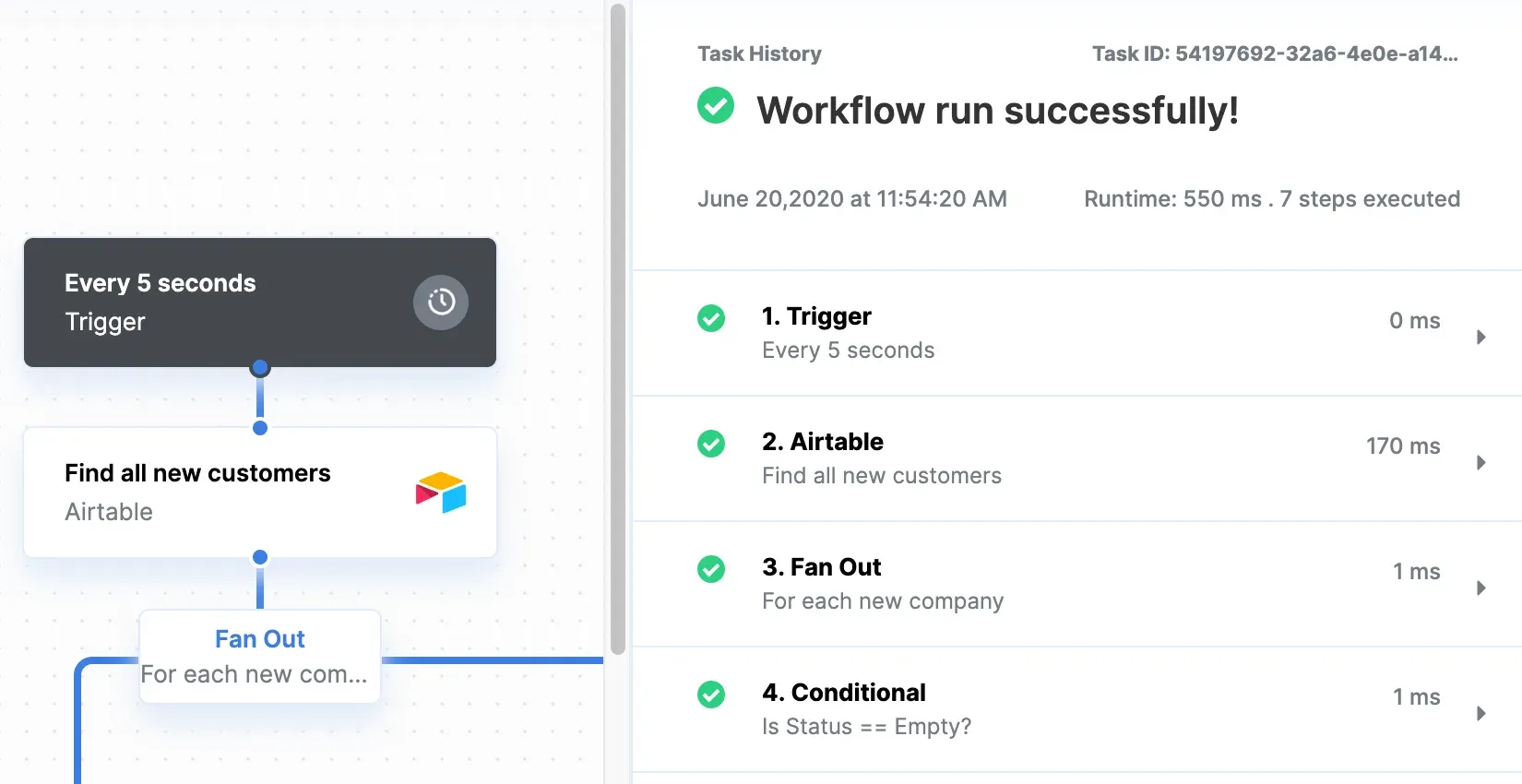
Workflow execution view with task history, from the Paragon task usage documentation.
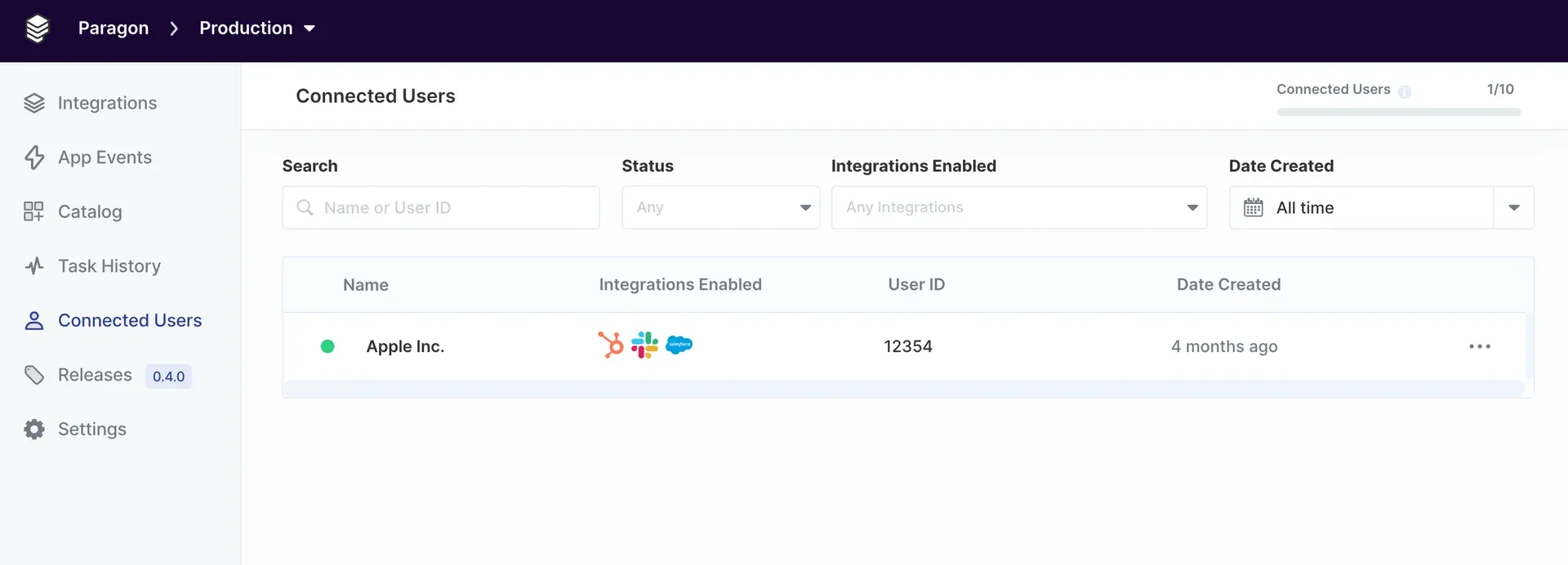
Connected Users dashboard from the Paragon documentation, with the plan limit shown in the header.
Source: official Paragon project page.
Key capabilities
- Connector catalog The platform documentation counts more than 130 native connectors in categories such as CRM, file storage, project management and documents. A custom integration builder adds connectors for any third-party API, and custom webhooks can be defined for providers that are not in the catalog.
- Fully managed authentication Paragon runs OAuth and other authentication flows for each connected user, stores credentials encrypted at rest and in transit, and attaches and refreshes authorization details automatically on every request. User-configured OAuth lets an end user authorize an integration with their own OAuth client and scopes.
- Connect Portal The out-of-the-box Connect Portal is a React component embedded in the vendor's app. It handles connection, onboarding, user settings, field mapping and workflow visibility, and it can be white-labeled. The authentication layer docs describe both the portal and the headless option.
- Headless Connect Portal and SDK The headless mode keeps Paragon's authentication and integration logic while the vendor renders its own components or design system. The SDK is installed with
npm install @useparagon/connect(yarn, pnpm and bun also documented) and authenticated with a Paragon User Token signed by the vendor; on-premise instances are addressed withparagon.configureGlobal. - ActionKit ActionKit is one API and MCP server that exposes pre-built Tools (actions in third-party systems) and Triggers (events) through a uniform interface. It offers agent-optimized and workflow UI schema formats, a universal filter schema for list and search operations and a
reload_fieldsoption to fetch each user's custom fields at query time. The ActionKit overview lists AI agents, in-app workflow builders and front-end functions as uses. - Managed Sync Managed Sync provides a Sync API that starts a full sync of a user's third-party data with two API calls, plus a Permissions API for enforcing source access control on ingested data in retrieval pipelines. It covers files, CRM records, tickets and accounting data, performs historical backfills and incremental updates, and supports sync frequencies down to every minute.
- Permissions API For file-storage sources, Paragon syncs permission information along with the files. The vendor's application queries inherited, group-based, organisation-wide and link-sharing access before returning content to a user, as described on the Managed Sync product page.
- Workflows Workflows is an embedded iPaaS for durable, asynchronous, event-driven jobs between the vendor's app and its users' third-party apps. Logic is authored in a low-code editor or a TypeScript framework, version controlled through Git repo sync, and triggered from the app, on a schedule or from third-party webhooks, with queues and dynamically scaled workers underneath.
- Workflow steps and task counting Integration actions, HTTP requests and functions count as tasks; triggers, conditionals, fan outs, responses and delays do not, although steps inside a fan out count per iteration. All Proxy API requests also count. The task usage page notes that task limits apply to legacy task-based plans.
- Field mapping and user settings User settings in the Connect Portal let end users configure an integration, including custom dropdowns populated from the vendor's app. Field mapping settings let users map objects and fields in the vendor's app to objects in their own instance of a tool such as Salesforce; dynamic field mapping is an Enterprise feature.
- Monitoring and event logs Every integration event is captured, from authentication and credential refreshes to individual tool calls and workflow executions. Event logs can be searched and traced, and event destinations forward notifications to Slack, Datadog, New Relic or Sentry. Task history is retained for 90 days on Pro and without limit on Enterprise.
- Connected Users dashboard The dashboard lists every connected user with enabled integrations, user ID and creation date, and shows usage against the plan's Connected User limit. Admins receive emails at 70, 85 and 100 percent of the limit; once exceeded, new users cannot connect while existing users and their workflows keep running.
- Release environments Development, Staging and Production are separate projects with their own IDs, signing keys and environment secrets. Changes are made in Development, previewed read-only in Staging and deployed as versioned releases to Production. The environments share underlying servers and databases.
- Team management and RBAC Team members are invited to the dashboard and assigned roles through role-based access control. Multiple projects separate teams or products, and SAML-based SSO is available on Enterprise.
- Hosting options The hosted cloud runs in US or EU data centers, with Australia listed as coming soon. On-premise deployments on AWS, Azure or GCP need a license, a domain name, an email provider (SendGrid or SMTP), a Kubernetes cluster and Postgres, among other components; infrastructure is managed with Terraform. The system requirements page lists the full set.
- Data protection Third-party credentials sit in a separate vault, each under its own key, with keys and encrypted values stored apart. Event logs redact sensitive values, and support access to managed installs is temporary, approved and logged. Self-hosted deployments limit outbound traffic to a license check, usage metadata and anonymized analytics, and air-gapped deployments can be supported.
- Agent Skills for coding agents The documentation offers a Paragon skill that gives coding agents context on setting up and building Paragon integrations, alongside a hosted demo environment for testing integrations without embedding the SDK.
Where Paragon fits
Ingesting customer data for retrieval
An AI product connects users' Google Drive, SharePoint, Confluence or similar sources through the Connect Portal, then starts a Managed Sync that backfills existing files and keeps them current. Before an answer is generated, the application calls the Permissions API to check whether the requesting user may see each document. The Managed Sync documentation describes these pipelines and their webhooks.
Giving an AI agent tools in third-party apps
An agent fetches the available ActionKit tools for a user at query time, for example categories such as CRM and project management, and passes them to an LLM framework as function tools. Paragon executes the chosen action, such as creating a Jira issue or a HubSpot contact, with the user's stored credentials. ActionKit is also exposed as an MCP server.
Bidirectional record sync
A SaaS vendor keeps contacts, deals or tickets in step with a customer's CRM or ticketing system. Inbound changes arrive through sync webhooks or triggers, and outbound changes are written through workflows or ActionKit, with field mapping chosen by each customer in the Connect Portal.
Event-driven automations
A workflow listens to an app event from the vendor's backend, for example contact created, looks up data with an HTTP request, transforms it in a function step and creates a lead in Salesforce. Task history shows each step with its runtime, and failed executions can be replayed, as described in the workflow building guide.
Extending an in-app workflow builder
A product that already has its own automation builder renders ActionKit tool input schemas as action nodes and triggers as trigger nodes. Its users then build automations against Paragon's connector catalog from inside the vendor's interface.
Running integrations inside a private environment
Vendors selling to regulated or government customers deploy Paragon in their own VPC on AWS, Azure or GCP, either managed by Paragon or by their own team, or forward-deploy instances next to on-premise installations of their product. The SDK is pointed at the private instance with paragon.configureGlobal.
Install
npm install @useparagon/connectReviews of Paragon
Be the first to share your experience with Paragon.
Write a review
Loading review form…
Alternatives to Paragon
 NangoNango is an open-source platform for product integrations, with managed auth for 1,000+ APIs and TypeScript functions run on its production runtime.
 MergeMerge offers one Unified API per category (HRIS, ATS, CRM, accounting, ticketing, file storage, knowledge base, chat), Agent Handler for MCP tool access by AI agents, Gateway for LLM routing and Merge for Workforce.
 n8nn8n is a fair-code workflow automation platform from n8n GmbH in Berlin. It combines a node-based visual editor with JavaScript and Python code, AI agent nodes, 1500+ integrations, a REST API and an MCP server, self-hosted or on n8n Cloud.