
What is OpenFilm?
OpenFilm is an open-source toolkit that lets a coding agent make videos and lets a person edit what the agent made. A film is a folder: film.html holds the edit (which clips play, where, when and how each looks in CSS), each shot is a web page that draws any moment through one function, frame(t), and assets/ holds footage, music, voice and images. Because a film is plain files, the documentation describes it as something that can be read, versioned, copied and changed like code, by a person or by any agent that runs shell commands.
The project is published by OpenFilm, and the website footer credits OpenFilm contributors. It is distributed in three ways: an Agent Skill installed with npx skills add openfilm/openfilm, the openfilm npm package that provides the CLI and Studio, and a desktop app for macOS (Apple silicon and Intel) and Windows x64 that bundles Studio, ffmpeg and the headless browser with a chat panel for coding agents. The CLI requires Node.js 22.2 or later and ffmpeg on macOS, Windows or Linux, plus git for Studio's saved versions; the first run downloads a headless Chromium of about 100 MB. Building from source needs Node 22.18 or later and pnpm 9.
The latest release is v0.3.2, published November 9, 2026. It improves project switching on Windows, keeps masks, crops, effects and visible subtitles in editing-project exports, retains subtitle styling in Jianying and CapCut drafts, lets canvas writing nodes take text, image and video references, and adds two OpenRouter video models. Version 0.3.1 added a built-in OpenFilm agent with Claude, GPT and DeepSeek models, editable workspace layouts and exports that keep complete source footage. Version 0.3.0 introduced the canvas, the free asset library and the skills system, and made words on the picture caption tracks based on WebVTT.
The repository is a pnpm monorepo. packages/openfilm contains the format, the CLI and Studio (a local server plus a React editor built with Vite), and apps/desktop is the Electron desktop app. Rendering draws frames in a headless Chromium, so a page may use three.js, WebGL, canvas, SVG, CSS, GSAP or video. Footage made by other tools such as Python, Blender or a video model enters the film as video or images. The format is specified in a public Spec for anyone building a player, renderer or editor. The README contrasts this single-function contract with frameworks such as Remotion and HyperFrames; another agent-driven video project on iThub is Hypit.
The format, CLI, Studio and desktop app are released under the MIT License. The OpenFilm name and logo are trademarks covered by separate trademark guidelines. The Terms of Service state that users own what they make, that the service must not be used to imitate a real person's voice or likeness without consent or to make illegal or harmful content, and that AI output should be reviewed before it is relied on or published. Making, editing and rendering films needs no account.
Key capabilities
- film.html edit format The edit is one HTML file in which each
<section>is a track, listed top to bottom as the timeline shows them. A clip is aniframepage,video,imgoraudioelement; a media fragment such as#t=12,18selects the part that plays,atsets where it starts, and the style'sleft,top,widthandheightplace it. Without a viewport meta tag the stage is 1920 x 1080. - Pages drawn by frame(t) A page exposes
window.filmwith aframe(t)function that draws the complete picture at t seconds, plus optionalduration,readyand size properties. The one rule is that the same t always draws the same picture, because frames are requested out of order, in parallel and between frames for motion blur. Any browser technology works: CSS, SVG, canvas, WebGL, three.js, GSAP or plain DOM. - Agent Skill and agent manual
npx skills add openfilm/openfilmteaches agents that take skills to make films. Runningopenfilmwith no arguments prints the manual: what a film is and OpenFilm's own skills,edit,mediaandcanvas, which an agent reads withopenfilm skill <name>. An agent without skill support can be told to runnpx -y openfilm@latestand follow its output. - Works with command-running agents The website lists Claude Code, Codex, Cursor, GitHub Copilot, OpenCode, Windsurf, Cline, Amp and Devin among the agents that can use OpenFilm, since any agent that can run a command qualifies. The agent writes
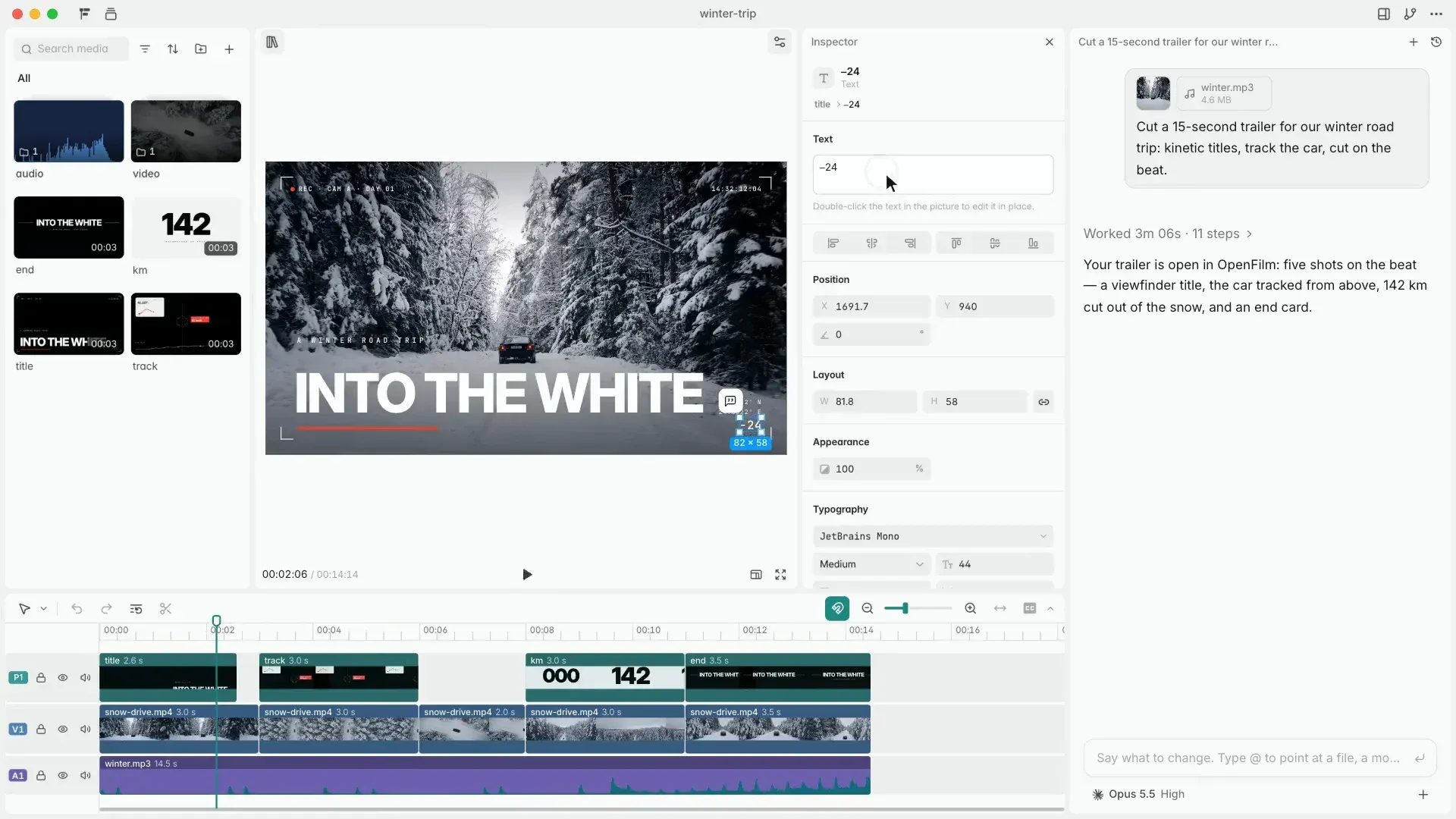
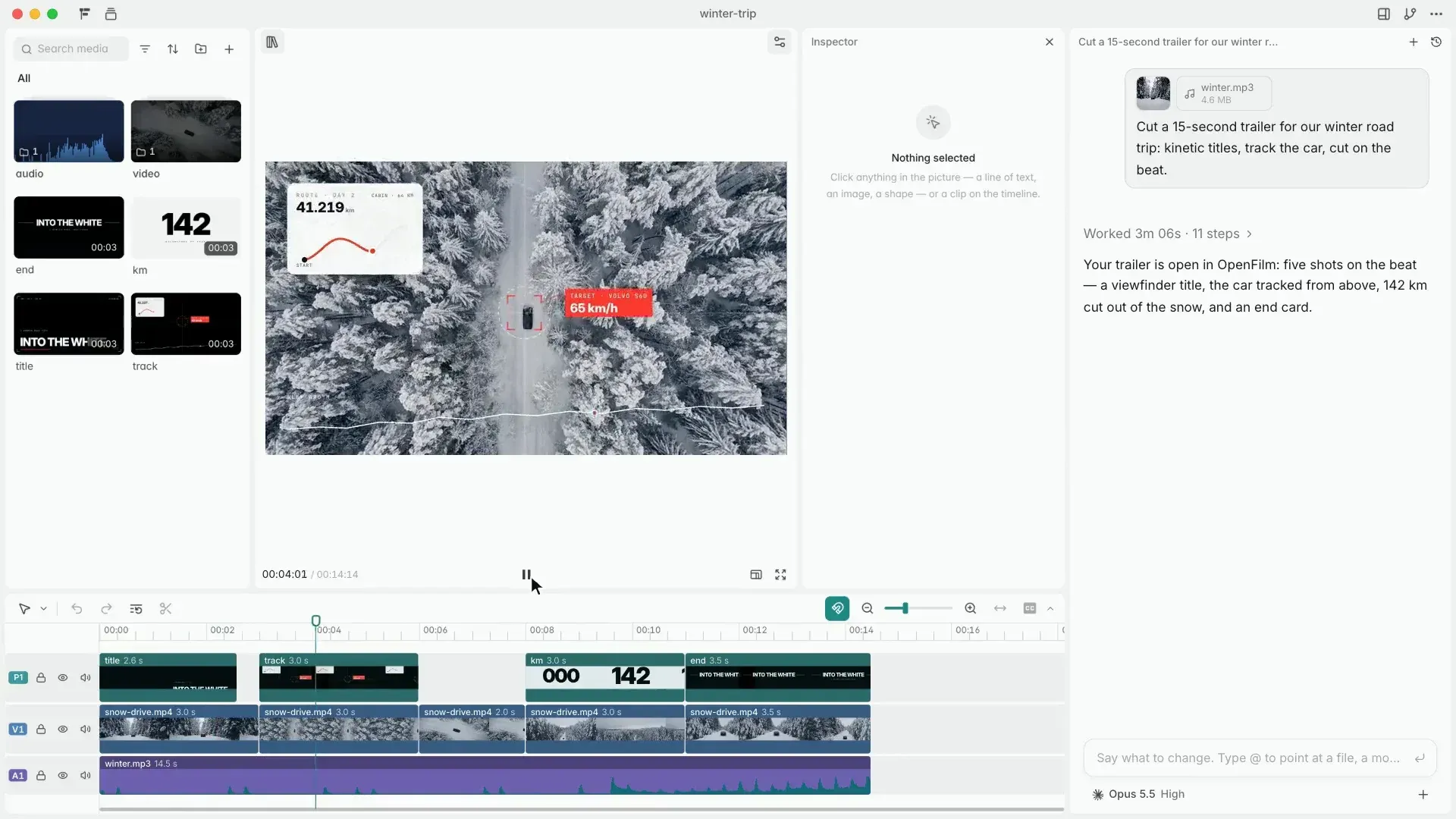
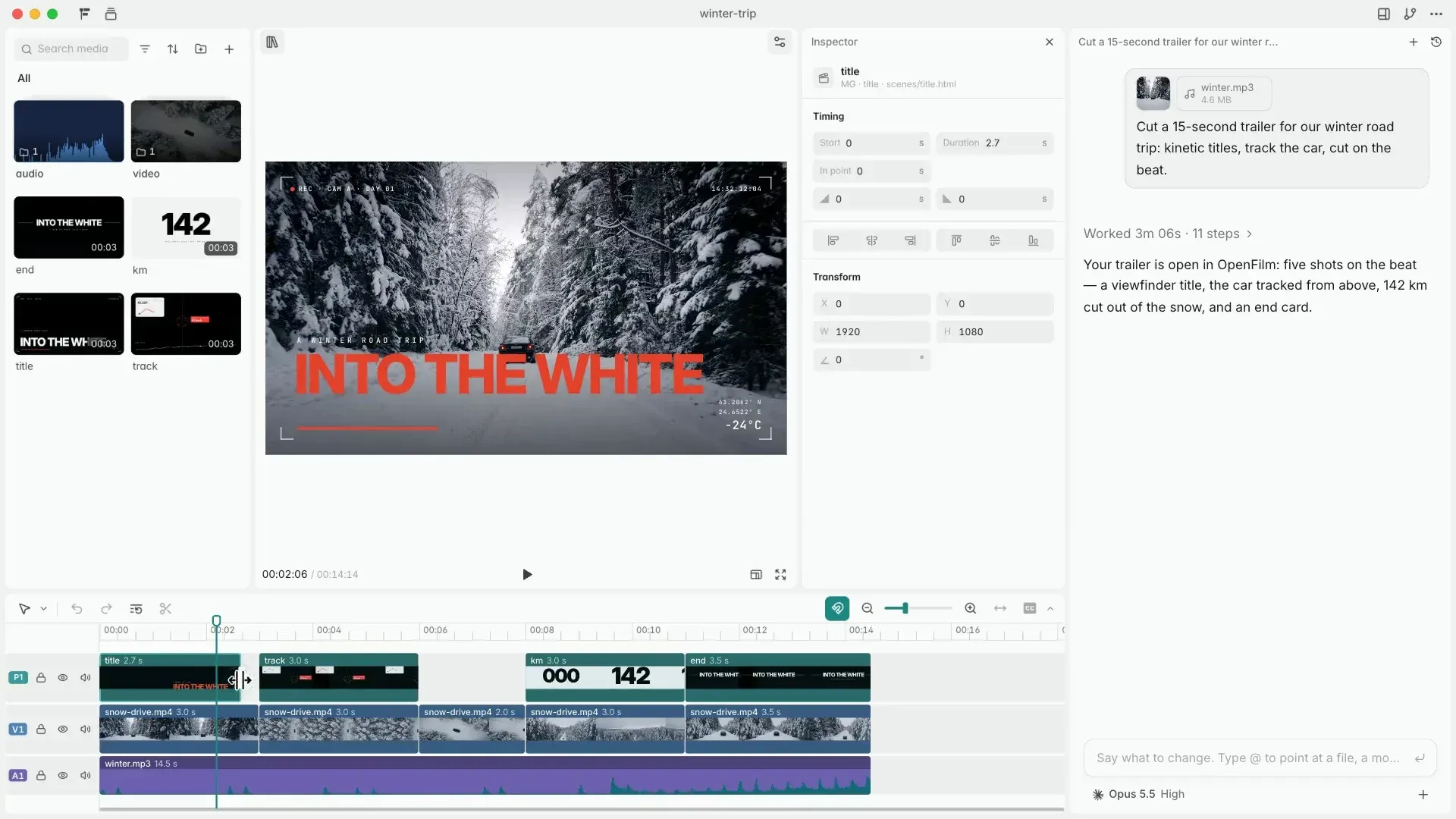
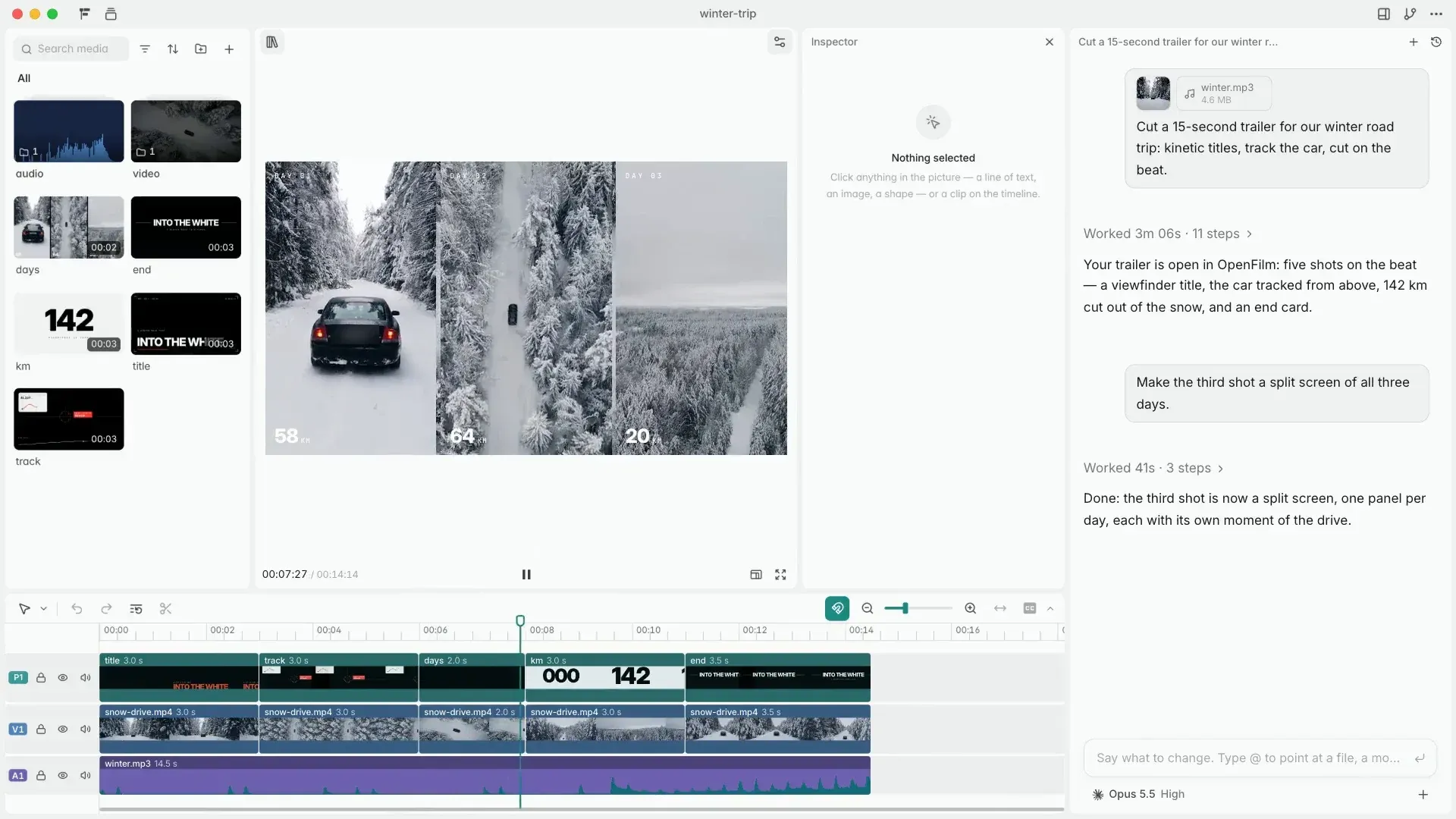
film.html, its pages and its assets, and Studio shows each saved file within seconds. - Studio editor Studio runs on the user's machine and opens in a Chromium-based browser such as Chrome or Edge, the same engine used for export. It has five panes: Assets, Layers, Viewer, Inspector and Timeline. Elements inside a page can be moved, scaled, rotated and retyped in the Viewer, and clips can be trimmed, split and moved on the timeline with snapping to cuts and the playhead.
- Overrides that agents keep Studio never rewrites a page. A change to an element is stored in
film.htmlas an override on that clip, with a selector and the changed properties, so the agent reads the same file and keeps the edits when it continues working. Named versions can be saved to return to later. - Desktop app The desktop app is Studio with a chat beside it for Claude Code, Codex and other agents, or for OpenFilm's own agent. Installers on the Releases page cover macOS arm64 and x64 (DMG and ZIP) and Windows x64; ffmpeg and the headless browser are included. Version 0.3.1 added Google Antigravity through ACP and system notifications when an agent finishes, fails or needs an answer.
- CLI commands
openfilm openstarts or opens a project, including one copied from a GitHub or GitLab address;lookdraws a contact sheet, one frame or a range;renderexports;getfetches media;canvasreads or lays out the canvas;skillslists skills;doctorprints a system report for issues. The CLI reference documents exit status 0, 1 and 2. - Rendering options
openfilm renderwrites an MP4 besidefilm.html, named after the folder, at 30 fps by default. Options include--4kfor 3840 px wide,--fps,--scale,--blurfor motion blur with 8 samples,--alphafor transparent .webm or .mov output,--loudnessand--workersfor parallel browsers. Release 0.3.1 lets an interrupted render reuse completed chunks when inputs still match. - Film checks with look
openfilm lookdraws every frame of its sheet twice in two shuffled orders and names any that changed. It also reports page errors, fonts that failed to load, missing sound files and text cut off by the frame. The PNGs go under.film/cache/look/. - Exports from Studio Studio exports a video, a GIF, the sound or its stems, subtitles, stills, slides and transparent video. The timeline itself can be exported for Final Cut Pro, Premiere Pro and DaVinci Resolve, and release notes add Jianying and CapCut drafts, with a choice between linking original files and copying complete sources.
- Canvas Beside the edit is a board where the user and the agent lay out notes, pictures, clips, voice-over, music and sound, connect them, generate each item with connected services and send results to the timeline in order. A project can have several canvases, each also shown as a storyboard, and Cmd+E or Ctrl+E switches between edit and canvas. Agents use it through
openfilm canvas. - Free asset library The assets drawer holds footage, voices, sounds, music, text, stickers, filters, effects, transitions and templates. The Terms state that everything in the library can be used in any film, commercial or not, changed and shared without credit. Agents search it by meaning before generating anything; the privacy policy notes that only the search words are sent, and search can be set to local only.
- Captions Words on the picture are caption tracks: WebVTT styled with CSS, as defined in the Spec. Release 0.3.0 lists 18 caption looks with translation by the agent, and microphone recording on the timeline.
- Community and official skills Each way of making a kind of film is a skill named
owner/name. Studio's library lists OpenFilm's and community skills under Discover from the openfilm/skills repository, which also explains how to write one. Skills can be installed, tried in a conversation without installing, or added from a link or folder withopenfilm skill add. - Media services with your own keys Generated voice, music, images and video come from services connected in Studio's Settings, Services with the user's own keys; the README names ElevenLabs, OpenAI, Google, OpenRouter and fal.
openfilm getcovers voice-over, music, sound effects, transcripts, images, image search, video and subtitle translation, and each service bills the user directly. - Optional OpenFilm service Signing in to an OpenFilm account makes media without personal keys, paid with credits. The Terms state that every plan buys credits at 500 credits per US dollar, that a month's credits expire after the following month, that the maximum cost of a run is held and the unused part returned, and that a failed run costs nothing. Model prices are shown on the account's Pricing page beside each official price.
- Example films The openfilm/examples repository holds finished films, each a folder that can be opened, changed and rendered, for example with
npx -y openfilm@latest openand a GitHub folder URL.
Where OpenFilm fits
Making a film from one prompt
The Quickstart adds the skill, then asks the agent in a folder for a video such as a 20-second launch video with music, optionally with footage, music, a logo or a script. The agent runs npx openfilm, reads the manual and writes film.html, its pages and assets, then opens the film in Studio with npx openfilm open. Follow-up requests in plain words, such as cutting a shot on the beat, edit the same files.
Editing the agent's work by hand
In Studio the user clicks text, colors or shots in the Viewer and changes them, adjusts typography and fills in the Inspector, and trims or moves clips on the Timeline. The Studio documentation explains that these changes are saved as overrides in film.html, so the agent keeps them and the file history shows every change.
Cutting existing footage
The website lists editing workflows for recorded material: cutting talks into highlights with captions, removing pauses and slips, picking a few shots from hundreds, word-by-word captions, color grading flat log footage, laying in voice-over and music, and cutting to the beat of a song. Footage sits in assets/ and is referenced as video clips with media fragments.
Motion graphics and code-drawn films
Because every shot is a web page, titles, charts drawn from data, 2D animation, explainers, education lessons and presentations can be produced entirely in code. The website also lists music videos, picture books, product films, commercials, social ads and VFX templates. Other tools that produce pictures, such as Blender or a video model, contribute their output as video or image files.
Generating media on the canvas
On the canvas, notes, references, voice-over, music and pictures are laid out and connected, each generated with a connected service or the OpenFilm service, then sent to the timeline in order. openfilm get offers the same media from the command line, starting with OpenFilm's free library before calling a paid service.
Rendering and handing off
openfilm render produces the final MP4 or a transparent video, and Studio exports GIFs, stems, subtitles, stills and slides. For finishing elsewhere, the timeline exports to Final Cut Pro, Premiere Pro, DaVinci Resolve, Jianying or CapCut, either referencing or copying source files. Developers building their own player or renderer follow the film format Spec.
Install
npx skills add openfilm/openfilmReviews of OpenFilm
Be the first to share your experience with OpenFilm.
Write a review
Loading review form…
Found OpenFilm useful? Upvote it todayYour vote helps other IT teams find it in the daily ranking.