

What is PHPRunner?
PHPRunner is a low-code web application builder made by Xlinesoft. The product overview describes it as a tool for creating web applications around your data: a developer connects an existing database (or creates one), configures pages visually, adds business logic with events and code, and deploys the generated application to their own web server. The PHPRunner manual puts it more directly: the software creates a set of PHP pages that let users search, edit, delete and add data in the database.
The development application runs on Windows 11, Windows 10, Windows Server 2019 or later, macOS and Linux (Debian or RedHat based), according to the system requirements. macOS and Linux versions arrived with version 11.0 in February 2024. End users work with the generated application in a browser. Deployed applications run on Apache or Microsoft IIS with PHP 5.4 to 5.6, 7.0 to 7.4 or 8.x (the download page lists 8.0 to 8.4, the manual lists 8.0 to 8.5), and PHPRunner includes a built-in web server for local testing. Supported databases are MySQL, MariaDB, Microsoft SQL Server, PostgreSQL, Oracle, Microsoft Access (Windows-based web server only), IBM DB2 and IBM i, Informix, SQLite and ODBC-compatible databases.
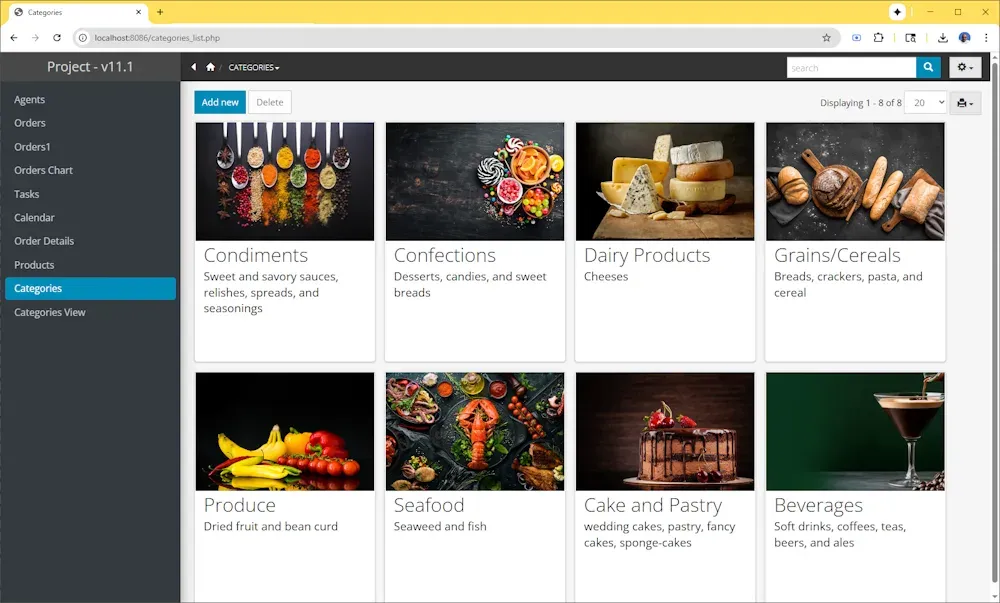
The current release on the changes history page is version 11.3, dated June 2026; the download page offers build 44378. Version 11.3 added AI help for writing PHP, JavaScript, CSS and SQL code, Intellisense code completion in all code editing areas, saving a project as a template, export and import of individual objects between projects, and Google Cloud and Azure Blob Storage as file storage providers. Version 11.2 (December 2025) added a cards layout for list pages, new dark and light themes and dashboard tabs; version 11.1 (August 2025) added calendar and Gantt views and SVN and git support.
PHPRunner is closed-source commercial software sold per developer. The order page lists three editions: Professional, Enterprise and MultiDev. According to the purchase and licensing FAQ, a licensed developer can build and deploy unlimited applications for unlimited end users, people who only use a deployed application need no license, and the licensed version keeps working after the included year of support and upgrades ends. A 21-day trial with Professional Edition features is available from the download page.
Xlinesoft lists its contact address in Herndon, Virginia, USA. Its sister product ASPRunner.NET is a separate low-code builder for ASP.NET applications; Xlinesoft states that it has its own requirements. The company also sells ready-made application templates (invoicing, document management, helpdesk, workflow and others) and a PHP to C# converter. Other low-code builders listed on iThub include Appsmith, Budibase and Retool.
Key capabilities
- Generated pages for each table For every table or view, PHPRunner builds List, Add, Edit, View, Search, Export and Print pages. Users can search, sort, filter, edit, delete and add records through the generated interface. Version 10.9 added Excel-like filters in column headers, and version 11.2 added a cards layout for list pages.
- Database connections PHPRunner connects to MySQL, MariaDB, Microsoft SQL Server, PostgreSQL, Oracle, Microsoft Access, IBM DB2 and IBM i, Informix, SQLite and ODBC-compatible databases, locally or on a remote server. Microsoft Access applications require a Windows-based web server. Using several database connections in one project is an Enterprise Edition feature.
- Table designer and SQL editor Tables can be created and modified inside PHPRunner, including field names, types, sizes and primary keys, and the software can create a new database. The SQL editor generates the query for each data source, shows a preview of results, and supports drag-and-drop joins and WHERE, ORDER BY and GROUP BY criteria.
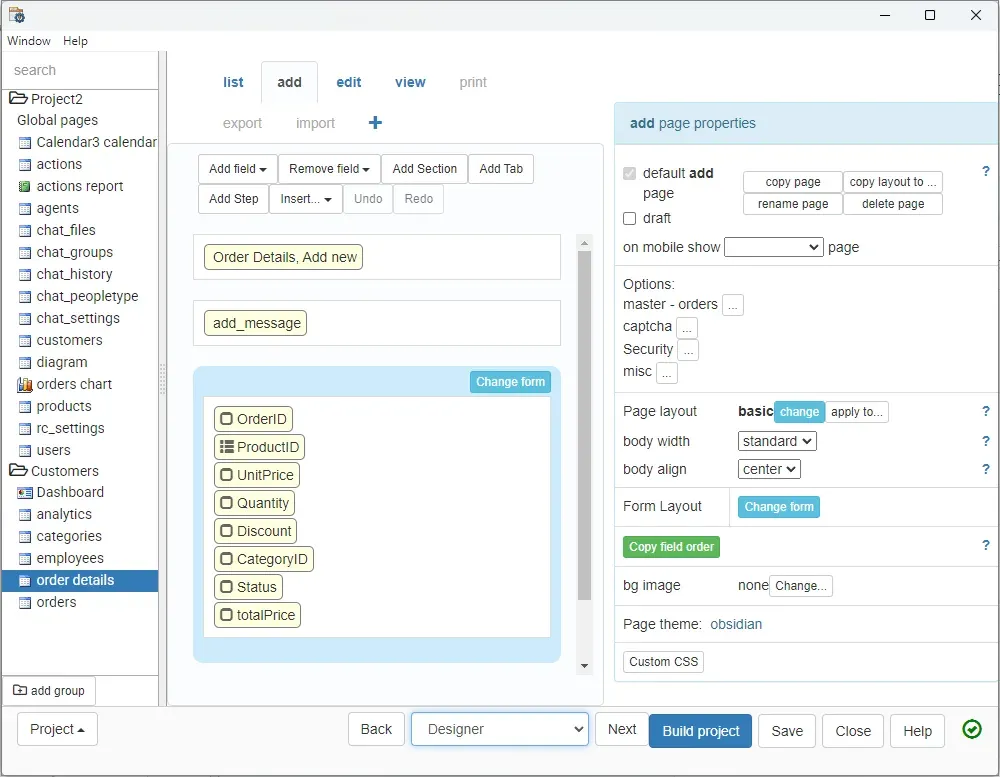
- Page Designer The WYSIWYG Page Designer arranges fields, sections, tabs and steps with drag and drop and edits font, size, color, alignment and custom CSS per element. Version 10 added Page Designer and multiple pages of the same type; version 10.5 added report editing in Page Designer.
- Themes and layouts The Editor screen offers built-in Bootstrap themes, theme options and custom CSS with a live preview. Version 11.2 added two visual themes (dark and light) and three welcome page layouts. Version 10.8 added the option to show different pages in mobile and desktop mode.
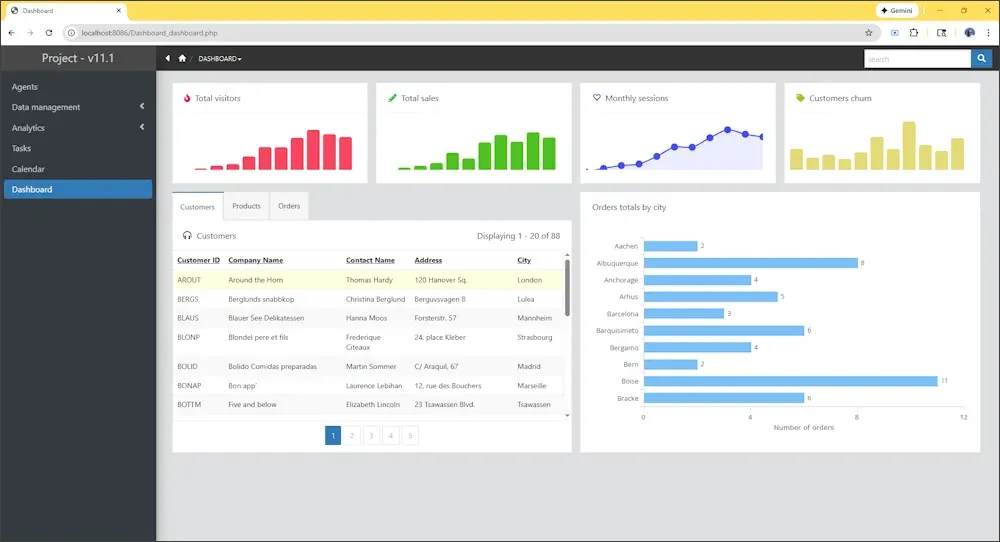
- Reports, charts and dashboards PHPRunner builds interactive charts and reports, including grouped, pivot and crosstab reports, with drill-downs and chart export to PDF or image. Dashboards combine grids, charts, maps and other widgets; version 11.2 added dashboard tabs, widgets and foldable elements. The overview page states that a Web Charts and Reports Builder is part of the Enterprise Edition.
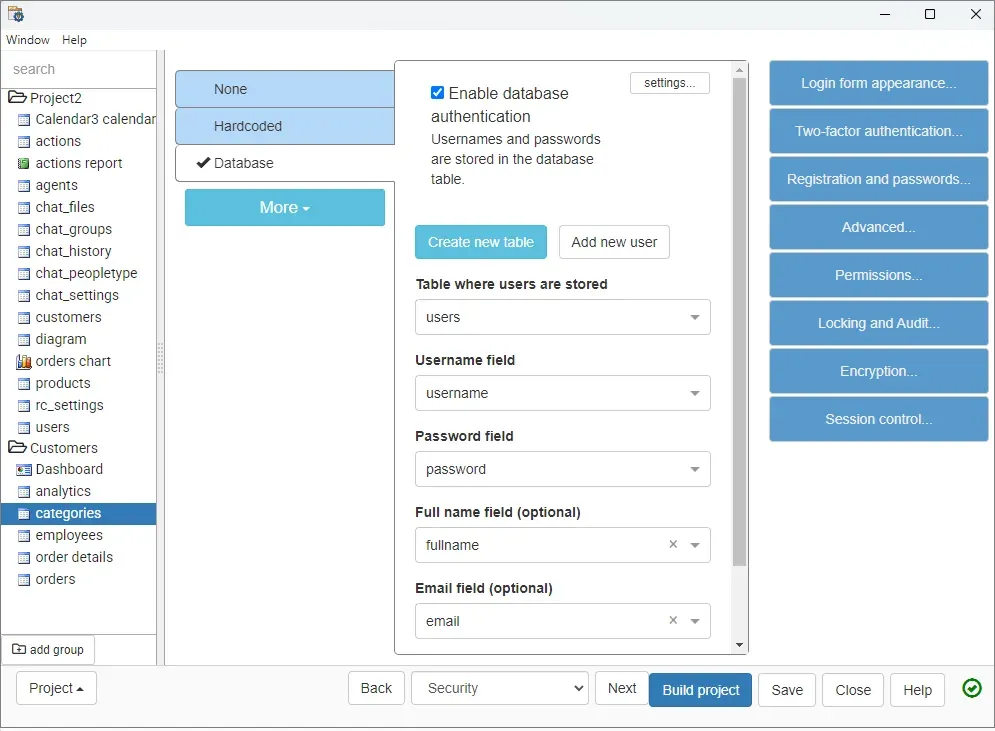
- Authentication and permissions Applications can use hardcoded credentials or a database table of users, with self-registration, password recovery, CAPTCHA, password strength rules and password encryption. User group permissions restrict tables, views, pages and features. Dynamic permissions let administrators create groups and assign users from within the running application without rebuilding the project.
- Two-factor and external login Two-factor authentication supports email, phone and Google Authenticator (TOTP), and users can enable several methods on their profile page. The changes history lists login via Google, login via Facebook and single sign-on via JWT. Active Directory, Okta, Azure AD, OpenID and SAML authentication belong to the Enterprise Edition; the overview page also names LDAP.
- Events and business logic Events run custom code at defined points, for example after a record is added, before a page is displayed or when a user performs an action. Xlinesoft describes using events for workflows, validation, notifications and integrations. The event editor includes Intellisense code completion since version 11.3.
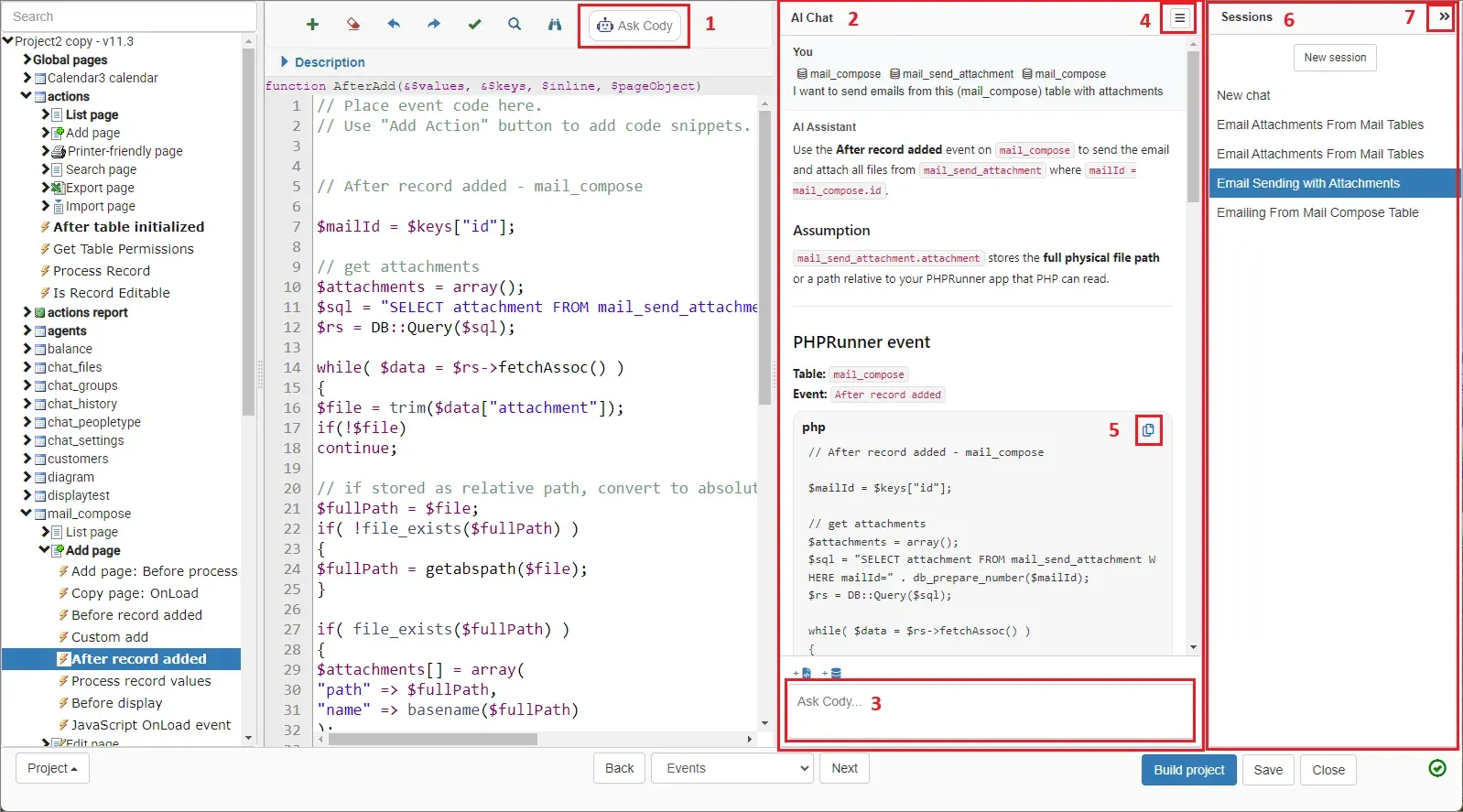
- AI assistant Version 11.3 added an AI assistant (named Cody in the manual) in the Event Editor that helps write PHP, JavaScript, CSS and SQL code. By default it uses free AI help from Xlinesoft with daily limits; developers can instead enter their own API key for OpenAI, Claude AI or Gemini. PHPRunner sends the current table definition automatically, and existing event code or other table definitions can be attached.
- REST API Since version 10.4, a generated application can expose a REST API so other applications can talk to it, and it can consume third-party REST APIs as data sources. Version 10.91 added JSON input for add and edit operations. Multiple REST API connections are an Enterprise Edition feature.
- Files, images and cloud storage Uploaded documents and images can be stored in the database or in a folder on the web server, with on-the-fly thumbnails, resizing on upload and gallery display. Cloud providers include Google Drive, OneDrive, Amazon S3, Dropbox and Wasabi (version 10.7), plus Google Cloud and Azure Blob Storage (version 11.3).
- Data entry controls Edit controls include text fields, date and time pickers, check boxes, radio buttons, file and image upload and lookup wizards. Dependent drop-down boxes can be chained, and PHPRunner supports the TinyMCE, CKEditor and InnovaStudio rich text editors.
- Master-detail and views Relationships between data sources, including master-detail, are shown visually and linked with drag and drop, so users can move from a master record to its details. Version 11.1 added calendar and Gantt views.
- Multilingual applications Generated applications support more than 30 languages, including Arabic, Chinese, German, Hebrew, Japanese, Spanish and Turkish, and users can choose a language at login. Translations can be added for table and field names.
- Audit, locking and encryption Version 5.2 added audit trail and record locking, and the security screen includes settings for locking and audit, encryption and session control. Data encryption of selected database fields, by database-based or code-based method, is an Enterprise Edition feature.
- Templates and project reuse Bundled application templates include cars, classified ads, knowledge base, real estate, job listings and news. Version 11.3 added saving a project as a template and exporting or importing individual objects, such as a table with its field settings, page designs and events, between projects.
- Testing and deployment After a build, the application can be opened with the built-in web server (ports 8085 to 8090), uploaded with the built-in FTP client (SFTP and FTPS supported), packaged as a desktop application, or published to an Xlinesoft demo account. PHPRunner can also create an SQL script to move tables and data to another server.
- Team development Version 11.0 stored projects in a database for a faster UI and better support for projects with more than 1000 tables. The MultiDev Edition lets several developers work on the same project at the same time, and version 11.1 added source control support for SVN and git.
- Editions and pricing The order page, checked on November 13, 2026, lists Professional at $599, Enterprise at $999 and MultiDev at $3,599 (three Enterprise licenses; additional developer seats are $599). Each purchase includes one year of email support and free upgrades. Upgrade and maintenance renewals cost $249 for Professional and $399 for Enterprise; moving from Professional to Enterprise costs $400 for current 11.3 Professional owners and $499 for Professional licenses bought one year ago.
- Free trial The 21-day trial includes Professional Edition features with limits of 20 database objects and 200 builds per project, an "Unregistered" banner on application pages and an "Evaluation version" message on charts. Enterprise Edition features are not included in the trial.
Where PHPRunner fits
Building a web front end for an existing database
Xlinesoft describes starting from an existing database: the developer chooses the database type, connects to it, selects tables and views, picks the key column and the pages to build, then adjusts pages in Page Designer and builds the project. The generated PHP application provides list, add, edit, view, search, export and print pages for each table. Connectivity depends on the matching PHP extensions, such as php_mysqli for MySQL, php_pgsql for PostgreSQL or php_oci8 for Oracle, listed in the system requirements.
Replacing a Microsoft Access application
Xlinesoft publishes a guide on replacing Microsoft Access with a PHPRunner web application. PHPRunner can connect directly to Access databases, but the product facts page notes that applications using Access require a Windows-based web server. The table designer and SQL script output can be used when data moves to another database server.
Internal admin panels and portals
The product facts page lists internal database applications, administrative interfaces and customer or partner portals as typical projects. Database authentication, user groups and dynamic permissions control which tables, pages and functions each group can use, and Enterprise Edition adds Active Directory, Okta, Azure AD, OpenID and SAML sign-in. Xlinesoft states that access rules and business processes still have to be configured for the actual users.
Reporting dashboards on business data
Reports, charts and dashboards are built from the same data sources as the data entry pages. Dashboards can combine grids, charts and maps on tabs, and reports support grouping, pivots, crosstabs and drill-downs, with chart export to PDF or image. In the Enterprise Edition, the Web Charts and Reports Builder lets end users create charts and reports online under the security settings defined in the project.
Adding custom logic with events and AI help
Developers add PHP or JavaScript code to events, for example to send an email with attachments after a record is added. In version 11.3, the AI assistant in the Event Editor proposes code using the current table definition, and the developer copies the result into the event. Free AI usage from Xlinesoft has daily limits; an own OpenAI, Claude AI or Gemini API key can be configured instead.
Exposing and consuming data through REST
A generated application can publish a REST API so other systems can talk to it, and it can display data from third-party REST APIs as REST views. The changes history notes that date values from REST APIs can be used as dates in the application and that the API accepts JSON for add and edit operations. Projects that need several REST API connections require the Enterprise Edition.
Reviews of PHPRunner
Be the first to share your experience with PHPRunner.
Write a review
Loading review form…
Found PHPRunner useful? Upvote it todayYour vote helps other IT teams find it in the daily ranking.


