What is Outline?
Outline is a team knowledge base and wiki with a Markdown-compatible editor, realtime collaborative editing, collections, search with AI answers, comments, sharing and an API. It is developed by General Outline, Inc., whose website states that the product is built in New York City. Outline is offered as a hosted cloud service at getoutline.com and as source code for self-hosting in the outline/outline repository, which has been public since 2016. The README describes the stack as React and Node.js written in TypeScript; the server uses Sequelize migrations on PostgreSQL.
The code is published under the Business Source License 1.1, not an OSI open-source license. For version 1.12.0 the licensor is General Outline, Inc., the change date is October 23, 2030 and the change license is Apache License 2.0. The additional use grant permits production use except for a "Document Service", defined as a commercial offering that lets third parties other than the licensee's employees and contractors create teams and documents with the software. The hosting documentation states that reselling Outline or hosting it as a service breaches the terms. The license text itself notes that BSL is not an open-source license and that each version converts to the change license on its change date.
Self-hosting uses the outlinewiki/outline container image on Docker Hub, with release and nightly tags. According to the hosting requirements, an installation needs a Unix-compatible OS (the image is based on Alpine Linux; Windows Server is not supported), PostgreSQL 14 or later, Redis 4 or later, at least 512 MB of memory with 1 GB or more recommended, a dedicated domain and a compatible authentication provider. The free self-hosted Community Edition is supported through GitHub Discussions, while paid Business and Enterprise licenses add further features and support.
The latest release is v1.12.0, published on October 23, 2026. It adds a personal section for private documents for every user (which admins can disable), a rebuilt sidebar drag and drop, faster Mermaid rendering, passkey login inside the desktop app, MCP support for OAuth Client ID Metadata Documents and the 2026-07-28 protocol, a tool that shows what changed in a document, and an upgrade of Node in the Docker image to 26.12.1 for security fixes.
Desktop apps are distributed for macOS (Apple Silicon and Intel) and for Windows 10 and 11. The documentation states that native mobile apps are not offered; Outline can be installed as a progressive web app on iOS and Android. The interface is translated into 20 languages and supports right-to-left text. Similar team wikis on iThub include Docmost, Slab, Notion and XWiki.
Key capabilities
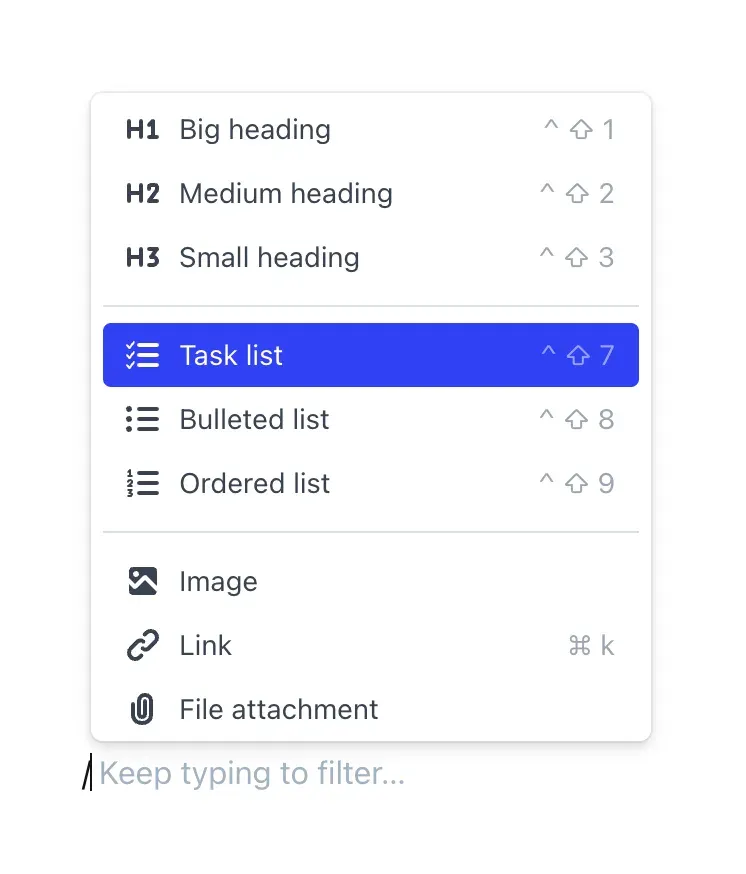
- Markdown-compatible editor The editor accepts Markdown shortcuts and a slash command menu for headings, task lists, bulleted and ordered lists, images, links, file attachments and embeds. The user guide also documents tables, toggles, notices, code blocks with line numbers, LaTeX math through KaTeX and Mermaid diagrams.
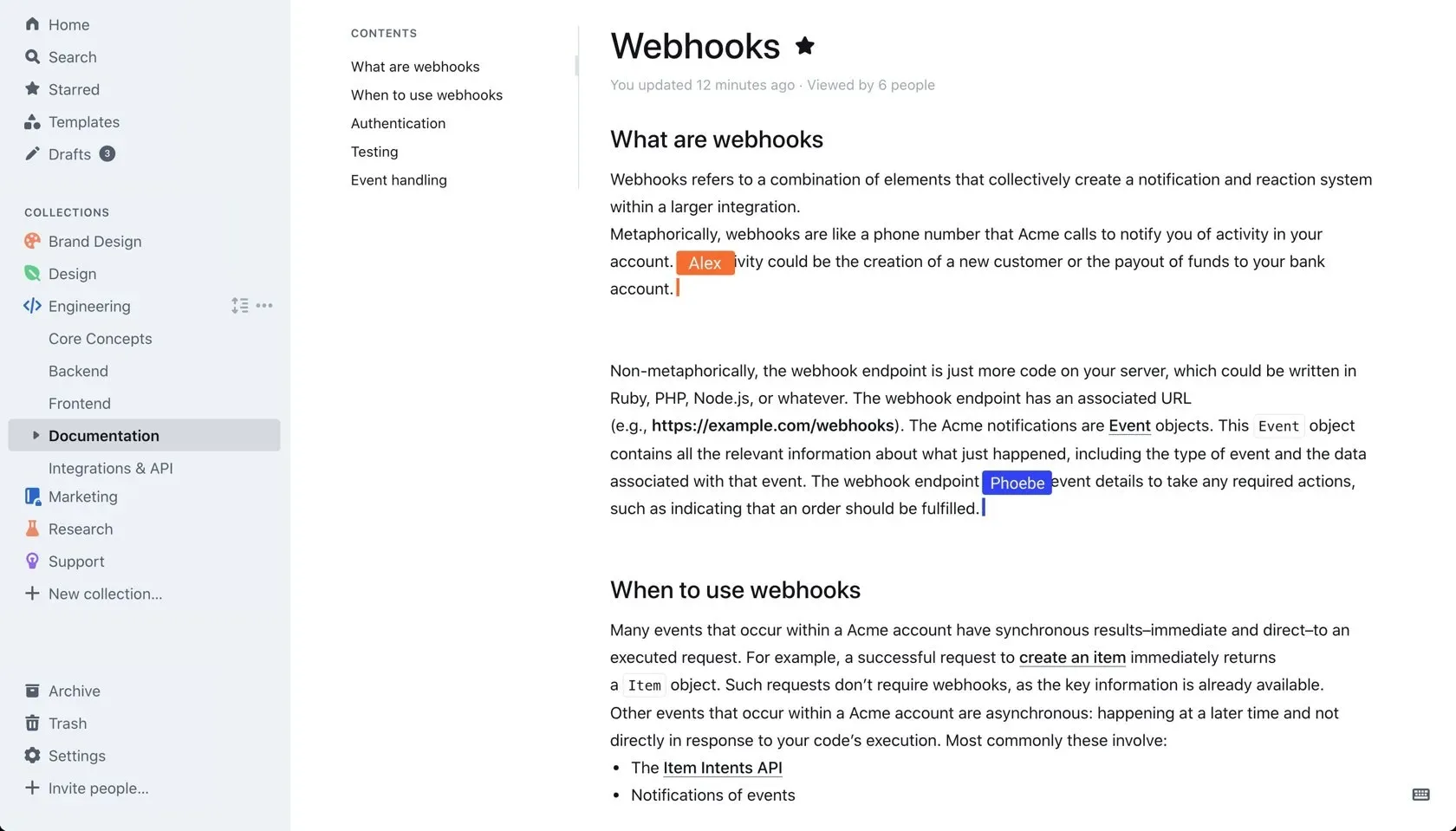
- Realtime collaboration Several people can edit the same document at once with live cursors, and documents keep a revision history. Comments and threads are attached to text inside documents.
- Collections and nested documents Documents are organized into collections with nested child documents, a table of contents per document, templates and drafts. Since v1.12.0, each user also has a personal section for private documents.
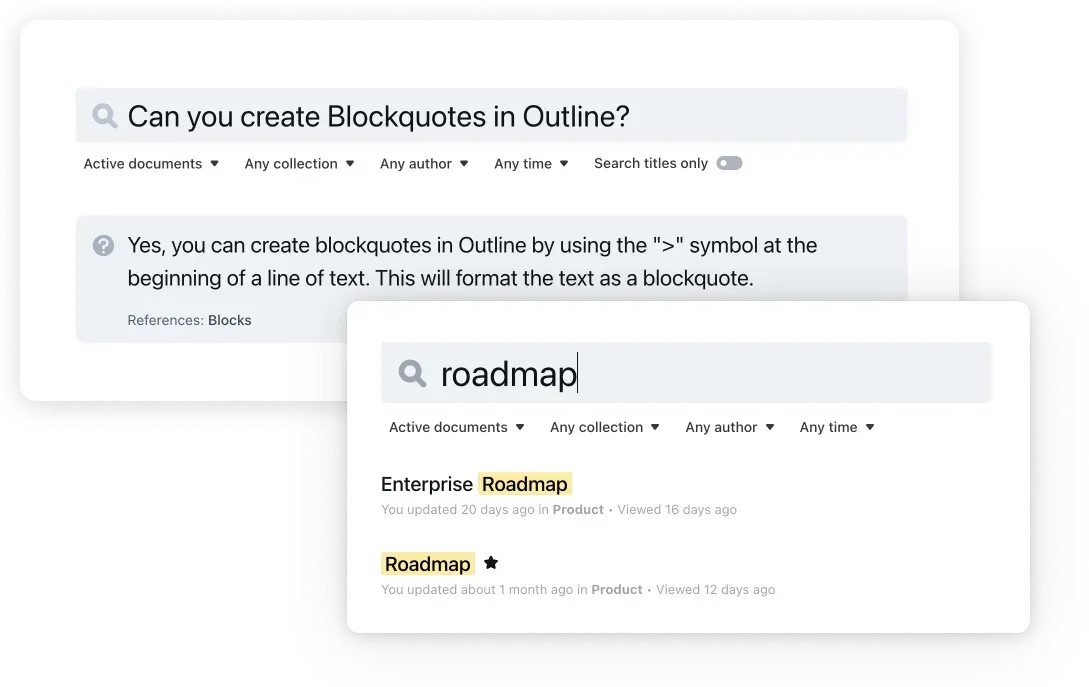
- Search and AI answers Workspace search supports filters by collection, author and time and operators such as quoted phrases and OR. AI answers return a direct answer with references to source documents; the documentation states this feature is available only in the cloud and licensed editions and is enabled under Settings, Workspace, AI.
- Built-in MCP server Each workspace exposes an MCP endpoint that lets assistants such as Claude, ChatGPT and Cursor search, read, create and edit documents. The MCP server uses OAuth sign-in by default, and admins can turn it off for the whole workspace.
- Sharing and permissions Documents and collections can be shared publicly or privately, with read and write permissions, user groups and guest users. Public shares can use custom brand colors, logos and custom domains.
- Authentication A workspace connects to one or more authentication providers: Google, Microsoft, Slack, email or, on licensed editions, SAML and OIDC identity providers, according to the authentication guide. Passkeys with Touch ID, Windows Hello or hardware keys are also supported.
- Integrations The website lists more than 20 integrations, including Slack for search, sharing and channel notifications, and embeds for services such as Figma and Loom. A Slack slash command searches the knowledge base from Slack.
- Import and export Admins can import exports from Confluence and Notion, Word .docx files, and Markdown or JSON from another Outline instance. The Confluence importer is limited to Business and Enterprise editions on self-hosted installs. Documents can be exported, including when a cloud trial has become read-only.
- API and webhooks The API is RPC style: every endpoint is a POST to
/api/:methodreturning JSON. Authentication usesol_api_API keys or OAuth 2.0 applications with read, write or per-endpoint scopes, and webhook subscriptions are managed by workspace admins. An OpenAPI specification is published under BSD-3-Clause in the outline/openapi repository. - Desktop apps and PWA Desktop apps are available for macOS and for Windows 10 and 11, installed through an NSIS installer and updated automatically. On iOS and Android, Outline is installed as a progressive web app from the browser.
- Insights and governance Workspace insights report searches per day, content gaps and how many searches generated an AI answer. Governance settings let admins control AI features and MCP access for the workspace.
- Cloud plans The pricing page lists cloud plans at $10 per month for 1 to 10 members, $79 per month for 11 to 100 and $249 per month for 101 to 200, each with unlimited documents, version history, SSO, integrations, API, webhooks and an audit log. The first 30 days are free; larger teams contact sales.
- Self-hosted editions The Community Edition is free with limited features and no support. It excludes AI answers, guest users, SAML 2.0, the audit log, the Confluence importer and the Glean integration. Business costs $4 per user per month billed annually with a 10-user minimum, and Enterprise $5 per user per month with a 100-user minimum, branding removal and a support contract.
- Docker deployment The
outlinewiki/outlineimage is published on Docker Hub. The hosting documentation covers installation methods, configuration, backups and troubleshooting, and states that production use of a horizontally scalable deployment requires operations experience. - Logging and debugging In production the server writes JSON logs. HTTP logging is enabled with
DEBUG=http, andLOG_LEVELcontrols verbosity, as described in the README.
Where Outline fits
Company wiki and handbook
Teams create collections for departments or topics such as engineering, design and support, and nest documents inside them. Templates standardize recurring pages, starred documents and a sidebar give navigation, and permissions per collection decide who can read or edit.
Engineering documentation
Engineers write runbooks and technical notes in Markdown with code blocks, Mermaid diagrams and LaTeX, collaborate in real time and keep revision history. The API and webhooks connect Outline to other systems, for example to create documents from a script or react to document events.
Answering questions from the knowledge base
On cloud and licensed editions, members type a question into search and receive an AI answer with references to the documents it came from. The search and answers guide describes the semantic index that is built when the feature is enabled.
Working from Slack
With the Slack integration, members search Outline with a slash command, share documents into channels and receive channel notifications when documents change, without leaving Slack.
Connecting AI assistants
Members add the workspace MCP endpoint to Claude, ChatGPT, Cursor or Codex, sign in with OAuth and let the assistant search, read, create and edit documents within their permissions. Admins can disable MCP for every client in the governance settings, as described in the MCP guide.
Public documentation sites
A collection or document can be shared publicly as a read-only site with its own navigation, search, brand colors, logo and custom domain. Outline's own user guide at docs.getoutline.com is published this way, with a sidebar of nested documents and a search field for visitors.
Migrating from Confluence or Notion
Admins import Confluence HTML space exports, Notion exports, Word files or Markdown through Settings, Preferences, Import. On self-hosted installations, the Confluence importer is part of the Business and Enterprise editions.
Reviews of Outline
Be the first to share your experience with Outline.
Write a review
Loading review form…
Found Outline useful? Upvote it todayYour vote helps other IT teams find it in the daily ranking.