

What is XWiki?
XWiki is a Java wiki platform for knowledge bases, intranets, documentation sites and small structured business applications. The xwiki-platform repository holds the generic runtime: page storage, rendering, rights, search, the REST API and the user interface modules. XWiki Commons, XWiki Rendering and XWiki Platform are released together under one version number. What most teams install is XWiki Standard, the default flavor that bundles the editors, applications and administration screens on top of the platform.
The project was started in 2004 by Ludovic Dubost, who founded XWiki SAS the same year; XWiki 1.0 shipped in 2007. According to the project's sponsors page, XWiki SAS employs eight active core committers and finances the xwiki.org infrastructure, while the code is developed in the open with a public issue tracker on Jira rather than GitHub Issues. The license page states that the code in the WAR is distributed under LGPL 2.1 and that the default wiki pages shipped in the XAR are under Creative Commons Attribution.
Distribution is self-managed or hosted. The installation methods list a standalone demo package with Jetty and HSQLDB for testing, Debian packages from an APT repository for production, the official Docker image, and a WAR file for any Servlet 5.0 container with a JDBC 4.2 database. A XIP package provides an offline extension repository for hosts without internet access. XWiki SAS sells a managed XWiki Cloud service and support subscriptions with paid Pro applications.
The download page lists three release lines. As of November 11, 2026, the Long Term Support line, described by the project as the latest stable version from the last cycle and the one it recommends for production, is at 17.10.15 (November 10, 2026). The intermediate LTS line of the mid-cycle, which the project recommends for new production installations, is at 18.4.8 (November 3, 2026). The stable line of the current cycle is at 18.9.0 (October 26, 2026). All three lines are published as GitHub releases, so the release GitHub marks as latest is 17.10.15 even though 18.9.0 is the highest version number. Within the 18.x cycle, 18.5.0 restyled Live Data table headers and improved tree navigation contrast, 18.6.0 redesigned the comments tab and added macro insertion to the BlockNote formatting toolbar, 18.7.0 added an experimental Live Data edit mode with row creation and reproducible Maven builds, 18.8.0 allowed a hashed superadmin password in xwiki.cfg, and 18.9.0 added automatic saving of Live Data entries, in-place Code macro editing and realtime edit actions in the experimental BlockNote editor, CSRF tokens shared across cluster nodes, and a confirmation step for exports opened from a link. Each of these releases lists security fixes, with highest severities between 8.7/10 and 9.3/10.
Out of scope: XWiki is a server application used in a browser, with no official desktop or mobile client. It is not a Markdown-file knowledge base and not an end-to-end encrypted editor; content sits in a relational database the administrator controls. XWiki Cristal, a newer front-end that can also work offline, is a separate experimental project and not part of the platform release covered here.
XWiki screenshots
Explore the interface. Open a screenshot to view it at full size.
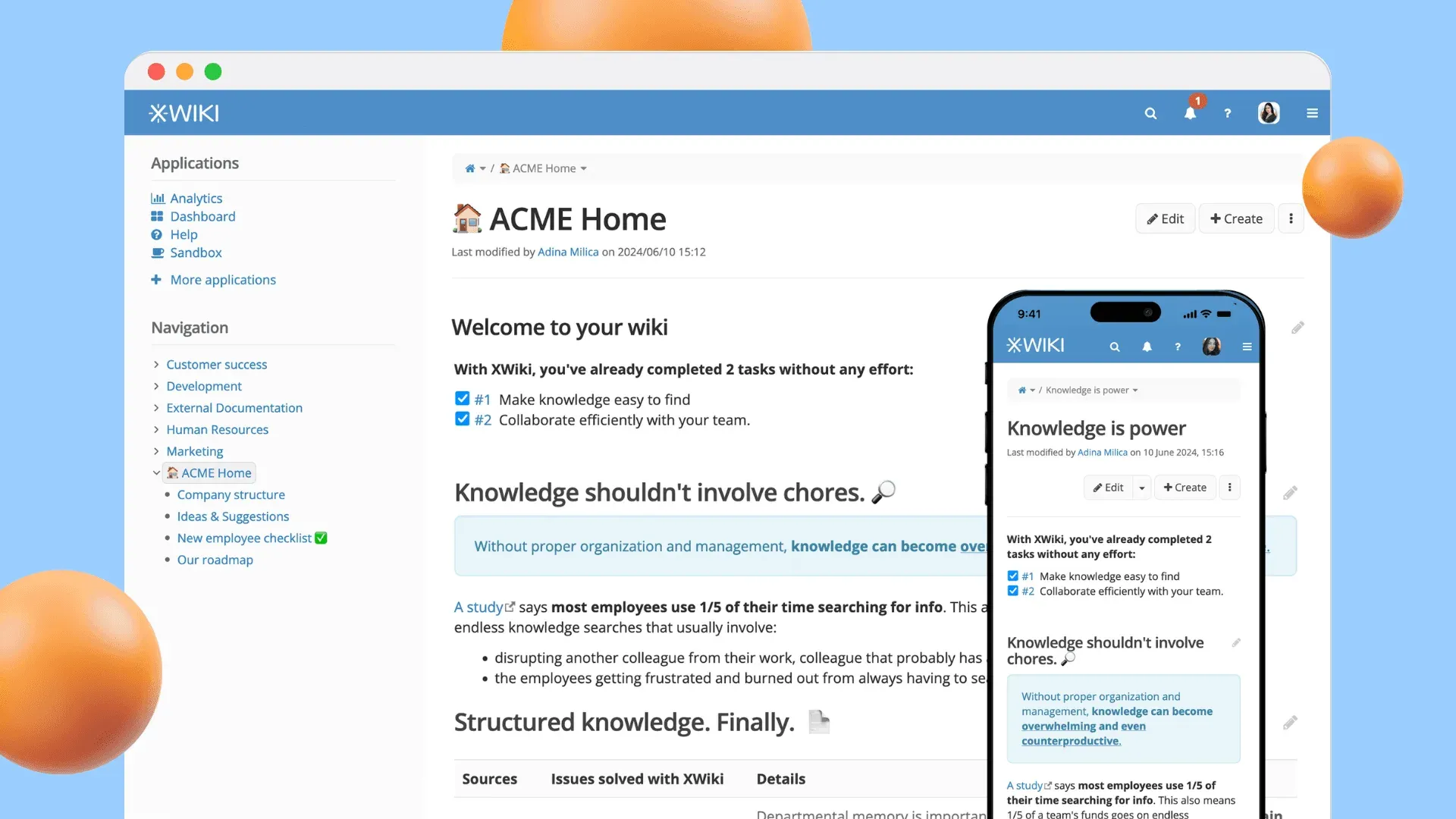
Official XWiki product image showing the Flamingo skin with page tree navigation, a welcome page, and the responsive mobile layout.
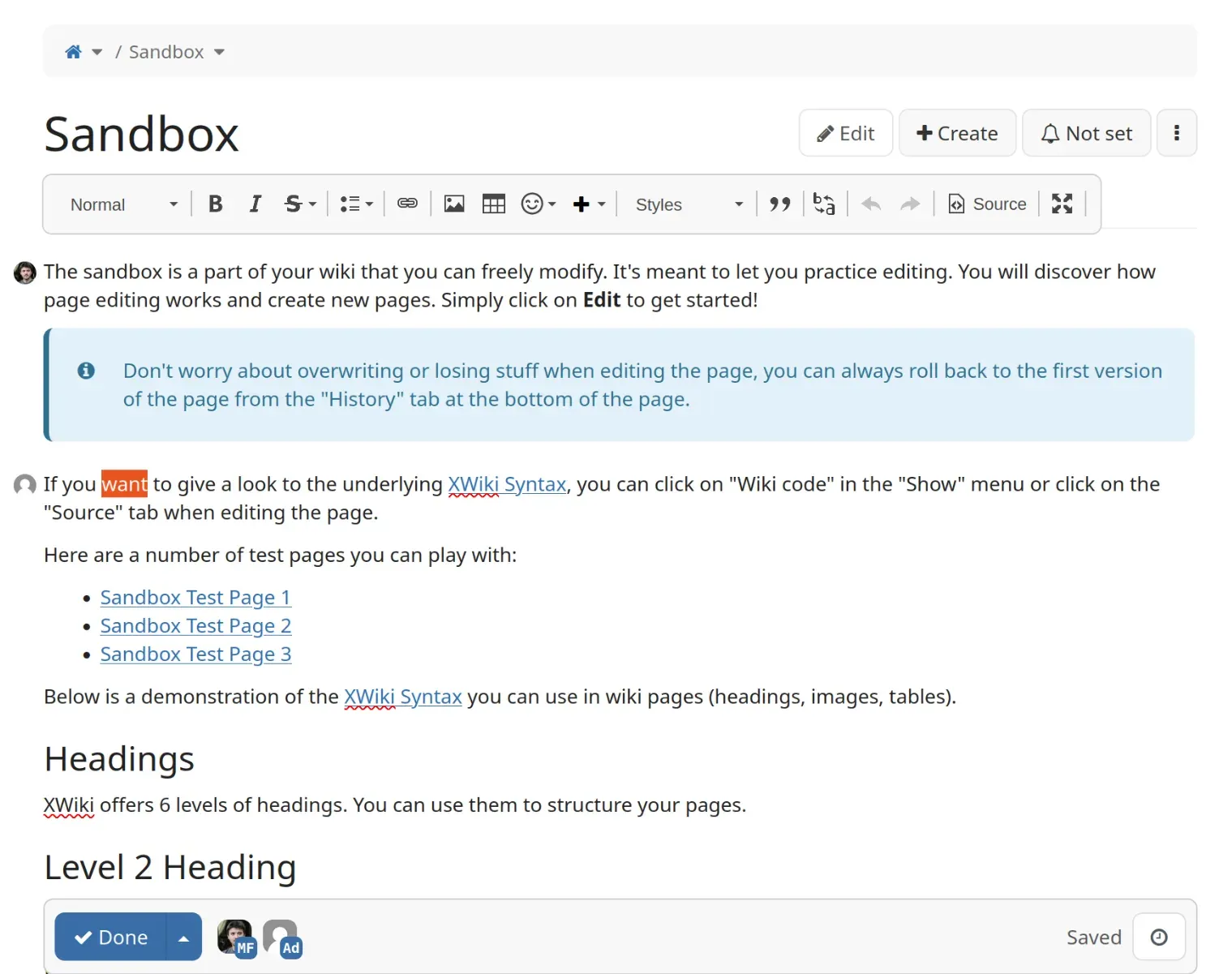
Realtime WYSIWYG editor from the extension documentation: two collaborators edit the same page and the footer shows the autosave state.
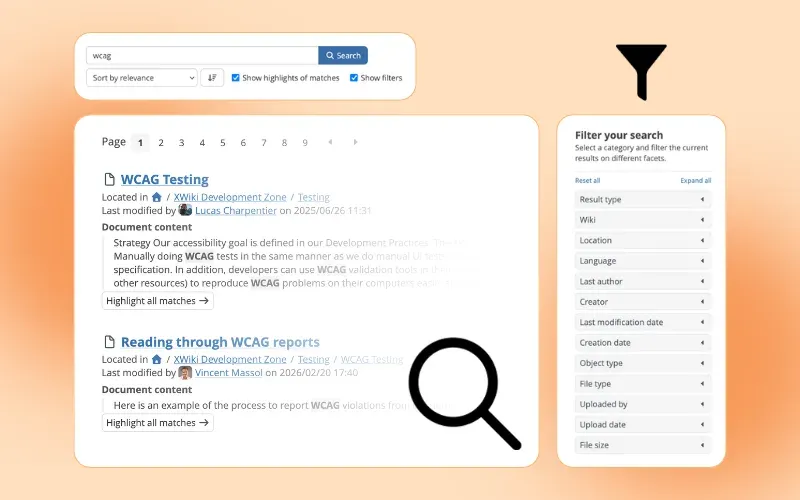
Official XWiki illustration of the search page with result highlights and faceted filters.
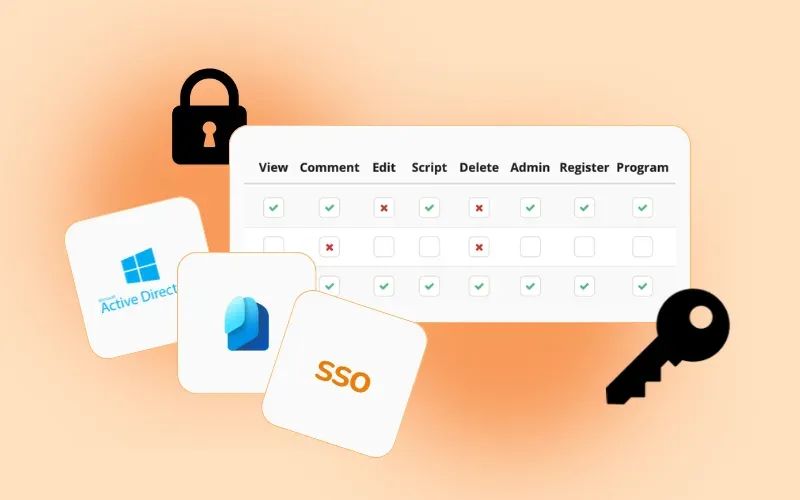
Official XWiki illustration of the rights matrix; Active Directory and SSO configuration UIs are part of paid support tiers.
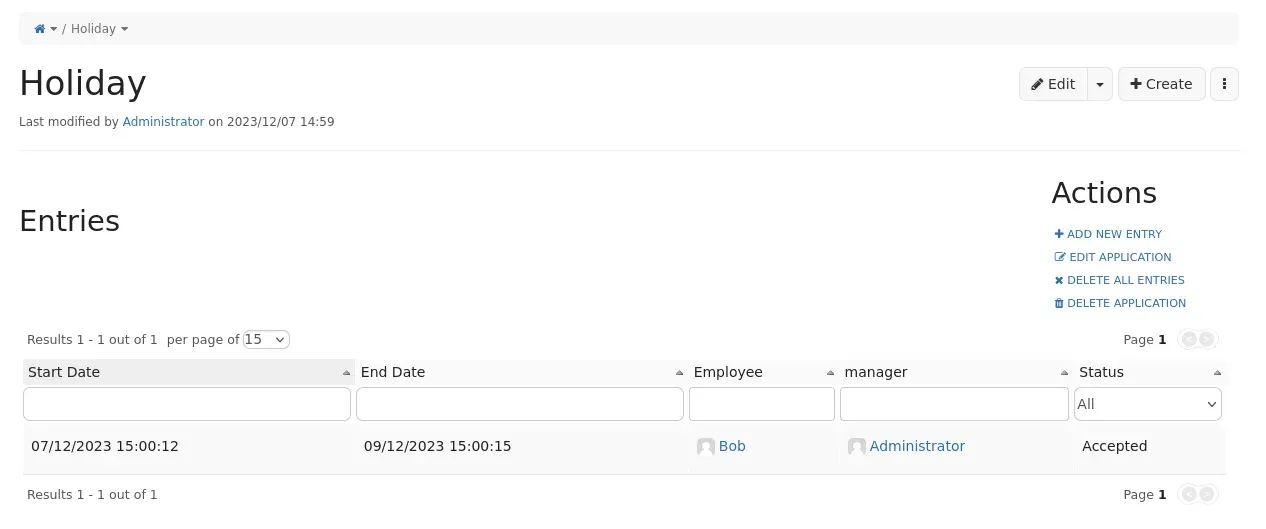
An App Within Minutes application home page listing entries in a filterable table, from the extension documentation.
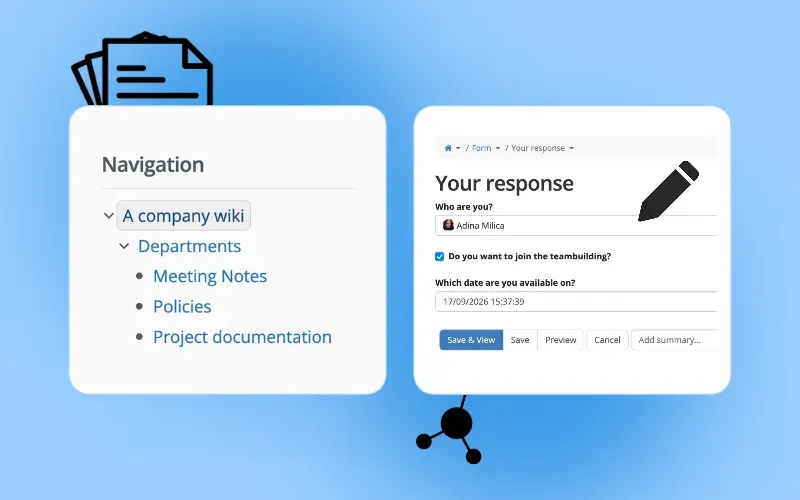
Official XWiki illustration of nested page organisation and a structured form page in edit mode.
Source: official XWiki project page.
Key capabilities
- WYSIWYG and wiki syntax editing Pages are edited in a CKEditor based WYSIWYG editor, the default since XWiki 8.2, or directly in XWiki Syntax through the Source tab. Macros render tables of contents, code blocks, info boxes and live data views inside a page. An experimental BlockNote editor is also available; 18.9.0 lets it edit standalone Code macros in place.
- Realtime collaborative editing The Realtime WYSIWYG Editor synchronises edits between users on the same page and is enabled by default since XWiki 16.9.0. It shows who is editing, autosaves, and lets editors summarise changes before leaving. Script macros and some wiki syntax constructs have documented limitations in realtime sessions.
- Version history and rollback Every change is saved under version control. Users can view an earlier version, compare two versions and roll back a page. Minor edits can be marked so they collapse in the page history.
- Page tree, spaces and sub-wikis Pages nest in a hierarchy with breadcrumbs, a navigation tree and a page index. One installation can host several sub-wikis, which XWiki also calls virtual wikis or a wiki farm, each with its own users and settings. Cloud plans cap sub-wikis per tier, for example 25 on Basic.
- Rights management View, comment, edit, script, delete, admin, register and programming rights can be granted or denied to users and groups at wiki, space or page level, and inherit down the tree. Script and programming rights control who may run Velocity or Groovy independently of content permissions.
- Authentication and directories Form and HTTP Basic authentication are built in. The LDAP Authenticator and the OpenID Connect Authenticator are LGPL extensions installable from the Extension Manager. XWiki SAS sells a configuration UI for Active Directory, and its pricing lists SAML, CAS, Entra ID and SCIM support in higher support tiers.
- Structured data and App Within Minutes Pages can carry typed objects defined by classes, which turns a wiki into a small database. App Within Minutes builds an application with fields, a form, an entry template and a list view from the browser, without code. Live Data tables display and edit these entries with filters and sorting; 18.7.0 added an experimental edit mode with bulk editing and row creation, and 18.9.0 saves new entries automatically and adds a maximize view.
- Search XWiki Standard indexes pages, attachments and objects with Solr and offers a search page with facets such as location, language, author, dates, object type and file type. Larger installations can move Solr to a standalone server; the APT repository ships preconfigured Solr 9 cores for search, events, ratings and the extension index.
- Extension Manager and flavors Applications, macros, skins and themes install from extensions.xwiki.org through the administration UI, with dependency resolution and upgrades. The project lists more than 900 extensions. A flavor is a curated set of extensions; XWiki Standard is the one maintained by the core team.
- Scripting inside pages Pages can contain Velocity and Groovy scripts that call the documented XWiki APIs, and wiki macros can be defined in pages. This is how many applications are built without compiling Java. Classes in internal packages and APIs marked @Unstable carry no compatibility promise.
- REST API The REST API under
/xwiki/restexposes wikis, spaces, pages, attachments, objects, tags and comments. Responses are XML by default and JSON with?media=jsonor an Accept header. Java components can register additional resources, which follow JAX-RS 2.1 from XWiki 16.2.0. - Import and export Pages export to PDF through the browser print engine, to HTML, and to XAR packages that another XWiki can import; ODT and RTF exports are also documented on the exports page. Office documents can be imported when a LibreOffice server is configured. Since 18.9.0 an export URL only runs on a POST request, so a script that exports pages, such as a curl or wget backup, has to send a POST request.
- Notifications and activity Users can follow pages, spaces or other users and receive notifications in the interface or by email, and RSS feeds are available. Events can be stored in Solr. Notification preferences are set per user.
- Internationalisation and accessibility The interface is translated by the community through a public translation platform, and each page can have translations that users are routed to by language. The project tests against WCAG and publishes a browser support strategy.
- Debian and Ubuntu packages The APT repository offers stable, LTS and latest-LTS lists. Packages combine Tomcat 10, Tomcat 11 or a bundled Jetty with MariaDB 10.2+, MySQL 5.7+ or PostgreSQL, for example
xwiki-tomcat10-pgsql, and install the Java runtime as a dependency. - Docker image The official xwiki image on Docker Hub comes in MariaDB, MySQL and PostgreSQL variants on Tomcat; the Dockerfiles for 18.x build on
tomcat:10-jre21. The Docker guide covers docker run, Compose and Swarm, environment variables and volumes. The database runs in its own container next to the XWiki image. - WAR and standalone packages The WAR deploys into any Servlet 5.0 container with a JDBC 4.2 database, on most operating systems with a supported Java runtime; a JRE is enough. The standalone package bundles Jetty and HSQLDB and is meant for evaluation, not production. The prerequisites page lists the supported Java runtimes, databases and Servlet containers.
- XWiki Cloud and Pro applications XWiki SAS runs XWiki Cloud on OVHcloud infrastructure in France with backups, monitoring and antivirus scanning. Paid Pro applications add items such as a draw.io based Diagram app, Task Manager, Pro Macros and a Confluence Migration Toolkit, which is included in the Business and Enterprise plans.
- Administration and security changes in 18.x Since 18.8.0 the superadmin rescue password in xwiki.cfg can be stored as a hashed value written as {algorithm}hash, while a plain text value keeps working. Since 18.9.0 a user's CSRF token is derived from the authentication validation key, so it survives restarts and is accepted by every cluster node sharing the same xwiki.authentication.validationKey; tokens rotate every 24 hours by default, configurable with csrf.tokenLifetime in xwiki.properties. Saved scheduler jobs that are already scheduled or paused now reload automatically, and security issues are handled under the published XWiki Security Policy.
Where XWiki fits
Company knowledge base and intranet
Content is organised in spaces and nested pages, and view, comment and edit rights set on a space are inherited by the pages below it. Users can come from the built-in user directory, from LDAP through the LDAP Authenticator or from an identity provider through the OpenID Connect Authenticator. Page templates give procedures and policies a fixed structure, and the Solr-based search page filters results by location, language, author, dates, object type and file type. Notifications let users follow spaces, pages or other users in the interface or by email.
Migrating from Confluence
XWiki SAS publishes a Confluence Migration Toolkit that imports pages, history, users, permissions and attachments. It is a paid Pro offering and is included in the Business and Enterprise plans of XWiki SAS. The xwiki.org site also maintains a comparison page between XWiki and Confluence. Similar self-hosted wikis listed on iThub include Docmost and Outline, and Confluence itself is part of Atlassian.
Structured applications on wiki pages
App Within Minutes defines an application from the browser with fields such as dates, users, lists and status, then generates a form, an entry template and a Live Data list. Entries are wiki pages carrying typed objects, so they share the wiki's rights, history and search. Since 18.7.0 a Live Data backed by a livetable source can expose an experimental edit mode for bulk editing with keyboard navigation and for creating rows, using the hasEditMode, newRowLocation and newRowNamingStrategy parameters. In 18.9.0 new rows are created as soon as one cell has a value, rows can be deleted in edit mode, edited rows keep their position, and a Live Data can be maximized to fill the window.
Public documentation site
A space can be opened to guest viewing while editing stays limited to a group, and registration can be switched off. The Flamingo skin is customised with color themes, and since 18.9.0 a custom skin can add plain CSS through a custom.css file that is appended after the LESS styles and can use the skin's CSS properties such as var(--brand-primary). Pages export to PDF, HTML and XAR, and since 18.9.0 an export opened from a link first shows a Confirm the Export page.
Integrating with other systems through REST and scripts
External services read and write wikis, spaces, pages, attachments, objects, tags and comments through /xwiki/rest, in XML by default or JSON with ?media=json. Since 18.9.0 the REST resource of a single Live Data entry accepts a properties query parameter, and extensions can add or replace export formats through an ExportFormatHandler component. Inside the wiki, Velocity and Groovy scripts call the documented APIs, subject to script and programming rights.
Running a self-hosted instance across releases
Administrators choose between the LTS, intermediate LTS and stable lines; the APT repository publishes matching stable, LTS and latest-LTS lists. The release notes ask administrators to compare and merge xwiki.cfg, xwiki.properties, web.xml and hibernate.cfg.xml when upgrading, to back up the database, and to set xwiki.store.migration=1 so the database schema migrates automatically. For clusters, 18.9.0 makes CSRF tokens valid on every node that shares the same validation key, and scheduler job changes take effect without unscheduling the job.
Install
sudo apt install xwiki-tomcat10-pgsqlReviews of XWiki
Be the first to share your experience with XWiki.
Write a review
Loading review form…
Alternatives to XWiki
 AtlassianAtlassian, founded in 2002 by Mike Cannon-Brookes and Scott Farquhar, makes Jira for work tracking and Confluence for knowledge, plus the Forge platform.
 DocmostDocmost is an AGPL-3.0 wiki and documentation platform for teams, deployed with Docker, PostgreSQL and Redis on your own servers. Business and Enterprise license keys add SSO, AI search, MCP, the API, Bases and audit features.
 OutlineOutline is a team wiki by General Outline, Inc. with realtime collaborative Markdown editing, collections, search with AI answers, an MCP server and an API. It runs as a paid cloud service or self-hosted under the Business Source License 1.1.