

What is Docmost?
Docmost is an open-source collaborative wiki and documentation application published by Docmost, Inc. Teams write pages in a block editor, organise them in nested trees inside spaces, discuss them in comments and edit the same page at the same time. The project positions itself as a self-hosted alternative to Confluence and Notion. It is a server application used through a web browser; there are no official desktop or mobile clients.
Distribution is container based. The installation guide downloads a Docker Compose file that runs the docmost/docmost image beside PostgreSQL 18 and Redis 8, exposes port 3000 and stores uploads in a local volume. Each GitHub release also attaches amd64 and arm64 Docker image archives for offline or air-gapped hosts. The README still links a cloud version through the pricing page, but the current pricing page describes Docmost as deployed entirely on the customer's own infrastructure and lists only self-managed editions.
The latest release is v0.97.0, published October 25, 2026. It adds link previews for GitHub, GitLab, Jira, Linear, Azure DevOps and Figma, a presentation mode that turns a page into slides, a tabs block, sortable subpage lists, deep links to comments, attachment deletion by space admins and faster search, together with fixes for recent Node.js CVEs. Version 0.96.0 brought footnotes, comparison of two page versions, an attachments gallery, right-to-left text, MCP over OAuth and an AES-256-GCM encryption module for stored secrets. Version 0.95.0 introduced Bases with table and Kanban views, personal spaces and DOCX export for the commercial editions, and 0.90.0 added page labels, synced blocks, backlinks and Azure Blob Storage.
The code base is a TypeScript monorepo managed with pnpm. The server uses NestJS on Fastify, the Kysely query builder for PostgreSQL, BullMQ jobs on Redis and Hocuspocus 4 for real-time document synchronisation over WebSockets. The client is a React 19 application built with Vite and the Mantine component library. The interface is translated into English, Chinese, French, German, Italian, Japanese, Korean, Portuguese, Russian, Spanish, Dutch and Ukrainian through a Crowdin project.
The core is licensed under AGPL-3.0. Files in apps/server/src/ee, apps/client/src/ee and packages/ee are under the separate Docmost Enterprise license and are unlocked by a license key, as described in the editions documentation. Docmost is a wiki and knowledge base: it is not a project tracker, a chat tool or a static documentation site generator, although Bases add simple table and board views for structured lists.
Docmost screenshots
Explore the interface. Open a screenshot to view it at full size.
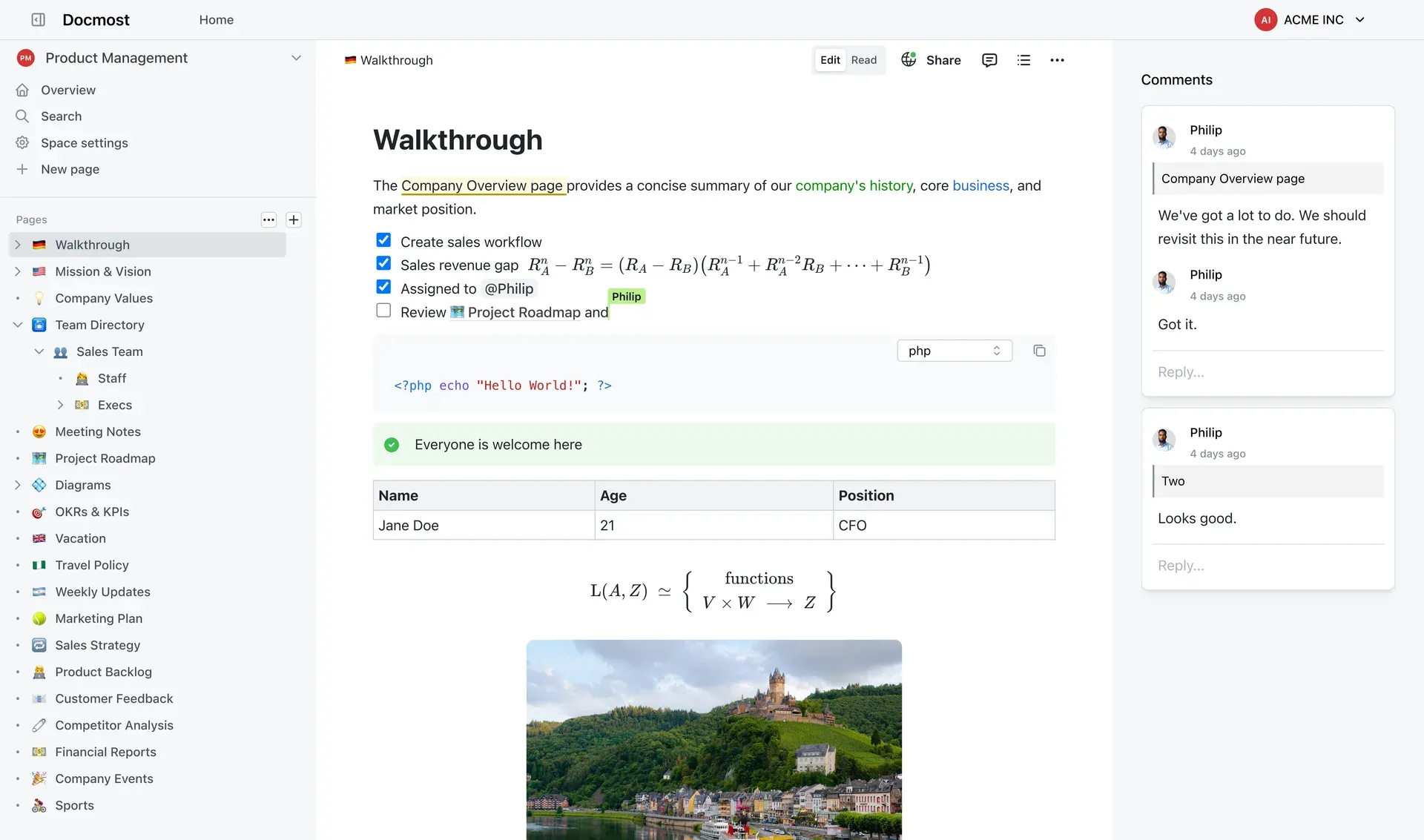
Official Docmost screenshot of the page editor with nested pages in the sidebar and inline comments on the right.
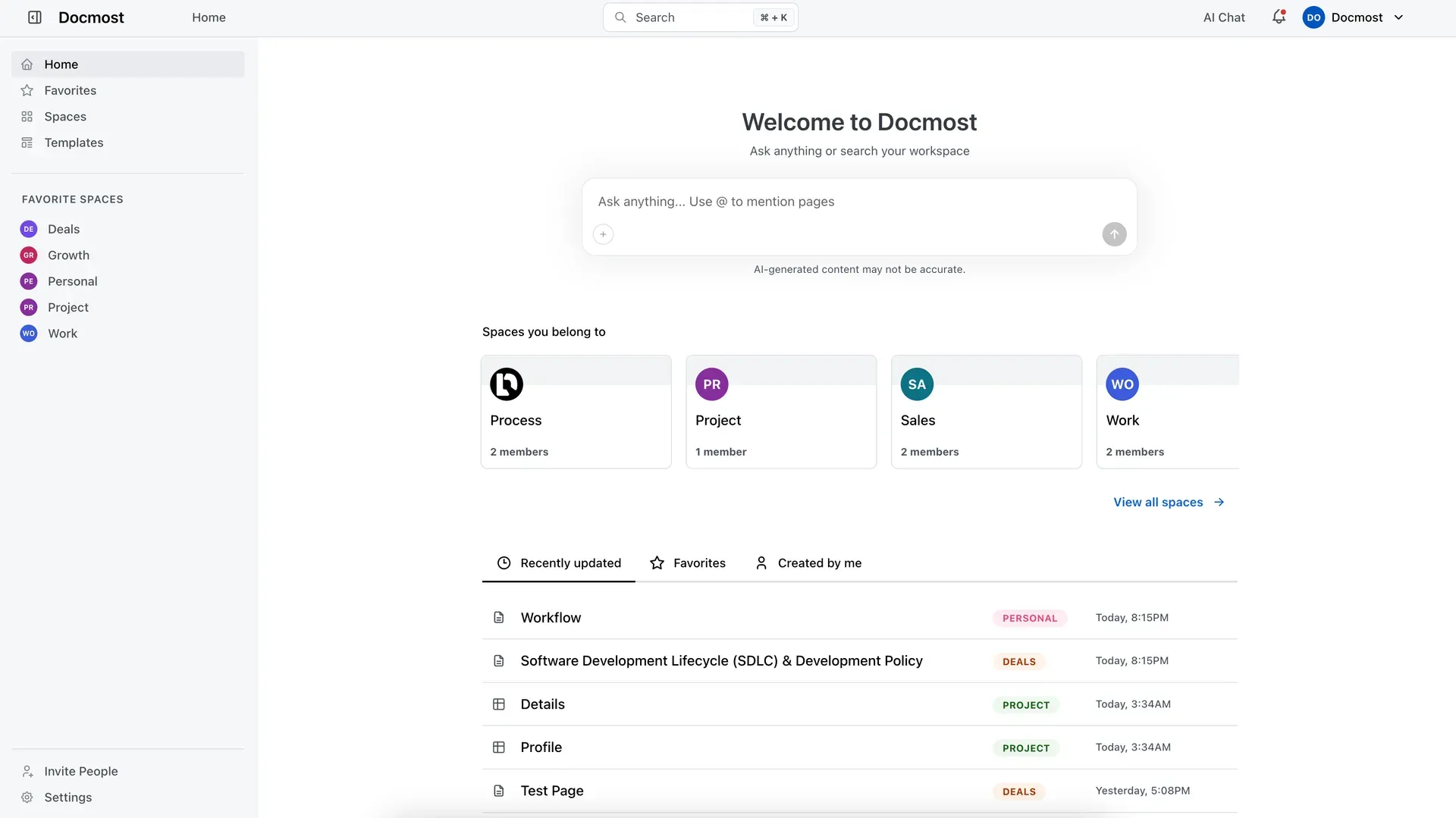
Workspace home screen showing the AI question box, the user's spaces and recently updated pages.
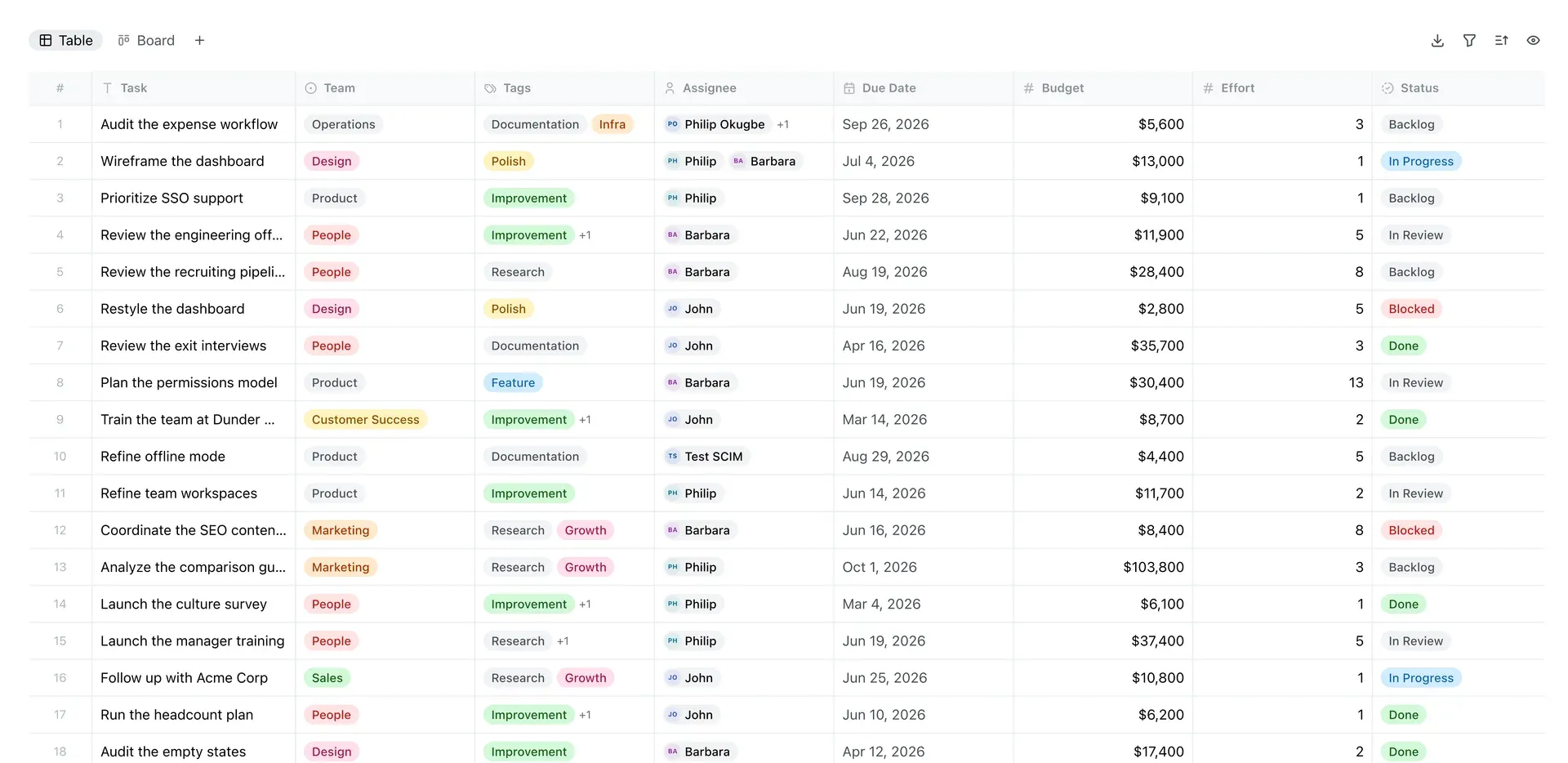
A Base in table view, a feature of the Business and Enterprise editions; the Board tab switches to Kanban.
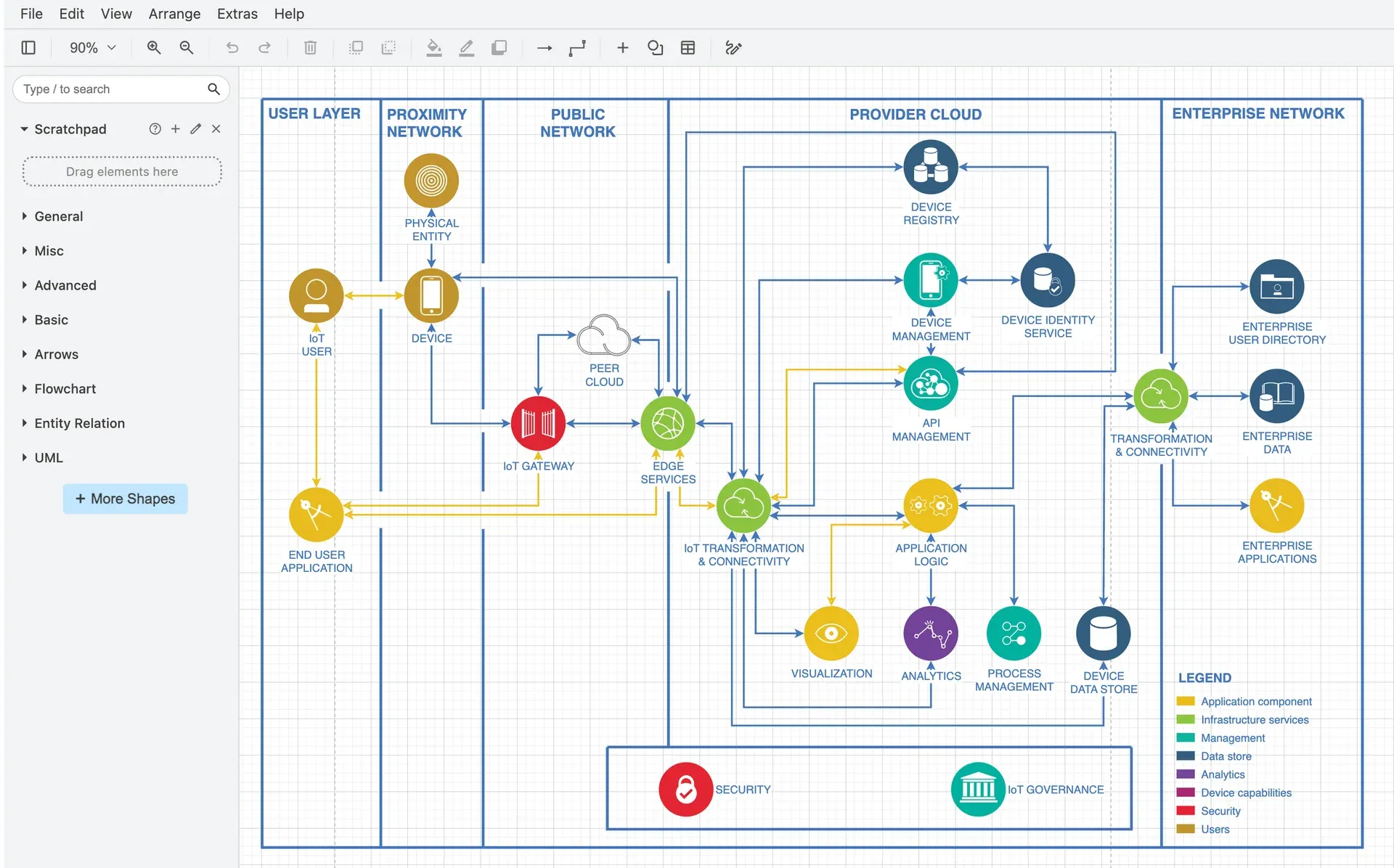
The embedded Draw.io editor used to create and edit diagrams on a Docmost page.
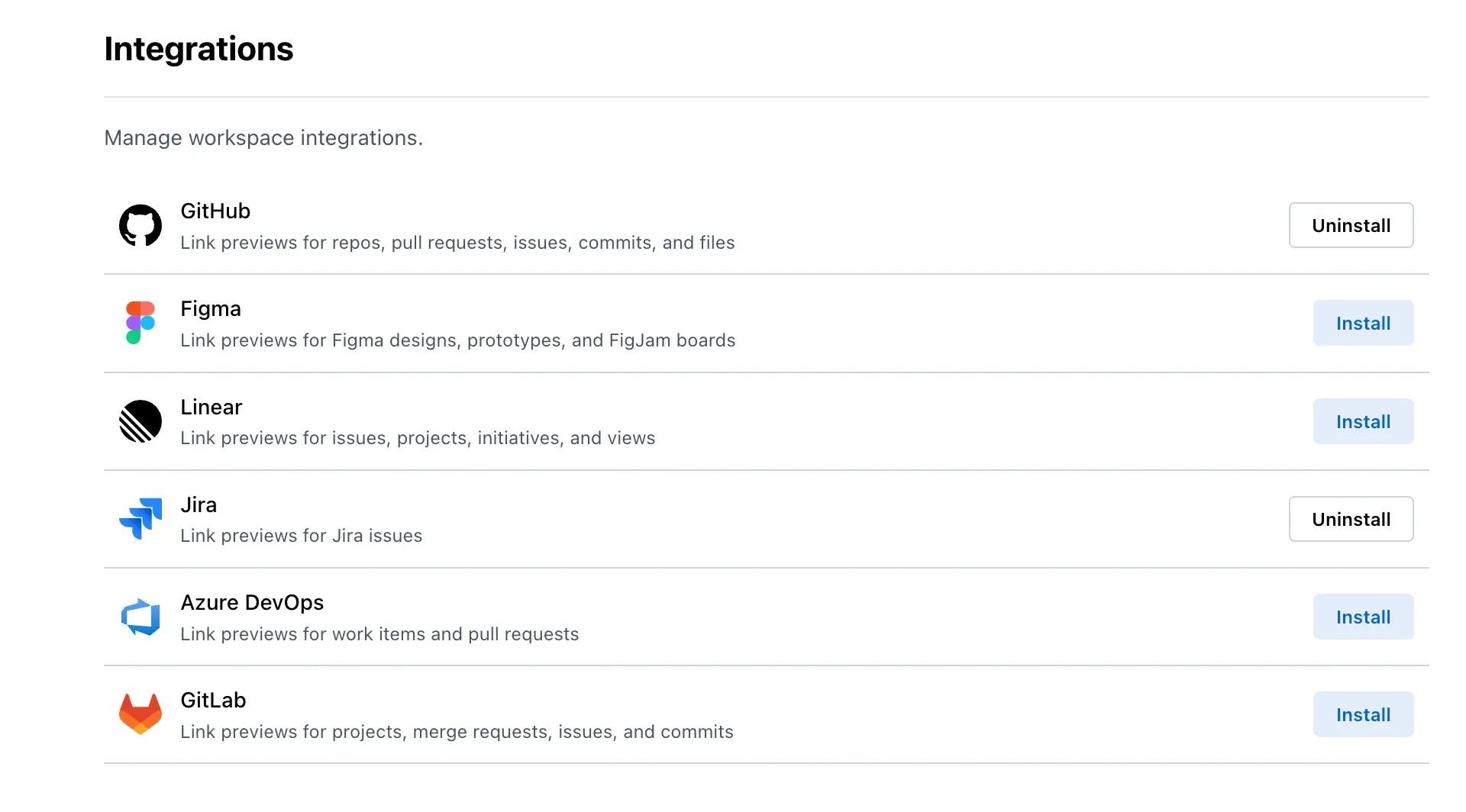
Workspace integration settings added in v0.97.0 for link previews from six external tools.
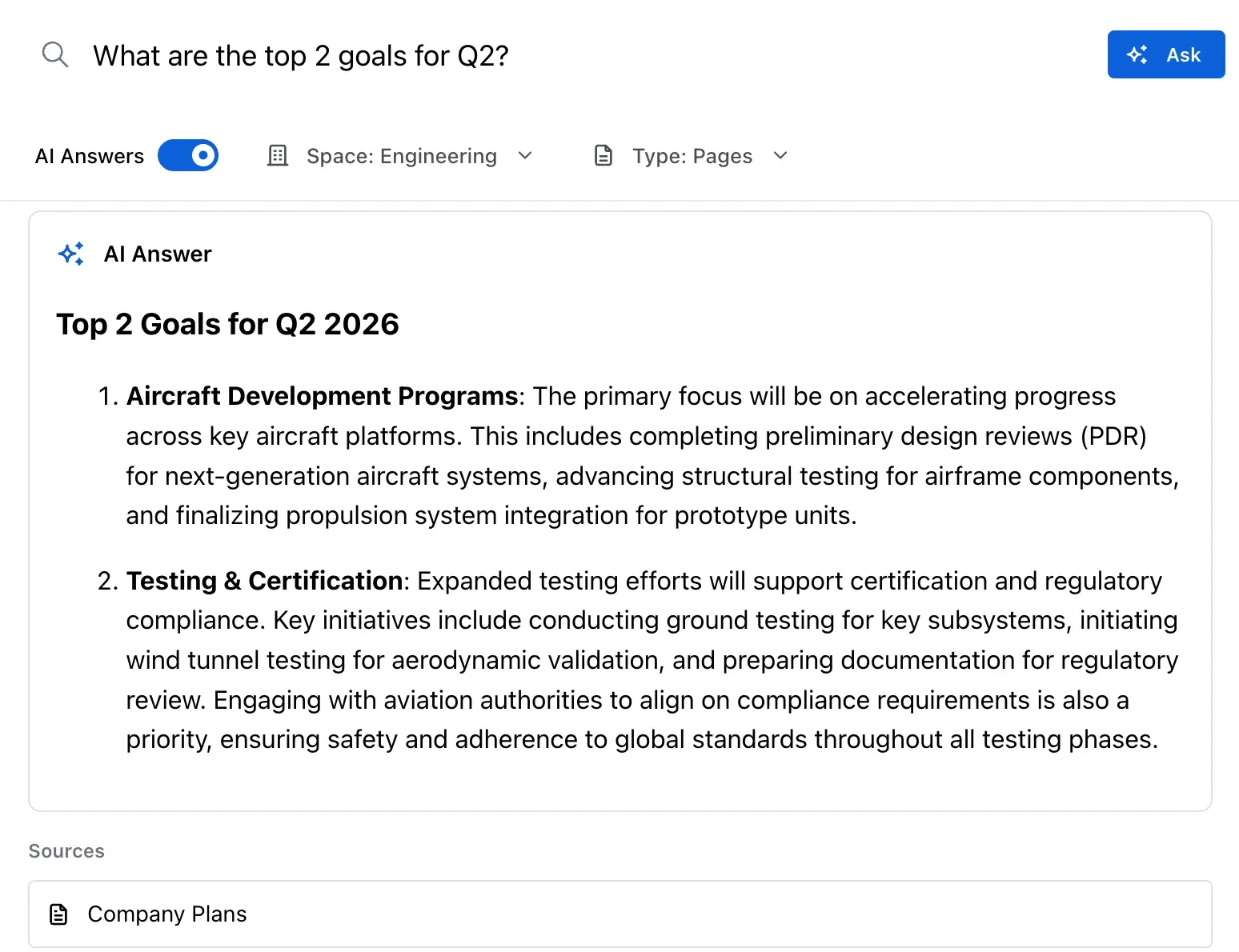
AI Answers in search, a paid feature, returning an answer with the source page it used.
Source: official Docmost project page.
Key capabilities
- Docker Compose installation The official compose file starts three services: the Docmost application, PostgreSQL 18 and Redis 8 with append-only persistence. Before the first start you must set
APP_URLto the public address and replaceAPP_SECRETwith a random value of at least 32 characters, for example fromopenssl rand -hex 32; the application refuses to start with the default. The first visit opens a setup page that creates the workspace and its owner account. A health endpoint is available at/api/health. - Upgrades and offline images Upgrading means changing or pulling the image tag and recreating the container, and the project recommends a database backup first. Pinning a version tag such as
docmost/docmost:0.97.0gives controlled upgrades instead of followinglatest. Release pages carrydocmost-amd64.docker.tar.gzanddocmost-arm64.docker.tar.gzarchives for hosts without registry access. - Real-time collaborative editor Several people can edit a page at once, with live cursors and changes synchronised through the Hocuspocus collaboration server. The editor supports headings, checklists, tables with merging and sorting, code blocks with syntax highlighting, callouts, math, mentions, footnotes, synced blocks, tabs and media. The real-time editor depends on WebSockets, so a reverse proxy in front of it must pass WebSocket upgrades.
- Spaces, groups and roles Spaces act as top-level containers with their own members, page trees and settings. Space roles are Full Access, Can Edit and Viewer, and they can be granted to individual users or to groups. Pages can be moved or copied between spaces and rearranged by drag and drop in the sidebar.
- Page-level permissions With a Business or Enterprise license, a page can be switched from Open to Restricted so that only listed users and groups with Can View or Can Edit roles reach it. Restrictions are inherited by child pages, and at least one Can Edit member must remain. The page permissions guide describes the inheritance rules.
- Page history and version comparison Pages keep a history that can be browsed and restored. Since 0.96.0 two versions of a page can be compared. This covers page content; it is not a replacement for database backups of the whole instance.
- Comments and notifications Inline comments attach to selected text, can be resolved, and since 0.97.0 can be linked directly. Page update notifications are skipped for users who are already viewing the page.
- Diagrams Draw.io, Excalidraw and Mermaid diagrams are inserted from the slash menu and edited on the page. Mermaid renders flowcharts, sequence, class, state, ER, Gantt and other diagram types from text. The Draw.io editor loads from
https://embed.diagrams.netby default, and theDRAWIO_URLvariable can point it to a self-hosted draw.io server, as listed in the environment variable reference. - Search Full-text search runs in PostgreSQL by default and opens with Ctrl or Cmd plus K. Filters cover space, pages or attachments, title only, creator and labels. Paid editions can switch to Typesense as the search driver and index the text of PDF and DOCX attachments.
- Import and export The import dialog accepts Markdown, HTML, ZIP archives of both, Word DOCX files, Notion exports and Confluence HTML space exports, as described in the import and export guide. Pages export to Markdown and HTML, and the commercial editions add DOCX export and PDF import. The pricing page lists the Confluence importer as a Business feature. Default limits are 100 MB per uploaded file and 200 MB per import file, configurable through environment variables.
- Storage, email and embedding options Attachments are stored on local disk by default, or in S3-compatible storage such as AWS S3, Backblaze, Wasabi or MinIO, or in Azure Blob Storage. Invitations need an SMTP or Postmark email driver. Embedding the instance in another site's iframe is blocked by default and can be allowed for listed origins, while public share links under
/share/can always be embedded. - Link previews for engineering tools Since 0.97.0, links from GitHub, GitLab, Jira, Linear, Figma and Azure DevOps can be shown as cards or inline mentions. An administrator registers an OAuth app with each provider and installs the integration, then members connect their own accounts; readers without access see only a label. The integrations guide covers each provider.
- Presentation mode Any page can be presented as slides, with a new slide at every Heading 1 and every divider. Arrow keys, Space and Page Down move between slides, and a laser pointer and fullscreen button are available. The presentation shows the page as it was when it started, and it is not available for Bases.
- Bases In the Business and Enterprise editions, Bases store structured records with typed properties, formulas, filters and sorting, displayed as a table or a Kanban board. CSV export follows the filter of the active view. An existing base can be embedded in a page by pasting its link.
- AI search and AI chat Paid editions can answer questions from workspace content using vector embeddings. Supported drivers are OpenAI or Azure OpenAI, OpenAI-compatible endpoints, Google Gemini and a local Ollama server. Embeddings are stored with the pgvector extension, which the default Alpine PostgreSQL image does not include, so the AI search setup requires migrating to a pgvector PostgreSQL build.
- MCP server With a Business or Enterprise license, an administrator can enable a Model Context Protocol endpoint at
/mcp. Clients such as Claude, ChatGPT, Claude Code, Cursor and VS Code connect through OAuth, where the user chooses Read or Read and Write access, or with an API key if the admin allows it. An MCP client acts as the user and cannot exceed that user's space and page permissions. - REST API and API keys A REST API creates, reads, updates and deletes pages, spaces and other resources, documented in the API reference. Personal API keys inherit the creator's permissions and expire after 30, 60, 90 or 365 days, a custom period or never. Administrators can list, rename and revoke every key in the workspace.
- Identity and governance The Business edition adds SSO through SAML 2.0, OIDC and LDAP and multi-factor authentication. The Enterprise edition adds SCIM provisioning, audit logs, SIEM export to Splunk, Datadog or a generic HTTP endpoint, security and retention controls and a page verification workflow. License keys are validated offline, so these features do not require the server to reach the vendor.
Where Docmost fits
Replacing a hosted team wiki
Export the existing Confluence space as HTML or the Notion workspace as a ZIP and import it into a test space. Compare page hierarchy, tables, attachments, internal links and diagrams with the source before moving a whole department. Note that the Confluence importer is listed as a Business feature on the pricing page, so plan a trial license key from the customer portal if the migration depends on it. Keep the source system read-only until search results and permissions in Docmost have been checked by the people who use them.
Running an internal engineering knowledge base
Create one space per team or product, add groups instead of individual users, and use Can Edit and Viewer roles to separate authors from readers. Use Mermaid for diagrams that should live as text, Draw.io for architecture drawings, and the GitHub, GitLab, Jira or Linear previews to show the state of linked work. Check that the reverse proxy passes WebSockets, because live editing fails without them, and test link previews with an account that has no access to the linked repository.
Publishing selected pages outside the workspace
Public sharing produces read-only links under /share/ that can also be embedded in another site. Before relying on it, decide which spaces may share publicly; the pricing comparison lists a setting that disables public sharing per workspace or space. Review a shared page in a private browser window to confirm that restricted child pages, comments and attachments are not exposed.
Connecting AI assistants to company documentation
With a paid license, enable AI search with a provider that matches your data policy: a hosted OpenAI or Gemini model, or a local Ollama model when content should not leave the network. Switch PostgreSQL to a pgvector build first and back up the database before the migration. For tools such as Claude Code or Cursor, enable the MCP endpoint and connect with OAuth, choosing read-only access for assistants that should not write. Confirm that answers cite only pages the asking user can open.
Operating a self-hosted instance
Follow the backup and restore guide: dump PostgreSQL with pg_dump, archive the storage volume or object storage bucket, and keep the compose file and APP_SECRET with each backup, since the secret decrypts MFA secrets and integration tokens. Restores need the same Docmost version, the same PostgreSQL major version and the unaccent and pg_trgm extensions. Pin the image tag and read the release notes before each upgrade, because several releases have shipped security fixes.
Presenting and reviewing documents in meetings
Structure a page with Heading 1 sections or dividers and start presentation mode from the page menu instead of copying content into a slide tool. Use comments with deep links to collect review feedback on specific passages, then compare page versions to see what changed after the meeting. Remember that a running presentation does not refresh when someone edits the page.
Install
mkdir docmost && cd docmost && curl -O https://raw.githubusercontent.com/docmost/docmost/main/docker-compose.ymlReviews of Docmost
Be the first to share your experience with Docmost.
Write a review
Loading review form…
Alternatives to Docmost
 OutlineOutline is a team wiki by General Outline, Inc. with realtime collaborative Markdown editing, collections, search with AI answers, an MCP server and an API. It runs as a paid cloud service or self-hosted under the Business Source License 1.1.
 NotionNotion is a hosted workspace from Notion Labs, Inc. for documents, wikis, databases and projects, with Notion Agent, Custom Agents, an MCP server, a REST API, desktop apps for macOS and Windows, and mobile apps for iOS and Android.AAFFiNEAFFiNE is an open-source, local-first workspace that merges documents, an edgeless whiteboard and databases as an alternative to Notion and Miro.