

What is Jiumi?
Jiumi (Chinese name 揪咪) is an open-source Android app from ybblab that records what installed apps do on a phone and lets the owner act on it. The English README calls it a lightweight Android app behavior monitor and manager: it logs which apps use permissions such as location, the clipboard or device identifiers, which network addresses they connect to and whether they were in the foreground or background at the time. It needs no root and no computer, and the records stay in a database on the phone. Jiumi supports Android 11 and later, the APK is about 4 MB, the code is written in Kotlin and the project is licensed under Apache 2.0. The main README is in Simplified Chinese, with translations into English and nine other languages, and the project website has English and Chinese pages.
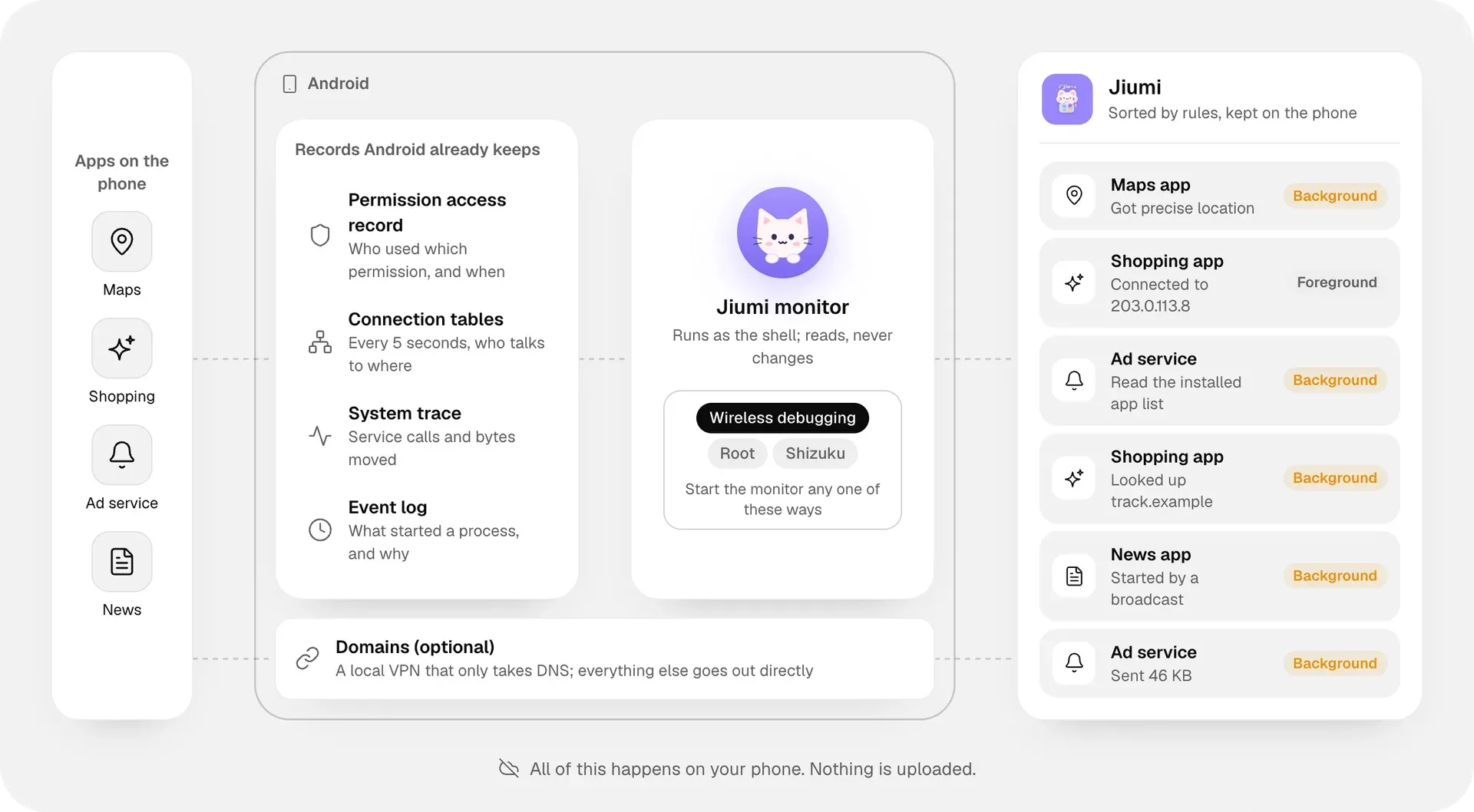
Jiumi does not intercept traffic or inject code into other apps. Its monitor runs as the Android shell user and reads signals the system already keeps: AppOps permission access records, the connection tables (sampled every five seconds by default), Perfetto system traces for identifiable service calls and per-connection traffic, and the event log that notes why a process started. The monitor can be started in three ways: wireless debugging, which pairs on the phone itself with a six-digit code and is the recommended method, Shizuku, or root through Magisk, KernelSU or APatch. Optional domain recording adds a local VPN that only receives DNS queries and forwards them unchanged to the current network's DNS servers, so connections can show domain names instead of bare IP addresses.
Distribution is through GitHub Releases only: the setup guide states that the APK is offered only from the project's GitHub releases, and neither the README nor the website mentions Google Play or F-Droid. Each release carries the APK, a SHA-256 file and a release.json manifest. The app can check GitHub for new versions on opening, at most every six hours, and verifies size, SHA-256 and signing key before installing an update; the check can be turned off. Building from source needs JDK 17 and the Android SDK, and the classification, attention and protected-app rules live as JSON files in the rules directory. The Shizuku and root connection code is adapted from ybblab's Droidance project, as listed in the NOTICE file.
The repository was created in November 2026 and the first public release, 0.1.0, followed on November 16, 2026. According to the changelog, 0.2.0 added per-app permission management and network blocking through Android's own firewall, 0.3.0 added freezing and removal of preinstalled apps as root or through Shizuku started with root, a compact notification and automatic session resume, and 0.3.1 reorganized Settings, added system components and APEX modules to the package inventory, enabled DNS over TCP for domain recording and turned ADB persistence off by default. The current release, Jiumi 0.3.2 of November 20, 2026, adds a monitoring allowlist and uses the terms Disable, Enable and Uninstall consistently.
The project lists its own limits. Jiumi sees that a permission was used or an access was refused, but not message contents, passwords or the payload of network transfers. Short connections can end between two samples, direct file reads and similar actions may leave no usable signal, per-connection traffic needs Android 14 or later with system support, and monitoring uses extra battery. Jiumi leaves out activity it cannot confirm in order to avoid false reports, and the README asks users to run it only on devices they own or are authorized to use. Related tools on iThub include OpenSnitch, an application firewall for Linux, and CleanYourTV, which disables preinstalled packages on Android TV over ADB.
Key capabilities
- APK for Android 11 and later Jiumi is installed from the APK attached to each GitHub release, for example jiumi-0.3.2.apk with a matching .sha256 file. The package targets API level 35 with a minimum of API 30 (Android 11), and the README gives its size as about 4 MB. No store listing is documented.
- Three ways to start the monitor On first launch Jiumi offers wireless debugging, Shizuku or root, and the choice can be changed later in Settings. All three run the monitor as the shell user and see the same records. Wireless debugging needs Wi-Fi and Developer options; Jiumi guides through enabling notifications, turning on Developer options and entering the six-digit pairing code in its own notification.
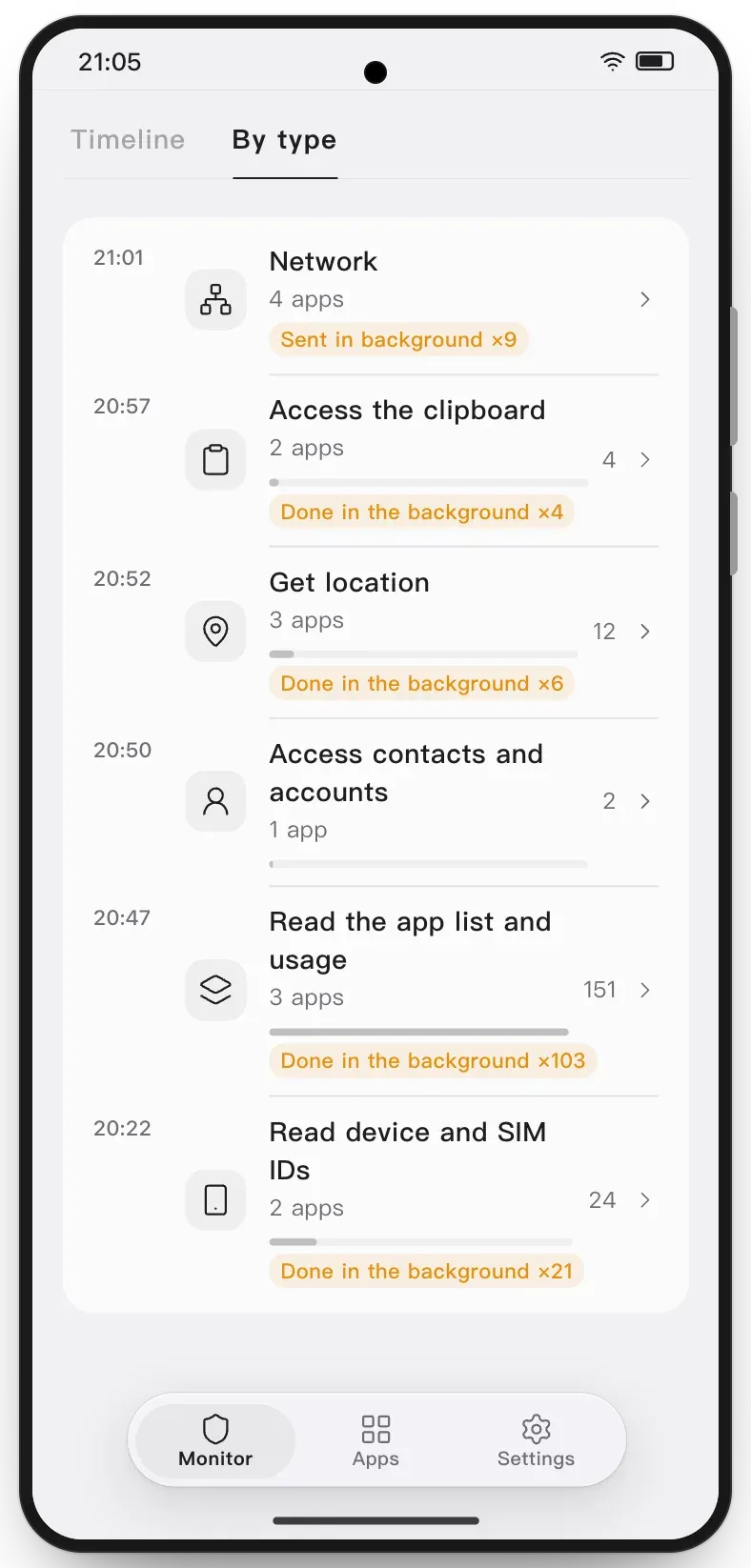
- Activity records in 12 groups Jiumi records 56 kinds of access in 12 groups: location, device and SIM identifiers (such as IMEI, IMSI, ICCID, phone number, serial number and MAC address), contacts and accounts, messages and calls, calendar, camera, microphone and screen capture, storage and media, clipboard, health and activity data, the app list and usage, notifications, and accessibility services, VPN and overlays. Each record notes whether the app was in the foreground or background and whether the screen was on.
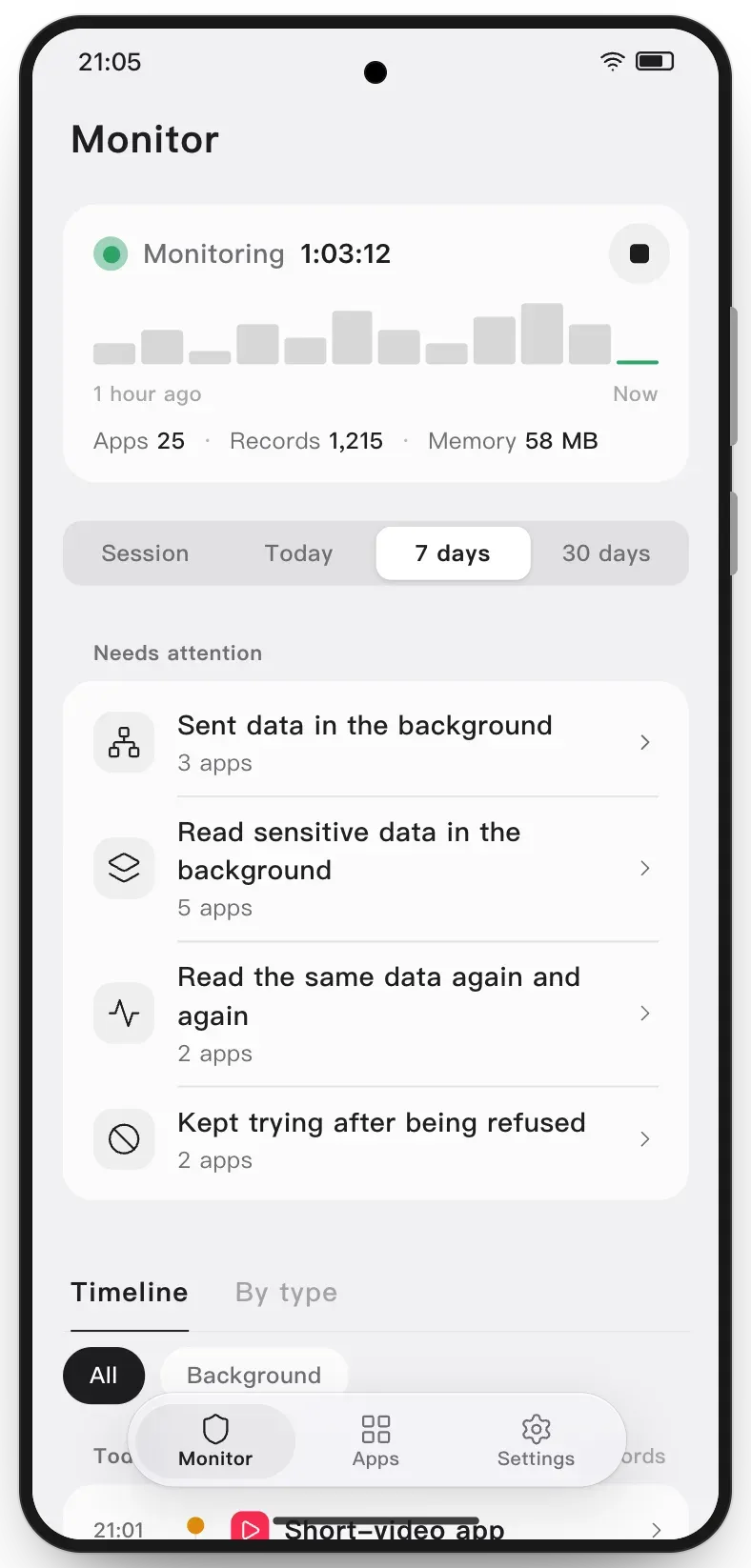
- Needs attention The Monitor page lists four kinds of behavior separately: data sent in the background, sensitive data read in the background, the same data read again and again, and repeated attempts after Android refused access. Each entry opens the apps it covers and explains how it is judged. Data sent in the background is shown as measured bytes, with no inference about why.
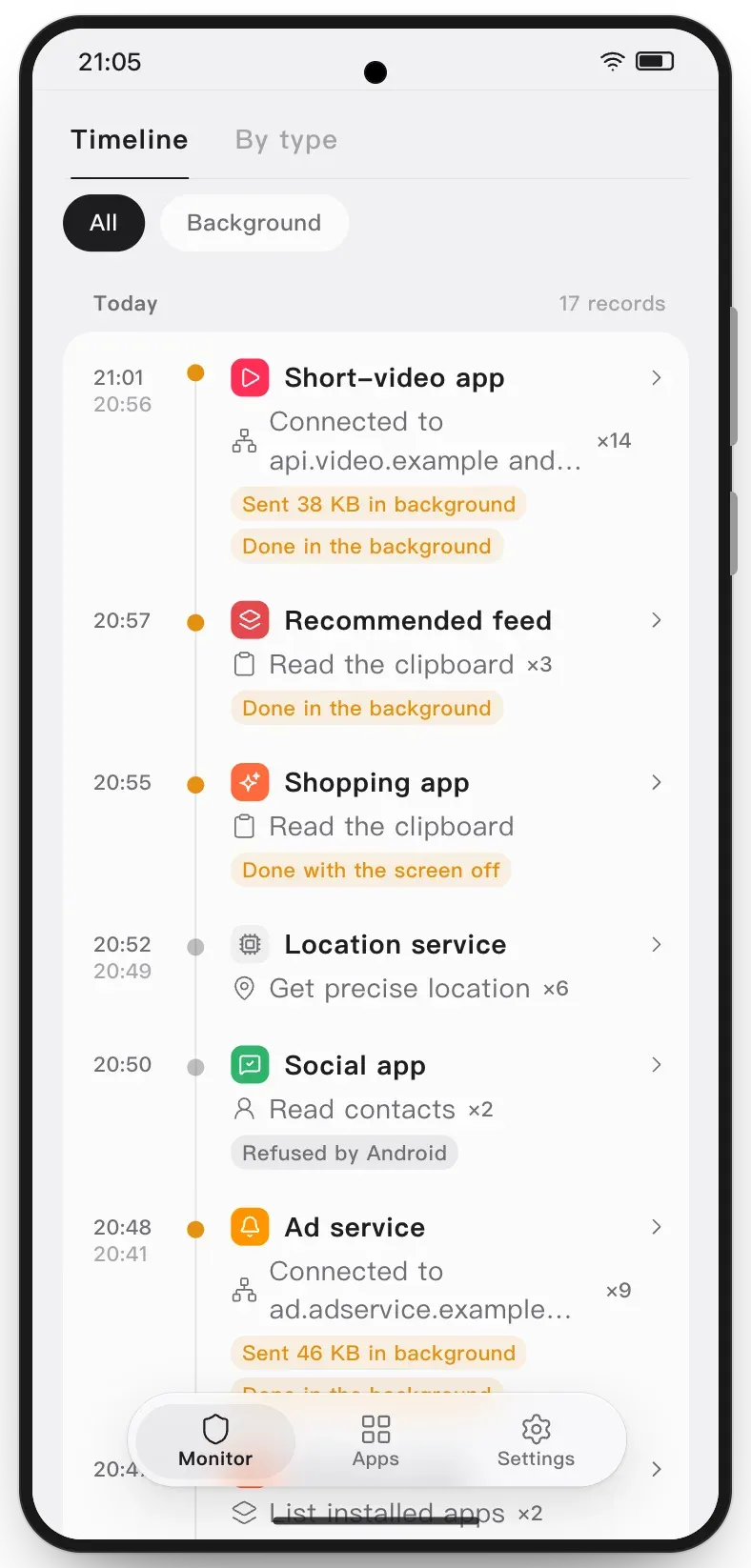
- Timeline and By type views The timeline shows one line per record with time, app and action; repeats close together are merged with a count, and bursts of network connections fold into one line. It can be narrowed to background activity or refused attempts. The By type view groups records into the 12 categories with app counts and totals.
- Record labels Records carry labels such as Done in the background, Done with the screen off, Refused, and Filled in from the permission usage record. The last label marks entries that come from Android's retained records rather than from live monitoring.
- Network activity per app Each app's page lists the addresses it connected to, and the Connect to the network summary shows destinations and bytes sent and received per app, with the largest background senders first. Connection tables are read every five seconds by default. Per-connection traffic needs Android 14 or later and support from the system.
- Optional domain recording With Record domains turned on, a local VPN receives only DNS queries and forwards them unchanged, so connections can be matched to the domains an app looked up. It occupies the system VPN slot, so no other VPN can run at the same time. Lookups through an app's own encrypted DNS or a named Private DNS provider are not seen; DNS over TCP is supported since 0.3.1.
- System history from before monitoring An app's page also shows what Android itself retains: the per-access permission record with times (about a week, according to the changelog) and long-term counts per permission (about a month). This covers some activity from before Jiumi was installed or started. The page also counts how often the app's alarms woke the sleeping phone since the last restart.
- Permission management From an app's details, permissions can be turned off or on one at a time. The Manageable permissions switch turns all of them off at once, and turning it back on restores only the permissions Jiumi revoked. Permissions locked by the system are shown as read only.
- Per-app network blocking On supported devices Jiumi can block or restore network access for a single app with Android's own firewall, without a VPN. The switch is locked with a reason when the app shares a UID with other apps, when the rule was set by another tool, or when Jiumi cannot confirm that only this app is affected.
- Disable and re-enable apps Disabling applies to the current user and keeps the app and its data; disabled apps carry a snowflake badge and can be enabled again under Apps, Disabled. When an app Jiumi disabled is enabled again, it is marked Re-enabled and the change is noted in the timeline, and an optional setting disables it again automatically.
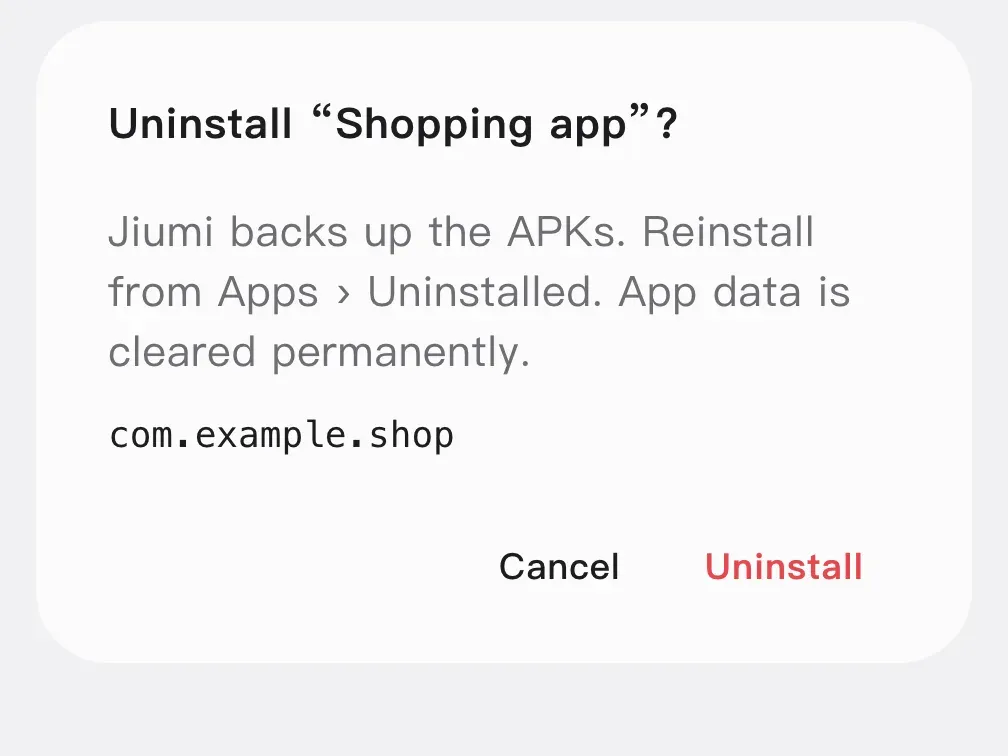
- Uninstall with APK backup Uninstalling a user-installed app requires typing the full package name. Jiumi first backs up the base APK and any split APKs, so the app can be reinstalled from Apps, Uninstalled, but app data is cleared. Preinstalled apps can be uninstalled for the current user after enabling a setting, which keeps the factory copy and the app data for a later restore.
- Protection and execution identity Core system components are protected by default and stay locked until Expert mode is enabled in the advanced settings, and Jiumi shows a warning before changing components the phone depends on. A Runs as field shows whether management actions run as root (with root or Shizuku started with root) or as the shell (with wireless debugging). After every change Jiumi reads the state back from Android and shows the reason if Android refuses.
- Monitoring allowlist Added in 0.3.2, the allowlist under the monitoring settings excludes chosen apps: they move to the top, generate no new records and have their saved records hidden. Removing an app resumes monitoring and shows its records again; activity during the excluded period is not backfilled.
- Log export The Export logs option saves the records of a chosen time range as a ZIP file with CSV files: a readable timeline, the raw tables and a note on each. Apart from this export, the records do not leave the phone.
- Notification and attention alerts While monitoring, a compact persistent notification shows the monitored time and a stop button, and it can be turned off. It can also show the session's app and record counts. With Attention alerts on, Jiumi notifies once per app and item per session when an app newly raises an item that needs attention.
- Session resume and ADB persistence After a reboot, a Jiumi update or an interrupted debugging service, Jiumi resumes the same session when the chosen connection is available; with wireless debugging this can require tapping Resume on Wi-Fi. Interrupted time is not counted. Optional ADB persistence, off by default since 0.3.1, uses a local debugging port with USB debugging so monitoring can start without Wi-Fi until the next restart.
- Build from source The Gradle project lives in the
codefolder, and./gradlew :app:assembleDebugbuilds a debug APK with JDK 17 and the Android SDK. CONTRIBUTING.md describes the code layout, and security issues are reported privately as described in SECURITY.md.
Where Jiumi fits
Checking which apps read data in the background
After pairing and tapping Start on the Monitor tab, the Needs attention card collects apps that read sensitive data or sent data while not on screen. The timeline can be filtered to background records, and each line shows whether the screen was off. The project notes that Jiumi prefers missing an event to misreporting one, so calls that only return the app's own information and records without a known caller are left out.
Seeing where an app connects
The app page lists the IP addresses an app reached and the Connect to the network summary ranks apps by destinations and bytes. Turning on Record domains adds the domain names apps looked up, at the cost of occupying the VPN slot. Lookups made through Private DNS with a named provider or through an app's built-in encrypted DNS are not recorded.
Reviewing activity from before monitoring started
Because Jiumi also reads Android's retained permission records, opening an app's details right after installation shows recent accesses and long-term counts per permission. These entries are labelled as filled in from the permission usage record. The same page shows how often the app's alarms woke the phone since the last restart.
Restricting an app without uninstalling it
From the app's details, individual permissions can be revoked or all manageable permissions turned off at once, and network access can be blocked with Android's firewall on supported devices. Jiumi reads the result back from Android and explains when the system refuses a change or when the network switch is locked, for example for apps that share a UID.
Disabling or removing preinstalled apps
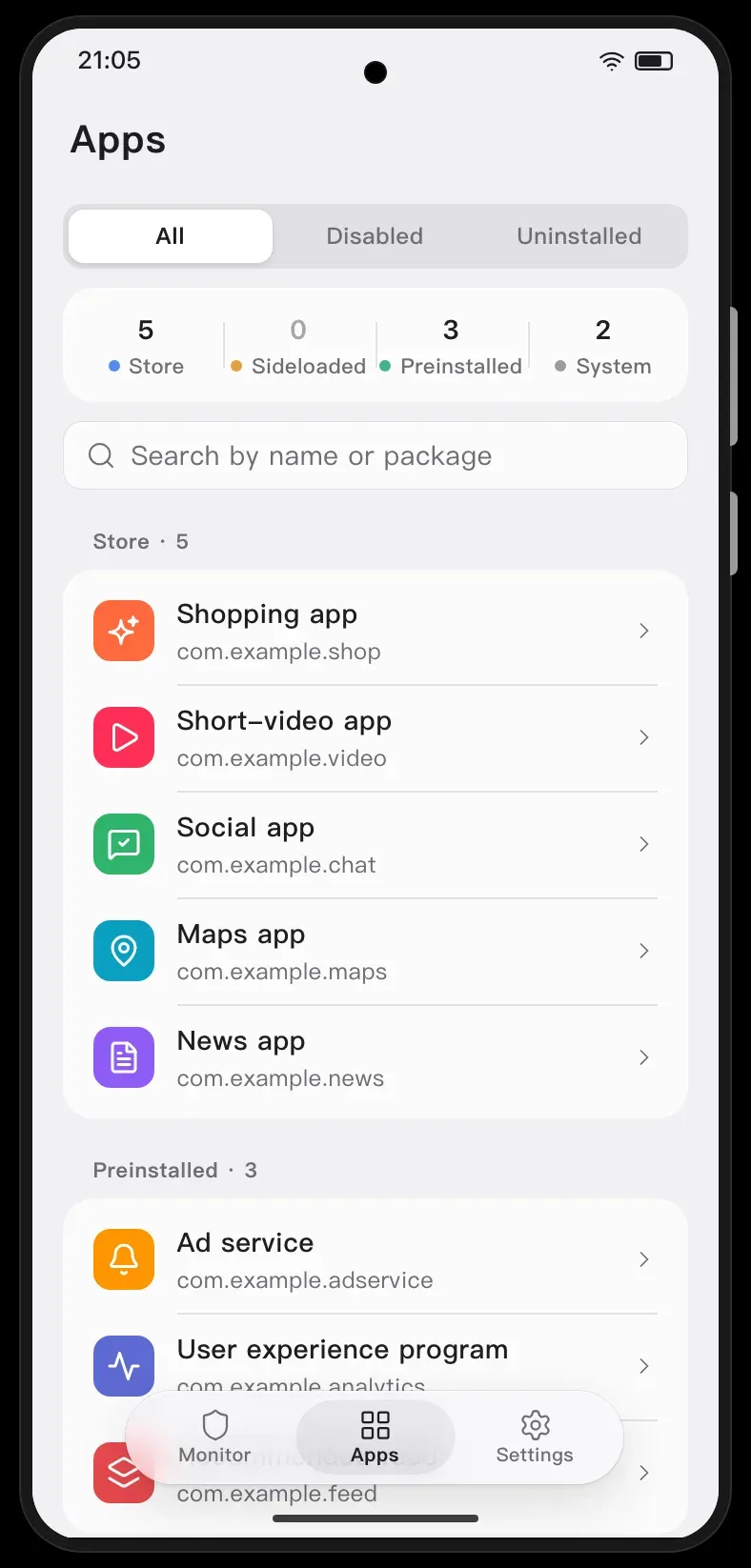
The Apps tab groups apps by source (Store, Sideloaded, Preinstalled and System). Preinstalled apps can be disabled for the current user or, after enabling the corresponding setting, uninstalled for the current user while keeping the factory copy for a restore. With wireless debugging these actions run as the shell, which some phones restrict for system apps; with root or Shizuku started with root they run as root.
Exporting records for analysis
For a closer look outside the phone, the Export logs option writes a ZIP with CSV tables for a chosen time range, including a readable timeline and the raw tables. The monitoring allowlist in 0.3.2 keeps chosen apps, for example trusted ones, out of new records and exports.
Reviews of Jiumi
Be the first to share your experience with Jiumi.
Write a review
Loading review form…
Found Jiumi useful? Upvote it todayYour vote helps other IT teams find it in the daily ranking.


