

What is Pi-hole?
Pi-hole is a DNS sinkhole for a home or office network. It answers the DNS queries of the devices that use it and returns a blocked answer for domains found on its lists, so advertising and tracking domains are filtered for every client without installing software on each device. The project describes this as network-wide ad blocking via your own Linux hardware, and the official website notes that blocking also reaches places a browser extension cannot, such as mobile apps, smart TVs and IoT devices. Pi-hole is developed by a remote team of volunteers, and the copyright is held by Pi-hole, LLC.
The software is split into several repositories. Pi-hole Core contains the installer, the pihole command and the gravity script that builds the block list database. FTL (pihole-FTL) is the resolver at the center of the system: it is based on dnsmasq, embeds SQLite and the CivetWeb web server, and provides DNS, the optional DHCP and NTP servers, the REST API and the statistics. The web interface is served directly by FTL, so version 6 needs no separate web server or PHP installation. The official Docker image bundles all three components.
Pi-hole Core v6.6 was published on November 11, 2026 together with FTL v6.9 and Docker image 2026.11.0; the web interface is at v6.6.1. Core v6.6 fixes five security advisories, four rated High and one Medium: symlink handling in /etc/pihole by the installer, updater, checkout, uninstall and debug scripts, unescaped SQL in gravity.sh, and password hashes and the TOTP secret appearing in the pihole -d debug log. The release also drops from root to the pihole user with setpriv instead of sudo, writes installer files as pihole, and relies on the system's daily logrotate instead of a separate nightly run. FTL v6.9 updates the embedded dnsmasq, SQLite and TRE regex engine, which changes how some stored regex filters match.
Pi-hole runs on Linux. The prerequisites page lists Alpine, Armbian OS, Debian, CentOS Stream, Fedora, Raspberry Pi OS and Ubuntu as officially supported, in actively maintained versions with systemd or sysvinit. Prebuilt pihole-FTL binaries exist for x86_64 (amd64 and i686), armv6, armv7, armv8 (aarch64) and riscv64; other architectures need FTL compiled from source. The stated minimum is 2 GB of free space (4 GB recommended) and 512 MB of RAM, and the host needs a static IP address or a DHCP reservation. Despite the name, any hardware running a supported system can be used, including an old PC, a virtual machine or a NAS.
Core, FTL and the web interface are licensed under the European Union Public Licence 1.2 (EUPL-1.2). The Core license excludes commits made before version 3.0, and the web interface license excludes the files under vendor/, which carry their own licenses. Pi-hole is free; the project states that volunteers cover recurring costs and asks for support through donations, GitHub Sponsors, Patreon and affiliate links. For devices away from home, the website describes pairing Pi-hole with a VPN such as WireGuard.
Pi-hole screenshots
Explore the interface. Open a screenshot to view it at full size.
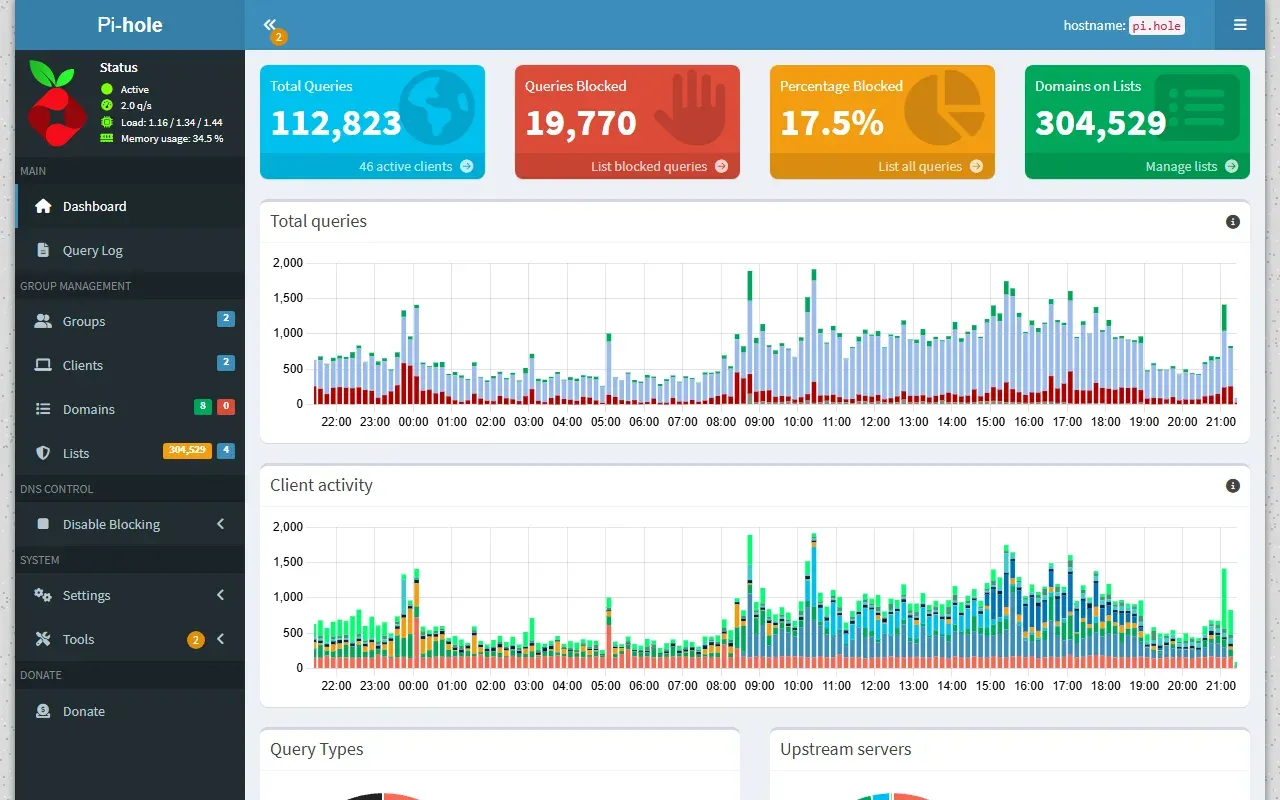
Official Pi-hole v6 dashboard screenshot from pi-hole.net: summary tiles, total queries and client activity charts.
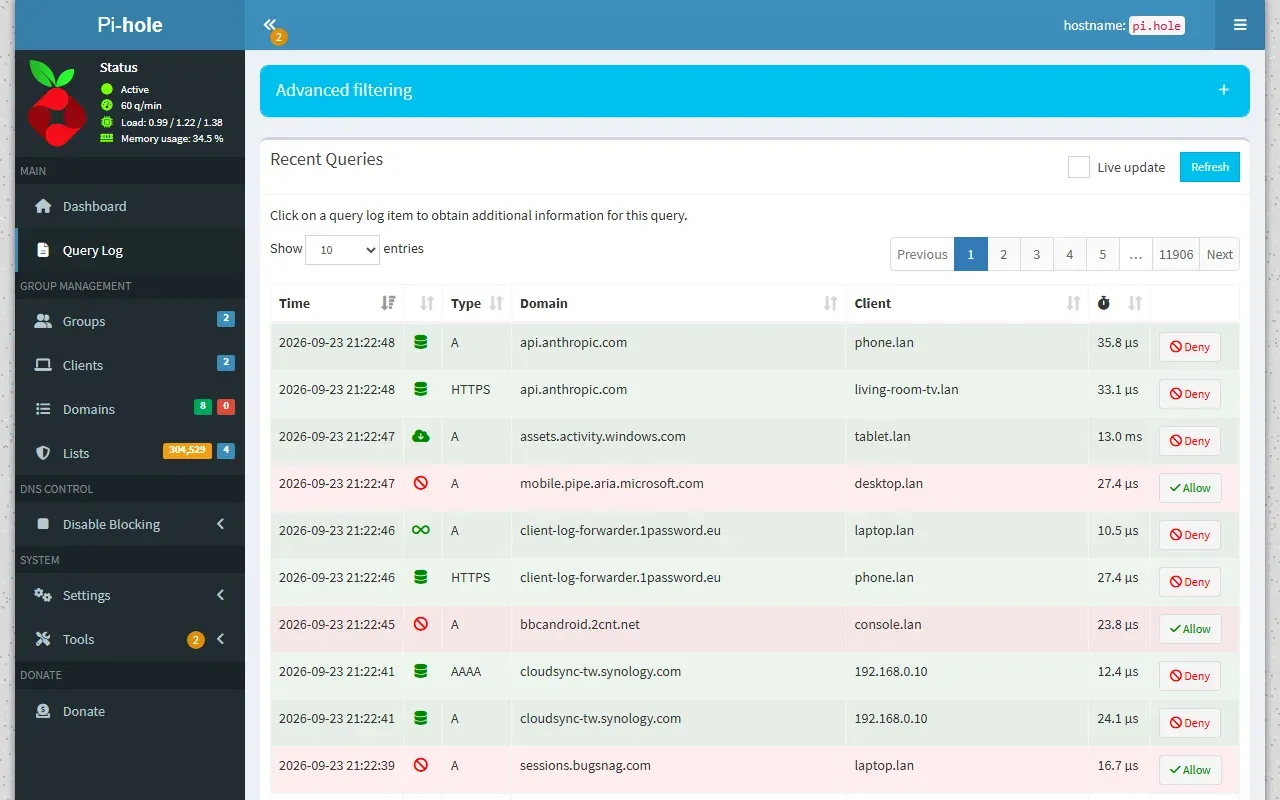
Official screenshot of the query log with advanced filtering and one-click allow or deny.
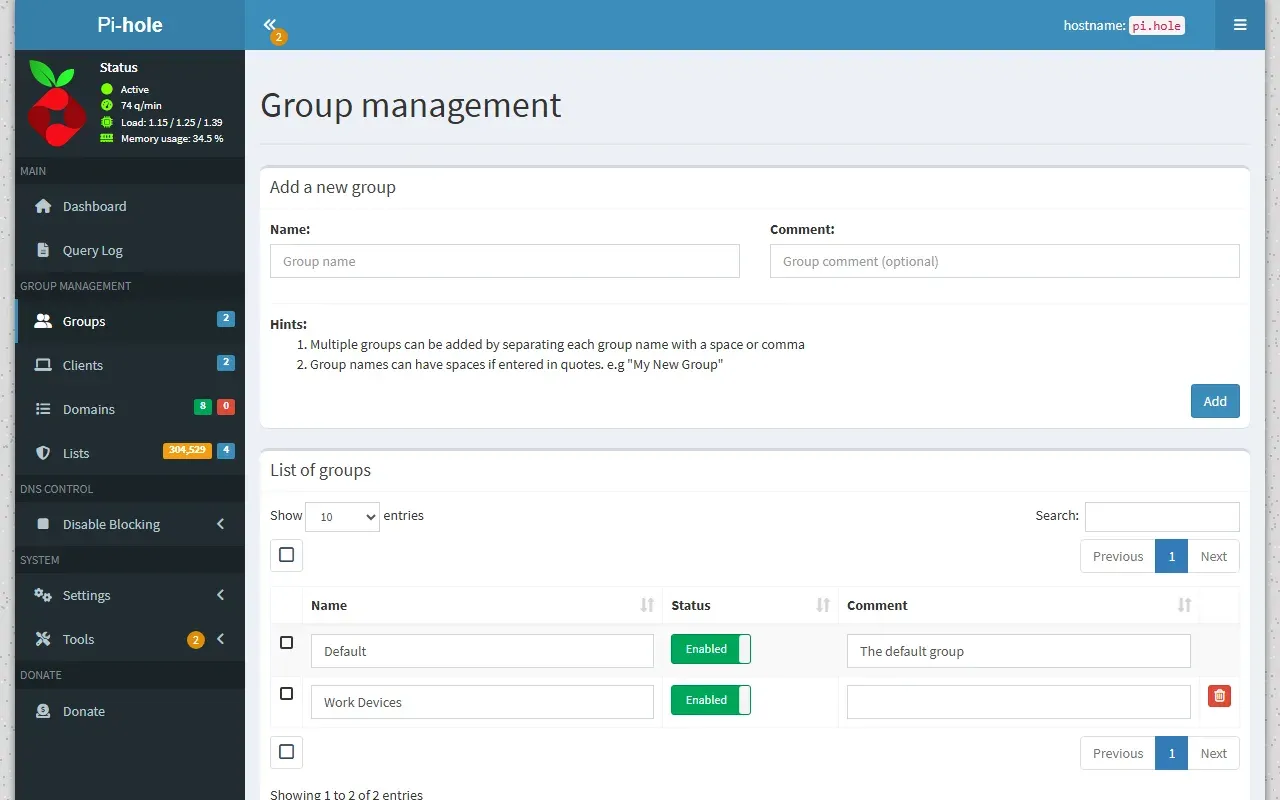
Official screenshot of group management, used to apply different lists to different clients.
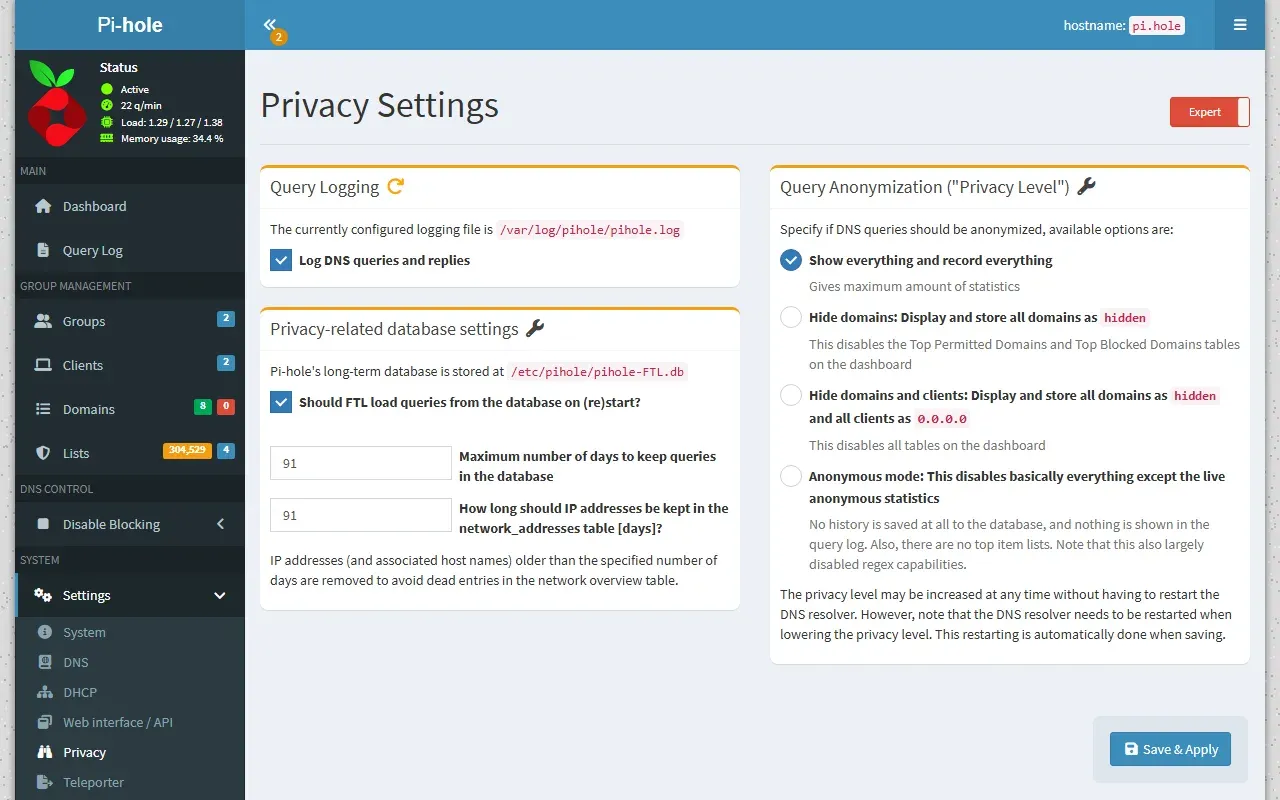
Official screenshot of the privacy settings: query logging, retention days and privacy level options.
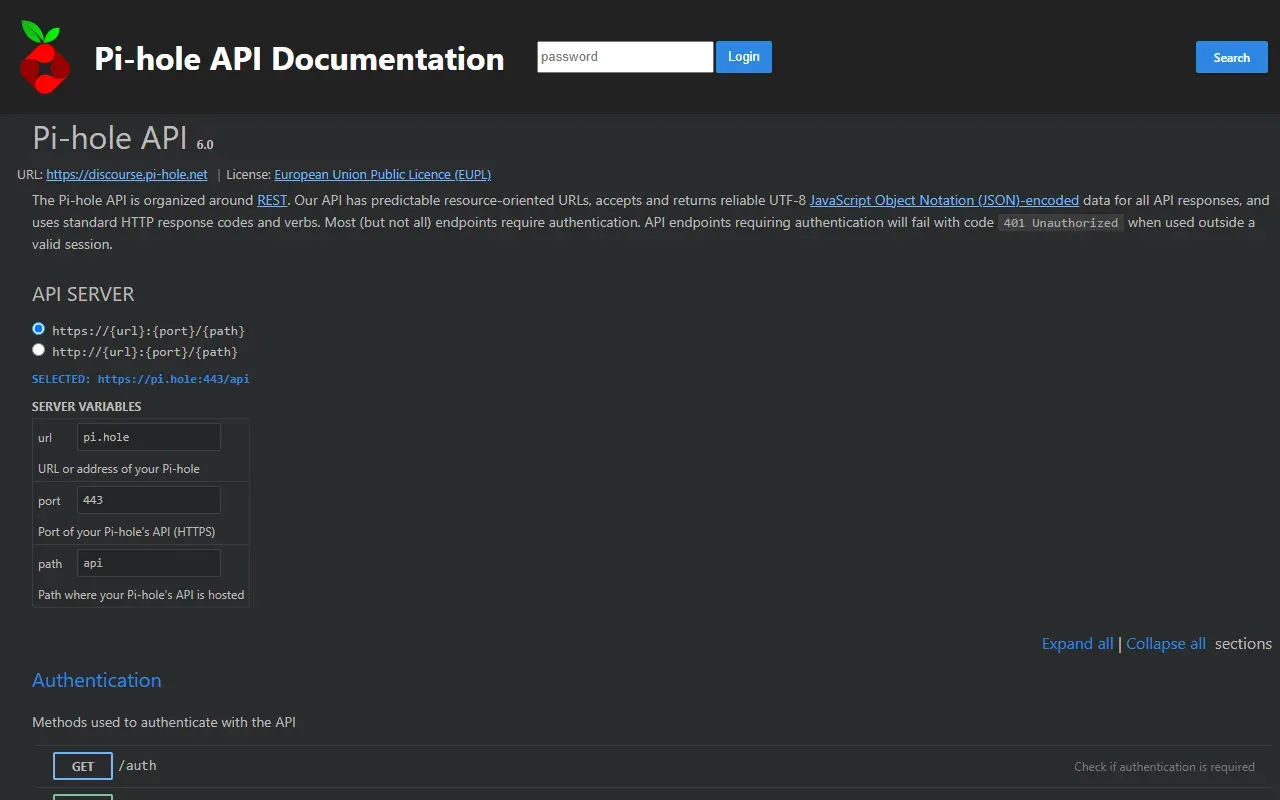
Official screenshot of the interactive API documentation served by each Pi-hole.
Source: official Pi-hole project page.
Key capabilities
- Network-wide DNS sinkhole Clients send DNS queries to Pi-hole, which answers blocked domains locally and forwards the rest to the configured upstream servers. Because filtering happens at the DNS level, no client software is needed, and blocking works over IPv4 and IPv6.
- Blocklists and the gravity database Subscribed lists (adlists) are downloaded by
pihole -g(gravity) into the SQLite domain database/etc/pihole/gravity.db, and can be refreshed automatically. Individual domains can be added to the allowlist or denylist, as exact entries or regular expressions. Partial domain searches in FTL v6.9 also find ABP-style list entries. - Group management Lists, allowlist, denylist and regex entries can be assigned to groups, and clients are placed in groups, so different devices can get different filtering. Group
Default(ID 0) is assigned automatically to new clients and domains. The group management documentation explains how overlapping group memberships are resolved. - FTL resolver and DNS cache
pihole-FTLis based on dnsmasq and caches DNS answers, so repeated lookups are answered locally. Release v6.9 embeds dnsmasq v2.93+42 and SQLite v3.54.1, keeps extra TCP slots for DNSSEC validation queries, and only reopensgravity.dbwhen it changed on disk. Upstream choices offered by the installer include Google, OpenDNS, Level3, Comodo, three Quad9 variants, CloudFlare DNS and a custom server. - Built-in web interface The dashboard shows total and blocked queries, the percentage blocked, domains on lists, query and client activity over time, query types, upstream servers and top domains and clients. It is served by FTL itself at
http://pi.hole/admin/or the server IP, uses a self-signed certificate for HTTPS by default and is password protected. The interface is mobile-friendly and includes Long Term Statistics over user-defined time ranges. - Query log Every query is listed with time, type, domain, client, reply and response time, and a single click allows or denies a domain. Queries are stored in the long-term database
/etc/pihole/pihole-FTL.db, and advanced filtering searches any time range. The retention period in days is configurable in the privacy settings. - Privacy levels Four levels control what is shown and stored: level 0 shows everything, level 1 stores domains as hidden, level 2 also stores clients as 0.0.0.0, and level 3 (anonymous mode) disables the query log and long-term database logging. Details already hidden cannot be revealed by lowering the level later. The levels are described in the privacy level documentation.
- REST API with built-in documentation Version 6 exposes a JSON REST API through FTL, and the project states that everything the web interface does is available through it. Interactive documentation is served by each installation at
http://pi.hole/api/docs, matching its own API version, with the API reference online. Most endpoints require a session obtained from/api/auth. - Authentication, app passwords and 2FA The web interface and API use a password, and an application password can be generated for scripts and home-automation tools. Two-factor authentication with TOTP codes is supported. The v6.9 release adds a fix that stops limited app and CLI sessions from listing or ending other API sessions.
- Optional DHCP server FTL can act as the network's DHCP server, with optional IPv6 support, using UDP port 67 (and 547 for DHCPv6). The project describes this as the option when a router cannot hand out Pi-hole as DNS server; the router's own DHCP should be disabled first. In Docker, the DHCP server needs the
NET_ADMINcapability. - NTP server and other FTL services FTL can serve NTP on UDP port 123 and, as a dnsmasq-based resolver, can provide TFTP. Local DNS records and conditional forwarding are configured from the web interface. The Docker image needs
SYS_TIMEwhen Pi-hole should set the host clock as NTP client. - Command-line administration The pihole command administers the system without the web interface: allow and deny lists, regex, gravity updates, list queries, live log tail, enable and disable, a debugger and API calls such as
pihole api stats/summary. In v6.6 it no longer requiressudoand drops privileges withsetpriv. - Settings, expert mode and Teleporter DNS, DHCP, the web interface and API, privacy and other options are configured in the browser, and expert mode shows every option. Settings are stored in
pihole.toml. Teleporter backs up and restores the whole configuration in one file. - Install on Linux with the automated installer The one-step installer runs with
curl -sSL https://install.pi-hole.net | bashand asks a few questions before configuring the system. For code review before running, the installation documentation also describes cloning the repository and runningbasic-install.sh, or downloading the script withwgetfirst. - Run in Docker The official
pihole/piholeimage is published with date-based tags such as 2026.11.0, pluslatestandnightly. The documented Docker Compose file maps DNS port 53 (TCP and UDP) and ports 80 and 443, sets the password throughFTLCONF_webserver_api_passwordand persists/etc/piholein a volume. See the Docker documentation for capabilities and upgrade notes. - Ports and network requirements Pi-hole needs port 53 for DNS, 80 and 443 for the web interface (falling back to 8080 and 8443 when another web server holds them), and optionally 67, 547 and 123. Another DNS server on the host, such as BIND, must be stopped. The prerequisites page gives iptables, FirewallD and ufw examples limited to local network ranges.
- Recursive resolver and encrypted DNS guides The documentation includes guides for running Pi-hole with unbound as a local recursive resolver, and with cloudflared or dnscrypt-proxy for DNS over HTTPS. A WireGuard guide describes reaching Pi-hole from devices outside the home network.
Where Pi-hole fits
Blocking ads for every device on a home network
After installation, the router's DHCP settings are pointed at Pi-hole as DNS server, so all devices that receive an address from the router use it automatically. The post-install guide covers this step, the fallback of Pi-hole's own DHCP server when the router cannot set a DNS server, and the last resort of configuring each device by hand. The dashboard then shows blocked and total queries per client.
Different filtering per device group
Clients are added by IP address, or by a whole subnet in CIDR notation, and placed in groups, and each group gets its own subscribed lists and allow or deny entries. The website gives the example of stricter filtering for children's tablets and lighter filtering for a work laptop. Domains and lists not assigned elsewhere stay in group Default.
Investigating what a device contacts
The query log lists every domain a client requested, the query type, the reply and whether it was blocked, forwarded or answered from cache. Advanced filtering narrows the log by time range, client, domain or status, and Long Term Statistics summarise older periods from pihole-FTL.db. Privacy levels 1 to 3 hide domains, clients or the whole log when that detail should not be stored.
Running a local DNS and DHCP service
Pi-hole can replace a router's DNS and DHCP roles: local DNS records give names to devices, conditional forwarding can be configured, and the built-in DHCP server hands out addresses, with optional IPv6. Paired with unbound, Pi-hole resolves names recursively instead of forwarding them to a public resolver, as described in the unbound guide.
Automating Pi-hole through the API
Scripts and home-automation tools authenticate with an application password and call the REST API, for example to read stats/summary or toggle blocking with dns/blocking. The same calls are available from the shell with pihole api. The documentation includes a Home Assistant guide with a switch that enables and disables blocking through the API.
Ad blocking away from home
The website describes pairing Pi-hole with a VPN such as WireGuard, so phones and laptops on mobile data or public Wi-Fi still resolve names through Pi-hole. The WireGuard guide in the documentation explains the server and client setup. Similar network-level filtering exists in Zen, which runs as a local proxy on each desktop instead, while Pi-hole can also run as a Docker container on an existing host.
Install
curl -sSL https://install.pi-hole.net | bashReviews of Pi-hole
Be the first to share your experience with Pi-hole.
Write a review
Loading review form…
Alternatives to Pi-hole
 ZenZen is an MIT-licensed, system-wide ad blocker for Windows, macOS and Linux from Irbis. A local proxy filters browser and app traffic with EasyList-style and hosts lists, custom rules and a request history.
 CloudflareCloudflare provides authoritative DNS, reverse-proxy services, CDN caching, web application firewall controls, and edge application tools.