
What is Exo?
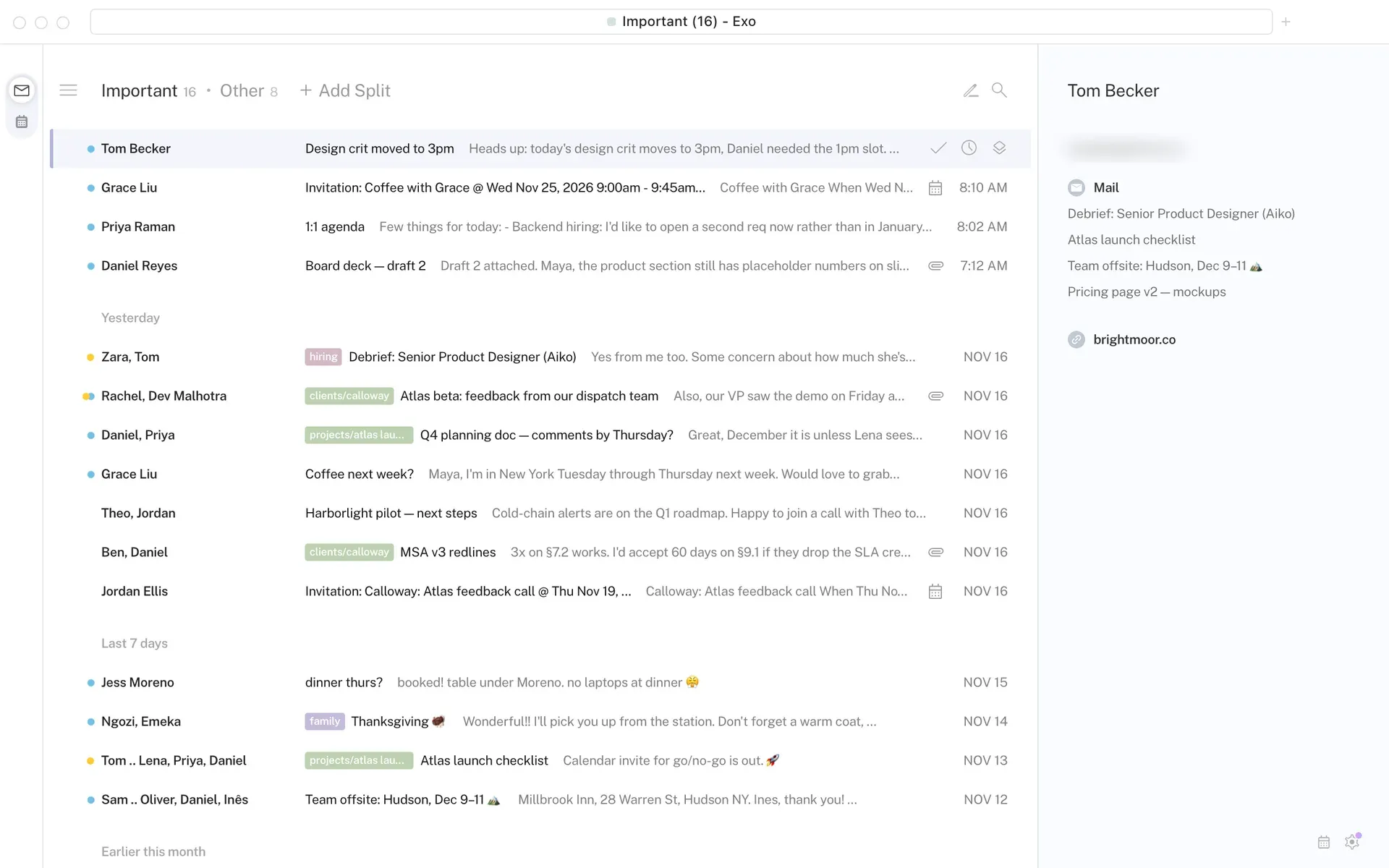
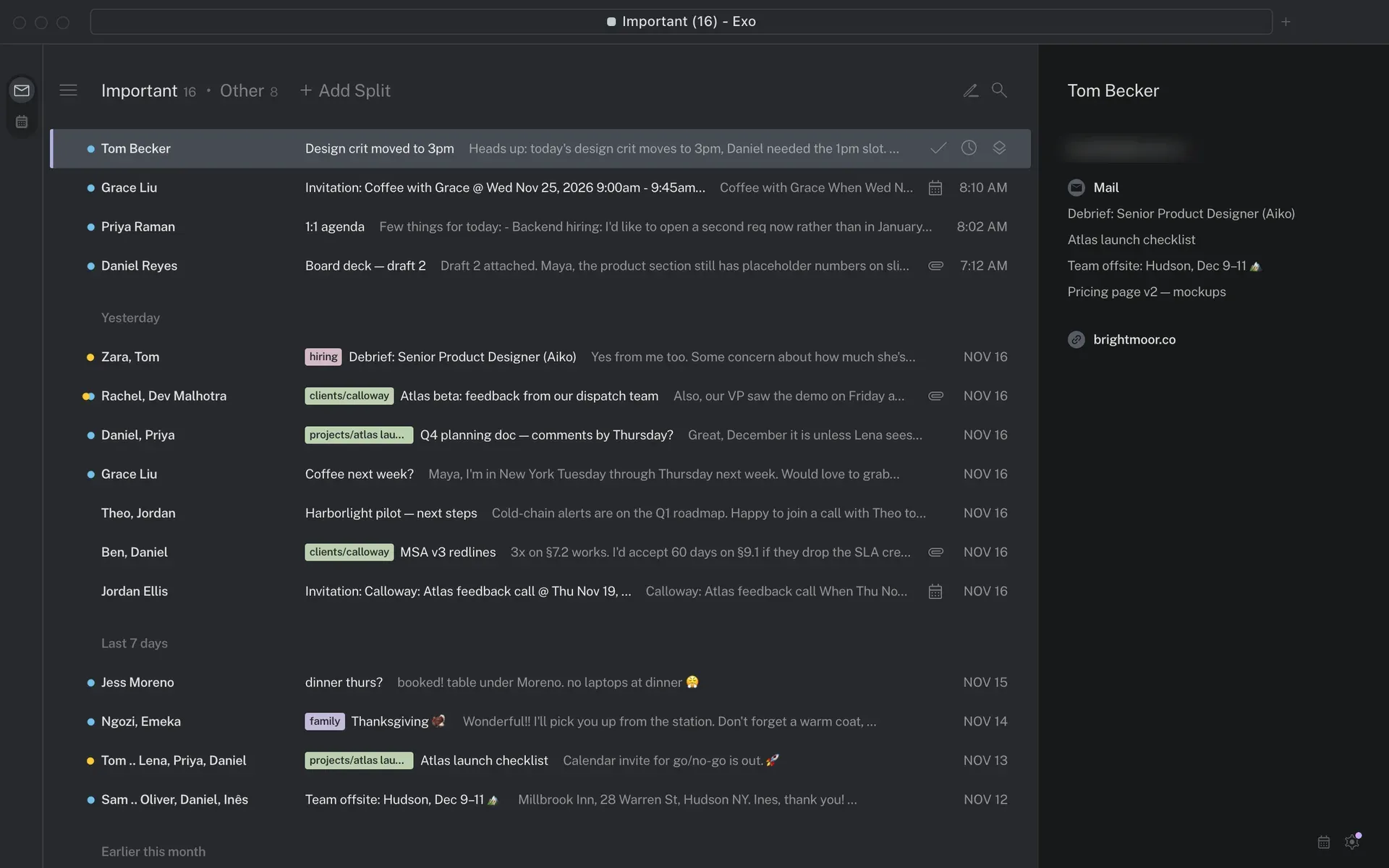
Exo is an open-source Gmail client for macOS. The project README describes it as a fast, local and native Gmail client that is heavily inspired by Superhuman. It talks to Gmail directly, with no third-party server in between, and it is written in Rust without Electron or a web view. The app works with Gmail and Google Workspace accounts only: mail goes through the Gmail API, the calendar through the Google Calendar API and contact details through the People API. Several Google accounts can be signed in at once and switched between, each with its own local database.
Exo is developed by Miguel Piedrafita under the GitHub account m1guelpf. The repository was created on November 21, 2026, and the first two releases followed on the same day: v0.1.0 and v0.2.0, the current release. Neither release carries notes beyond a link to the commit comparison. The project is therefore very new, and its feature set and setup steps may change quickly between versions.
The README contains a section titled "Use of AI". In it, the author states that Exo was built almost entirely with automated code-generation tools, mainly Claude Opus 5.5, and that no human has reviewed the generated code for correctness or security. The author adds that he has tested the app extensively and uses it as his daily driver, but that there may be issues he has not encountered yet.
Distribution is a single disk image per release, exo-v0.2.0-macos-arm64.dmg, built for Apple silicon Macs. The fastlane configuration sets macOS 13.0 as the minimum system version, and the release workflow signs the app and the disk image with a Developer ID certificate, notarizes both with Apple and staples the tickets. Exo ships no Google sign-in client of its own: each user creates an OAuth client in Google Cloud and places its JSON file in the app folder before the first sign-in. The app checks its GitHub releases for updates and can install a newer signed release itself.
The workspace is split into Rust crates for the app, the UI design system, the compose editor, message rendering, the local store, Google sign-in, a typed Google API client and a mock Google server used by the tests. The interface is drawn with egui on the GPU, and HTML message bodies are laid out with the Blitz rendering engine after sanitizing with DOMPurify allowlists. Exo is released under the MIT License; bundled fonts, icons and photos, and code ported from other projects, are listed with their own licenses in THIRD_PARTY_NOTICES.md. Similar desktop clients on iThub include Mailspring, MailCraft and Flectar Mail.
Key capabilities
- Gmail API client without a relay server Exo calls Google's APIs from the Mac: Gmail v1 for mail, Calendar v3 for events and People v1 for contacts and the Workspace directory. There is no Exo backend that stores refresh tokens or proxies mail. A shared request layer retries with backoff on network errors, server errors and rate limits, and budgets Gmail's per-user quota ahead of time.
- Bring-your-own Google OAuth client The app does not include a Google client ID. Users create a Google Cloud project, enable the Gmail, Calendar and People APIs, configure the Google Auth Platform with an External audience and create a Desktop app client. The downloaded JSON file goes to
~/Library/Application Support/Exo/google-oauth-client.json. Sign-in uses the system browser with PKCE and a loopback redirect. - Requested Google permissions According to the README, Exo asks Google for permission to read, send and organize mail, to change mail settings such as filters, signatures and the vacation responder, to manage calendars, and to read contacts and the organization's directory. If any of these is unticked on Google's consent screen, sign-in fails. Because the client is the user's own unverified app, Google shows an unverified-app warning that has to be passed through Advanced.
- Offline-first local store Each account has one SQLite database in the app's folder that caches threads, messages, labels, bodies and attachments, kept current through Gmail's incremental history. Triage actions go into an outbox and are applied in the UI at once, then sent to Gmail when the connection allows, so they survive offline periods and app restarts. The store keeps roughly three months of conversations within a 256 MB budget and fetches older mail from Gmail again when scrolled to.
- Keyboard-driven triage and command palette Every action is a command bound to a shortcut and listed in a
⌘Kpalette with fuzzy search, using a Rust port of Superhuman's MIT-licensed command-score library. Key sequences such asg inavigate, a searchable Shortcuts sheet lists every binding, and actions show a toast with undo. Auto Advance decides whether the next older or newer conversation opens after an action. - Split Inbox The inbox can be divided into split tabs alongside Important and Other, each defined by a search query. A bundled Split Inbox Library offers templates by category and role, and account setup previews which threads each candidate split would take. Empty splits can be hidden, and
Tabmoves between splits. - Search with local index and Gmail fallback Search combines a local SQLite FTS5 full-text index of stored messages with Gmail's own search for mail that is not stored or not matched locally, and merges the results. The query language follows Gmail's operators, and the search bar offers suggestions and history.
- Remind me, Send later and Undo Send
Hsnoozes a conversation until a picked time, either regardless of replies or only if nobody replies; a parser understands typed times such astom 3pmor2 weeks. Send later holds a draft until its scheduled time, and Undo Send holds a sent message briefly so it can be recalled. Reminders are kept locally and brought back by the app. - Calendar pane and week view A day view sits in the right pane and a week view is available, both backed by Google Calendar with queued offline changes. Events can be created, edited, repeated and answered with RSVP, including RSVP plus Mark Done from an invitation. Meet with and Find Time show guests' calendars and shared free times, and Share Availability inserts free times into a draft.
- Compose tools The HTML compose editor supports formatting, inline images, macOS spell checking and autocorrect, emoji and contact triggers in the body, signatures and personal snippets with variables. Instant Intro moves an introducer to Bcc with a configurable line, and Auto Bcc adds set addresses to outgoing mail. Dates typed in a draft are detected and can be turned into calendar events.
- Bulk actions and Get Me To Zero Bulk actions apply to every conversation a select-all or a search reaches, loaded or not, and a log of the last week of bulk actions allows them to be reverted after a relaunch. Get Me To Zero marks every inbox conversation older than a chosen age as done, optionally keeping unread or starred ones. Achievements count conversations marked done, messages sent and Inbox Zero streaks on the Mac.
- Privacy controls for message content Remote images can be shown, filtered for known tracking pixels (the default, since there is no image proxy) or blocked entirely until requested. Message bodies load remote content only from the public internet, never from the local network. One-click unsubscribe (RFC 8058) is queued so it still goes out after an offline period.
- Contact pane and sender branding The right pane shows a contact card with recent conversations and the sender's domain, plus the photo, company and title Google lists for saved contacts and Workspace colleagues. For senders without a photo, Exo can show a brand logo published through BIMI after checking the certificate and the message's authentication results.
- Account settings Exo can change Settings dialogs edit Gmail's vacation responder (Out of Office Reply), with a nudge when the calendar shows out-of-office days, as well as signatures, blocked senders, downloads, notifications and themes (Snow, Carbon or Match System). Palette rows open Gmail's own filter, alias and label settings in the default browser.
- macOS integration Exo posts native notifications for new mail, calendar reminders and available updates, previews attachments in Quick Look, supports print and Save as PDF, registers the
mailtoandexoURL schemes and can start at login. Refresh tokens are stored in the macOS Keychain, one item per account. Windows hold tabs, each an account and a route. - Installation from the DMG Download the disk image from the latest release, open it and drag Exo into Applications. The v0.2.0 image targets Apple silicon (arm64) and macOS 13.0 or later, is Developer ID signed and notarized, and comes with a
checksums.txtSHA-256 file. No Intel, Windows, Linux or mobile build is published. - Automatic updates The app checks its GitHub releases at launch and periodically, downloads a newer disk image in the background and verifies its checksum, bundle identifier, version, signing team and Gatekeeper approval before offering Install and Restart. Local builds that are not signed by a team do not update themselves.
- Building from source and tests Building requires Rust 1.98 or later, Xcode 27 and Ruby 4.0 with Bundler;
bundle exec fastlane buildproducestarget/release/Exo.app. Local builds are signed ad hoc, so macOS may ask for Keychain access after each rebuild unless a signing identity is set inEXO_SIGN_IDENTITY.cargo test --workspaceruns the tests against a mock Gmail, Calendar and People server (crates/gmail-mock) with an invented fixture mailbox, so tests never contact Google.
Where Exo fits
Connecting a personal Gmail account
The README describes a one-time setup in the Google Cloud console: create a project, enable the Gmail, Google Calendar and People APIs, start the Google Auth Platform with Exo as the app name and an External audience, then create a Desktop app client and download its JSON. The README suggests publishing the app in the Audience page, because a client left in Testing gets signed out by Google every 7 days. After the file is moved to ~/Library/Application Support/Exo/, the first sign-in shows Google's unverified-app warning, which the README explains is expected for a self-created app.
Using a Google Workspace account
The same setup applies to Workspace mailboxes. With the People API permission, Exo reads the organization's directory, so colleagues appear in recipient suggestions and in the contact pane with photo, company and job title. Out of Office Reply edits the account's Gmail vacation responder, and Exo offers to set one when the calendar shows out-of-office events.
Triaging the inbox from the keyboard
Exo is organized around marking conversations done, snoozing them with Remind me and moving between split tabs without the mouse. The command palette lists every action with its shortcut, Auto Advance opens the next conversation after each action, and Get Me To Zero clears older mail in one bulk step, which is offered at first run for inboxes with more than ten conversations.
Scheduling and calendar work from mail
The calendar shares the window with mail: invitations can be answered from the conversation, dates in messages offer a Create Event action, and drafts can include free times taken from the week view. Find Time compares guests' calendars within working hours. Calendar edits made offline are queued and sent when the connection returns.
Working offline
Because recent mail, bodies and attachments are cached in SQLite, conversations stay readable without a network, and actions, sends, unsubscribes and calendar changes wait in an outbox. A footer line shows what is waiting or being sent. Mail older than the local window of about three months is fetched from Gmail again when needed.
Building and testing a local copy
Developers can build the app with fastlane from the repository and run the workspace tests against the bundled mock server, which serves Google's API paths with a deterministic fixture mailbox. A local build is ad hoc signed and does not use the self-updater, which only accepts releases signed by the project's team.
Reviews of Exo
Be the first to share your experience with Exo.
Write a review
Loading review form…
Found Exo useful? Upvote it todayYour vote helps other IT teams find it in the daily ranking.