
What is Leonida Atlas?
Leonida Atlas is an open-source interactive map of Leonida, the fictional state in which Grand Theft Auto VI is set. It is an independent fan project: the README states that it is not affiliated with or endorsed by Rockstar Games or Take-Two Interactive, that community positions are approximate and that unknown locations remain unknown. The code is published in the navanem/gta6-leonida-atlas repository by Navanem, a web agency in Geneva and Lausanne, which describes the atlas on its project page as an internal Navanem Lab project.
The app runs in the browser. The README links the live atlas on GTA6 State as the main instance and also lists a second deployment at atlas.zonepedia.com. According to the README, the public catalogue holds 3,437 searchable places: 3,431 records from the GTADB / Map GTA community project (3,340 with a position and 91 without coordinates) plus six regional entries for Vice City, Leonida Keys, Grassrivers, Port Gellhorn, Ambrosia and the Mount Kalaga area. No account, map API key or private backend is required, and favorites, collections, notes and personal markers are stored locally in the browser.
The latest GitHub release is v0.8.2, published on November 17, 2026. It refreshes the landmark catalogue to the GTADB revision of that date while keeping all 2,198 earlier landmark identifiers, so existing favorites and notes still resolve. It also checks marker and note revisions before deletion, caches the optional 3D code on first use and adds Chromium and WebKit to the pull request and release checks. Earlier releases introduced the standalone React and Vite app (v0.5.0), an optional account extension point used by the official instance (v0.6.0), and a fuller 3D reconstruction with regional scenes (v0.7.0 and v0.8.0). The full history is in RELEASES.md.
Technically, the atlas is a static Vite, React and strict TypeScript application. Leaflet renders the fictional coordinate system, Zustand holds domain and UI state, Dexie provides transactional IndexedDB storage and Three.js powers the optional 3D explorer. The build output can be served from any static host, at the root or in a subdirectory, and the repository includes an Nginx container image. Source code is licensed under AGPL-3.0-only; GTADB-derived data stays under CC BY 4.0 with attribution, as set out in THIRD_PARTY_LICENSES.md.
The project's methodology describes its sources: official Rockstar Games media can support the visual identity or existence of a place, GTADB / Map GTA community reconstruction data supports approximate placement, and Florida or Miami references are used only as atmosphere analogues, not as GTA VI facts. The basemap is a generalized, recolored presentation of pinned GTADB material and is not an official Rockstar map. Other map tools listed on iThub include Organic Maps for real-world offline navigation and God's Eye View, a local 3D globe for live data.
Key capabilities
- Searchable community catalogue The README counts 3,437 searchable places: 3,431 GTADB / Map GTA records and six regional entries. Of the GTADB records, 3,340 have a position and 91 have none; unpositioned places stay in the catalogue without invented coordinates. The landmark catalogue is pinned to a specific GTADB commit, and the v0.8.2 refresh kept all 2,198 earlier identifiers.
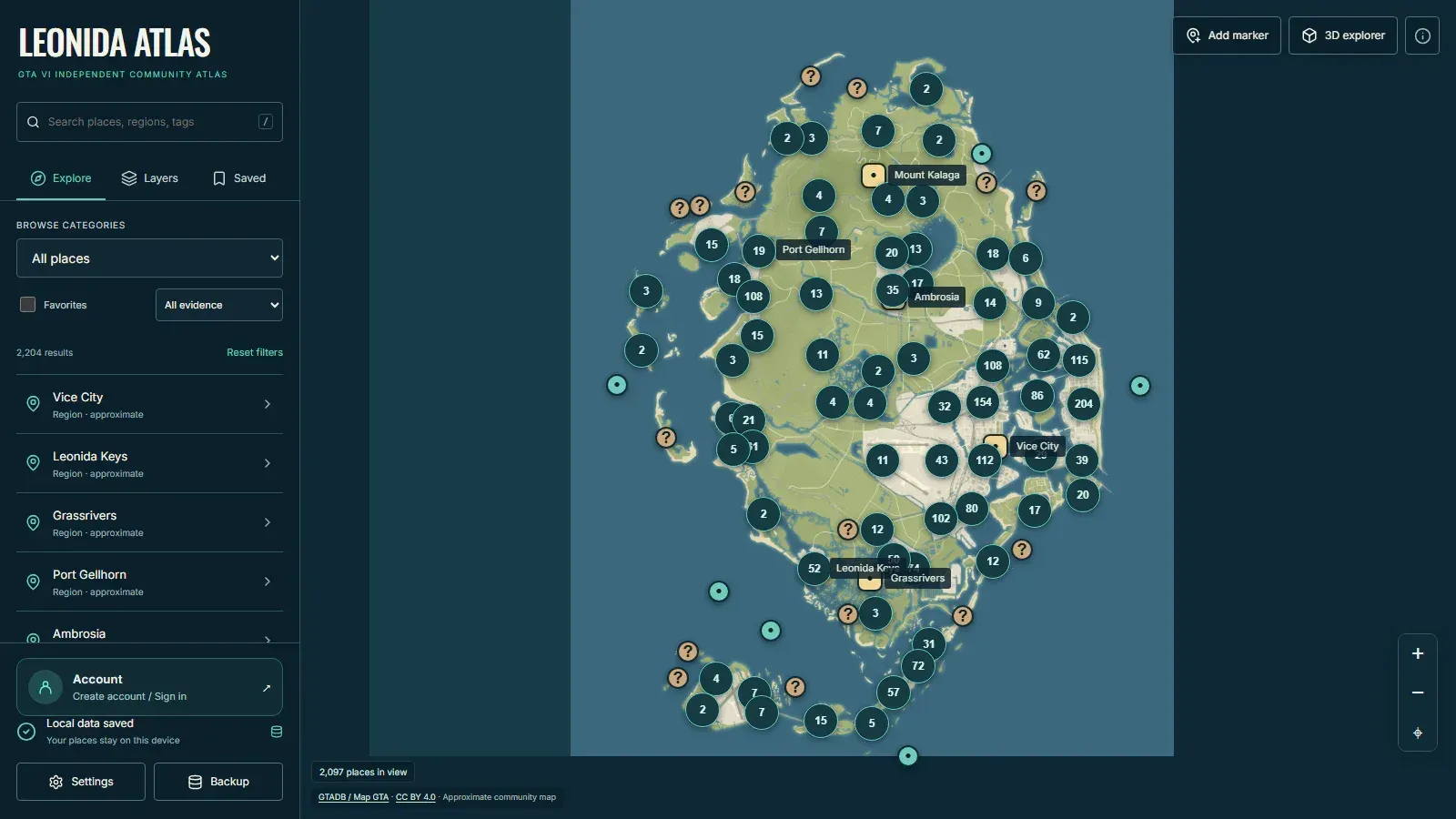
- Six regions Vice City, Leonida Keys, Grassrivers, Port Gellhorn, Ambrosia and the Mount Kalaga area appear as regional entries. Selecting a region moves the map from the state-wide view to that area and opens its details panel, and each region is also a travel destination in the 3D explorer.
- Search, categories and evidence filters A search field covers places, regions and tags. Category browsing and filters cover landmarks, nature, transport, businesses and evidence, and the filters can be combined with a favorites-only view. Layers, zoom rules and bounded spatial clustering keep dense areas readable, with counts shown on grouped markers.
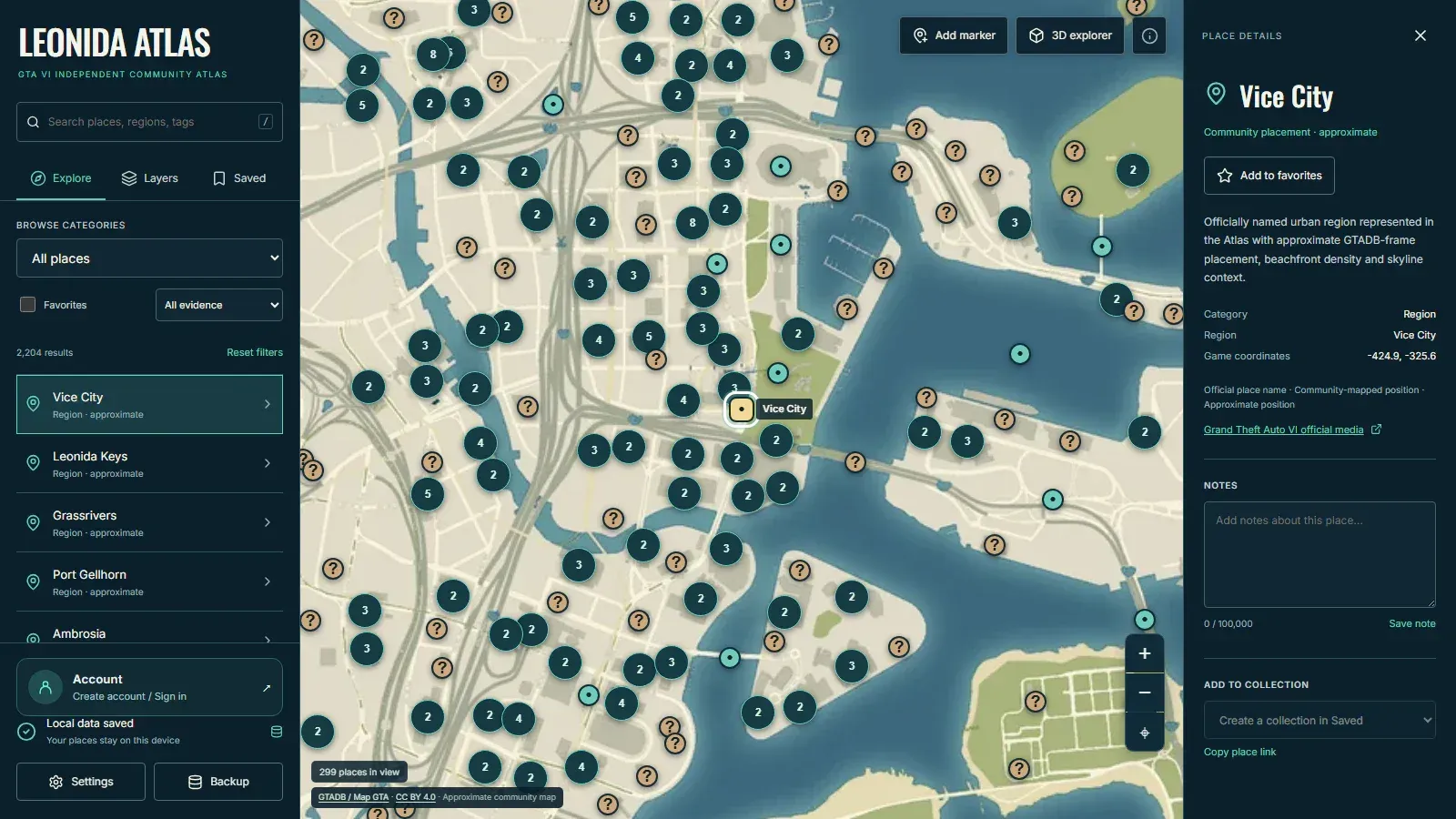
- Place details with source and precision Each place panel shows its category, region, approximate game coordinates, a precision status such as community placement or approximate, and a link to its source. A copy-link action creates a URL that reopens the atlas on that place.
- Uncertainty labels The methodology defines four labels: APPROXIMATE for transformed or reconstructed placements, UNKNOWN for areas without source coverage, SUPPORTED for community-estimated placements with usable source context, and CONFIRMED, reserved for official visual identity or existence. Low-evidence areas are not presented as confirmed roads or landmarks.
- Favorites, collections and notes Places can be added to favorites, grouped into named collections and annotated with private notes; the notes field in the repository screenshot accepts up to 100,000 characters. All of this is stored in the browser's IndexedDB database through Dexie, and a write is reported as saved only after its transaction commits.
- Personal marker editor An Add marker control places personal markers on the map. Markers can be created, edited, moved to new coordinates and deleted, and deletion cleans up local references such as collection entries. Revision checks stop an older tab from overwriting or erasing newer markers and notes.
- Portable backups Favorites, notes, collections, markers and settings can be exported as a versioned JSON file. Backups are capped at 10 MiB, validated before any write, previewed before import and merged atomically, so a malformed or oversized file leaves the existing workspace untouched. The README recommends exporting before changing hosting origin, since browser storage can be cleared or evicted.
- Cross-tab updates Open tabs refresh through the browser's BroadcastChannel API, and stale drafts are checked against stored revisions. This keeps several atlas tabs on the same device consistent without a server.
- Offline reopening A production service worker caches the app shell, public catalogue and basemap after the first complete online load, so the map and personal library reopen offline. The 3D code is cached on first use and 3D image assets are cached as visited with bounded eviction; the project does not promise a complete offline download of the 3D world.
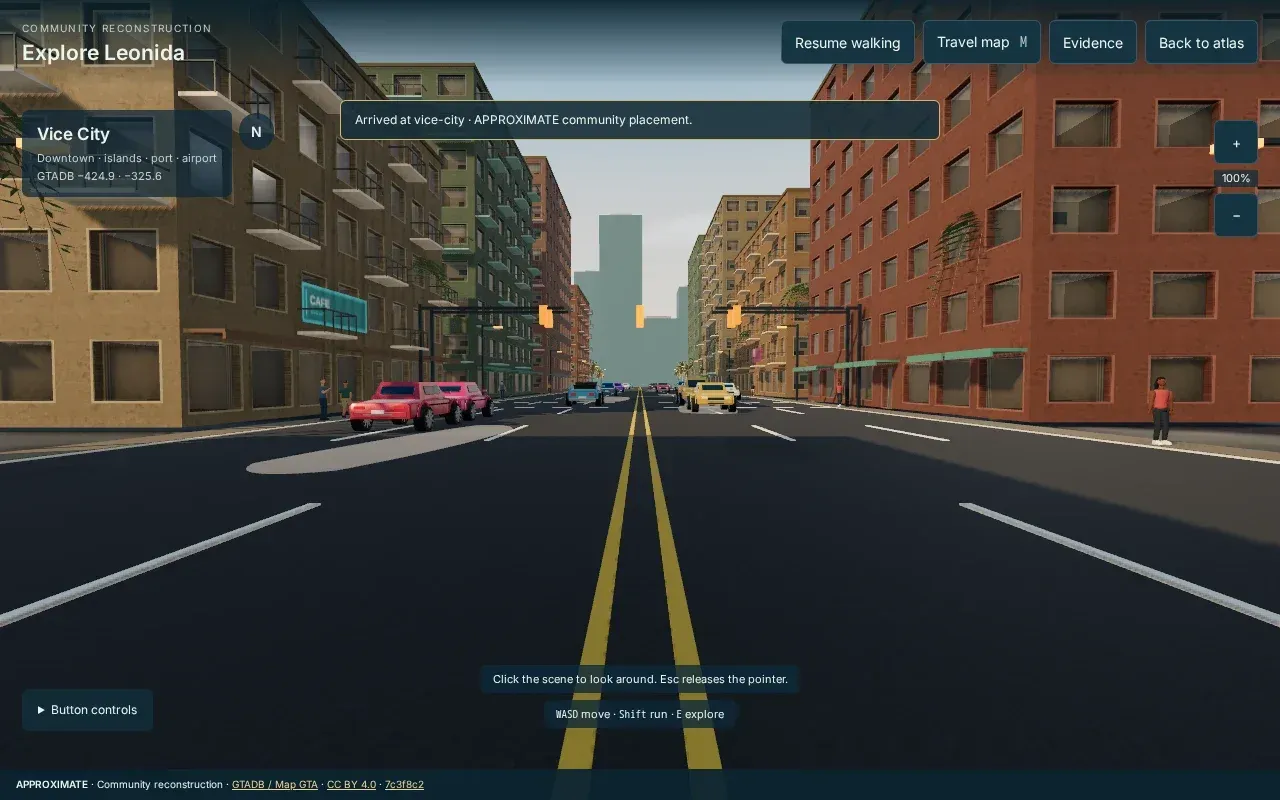
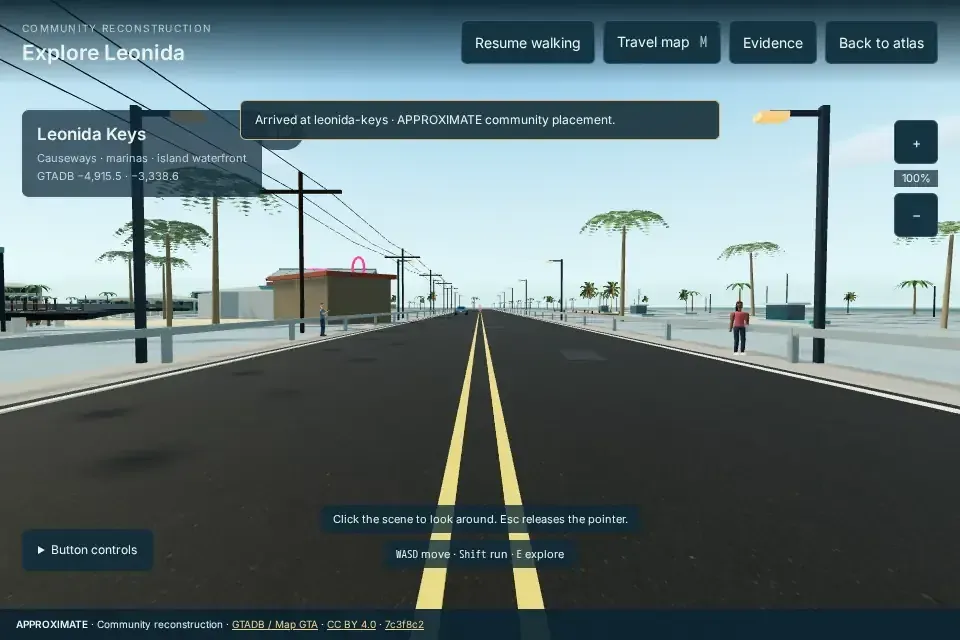
- Optional 3D explorer A Three.js reconstruction loads on demand from the 3D explorer button. Users can walk or run (WASD and Shift on desktop, button and touch controls on mobile), open a travel map between the six regions, inspect evidence and return to the atlas. A place selected on the map becomes the spawn point, and a fallback covers browsers without WebGL.
- Regional 3D scenes Release v0.8.0 added local scenes around each regional arrival point, such as a bakery court in Vice City and a working marina in the Keys, plus photographic CC0 surface textures from Poly Haven. The release notes state that the scenes are approximate browser reconstructions with visible simplifications and that exact game models and surveyed terrain are not available to the project.
- Keyboard, touch and mobile use The atlas supports desktop, touch and keyboard navigation, including a slash shortcut for search. Evidence panels and regional travel work with native keyboard activation, and v0.8.2 stabilized the mobile sidebar and keyboard focus handling.
- No account in the public build The public build needs no environment variables, account, database server, CMS or external map provider. The official GTA6 State instance plugs in a separately maintained, private account service with optional server backups; that service is not part of the repository, and guest data is never uploaded automatically on sign-in.
- Local development Running locally requires Node.js 22.13 or later within the 22.x line, 24.x or 26+, and pnpm 10 or later. After cloning,
pnpm install --frozen-lockfileandpnpm devstart the app onhttp://127.0.0.1:4330. Type checking, linting, unit tests, a production build and Playwright end-to-end tests are available as pnpm scripts. - Static and Docker hosting The
dist/folder can be deployed to any static host, andATLAS_BASE_PATH=/my-atlas/ pnpm buildtargets a subdirectory. The repository also ships a standalone Nginx image (docker build -t leonida-atlas ., served on port 8080) and a Docker Compose file for an existing Traefik reverse proxy, documented in the production deployment guide. - Fork check
pnpm test:forkcopies the public-source allowlist to a temporary directory, excludes credentials and local environment files, installs from the frozen lockfile, runs the quality suite and starts an isolated production preview. A public fork includes the map, editor, local library, backups and 3D explorer without access to the official instance. - Contribution and security process Issue forms cover bug reports, feature ideas and map corrections. Public-place changes need a verifiable source, unknown positions stay
position: null, and game coordinates must not be inferred from real-world analogues. Suspected vulnerabilities go through private reporting per SECURITY.md; as a pre-1.0 project, only the v0.8.x line receives security fixes.
Where Leonida Atlas fits
Finding a place in Leonida
Users type a name, region or tag into the search field, or browse by category and evidence type, and the map moves to the result. The details panel then shows the approximate game coordinates, the precision status and the source link. Places without a known position stay in the catalogue without invented coordinates.
Building a personal list of places
While exploring, users add places to favorites, group them into collections and write notes in the details panel. Personal markers mark spots that are not in the catalogue. Everything stays in the browser's IndexedDB storage on that device; the sidebar shows a Local data saved status, and the Saved tab lists favorites and collections.
Moving or backing up local data
Because data lives in one browser, the Backup control exports a portable JSON file of favorites, notes, collections, markers and settings. Importing it on another browser or another hosting origin shows a preview, validates the file and merges it atomically. The README notes that browser storage can be cleared or evicted, so exports also serve as a safeguard.
Checking where a location comes from
Each entry keeps its stable source ID, evidence and an uncertainty label. Readers can follow the source link to the GTADB / Map GTA record or, for the regional entries and the short discoveries added in v0.8.0, to official Rockstar Games pages, and see whether a placement is approximate, supported or unknown, as defined in the methodology.
Walking a region in 3D
From the map, the 3D explorer button opens the Three.js reconstruction at the selected place or a default entry point. Users walk or run through streets, use the travel map to jump between regions and return to the atlas at any time. The scene is labeled as an approximate community reconstruction, not game geometry.
Hosting an independent copy
Site owners can fork the repository, build it with pnpm and serve dist/ from a static host or subdirectory, or run the bundled Nginx container behind an existing proxy as described in the deployment guide. A fork works with guest data only; analytics stay disabled unless the instance configures a measurement ID, in which case measurement starts only after visitor consent.
Install
git clone https://github.com/navanem/gta6-leonida-atlas.git && cd gta6-leonida-atlas && pnpm install --frozen-lockfile && pnpm devReviews of Leonida Atlas
Be the first to share your experience with Leonida Atlas.
Write a review
Loading review form…
Found Leonida Atlas useful? Upvote it todayYour vote helps other IT teams find it in the daily ranking.