
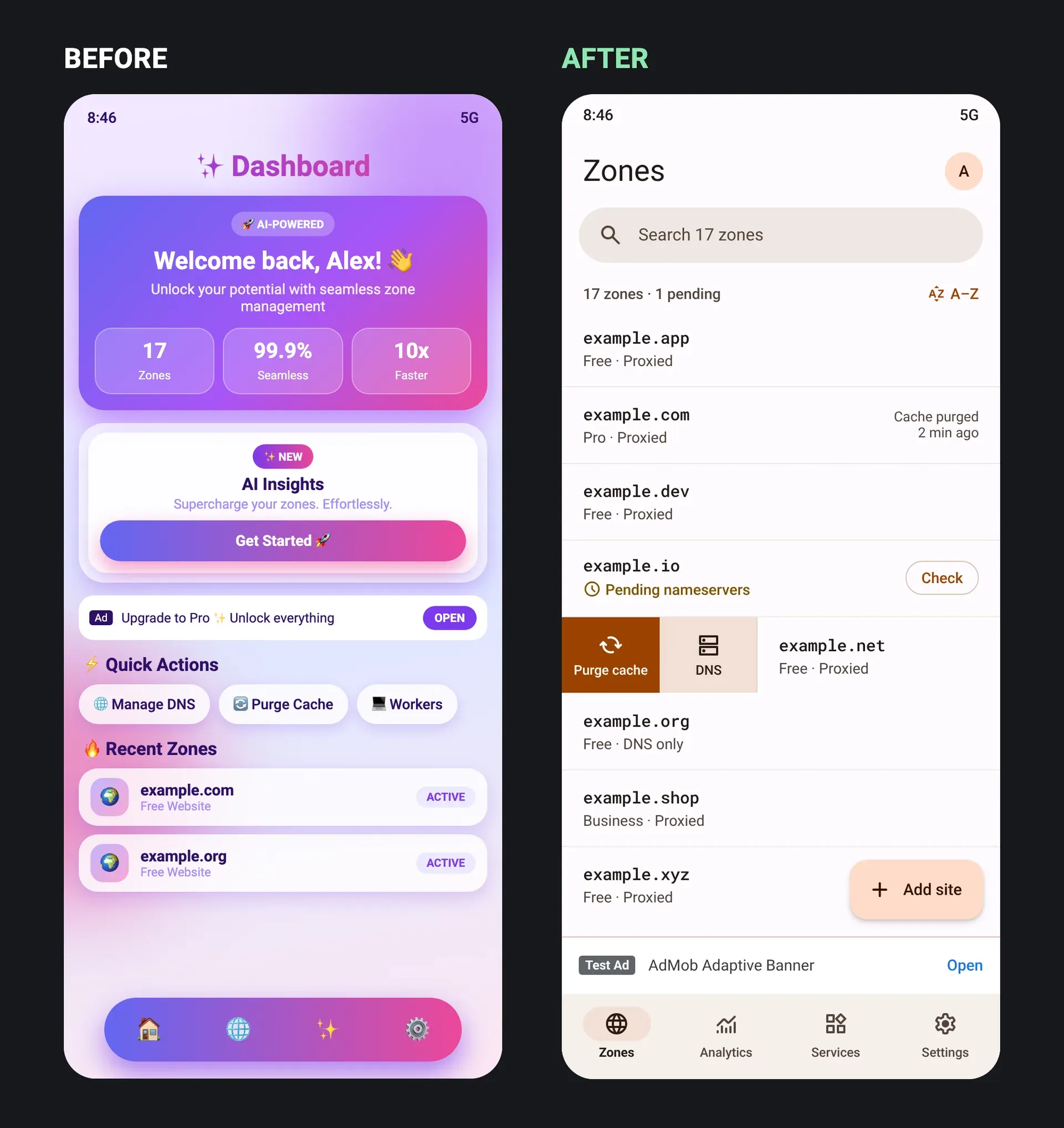
What is Unslopovich?
Unslopovich is an open-source agent skill that reviews and repairs user interfaces which look generated by AI or copied from a template. It works on native mobile apps, web apps and websites, and runs inside a coding agent such as Claude Code, Codex, Cursor, OpenCode, Gemini CLI or GitHub Copilot. The skill plays a fictional critic, "Dr. Unslopovich", but keeps findings, code and instructions in plain language. Its stated priority is user friction first: moved or missing controls, popups and AI features in the way of a task, numbers that are not true, and missing loading or error states come before visual tells such as purple gradients, sparkle icons or nested cards.
The project is maintained by Erkam Yaman, who also publishes rust-anything. The repository was created on November 9, 2026 and is distributed as the npm package unslopovich, whose installer copies the skill into the skills folder of every supported agent it finds. It is also packaged as a Claude Code plugin marketplace and a Codex plugin, and can be added with the open npx skills installer or copied by hand. The skill itself is a SKILL.md file, a reference folder the agent reads on demand and a detector script in plain Node.js with no dependencies. Node.js 18 or later is required.
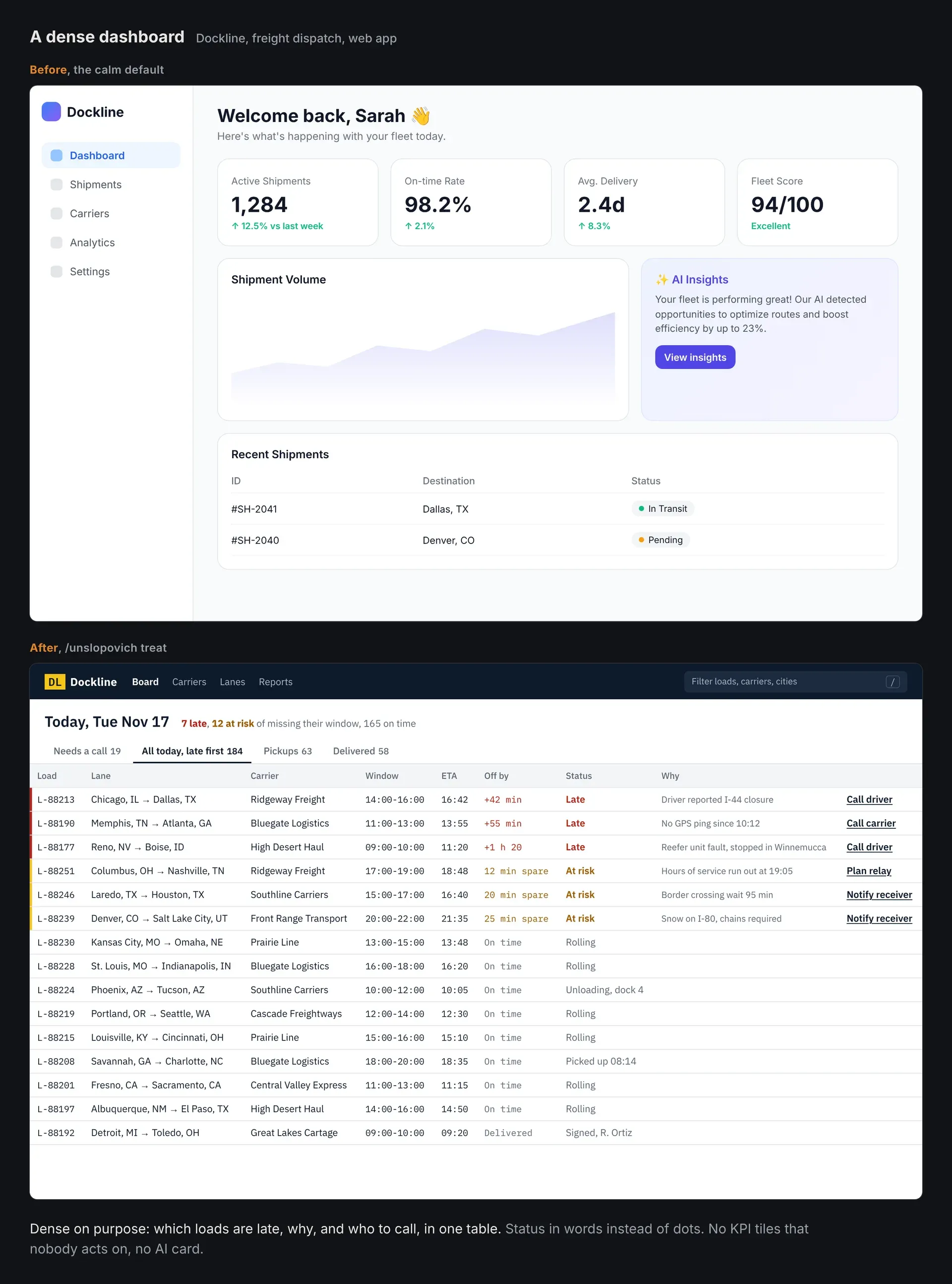
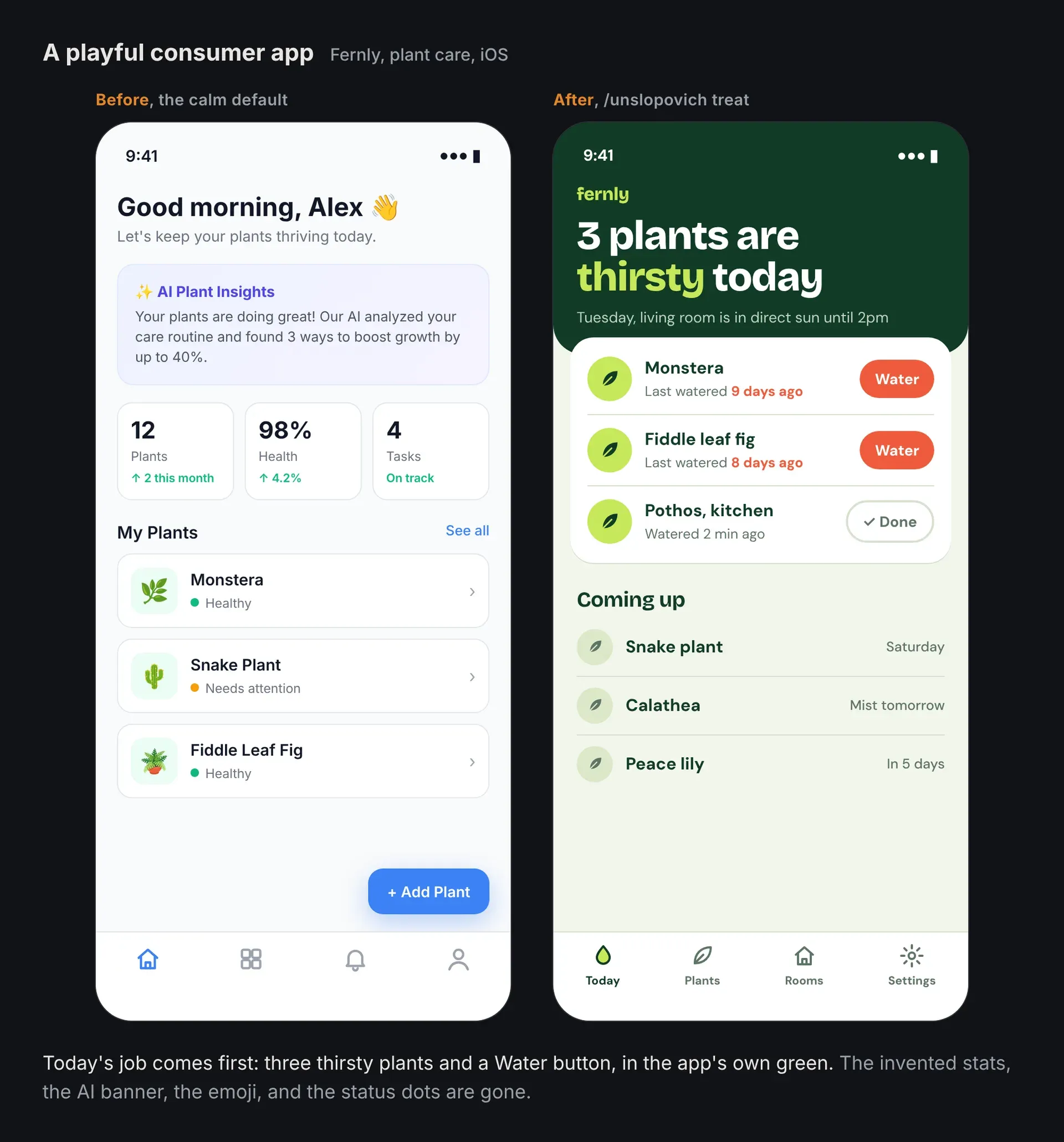
The current release is v3.0.0, published on November 17, 2026 and identical to the latest version on npm. It added the Codex plugin, update and removal steps for every install path, three illustrated before and after examples and a full report and diff from a run on the open-source QuizHub quiz app. Version 2.0.0 (November 15, 2026) introduced the six-agent installer, web app and website support, the standalone detect command with 31 deterministic rules, the five commands and the score out of 24.
The ordering of checks is based on a review study that ships in the repository. According to the research notes, version 3 collected 5,008,684 reviews of 7,786 apps from the App Store and Google Play, and a random sample of 1,200 reviews rated three stars or lower was labelled against written theme definitions. The labelling was done by Claude and no person checked the labels, which the project lists among the study's limits. In that sample, bugs were the largest complaint group (35% on both stores), while "AI forced into the app" and broken layouts were 1% to 2%.
Unslopovich is MIT-licensed. The README credits three earlier skills for ideas it adapted: Impeccable, Hallmark and unslop, and describes its own focus as native mobile apps and the everyday screens of web apps. The project states what is out of scope: the detector reads code, not running screens; performance is never scored without a profiler; it does not fix functional bugs; and final design decisions stay with the app owner.
Key capabilities
- Five commands
reviewproduces a diagnosis and score without editing files.treatdiagnoses, agrees a direction, applies fixes and verifies them.scanruns only the code detector and triages its hits.chartwrites the project's standing context, andfollow-upre-reviews earlier screens and compares scores. The workflow for each command is defined in SKILL.md. - User friction checked first The first section of the tells catalog covers controls that moved or vanished, AI features intercepting a core task, ads and rating prompts mid-task, actions out of thumb reach and controls that do nothing. Many of these need eyes on the running app, so the catalog marks which ones the detector can see in code and which need judgment.
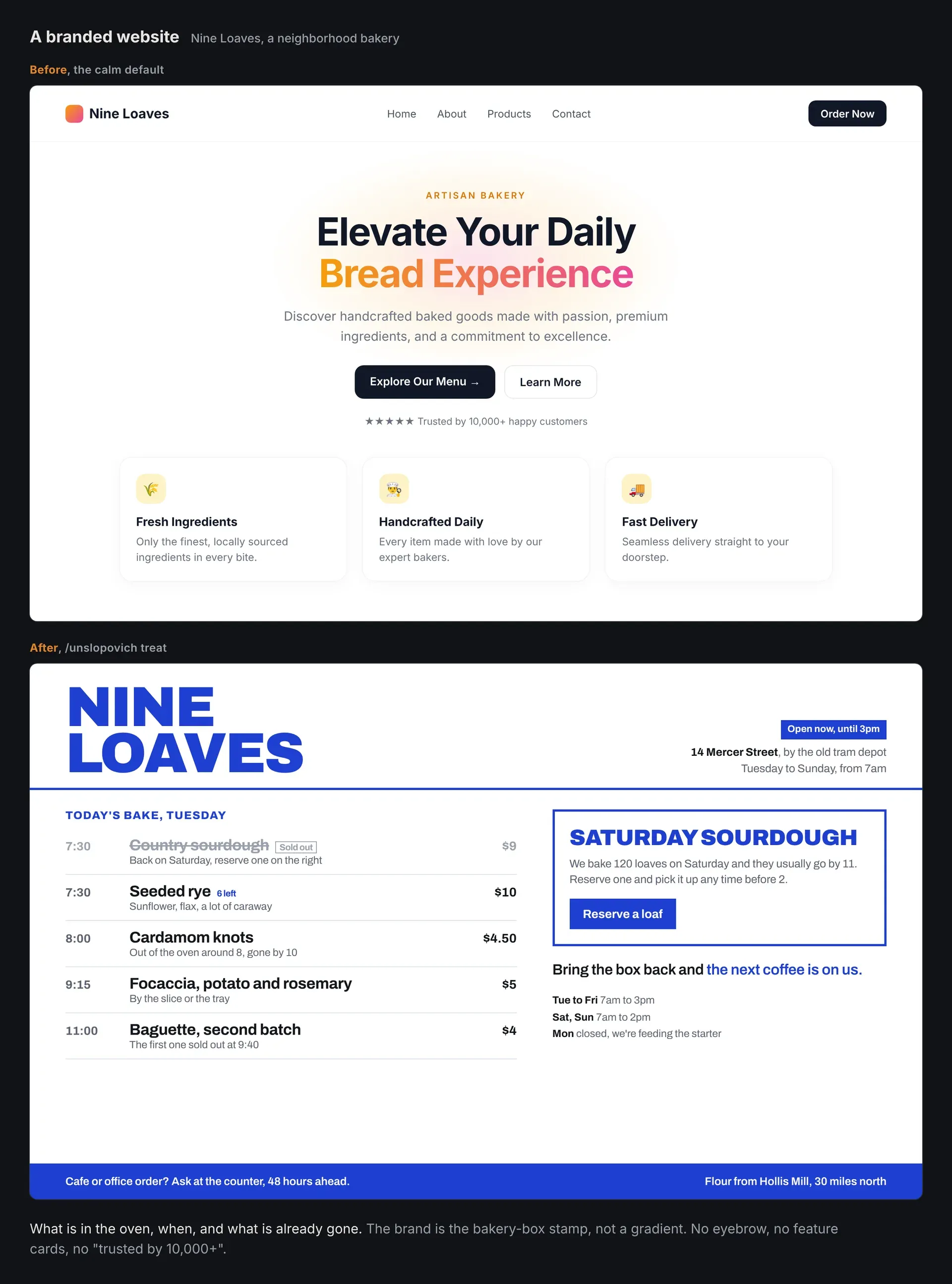
- Truthfulness checks The skill looks for failed loads shown as empty states, invented statistics, labels that do not match the data and claims such as "Trusted by 10,000+ teams" that nobody counted. One of its fixed rules is never to invent or polish data, metrics, quotes, logos or testimonials, and to mark placeholders as placeholders.
- AI-looking and template-looking patterns The tells catalog covers purple gradients and sparkles as well as the "calm default" of white cards, thin gray borders, one blue accent, an icon in a tinted square on every row, tracked capitals above headings and a colored dot beside every label. Emoji used as icons, nested cards, glow shadows, gradient text and stat tiles with unmeasured numbers are also listed.
- Native fit on mobile For apps that ship to phones, it checks for a website inside a phone: hamburger menus, hero sections, hover effects, centered modals, hand-built back buttons and disabled back gestures. A stack reference lists the native building blocks to prefer, for example NavigationStack in SwiftUI, LazyColumn with keys in Jetpack Compose, FlatList or FlashList in React Native and ListView.builder in Flutter.
- The web floor For web projects, the web reference separates apps people work in from sites that persuade visitors, and sets a floor: real buttons and links, visible focus, zoom left on, alt text, meaningful URLs, 4.5:1 body text contrast, reduced-motion fallbacks, no horizontal scroll at 375 pixels and labelled forms.
- Accessibility checks Access is one of the six scored dimensions: target sizes, contrast, text scaling, screen reader labels and reading order. During a review the agent is asked to walk each top task as a first-time user, a hurried returning user and a user with the largest text size and a screen reader turned on.
- Deterministic detector with 31 rules The detector reads SwiftUI, UIKit, Jetpack Compose, Android XML, React Native, Flutter, Ionic, React, Vue, Svelte, Astro, HTML, CSS and Tailwind classes. It uses no model and no network. Rules include nested cards, decorative status dots, emoji icons, unvirtualized lists, text that ignores the user's font size, keyboards covering inputs, clickable divs, removed focus rings, disabled zoom, images without alt text and
transition-all. - Platform detection and CI use The detector reads the nearest
package.jsonto decide between mobile and web rules, so hover is flagged in an Expo app but not on a Next.js site;--platformoverrides the guess.--jsongives machine-readable output,--list-rulesprints every rule and its fix, and exit code 2 signals findings so it can gate a pull request. - Ignores and project config Single lines can be silenced with an
unslopovich-ignorecomment naming the rule. Whole rules or paths can be excluded in.unslopovich/config.jsonwithignoreRulesandignorePaths. Brand decisions that look like tells, such as a gradient that is the real brand, are recorded in the chart so they are not raised again. - Scored report Each review scores six dimensions from 0 to 4: Task path, Truth, Native fit, States and input, Access and Specificity, for a total out of 24 with four bands from "Intensive care" to "Discharged". Findings are grouped as Critical, Noticeable, Minor and Ask first, with file and line, and dimensions reviewed only from code are marked as estimated. The format is in the report reference.
- Performance kept separate Performance is never scored from code. Every report carries a line that says "Not profiled" plus static leads, such as list items mapped in a plain scroll container or parsing inside a render method, unless someone measured on a real device with a named tool.
- Treatment with a direction step Before editing,
treatclassifies the case as heavy, light or healthy. A heavy case gets a five-line direction (product, use, character, bright spot, signature) that the user approves before the first edit. Fixes go to tokens and shared components first, then screens, in passes for spacing, color, icons, copy and type. - Fixed rules for the agent The skill must not move or remove a frequently used control, change business logic, data flow or analytics, add a dependency, change navigation or change the visual identity without asking. It must not trade one generic look for another or change a healthy screen just to make it different.
- Verification and saved visits After a treatment the agent rebuilds and re-checks changed screens in light and dark mode, at the largest text size and at each supported screen size, runs the detector again and, where it can start a sub-agent, asks a fresh reviewer whether the screens could belong to another product. Reports are saved under
.unslopovich/visits/for later comparison. - Install with npx Running
npx unslopovichdetects installed agents and copies the skill to each:~/.claude/skillsfor Claude Code,~/.agents/skillsfor Codex, Cursor and OpenCode, and per-project folders for Gemini CLI and GitHub Copilot.--agentlimits the targets,--projectinstalls into the current project for a team, and--dirtargets any agent that reads SKILL.md. - Plugin and skills installer routes In Claude Code it can be installed with
/plugin marketplace add erkamyaman/unslopovichand/plugin install unslopovich@unslopovich; in Codex withcodex plugin marketplace addandcodex plugin add.npx skills add erkamyaman/unslopovichalso works. Updating means rerunning the installer or updating the plugin, as described in the install section.
Where Unslopovich fits
Reviewing an app before release
A developer runs /unslopovich review on named screens, or on the first-run path and main screen when none are given. The agent reads any existing chart, identifies the stack, reads the theme and shared components, screenshots the running app when it can, runs the detector and writes a report with a score out of 24. No files are changed. When the app could not be run, the report says it was reviewed from code and marks the estimated dimensions.
Treating a generated-looking screen
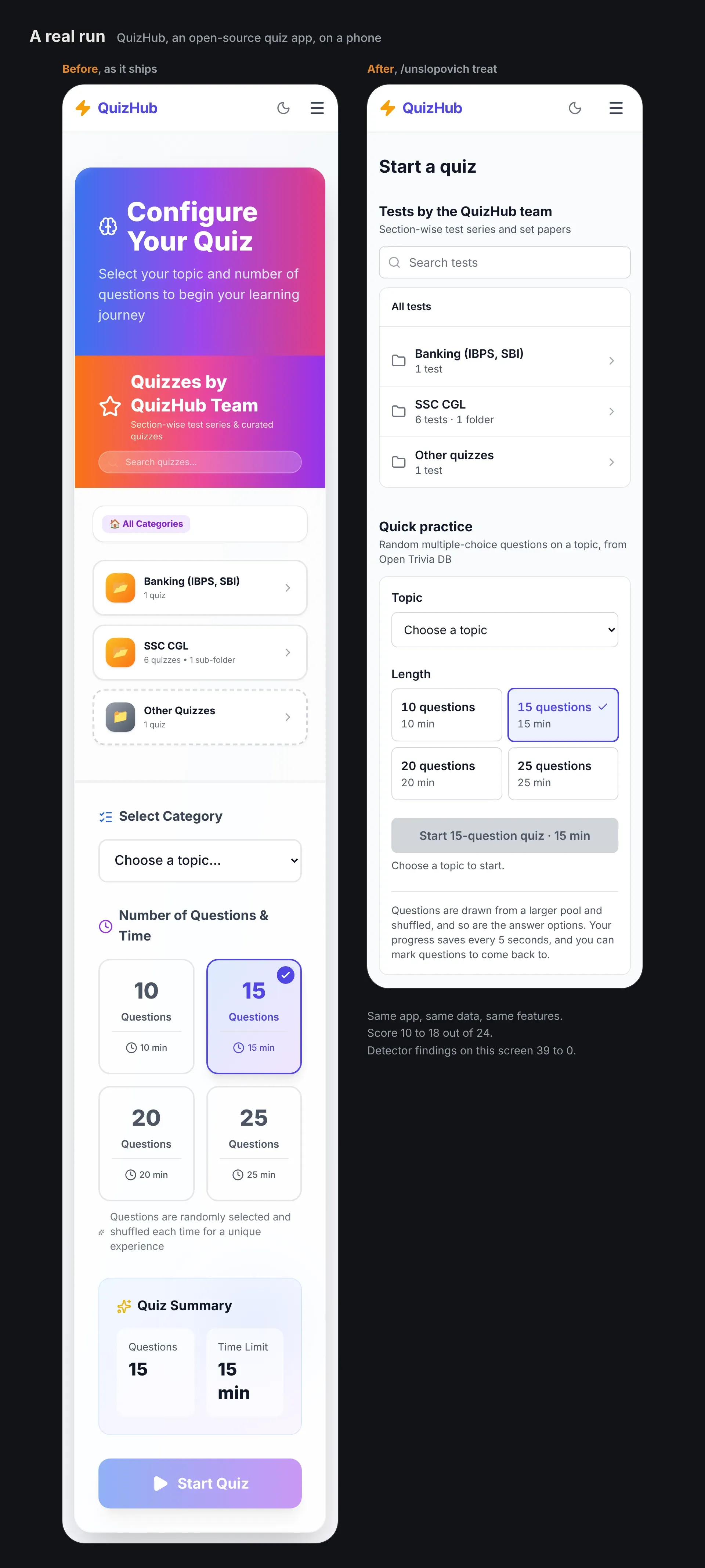
With /unslopovich treat, the agent diagnoses the screen, calls the case heavy, light or healthy and, for a heavy case, proposes a five-line direction before editing. The project's QuizHub example documents such a run on a React, Vite and Tailwind quiz app: the score moved from 10 to 18 of 24, detector findings on that screen went from 39 to 0, and three data-loading changes were left for the owner.
Gating pull requests on detector rules
Because npx unslopovich detect --json exits with code 2 when it finds something, the detector can run in CI against source folders such as ios/, android/ or src/. Teams silence accepted lines with ignore comments and exclude legacy paths in .unslopovich/config.json. The project notes that the detector reads code only, so moved buttons, popups and slow lists still need a look at the running app.
Making a cross-platform app feel native
For React Native, Expo, Flutter, Ionic and Capacitor apps, the stack reference lists template leftovers and web habits to remove, such as the default Expo starter screens, Colors.deepPurple from flutter create, deprecated WillPopScope, forced Ionic modes and desktop hover styles on a phone. Fixes use each platform's own navigation, list, sheet and safe-area components.
Recording brand decisions for a team
/unslopovich chart writes .unslopovich/chart.md with the stack, platforms, top tasks, users and context, brand elements to keep and accepted exceptions. Installing with npx unslopovich --project and committing the folder gives everyone on the team the same skill and the same standing context, so a brand gradient is waived on the record instead of being flagged on every visit.
Tracking progress across visits
Each review is saved with a timestamped file name under .unslopovich/visits/. /unslopovich follow-up reads the last visit for the same scope, re-reviews the screens and lists the change per dimension, for example Task path 2 to 3, so a team can see whether a redesign improved the scored areas.
Install
npx unslopovichReviews of Unslopovich
Be the first to share your experience with Unslopovich.
Write a review
Loading review form…
Found Unslopovich useful? Upvote it todayYour vote helps other IT teams find it in the daily ranking.