What is World Monitor?
World Monitor is an open-source, real-time global intelligence dashboard. It collects news, geopolitical, military, infrastructure, market, energy, climate and cyber signals and shows them on one live map with panels, AI-generated briefs and country risk scores. The project is maintained in the koala73/worldmonitor repository and published at worldmonitor.app. According to the official About page, it began in January 2026 as a weekend project by Elie Habib, co-founder and CEO of the music-streaming service Anghami, and the free public dashboard needs no account.
One codebase produces six themed site variants: World Monitor for geopolitics, military and infrastructure, plus Tech, Finance, Commodity, Energy and Happy monitors, each on its own subdomain. The same code is shipped as a hosted web app and PWA, a native desktop app built with Tauri 2 for Windows, macOS and Linux, a full-screen terminal dashboard and command-line client in the worldmonitor npm package, client SDKs for Python, Ruby and Go, a hosted MCP server and a REST API described by an OpenAPI specification. The README marks the public deployments, the desktop binaries and the npm package as stable surfaces.
The latest GitHub release is World Monitor v2.11.8, published on November 4, 2026. It ships Windows x64 setup.exe and MSI installers, macOS DMG and app archives for Apple Silicon and Intel, and Linux AppImage files for x86_64 and ARM64. Its changes include unlocking Pro panels on self-hosted dashboards with the subscriber's own desktop key, one shared table style across market, energy, FX and watchlist panels, readability fixes for the light theme, Thailand daily farm prices in the food-price data, and self-hosting settings for bind hosts and pinned military-base queries. The desktop app is a single binary for every variant: the variant is switched inside the app.
The front end is written in vanilla TypeScript with Vite, uses globe.gl and Three.js for the 3D globe and deck.gl with MapLibre GL for the flat WebGL map. API contracts are defined with Protocol Buffers. The hosted service runs on Vercel Edge Functions with a Railway relay and Redis caching; the desktop app wraps the dashboard with a Rust shell and a local Node.js sidecar. AI features use Ollama or OpenRouter, plus Transformers.js in the browser, and the README states that everything can run with Ollama without API keys. The full stack can also be self-hosted with Docker or Podman, as described in the self-hosting guide.
The source code is licensed under AGPL-3.0-only, with a separate commercial license offered for teams that need non-AGPL terms; the official thin clients carry MIT licenses. The World Monitor name and wordmark identify the official site, and forks are asked not to present themselves as it. Data provided by the hosted service is governed by its end user license agreement and paid plans, described on the plans and pricing page. Similar listings on iThub include God's Eye View for a locally run 3D globe of live flights, ships and satellites, SpiderFoot for automated OSINT collection, and Fincept Terminal for market data and financial analytics.
Key capabilities
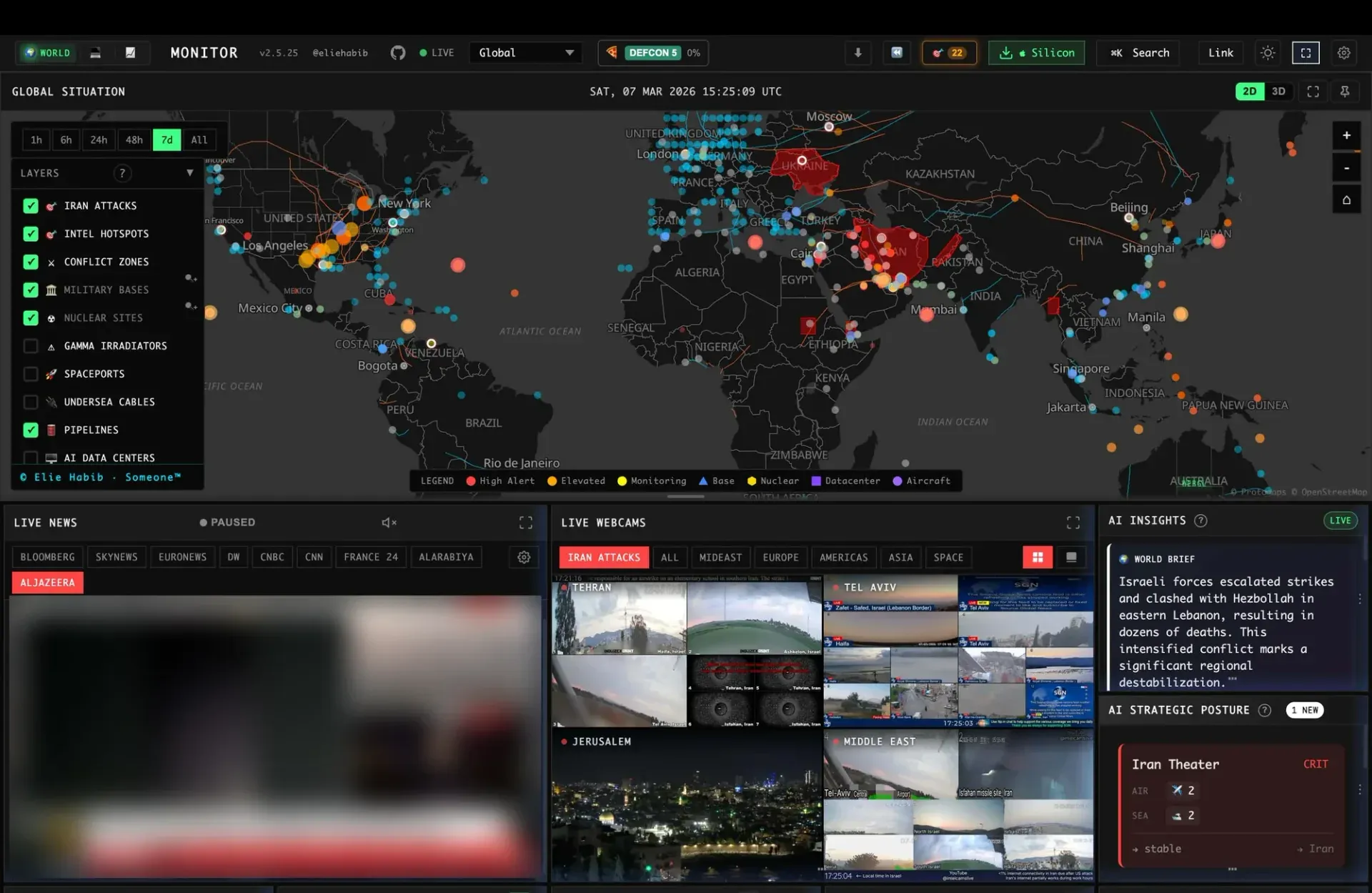
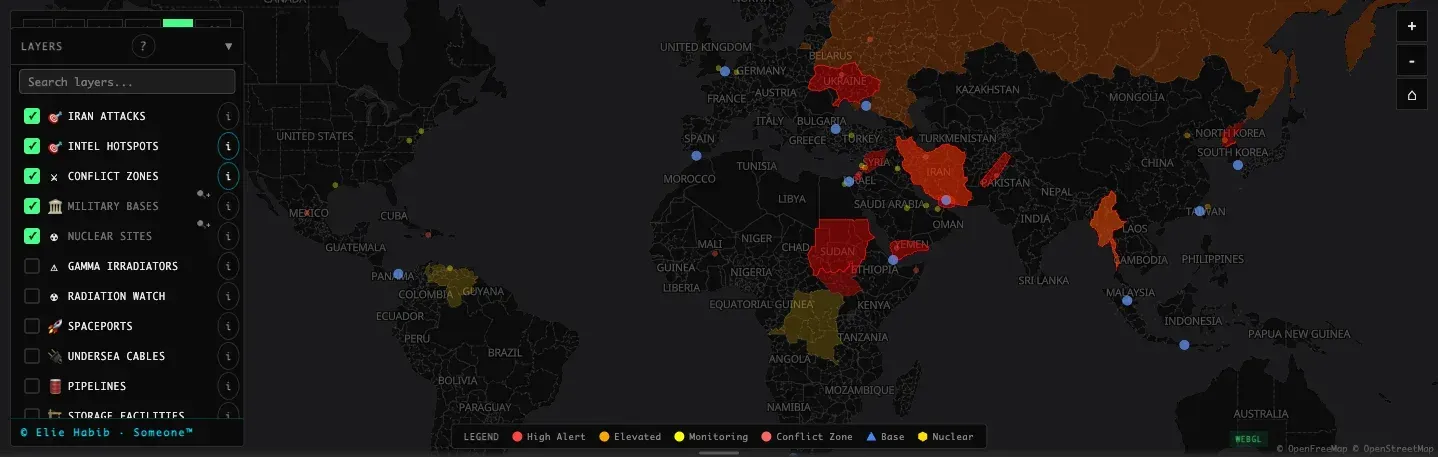
- Live map with two engines The dashboard shows a 3D globe built on globe.gl and a flat WebGL map built on deck.gl and MapLibre GL, sharing one catalog of map layers. Layers cover items such as conflict zones, military bases, nuclear sites, undersea cables, pipelines, AI data centers, spaceports and aircraft, each toggled from a layers panel. A time filter limits events to the last hour, 6 hours, 24 hours, 48 hours, 7 days or all. The map engine documentation describes rendering and layer handling.
- Curated news feeds and AI briefs News is aggregated from curated feeds grouped into global and regional categories, with native-language feeds for the localized interface. An AI world brief summarizes the current clusters and cites the stories it uses. Panels show their sources and timestamps, and a live news panel can play news channels inside the dashboard.
- Cross-stream correlation World Monitor compares military, economic, disaster and escalation signals and flags when they converge. According to the About page, a breaking banner must pass fixed gates on severity, age and corroboration, so one unverified report does not become an alert by itself. Strategic posture cards summarize air and sea activity for theaters such as Iran, Taiwan and the Baltic.
- Country Instability Index The Country Instability Index (CII v14) maintains a live stability score for 31 Tier-1 countries. It blends an editorial baseline with unrest, conflict, security and information signals and shows bands plus an approximate 24-hour movement. Clicking a country opens a dossier with its score components, a cited AI brief, active map signals and a 7-day timeline.
- Finance and commodity radar The Finance and Commodity variants add stock exchanges, indices, commodities, FX, crypto and a market composite, along with sector heatmaps, ETF flows, stablecoin pegs, prediction markets and freight indices. The Energy variant focuses on oil and gas, chokepoints, storage and disruptions. All variants are built from the same codebase and can be switched from the header bar.
- Six site variants The public deployments are worldmonitor.app and the tech, finance, commodity, happy and energy subdomains. The Happy Monitor tracks positive news, breakthroughs, conservation and renewables. For development, each variant has its own npm script, for example
npm run dev:finance. - Download World Monitor for Windows The release page provides an x64 setup.exe installer and an x64 MSI package, and the README links a direct Windows download. API keys entered in the desktop app are stored in Windows Credential Manager rather than plain-text files. The latest packages are on the GitHub releases page.
- Download World Monitor for macOS Release v2.11.8 includes separate DMG images and app archives for Apple Silicon (aarch64) and Intel (x64) Macs. Keys are kept in the macOS Keychain as a single consolidated vault entry, which the project documents as reducing Keychain prompts to one per launch. The desktop app checks the cloud API for new versions every 6 hours and shows an update badge with a download link.
- Download World Monitor for Linux Linux builds are AppImage files for x86_64 (amd64) and ARM64 (aarch64). Secrets are stored through the Linux Secret Service, or the kernel session keyring when no Secret Service is running. As on the other platforms, one binary contains every variant, and there is deliberately no per-variant download.
- Desktop sidecar and settings The Tauri 2 desktop app runs a local Node.js sidecar that serves the supported API handlers on localhost, protected by a per-launch session token. When a local handler fails or is missing, requests fall back to the cloud deployment. A settings window has tabs for LLMs (Ollama endpoint, LM Studio, OpenRouter), API keys with per-key validation, and debug logs. Details are in the desktop app documentation.
- Local AI with Ollama AI briefs and analysis can use a local Ollama or LM Studio endpoint, so the dashboard can run without a cloud AI key. When an endpoint URL is set, the desktop settings query it for available models and fill a dropdown, filtering out embedding models. OpenRouter is the documented cloud option, and Transformers.js runs some models in the browser.
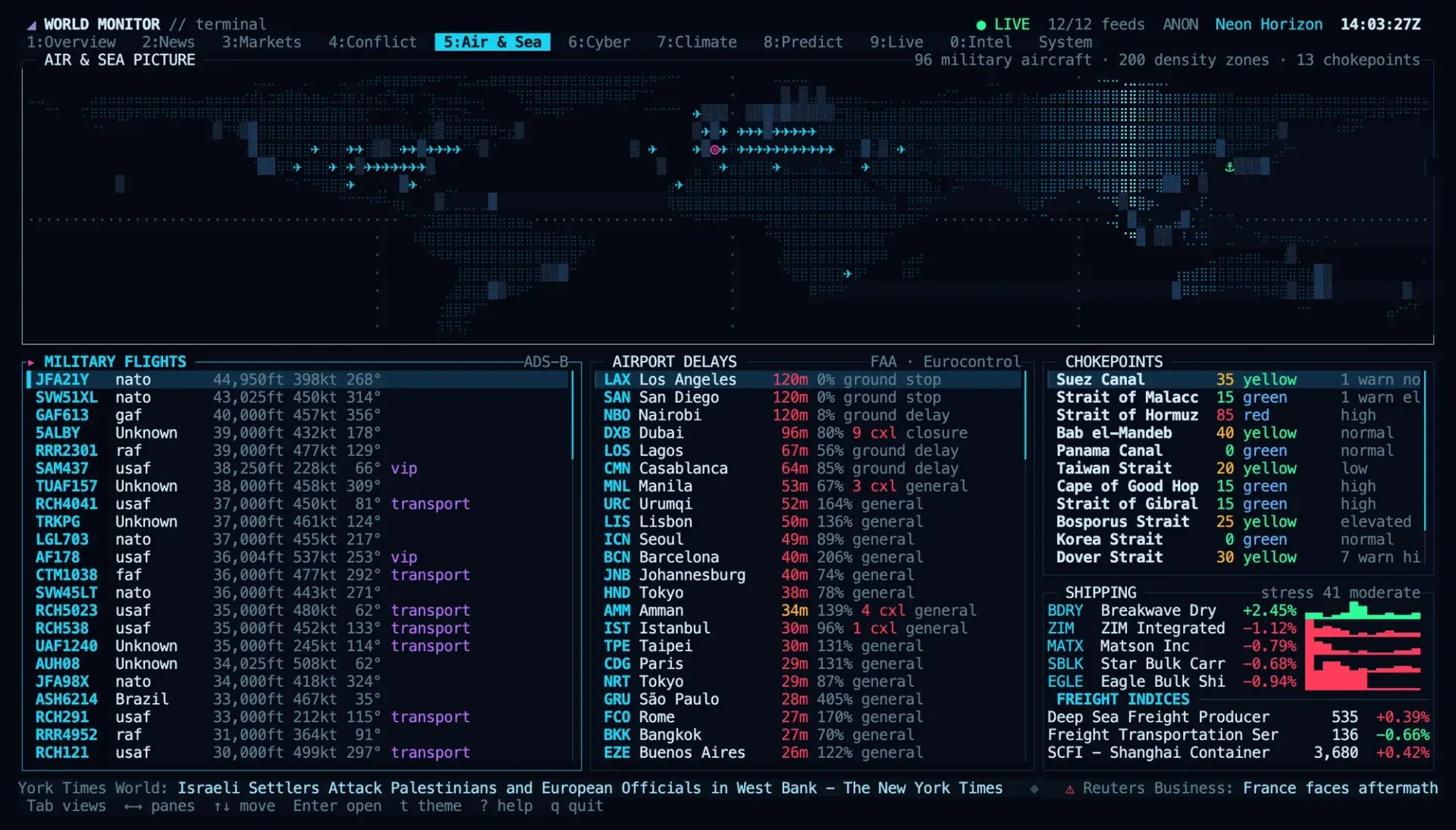
- Terminal dashboard Running
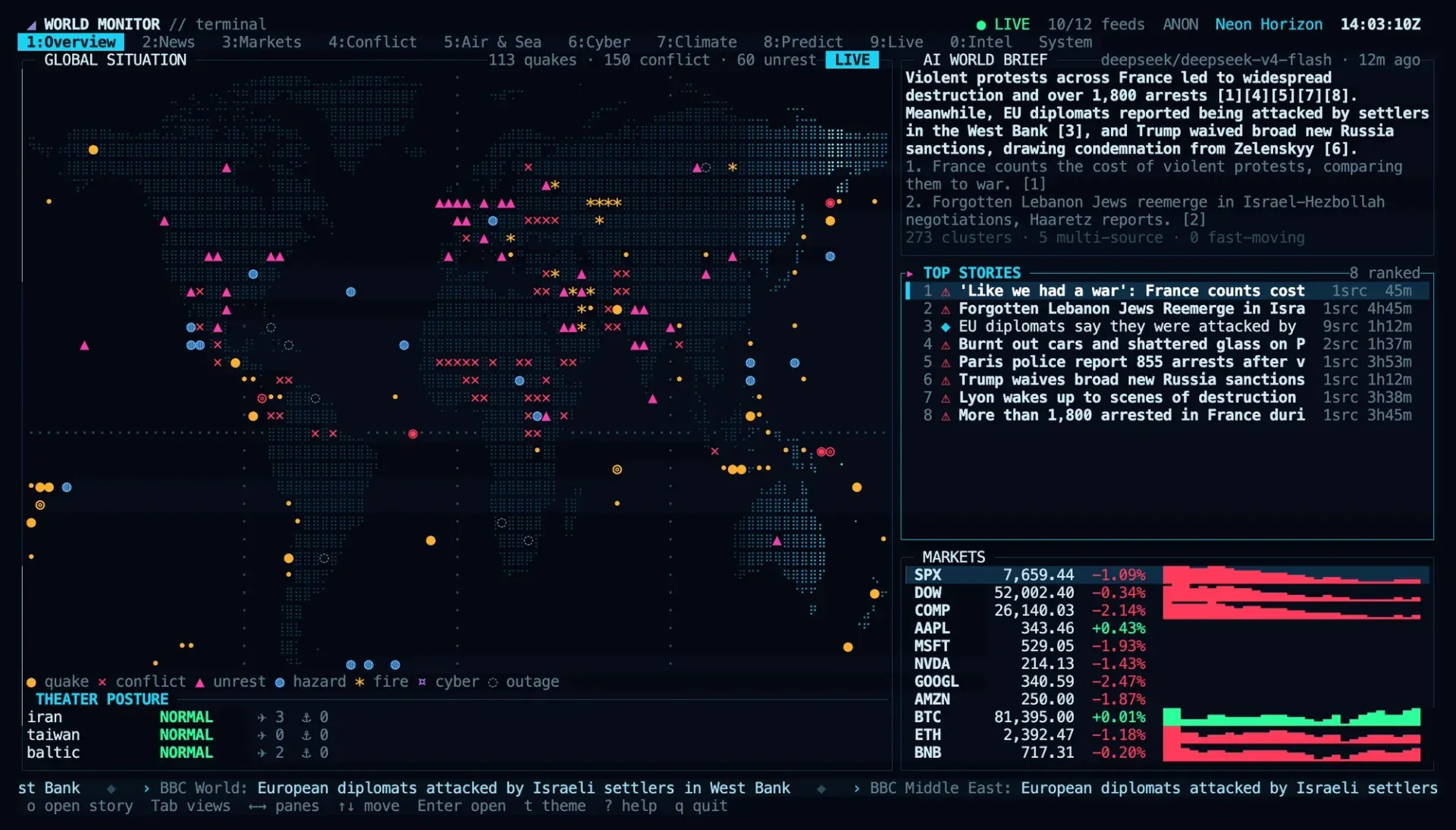
npx worldmonitorin an interactive terminal opens a full-screen dashboard with views for overview, map, brief, news, markets, conflict, air and sea, cyber, climate, predictions, live TV, intel and system health. It needs Node.js 18 or newer, a terminal of at least 80 by 24 characters and no API key. Optional mpv and yt-dlp play live TV and webcams in the terminal. See the terminal dashboard guide. - Command-line client The same npm package installs the
worldmonitorcommand (aliaswm), also available throughbrew install worldmonitor. Its scripting commands are a dependency-free wrapper over the MCP server with a REST fallback, returning country briefs, risk scores and conflict, cyber, market and news feeds as JSON.worldmonitor toolslists every MCP tool without a key; data commands need a subscription API key. The CLI documentation lists all commands. - MCP server for AI agents A hosted Model Context Protocol server at
https://worldmonitor.app/mcpuses the Streamable HTTP transport.tools/listis public;tools/callauthenticates with anX-WorldMonitor-Keyheader or OAuth 2.1. The freeget_sourcestool needs no credential, while Pro and Pro Business accounts have 50 and 250 MCP units per UTC day. The server is listed in the official MCP registry asapp.worldmonitor/mcp; see the MCP overview. - REST API and SDKs The REST API has its base at
https://api.worldmonitor.appand is described by one OpenAPI specification. Official zero-dependency SDKs mirror the CLI:worldmonitor-sdkon PyPI, theworldmonitorgem on RubyGems and the Go modulegithub.com/koala73/worldmonitor/sdk/go. The SDK guide also lists the npm package and a Rust crate. REST access belongs to the API plans. - Self-hosted Docker stack A one-line installer,
curl -fsSL https://www.worldmonitor.app/install.sh | bash, clones the repository, generates the required secrets, starts the stack and seeds public data. The stack contains the dashboard, Redis and an AIS relay, runs under Docker or Podman and opens on port 3000 by default (WM_PORTchanges it). Four secrets are required before Compose starts, and seeding needs Node.js 22.19 or newer on the host. API keys are optional and unlock additional data feeds. - Multilingual interface The interface is localized, with native-language feeds and right-to-left layouts for Arabic and Persian. The README links Chinese, Japanese and Russian translations of the README. The PWA build can be installed from the browser and supports offline map tiles.
- Free and paid plans The free dashboard requires no signup and includes all registered map layers except the Pro-only Resilience layer, country briefs, hotspots, instability scores, chokepoints, cascade analysis, breaking alerts and watchlists across 3 dashboard tabs. Pro costs $39.99 per month or $359.99 per year and adds the WM Analyst chat, Scenario Engine, AI digests, custom widgets, MCP access and 2 desktop keys. Pro Business, API Starter, API Business and Enterprise tiers are listed on the pricing page.
Where World Monitor fits
Following a geopolitical crisis on one map
The World variant places conflict zones, military bases, nuclear sites, aircraft and intel hotspots on the map, next to live news channels, webcams, AI insights and strategic posture cards. The time filter narrows events to a window from one hour to seven days, and each panel shows the sources and timestamps behind its items. Country dossiers combine the instability score, an AI brief and a 7-day timeline for one country.
Watching markets alongside world events
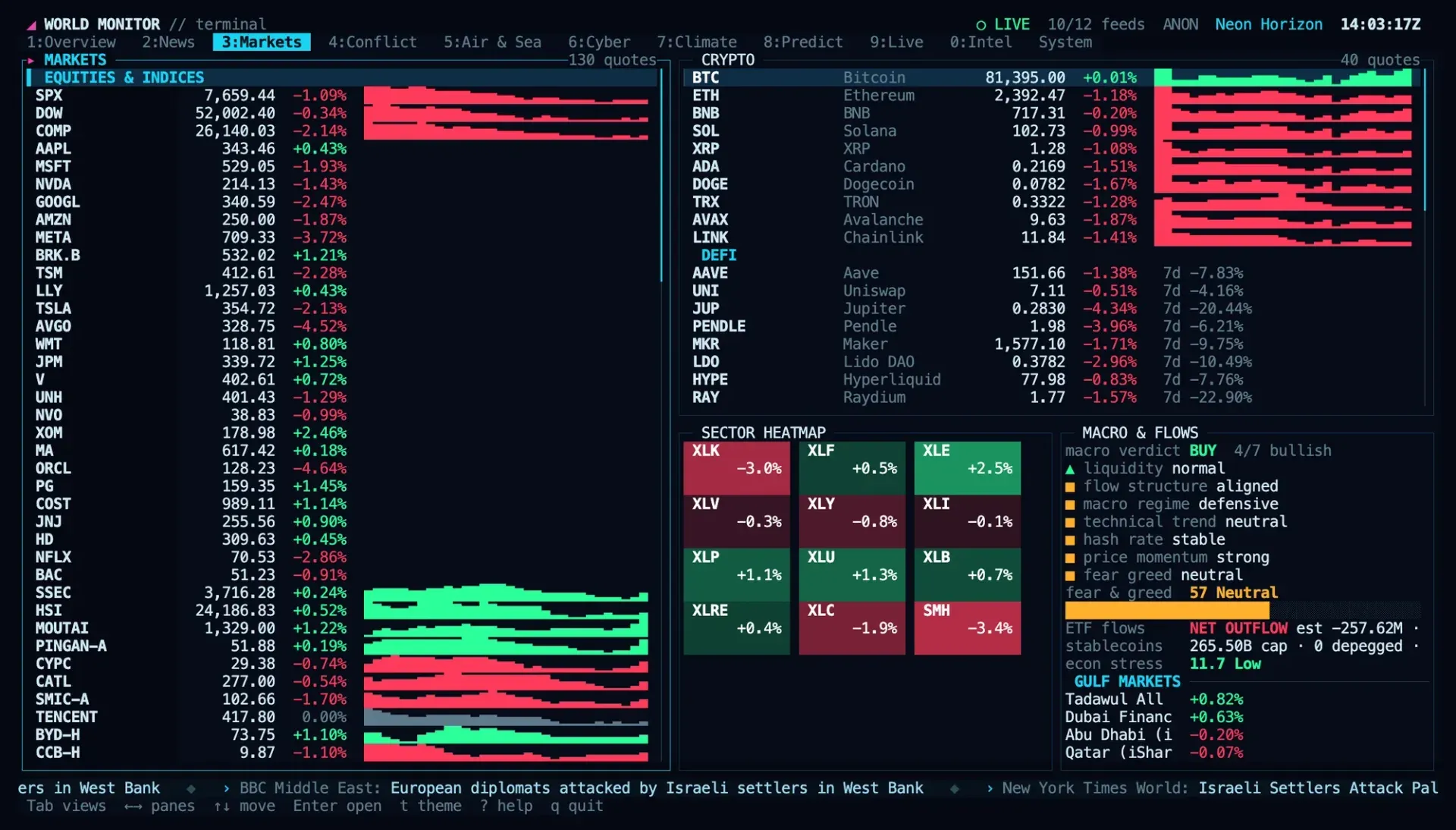
The Finance and Commodity monitors show indices, commodities, FX, crypto, sector heatmaps, ETF flows and prediction markets, and the project documents news-to-market correlation as part of the finance view. The terminal dashboard has a dedicated Markets view with sparklines, a fear and greed gauge and Gulf market quotes. The finance data documentation lists the market coverage.
Tracking shipping, aviation and infrastructure
Maritime chokepoints, freight indices, military flights, airport delays, undersea cables and pipelines are available as map layers and as the Air and Sea view in the terminal. Flight data is provided by Wingbits, according to the README. The maritime intelligence documentation covers chokepoint disruption scoring and vessel density.
Giving AI agents live data
An MCP client such as Claude, ChatGPT, Codex or Cursor connects to https://worldmonitor.app/mcp and signs in through OAuth, or sends a wm_ API key. The server also publishes its Agent Skills through the draft MCP skills extension, and a bundled plugin targets Google Antigravity. The MCP quickstart describes the connection steps per client.
Scripting briefs and risk scores
The worldmonitor CLI and the Python, Ruby and Go SDKs call the same tools from shell scripts, pipelines and applications. A command such as worldmonitor risk IR requests the risk result for Iran when an API key is supplied. Signed webhooks for chokepoint disruptions, country risk surges, breaking news, market moves and natural hazards are part of the API plans.
Running a private instance
The Docker or Podman stack from the self-hosting guide runs the dashboard, Redis and an AIS relay on one host, with public data sources such as earthquakes, weather and conflicts available without keys. Additional feeds use credentials listed in .env.example. Since v2.11.8, a Pro subscriber can unlock Pro panels in their own browser on a self-hosted dashboard with a desktop key; Vercel and static deployments are documented as other options.
Install
curl -fsSL https://www.worldmonitor.app/install.sh | bashReviews of World Monitor
Be the first to share your experience with World Monitor.
Write a review
Loading review form…
Found World Monitor useful? Upvote it todayYour vote helps other IT teams find it in the daily ranking.