

What is Fincept Terminal?
Fincept Terminal is a desktop application for financial research and quantitative analysis, developed by Fincept Corporation. The open-source edition in the FinceptTerminal repository is written in C++20 with a Qt6 interface and an embedded Python 3.11 runtime for analytics scripts. It ships as one native binary per operating system, without Electron, Node.js or a browser runtime, and combines market and economic data, equity research, portfolio and risk analytics, derivatives pricing, news, AI agents, a visual workflow editor and paper trading in one multi-window workspace. According to the company page, Fincept was founded in early 2024 and published the first open-source desktop release under AGPL-3.0 in the second quarter of that year.
Fincept publishes two editions on a shared data core. The repository edition is licensed under AGPL-3.0-or-later and, according to the README, is aimed at learning, personal use and academic research. It now receives one release a month, while issues and pull requests continue to be reviewed and the repository stays public. Fincept Terminal Enterprise is a separate closed-source build that is not compiled from the repository, has its own signed installers and requires a separate Enterprise account. The pricing page lists Enterprise seats as one-time payments per user for 30 days: Exclusive at $15, Exclusive+ at $30 and Exclusive Pro at $45, shown as an 85% launch discount on list prices of $99, $199 and $299 until 30 November, with 90-day plans and no automatic renewal. The README also mentions a free Fincept account and a Pro account at $10 per month with cloud credits, higher API limits and priority support.
The latest release is v4.5.2, published on November 9, 2026, with installers for Windows x64, Linux x64 (DEB, RPM and a portable .run installer) and macOS on Apple Silicon. Its commits fix an empty News tab, industry peers and cross-currency ratios in Equity Research, add MCP research controls, stop crashes on quit (including from the Node Editor), correct a dividend yield calculation in the equity risk premium script and fix Python environment setup on paths that contain spaces. The previous releases were v4.5.1 on October 13 and v4.5.0 on September 1, 2026.
The architecture document describes a modular monolith with 54 lazily created screens, about 50 services and a DataHub publish/subscribe layer that fetches each data topic once and distributes it to every subscribed panel. Local state is stored in SQLite databases with a TTL cache, and credentials are kept in a SecureStorage component encrypted with AES-256-GCM. Python analytics run in a bundled virtual environment managed by uv, and the Advanced Docking System provides detachable windows and panel layouts.
The README states that Fincept owns the code but does not supply, sell or resell exchange price data through the terminal. Quotes, charts, order books and option chains are fetched on the user's computer from sources the user selects, such as a broker account, a public exchange feed or Yahoo Finance, under that source's terms. Indian NSE and BSE data is only available through the user's own broker account. Fincept account features, including sign-in, AI usage on Fincept credits and optional sync of watchlists and portfolios, run on Fincept servers. "Fincept" and "Fincept Terminal" are trademarks of Fincept Corporation, and their use in forks or rebranded products requires written permission.
Similar research and market analytics projects on iThub include OpenBB, TradingAgents and Vibe-Trading. Local models for the AI features can be served by Ollama.
Fincept Terminal screenshots
Explore the interface. Open a screenshot to view it at full size.
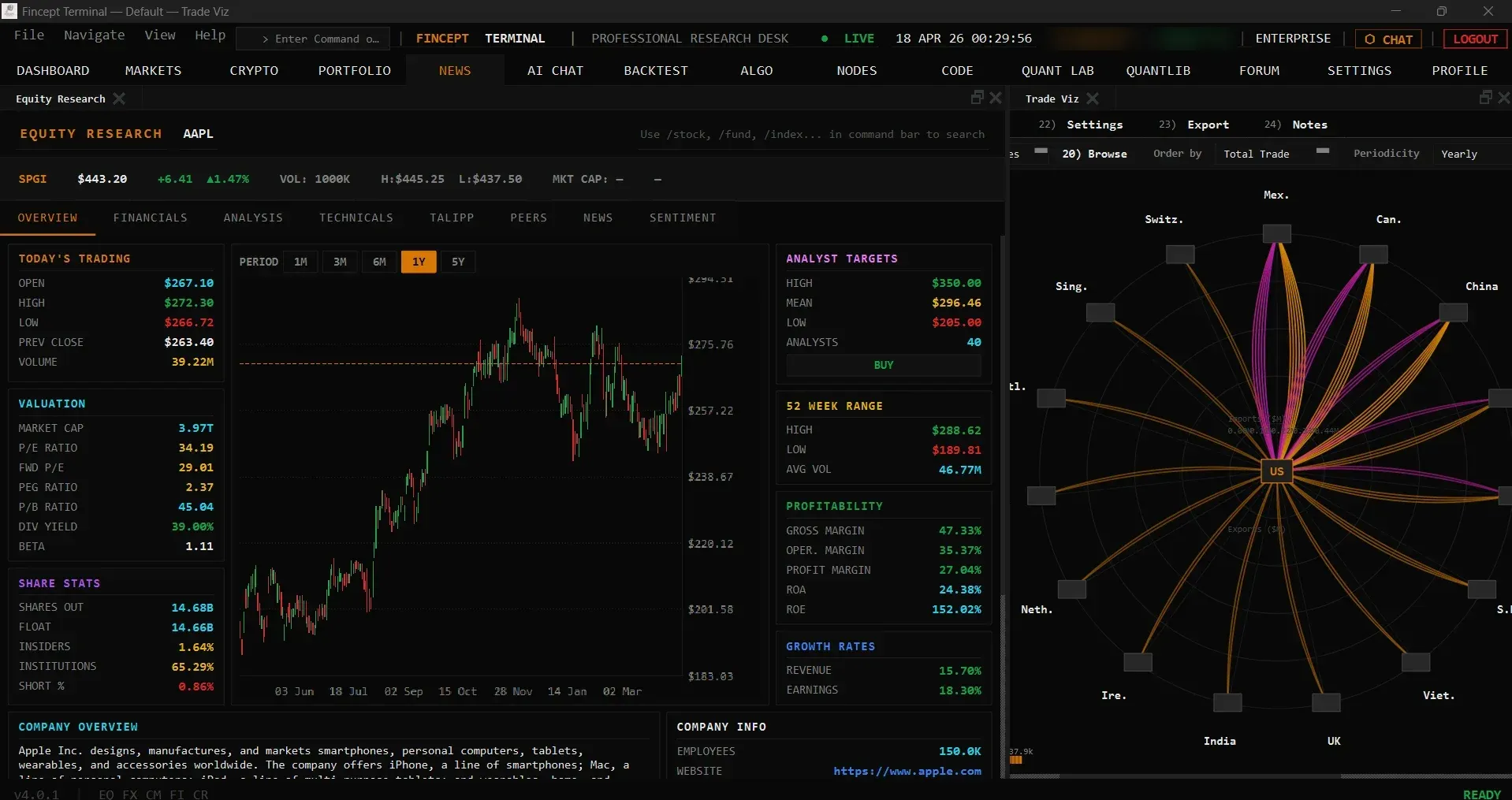
Equity Research overview docked next to the Trade Viz panel, from the project README (v4.0.1). The account name and credit balance in the top bar are blurred.
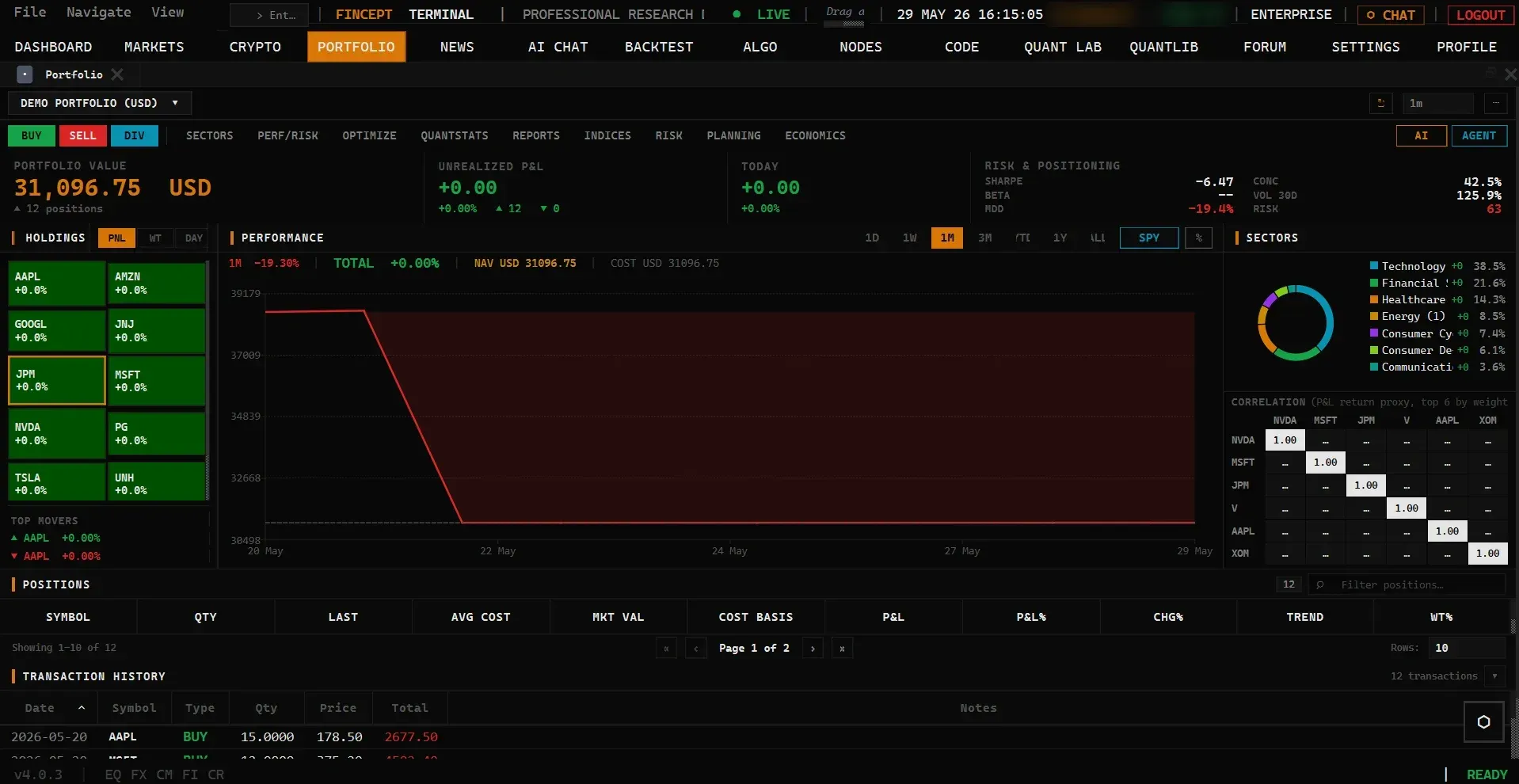
Demo portfolio with holdings, performance against SPY, sector weights and a correlation matrix (v4.0.3). Account details in the top bar are blurred.
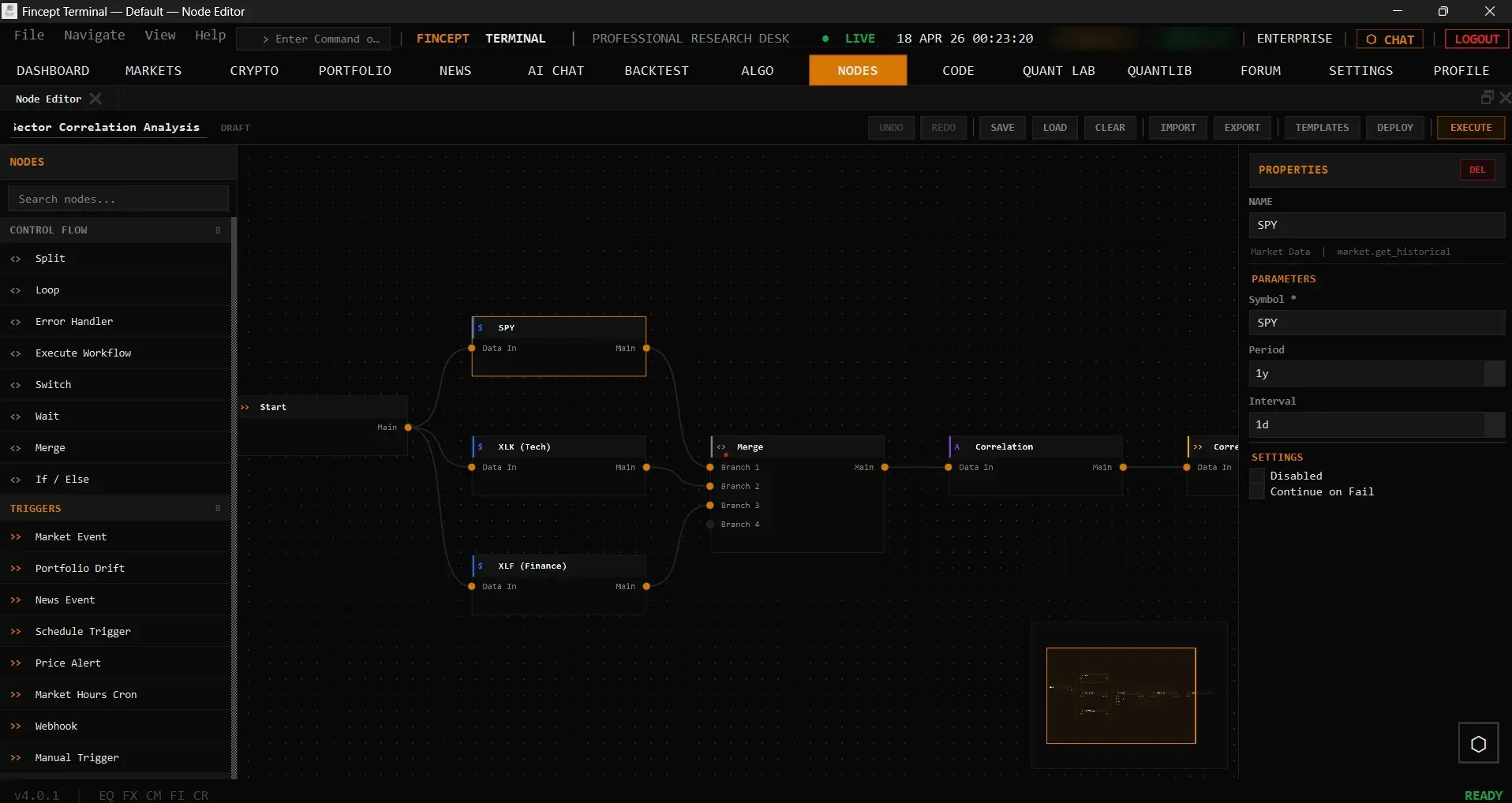
Node Editor building a sector correlation workflow, with control-flow and trigger nodes in the left panel (v4.0.1). Account details in the top bar are blurred.
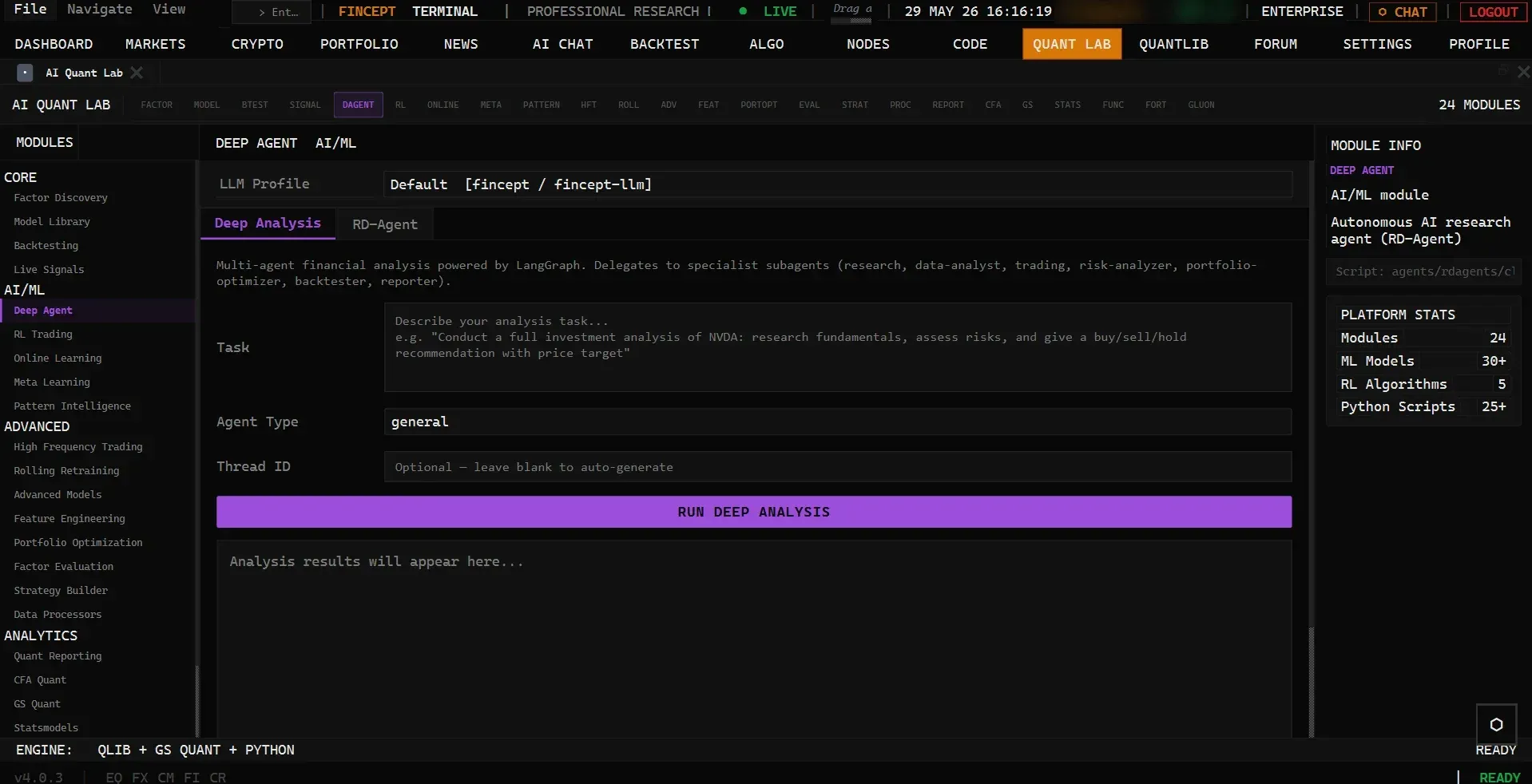
AI Quant Lab showing the Deep Agent module and the list of core, AI/ML, advanced and analytics modules (v4.0.3). Account details in the top bar are blurred.
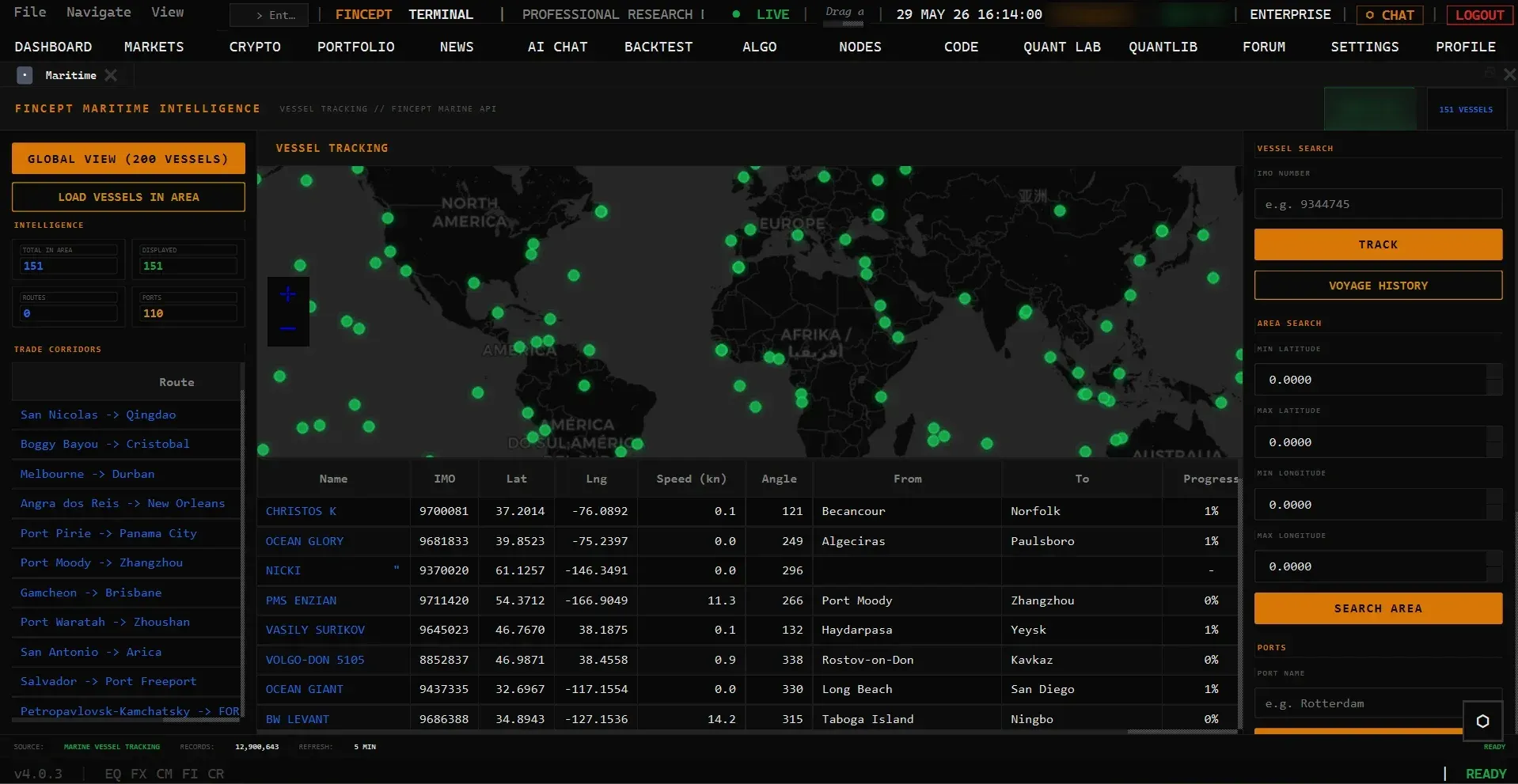
Maritime intelligence screen with vessel positions, a vessel table and trade corridors (v4.0.3). Account details and the credit balance are blurred.
Key capabilities
- Windows installer Windows 10 and 11 on x64 use the
FinceptTerminal-4.5.2-windows-x64-setup.exeinstaller from the v4.5.2 release page, which installsFinceptTerminal.exe. No Windows ARM64 package is published. - Linux packages Linux x64 builds come as a DEB package for Ubuntu 22.04+ and Debian 12+ (
sudo apt install ./FinceptTerminal-*.deb), an RPM for Fedora 36+ and RHEL 9+ (sudo dnf install ./FinceptTerminal-*.rpm) and a portable.runinstaller that is made executable and run. The release also contains a.binwizard installer and a zsync file for the portable build. No Linux ARM64 binary is published. - macOS disk image Apple Silicon Macs running macOS 13 or newer use the arm64 DMG: open it and drag the application to Applications. The release does not include an Intel Mac build.
- Build from source and Docker On Linux and macOS,
./setup.shin a clone builds the application. The getting started guide covers Windows and manual builds with CMake presets and a pinned toolchain: CMake 3.27.7, Ninja 1.11.1, Qt 6.8.3 and Python 3.11.9, with MSVC 19.40+, GCC 12.3+ or Apple Clang 15.0+. The README states that other versions are unsupported. A multi-stage Dockerfile builds Linux images for amd64 and arm64 that display through X11. - Equity research The Equity Research screen opens a symbol from the command bar (for example
/stock,/fundor/index) and shows overview, financials, analysis, technicals, peers, news and sentiment tabs. The overview combines trading data, valuation ratios, share statistics, analyst targets, profitability and growth rates with a price chart over one month to five years. - Valuation, risk and QuantLib analytics The open build includes discounted cash flow valuation, portfolio optimisation, value at risk and Sharpe ratio metrics, derivatives pricing, fixed income and alternative investment analytics, plus an 18-module QuantLib suite for pricing, risk, stochastic models and fixed income. The FAQ lists more than 50 technical indicators, including RSI, MACD, Bollinger Bands, ATR and OBV, in both editions.
- Portfolio workspace Portfolios record buy, sell and dividend transactions and show holdings, unrealized and daily P&L, sector allocation, a performance chart against a benchmark such as SPY and a correlation matrix of the largest positions. Further tabs cover performance and risk, optimisation, QuantStats reports, indices, planning and economics.
- Data connectors The README lists more than 100 connectors, including FRED, IMF, World Bank, DBnomics, AkShare, Polygon, Kraken, Yahoo Finance and government data APIs. Data is requested from the user's machine with the user's own accounts and API keys, so coverage, history depth and rate limits follow each provider's terms and free-tier quotas.
- Markets, news and prediction markets Markets, watchlists, crypto and Asia market screens sit alongside a news module that aggregates feeds, clusters related stories, tracks monitors and flags breaking items with sentiment tags. The architecture document also lists prediction market data from Polymarket and Kalshi, and a screener and economic data screens are part of the 54-screen set.
- AI agents and chat The open build ships 37 trader, investor, economic and geopolitics agents and an AI chat screen. Models are used through the user's own key for OpenAI, Anthropic, Gemini, Groq, DeepSeek or OpenRouter, or through a local Ollama server, and provider usage is billed by that provider. The FAQ describes multi-agent planning, a private dataroom and agent teams as Enterprise features.
- AI Quant Lab The AI Quant Lab groups machine learning models, factor discovery, backtesting, live signals and reinforcement learning research. The published v4.0.3 screenshot shows 24 modules, including a LangGraph-based deep analysis agent, rolling retraining, high-frequency trading research and a strategy builder, running on Qlib, GS Quant and Python.
- Visual node editor The Node Editor builds workflows from data, analytics and control-flow nodes such as split, loop, switch, merge, if/else and error handlers. Triggers include market events, portfolio drift, news events, schedules, price alerts, market-hours cron expressions, webhooks and manual runs. Workflows can be saved, loaded, imported, exported, built from templates, deployed and executed.
- MCP integration An in-app Model Context Protocol bridge exposes more than 40 MCP tools to the AI features, according to the architecture document, and an MCP Servers screen manages the lifecycle of external MCP servers. Release v4.5.2 added research controls for the MCP tools.
- Paper trading and broker connections A paper-trading engine with order matching simulates positions, and the README lists crypto and equity feeds and 16 broker integrations. Broker adapters in the source tree include Zerodha, Upstox, Angel One, Dhan, Fyers, Alpaca, Interactive Brokers, Saxo and Tradier, with Kraken and Hyperliquid for crypto. The README describes live trading through the user's own broker in the open build, while the website edition table lists live broker routing and live algorithm deployment as Enterprise features.
- Alpha Arena Alpha Arena runs several LLM agents against each other on the same crypto perpetual futures universe, tick by tick. It routes orders to a paper venue that mirrors Hyperliquid fees, funding and liquidation rules or to the live Hyperliquid venue, applies a risk engine and human-in-the-loop approvals with a 60-second timeout, and stores prompts, decisions, orders and fills in SQLite for replay.
- Geopolitics and maritime screens The Geopolitics screen maps events from HDX and ACLED data by category and country, with monitor, relations and trade views. The Maritime screen tracks vessels on a world map, searches by IMO number or area, shows voyage history and lists trade corridors between ports.
- Workspace tools The screen set also includes a code editor, an Excel-style sheet, a report builder, notes, a file manager, data source and data mapping screens and a relationship map. Screens open as docked or floating panels, and the command bar and function-key bar move between them.
- Local storage and accounts Settings, caches and repositories live in local SQLite databases, and broker tokens, API keys and the Fincept session are encrypted with AES-256-GCM using a key derived from the machine ID. The getting started guide documents a guest mode for development builds, while a free Fincept account enables sign-in, Fincept AI credits and optional cloud sync of watchlists and portfolios.
- Fincept Data API Fincept also runs a separate Data API that the README describes as more than 500 REST endpoints covering over 423,000 instruments from more than 2,000 sources. A free tier comes with any account, and credit packs are sold as one-time purchases separate from Enterprise seats.
Where Fincept Terminal fits
Researching a listed company
A symbol typed into the command bar opens the Equity Research screen with trading data, valuation ratios, share statistics, analyst targets and growth rates. The financials, technicals, peers, news and sentiment tabs extend the same view, and the analytics modules add discounted cash flow valuation and risk metrics. The same command bar accepts fund and index lookups, and every figure comes from the data sources and API keys configured on that machine.
Tracking a portfolio and its risk
Buy, sell and dividend entries build a portfolio whose holdings, P&L, sector weights and benchmark performance update in one screen. Risk tabs report Sharpe ratio, beta, drawdown and concentration, a correlation matrix compares the largest positions, and optimisation and QuantStats reports run through the embedded Python analytics.
Following macro, geopolitical and shipping data
Economic series from FRED, IMF, World Bank, DBnomics and government APIs load into the economics screens. The Geopolitics screen plots HDX and ACLED events by category, country and city, and the Maritime screen follows vessels, ports and trade corridors on a world map.
Automating research with nodes and AI agents
The Node Editor connects market data nodes to merge, correlation and analytics steps and starts them from triggers such as price alerts, schedules, news events or webhooks. AI agents and the chat screen use the configured model provider or a local Ollama model, and the MCP bridge gives those models access to terminal tools. Workflows stay as drafts until they are saved, exported or deployed.
Paper trading and LLM agent competitions
The paper-trading engine records simulated orders and positions without a broker account. Alpha Arena runs several language models on the same crypto perpetual futures universe through its paper venue, with a leaderboard, model chat, positions, risk and audit tabs for each competition.
Extending the open build
The contributing guide and the C++ and Python contributor guides describe the extension points: Python data fetchers that take command-line arguments and print JSON, new Qt screens registered in the screen router, and broker adapters built on the BrokerInterface pattern. Modified builds that are distributed, or run as a network service for other users, fall under the AGPL-3.0 source-sharing terms. Pull requests are reviewed, and accepted fixes ship on the monthly release cycle.
Install
sudo apt install ./FinceptTerminal-*.debReviews of Fincept Terminal
Be the first to share your experience with Fincept Terminal.
Write a review
Loading review form…