

What is Hummingbot?
Hummingbot is an open-source Python framework for building, configuring and running automated trading strategies, called bots, against centralized and decentralized cryptocurrency exchanges. On each clock tick a bot reads order books, balances and order status from the connected venues, then places or cancels orders according to a strategy and a YAML configuration file. The project describes its mission as making high-frequency and market-making techniques available to individual and professional users. It is software for operating strategies that the user chooses and configures: it is not a signal service or a managed account, and it does not promise that any strategy will be profitable.
CoinAlpha built and open-sourced Hummingbot in April 2019. In December 2021 it spun off the Hummingbot Foundation, a not-for-profit organization established in the Cayman Islands, which now maintains the GitHub repository, reviews pull requests, assigns developer bounties and packages releases into Docker images. Changes to the codebase and to the list of maintained connectors pass through a proposal process in which HBOT token holders vote on a Snapshot space; the governance page documents the thresholds. Several exchanges sponsor development through broker partnerships, and the README lists them with referral links.
The client is distributed as source code and as the hummingbot/hummingbot Docker image. The Docker route clones the repository and runs make setup and make deploy, optionally adding the Gateway container for DEX access. The source route uses Anaconda, a hummingbot conda environment with Python 3.10 or later and compiled Cython extensions. The client installation guide lists Linux x64 or ARM (Ubuntu 20.04+, Debian 10+), macOS and Windows through WSL2, with 4 GB RAM, 5 GB of disk and at least one vCPU per instance.
The latest release is v2.17.0, published September 22, 2026. It adds a kalshi_perpetual connector with emulated reduce-only closing orders, moves the Gateway integration to a unified route surface with a slippage ramp for executors, adds a configurable position refresh interval to the liquidity-provision executor and fixes Hyperliquid authentication that accepted a wrong private key without an error. Version 2.16.0 (July 2026) introduced the non-interactive hbot command-line interface, added Gemini and Lambdaplex connectors and removed the Cube, AscendEx and Vertex connectors. Version 2.15.0 (June 2026) added a Lighter connector and moved the MQTT bridge to aiomqtt.
The codebase is Python with Cython modules for latency-sensitive paths and is licensed under Apache 2.0. Sibling repositories extend it: Gateway is a TypeScript middleware for AMM and on-chain DEX connectors, the Hummingbot API is a REST backend for managing several bots, and Condor is an AI harness that drives that API from Telegram or a web dashboard. Servers, exchange accounts, funding, tax and the trading decisions themselves stay with the operator; the Foundation provides software and documentation, not hosting or trading services.
Hummingbot screenshots
Explore the interface. Open a screenshot to view it at full size.
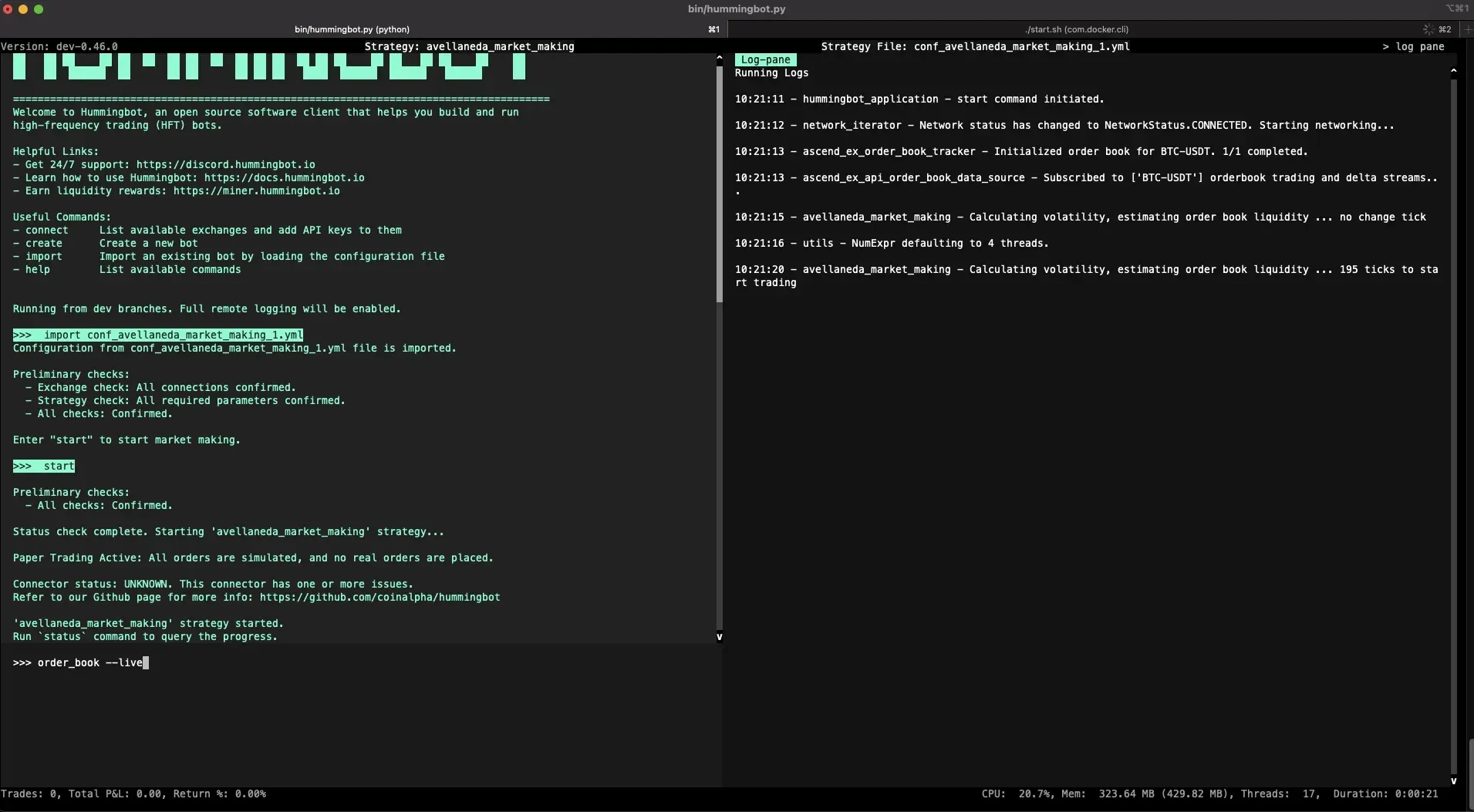
Official documentation screenshot of the interactive client running an Avellaneda market-making configuration in paper trading mode; it shows an older version of the client.
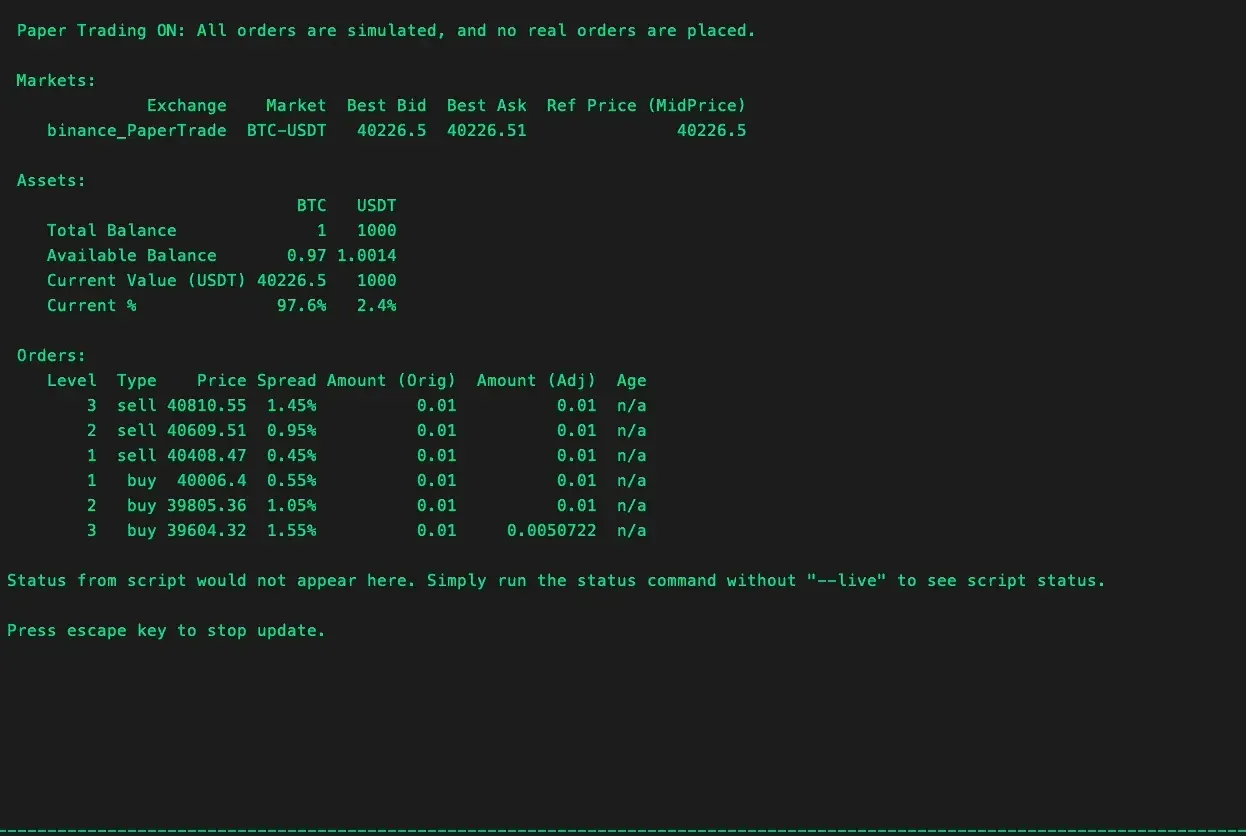
Last frame of the official status --live animation: a paper-trading bot on BTC-USDT with three order levels on each side.
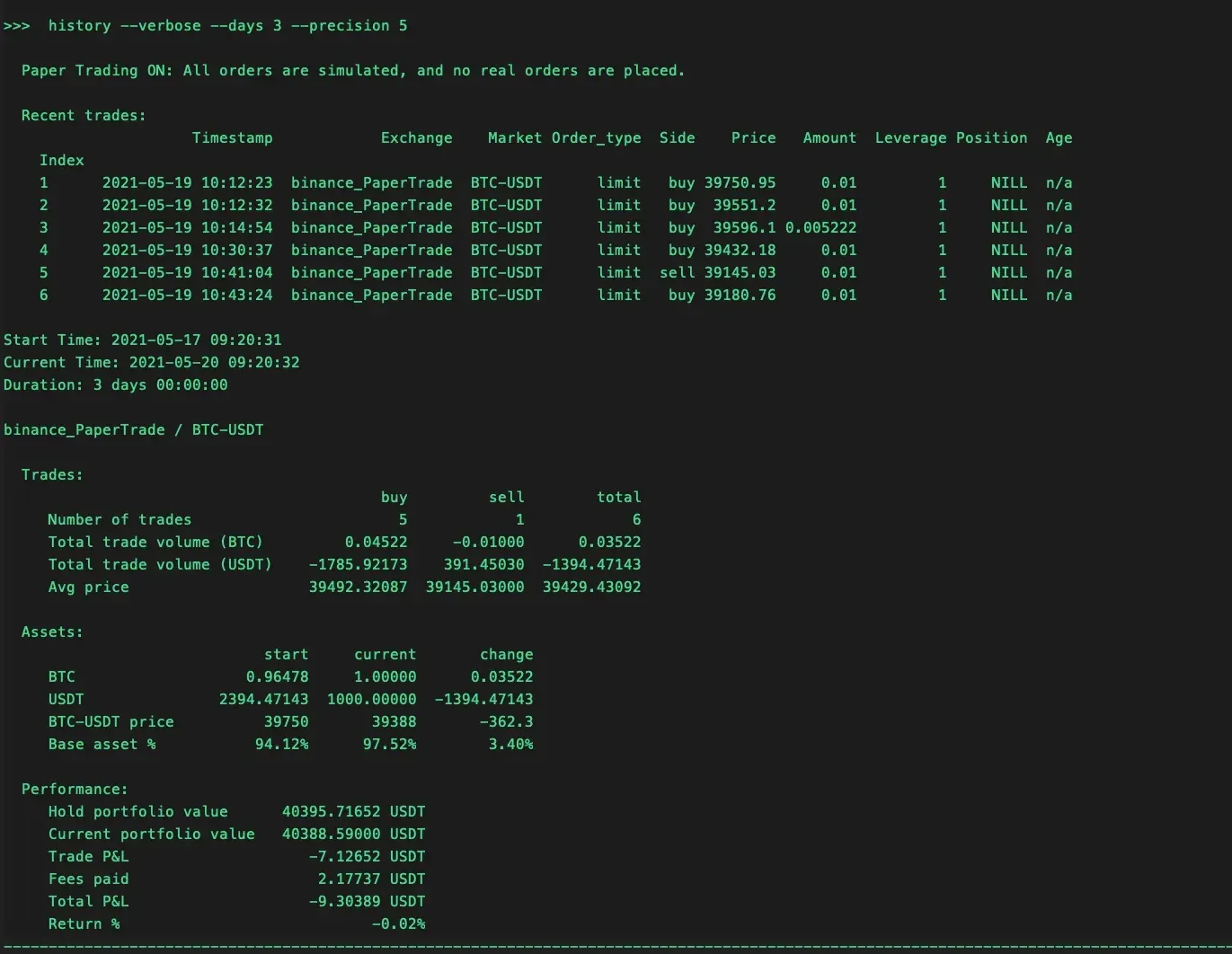
Official example of the history command for a paper-trading session; the figures are sample data, not a performance claim.
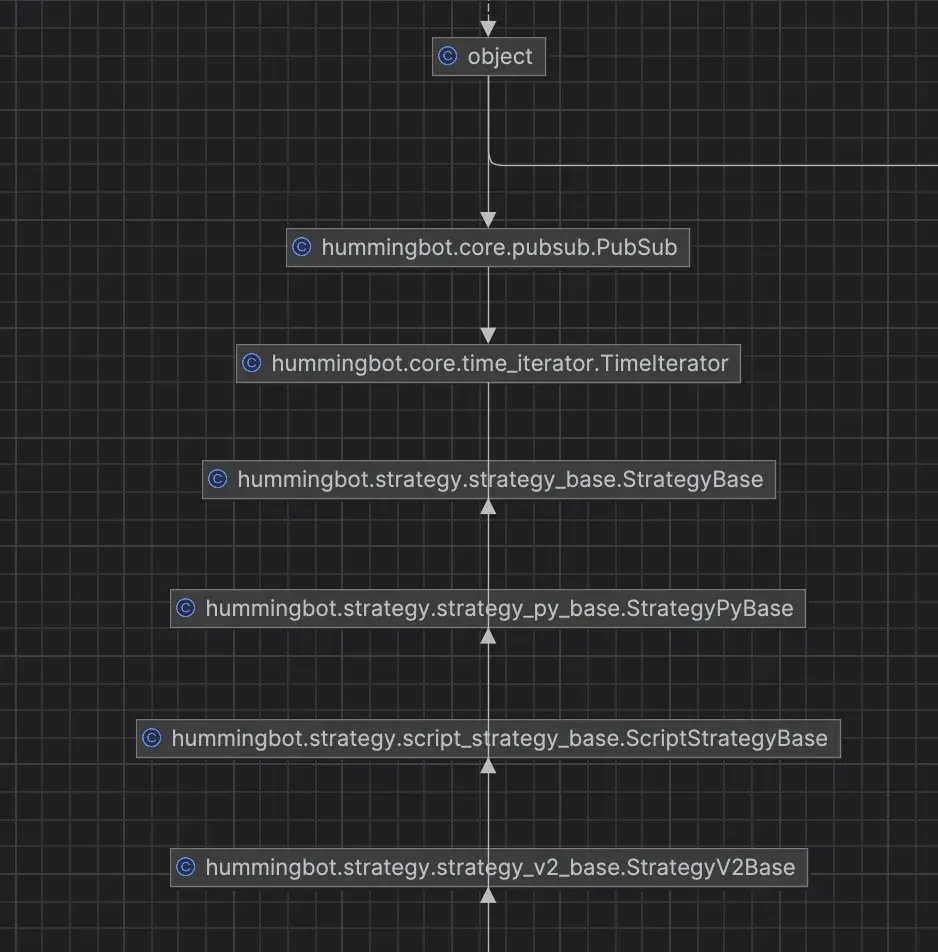
Official diagram of the strategy class inheritance used by V2 scripts and controllers.
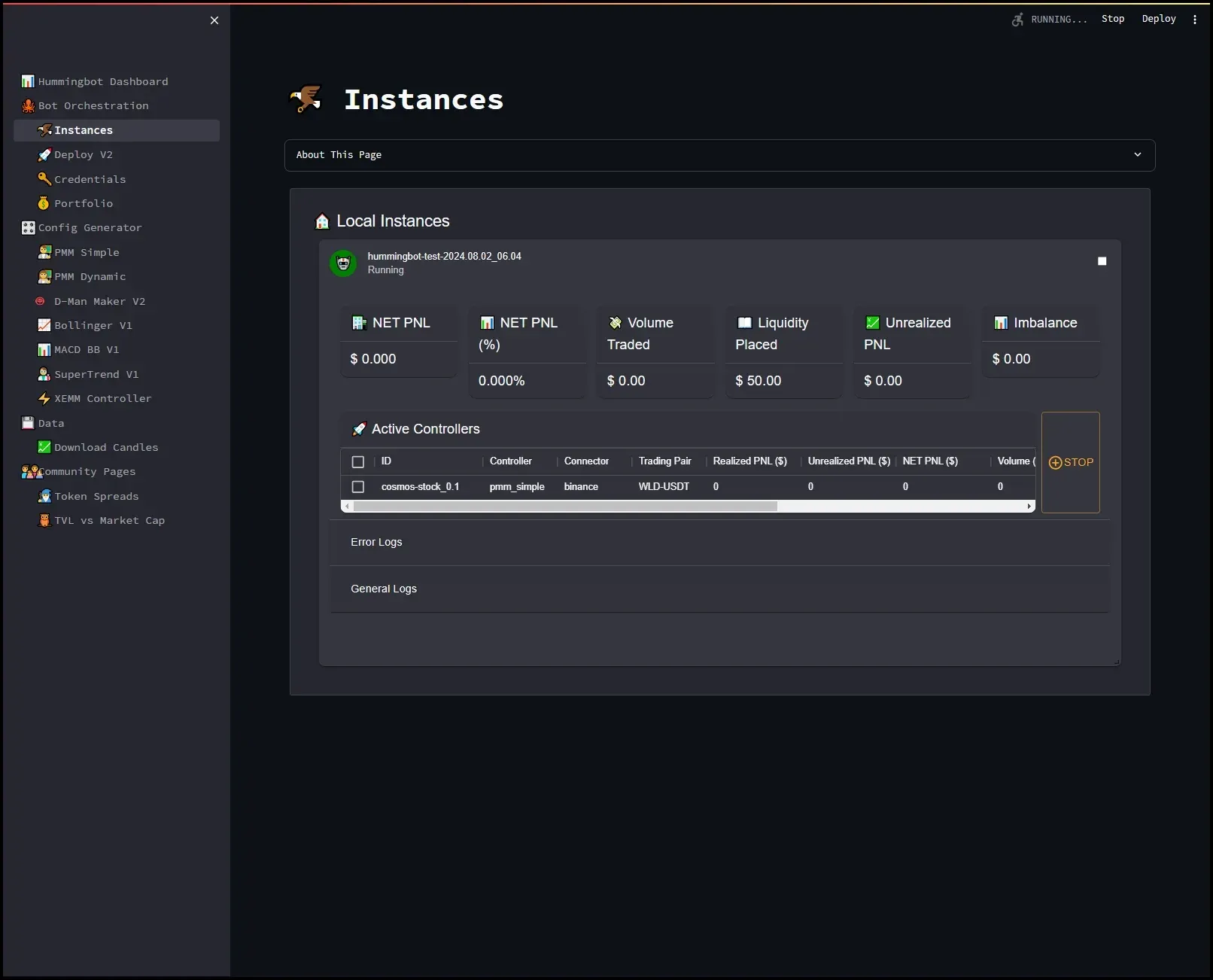
Official screenshot of the separate Streamlit Dashboard, which the Foundation no longer actively maintains and has replaced with Condor.
Source: official Hummingbot project page.
Key capabilities
- Docker installation on Linux, macOS and Windows Clone the repository, run
make setup(answer yes to include Gateway for DEX connectors) andmake deployto start thehummingbot/hummingbot:latestcontainer. The compose file mountsconf,logs,data,certs,scriptsandcontrollersfrom the host, so configurations and trade data survive container updates. Windows requires Docker Desktop with WSL2 and an Ubuntu distribution; the installation guide covers all three systems. - Source installation with conda Developers can run
make install(or the older./installand./compilescripts) to create thehummingbotconda environment and build the Cython extensions. The environment requires Python 3.10.12 or later; the documentation recommends the full Anaconda distribution on macOS and Linux, while the README accepts Miniconda. Specific versions are checked out by Git tag, such asv2.17.0. - hbot command-line interface Added in v2.16.0,
hbotruns, controls and monitors one bot per install without interactive prompts. Commands such asconnect,create,start,status,logs,historyandstopprint compact Markdown with stable exit codes, and the run and observe commands accept--json. The hbot CLI guide documents the full command set; Gateway commands are not yet included. - Interactive terminal client The classic full-screen client is still the Docker default, reached with
docker attach hummingbot. It has an input pane, an output pane and a log pane, with commands for connecting exchanges, importing configurations, viewing live status and order books, and exporting history. Detaching with Ctrl+P, Ctrl+Q leaves the bot running inside the container. - Paper trading against live market data Paper-trade connectors such as
binance_paper_tradesimulate orders against real order books without exchange API keys. Binance, KuCoin, Kraken and Gate.io are enabled by default and other exchanges can be added inconf_client.yml. Simulated fills do not model every queue position, fee tier or latency effect of a live venue. - Scripts A script is a single Python file that contains a whole strategy, such as the
simple_pmm.pymarket-making example. All scripts now inherit fromStrategyV2Base, which gives them access to executors and the market data provider. The strategies documentation recommends scripts for learning and prototyping. - Controllers Controllers are reusable V2 sub-strategies, such as the
pmm_mistermarket-making controller, grouped into market-making, directional and generic folders. One bot can run several controllers, each with its own pairs and settings. Fields marked live-updatable are applied about ten seconds afterhbot configchanges them; other fields take effect on the next start. - Executors Executors are self-contained components that manage the order lifecycle of one task. The repository ships position, order, DCA, grid, arbitrage, cross-exchange market making (XEMM), TWAP and liquidity-provision executors. The position executor applies triple-barrier controls (take profit, stop loss and time limit) to a directional position.
- V1 strategies Legacy strategies, including Pure Market Making, Avellaneda Market Making and Cross-Exchange Market Making, remain available through the interactive client. The documentation positions them for existing users and recommends the V2 framework, introduced from 2023, for new work.
- Centralized exchange connectors CLOB CEX connectors standardize REST and WebSocket APIs for spot and perpetual markets on venues such as Binance, OKX, Bybit, Kraken, KuCoin, Gate.io, Bitget and Coinbase Advanced Trade. These exchanges hold custody of funds and connect through API keys. The maintained list changes between releases, so check the exchange pages for the current status of a venue.
- Decentralized exchanges and Gateway CLOB DEX connectors such as Hyperliquid, dYdX v4, Injective Helix and the XRP Ledger connect with wallet keys. AMM venues, including Uniswap, PancakeSwap, Raydium, Orca, Meteora and Jupiter, are reached through Gateway, a TypeScript API server on port 15888 with router, AMM and CLMM connector types. Gateway is a separate repository and container with its own wallet storage.
- Candle feeds and backtesting The data feed module provides candle feeds for many spot and perpetual venues. Controller configurations can be backtested before deployment, v2.16.0 enabled backtesting for Hyperliquid markets, and v2.17.0 bounded the executor view a controller keeps during a backtest. Backtest output is a model result based on historical data, not a forecast.
- Encrypted credential storage Exchange API keys, secrets and wallet private keys are encrypted with a local password and stored in
conf/connectors. The password itself is never uploaded; for unattended use it can be supplied withHBOT_PASSWORDor--password-stdin. Resetting the password means deleting the verification file and reconnecting every key, as the password page explains. - Trade database and history Trades are recorded in a local SQLite database under
data/, with CSV exports. Thehistorycommand summarizes trades, fees, volume, asset changes and profit and loss per market. Through SQLAlchemy the client can write to PostgreSQL, MySQL, Oracle or Microsoft SQL Server instead, after installing the matching driver. - Kill switch and health checks The optional kill switch stops a bot when its measured profit or loss reaches a configured rate, using the same calculation as
history.hbot doctorchecks the install, keystore, clock skew against internet time, free disk and stale state, and exits with 1 on any failure. Neither replaces exchange-side limits or position monitoring. - Hummingbot API, Condor and remote control For several bots, the separate Hummingbot API provides a REST backend for accounts, portfolios, orders and bot deployment, with an MCP interface for AI assistants. Condor builds on that API and is controlled from Telegram or a web dashboard. The client also includes an MQTT bridge for remote commands.
- Anonymized usage reporting By default each instance sends aggregated USD trade volume, connector identifiers, version, general system information and a random instance ID to Foundation servers every 15 minutes. The reporting page states that no API keys, wallet addresses or individual trades are included. Setting
anonymized_metrics_modetoanonymized_metrics_disabledturns it off.
Where Hummingbot fits
Testing a strategy with paper trading
Create the simple_pmm script with hbot create simple_pmm --set exchange=binance_paper_trade --set trading_pair=BTC-USDT, then start it and read hbot status. No API keys are needed because orders are simulated against live order books. Check how often orders are refreshed, how spreads behave as the market moves and what history reports after several hours. Treat the result as a functional test of the configuration rather than evidence about live returns, since simulated fills ignore queue position and some fee and latency effects.
Running a market-making controller on a centralized exchange
Store API keys with hbot connect binance, create a pmm_mister controller configuration with a connector, trading pair and total_amount_quote, and start it. Use status to see the run state and the count of recent errors, because a bot can be running and erroring at the same time. Change live-updatable fields with hbot config and confirm the reply says whether the change applies immediately or on restart. hbot stop cancels open orders before exiting.
Driving bots from scripts, CI or an agent
The hbot interface is designed for non-interactive use: deploy turns a configuration or strategy name into a running bot in one step, outputs are Markdown or JSON, and exit codes are stable. Supply the keystore password through HBOT_PASSWORD or --password-stdin from a secrets store rather than a shell history. Bound logs -f with a timeout in automation, and run hbot doctor before starting to catch clock skew, which causes signed exchange requests to fail.
Adding decentralized venues through Gateway
Answer yes to the Gateway prompt during make setup, or install Gateway from source, then add wallets and select chain, network and connector. Gateway starts in development mode with unencrypted HTTP; the production mode uses DEV=false and certificates generated with gateway generate-certs. Check RPC endpoints, token lists and slippage settings on a small transaction before connecting a strategy. DEX wallet setup and swaps are handled in the interactive client or the API, because hbot has no Gateway commands yet.
Backtesting and tuning a controller
Write or select a controller, download candles for the pair and backtest its configuration over a defined period. Compare several parameter sets on the same data, then run the chosen one with paper trading before using real keys. Keep the configuration file, data range and Hummingbot version together so a result can be reproduced after an upgrade. Historical results depend on the chosen period and on fill assumptions and do not predict live behavior.
Operating several bots on a server
The client runs one bot per install, so separate bots need separate installs or containers, or a single bot with several controllers. For larger setups the Hummingbot API deploys and monitors bot containers and is driven by Condor. The API always enables HTTP Basic Auth, and the documentation recommends keeping it on a private Tailscale network instead of exposing port 8000. Plan disk for logs and trade databases, and update containers with docker compose pull after reading the release notes.
Install
git clone https://github.com/hummingbot/hummingbot.git && cd hummingbot && make setup && make deployReviews of Hummingbot
Be the first to share your experience with Hummingbot.
Write a review
Loading review form…