

What is OctoBot?
OctoBot is an open-source cryptocurrency trading bot written in Python and maintained by Drakkar-Software, a company based in Paris, France. The project has been published as free software since 2018. It connects to exchange accounts through their APIs, runs configurable strategies such as DCA, grid, crypto baskets and TradingView alerts, and can simulate them with paper trading or historical backtests before any real order is sent. It only trades crypto markets: stocks and forex are outside its scope. The GitHub repository holds the bot and its documentation site.
The current release is 3.0.0-beta3, published on GitHub on October 8, 2026, with Windows x64, Linux x64 and macOS arm64 executables and a SHA256 value for each. Docker images (drakkarsoftware/octobot), the OctoBot package on PyPI, a DigitalOcean Marketplace image and a Raspberry Pi guide cover the other installation routes. The 3.0 series changes the default start mode: the process now runs as a node that serves as the backend for a new web and mobile interface. Version 3.0.0-beta1 introduced node mode, multiple bots per node and Kraken spot support; beta2 added WEEX; beta3 added Kucoin EU, Bybit EU and Coinrabbit, portfolio history, a mandatory seed phrase backup quiz, signal-based automations and read-only client pairing by device code. The maintainers state that the beta is work in progress and may contain bugs or incomplete features.
Two operating layers now coexist. Automations (DCA, baskets, grids and similar strategies) are started from the new interface and executed by the node. A manual OctoBot, the classic single bot with its own web interface, is started from the node for backtesting, Telegram control, TradingView webhooks and the full profile and tentacle configuration. Most existing guides still describe that classic bot. Strategies, evaluators and interfaces are packaged as plugins called tentacles, which a tentacles manager installs and updates.
Since 2.1.0 all former satellite libraries live in one monorepo, with packages for trading, evaluators, backtesting, services, async channels, sync, agents and the node. The node package runs a FastAPI application on the DBOS workflow engine, stores tasks in SQLite or PostgreSQL and resumes interrupted workflows from the last completed step. Some packages include Rust code bridged to Python with PyO3. Exchange connectivity relies on the CCXT library. Version 2.1.0 also moved the bot to Python 3.13 or 3.12; some older installation guides still mention Python 3.10. The changelog records each release.
The source is licensed under the GNU General Public License v3.0 or later. The TypeScript client SDK for nodes is published separately under LGPL-3.0, and the README invites institutions to ask about a commercial license or custom development. Drakkar-Software also runs OctoBot cloud, a hosted subscription service, and funds the free software partly through partnerships with exchanges. The project README carries an explicit risk disclaimer: the authors accept no responsibility for trading results and recommend starting in simulation mode. This profile describes features only and contains no assessment of trading outcomes.
OctoBot screenshots
Explore the interface. Open a screenshot to view it at full size.
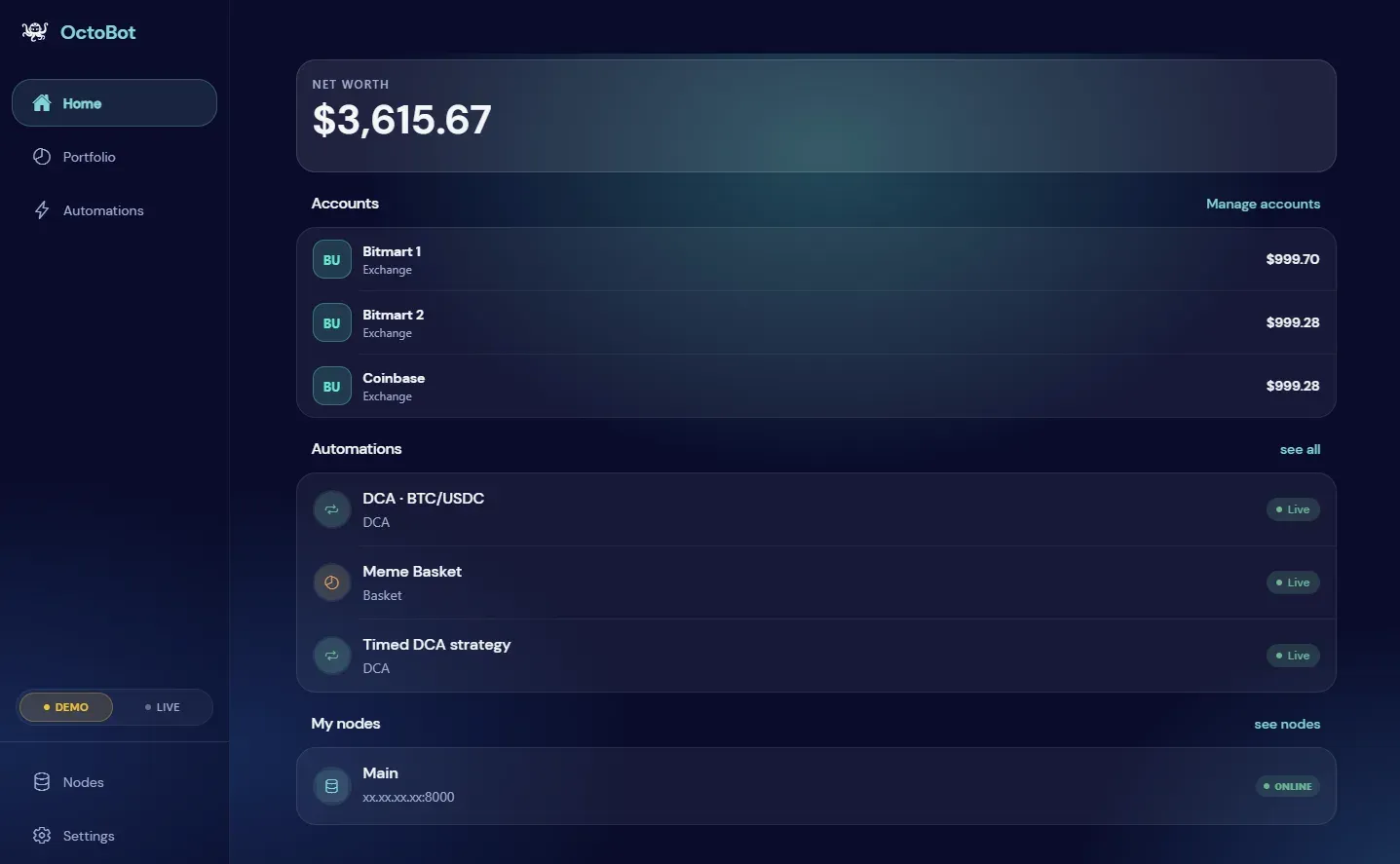
Official beta documentation screenshot of the new interface home dashboard; balances shown are example values.
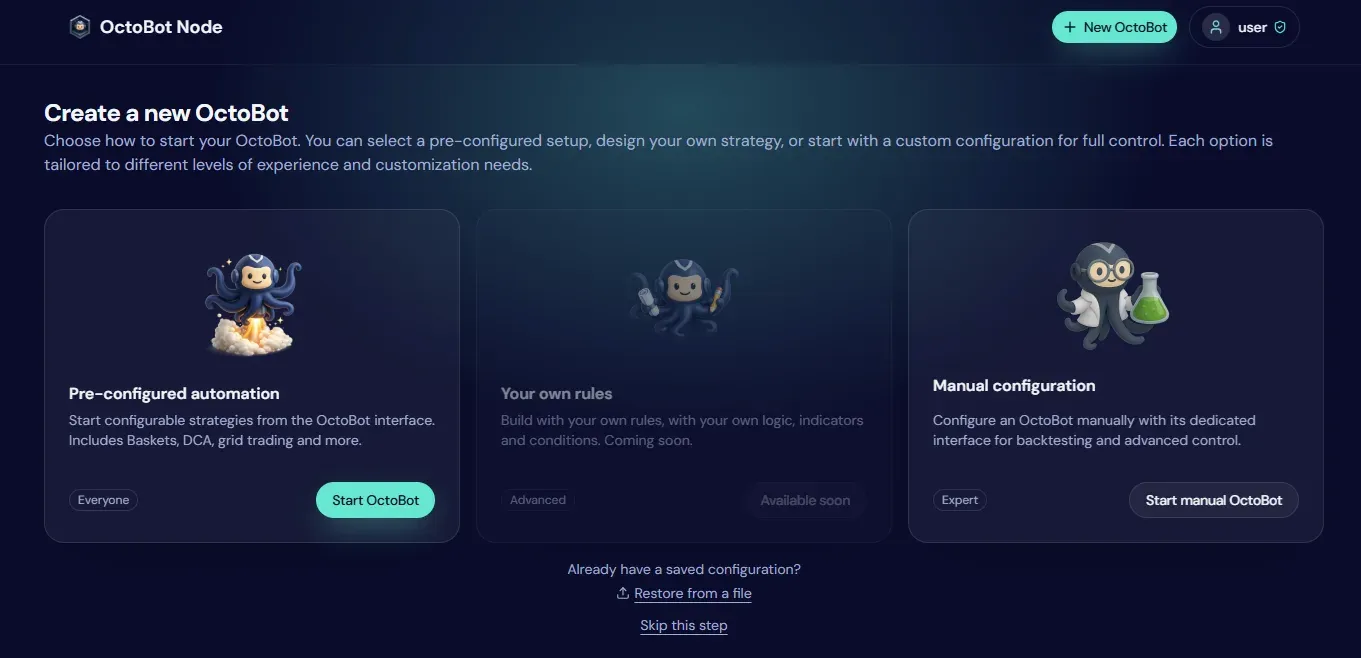
Official guide screenshot of the node page used to start an automation or a manual OctoBot for backtesting and advanced control.
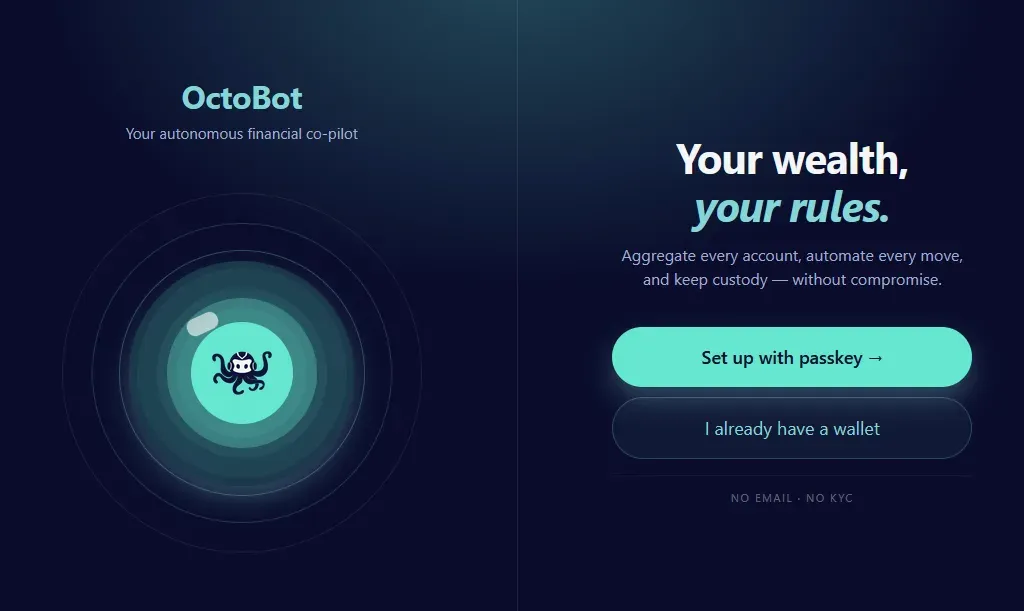
Official beta guide screenshot of the first screen of the new interface, where a wallet is created or imported.
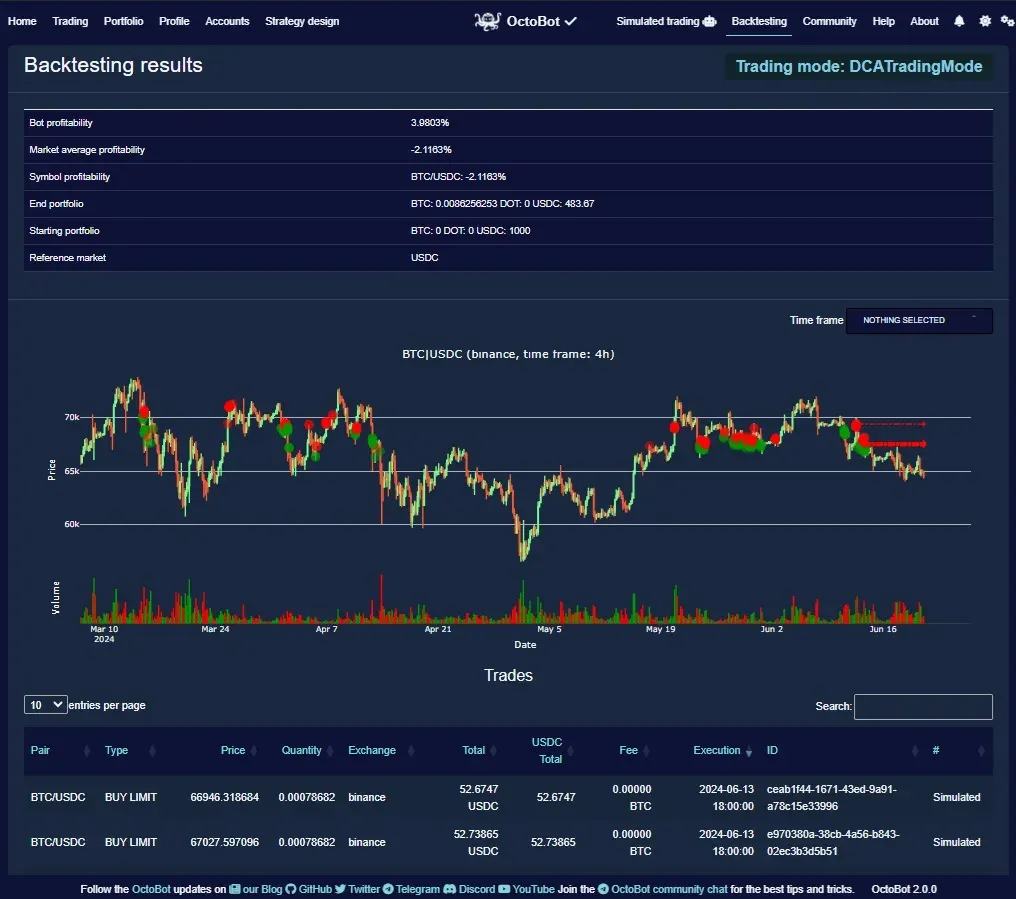
Official backtesting guide screenshot from OctoBot 2.0.0; the figures are a historical simulation example, not a performance claim.
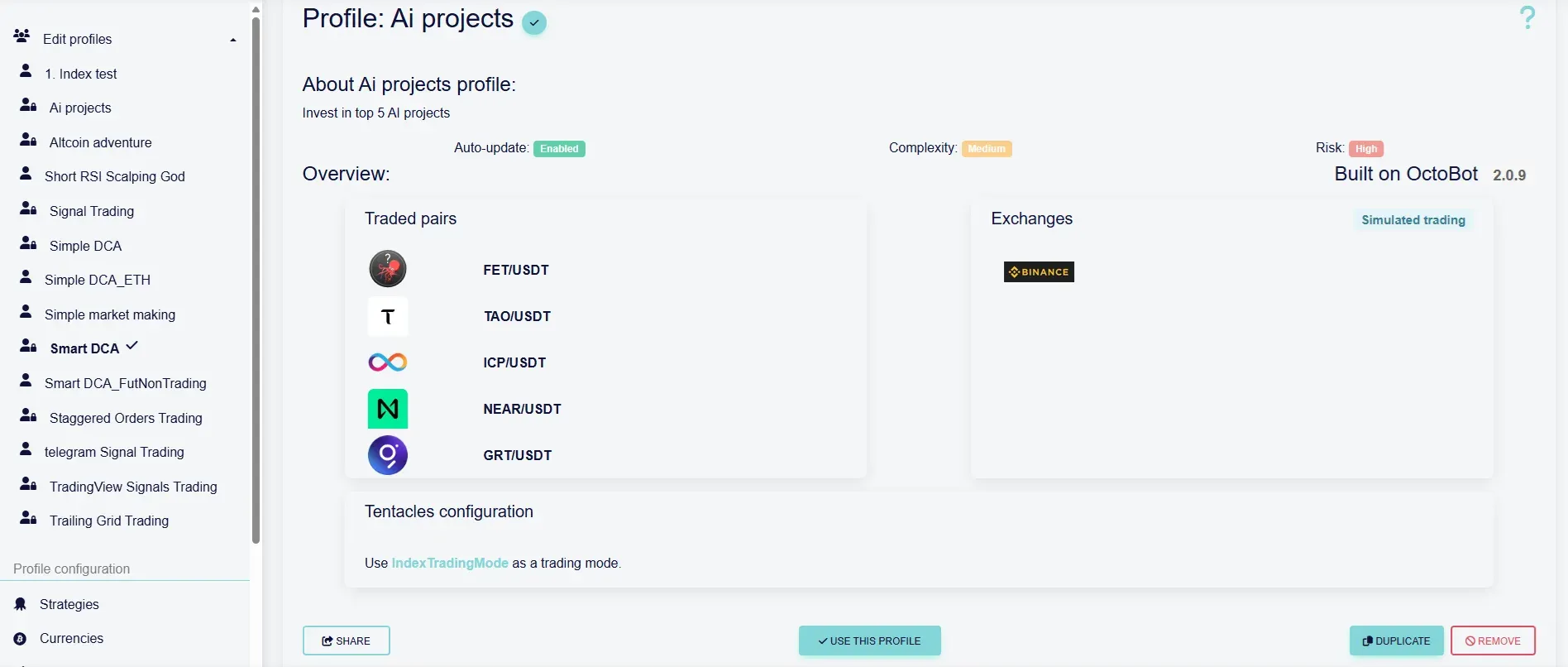
Official configuration guide screenshot of a profile page in the classic web interface.
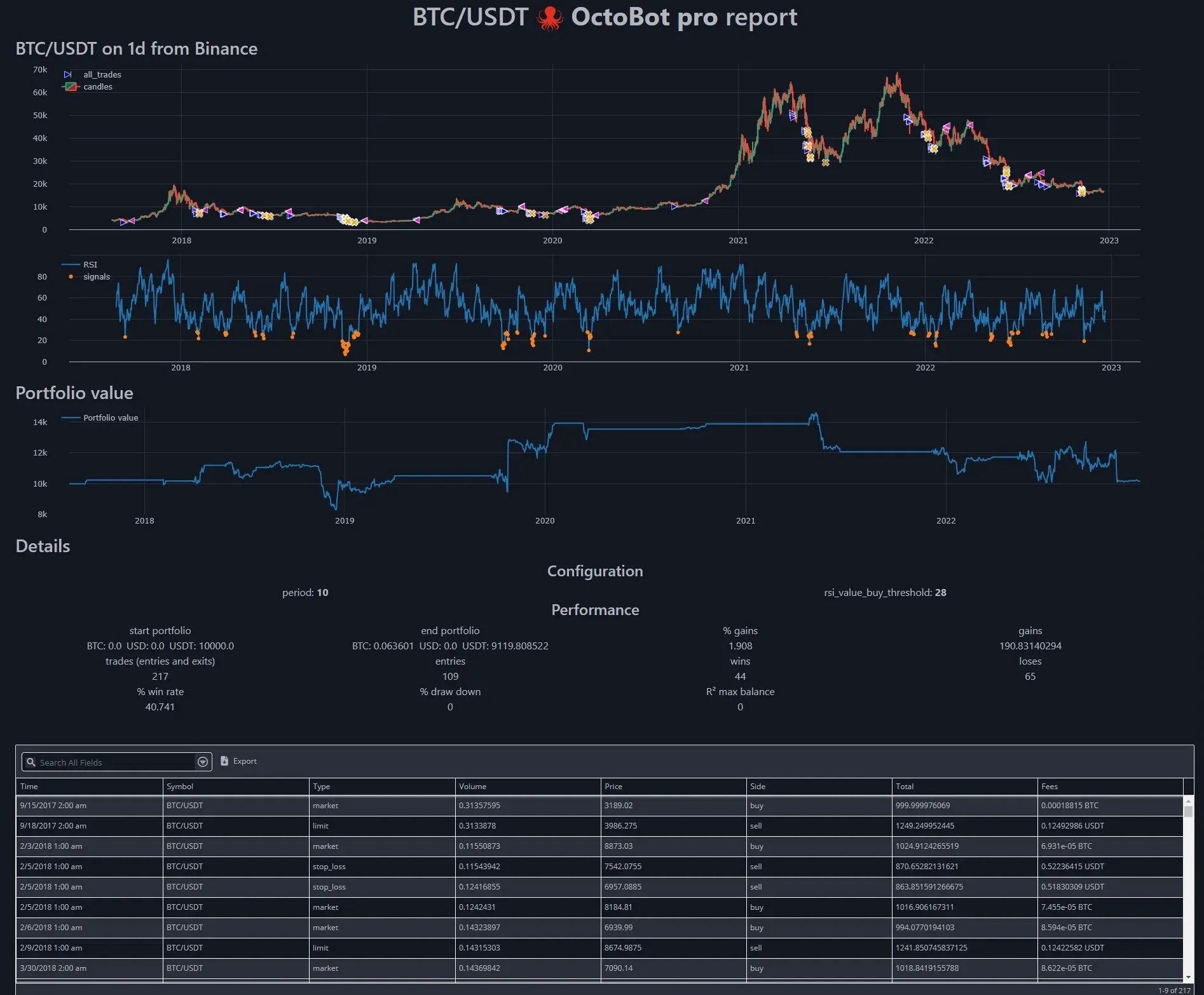
Official OctoBot script guide image of a generated strategy report on historical data.
Source: official OctoBot project page.
Key capabilities
- Download OctoBot for Windows, Linux and macOS The 3.0.0-beta3 release ships single executables named OctoBot_windows_x64.exe, OctoBot_linux_x64 and OctoBot_macos_arm64, each listed with its SHA256 hash. On Linux the file needs
chmod +xbefore it is started from a terminal. Starting the executable opens a terminal, creates the configuration environment and launches the node. There is no Intel macOS binary in this release. - Docker image and Docker Compose The official image is
drakkarsoftware/octobot, with astabletag used in the documented one-linedocker runcommand that mounts user, tentacles and logs folders. The 3.0 image exposes port 8000 and the range 5001 to 5010 so that child bots started by the node are reachable. A Docker Compose setup in the repository can request a Let's Encrypt certificate when a domain and e-mail address are set in an .env file. - Python package and source install The PyPI package installs with
pip install octobot[full]; since 2.0.15 the plain package is a minimal install meant for library use, and the [full] extra adds the user interface. Running from a Git clone withpython3 start.pyis documented for people who want to audit or edit the code. The installation guide covers executable, Docker and source routes. - Raspberry Pi and cloud servers A dedicated Raspberry Pi guide covers arm64 boards, and the README lists a one-click image on the DigitalOcean Marketplace. The stated minimum hardware is one 1 GHz CPU core, 250 MB of RAM and 1 GB of disk. A server keeps strategies running when a personal computer is switched off.
- Node mode and the new interface In 3.0 the node is the default process. It is managed from a web interface hosted by Drakkar-Software at new.mobile.octobot.cloud or from beta mobile apps, which connect to the node by hostname or IP address. On first launch the node runs an initial configuration guide that creates or imports a wallet and pairs the interface. Beta3 adds QR code scanning to confirm proposed actions and a read-only mirror per wallet for paired clients.
- Automations An automation is a strategy executed by the node: DCA, crypto baskets, grids, TradingView signals and similar. Several automations run from one node, in demo or live mode, and their schedules can be disabled. Stopping an automation can cancel its open orders, and outputs of failed or cancelled runs are viewable since beta3. A graphic strategy editor is announced but not yet available.
- Manual OctoBot instances The classic bot is started from the node with the New OctoBot button and keeps its own web interface. It holds profiles, trading modes, evaluators, exchange accounts and notification settings, and it is the only place where backtesting runs. Profiles can be duplicated, imported and shared as files. Its web interface can be reached remotely when the bot runs on a server.
- Built-in trading modes The guides document DCA, Index (crypto basket), Daily, ChatGPT, Dip Analyser, Grid, Staggered Orders and TradingView trading modes, plus a DSL trading mode added in 2.1.1. Grid trading gained an order-by-order trailing system in 2.0.13 and a
reinvest_profitsoption in 2.1.1. Each mode has its own parameters and limits, described in the trading mode guides. Market making is distributed as a separate OctoBot-Market-Making project. - Exchange connections through CCXT The exchange summary lists officially supported exchanges including Binance, OKX, Kucoin, Coinbase, Bybit, Crypto.com, HTX, Bitget, Hyperliquid, BingX, MEXC, CoinEx, BitMart, HollaEx-based exchanges, Phemex, Gate.io, Okcoin, WEEX and LBank, and community-tested ones such as Kraken and Bitfinex. Other CCXT exchanges may work but are not regularly tested by the team. Websocket feeds are used when the exchange supports them; REST polling limits how many pairs can be followed at once.
- Paper trading simulator The simulator trades against live market data with a virtual portfolio, and exchange API keys are not required in this mode. It reproduces order placement and portfolio changes, not the exact fills, slippage or liquidity of a real account. Exchanges that offer a sandbox or testnet can also be targeted with the
sandboxedoption, and Binance futures demo trading is supported since 2.0.13. - Backtesting engine and data collector Manual bots replay a profile against historical exchange data with the same evaluator and trading mode code used live. A data collector downloads candles for chosen exchanges, pairs and time frames, and results show portfolio changes, a price chart with orders and a trade table. The backtesting guide explains setup. Historical results describe a simulation of past data and do not predict future outcomes.
- TradingView webhooks The TradingView trading mode turns alerts from indicators or Pine Script strategies into orders on a connected exchange, using a documented alert message format. Webhook delivery requires a reachable endpoint, and the beta3 documentation adds a Tailscale guide for exposing the webhook port. E-mail alerts were deprecated in 2.0.15. Configuration is covered in the TradingView interface guide.
- LLM connectors The ChatGPT trading mode sends market context to an OpenAI model and acts on the returned opinion. A custom base URL allows a local Ollama server instead of a hosted model. Calls to a hosted provider carry that provider's costs and data handling. An AI agents distribution, OctoBot-AI, was announced as ongoing development in 2.1.0.
- Telegram and notifications A manual bot can be linked to a Telegram bot to follow its portfolio, open orders and trades and to send commands such as an emergency sell. Notification channels are configured in the web interface. Telegram configuration requires a bot token created through Telegram, which is stored in the local configuration.
- Encrypted exchange credentials Exchange API keys are stored encrypted in user/config.json, and a
--encrypterstart option encrypts keys before they are pasted in manually. In node mode the vendor states that API keys and wallet keys stay on the user's devices. Restricting API keys to trading permissions, without withdrawal rights, remains a decision made on the exchange side. - Node REST API and TypeScript client A node exposes a REST API under
/api/v1and a sync transport used by the interface. The client SDK is the npm package @drakkar.software/octobot-client, LGPL-3.0 licensed, for Node 18 or later, browsers, Deno and Bun. The wallet private key is the identity, and synced documents are encrypted per collection with AES-256-GCM keys derived by HKDF. - OctoBot script for Python strategies OctoBot script lets developers write strategies in Python with trading keywords, run them on historical data and produce reports with charts, indicators, portfolio value and trade tables. It targets research and testing rather than the point-and-click interface. Results depend entirely on the script, the data period and the fee assumptions used.
- Tentacles and developer packages Strategies, evaluators, exchanges and interfaces are tentacles that can be customized or written from scratch, with a developer environment guide for VS Code or PyCharm. The monorepo is built with Pants, and packages that include Rust crates use PyO3 and maturin. After updating the bot, the changelog advises updating tentacles with
start.py tentacles --install --all.
Where OctoBot fits
Testing a strategy without real funds
Start a manual OctoBot, pick a profile and enable the simulator so no API key is needed. Let it run on live prices, then compare its orders with what the configuration was meant to do. Run a backtest on several historical periods, including falling and sideways markets, and include realistic fees. The risk disclosure and the README disclaimer are a sensible read before moving to a funded account.
Running scheduled DCA or basket automations
Install the node on an always-on machine, complete the wallet setup and back up the seed phrase, which beta3 makes mandatory. Connect an exchange account with an API key limited to trading. Start the automation in demo mode first, then check the order sizes, schedule and portfolio history before switching to live. Confirm what happens to open orders when the automation is stopped.
Executing TradingView alerts on an exchange
Configure the TradingView trading mode in a manual bot, expose its webhook endpoint and paste the generated URL and message format into the TradingView alert. A private network such as Tailscale or a reverse proxy with TLS avoids leaving the bot interface open on the internet. Send test alerts in simulator mode and verify that symbols, order types and amounts match the alert format.
Operating a self-hosted node
Choose between the executable, Docker or a Python install, and keep the user, tentacles and logs folders on persistent storage. Monitor the node with its logs under logs/automations and keep the SQLite database small; beta3 reduced tasks.db growth. Pin the release used in production, read the changelog before upgrading a beta, and update tentacles after each upgrade. Test firewall and antivirus rules so the interface can reach the node.
Experimenting with LLM-assisted decisions
Configure the ChatGPT trading mode with an OpenAI key, or point its base URL to a local Ollama server to keep prompts on your hardware. Backtest and paper trade the configuration, since model answers can vary between calls. Record which model and prompt version produced each decision, and track the API cost of hosted models separately from exchange fees.
Building on the node API
Install @drakkar.software/octobot-client, generate a throwaway wallet key and connect to a test node, as the SDK guide recommends. User actions are appended to a queue rather than executed synchronously, so code should poll results. Check the LGPL-3.0 terms before shipping a client that links the SDK.
Install
docker run -itd --name OctoBot -p 80:5001 -v $(pwd)/user:/octobot/user -v $(pwd)/tentacles:/octobot/tentacles -v $(pwd)/logs:/octobot/logs drakkarsoftware/octobot:stableReviews of OctoBot
Be the first to share your experience with OctoBot.
Write a review
Loading review form…