
What is MailAccess?
MailAccess is an open-source email OSINT tool and email scraper written in Python and published in the KatrielMoses/MailAccess repository under the MIT license. It works in two directions: given one email address, its investigation engine looks for the accounts, names and breach records connected to that address; given one domain, its harvester lists the public email addresses at that organization. The engine has 82 modules, 70 of which need no API key, and its account checks draw on a list of more than 5,300 platforms.
The project is distributed as the mailaccess package on PyPI for Python 3.10 or later, with optional extras for spaCy name classification (mailaccess[ml]) and headless-browser checks through Playwright (mailaccess[browser]). The same code runs as a FastAPI backend with a Vite, React and TypeScript web interface through Docker Compose, as described in the self-hosting guide. A hosted version runs at mailaccess.pro, where the free plan and the paid Pro and Agency plans add quotas, photos, exports and a business-contact corpus.
According to the project disclaimer, MailAccess reads public, logged-out sources by default: web pages, public APIs, DNS and WHOIS records, certificate logs, public code hosts and breach notification services. Account checks use the public sign-up, sign-in or lookup pages of each site, and checks that could make a site send a password-reset message are off unless ENABLE_FORGOT_PASSWORD_PROBES is set. The disclaimer states that the tool does not exploit vulnerabilities, get around CAPTCHAs or bot checks, or access anyone else's accounts, messages or private data, and it names security research, OSINT investigations, authorized penetration testing and personal exposure audits as the intended uses.
The Python package reached version 0.19.3 on October 28, 2026, according to the changelog. That release added the MailAccess Index, the project's own index of emails seen on the public web, to domain harvests for users who sign in with mailaccess login, and separated the free account key (MAILACCESS_KEY) from the paid corpus key (MAILACCESS_PRO_KEY). Version 0.19.2 changed the breach aggregator to report itself as skipped when no HIBP, DeHashed or Snusbase key is set. The latest GitHub release, MailAccess for Gmail 1.0.0, published November 13, 2026, is a browser extension that checks the sender of an open Gmail message.
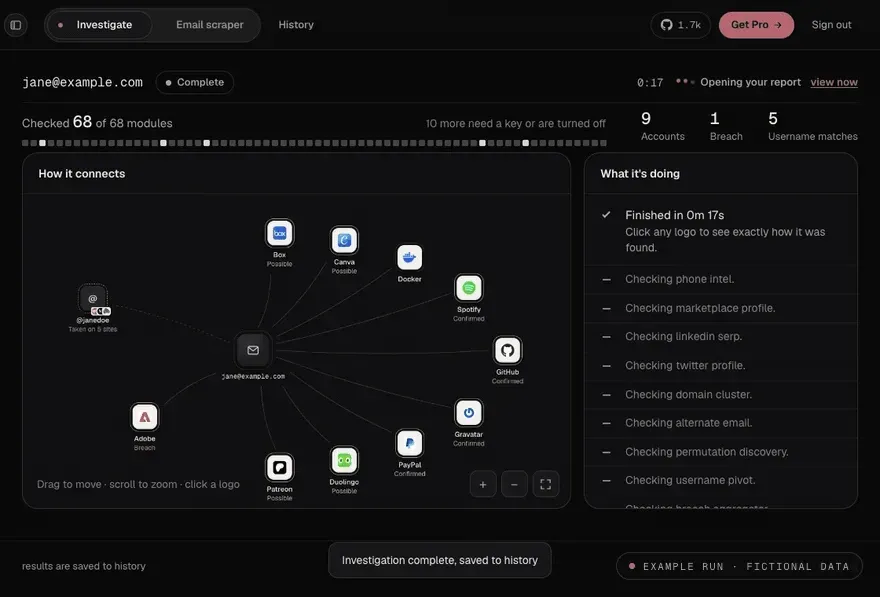
Internally, the backend runs investigations in ordered phases, streams progress over a WebSocket, merges module results into identity clusters, and stores investigations, module runs and findings with SQLAlchemy 2.0 in SQLite by default or in PostgreSQL. Each module is one Python file that inherits a shared base class and returns a status of success, partial, failed or skipped, as documented in the architecture notes. Related open-source tools in the iThub directory include Blackbird and Sherlock for account lookups and theHarvester for domain reconnaissance.
Key capabilities
- Account checks behind an email The investigation runs about 340 sign-up and login checks on public, logged-out pages, then a username sweep over the 746 strongest platforms from a list of more than 5,300. The platform list documents each method. A slower second wave of fragile platforms is optional and adds roughly 90 to 150 seconds according to the self-hosting reference.
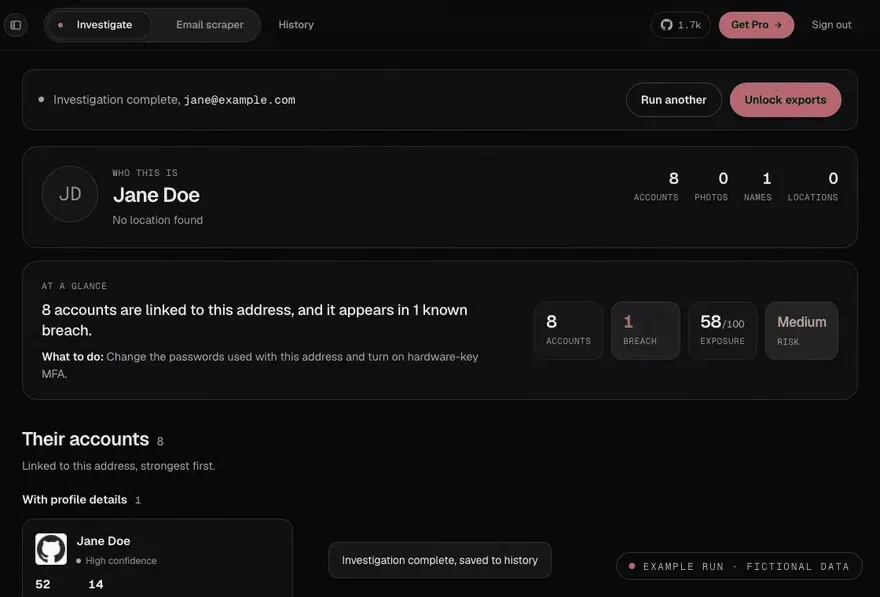
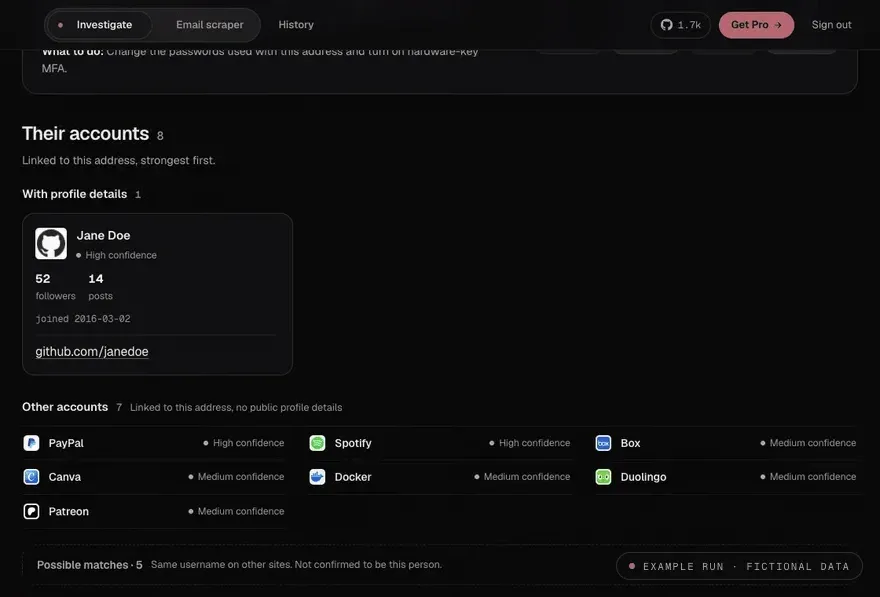
- Graded findings with their evidence Every finding records the check that ran, what the site returned, why it counts and a grade: Confirmed, Likely, Possible or Username match. The web report separates accounts with profile details from accounts that are only linked to the address, and lists same-username matches on other sites as possible matches that are not confirmed to be the same person.
- Identity and name consensus MailAccess builds a name consensus from independent sources and clusters profiles by avatar hashes, bio similarity, shared usernames and coordinated sign-up windows. With an operator Google credential it reads the name and photo Google shows for an address; with an Oxylabs key it searches for Instagram, Facebook and LinkedIn profiles that match the address.
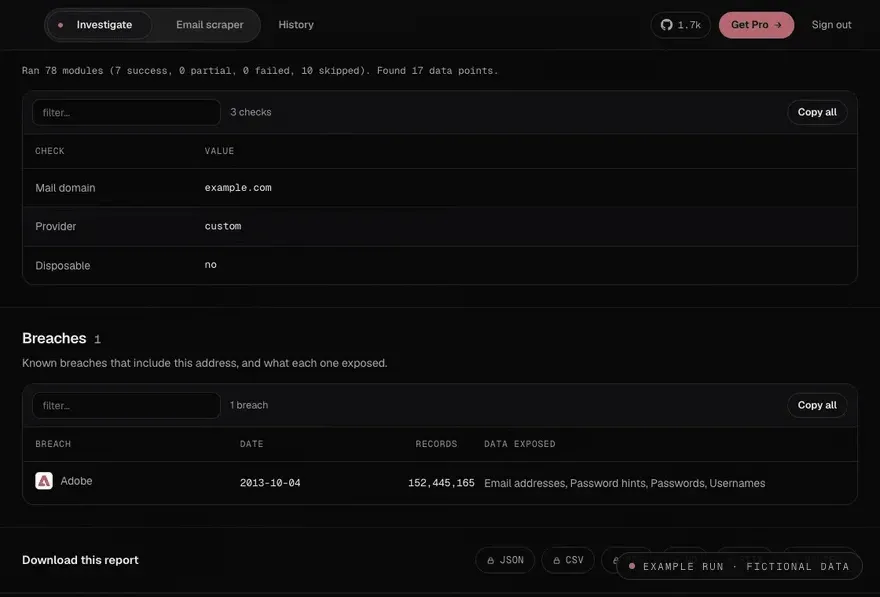
- Defender's Brief and risk scores Each report includes an exposure score out of 100, a risk level, a credential risk score and a Defender's Brief with a suggested next action. Breach records list the breach name, date, record count and the data classes exposed. The Defender's Brief can be turned off in the CLI with
SHOW_DEFENDERS_BRIEF=false. - Email scraper for a domain
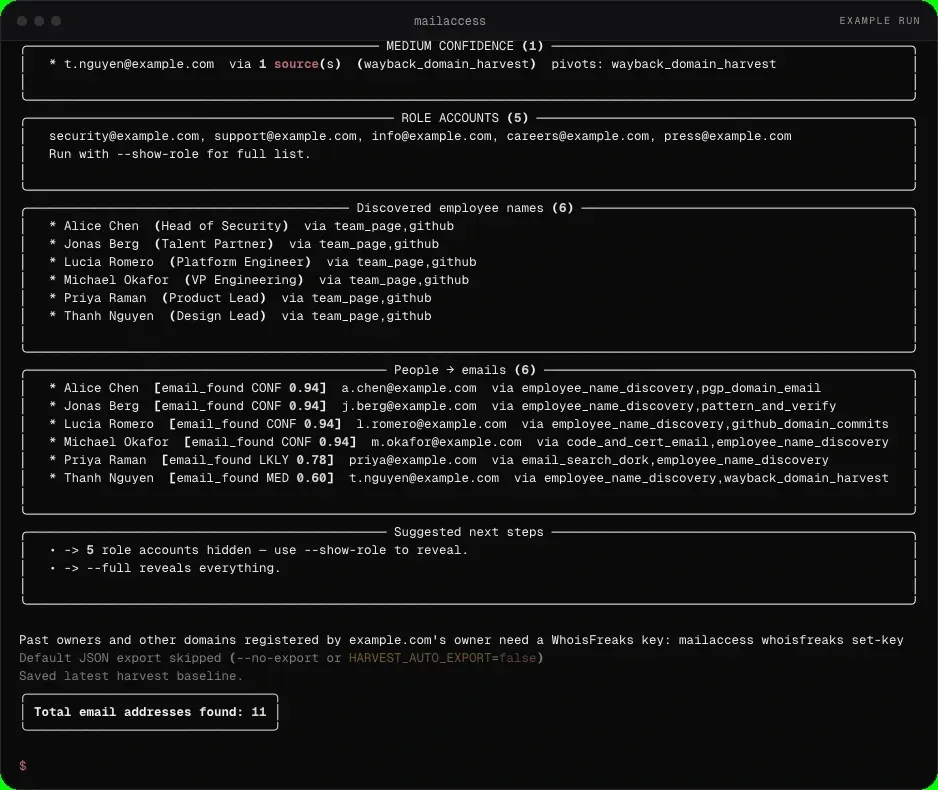
mailaccess harvest-emails --domain example.comcollects public addresses at a domain from sources such as Common Crawl, GitHub, certificate logs, keyservers, team pages and address patterns. The harvest guide describes high, medium and low confidence tiers, a separate list of role accounts, discovered employee names and exports to JSON, CSV or NDJSON. A--skip-moduleoption disables one source for a single run. - Address finder from a name
mailaccess find-email --name "Jane Doe" --domain example.comreturns one graded likely address for a person at an employer domain. Per the README it works offline from a bundled company pattern index covering about 384,000 domains. - MailAccess Index and account key
mailaccess loginsaves a free account key. Harvests then also query the MailAccess Index through mailaccess.pro, with 5 harvests a day and 30 a month on the free plan and higher limits on Pro. Without a key, a harvest only reports how many addresses the index holds for the domain, sending the domain alone. - Optional API keys Twelve of the 82 modules need a key. Providers documented in the API keys reference include Have I Been Pwned, DeHashed, Snusbase, Netlas, ipgeolocation.io, WhoisFreaks, Oxylabs, Hunter and SerpAPI. Keys are set with
mailaccess keys set NAME valueor in the.envfile, and keyed modules skip themselves when no key is present. - Seven export formats Reports export to JSON, CSV, HTML, PDF, Markdown, STIX 2.1 and a Maltego CSV for graph import, from the CLI with
-o report.htmlor throughGET /api/report/{id}/export?format=. The export reference notes that the HTML report is self-contained, opens in a browser and needs no PDF extras. - REST API and live events The backend exposes
POST /api/investigate, report, cluster and graph endpoints, lead endpoints per domain and a WebSocket at/ws/investigate/{id}for live run events, documented in the API reference. SettingMAILACCESS_API_KEYrequires anX-API-Keyheader on all/api/routes. - Maltego transform server A local transform endpoint at
POST /maltego/email_investigateaccepts an EmailAddress entity from Maltego Desktop, runs an investigation with a 55-second timeout and returns entities. A configuration bundle,MailAccess.mtz, is generated on startup for import. The endpoint is exempt from API key authentication and is intended for localhost use. - Pipelines and CI Passing
-as the address reads one email per line from stdin, and--format jsonlstreams findings as newline-delimited JSON. Exit codes distinguish no findings (0), findings present (1), active breaches (2) and errors (3), and the integrations guide includes a GitHub Actions example. Slack, Discord and generic webhooks can be notified when an investigation completes. - Installation with pip
pip install mailaccessinstalls the CLI, which starts and stops its own backend for each run;mailaccess servekeeps one server running for repeated investigations.mailaccess doctorchecks the setup andmailaccess upgradeupdates the package. The website lists Python 3.10 or later, 2 GB of RAM and 1 GB of disk for this path. - Self-hosting with Docker Compose The development compose file runs the backend on port 8000 and the frontend on port 3000 with hot reload, while
docker-compose.prod.ymlserves the built frontend through nginx on port 80 with health checks and automatic restarts. SQLite is the default database; apostgresprofile adds PostgreSQL 16 through the asyncpg driver, and migrations run automatically on startup. The guide lists 512 MB of RAM as the minimum and 1 GB when all modules run concurrently. - Proxy, Tor and local-only mode
PROXY_URLroutes outbound requests through an HTTP or SOCKS5 proxy, including a local Tor port, and ScrapingAnt routing can be enabled separately for harvests.mailaccess --local-only,mailaccess local-only enableorMAILACCESS_LOCAL_ONLYstops the calls the tool makes on its own: the coverage teaser, sponsor feed, founder-seat counter and PyPI update check. OSINT checks still run in that mode. - False-positive controls The false-positive documentation covers a common-name filter, disposable-domain detection, catch-all detection on username platforms, multi-language password-reset signals and a platform health record kept in SQLite that skips platforms with failing probes.
MAILACCESS_DISABLE_HEALTH=1bypasses those skip decisions without deleting the history. - Hosted app and paid plans The pricing page lists a free hosted plan with 3 investigations and 2 scrapes a month, with photos and location blurred and no exports. Pro costs $9 a month plus tax and adds photos, location, every export, 30 investigations and 10 scrapes a day, at least 150,000 business contacts a month and the
/v1/enrichAPI. Agency costs $24 a month or $240 a year for 3 seats and adds outreach lists and CRM sends; self-hosted use has no quota. - MailAccess for Gmail extension The Gmail extension shows a sender check next to an open message (checks passed, be careful, or a count of red flags) covering lookalike domains, brand names on the wrong domain, new domains and diverging reply-to addresses. A Find out button looks up the likely person, with 3 lookups a month on a free account. It is listed on the Chrome Web Store and as a zip on GitHub for Chrome, Edge, Brave and Arc.
Where MailAccess fits
Pentest reconnaissance
The MailAccess website lists mapping a target's footprint before an engagement as a primary use, and the disclaimer ties penetration testing to explicit written authorization from the target organization. A typical run combines harvest-emails on the client domain with investigate on selected addresses, and exports the results as STIX 2.1 or Maltego CSV for the engagement record. Proxy and Tor routing are configured in the .env file of a self-hosted instance.
Personal exposure audits
Running mailaccess investigate you@example.com on one's own address lists the platforms where it appears to be registered, the breaches that include it and an exposure score with a Defender's Brief. The breach table shows what each breach exposed, such as password hints or usernames, and the credential risk score feeds the suggested action, for example changing passwords and enabling hardware-key MFA in the published example report.
Listing public addresses at an organization
The domain harvester gathers public addresses from crawl archives, code hosts, certificate logs, keyservers and team pages, then grades each candidate and separates role accounts such as security@ or press@ from personal addresses. With a free account key the MailAccess Index adds addresses it has seen on the public web; with a Pro key, business contacts with name, role and LinkedIn appear in their own view and, per the README, never enter exports, the local database or history.
Resolving a likely address from a name
When a person's name and employer domain are known, find-email applies the company's address pattern from the bundled index and returns one graded result. The false-positive documentation states that every pattern-derived address is stamped as unverified and capped below the confirmed band, so an inferred address is graded likely at most, and a person already resolved to an observed on-domain address receives no guessed address.
Investigations inside existing tools
Analysts working in Maltego import the generated MailAccess.mtz bundle and run the MailAccess transform on an EmailAddress entity; investigations longer than 55 seconds return partial results while the full run continues in the web interface. Scripted workflows read targets from stdin, stream JSONL into tools such as jq, and branch on exit codes in CI jobs, and Slack, Discord or webhook notifications report completed runs.
Checking the sender of an email
The Gmail extension evaluates the sender line and the receiving server's checks in the browser and labels the message as passed, be careful, or with a number of red flags. Per the extension page, only the sender's address and name, the reply-to and bounce addresses, those check results and the domain of the message ID are sent to MailAccess; the subject, body, attachments and other recipients stay in the browser.
Install
pip install mailaccessReviews of MailAccess
Be the first to share your experience with MailAccess.
Write a review
Loading review form…
Found MailAccess useful? Upvote it todayYour vote helps other IT teams find it in the daily ranking.