At a glance
- Best overall
- SuniPDF: desktop editor with annotation threads, measurements, form tools and local OCR
- Best for many platforms and scripting
- PdfCraft (formerly PrintCraft): Windows, macOS, Linux, FreeBSD and web, with a CLI and MCP server
- Best for self-hosted servers and APIs
- Stirling PDF: desktop, browser and server editions with a REST API
- Licences
- SuniPDF and PdfCraft: MIT or Apache-2.0. Stirling PDF: MIT for most code, separate licences for some directories (open-core)
- Platforms
- SuniPDF: Windows, Ubuntu, macOS on Apple silicon. PdfCraft: Windows, macOS, Linux, FreeBSD, web. Stirling PDF: Windows, macOS, Linux, browser, Docker, Kubernetes
- Price
- SuniPDF and PdfCraft: free. Stirling PDF: free plan; Team $99 per month for 100 users; Enterprise custom
- Versions compared
- SuniPDF 0.94.0, PdfCraft 0.21.1, Stirling PDF 3.3.0
- Last checked
- November 14, 2026
On this page
- How iThub picked these PDF editors
- 1. SuniPDF: best overall for local annotation, editing and plan review
- 2. PdfCraft: best for broad platform coverage and scripted workflows
- 3. Stirling PDF: best for self-hosted servers, batch processing and APIs
- Comparison table
- Which PDF editor should you choose?
- Limitations of this ranking
- Summary
The three best open-source PDF editors in iThub's editorial ranking are SuniPDF, PdfCraft and Stirling PDF. SuniPDF suits people who annotate, edit and measure PDFs offline on a desktop. PdfCraft suits users who want one free editor across Windows, macOS, Linux, FreeBSD and the browser. Stirling PDF suits teams that self-host PDF processing behind an API.
All three can be used without paying and can process documents on hardware the user controls. They differ in licence, platforms, annotation depth and how much works without a server. This guide compares them on annotation, editing, forms, signatures, OCR, conversion, privacy, platforms, licences and pricing.
How iThub picked these PDF editors
This ranking is iThub's editorial evaluation, built from each project's official documentation, release notes, source repositories and pricing pages. iThub did not run hands-on lab tests or benchmarks of these applications, so the comparison describes documented features and the limits each project states about itself.
The criteria were:
- Annotation tools Text markup, drawing, shapes, stamps, comment threads and standard PDF annotation output.
- Page and content editing Existing text and objects, added text and images, page organization.
- Forms and signatures Filling and creating fields, data exchange, visual and certificate signatures.
- OCR Whether text recognition runs locally and in which languages.
- Conversion To and from Office formats and images.
- Privacy and offline use Accounts, telemetry and where files are processed.
- Platforms Operating systems, browser and server options, and installer signing.
- Licence and cost Licence terms and paid tiers.
- Project activity Release cadence and the maturity each project reports.
Because the question is which tool works best as an editor and annotator, annotation, editing, forms and offline use carried the most weight; server automation counted less.
1. SuniPDF: best overall for local annotation, editing and plan review
SuniPDF is a free, open-source PDF reader and editor for Windows, Ubuntu and macOS, built in Rust with egui and the PDFium rendering library. Its README describes one desktop application for reading, annotation, page editing, calibrated measurements and quantity review, with PDF processing kept on the computer. The interface is available in English and French, and a JSON command-line interface (CLI) ships with the desktop app.
SuniPDF ranks first because its documentation describes the most detailed desktop annotation and editing toolset of the three, including review states, annotation templates and calibrated measurements, its OCR runs locally on Windows and Ubuntu without downloading models or uploading pages, and it needs no account, no subscription and no server.
- Editing The Edit a PDF tool changes the page content itself. Users can select, move, resize, rotate and reorder text, image and path objects, add text in standard or embedded system fonts, insert images and shapes, and edit existing upright text in place with F2 or a double-click.
- Pages Rotate, delete, insert, reorder, crop, merge, split and extract pages, author page labels, and add text or image watermarks, page numbers and headers and footers in six zones.
- Forms Fill and create AcroForm text, checkbox, radio, combo and list fields, exchange values as JSON, XFDF or FDF, and flatten forms. XFA forms are detected and read-only, and form scripts are never run.
- Signatures Drawn, typed or imported visual signatures on every platform, and certificate signatures from PFX or P12 files on Windows, written to a new copy. Verification is offline by default.
- OCR Local English and French recognition adds an invisible text layer for search and copy. Windows packages bundle Tesseract and its fast models, and Ubuntu uses the system Tesseract.
- Conversion Images to PDF, PDF to PNG and text, simple PDF to DOCX, XLSX and PPTX exports, and Office to PDF on Windows through an installed LibreOffice.
- Security and privacy AES-128 and AES-256 encryption, redaction with preview and sanitized copies. The FAQ states that no account is required and that there is no telemetry.
- Plan review Calibrated lengths, perimeters, areas with deductions, volumes, angles and counts, with quantity tables and PDF, CSV, JSON or XLSX reports.
Annotation tools
The Add comments tool combines text markup (highlight, underline, strikethrough and sticky note) with what the user guide calls real PDF annotations, which other readers show too: grouped freehand ink of up to 64 strokes, free text boxes with size, colour, background and border settings, rectangles, ellipses, lines and arrows with optional dashed borders, and links. The feature matrix adds polygons, polylines, revision clouds, stamps and file attachments.
The Comments panel groups annotations into threads with author, date, replies and a review status of None, Accepted, Rejected, Cancelled or Completed. Markups can be saved as templates in a local annotation library. Version 0.94.0 saves highlight, underline, strikeout and note annotations with an appearance stream, so readers that do not draw these annotations themselves still display them. The annotate, reply and review-state CLI commands create the same kinds of markup from scripts.
Platforms, licence and pricing
Version 0.94.0, published on November 7, 2026, ships an MSI installer and a portable ZIP for Windows 10 and 11 on x64, a portable ZIP for Windows on ARM64, a DEB package for Ubuntu 22.04 and 24.04 on amd64, and a DMG for macOS 12 or later on Apple silicon. Each file has a SHA256 checksum. SuniPDF is free and dual-licensed under MIT or Apache-2.0.
Limitations stated by the project
- Windows packages are unsigned, the macOS DMG is ad hoc signed but not notarized, and the ARM64 build has not been run on physical ARM64 hardware.
- On macOS, OCR, native printing, certificate signing, Office import and automatic update installation are unavailable. On Ubuntu, printing, certificate signing and Office import are unavailable.
- OCR covers English and French only, and its accuracy depends on the scan.
- PDF to Office exports do not rebuild complex layouts, formulas or editable slides, and timestamp creation and long-term validation (LTV) of signatures are not supported.
- The project is at version 0.x, and its README states that the remaining 1.0 release criteria are still open.
Best for: individuals and small teams who annotate, edit, fill and review PDFs offline on Windows, Ubuntu or Apple silicon Macs, including people who measure technical plans.
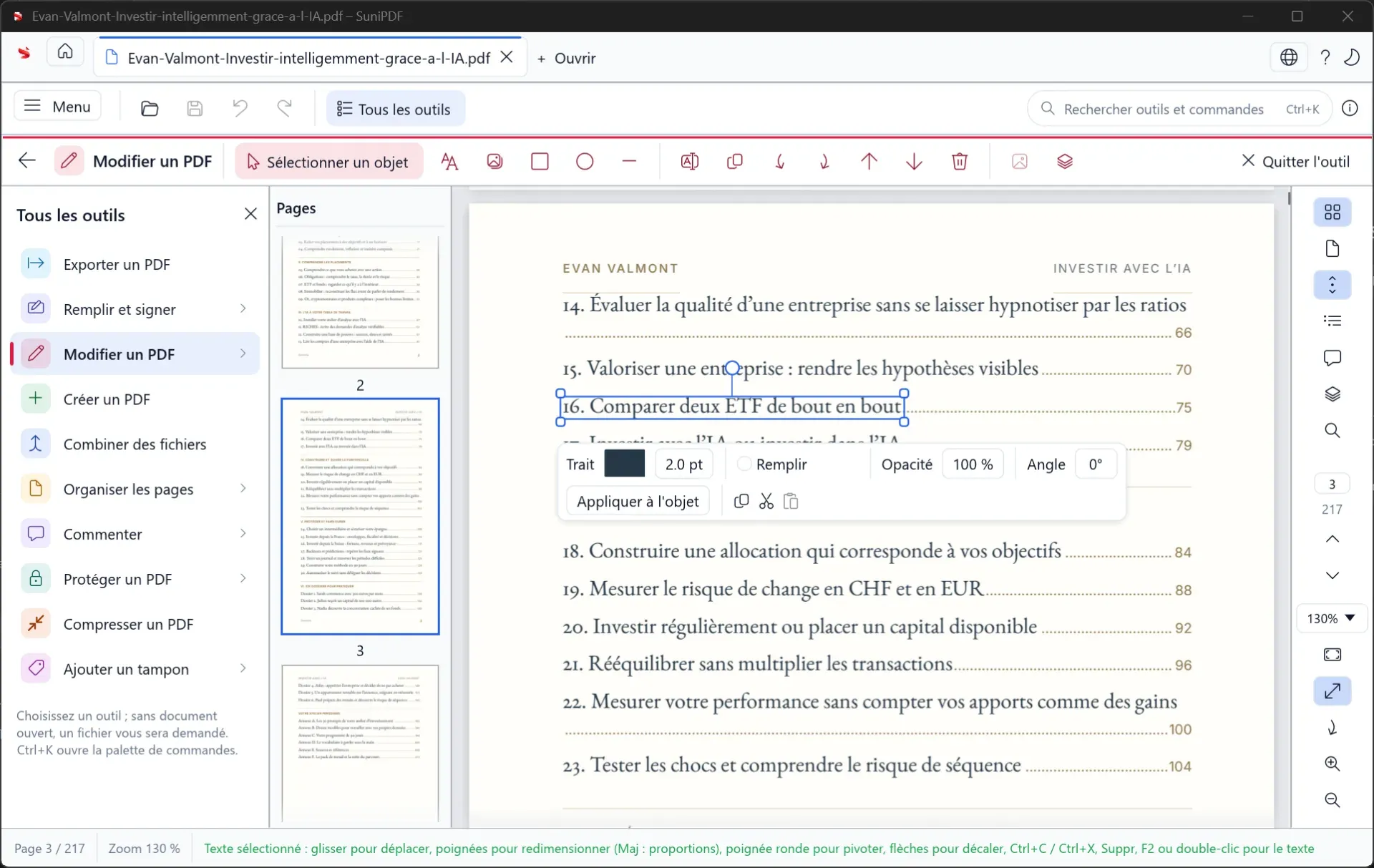 SuniPDF's Edit a PDF tool, shown in an earlier French-language version: a selected text object with resize and rotate handles, and the bar for stroke, fill, opacity and angle.
2. PdfCraft: best for broad platform coverage and scripted workflows
PdfCraft is an open-source PDF reader and editor written from scratch in Rust by the ArtCraft team. It was first released as PrintCraft and renamed PdfCraft on October 7, 2026, and the old getartcraft.com/apps/printcraft address now redirects to the PdfCraft page. One codebase runs natively on macOS, Windows, Linux and FreeBSD, and in the browser through WebAssembly.
PdfCraft ranks second. Its documented comment, form and signature tools are close to SuniPDF's, and it covers more platforms with signed installers. The project labels itself alpha, however, and lists reliable editing of existing text, Office import and export, and OCR beyond Latin script as thin or missing.
- Editing Edit text & images changes text and pictures already on the page, and new text, images, headers and footers, watermarks, backgrounds, links, Bates numbering and file attachments can be added.
- Pages The Organize pages grid rotates, deletes, inserts, replaces, extracts, duplicates and crops pages. Combine files merges PDFs with one bookmark per file, and Split divides a document every n pages or before chosen pages. Links, form fields, layers and attachments are carried over.
- Forms Fill fields with a Fields panel, fill and sign flat forms with text, checkmarks and dates, detect or add fields (including date, image and signature fields), and import or export form data. Form scripts run in a sandbox with no file or network access.
- Signatures Typed, drawn, image or scanned signatures and initials through Fill & Sign, plus digital ID signing, certification and validation in the Use a certificate tools.
- OCR Scan & OCR recognizes one file or many. The OCR Verify screen colours each word by confidence so corrections happen before the text is added, and Enhance scanned file removes backgrounds, edge shadows and specks.
- Conversion Export to Word, PowerPoint, RTF, HTML, text or images, create PDFs from images, other files or the clipboard, and reduce file size.
- Security and privacy Opening RC4 to AES-256 encrypted files, password protection, removal of hidden information, redaction and sanitizing. The README states no account, no telemetry and no cloud processing.
- Saving and automation Saves append changes and leave the original bytes untouched, with autosave every minute.
pdfcraft-cli, an opt-in MCP server for AI agents and a Rust API expose the same tools.
Annotation tools
Add comments offers sticky notes, highlight, underline, strikethrough and squiggly underline, text boxes, freehand drawing, rectangles, ovals, lines and arrows. Add a stamp places a stamp from a palette, and Measure objects records distance, perimeter and area. Every comment is listed by page in the Comments panel, where users can jump to it or reply, and Flatten comments makes comments part of the page. Through the CLI and MCP tools, agents can add, reply to, restyle and delete comments.
Platforms, licence and pricing
Release 0.21.1, published on November 12, 2026, provides MSI installers and portable ZIPs for Windows, a universal macOS DMG for Apple silicon and Intel, AppImage, Flatpak, DEB, RPM and tarball builds for Linux on x86_64 and ARM64, RISC-V builds, a FreeBSD build and a static web build. The README states that Windows installers and executables are code-signed and that the macOS app is signed and notarized. PdfCraft is dual-licensed under MIT or Apache-2.0 and free on every platform; the ArtCraft name and logos are trademarks outside that licence.
Limitations stated by the project
- PdfCraft is alpha. The README's October 2026 self-assessment puts readiness for everyday work at about 55%.
- Editing existing text works best on simple pages and is weak on complex layouts, right-to-left scripts and Chinese, Japanese or Korean text.
- OCR works best on Latin-script languages, and Word exports do not keep layout well.
- The documentation advises using another tool to redact sensitive documents before sharing them while PdfCraft is in alpha.
- Pages are currently drawn by the hayro crate while the project builds its own renderer, and fuzzing still finds crashes and hangs on hostile files.
Best for: users who need one free editor across several operating systems or in a browser, and developers who want to drive PDF tasks from scripts or AI agents.
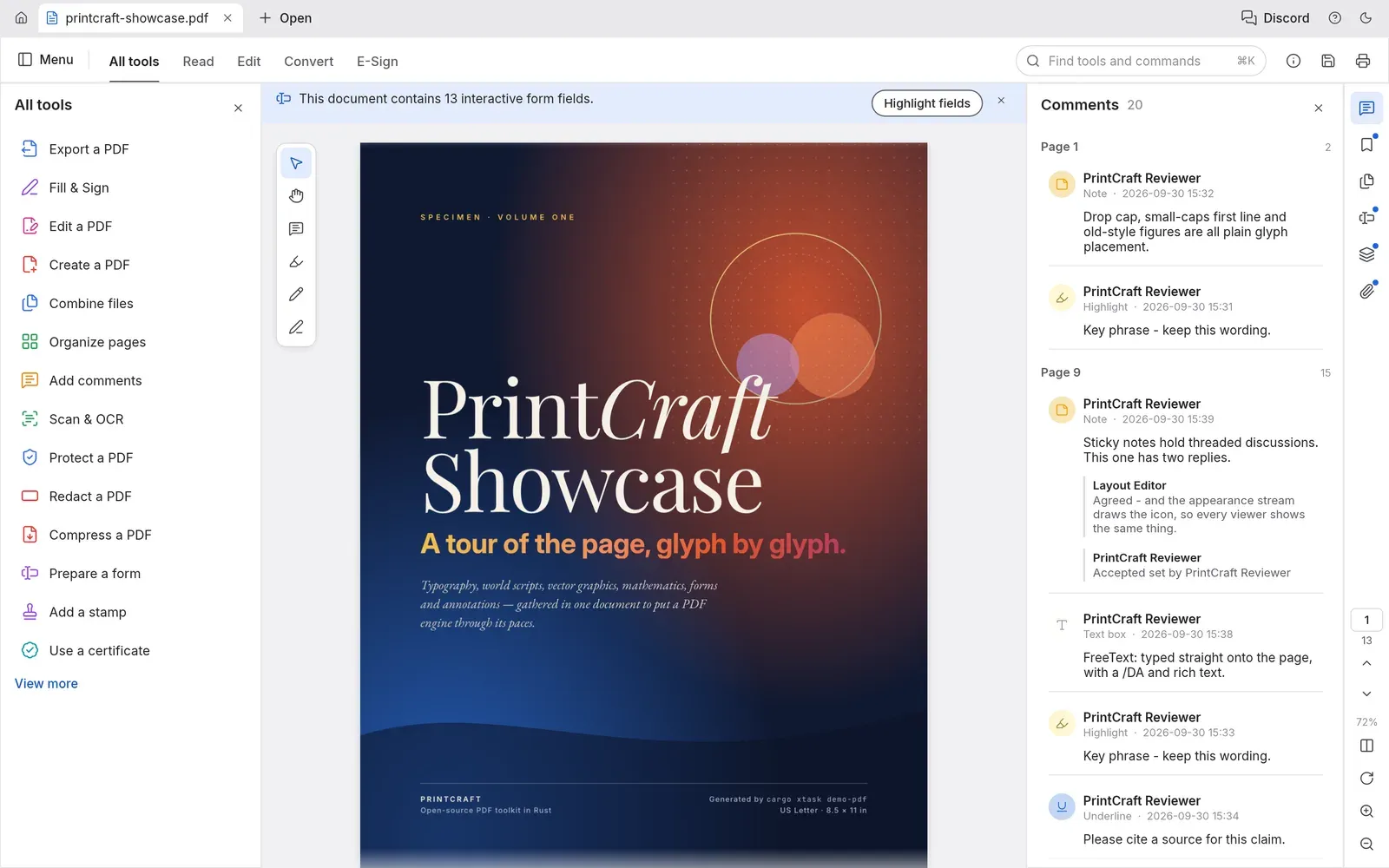 PdfCraft's viewer with its showcase PDF, still titled PrintCraft from before the rename, the All tools panel and a Comments panel with 20 comments, including notes, highlights, a text box and threaded replies.
3. Stirling PDF: best for self-hosted servers, batch processing and APIs
Stirling PDF is a PDF platform from Stirling PDF Inc. that runs as a desktop app, in the browser, or on a self-hosted server with a private API. Its README lists more than 50 PDF tools, an interface in more than 40 languages, no-code automation pipelines and REST APIs for nearly all tools. The repository dates from January 2023, the longest history of the three, and version 3.3.0 was released on November 5, 2026.
Stirling PDF ranks third in this editor-focused ranking. It has the largest tool catalogue and the only documented self-hosted server, REST API and single sign-on (SSO) of the three. In its desktop app, however, OCR and several conversions usually need Stirling Cloud or a server, the project is open-core, and team features are paid.
- Editing The PDF Text Editor edits existing text and images, and Add Text, Add image and Add Stamp to PDF (with dynamic variables such as the date or page number) add content.
- Pages Merge, split (by pages, chapters, size, count or QR code divider sheets), reorganize, rotate, auto-rotate, crop, booklet imposition and page numbers.
- Forms Form Editor fills, creates and modifies fields, Auto Form Detection makes flat PDFs fillable, and entered values export as JSON, CSV or XLSX.
- Signatures Sign adds drawn, typed, uploaded or phone-captured visible signatures. Sign with Certificate accepts PKCS12/PFX, PEM and JKS files, and the desktop app can also use the Windows certificate store or PKCS#11 tokens. Timestamp PDF adds RFC 3161 timestamps, and Validate PDF Signature checks existing ones.
- OCR OCR / Cleanup scans offers Auto, Force and Strict modes, deskewing and cleaning. On a server it uses OCRmyPDF or Tesseract, and the standard Docker images include English, German, French, Portuguese and Simplified Chinese.
- Conversion Office, image, HTML, Markdown, email and eBook files to PDF, and PDF to Office, text, image, HTML, PDF/A, PDF/X, PDF/UA and eBook formats. Version 3.3.0 upgraded the Stirling Office Convert converter, still in beta.
- Redaction and automation Automatic redaction by words or regular expressions, manual redaction, saved tool chains, an MCP server and the REST API.
- Privacy In the desktop app's Local Only mode, every tool runs on the computer and nothing is uploaded. Usage analytics are opt-in, and the project states that document contents are never sent.
Annotation tools
The Annotate tool opens the viewer with tools grouped as Text Markup (highlight, underline, strikeout, squiggly), Drawing (pen, freehand highlighter), Shapes (square, circle, line, polygon), Comments (comment, insert text, replace text) and Notes & Stamps (text box, note, add image). Version 3.2.2 added arrow and polyline shapes. The Comments sidebar lists comments by page with replies and search. Annotations are saved as standard PDF annotations that other readers can show.
Platforms, licence and pricing
The desktop app installs on Windows 10 and 11 (x64 MSI, winget, Scoop, or an ARM setup), macOS 10.15 or later on Apple silicon and Intel (DMG or Homebrew), and Linux x86_64 (DEB, RPM, AppImage or the AUR). The server runs from Docker, Kubernetes or a JAR file. The LICENSE file applies MIT to most of the code, while directories such as app/proprietary and engine have their own licences. The pricing page lists a Free plan at $0 per month with 60+ tools and 1,000 monthly automation credits, Team at $99 per month with 100 users and SSO, and custom Enterprise terms. A self-hosted server on the Free plan allows 5 users.
Limitations stated by the project
- In the desktop app, OCR, Office, eBook and HTML conversions to PDF, and PDF to Word, PowerPoint or PDF/A usually need Stirling Cloud or a server. Local Only mode blocks them.
- The text editor warns that fonts and layout can shift.
- A visible signature from Sign can be copied by anyone; proof of identity needs certificate signing.
- Clustering needs a Team or Enterprise licence, and SAML SSO and the full audit log need Enterprise. The ultra-lite Docker image has no OCR.
- Measurement tools are not documented.
Best for: organizations that want a self-hosted PDF service with SSO, batch processing and an API, and users who need many conversion and page tools in one interface.
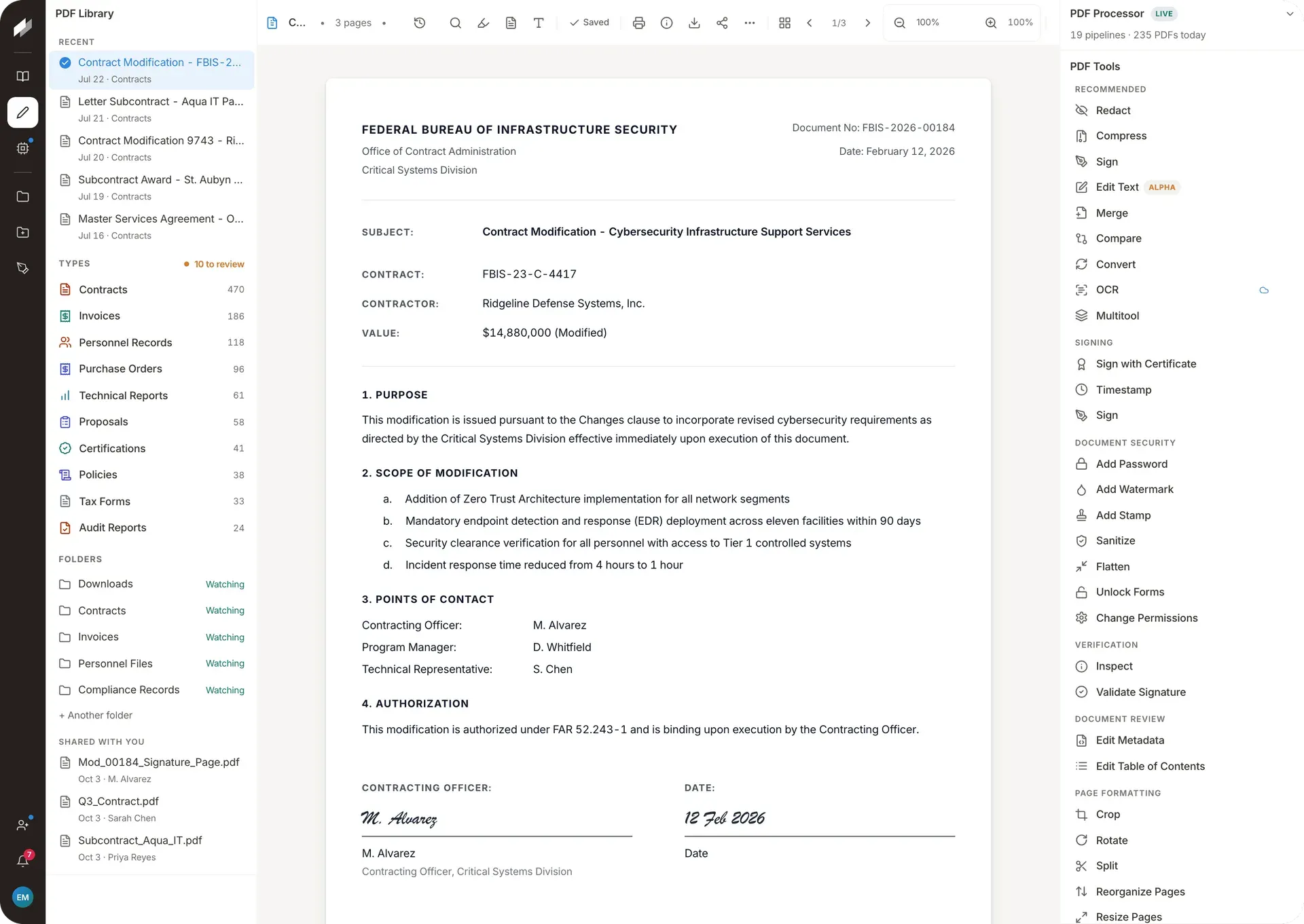 Stirling PDF's editor from the official website: a sample contract in the viewer, the PDF Library with document types and watched folders, and the PDF Tools list, where OCR carries a cloud icon.
Comparison table
The table lists documented features only. "Partial" means a documented restriction applies, as explained above.
| Feature | SuniPDF 0.94.0 | PdfCraft 0.21.1 | Stirling PDF 3.3.0 |
|---|---|---|---|
| Highlight, underline, strikeout | Yes | Yes | Yes |
| Sticky notes and text boxes | Yes | Yes | Yes |
| Freehand drawing | Yes | Yes | Yes |
| Shapes (rectangle, ellipse, line, arrow) | Yes | Yes | Yes |
| Stamps | Yes | Yes | Yes |
| Comment replies | Yes | Yes | Yes |
| Measurement tools | Yes | Yes | Not documented |
| Edit existing text | Yes | Partial | Yes |
| Organize, merge and split pages | Yes | Yes | Yes |
| Fill forms | Yes | Yes | Yes |
| Create form fields | Yes | Yes | Yes |
| Visual signatures | Yes | Yes | Yes |
| Certificate signatures | Partial | Yes | Yes |
| OCR inside the desktop app without a server | Partial | Yes | Partial |
| Office to PDF | Partial | Partial | Yes |
| PDF to Office | Partial | Partial | Yes |
| Redaction | Yes | Yes | Yes |
| Works offline without an account | Yes | Yes | Partial |
| Windows, macOS and Linux | Partial | Yes | Yes |
| Browser version | Not documented | Yes | Yes |
| Self-hosted server with REST API | Not documented | Not documented | Yes |
| Command-line interface | Yes | Yes | Not documented |
| MCP server for AI agents | Not documented | Yes | Yes |
| Whole codebase under an OSI licence | Yes | Yes | Partial |
| Free of charge | Yes | Yes | Partial |
Which PDF editor should you choose?
Annotating and reviewing PDFs on a desktop
SuniPDF is the first choice for reading, marking up and replying to comments without a network connection. PdfCraft offers a comparable comment toolset on systems SuniPDF does not cover, such as Intel Macs, FreeBSD or Linux distributions other than Ubuntu.
Technical drawings and quantity takeoff
SuniPDF documents calibrated scales, vector snapping, area deductions, counts, quantity tables and revision overlays. PdfCraft's Measure objects tool covers distance, perimeter and area. Stirling PDF documents no measurement tools.
Mixed operating systems, signed installers or a browser build
PdfCraft has the widest native platform list, a static web build for any web server, and code-signed Windows and notarized macOS packages.
A team server, batch processing or an API
Stirling PDF is built for this case, with Docker and Kubernetes deployment, SSO, a REST API for nearly all tools and saved automation chains. A self-hosted Free plan covers up to 5 users.
Privacy and offline work
SuniPDF and PdfCraft process files locally, and their documentation states no account and no telemetry. Stirling PDF's Local Only mode keeps files on the computer but blocks tools that need a server, so using its full catalogue without Stirling Cloud requires a self-hosted server.
Narrower tasks
For splitting and merging only, PDFsam Basic is a free, open-source tool focused on those tasks. For reading PDFs, eBooks and comics on Windows without editing, SumatraPDF is a small, free reader.
Limitations of this ranking
- The ranking reflects documented features of SuniPDF 0.94.0, PdfCraft 0.21.1 and Stirling PDF 3.3.0 as of November 14, 2026. All three release often, so features can change within weeks.
- Documentation describes what each project says its software does, not rendering fidelity, speed or reliability on a given set of files.
- SuniPDF and PdfCraft are at 0.x versions, and PdfCraft describes itself as young and in alpha. Stirling PDF has the longest release history of the three.
- The weighting favours desktop annotation, editing and offline use. A ranking focused on server deployment, batch processing or SSO would place Stirling PDF first.
- Some features depend on platform or edition, such as SuniPDF's Windows-only certificate signing or Stirling PDF's paid tiers.
Summary
SuniPDF ranks first for its annotation threads, page content editing, form tools, local OCR on Windows and Ubuntu and plan measurements, all free under MIT or Apache-2.0. PdfCraft, formerly PrintCraft, ranks second with similar comment, form and signature tools on more platforms, as an alpha with stated gaps in text editing, OCR languages and Office conversion. Stirling PDF ranks third for desktop editing and leads for self-hosted, API-driven and batch work, as an open-core project with a free plan and paid team tiers. The iThub profiles of SuniPDF, PdfCraft and Stirling PDF list their current versions and related tools.
Frequently asked questions
What is the best open-source PDF editor for annotation?
In iThub's editorial ranking, based on official documentation as of November 14, 2026, SuniPDF ranks first for annotation. It documents text markup, sticky notes, grouped freehand ink, free text boxes, shapes with dashed borders, polygons, revision clouds, stamps, threaded replies with a review status and a reusable annotation library, plus calibrated measurements. PdfCraft offers a similar comment toolset on more platforms, and Stirling PDF includes markup, drawing, shape, note and comment tools in its viewer.
Is Stirling PDF fully open source?
Stirling PDF describes itself as open-core. Its LICENSE file applies the MIT License to most of the repository, while directories such as app/proprietary, engine and several frontend folders have separate licences. The Free plan includes 60+ PDF tools on web, desktop and self-hosted setups, and a self-hosted server on that plan allows 5 users. The Team plan costs $99 per month for 100 users, and Enterprise terms are agreed with the vendor.
Which open-source PDF editor works fully offline?
SuniPDF and PdfCraft both process PDFs on the computer, with no account and, according to their documentation, no telemetry. SuniPDF's OCR runs locally on Windows and Ubuntu but is not available on macOS. PdfCraft's release builds include the models its OCR needs. Stirling PDF's desktop app has a Local Only mode in which nothing is uploaded, but OCR and several conversions are blocked there because they usually need Stirling Cloud or a server.
Can these open-source PDF editors add digital signatures?
Yes, with differences. SuniPDF adds drawn, typed or imported visual signatures on every platform, and certificate signatures from PFX or P12 files on Windows only. PdfCraft supports typed, drawn, image or scanned signatures, plus digital ID signing, certification and validation. Stirling PDF offers visible signatures, certificate signing with PKCS12, PEM or JKS files, the Windows certificate store or PKCS#11 tokens in its desktop app, and RFC 3161 timestamps.
Do these PDF editors include OCR for scanned documents?
All three document OCR. SuniPDF recognizes English and French text locally on Windows and Ubuntu and adds an invisible text layer. PdfCraft's Scan & OCR shows recognized words coloured by confidence so they can be corrected before the text is added, and it works best on Latin-script languages. Stirling PDF uses OCRmyPDF or Tesseract on a server, with five languages in the standard Docker images, and its desktop app usually needs Stirling Cloud or a server for OCR.
Was PdfCraft renamed from PrintCraft?
Yes. The project was first released as PrintCraft and renamed PdfCraft in a commit dated October 7, 2026. The current official name on GitHub, on the ArtCraft website and in release 0.21.1 is PdfCraft, and the old getartcraft.com/apps/printcraft address now redirects to the PdfCraft page. Some screenshots published by the project, including its showcase document, still show the earlier PrintCraft name.
Tools in this article
 PdfCraftOpen-source Rust PDF reader and editor for desktop and web, with a CLI, opt-in MCP server and Rust API
 SuniPDFLocal PDF reader and editor with plan measurements and a JSON CLI
 Stirling PDFOpen-core PDF editor and processor for desktop, browser and self-hosted servers, with REST API and MCP
- PBPDFsam BasicFree desktop tool to split, merge, mix, rotate and extract PDF pages
- SSumatraPDFAn open-source reader for PDF, ebooks, comics and other document formats on Windows.
Facts link to their official sources. Product details can change after publication: report an error or read the editorial methodology.

Written by
Emanuel DE ALMEIDA
Geneva-based entrepreneur, IT consultant and creator of SuniPDF and SuniCapture. Emanuel shares practical IT, cybersecurity and software insights on iThub.