What is Answer me with HTML?
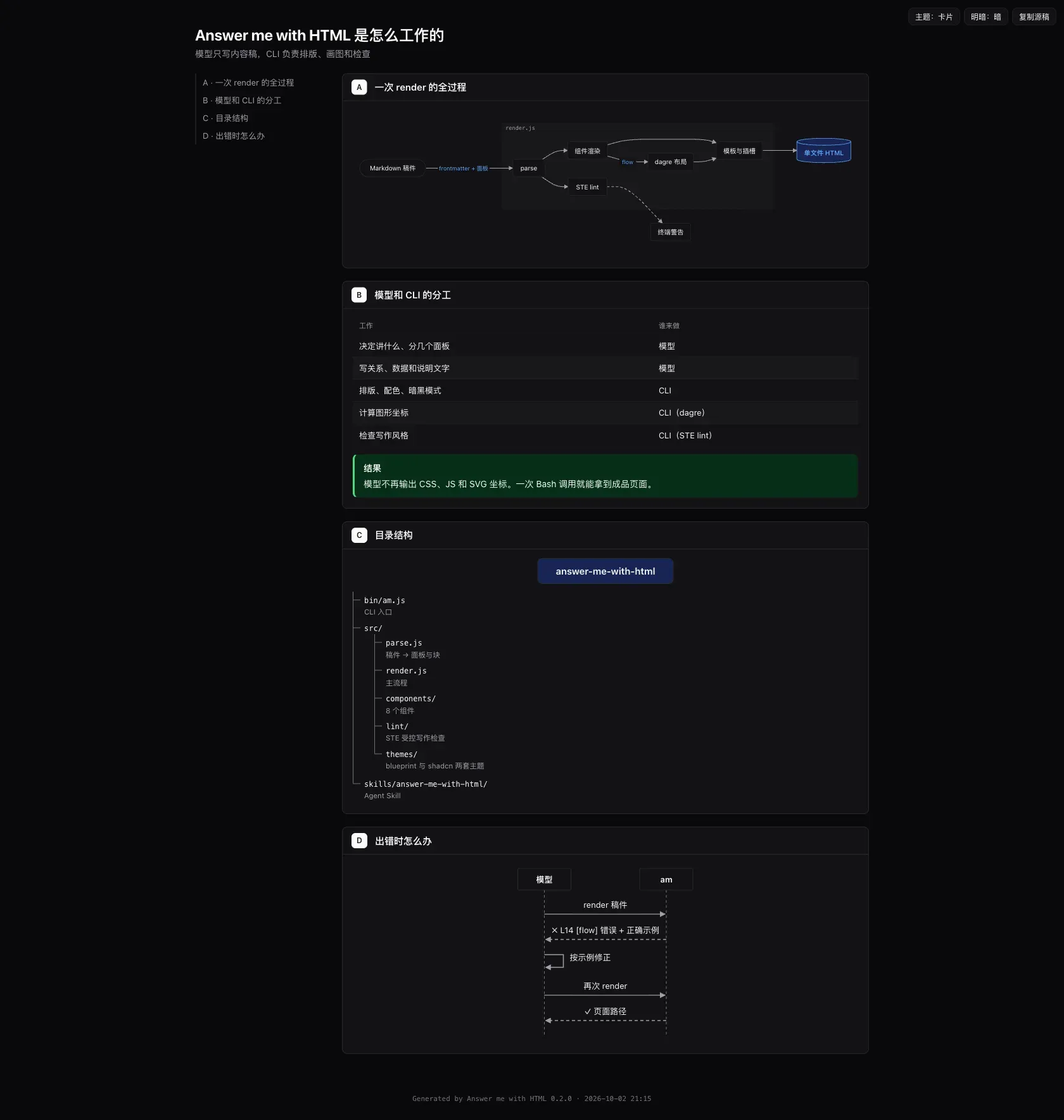
Answer me with HTML is an Agent Skill that makes a coding agent answer a complex question with one readable HTML page instead of a long block of terminal text. The agent writes only a short Markdown draft with front matter and panels. A command-line tool bundled inside the skill, called am, turns that draft into a finished page with panels, tables, code blocks, callouts and diagrams. It is developed in the QingYunA/answer-me-with-html GitHub repository, with a website at answer-me-with-html.com and READMEs in English, Simplified Chinese and Japanese.
The skill is distributed in several ways. Claude Code installs it as a plugin from the repository's own plugin marketplace, DeepSeek Harness installs it with dsh plugin add, and other agents receive it as a plain skill through npx skills add QingYunA/answer-me-with-html, which uses the vercel-labs/skills installer. INSTALL.md is written for agents to follow. Node.js 20 or newer is required. There is no npm package and no npm install step for users: the CLI ships as one bundled file, scripts/am.mjs, inside the skill folder.
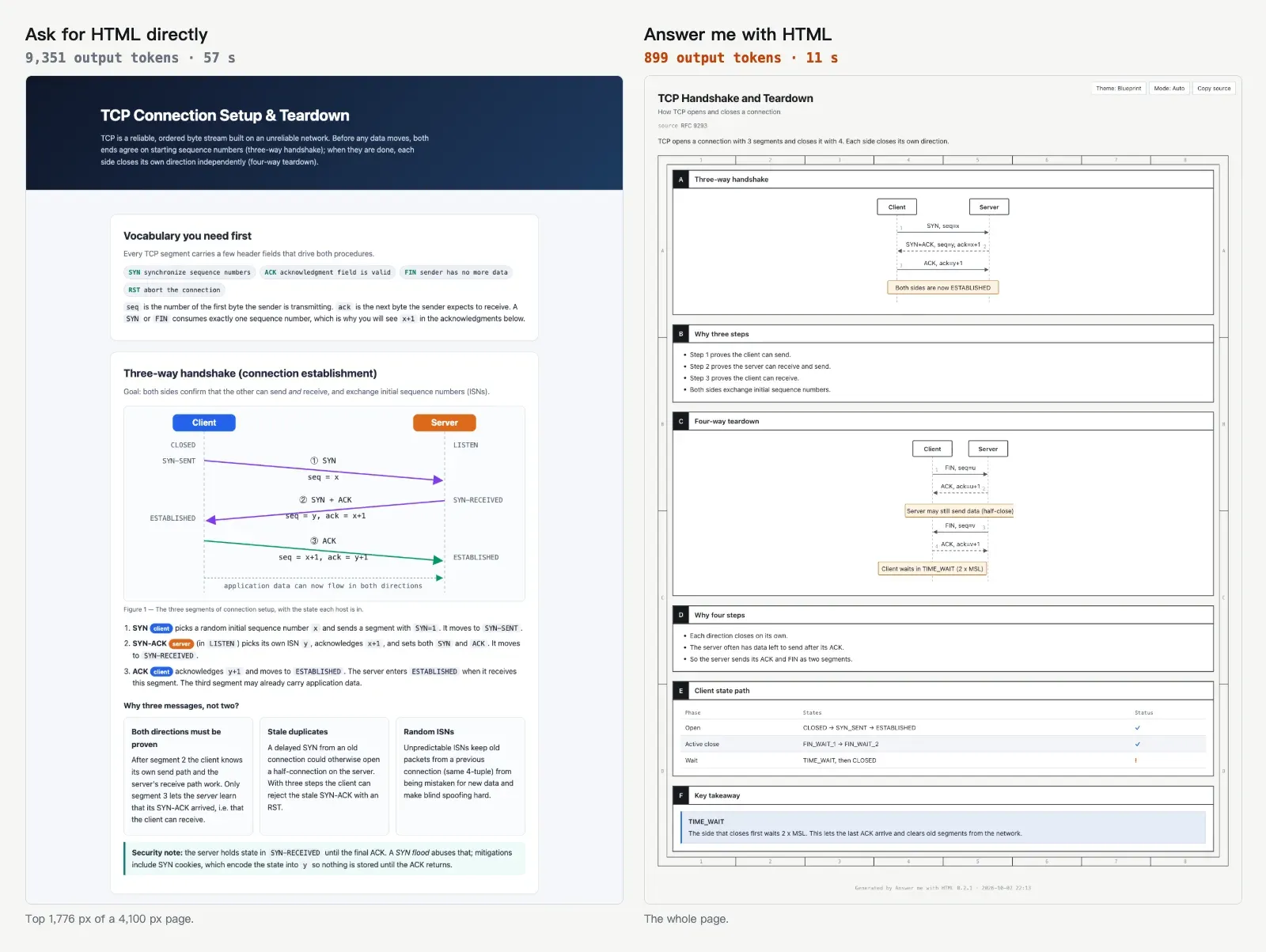
Inside the CLI, marked parses the Markdown, @dagrejs/dagre lays out flow charts and Temml typesets LaTeX into MathML when the page is made. Two templates exist: sheet, a grid of panels, and doc, a single column with an outline rail. Three built-in themes (blueprint, shadcn and paper) each have light and dark modes. Every page is a single .html file with no CDN links or web fonts, carries a Content-Security-Policy that blocks network requests. Pages are stored in ~/.answer-me-with-html/pages/, a folder created with mode 0700. The project's benchmark reports 612 output tokens per draft on average against 4,893 for hand-written HTML on nine pages, and a total cost about 15% lower.
The latest release is v0.5.11, published on November 5, 2026. It added am export for PDF and PNG, sortable and filterable tables, video narration from existing audio files and fewer edge crossings in flow diagrams. Version 0.5.0, from October 9, 2026, introduced the er component, right-to-left pages and am serve. Release notes for every version are on the website changelog.
The source code is under the MIT license; the Bangers font that one theme can embed is under the SIL Open Font License 1.1. The tool does not generate images, remote images do not load on a page, and scripts inside raw html or svg blocks do not run. Updates are manual: once a day the CLI downloads the project's package.json and highlights.json from GitHub to read the latest version, and the documentation states that no user data is sent. Only the latest release receives security fixes. The project's comparison page describes how it differs from Archify and the dsh-genui plugins for DeepSeek Harness.
Key capabilities
- Markdown draft to page The agent writes a draft in which every
##heading is a panel, with optional IDs from A to Z,spanandrowshints, and abareoption that removes the title bar. The CLI reads it from a file or from stdin (am render -), picks the template and theme, and writes one HTML page in about 50 ms according to the README. - Fourteen components The
flow,state,er,class,api,sequence,tree,timeline,limits,chart,annot,kv,calloutandaskcomponents cover architecture, state machines, data models, UML classes, HTTP and RPC contracts, message sequences, hierarchies, history, values against limits, charts, sentence annotations, metadata, conclusions and decisions. Markdown tables turnok,noandwarncells into check, cross and warning marks.am help <component>prints the full syntax of each one. - Computed diagram layout Panel placement and diagram coordinates are calculated by the CLI rather than written by the model. Flow charts are laid out with dagre, sequence diagrams are spaced by label width, and since v0.5.11 the layout removes crossings that swapping two neighbouring nodes can fix. When a flow edge still runs through another node or label,
am renderwarns with the draft line and suggests another direction or a split diagram. - Error messages the agent can act on A render lists every draft error at once, in line order, with the component and a correct example, and writes no page. A draft that came from stdin with errors is saved under
drafts/so the line numbers match a real file.am render ... --replace <page>writes the corrected page and deletes the earlier one. - Themes and the theme catalog The built-in themes are blueprint, styled like an engineering drawing, shadcn with clean cards, and paper for long reading;
autopicks paper for long text and blueprint for diagrams. All have light and dark modes, switchable from buttons on the page. Users can write their own theme or install one from the theme catalog witham theme add <name>. - Single-file, offline pages Each page is one
.htmlfile with no CDN links and no web fonts, so it opens offline and can be sent as a file. A Content-Security-Policy blocks scripts in raw blocks and every network request. A Copy source button returns the Markdown that produced the page, andam patchreplaces one panel in an existing page. - Code quoted from real files A code fence with
src=andlines=embeds the actual lines from a file in the current folder, withhl=for highlighted lines. Files outside the folder, files that hold keys by convention such as.env,*.pemor.ssh/, and files containing anything that looks like a token are refused. Blocks over 40 lines warn and over 200 lines are an error; adifffence draws a unified diff with two line-number gutters. - Math and images Inline
$...$and block$$LaTeX is typeset by Temml into MathML when the page is built, so no script or network access is needed. Local PNG, JPG, GIF, WebP, AVIF and SVG files up to 5 MB are embedded in the page, with the alt text used as caption. Remote image URLs show nothing, and the tool does not generate images. - Answering on the page Readers can comment on any panel, pick options in
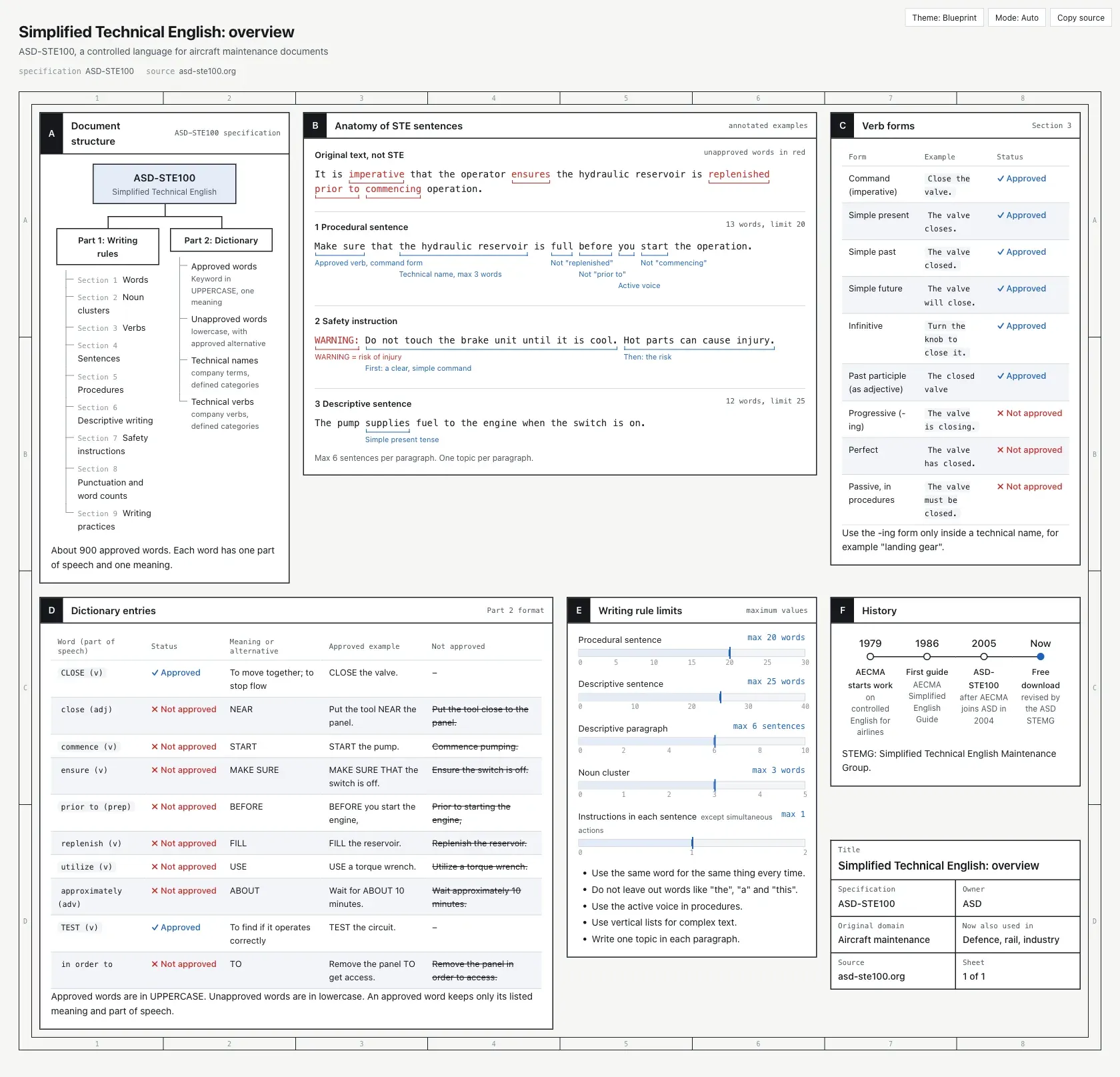
askblocks (2 to 6 options, single or multiple choice, with the agent's suggestion tagged but not preselected) and mark paragraphs, list items, code or tables as a suggestion, keep, question or concern in Remark mode. The Reply button collects answers, comments and remarks into one Markdown message to paste back to the agent. - ASD-STE100 writing check Every render checks sentence length, plain word choice and English passive voice in steps, using rules adapted from ASD-STE100 Simplified Technical English. A Chinese rule set flags common typos, vague quantities and filler phrases. The
stylesetting isoff,80(warn only, the default) orstrict, which refuses to render a failing draft. - Languages and right-to-left pages Simplified Chinese, Traditional Chinese, English, Japanese and Hebrew get their own button labels and fonts, and the language is detected from the script when the draft does not declare
lang:. Hebrew, Arabic, Persian, Urdu and Yiddish pages render right to left with mirrored diagrams, while code, paths and numbers stay left to right. Other languages use English labels. - Narrated explainer videos
am videoturns a draft with one narration line per beat into a player page in which the diagram builds step by step and the camera follows the node named in brackets. The player has a chapter strip, a speed control from 0.5x to 2x and an in-browser export.--mp4writes an MP4 with ffmpeg and--webmwrites a WebM without it. - Narration voices The
voicesetting uses ElevenLabs whenELEVENLABS_API_KEYis set, the system voice otherwise (macOSsay, espeak-ng on Linux), and captions only when neither exists.--voice localcalls a self-run OpenAI-compatible/v1/audio/speechserver that returns 16-bit PCM WAV, such as Kokoro-FastAPI, and--audio-mapreads ready-made audio files listed in a JSON map. - Export for chat apps
am export page.html --pdfwrites an A4 PDF using the page's print rules, and--pngwrites slices 1200 CSS px wide at 2x, no taller than 1800 CSS px, cut in gaps between panels. Toolbar and reply controls are hidden in the export. It needs Chrome, Chromium or Edge (path set withAM_CHROME) and Node.js 22 or later. - am serve for remote machines When the agent runs on a remote or headless host,
am servelistens on127.0.0.1:8765and render commands print a private per-page link to open through an SSH tunnel. Flags add--lan,--tailscale,--public-urlfor a TLS reverse proxy and--secret-filefor links that survive restarts. The server has no password and no TLS of its own, and on an http link replies and comments are saved on the server. - Settings through slash commands Settings are changed with
/answer-me-with-html:configin the Claude Code plugin,/answer-me-with-html configin other agents, oram configin a terminal, and are stored in~/.answer-me-with-html/config.json. Keys includeopen,theme,mode,style,scale(0.8 to 1.5),update_check,close_after_reply,colophonandvoice. - Optional always-on mode Off by default, always-on mode is a rule the user adds to a file such as
~/.claude/CLAUDE.mdorAGENTS.md. With it, every reply that gives a conclusion, summary, plan or comparison also produces a small page of 2 to 4 panels that does not open on its own. Claude Code makes no pages in plan mode. - Housekeeping and updates
am cleandeletes pages, videos and drafts older than 30 days and empties the narration cache, with--days,--alland--dry-runoptions; settings and themes are kept. The agent asks about cleanup once a week when the data folder passes 200 MB. Update commands differ per install method, for exampleclaude plugin update answer-me-with-html@answer-me-with-htmlornpx skills update answer-me-with-html -y. - Installation per host Claude Code:
/plugin marketplace add QingYunA/answer-me-with-htmlthen/plugin install answer-me-with-html@answer-me-with-html. DeepSeek Harness:dsh plugin --profile web add github:QingYunA/answer-me-with-html. Codex, Cursor, OpenCode and other agents:npx skills add QingYunA/answer-me-with-html, which installs the skill without slash commands; the project ships no Codex or Cursor plugin.
Where Answer me with HTML fits
Explaining a protocol or technical concept
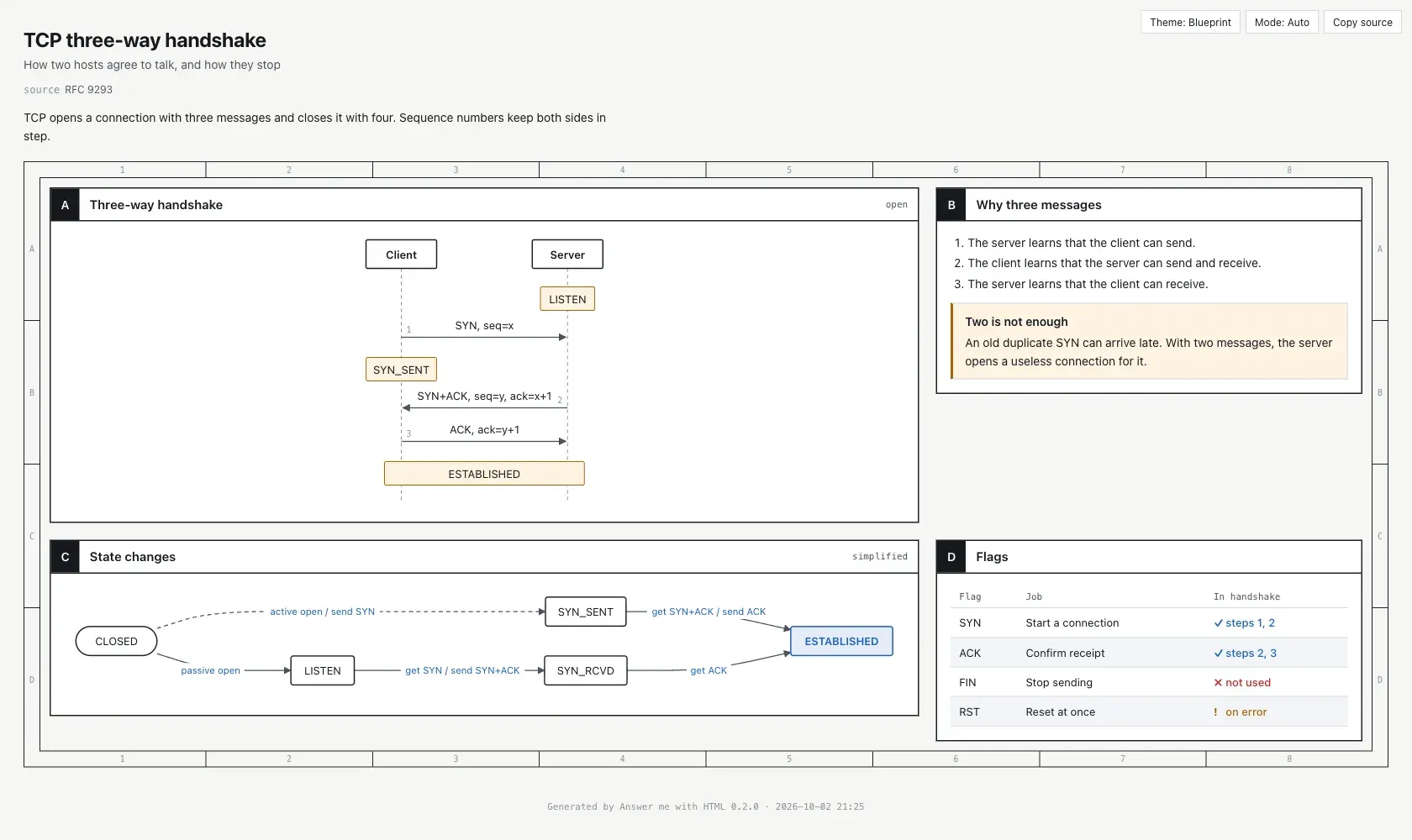
A question such as "Explain the TCP three-way handshake" produces, in the README's example, a page with a sequence diagram, a state diagram and a flag table. The draft for that page, published as examples/tcp.en.md, uses a numbered sequence block and a flow block for the state changes; the CLI handles positions, spacing and theme. The agent decides when a page is worth making, and a one-line question such as how to list hidden files with ls gets a one-line answer with no page.
Mapping how a repository fits together
Asked how the modules in a repository are organised, the agent returns a folder tree plus a call graph using the tree and flow components. Code blocks with src= and lines= quote the actual source lines instead of retyping them, and the render lists every file it embedded. class, er and api blocks describe code structure, database entities and HTTP or RPC contracts; they display definitions and do not import OpenAPI or protobuf files.
Comparing options and recording decisions
For a question such as "Redis or Memcached?", the README shows a comparison table with check and cross marks followed by a verdict, and a table can be made sortable and filterable with {table sort filter}. For a change plan, the page quotes the relevant code and presents open decisions as ask blocks. The reader selects options and comments on panels, then the Reply button produces one Markdown message that states, for each decision, whether the suggestion was confirmed, changed or left unanswered.
Reviewing a piece of writing
The annot component places word-by-word notes under a sentence, which the README lists for questions such as "What's wrong with this paragraph?". The built-in ASD-STE100 writing check also runs on the agent's own draft at every render, flagging long sentences, wordy phrases and passive voice in steps, and in Chinese text common typos and filler. In strict mode a draft that fails the check is not rendered.
Producing a narrated explainer video
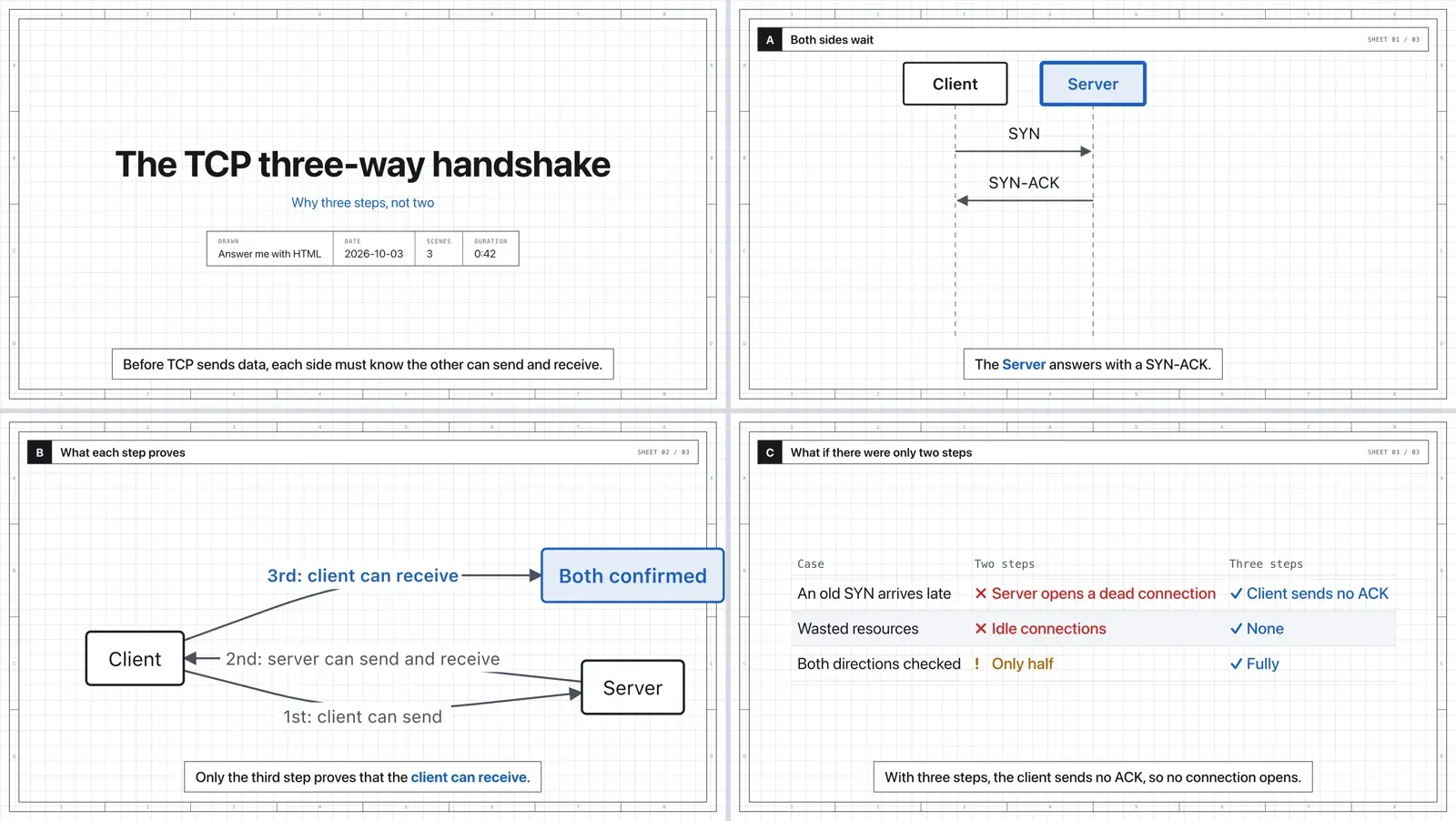
Asking for a "3b1b-style video" makes the agent write the same kind of draft with one narration line per beat; the agent makes videos only when asked. am video builds a player page whose diagrams appear step by step in sync with the narration, with offline audio embedded in the page. The video guide documents voice selection, local TTS servers, audio maps and MP4 or WebM export; the project's benchmark reports about 18 times fewer output tokens for videos in a small test.
Reading and sharing pages from remote sessions
When the agent runs over SSH or on a headless server, am serve serves pages from 127.0.0.1 with a token per page, and the agent hands back that link instead of a file:// path; the reference covers SSH tunnels, Tailscale and reverse proxies. For chat apps such as Discord, Telegram, Slack and WeChat, which show an .html file as source, am export converts a page into a PDF or a set of PNG slices. Similar agent skills on iThub include Diagram Design and Anatomy.
Install
npx skills add QingYunA/answer-me-with-htmlReviews of Answer me with HTML
Be the first to share your experience with Answer me with HTML.
Write a review
Loading review form…
Found Answer me with HTML useful? Upvote it todayYour vote helps other IT teams find it in the daily ranking.