
What is Arize Phoenix?
Arize Phoenix is an AI observability and evaluation platform from Arize AI. It collects traces from LLM and agent applications over OpenTelemetry, using the OpenInference semantic conventions, and combines them in one web application with evaluations, versioned datasets, experiments, a prompt playground and prompt management. Arize presents Phoenix as its self-hosted platform and sells a separate managed product, Arize AX, built on the same instrumentation. Dynatrace completed its acquisition of Arize in 2026 and states that Phoenix remains available as an open project.
The repository LICENSE is the Elastic License 2.0 (ELv2), and the main arize-phoenix package declares Elastic-2.0. ELv2 allows use, copying, distribution and derivative works, but it prohibits offering the software to third parties as a hosted or managed service and prohibits circumventing license key functionality. ELv2 is not an OSI-approved license, so the Phoenix server is source-available, although Arize describes it as open source. The self-hosting license page states that running Phoenix on your own infrastructure or cloud account is free, with no feature gates. Some sub-packages use other terms: arize-phoenix-otel, arize-phoenix-client and the TypeScript client are Apache-2.0, while arize-phoenix-evals is Elastic-2.0. The README also refers to an IP notice covering U.S. patents.
Phoenix is a Python application. It installs from PyPI or conda-forge (Python 3.11 to 3.15 according to the package metadata) and starts with phoenix serve; container images are published as arizephoenix/phoenix in root, nonroot and debug variants, with a Helm chart, Kubernetes manifests, an AWS CloudFormation template and one-click templates for Railway, Render, Google Cloud Run and Azure. The architecture page describes a web UI, a trace collector and a SQL backend: SQLite is the default (stored under ~/.phoenix/), and PostgreSQL 14 or later is the documented production option. Several instances can share one PostgreSQL database for horizontal scaling; each instance is single-tenant.
The latest release is arize-phoenix v22.0.0, published on November 20, 2026. It adds cost calculation for decision and embedding spans, records model types in the cost manifest synced from LiteLLM data and runs SQLite migrations in an explicit transaction; the migration guide lists no manual steps from v21. Phoenix 21, released earlier in November 2026, changed defaults: the server binds to loopback, authentication switches on automatically for non-loopback addresses (including the Docker image), and the --host flag was replaced by PHOENIX_HOST. Releases arrive several times a week.
By default Phoenix sends basic web analytics (page views and UI interactions) to Arize; the README states that trace data and evaluation results are not collected, and PHOENIX_TELEMETRY_ENABLED=false turns it off. Arize's Phoenix and AX comparison lists SAML SSO, multi-level organizations and spaces, production monitors and alerting, managed compute and compliance certifications such as SOC 2 and HIPAA as Arize AX features outside Phoenix.
Key capabilities
- OpenTelemetry tracing Phoenix receives spans over OTLP, on port 6006 for HTTP (shared with the UI) and 4317 for gRPC. Traces show nested spans for agents, chains, tools, retrievers, embeddings and LLM calls with inputs, outputs, attributes, latency and token counts. The
arize-phoenix-oteland@arizeai/phoenix-otelpackages wrap OpenTelemetry setup with Phoenix defaults. See the tracing documentation. - Auto-instrumentation through OpenInference OpenInference packages instrument Python libraries such as OpenAI, OpenAI Agents, Anthropic, LangChain and LangGraph, LlamaIndex, DSPy, CrewAI, Haystack, LiteLLM, AWS Bedrock, Google GenAI, Mistral, Groq, Smolagents, Pydantic AI and the Claude Agent SDK. JavaScript packages cover the OpenAI SDK, LangChain.js, Vercel AI SDK and Mastra; Java covers LangChain4j, Spring AI (through Arconia) and Google ADK; Go covers the OpenAI and Anthropic SDKs.
- Guided setup with the CLI
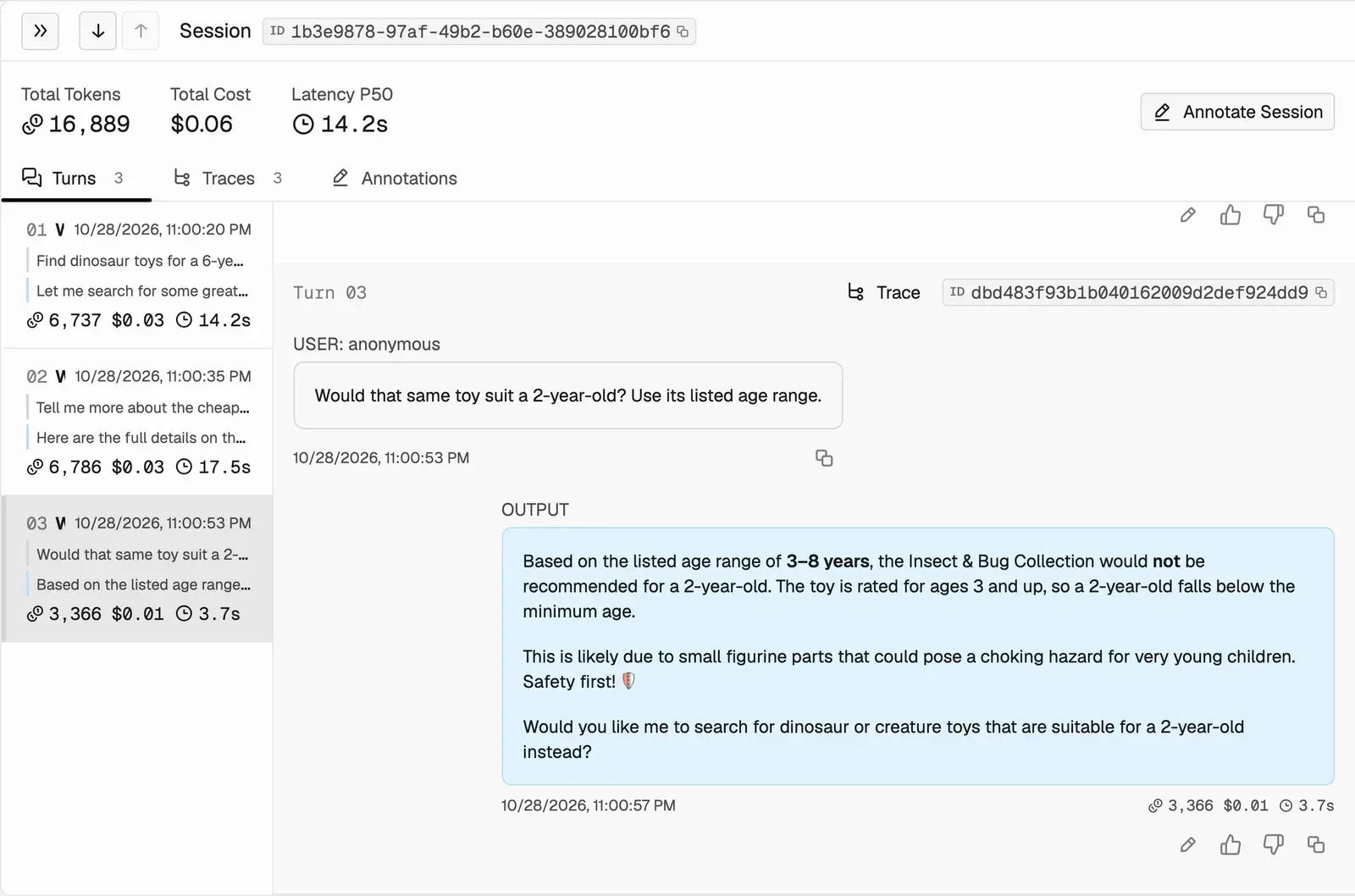
npx @arizeai/phoenix-cli setup(orpx setup) detects the framework and LLM provider in a project, installs the matching OpenInference instrumentation and configures trace export. The Phoenix CLI also fetches traces, datasets and experiments in a terminal. - Sessions and multi-turn views Traces that share a session ID are grouped into sessions with turn lists, total tokens, total cost and latency percentiles. Each turn links back to its trace, and sessions can be annotated as a whole.
- Token and cost tracking Phoenix calculates costs per span from a built-in model price manifest that, since November 2026, updates daily without a server upgrade. Version 22.0.0 extends cost calculation to decision and embedding spans. Custom models and price overrides are managed under Settings, Models, and take precedence over built-in prices.
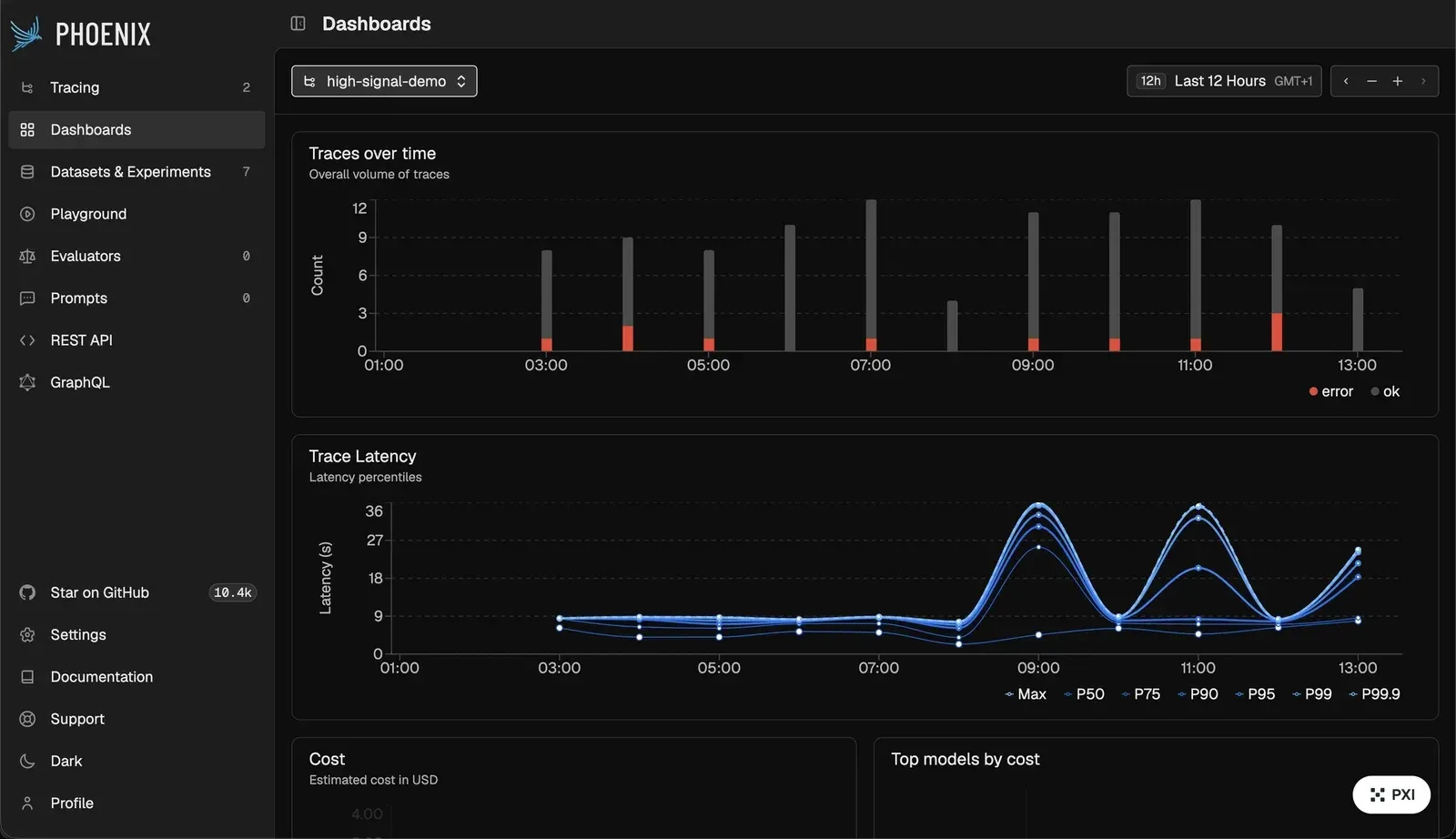
- Dashboards Project dashboards chart trace volume with error counts, latency percentiles from P50 to P99.9, estimated cost in USD and top models by cost over a selectable time range.
- Evaluations Phoenix runs code-based evaluators (exact match, regex, custom logic) and LLM-as-a-judge evaluators that return labels, scores and explanations through tool calling. Client-side evals run from the Python and TypeScript SDKs on traces, datasets or any data; server-side evaluators are configured in the UI and attached to datasets. Pre-built metrics target RAG and tool-calling agents, per the evaluation docs.
- Sandboxed code evaluators Server-side code evaluators in Python or TypeScript can run in hosted sandboxes from E2B, Daytona, Vercel Sandbox, Modal or Docker Sandboxes for isolation and runtime dependency installation, configured by admins under Settings.
- Annotations and human feedback Spans, traces and sessions accept annotations from people, LLM judges and code, including the DECISION and AGENT annotator kinds added in November 2026. Annotation configurations can be assigned per project, and scores appear in trace trees and experiment comparisons.
- Versioned datasets Datasets hold examples with input, reference output and metadata. They can be created from traced spans, uploaded as CSV or built with the SDKs, and edits are saved as new versions. Splits and labels organise examples, per the datasets overview.
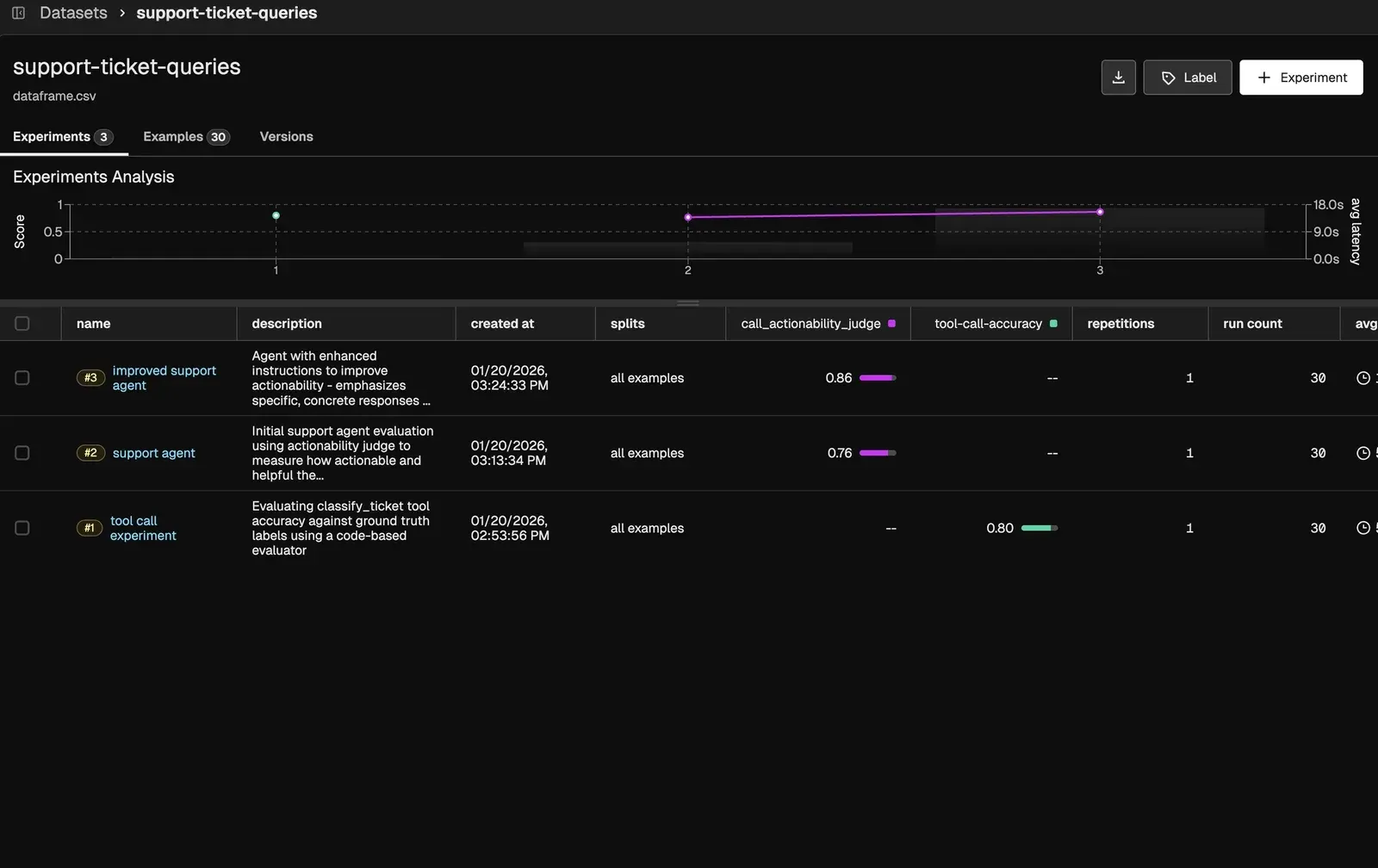
- Experiments An experiment runs a task (a prompt, model, agent or application) over a dataset and scores the outputs with evaluators. Phoenix records each run with repetitions, latency, tokens and cost, charts scores across experiments and compares outputs side by side per example.
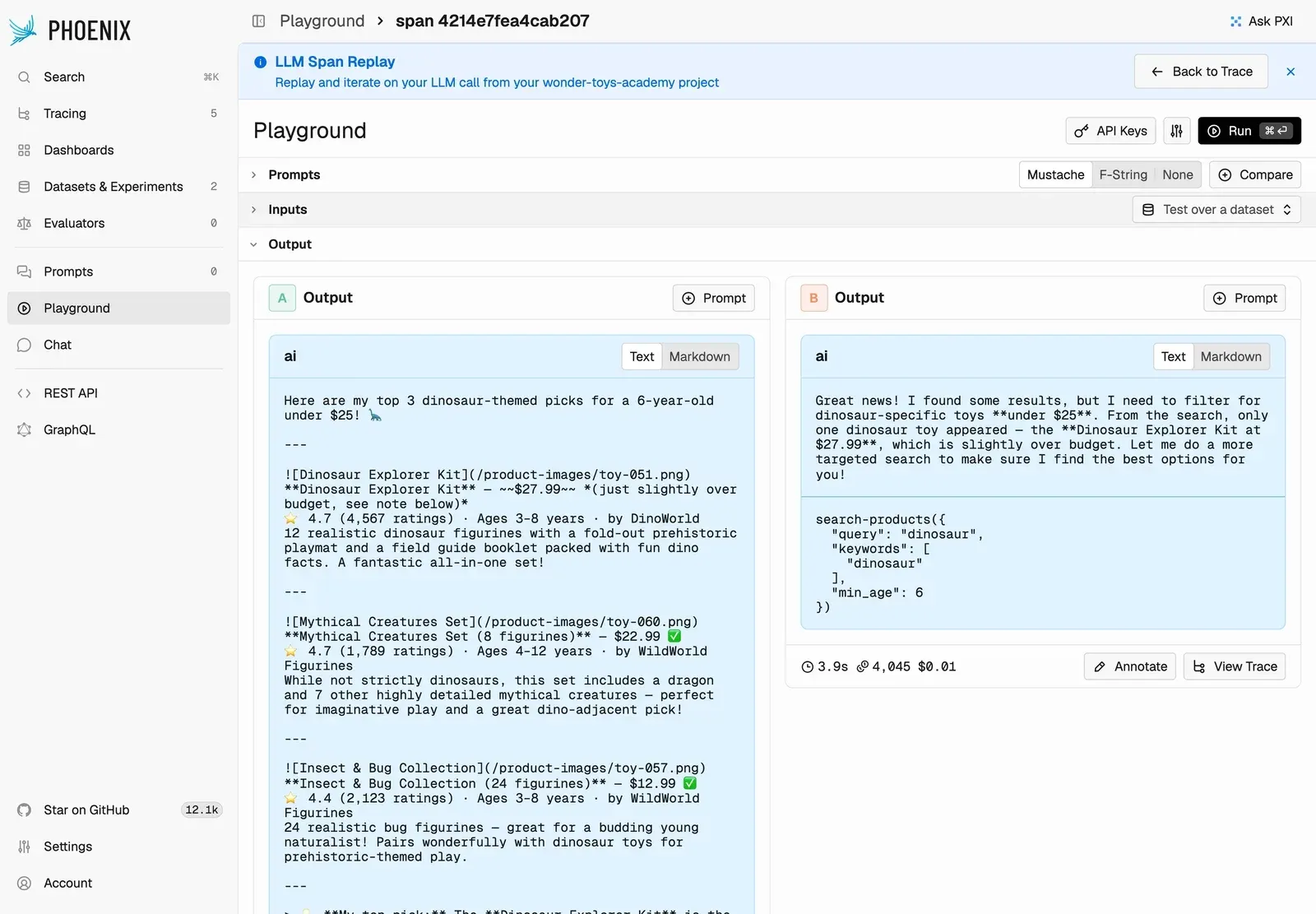
- Prompt playground The playground replays a traced LLM call, compares prompts or models side by side, runs a prompt over a dataset as an experiment and supports Mustache and f-string templates. Model credentials are stored per instance under Settings, AI Providers, with OpenAI, Anthropic, Gemini, AWS Bedrock and custom providers documented.
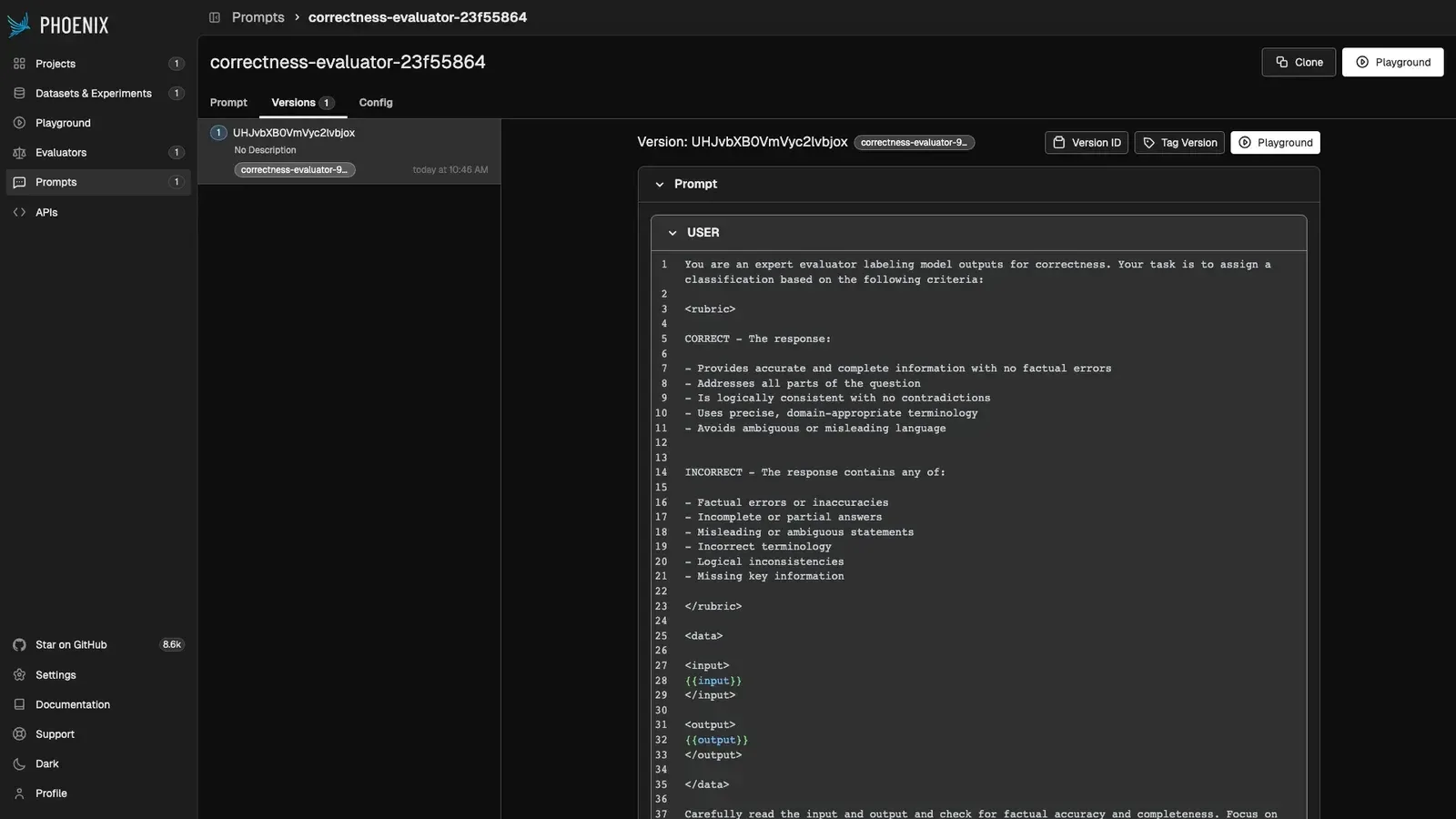
- Prompt management Prompts are stored with version history, tags and labels, can be cloned and opened in the playground, and are fetched by version or tag from the Python and TypeScript clients. See prompt engineering.
- PXI assistant PXI (Phoenix Intelligence) is a built-in agent that reads the current page, investigates failing traces, edits and tests playground prompts and queries Phoenix data. It uses a model from a configured provider (an Anthropic model by default) and shows proposed changes as cards or diffs for approval.
- MCP server, skills and plugins Each instance exposes a remote MCP server at
/mcpfor Claude Code, Cursor and other MCP clients, with read access to traces, datasets and experiments and GraphQL tools. The repository ships agent skills and plugins for Claude Code and Codex that register the MCP server. - Authentication and access control Phoenix supports local accounts, OAuth2 and OpenID Connect providers (Google, AWS Cognito, Microsoft Entra ID and other OIDC providers), LDAP, system and user API keys, and the roles admin, member and viewer. Options include a strong password policy, brute-force lockout and SMTP password recovery; see authentication.
- Data retention Data is kept indefinitely by default. Retention policies delete traces by age or trace count on a cron schedule, per project or through
PHOENIX_DEFAULT_RETENTION_POLICY_DAYS, and traces can be removed manually by date. - APIs and clients Phoenix serves a REST API described by OpenAPI and a GraphQL API. The
arize-phoenix-clientPython package and@arizeai/phoenix-clientTypeScript package wrap the REST interface for traces, datasets, experiments and prompts. - Self-hosting packages
pip install arize-phoenixfollowed byphoenix serveruns a full instance;uvx arize-phoenix serveruns it without an install. Docker images, a Helm chart published on Docker Hub, PostgreSQL connections with Amazon Aurora IAM or Azure managed identity authentication, and air-gapped operation are documented in the self-hosting guide. - Managed alternative: Arize AX Phoenix itself has no paid tier. Arize's hosted SaaS is Arize AX, which accepts the same OpenTelemetry and OpenInference instrumentation. The pricing page (checked November 21, 2026) lists AX Free at $0 with 25k trace spans and 1 GB ingestion per month and 15 days of retention, AX Pro at $50 per month with 50k spans, 10 GB per month and 30 days of retention, and AX Enterprise at custom pricing with SaaS or self-hosted deployment. The arize.com Phoenix page keeps a sign-in link for existing Phoenix Cloud users, but the current Phoenix docs redirect the former Phoenix Cloud page to the self-hosting guide and publish no hosted Phoenix plan or limits.
Where Arize Phoenix fits
Tracing an agent run to find a failure
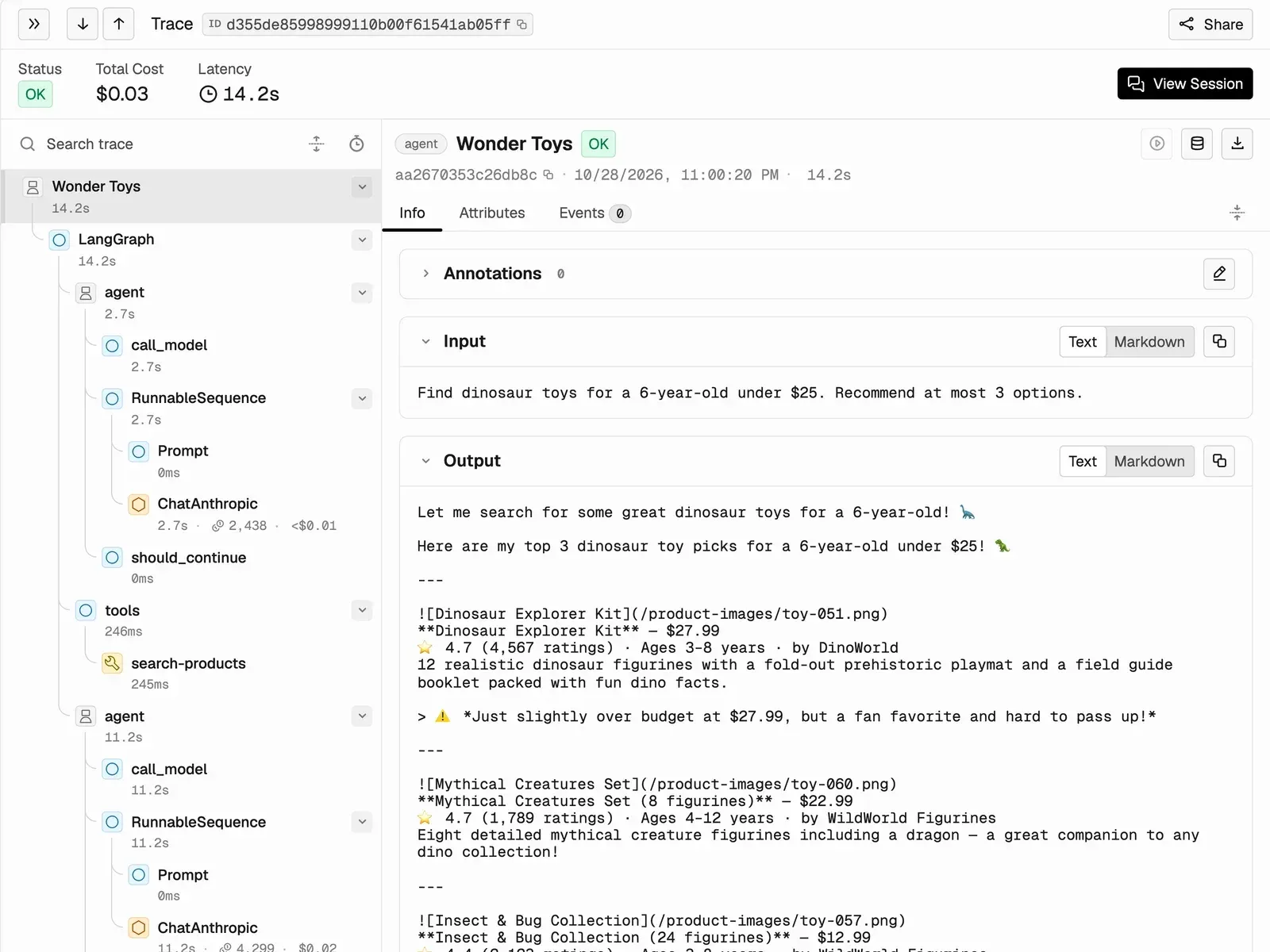
An application instrumented with OpenInference sends spans to Phoenix, and the trace view shows the agent, chain, tool and LLM steps as a tree with latency, tokens and cost per step. Selecting a span opens its input, output and attributes, and the View Session button groups related turns. The project's tracing guide covers manual spans, metadata and filters for narrowing traces by status or attributes.
Turning traces into an evaluation dataset
Spans from production or development traffic can be added to a dataset from the trace view or through the client SDKs, alongside CSV uploads. Each example keeps its input, reference output and metadata, and every edit creates a new dataset version. The dataset then serves as the fixed input for experiments and evaluator tests.
Comparing prompt and model changes with experiments
A task such as a prompt, agent or full application runs over a dataset, and evaluators score each output. The dataset page charts scores and average latency across experiments, and the comparison view shows outputs, scores, tokens and cost per example for each run, with repetitions to measure variation between identical runs. The datasets and experiments docs describe the SDK and UI paths.
Iterating on prompts in the playground
The playground can replay an LLM span captured in a trace, change the prompt or model and run both variants side by side, or run a prompt over a dataset as an experiment. Saved prompts receive versions, tags and labels in prompt management, and applications fetch a tagged version through the client libraries instead of hard-coding prompt text.
Running a shared team instance
For multi-user deployments the self-hosting guide documents Docker or Helm with PostgreSQL 14 or later, authentication through local accounts, OAuth2 or LDAP, API keys for trace exporters, admin, member and viewer roles, and retention policies. Since Phoenix 21, Docker deployments require authentication unless PHOENIX_ENABLE_AUTH=false is set, and the initial admin password can be supplied through PHOENIX_DEFAULT_ADMIN_INITIAL_PASSWORD.
Connecting coding agents to observability data
Claude Code, Cursor, Codex and other MCP clients connect to the instance's /mcp endpoint, authenticated through Phoenix's built-in OAuth2 authorization server when auth is enabled. The agent can then query traces, datasets and experiments and use the Phoenix skills, while the CLI offers the same data in a terminal. Similar projects listed on iThub include Langfuse and Weights & Biases.
Install
pip install arize-phoenix && phoenix serveReviews of Arize Phoenix
Be the first to share your experience with Arize Phoenix.
Write a review
Loading review form…
Found Arize Phoenix useful? Upvote it todayYour vote helps other IT teams find it in the daily ranking.