
What is DigitalPlat FreeDomain?
DigitalPlat FreeDomain is a service that registers free public names under a set of namespaces run by DigitalPlat. According to the FreeDomain repository, the available extensions are .dpdns.org, .us.kg, .qzz.io, .xx.kg and .qd.je, and the README states that more than 500,000 domains have been registered. The Terms of Service describe these names as public subdomain registrations under namespaces that DigitalPlat operates or makes available through third-party registries, not as ownership of a top-level domain.
The about page states that DigitalPlat Domains was initiated by Edward Hsing in August 2023 and is now operated by EdgeAlphix LLC, which provides the service, billing, infrastructure and support. DigitalPlat Foundation, Inc. is described as a separate 501(c)(3) organization that does not operate or bill for the domain service. The DigitalPlat organization page lists the dashboard under the name DigitalPlat One, operated by EdgeAlphix LLC.
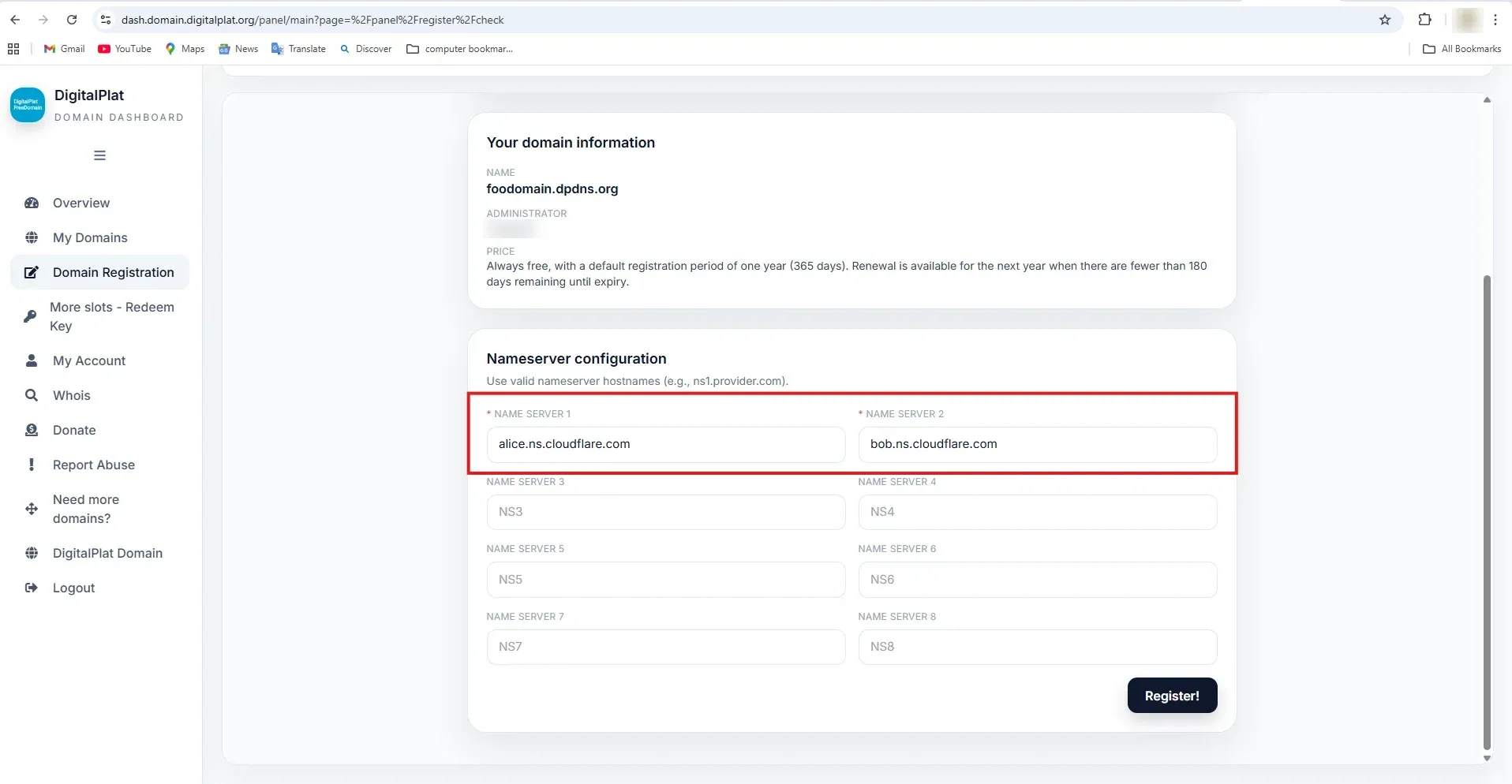
The service model is delegation only. A user creates an account in the DigitalPlat dashboard, chooses a name and suffix, and enters the authoritative nameservers of an external DNS service. Records such as A, AAAA, CNAME, MX and TXT are then managed at that external provider. The project documentation states that registration does not include web hosting, a mailbox, HTTPS certificates or a DNS record editor inside DigitalPlat. An official dashboard screenshot describes the price as always free, with a default registration period of 365 days and renewal available when fewer than 180 days remain before expiry.
The GitHub repository holds public information and a book-style learning guide, licensed under AGPL-3.0. It covers the DigitalPlat registration workflow and general topics such as DNS delegation, record types, static site deployment, HTTPS, email DNS records, renewal and operations. The application source is published separately as Domain-OSS, a self-hosted domain and DNS management platform written in Python and also licensed under AGPL-3.0. The FreeDomain repository has no versioned releases.
The free tier is limited. The FAQ states a default limit of one domain per user account, introduced because of increased abuse. Additional registration capacity is offered through a paid, non-refundable "Buy Slot" service fee described in the Terms. The Terms also state that the service runs on a best-effort basis without an SLA and that a namespace can become unavailable because of registry, Public Suffix List or upstream provider decisions. Delegated names are typically pointed at DNS services such as Cloudflare, or at a self-run authoritative server such as Technitium DNS Server.
Key capabilities
- Five public namespaces The README lists
.dpdns.org,.us.kg,.qzz.io,.xx.kgand.qd.jeas available extensions, and the DigitalPlat Domains site shows the same five as available. The project documentation states that supported suffixes, pauses and requirements can change and that the dashboard notice board is the current source of truth. - Free registration with a one-domain default The FAQ states that the default limit is one domain per user account. Subdomains below the assigned name, for example
example.foo.us.kg, can be created at the user's DNS provider without further registrations. Additional capacity is described as possible in the future through expansion programs or specific use cases. - One-year registration and renewal window An official dashboard screenshot states that registration is always free, with a default registration period of one year (365 days), and that renewal for the next year is available when fewer than 180 days remain until expiry. The documentation notes that renewal windows, fees, slot rules and grace behavior can change per suffix.
- Buy Slot for extra capacity The Terms of Service describe Buy Slot as a one-time platform service fee that adds registration capacity to an account. It does not purchase a domain, a namespace or any renewal right, does not guarantee approval of a request and is non-refundable except where the law requires otherwise. No price is published on the public site.
- External nameserver delegation During registration the dashboard asks for up to eight nameserver hostnames, with the first two required. DigitalPlat stores these hostnames for delegation, and the external DNS service hosts the zone. The documentation uses Cloudflare only as an example and states that DigitalPlat does not endorse any third-party DNS service; users can also run their own DNS infrastructure.
- No hosting, mail or record editor The product boundaries chapter lists what registration does not do: upload code, create a web server, open firewall ports, configure a reverse proxy, issue an HTTPS certificate or create a mailbox. A, CNAME, MX, TXT, CAA and SRV records are edited at the external DNS provider.
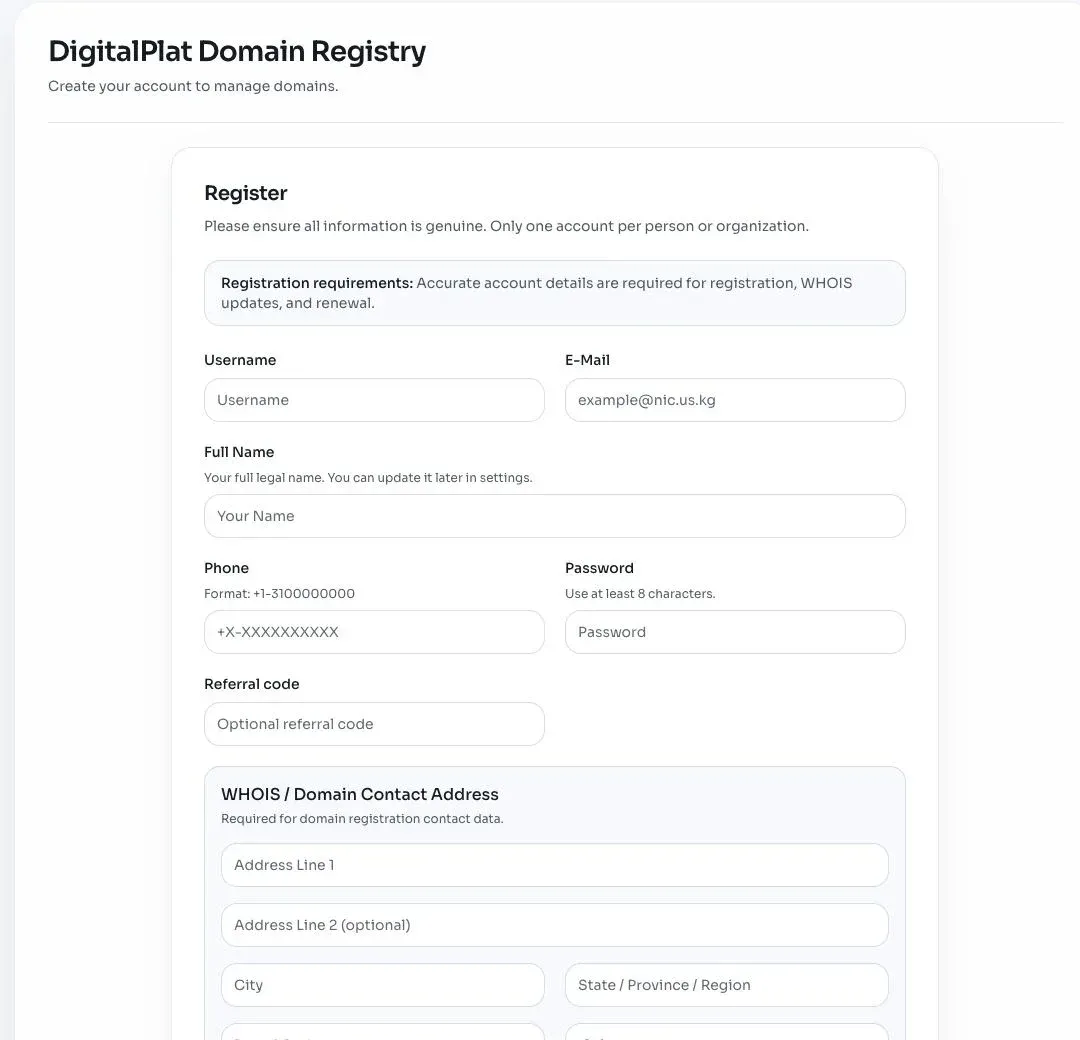
- Account and registration requirements The official registration form states "Only one account per person or organization" and asks for a username, email, full legal name, phone number, password of at least eight characters, an optional referral code and a WHOIS contact address. Accurate account details are required for registration, WHOIS updates and renewal. The Terms set a minimum age of 13, with parental consent required below the age of majority.
- Policy acknowledgement on registration The availability check form includes a checkbox stating that violation of the terms may result in immediate suspension or deletion of domains and the account, with or without prior notice, at the sole discretion of the service provider. Names that impersonate others or infringe rights are excluded by policy, and some names can be reserved or sent to manual review.
- Acceptable Use Policy The Acceptable Use Policy, effective June 29, 2026, prohibits phishing and credential theft, malware, botnets, spam, malicious reverse proxies and open redirects, impersonation, intellectual property abuse, fraud, child exploitation, violent extremist content and cryptomining abuse. It also prohibits platform abuse such as automated registrations, multiple accounts to obtain more free capacity, name hoarding and resale of slots.
- Abuse reporting Abuse can be reported by email to the address listed on the abuse page or through a report form, and the dashboard has a Report Abuse entry. The project states that every report is reviewed and that response times range from a few hours to several days depending on complexity and risk. The Terms allow suspension before a full investigation when delay could increase harm.
- Dashboard areas Official screenshots and the dashboard tour show Overview, My Domains, Domain Registration, More slots (Redeem Key), My Account, Whois, Donate, Report Abuse and a request page for more domains. The overview can show namespace notices, slot summaries, domains approaching expiration and registration contact data.
- API keys and API documentation The tutorial states that the dashboard currently exposes API key and API documentation areas, and that the authenticated documentation defines endpoints, permissions and limits. It also states that the DigitalPlat API manages registration data, not records at an external DNS provider.
- Sign-in and privacy The Privacy Policy, effective October 17, 2026, lists account, registration, DNS, billing metadata and technical log data as collected, states that personal information is not sold, and describes optional Google Sign-In with the openid and email permissions only. Abuse reports can require sharing registration data and logs with registries, registrars, CERTs or law enforcement.
- Learning guide The repository contains a book-style guide in LEARN.md with chapters on internet foundations, terminal basics, DNS delegation and record types, TTL and propagation, building and deploying a static site, HTTPS, email DNS, renewal, nameserver migration, server hardening, API automation and self-hosted DNS, plus a capstone project and troubleshooting appendices.
- Open-source application code The dashboard application is published as Domain-OSS under AGPL-3.0. Its README describes a Python 3.11 web panel with SQLite or MySQL storage, a versioned REST API with scoped keys, support for Cloudflare, PowerDNS and BIND (RFC 2136 with TSIG), ACME DNS-01 automation, a Terraform provider, Docker Compose deployment and an interface in eight languages.
- Community channels Official support and announcements run through a Discord server and GitHub Discussions. The README warns that the former Telegram account and group were compromised and are no longer an official channel.
Where DigitalPlat FreeDomain fits
Giving a personal or open-source project a public name
The README describes the purpose as removing domain cost as a barrier for individuals, open-source projects, communities and organizations. A user creates an account, checks availability for a label under one of the five suffixes, enters the nameservers of an external DNS service and submits the registration. The resulting name, for example example.dpdns.org, then serves the website or service configured at that DNS provider.
Connecting a name to an external DNS provider
The nameserver chapter walks through creating the zone at an external provider, copying every assigned nameserver hostname and entering them in DigitalPlat. The guide shows how to confirm delegation with dig NS, dig +trace and a direct SOA query to the external server, and lists common errors such as entering an IP address as a nameserver value.
Publishing a static website
The general chapters of the learning guide cover HTML and CSS basics, building and testing a static site locally, preparing a server, deploying it, connecting the DNS record and enabling HTTPS. The capstone section takes a project from brief to registration, deployment and final acceptance. These steps happen at the user's hosting and DNS providers, since DigitalPlat provides only the name and delegation.
Configuring email and verification records
Because the zone lives at the external DNS provider, MX, TXT, SPF-style policy and SRV records are created there. The guide includes chapters on email DNS and service records. The FreeDomain service itself does not create mailboxes.
Keeping a registration active
The dashboard Domain List shows the exact name, registration status and expiration date. Renewal for another year opens when fewer than 180 days remain, according to the official screenshot. The documentation describes renewal and expiration as dashboard-driven processes and states that a correct external DNS zone cannot restore a delegation that has expired or been suspended.
Running a comparable panel on own infrastructure
Organizations that want to offer their own subdomain or DNS service can deploy Domain-OSS with ./panel install or Docker Compose. It connects to Cloudflare, PowerDNS or BIND as DNS providers, manages users, per-user domain limits, teams, API keys and audit events, and binds to localhost by default with an HTTPS reverse proxy expected in front for internet access.
Reviews of DigitalPlat FreeDomain
Be the first to share your experience with DigitalPlat FreeDomain.
Write a review
Loading review form…
Found DigitalPlat FreeDomain useful? Upvote it todayYour vote helps other IT teams find it in the daily ranking.