

What is Technitium DNS Server?
Technitium DNS Server is an open-source DNS server from Technitium that works as an authoritative server for hosted zones and as a recursive resolver for a home or organization network. It ships with a default configuration that runs without setup and is managed through a web console that opens in any current browser. The project describes its purpose as self-hosting DNS for privacy and security, including network-wide blocking of advertising and malware domains. The first public release was announced on the Technitium blog in November 2017, and the source code is developed in the TechnitiumSoftware/DnsServer repository on GitHub.
The server is a cross-platform .NET 10 application written in C#. Technitium distributes a Windows setup installer for Windows 7 SP1 and later, a portable archive for Windows, Linux, macOS and Raspberry Pi with an arm7 CPU, an automated installer and updater script for Linux and Raspberry Pi, and an official image on Docker Hub. Raspberry Pi 1 and Raspberry Pi Zero, which use arm6 CPUs, are not supported. All packages are listed on the official download page with SHA256 checksums, and older builds remain available in the download archive.
The current release is version 15.6.2, published on October 17, 2026. It fixes several Cluster configuration sync issues, a missing zone boundary check that let a user with write access to one zone change records in a subdomain zone, and a UDP receive loop that an attacker could trigger with a stream of empty packets; Dashboard counters also became clickable links into filtered Query Logs. Version 15.0, released in April 2026, moved the codebase to .NET 10, added Single Sign-On with OpenID Connect, made the Windows and Linux installers create a non-root service, added Prometheus metrics, bearer-token authentication for the HTTP API and a PostgreSQL query log app. Later 15.x releases added LDAP authentication and a Zone File Editor (15.5), Alpine Linux support in the installer and Locally Served DNS Zones (15.3), and Unix Domain Socket support for the web service (15.4). Many of these releases also list fixes for vulnerabilities reported by external security researchers. Full details are in the change log.
Functionality beyond core DNS is delivered through DNS Apps, plug-in modules installed from a built-in DNS App Store. Apps implement features such as advanced regex blocking per client subnet, split horizon and geolocation answers, DNS64, a block page, DNS rebinding protection and query logging to SQLite, MySQL, SQL Server or PostgreSQL. Version 14 added Clustering, which syncs configuration between two or more instances managed from one console. A DHCP server for multiple networks is built in. Every action of the web console is available through the documented HTTP API.
The software is free and licensed under the GNU General Public License v3; source file headers allow version 3 or any later version. Technitium accepts donations through Patreon, and the README lists WavSpeed Inc as a sponsor. Support is offered by email to Technitium, through GitHub issues and in the r/technitium community on Reddit. The user manual and FAQ are published as online help topics. Comparable listings in this directory include Pi-hole, a DNS sinkhole for ad blocking, and Zen, a system-wide filter that uses a local proxy.
Technitium DNS Server screenshots
Explore the interface. Open a screenshot to view it at full size.
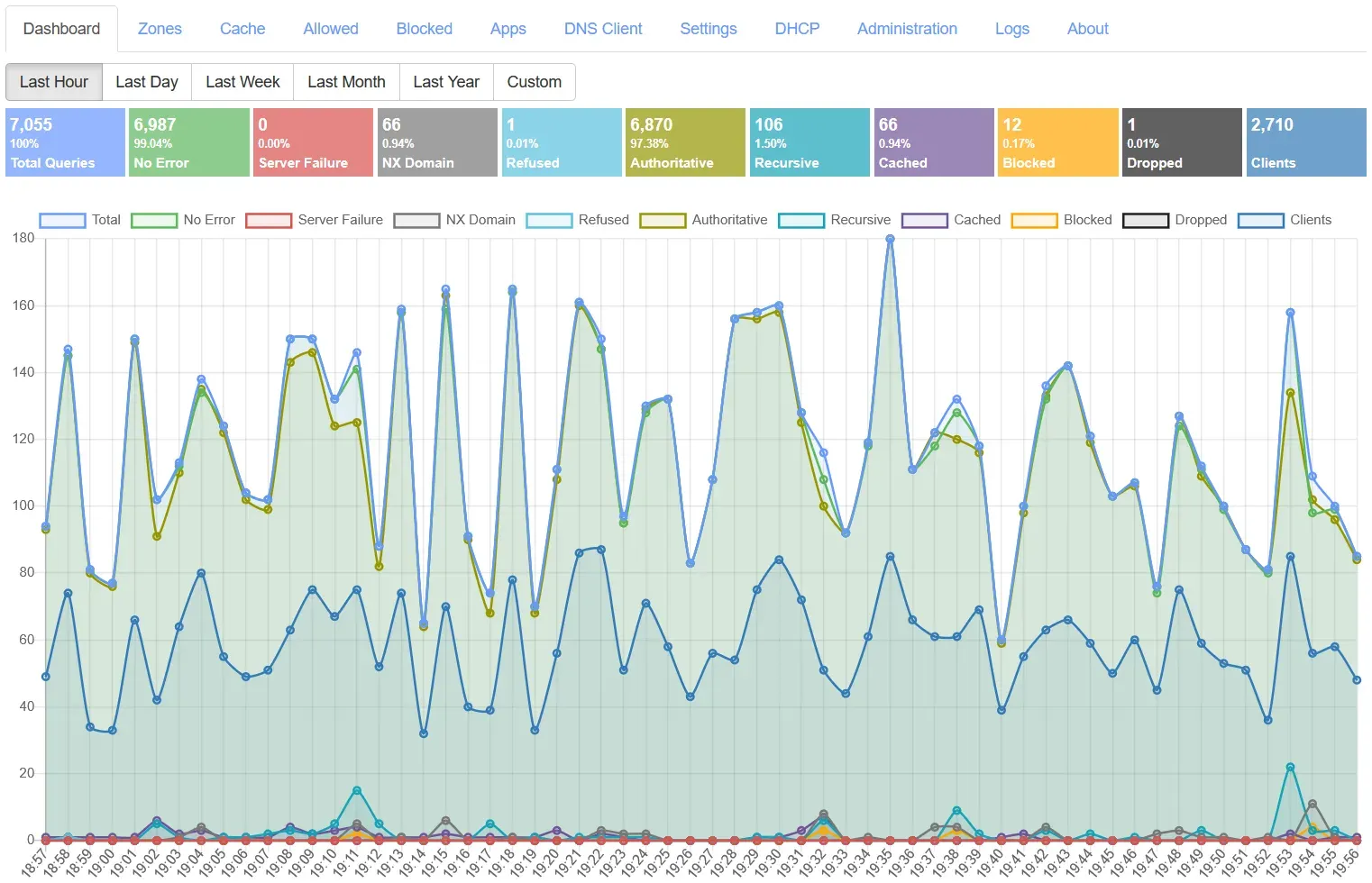
Official screenshot of the Dashboard: totals for queries, errors, authoritative, recursive, cached and blocked answers with a per-minute chart.
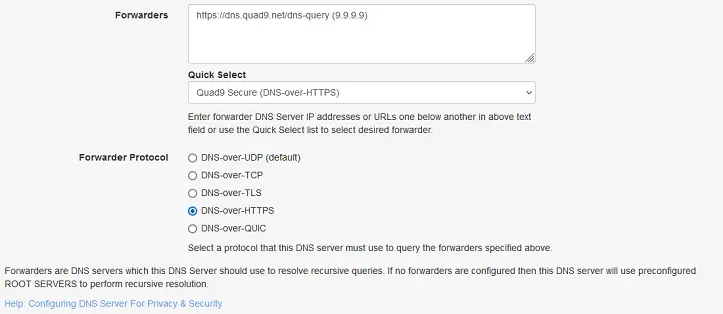
Official screenshot of the Forwarders setting with Quick Select and the UDP, TCP, TLS, HTTPS and QUIC protocol choices.
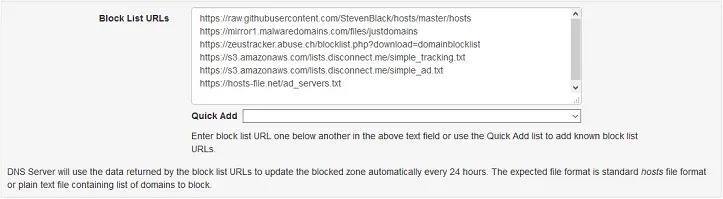
Official screenshot of the Block List URLs setting; lists are refreshed every 24 hours.
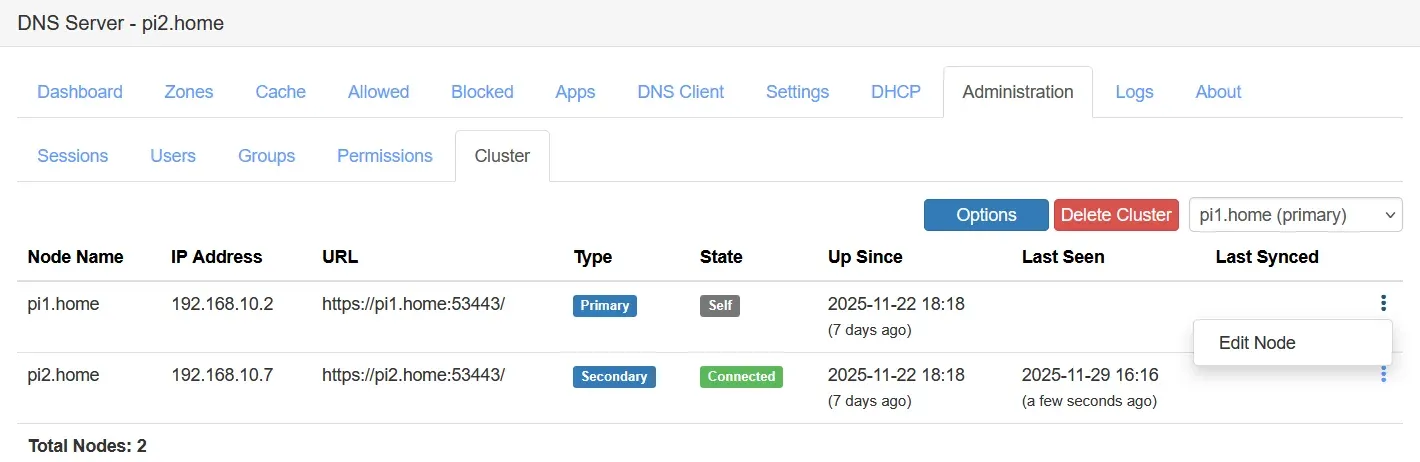
Official screenshot from the Technitium clustering guide showing two nodes of a cluster on a private home network.
Key capabilities
- Authoritative DNS hosting The server hosts Primary, Secondary, Stub and Conditional Forwarder zones, so a domain name can be served from equipment the owner controls. Zone transfers use AXFR and IXFR with DNS NOTIFY, can be secured with TSIG, and can run over TLS (XFR-over-TLS, RFC 9103) or QUIC. Secondary zones can be validated with ZONEMD records, and Catalog Zones (RFC 9432) automate secondary zone provisioning. The project blog describes self-hosting a domain name step by step.
- Recursive resolver with caching Without forwarders the server resolves names itself starting from the root servers. The resolver supports QNAME minimization (RFC 9156), QNAME case randomization over UDP, latency-based name server selection with concurrent queries, and EDNS Client Subnet. The cache supports Serve Stale and Prefetch, and a persistent cache option saves the cache to disk across restarts; version 15.6 added a separate setting to switch Prefetch on or off.
- Encrypted DNS as a client Forwarders can be queried over DNS-over-TLS, DNS-over-HTTPS or DNS-over-QUIC, and the settings page offers a Quick Select list of public resolvers such as Cloudflare, Google, Quad9 and AdGuard. HTTP and SOCKS5 proxies are supported, which the project documents as a way to route DNS through the Tor network or to Cloudflare's hidden resolver. If no forwarders are configured, the server uses the root servers for recursive resolution.
- Encrypted DNS as a server The server can offer DNS-over-TLS, DNS-over-HTTPS and DNS-over-QUIC to clients on the network. DoH supports HTTP/1.1, HTTP/2 and HTTP/3, and the PROXY protocol versions 1 and 2 are accepted on UDP and TCP. These optional protocols need a TLS certificate; the blog explains hosting DoH and DoT services and configuring DoQ and HTTP/3.
- DNSSEC validation and signing DNSSEC validation covers the recursive resolver, forwarders and conditional forwarders with RSA, ECDSA and EdDSA algorithms, NSEC and NSEC3, over every supported transport including encrypted ones. Primary zones can be signed with the same algorithm families. Version 15.0 added an option to activate a Key Signing Key manually, and DANE TLSA records can generate hash values from PEM certificates.
- Ad and malware blocking Block List URLs in standard hosts format or plain domain lists are downloaded and refreshed automatically every 24 hours, and a Quick Add menu lists known lists. Allowed and Blocked sections hold manual entries, and CNAME cloaking detection blocks names that resolve through a blocked CNAME. The Advanced Blocking app adds regex lists and different lists per client IP address or subnet, and the Dashboard can switch blocking on or off from the Top Blocked Domains panel.
- Record types and zone features Beyond the standard types the server supports SVCB and HTTPS (RFC 9460), URI, SSHFP, DNAME, TLSA and wildcard records. Two proprietary types are added: ANAME for CNAME-style aliases at the zone apex, and APP records that pass a query to a DNS App for a custom answer. Records can carry an expiry for automatic aging, zones and records can be disabled without deletion, and version 15.5 added a Zone File Editor for Primary and Conditional Forwarder zones.
- DNS Apps and the App Store DNS Apps are plug-in modules installed and updated from the DNS App Store inside the console. Apps listed in the change log include Advanced Blocking, Advanced Forwarding, Split Horizon, Geo Country and Geo Continent, DNS64, DNS Rebinding Protection, Block Page, Wild IP, Drop Requests, Failover, Log Exporter and Query Logs backends for SQLite, MySQL, SQL Server and PostgreSQL. App configuration is JSON and, since version 15.0, may contain comments; each app ships a Read Me. The blog covers creating and running DNS Apps.
- Clustering Introduced in version 14, Clustering joins two or more instances under one primary node and one or more secondary nodes that sync configuration from it. Allowed and Blocked lists, apps, users, groups and permissions are synced across nodes, while zones, cache and logs stay per node, with a node selector in the console and aggregate Dashboard statistics. Node-to-node TLS uses DANE-EE, and the built-in DHCP server does not yet cluster its scopes. The design is explained in the clustering guide.
- Built-in DHCP server The DHCP server can serve multiple networks through scopes, with reserved leases, host name overrides and ping checks before leasing an address. Scopes can register client names in Primary or Forwarder zones, and reserved leases can keep persistent DNS records. Supported options include Domain Search, TFTP server address, CAPWAP and a generic option type. The server listens on UDP port 67 when DHCP is used.
- Web console and access control The admin console runs on port 5380, or 53443 for HTTPS, with Dashboard, Zones, Cache, Allowed, Blocked, Apps, DNS Client, Settings, DHCP, Administration and Logs sections. It offers dark mode, an Amber theme and live-updating query logs. Multi-user role-based access, TOTP two-factor authentication, SSO through OpenID Connect (since 15.0) and LDAP (since 15.5) are supported. A fresh installation logs in automatically with a default admin account; according to the project, changing that password disables auto login.
- HTTP API and monitoring The HTTP API exposes every action of the web console to scripts and third-party tools, with non-expiring API tokens and, since 15.0, the Authorization Bearer header. A Prometheus metrics call returns lifetime counters, and a Health Check API added in 15.3 can be called from loopback without authentication for Docker health checks. Dynamic DNS Updates (RFC 2136) allow tools such as nsupdate and certbot DNS challenges.
- Windows installation The Windows setup installer runs on Windows 7 SP1 and later; Windows 7 SP1 and Server 2012 R2 need additional dependencies. Since version 15.0 the installer creates a non-system service. The setup ZIP is about 5.6 MB and is listed with its SHA256 value on the download page.
- Linux and Raspberry Pi installation An automated installer and updater is run with
curl -sSL https://download.technitium.com/dns/install.sh | sudo bash. The install instructions list Ubuntu, Raspberry Pi OS, CentOS and Fedora as tested, and version 15.3 added Alpine Linux with OpenRC. Since 15.0 the script installs a non-root systemd service. A matching uninstall script removes the server and the .NET runtime. The instructions also describe stopping systemd-resolved or dnsmasq when they already occupy port 53. - Docker and portable deployment The official image
technitium/dns-serveris published on Docker Hub, with a docker-compose.yml example that includes a health check. Environment variables documented in DockerEnvironmentVariables.md initialize the configuration on first start, including predefined static API sessions since 15.5. The portable tar.gz archive runs on any system with the ASP.NET Core 10 Runtime, and build instructions cover compiling from source. - Logging, DNS client and diagnostics System logs and query logs are built in, with a No Stack Trace option for shorter error entries. A built-in DNS Client queries the local server or any other server over the supported protocols and can import answers into a local zone. Extended DNS Errors (RFC 8914) are returned in responses, and the server can host DNSBL or RBL lists (RFC 5782).
- Performance and transport The server uses asynchronous I/O; the project reports a load test above 100,000 requests per second on an Intel i7-8700 over Gigabit Ethernet. IPv6 is supported in the core, with an IPv6 Mode option for dual-stack networks since 15.0. Out-of-order request processing is implemented for DNS-over-TCP and DNS-over-TLS, and UDP socket pooling and buffer sizes are configurable.
Where Technitium DNS Server fits
Network-wide ad and malware blocking
A home or office network points its clients at the server, either manually or through the built-in DHCP server, which hands out the server address with each lease. Block List URLs are entered in Settings or picked from the Quick Add list, and the server refreshes them every 24 hours. The Dashboard shows blocked query counts and Top Blocked Domains, and the Advanced Blocking app applies separate lists to different client subnets. The project describes the approach in Blocking Internet Ads Using DNS Sinkhole.
Encrypting upstream DNS traffic
In the Forwarders setting an administrator enters resolver addresses or URLs and selects DNS-over-TLS, DNS-over-HTTPS or DNS-over-QUIC as the forwarder protocol. Clients keep using plain DNS on the local network while queries leaving it are encrypted. The setup is covered in Configuring DNS Server For Privacy and Security, and proxies can route traffic through Tor.
Self-hosting authoritative zones
A domain owner creates a Primary zone, adds records in the console or the Zone File Editor, and lists the server as a name server at the registrar. DNSSEC signing can be enabled per zone, and secondary servers receive copies through AXFR or IXFR with NOTIFY, optionally over TLS or QUIC and authenticated with TSIG. Catalog Zones add new zones to secondaries automatically, as explained in the catalog zones guide.
Offering DoH, DoT and DoQ to devices
With a TLS certificate in place, the Optional Protocols settings enable encrypted DNS services for clients on the network or across the internet. DoH works over HTTP/1.1, HTTP/2 and HTTP/3 and can sit behind a reverse proxy, with allowed proxy addresses defined since version 15.2. The default ports are 853 for DoT and DoQ and 443 for DoH, per the install instructions.
Running several servers as a cluster
From the Administration section a first node initializes a cluster and further nodes join it, after which blocking lists, apps, users and permissions stay in sync. Zones are shared through the cluster catalog zone, and DNSSEC private keys of signed member zones are copied to every node. The install notes state that secondary nodes are upgraded before the primary.
Automating DNS changes
Scripts and other software use the HTTP API with an API token to add records, manage zones, flush the cache or read statistics. Dynamic Updates allow nsupdate and certbot DNS challenges, as shown in the blog post on renewing certificates with Certbot, while Prometheus collects metrics from the metrics endpoint.
Install
curl -sSL https://download.technitium.com/dns/install.sh | sudo bashReviews of Technitium DNS Server
Be the first to share your experience with Technitium DNS Server.
Write a review
Loading review form…
Alternatives to Technitium DNS Server
 Pi-holePi-hole is a free, EUPL-1.2 licensed DNS sinkhole for Linux and Docker. It blocks advertising and tracking domains for the whole network, with blocklists, groups, a built-in web dashboard, a REST API, an optional DHCP server and privacy levels.
 ZenZen is an MIT-licensed, system-wide ad blocker for Windows, macOS and Linux from Irbis. A local proxy filters browser and app traffic with EasyList-style and hosts lists, custom rules and a request history.
 CloudflareCloudflare provides authoritative DNS, reverse-proxy services, CDN caching, web application firewall controls, and edge application tools.