

What is Tabularis?
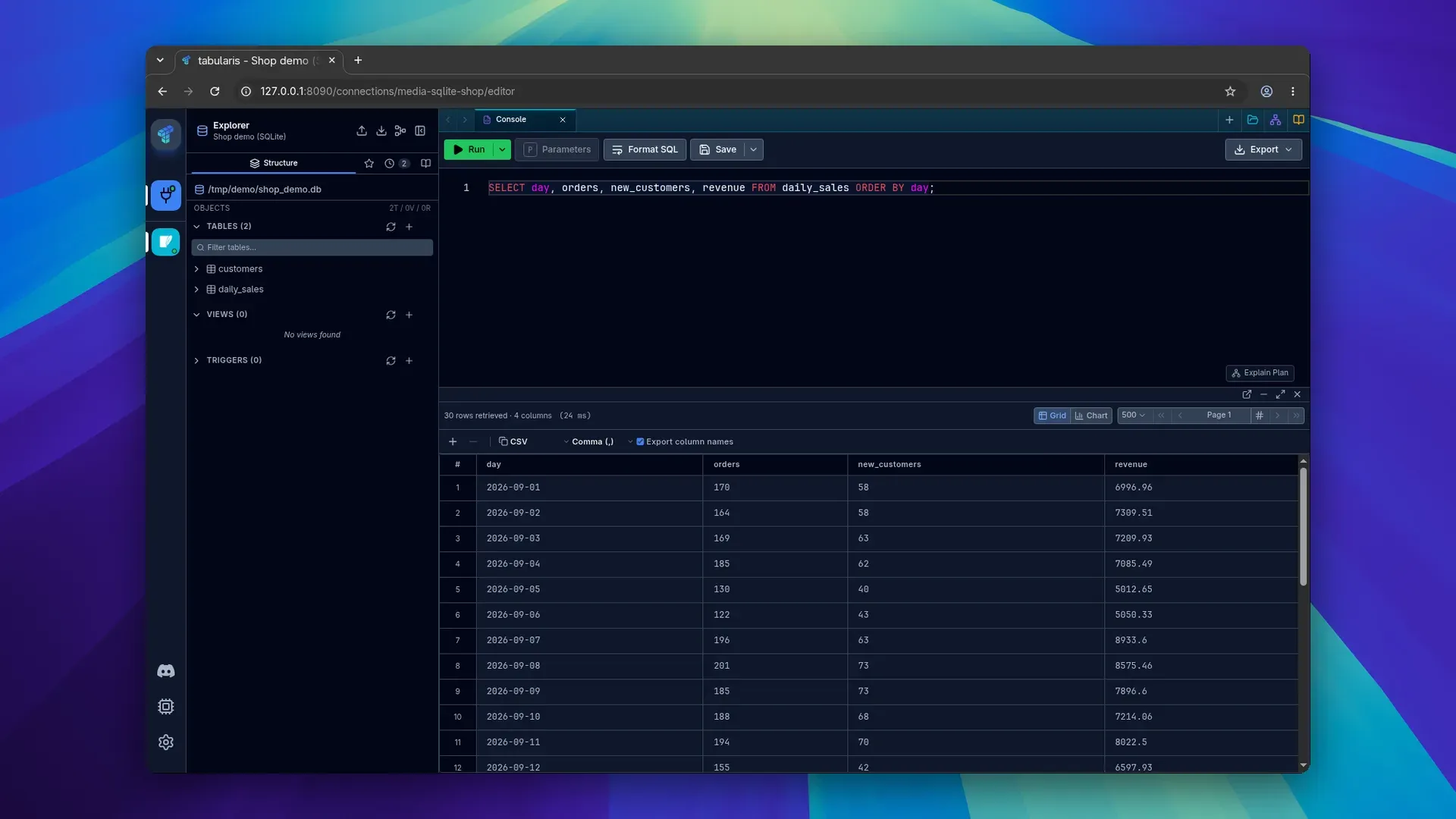
Tabularis is an open-source desktop SQL workspace for PostgreSQL, MySQL and MariaDB, SQLite and, through driver plugins, a range of other databases. It combines a Monaco-based SQL editor, SQL notebooks, a visual query builder, visual EXPLAIN, ER diagrams and a data grid with a built-in Model Context Protocol (MCP) server, so that AI clients such as Claude Desktop, Claude Code, Cursor and Codex can list saved connections, read schemas and run queries through the same app. The project is developed in the TabularisDB/tabularis repository and documented in the Tabularis wiki. The website credits the app to Debba, the handle of Andrea Debernardi, who also writes the release posts on the project blog. According to the README, the project started in January 2026 as an experiment in AI-assisted development.
The app is built with Tauri v2, not Electron, as the architecture page explains: the React 19 and TypeScript interface runs in the operating system's WebView, while database connections, file I/O and credential storage run in a Rust backend. Three drivers ship built in: PostgreSQL, MySQL/MariaDB and SQLite. The built-in PostgreSQL driver has been deprecated since v0.23.0 in favour of a PostgreSQL plugin, which Tabularis installs automatically while a saved connection still uses the old driver. Every other database is reached through a plugin: a standalone executable that speaks JSON-RPC 2.0 over stdin and stdout and can be written in any language. The driver page of the plugin registry listed 30 driver plugins on November 18, 2026, among them SQL Server, Oracle, DuckDB, ClickHouse, MongoDB and Redis; some are published by the TabularisDB organization and others by community authors. The README also counts 30, while the repository description still says 29.
Desktop builds are published for Windows (x64 installer, MSI package and portable ZIP), macOS (separate Apple Silicon and Intel disk images, signed and notarized since v0.13.1) and Linux x86_64 (AppImage, .deb and .rpm). The installation guide also lists WinGet, a Homebrew cask, Snap, a Flatpak through the Flatpark remote and an AUR package, plus a nightly channel. Since v0.30.0 the same interface also runs in a browser as Tabularis Web, started with tabularis web from a desktop install or from the official container image on the GitHub Container Registry, with Docker Compose and Helm instructions.
The latest stable release is v0.33.0, published on November 16, 2026. According to its notes and the announcement post, it opens CSV, TSV, JSON, NDJSON and Parquet files as tables through a plugin with the data-files capability (DuckDB plugin 0.3.0 is the first), and adds opt-in AI inline completion, an opt-in Vim mode, an enforced read-only mode per connection, a preview of UPDATE and DELETE changes on PostgreSQL and Unix socket connections.
Tabularis is licensed under the Apache License 2.0. The website states that it is free, with no trial and no account, and the project lists its supporters on a sponsors page; no paid edition is offered. Planned work such as a data compare tool and team collaboration is tracked on the public roadmap. Similar listings on iThub include Beekeeper Studio, a cross-platform SQL editor and database manager, and Tiny RDM, a desktop client for Redis.
Key capabilities
- Windows installers
winget install Debba.Tabularisinstalls the app from WinGet. Each release also carries an x64 setup executable, an MSI package for IT deployment and group policy, and a portable ZIP that runs without installation. The installation guide lists Windows 10 or 11 as the minimum and requires WebView2, which ships with Microsoft Edge. - macOS builds
brew install --cask tabularisinstalls the stable build, and thetabularis@nightlycask follows the nightly channel. Direct downloads are separate DMG files for Apple Silicon and Intel Macs, with macOS 10.15 as the minimum. Builds from v0.13.1 onward are signed with a Developer ID certificate and notarized by Apple. - Linux packages Release assets include an AppImage, a .deb for Debian and Ubuntu and an .rpm for Fedora and RHEL, all for x86_64 only, with Ubuntu 22.04 listed as the minimum and webkit2gtk-4.1 and libsecret as required libraries. The Snap needs
sudo snap connect tabularis:password-manager-servicebefore saved connections can use the keychain. A Flatpak is available from the Flatpark remote, and the AUR hastabularis-binandtabularis-nightly-bin. - Tabularis Web
tabularis webserves the same React interface and Rust services to a browser on 127.0.0.1:8080. The browser opens with a single-use token that expires after 60 seconds and is exchanged for an eight-hour HttpOnly session cookie, and Host, Origin and CSRF checks apply. The web mode page lists limits of 10,000 rows per query page, 16 MiB per serialized response and 64 concurrent requests per server. - Container image and Helm chart
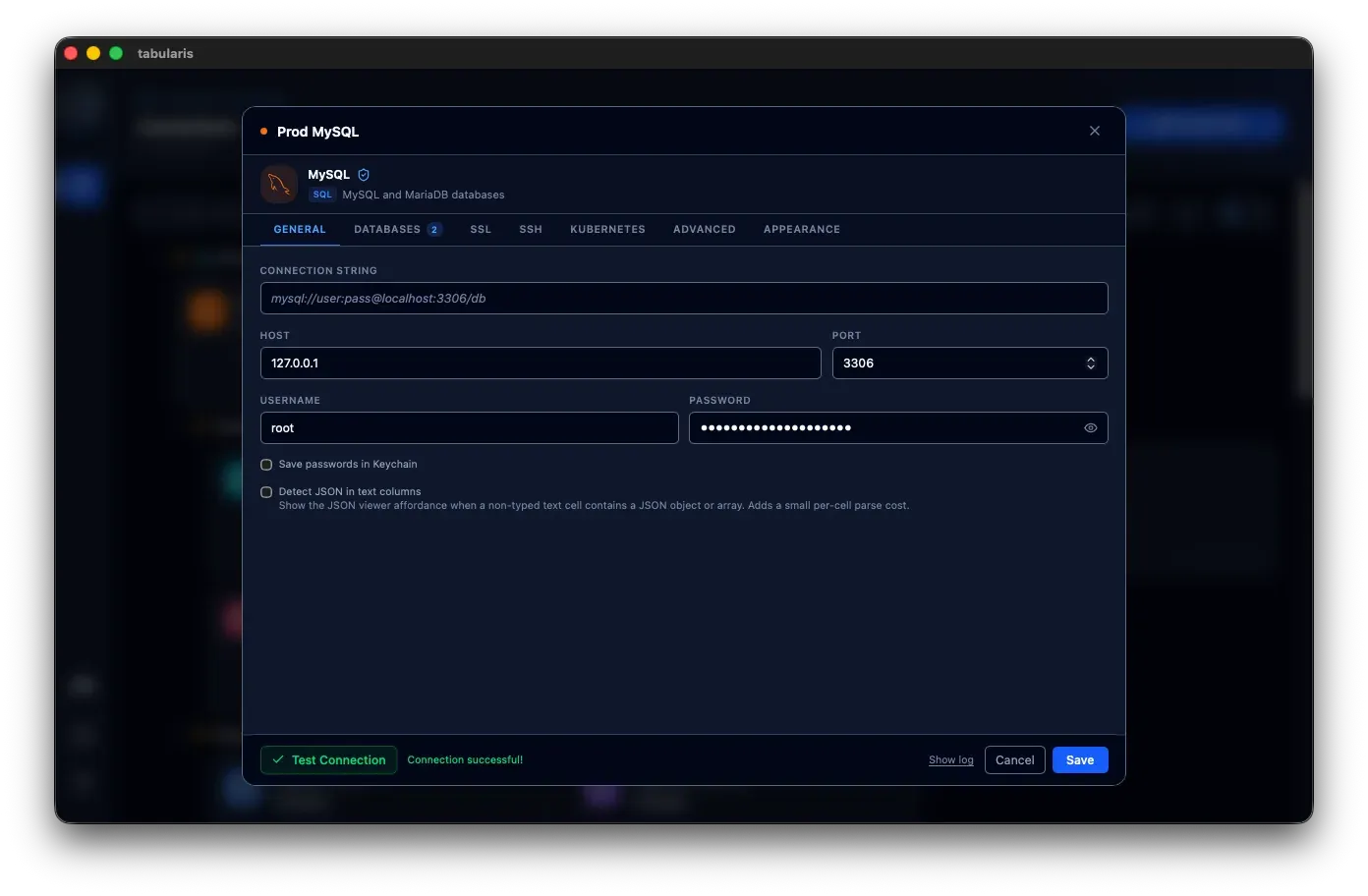
ghcr.io/tabularisdb/tabularisis published for linux/amd64 and linux/arm64, based on Debian slim at about 60 MB, and runs as UID 10001 with all state in/data. It is a server-only build without GTK or WebKitGTK that runs onlytabularis webandtabularis --mcp. Credentials are stored in an AES-256-GCM encrypted file with an Argon2id-derived key, a Compose file adds Caddy for HTTPS, and a Helm chart runs one replica. - Built-in drivers and connection options PostgreSQL (deprecated built-in driver, replaced by the PostgreSQL plugin), MySQL/MariaDB and SQLite are available without plugins, with several databases per connection. Connections can go through SSH tunnels, Kubernetes and AWS SSM tunnels, and since v0.33.0 Unix sockets. Saving passwords in the OS keychain is on by default for new connections since v0.28.0; with it off, passwords are written to
connections.json, which is created with mode 0600 on Unix. - Driver plugins in any language A driver plugin is an executable that Tabularis spawns as a child process and talks to with JSON-RPC 2.0 messages over stdin and stdout, so a crash in a community driver ends only that process. Plugins install from Settings without a restart and are described by a
.tabulariummanifest. The plugin registry also lists themes, a Neon cloud integration and a Google Gemini AI assistant, and a bounty board tracks requested drivers such as InfluxDB and Snowflake. - SQL editor The editor uses Monaco with syntax highlighting and autocompletion, tabs with isolated connections and a resizable split view. Run All, Run Selected or a single statement each return results in separate tabs with their own pagination, and query splitting handles stored procedures and
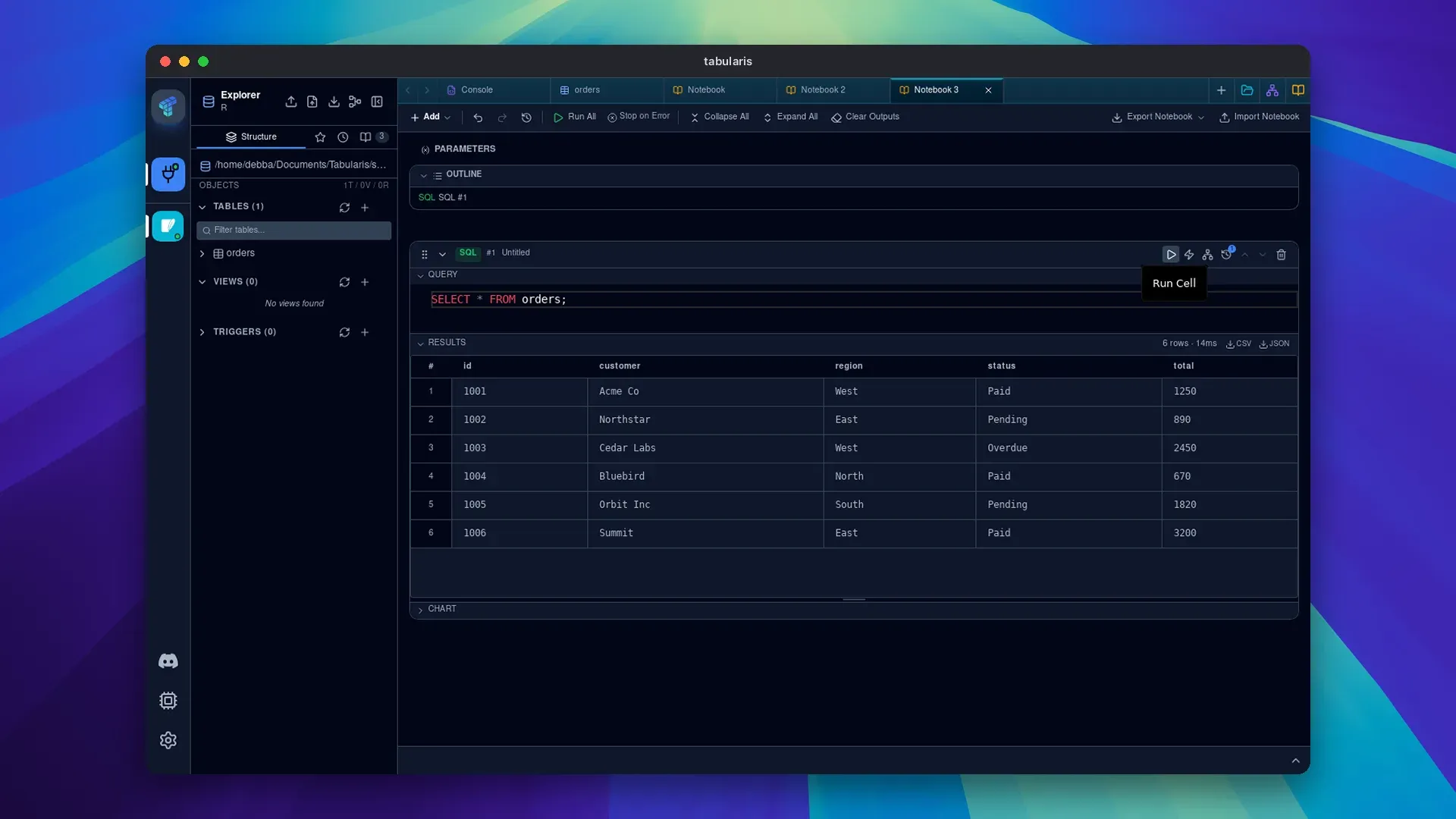
$$-delimited blocks..sql,.psqland.pgsqlfiles open in tabs without running, and v0.33.0 adds an opt-in Vim mode. - SQL notebooks A notebook mixes SQL and Markdown cells, shows results inline and draws bar, line and pie charts or a single-value KPI card.
{{cell_N}}references another cell's full result and is expanded to a CTE at run time, and@paramNameparameters apply across cells. Notebooks are saved as.tabularis-notebookfiles and export to HTML, CSV or JSON, as described in the notebooks guide. - Visual query builder Tables are placed on a ReactFlow canvas and joined by connecting them. WHERE and HAVING filters, COUNT, SUM and AVG aggregates, sorting and limits are set visually, and the generated SQL updates as the diagram changes.
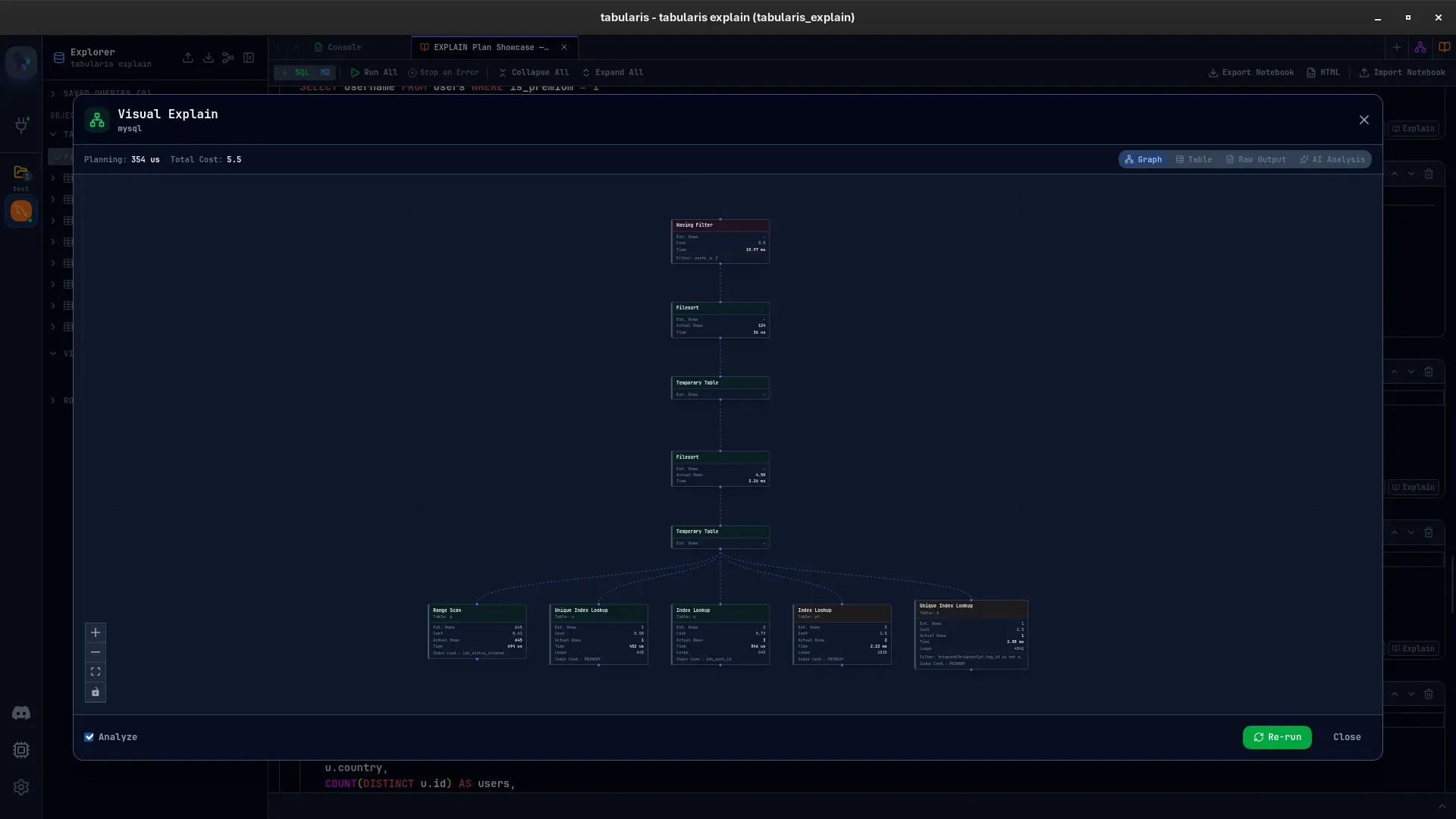
- Visual EXPLAIN Execution plans open as a navigable node graph, a table of node metrics, the raw database output or an optional AI analysis. The built-in drivers for PostgreSQL, MySQL/MariaDB and SQLite each use the best EXPLAIN format available, and plugins such as Oracle and Db2 can supply their own plans. The visual EXPLAIN page covers the views and the Analyze option.
- Database explorer and ER diagrams A sidebar tree lists tables, columns, keys, indexes, views and stored routines with inline editing. An interactive ER diagram supports pan, zoom, layout and diagrams for selected tables. SQL dump and import, and export of a single table with its structure and rows, are available from the sidebar or the command palette.
- Data grid Cells can be edited inline or in batches and committed together, rows can be added, deleted and multi-selected, and results export to CSV or JSON or copy to the clipboard. JSON and JSONB values are highlighted in the grid and open in a separate editor with tree, Monaco and raw modes; MySQL GEOMETRY support is described as initial.
- Built-in MCP server
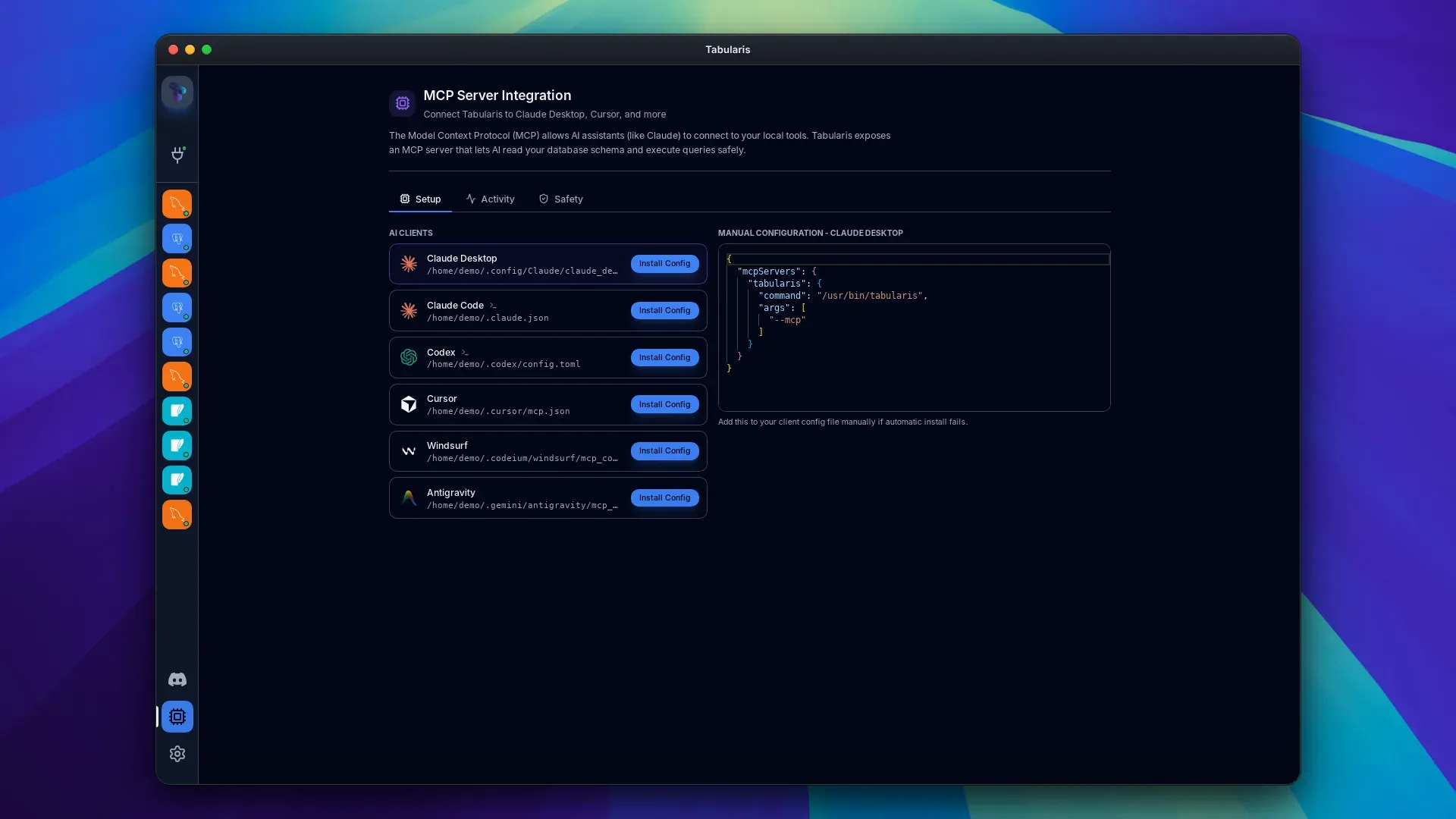
tabularis --mcpruns the app as an MCP server that the AI client starts as a child process and talks to over stdio, with no network port opened. The tools arelist_connections,list_databases,list_tables,describe_tableandrun_query, and connection resources never include passwords. The MCP server page documents one-click configuration for Claude Desktop, Claude Code, Cursor, Windsurf, Antigravity and Codex, and output in JSON or TOON. - MCP read-only mode and approval gates Read-only mode lets only statements classified as reads reach the database, and blocks anything the classifier cannot place, including multi-statement payloads. Since v0.28.0 such queries also run in a read-only database session on the built-in drivers. Approval gates (off, writes_only by default, or all) pause a query, show the SQL and a pre-flight EXPLAIN in the app, and return a denial or a timeout after 120 seconds; outcomes go to an audit log.
- AI assistant Optional text-to-SQL, query explanation and inline completion work with OpenAI, Anthropic, MiniMax, OpenRouter, Requesty, API Route, Ollama for local models and any OpenAI-compatible API, and since v0.29.0 with a ChatGPT Plus or Pro plan on the desktop. Prompts include a schema snapshot of up to 20 tables. For inline completion the app states that it sends at most 4,000 characters before the cursor, 1,000 after it and 8,000 characters of table and column names, never result rows or credentials.
- Configuration, languages and updates Settings, connection profiles, saved queries and themes live in
~/.config/tabularis/,~/Library/Application Support/tabularis/or%APPDATA%\tabularis\, andTABULARIS_DATA_DIRor Settings > Storage moves them, for example to a synced folder; plugins stay local. The interface is available in 13 languages, the app checks for updates on startup, andtabularis --debugenables verbose logging.
Where Tabularis fits
Connecting an AI coding agent to a database
In the desktop app, the MCP Server panel lists the supported AI clients with the path of each client's configuration file; Install Config writes the mcpServers entry, or runs claude mcp add or codex mcp add for command-based clients, and the client is restarted. The agent then works with the saved connections through the five MCP tools. The approval gates page describes the default writes_only mode, in which writes wait for approval in the open Tabularis window, and read-only mode blocks them outright.
Building a reusable analysis notebook
A notebook collects SQL cells and Markdown notes in one .tabularis-notebook file. A later cell can query an earlier result with {{cell_N}}, which Tabularis expands to a CTE, and global @paramName values change every cell at once. Run All executes the cells in order with an optional stop on the first error, charts and KPI cards show results inline, and the finished notebook exports to HTML, CSV or JSON.
Investigating a slow query with visual EXPLAIN
From the editor, Explain Plan opens the plan of the current query as a graph of nodes with estimated and actual rows, costs and timings, and the Analyze option re-runs it with runtime statistics. The table view lists the exact node metrics, the raw view keeps the database's own output, and the optional AI view analyses the plan with the configured AI provider. Approval gates reuse the same component to show a pre-flight plan before an agent's write runs.
Working with databases beyond the built-in three
Settings lists the driver plugins published in the registry; installing one, such as SQL Server, ClickHouse or DuckDB, adds it to the connection catalogue without a restart, and the MCP server and AI features use it like a built-in driver. Some drivers need vendor software on the machine: the registry entries state that the Oracle driver requires the Oracle Instant Client and the Informix driver the Informix Client SDK. The plugin guide covers writing a new driver in any language.
Opening data files as tables
Since v0.33.0, Open data file on the Connections page or in the command palette opens a CSV, TSV, JSON, NDJSON or Parquet file in a table tab, and on the desktop a file can also be passed on the command line, as in tabularis orders.csv. The file becomes a view in a workspace database saved as a connection named Data files, so filters, the SQL editor, exports and MCP work on it. Reading the file needs a plugin with the data-files capability; when none is installed, the dialog offers the DuckDB plugin.
Running Tabularis Web for a team server
The container quick start publishes the server on 127.0.0.1:8080 with a named data volume, and docker logs prints the generated login password. Access from another machine goes through an HTTPS reverse proxy that keeps the Host header and upgrades WebSockets, such as the Caddy setup in the Compose files, and --connection-mode managed-only restricts sessions to connections defined by an administrator. The container guide recommends setting and backing up TABULARIS_SECRET_KEY, because the stored credentials cannot be recovered without it.
Install
winget install Debba.TabularisReviews of Tabularis
Be the first to share your experience with Tabularis.
Write a review
Loading review form…
Found Tabularis useful? Upvote it todayYour vote helps other IT teams find it in the daily ranking.


