
What is Chops?
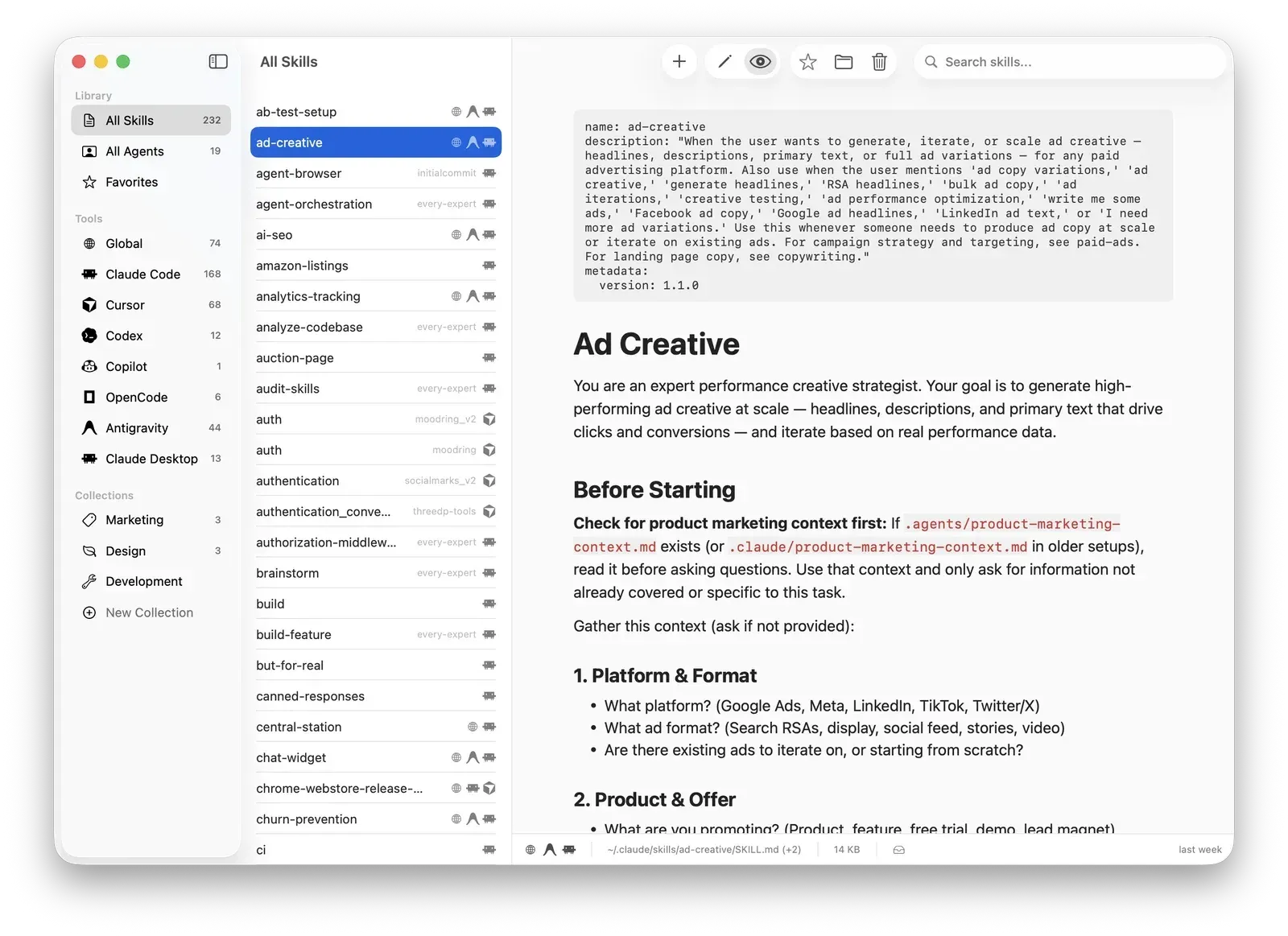
Chops is a desktop application for macOS that collects the skill and agent files used by AI coding tools into one window. Tools such as Claude Code, Cursor, Codex, Windsurf and Amp each keep their skills, rules and agents in their own dotfile directories under the home folder. Chops scans those directories, lists what it finds, and provides an editor, search and collections on top of the files. The official website describes it as one app to browse, edit and manage skills across these tools.
The application is a native macOS app written in Swift with SwiftUI and SwiftData, according to the README. Discovered skills and user collections are stored in a local SwiftData container. A file watcher based on macOS FSEvents triggers a rescan whenever files change on disk. Skills are identified by their resolved symlink path, so one file linked into several tool directories appears once with several tool badges. The app runs without the macOS App Sandbox, a choice the README states is required to read dotfiles across the home directory.
Chops is distributed as a DMG from GitHub Releases and updates itself through the Sparkle framework, which the 1.0.0 changelog entry lists with EdDSA signing. The website lists macOS Sequoia as the requirement, and the README states macOS 15 or later for building from source with Xcode and xcodegen. Sparkle is the only external dependency.
The latest release is Chops v1.16.0, published on August 23, 2026. It opens the skill browser on a Trending list, adds an Official-only filter to registry search, merges agents and rules into one Skills list with a Discovery row, and introduces a Command-K command palette plus shortcuts for the sidebar and the Skills library. Earlier releases in the changelog added AI Assist through the installed Claude and Codex CLIs (1.15.0), Hermes as a tool source (1.14.0), global skills symlinked to all installed agents (1.13.0) and remote server connections (1.5.0).
The app is free to download. Its source code is published under the Functional Source License 1.1 with MIT future license (FSL-1.1-MIT), with Sabotage Media LLC named as copyright holder. FSL permits use, modification and redistribution for any purpose other than a competing commercial use, and each version becomes available under the MIT license on the second anniversary of its release. The project switched from MIT to FSL-1.1-MIT in pull request 93. The website describes the app as free and open source and the source as available under FSL-1.1-MIT.
Key capabilities
- Multi-tool discovery The README lists Claude Code, Cursor, Codex, Windsurf, Copilot, Aider and Amp as supported tools, plus a Global location at
~/.agents/skills/. The changelog records later additions of Antigravity, OpenCode, Pi, Copilot CLI, Claude Desktop and CLI plugin skills, OpenClaw and Hermes as tool sources. The sidebar hides tools that are not installed. - Documented scan paths Chops reads skills from paths such as
~/.claude/skills/,~/.cursor/skills/and~/.cursor/rules,~/.codeium/windsurf/memories/,~/.codex/skills/and~/.config/amp/skills/, and agents from~/.claude/agents/,~/.cursor/agents/and~/.codex/agents/. Copilot and Aider are detected only at project level, without global paths. Custom scan paths can be added for any tool. - Skills, agents and rules in one library Since version 1.16.0, agents and rules appear in one unified Skills list. Library views include all items, favorites and a per-tool view with item counts.
- Native Markdown editor The editor has syntax highlighting, formatting shortcuts for bold, italic, headings, links and lists, a find bar with Command-F and saving with Command-S. Skill files are also saved automatically after one second of inactivity. YAML frontmatter in
.mdfiles and Cursor.mdcfiles are parsed by dedicated parsers. - Preview mode A rendered Markdown preview with a rich theme shows the skill as formatted text, and text in the preview can be selected and copied. The status bar shows the file path, size and modification time.
- Collections Collections group skills and agents without changing the source files. Skills are added by drag and drop or from the context menu, and collections can be renamed from the right-click menu.
- Full-text search Search covers name, description and content of every discovered skill. The search runs in memory inside the app.
- Real-time file watching FSEvents listeners rescan tool directories on any change on disk, so edits made by an agent or another editor appear in the list without a manual refresh.
- Create skills and agents New skills and agents are generated with the correct boilerplate for each tool. Since version 1.13.0, new skills default to Global and are symlinked to all installed agents, and an existing tool-specific skill can be converted to Global from the context menu.
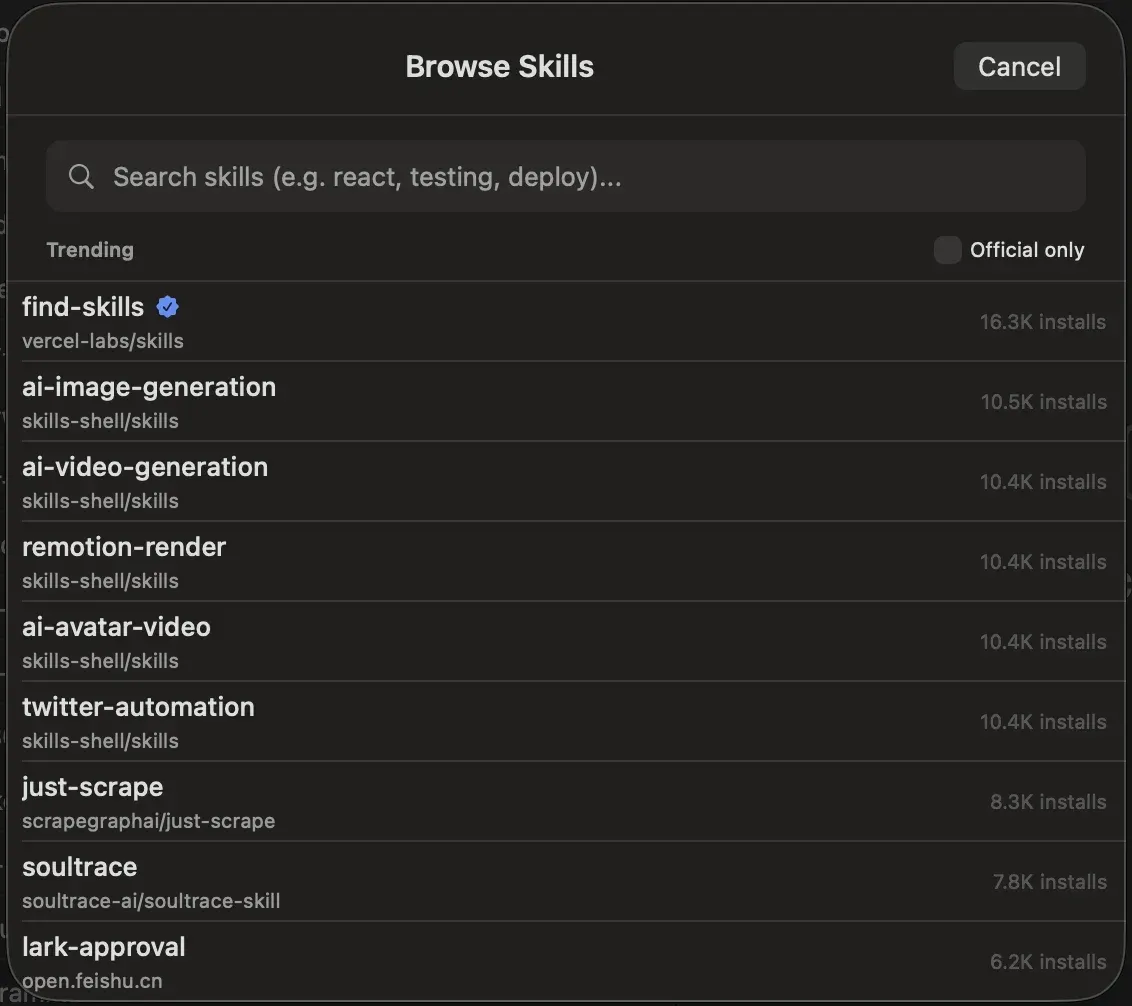
- Skills registry browser Skills Discovery browses, searches and installs skills from the skills.sh registry. The browser opens on a Trending list with install counts and offers an Official-only filter.
- Remote servers Chops can connect to servers running OpenClaw, Hermes or other layouts to discover, browse and install skills. Local OpenClaw skill detection was added in version 1.12.0.
- AI Assist AI Assist drafts or changes a skill through the Claude and Codex command-line tools installed on the Mac. Proposed changes are shown as a diff and are written to disk only after the user accepts them, and in-progress requests can be cancelled.
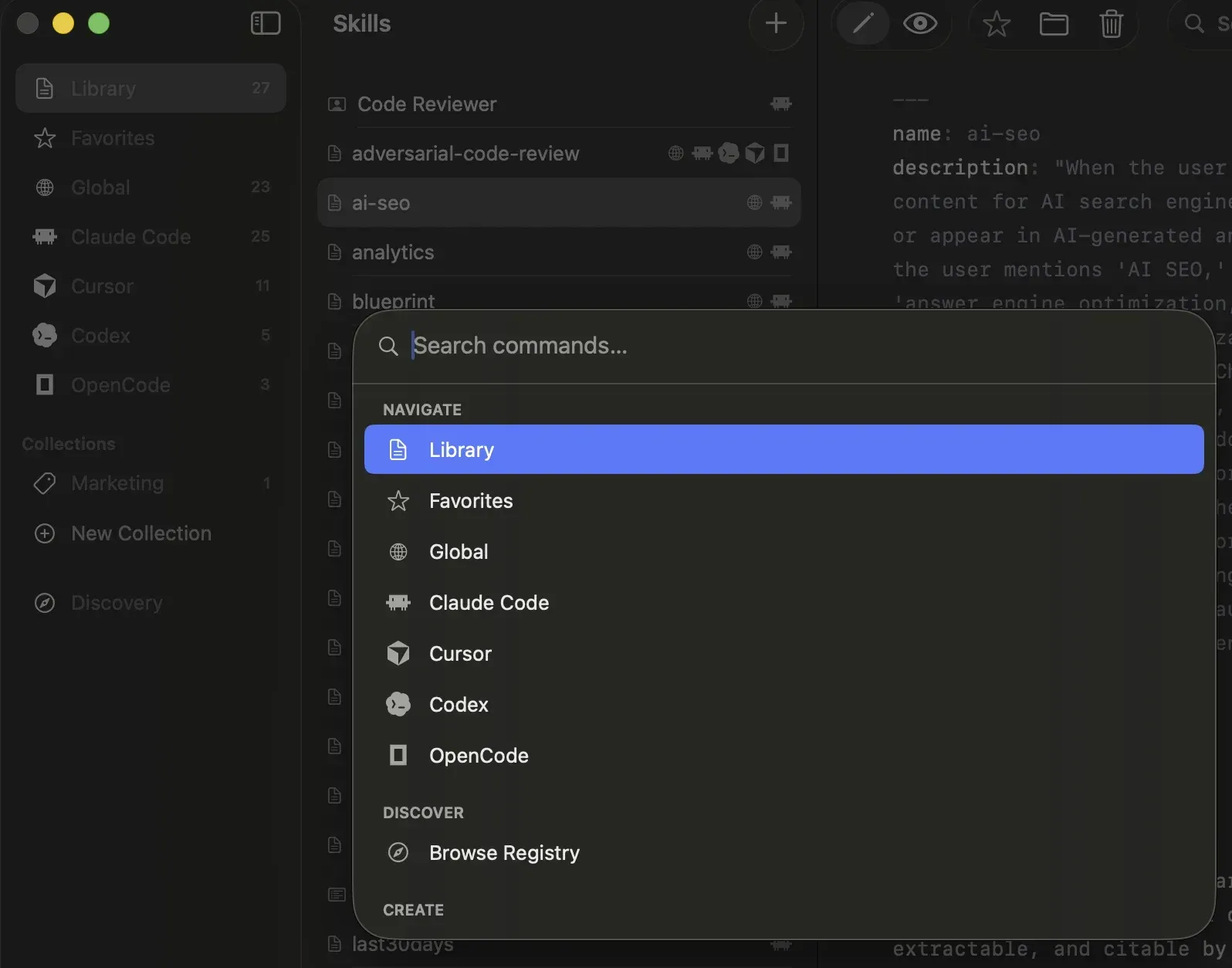
- Command palette and keyboard navigation Command-K opens a palette that filters commands to jump to a library section or a tool, browse the registry, or create a skill, agent or rule. Command-B toggles the sidebar and Command-Shift-L jumps to Skills. The keyboard navigation document lists all bindings.
- Download and automatic updates The DMG at
releases/latest/download/Chops.dmginstalls by drag to the Applications folder. Sparkle checks for new versions in the background, and the About tab in settings shows the installed version and update checks. - Build from source Developers can clone the repository, run
xcodegen generateto create the Xcode project fromproject.yml, and build with Xcode orxcodebuild. The README notes there is no automated test suite.
Where Chops fits
Seeing every installed skill in one place
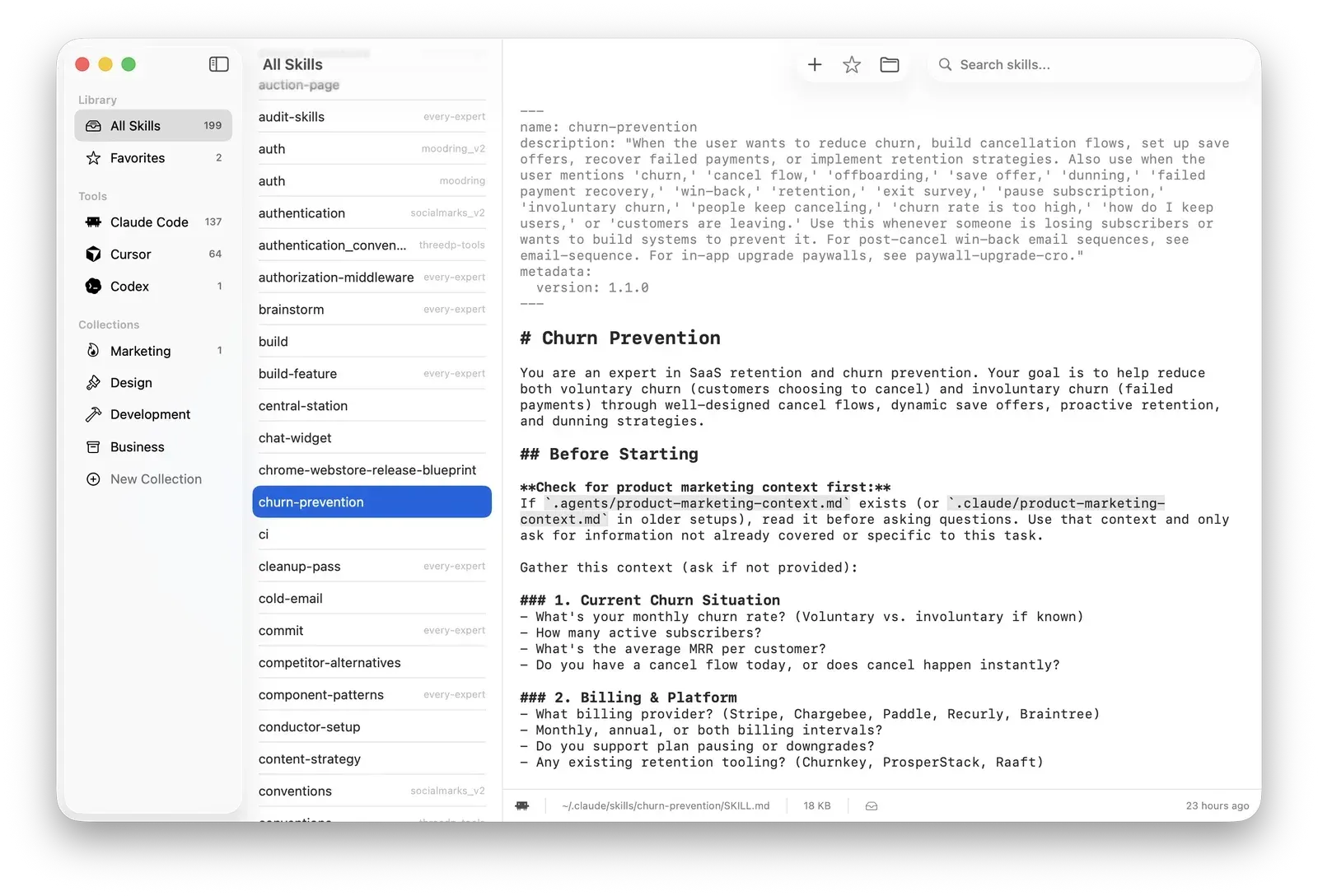
A user with several coding agents installed opens Chops, and the scanner reads each tool's skill, rule and agent directories into one library with per-tool counts. Tool badges show which agents use a file, and symlinked copies appear once. The status bar names the file path on disk for the selected item.
Editing skills and rules
Selecting a skill opens it in the native editor with frontmatter shown at the top. Changes are saved with Command-S or automatically after a short pause, and the file watcher keeps the list in sync with edits made elsewhere. Preview mode renders the Markdown for reading.
Sharing one skill across several agents
A new skill created in Chops defaults to the Global location and is symlinked into all installed agents, according to the 1.13.0 changelog. A skill that exists for only one tool can be converted to Global from the right-click menu, so the same file serves Claude Code, Codex and other tools.
Finding and installing community skills
The Browse Skills sheet lists trending entries from the skills.sh registry with their source repository and install counts. Users search by keyword, can limit results to official skills, and install a selected skill into their library. Connections to OpenClaw or Hermes servers provide the same browse and install flow for remote skill collections.
Organizing large skill libraries
Collections such as Marketing, Design or Development group skills without moving or modifying files. Favorites, full-text search and the command palette provide further ways to reach an item in libraries with hundreds of entries, as shown in the official screenshots.
Drafting changes with an installed coding agent
AI Assist sends a request to the locally installed Claude or Codex CLI and returns the result as a diff in the editor. Nothing is written until the diff is accepted. Similar tools on iThub include LazySkills, which manages skills across agent hosts, and opcode, a desktop interface for Claude Code sessions and agents.
Reviews of Chops
Be the first to share your experience with Chops.
Write a review
Loading review form…
Found Chops useful? Upvote it todayYour vote helps other IT teams find it in the daily ranking.