What is yt-dlp?
yt-dlp is a command-line program for downloading audio and video from websites, described by its maintainers as a feature-rich command-line audio/video downloader. The supported sites list covers thousands of sites, each handled by an extractor module. The project is a fork of youtube-dl based on the now inactive youtube-dlc, and it is developed in the open by the yt-dlp organization on GitHub. The code is written in Python and released under the Unlicense, which dedicates it to the public domain.
Distribution follows several official channels. The release files include a standalone x64 executable for Windows 10 and later (plus x86 and ARM64 variants), a universal macOS executable for macOS 10.15 and later, standalone Linux binaries for glibc and musl on x86_64 and aarch64, an armv7l build, and a platform-independent zipimport binary that needs a Python interpreter and is the README's recommended file for Linux and BSD. The same code is published as the yt-dlp package on PyPI. Package managers such as Homebrew, pacman, Snap, MacPorts, Alpine, Scoop, Chocolatey and winget carry yt-dlp too; the installation wiki lists them and notes that these packages are maintained by third parties.
Releases are date-versioned. The latest stable release is 2026.10.26, published October 26, 2026. Its notes state that the minimum required Python version is now 3.11, that the official Windows binaries now require Windows 10 or later, and that the executables bundle brotli 1.2.1 and curl-cffi 0.17.0 to address recent brotli and certifi security advisories. Besides stable, the project publishes nightly builds on days with code changes and master builds after every push. The README names the nightly channel as the one recommended for regular users, because sites change on their side and older stable builds can stop working with them.
Licensing differs by artifact. The git repository and the PyPI distributions contain only Unlicense code. The PyInstaller-bundled executables include GPLv3+ licensed components, so the combined work is GPLv3+, and the zipimport binary and source tarball include ISC and MIT code from the meriyah and astring JavaScript libraries.
The project's contribution guide follows youtube-dl's policy of not supporting services primarily used for copyright infringement, and states that the project cannot support services that serve only DRM-protected content. Users are responsible for complying with the terms of the sites they access and with applicable copyright law. Applications in this directory that build on yt-dlp include OmniGet, ReClip and SwiftDL, which falls back to yt-dlp with ffmpeg for some video sites; the SwiftDL guide covers that setup.
Key capabilities
- Standalone executables for Windows, macOS and Linux The release files table lists
yt-dlp.exe(Windows 10+, x64),yt-dlp_macos(universal, macOS 10.15+) and Linux builds for glibc 2.17+ and musl 1.2+ on x86_64 and aarch64. These PyInstaller builds include the Python interpreter and the optional packages marked in the dependency list, so no separate Python installation is needed. Unpackaged .zip variants exist for each platform; they are not packed into a single file and cannot update themselves. - Platform-independent zipimport binary The file named
yt-dlpis a zipimport archive that runs on any system with a supported Python interpreter, and the README recommends it for Linux and BSD. The wiki shows installing it into~/.local/binwith curl, wget or aria2c and marking it executable. Since release 2026.10.26, Python 3.11 or newer (CPython or PyPy) is required. - pip package with dependency groups The PyPI package installs with
python3 -m pip install -U "yt-dlp[default]"; thedefaultgroup pulls in the optional Python dependencies, including the yt-dlp-ejs scripts.--no-depsinstalls the bare package,--preinstalls nightly builds, and acurl-cffiextra adds browser impersonation support. - Third-party package managers The installation wiki documents commands for Homebrew, pacman, Snap, MacPorts and Alpine on Linux and macOS, Scoop, Chocolatey and winget on Windows, and pip inside Termux on Android. The wiki notes that these packages are maintained by third parties and may lag behind official releases.
- Self-updater and release channels Release binaries update with
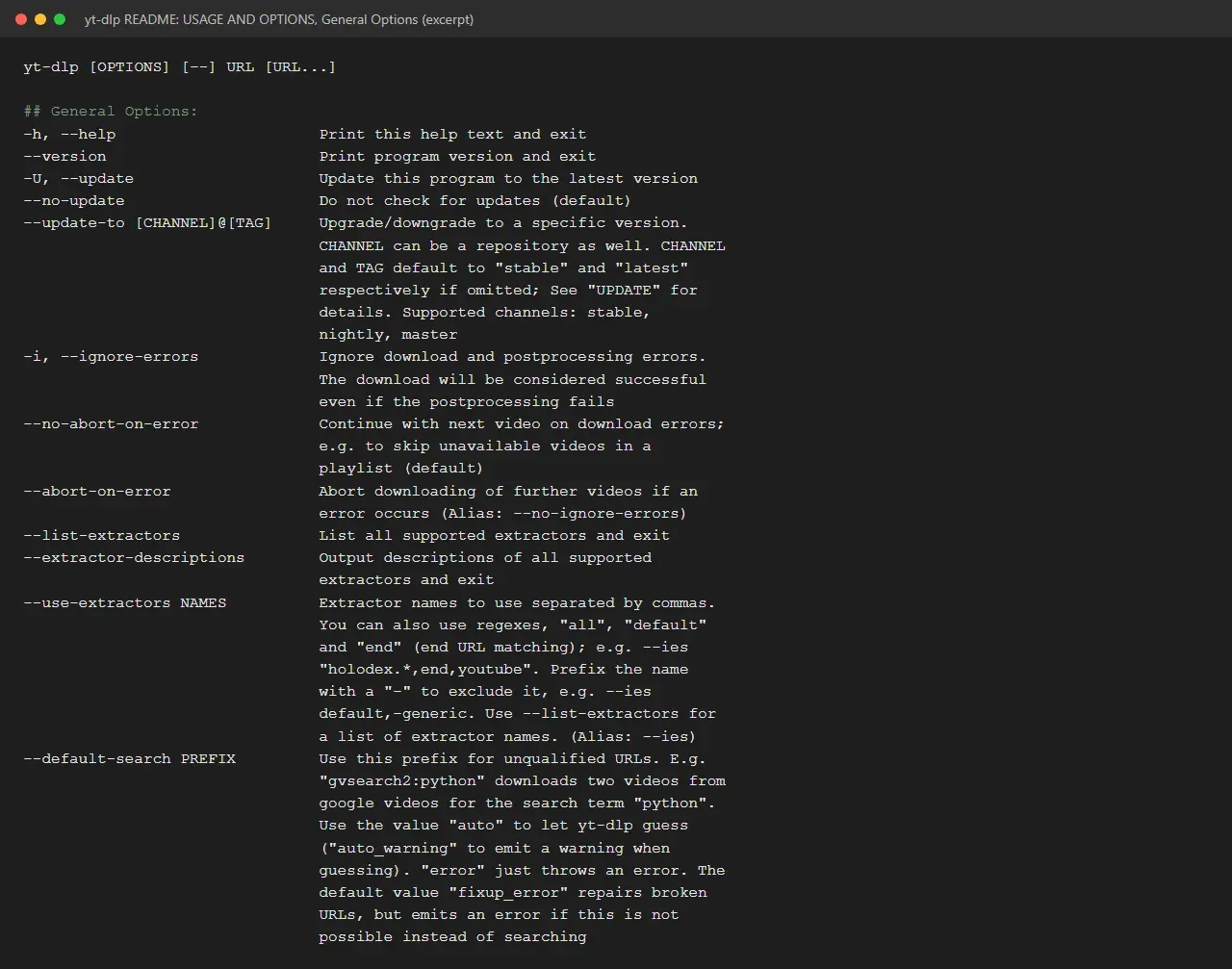
yt-dlp -U, which stays on the current channel.--update-toswitches betweenstable,nightlyandmaster, or moves to a specific tag such asstable@2023.07.06. Versions older than 90 days print a warning suggesting an update, which--no-updatesuppresses. - ffmpeg and ffprobe for merging and conversion Ffmpeg and ffprobe are listed as strongly recommended dependencies. They are required to merge separate video and audio streams and for most post-processing, such as audio extraction and remuxing. The project maintains its own builds in the yt-dlp/FFmpeg-Builds repository and points out that the ffmpeg binary is needed, not the Python package with the same name.
- JavaScript runtime and yt-dlp-ejs for YouTube Full YouTube support requires the yt-dlp-ejs challenge solver scripts plus an external JavaScript runtime. The EJS guide lists Deno (recommended and enabled by default, minimum version 2.3.0), Node, QuickJS and Bun, the latter marked deprecated; non-default runtimes are enabled with
--js-runtimes. The official executables and the zipimport binary already bundle yt-dlp-ejs, and pip users get it through thedefaultdependency group. - Format listing, selection and sorting
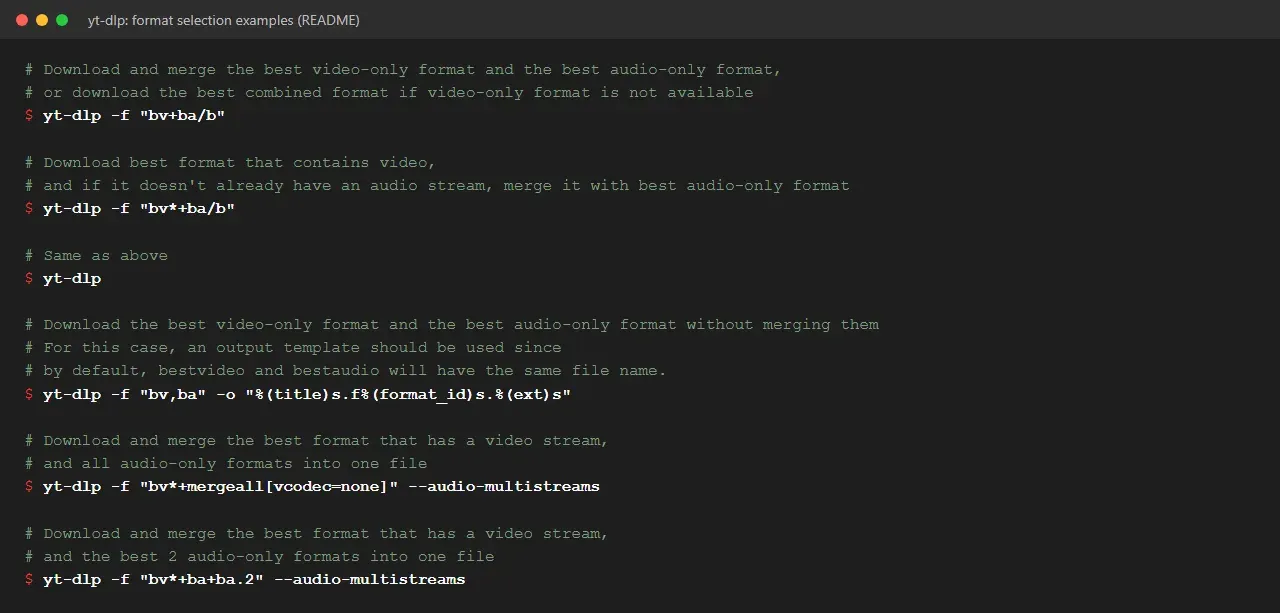
-Flists the formats an extractor found for a URL, and-ftakes a selector expression: format codes, extensions, keywords such asbvandba,/for fallbacks,+for merging and bracketed filters like[height<=480]. Without options the default is equivalent to-f bv*+ba/b.-Schanges what counts as best by sorting on fields such as resolution, codec, extension, file size or protocol. - Output templates and paths
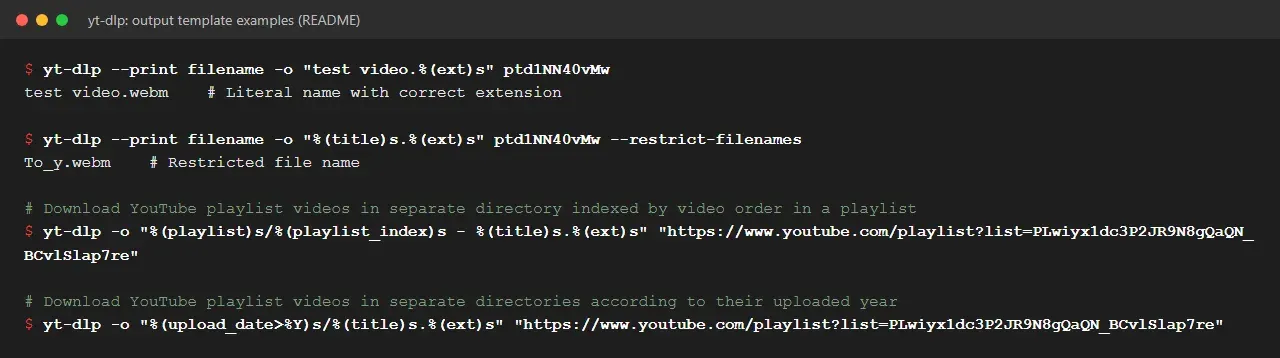
-osets file names with an output template such as%(title)s.%(ext)s, using fields like uploader, playlist index, upload date or episode number. Templates support date formatting, defaults, replacements and object traversal.-Psets separate directories for temporary files, subtitles, thumbnails and other file types, and--restrict-filenameslimits names to ASCII characters without spaces. - Post-processing With ffmpeg available,
-xconverts downloads to audio in formats such as mp3, m4a, opus, flac or wav, and--remux-videoor--recode-videochanges the container or codec.--embed-subs,--embed-thumbnail,--embed-metadataand--embed-chapterswrite extra data into the media file, while--split-chapterssplits a video into one file per chapter. Preset aliases such as-t mp3,-t mp4or-t sleepexpand to documented option sets. - Partial downloads, livestreams and fragments
--download-sectionsdownloads only matching chapters or time ranges, for example"*10:15-inf".--live-from-startdownloads supported livestreams from their beginning and is marked experimental.-Ndownloads several fragments of DASH or HLS streams in parallel, and--downloadercan hand transfers to aria2c, axel, curl, ffmpeg, httpie or wget. - Subtitles, comments and metadata files Subtitle options write manual or automatically generated subtitles, select languages with patterns such as
en.*,jaand choose formats in order of preference.--write-info-jsonsaves the extracted metadata as JSON,--write-commentsadds comments to it, and--load-info-jsonreuses a saved file. - Video selection and archive files Playlist items can be chosen with
-I, by date range, or with--match-filtersexpressions over any template field, such as excluding livestreams or requiring a minimum like count.--download-archiverecords the IDs of downloaded videos in a file and skips them on later runs. - Cookies and account authentication
--cookiesreads a Netscape-format cookie file, and--cookies-from-browserloads cookies from Brave, Chrome, Chromium, Edge, Firefox, Opera, Safari, Vivaldi or Whale, with optional profile, Firefox container and Linux keyring. Extractors with login support accept-uand-p, a two-factor code, a.netrcfile or a--netrc-cmdcommand that returns credentials, for example from an encrypted file. Adobe Pass TV provider logins and client certificates are also supported. - Network controls and impersonation Network options cover HTTP, HTTPS and SOCKS proxies, IPv4-only or IPv6-only connections, a client source address, rate limits with
-rand retry counts for requests, fragments and files. With curl_cffi installed,--impersonateimitates Chrome, Edge or Safari requests for sites that use TLS fingerprinting; curl_cffi is included in most official builds except the zipimport binary and the 32-bit Windows build. - SponsorBlock integration For YouTube videos,
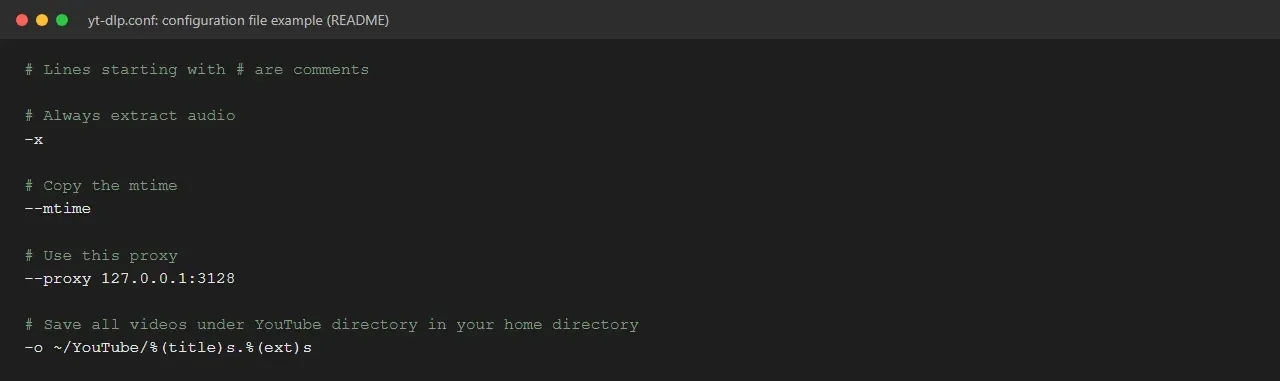
--sponsorblock-markcreates chapters from the community SponsorBlock database for categories such as sponsor, intro, outro or self-promotion, and--sponsorblock-removecuts those segments from the file. These options contact the SponsorBlock API at sponsor.ajay.app by default, and--sponsorblock-apichanges the address. - Configuration files Any command-line option can be stored in a configuration file. yt-dlp reads a file given with
--config-locations, a portableyt-dlp.confnext to the binary, a file in the home path, a user file such as~/.config/yt-dlp/configor%APPDATA%/yt-dlp/config, and a system file in/etc.--ignore-configstops further files from loading, and a# coding:line sets the file encoding. - Plugins Extractor and post-processor plugins are loaded from
yt_dlp_pluginsnamespace packages in the configuration directories, next to the executable, or from packages installed with pip. Extractor plugins take priority over built-in extractors, and post-processor plugins run with--use-postprocessor. The README warns that all plugins are imported and that their code is not checked;YTDLP_NO_PLUGINSdisables plugin loading. - Embedding in Python and other programs Python programs can import the
YoutubeDLclass, pass the same options as a dictionary and calldownloadorextract_info;devscripts/cli_to_api.pyconverts command-line switches to these parameters. For other languages the embedding section points to machine-readable output through-J,--print,--progress-templateand--execinstead of parsing the normal console output.
Where yt-dlp fits
Downloading a single video at a chosen quality
A plain yt-dlp URL downloads the best available video and audio and merges them with ffmpeg. For other results, -F lists what the site offers and -f or -S picks from it. The README's format selection examples include limiting height to 480p or 720p, preferring h264 or h265, capping file size at 50 MB and choosing direct HTTPS links over fragmented protocols.
Extracting audio from video pages
The -x option, or the -t mp3 and -t aac presets, downloads the best audio stream and converts it with ffmpeg. --audio-format and --audio-quality set the target format and VBR level or bitrate, and --embed-thumbnail with --embed-metadata adds cover art and tags, using mutagen or AtomicParsley where ffmpeg cannot.
Archiving playlists and channels
Playlist and channel URLs expand to their entries. Output templates such as %(playlist)s/%(playlist_index)s - %(title)s.%(ext)s or %(upload_date>%Y)s/%(title)s.%(ext)s place each item in a structured folder, and --download-archive keeps a list of finished IDs so that repeated runs fetch only new items.
Accessing content tied to an account
For material that a site shows only to a signed-in account the user holds, yt-dlp can reuse browser cookies with --cookies-from-browser, read a cookie file, or log in through supported extractors with credentials from the command line, .netrc or --netrc-cmd. The README's YouTube extractor notes describe which player clients are used when logged-in cookies are passed. Services that serve only DRM-protected content are outside the project's scope.
Running unattended with a configuration file
A configuration file holds the options that apply to every run, such as an output template, a proxy, audio extraction or --no-update. A portable yt-dlp.conf next to the executable keeps settings with a self-contained installation, and --exec runs a command at defined stages, for example after a file has been moved into place. The FAQ collects common questions about these setups.
Powering other applications
Front ends and services call yt-dlp as a Python library or as a subprocess with JSON output. Projects in this directory that are built on it include the desktop downloader OmniGet, the self-hosted web interface ReClip and the download manager SwiftDL. cobalt is another media downloader listed in the same category. Extractor and post-processor plugins extend yt-dlp itself without modifying its code.
Install
python3 -m pip install -U "yt-dlp[default]"Reviews of yt-dlp
Be the first to share your experience with yt-dlp.
Write a review
Loading review form…
Found yt-dlp useful? Upvote it todayYour vote helps other IT teams find it in the daily ranking.