

What is OmniGet?
OmniGet is a free, open-source desktop application for Windows, macOS and Linux that downloads online courses, video, audio, image galleries and torrents, then plays, reads, converts or transcribes the saved files. A single input box accepts a web link, a magnet link or a .torrent file. The app detects the source and sends it either to one of its native extractors or to yt-dlp, which the README says covers roughly 1,800 sites. The project README describes the application as one desktop app with no terminal required for normal use.
The repository is published by the OpenSelena organization on GitHub. The README describes it as an independent fork, maintained by igect under GPL-3.0 and based on the original architecture by Tonho, and states that it is not affiliated with OmniGet or with Tonho. The 0.15.0 release notes say that trademark questions arose because of that fork history, that the earlier mascot artwork was removed and replaced with an original penguin mascot, and that READMEs, documentation and website materials were updated to state the independent status. The README links the community website and its documentation; questions are handled in the OpenSelena Telegram channel.
The latest release is OmniGet 0.15.1, published on November 9, 2026. It completes the backend of the embedded Telegram plugin (67 commands, global media search, channel cloning and localhost range streaming), fixes Kiwify and Hotmart course extraction, restores Hotmart lesson attachments and resolves local .torrent file paths. Version 0.15.0 removed the OmniDisc chat system, the hardcoded peer-to-peer relay servers and the League of Legends companion, and added the omniget-cli search and omniget-cli archive commands. Every release publishes Windows installer, portable and MSI builds, macOS disk images for Apple Silicon and Intel, Linux .deb, .rpm and AppImage packages, a Chromium extension zip and the omniget-cli binaries.
The application is built with Tauri 2, Rust and SvelteKit with Svelte 5, and stores its data in SQLite. Bundled or managed components include yt-dlp, FFmpeg, librqbit for torrents, whisper.cpp, aria2 and gallery-dl. The courses, telegram and convert plugins compile into the main binary, and the plugin registry lives in a separate omniget-plugins repository. Windows builds are code signed through SignPath.io with a certificate from the SignPath Foundation; the README states that macOS builds are not notarized.
OmniGet is licensed under GPL-3.0. The README lists no paid tier, no account and no advertising. On legal limits, the README states that OmniGet downloads what the user's own logged-in session can already open, that it does not bypass DRM, break paywalls or share credentials, that DRM-protected lectures are skipped and reported, and that the user is responsible for respecting copyright and each platform's terms of service. The full text is available inside the application under About, Terms and ethics. Similar projects in this directory include cobalt and ReClip.
OmniGet screenshots
Explore the interface. Open a screenshot to view it at full size.
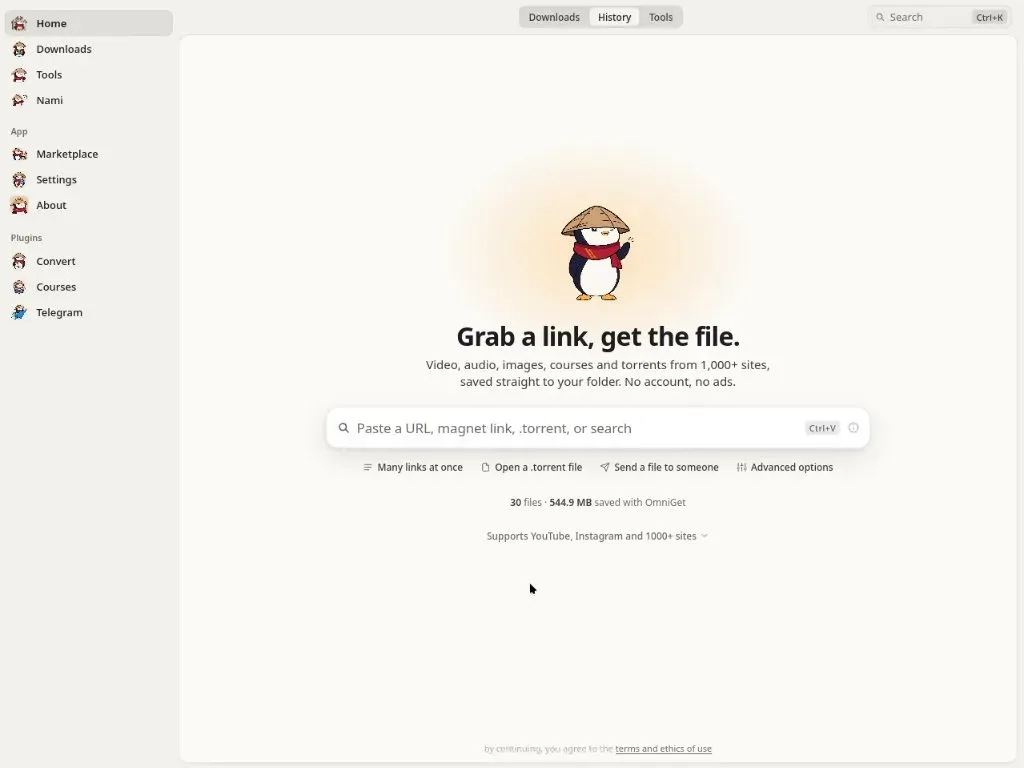
Official README screenshot of the OmniGet home screen with the link input, sidebar and plugin entries.
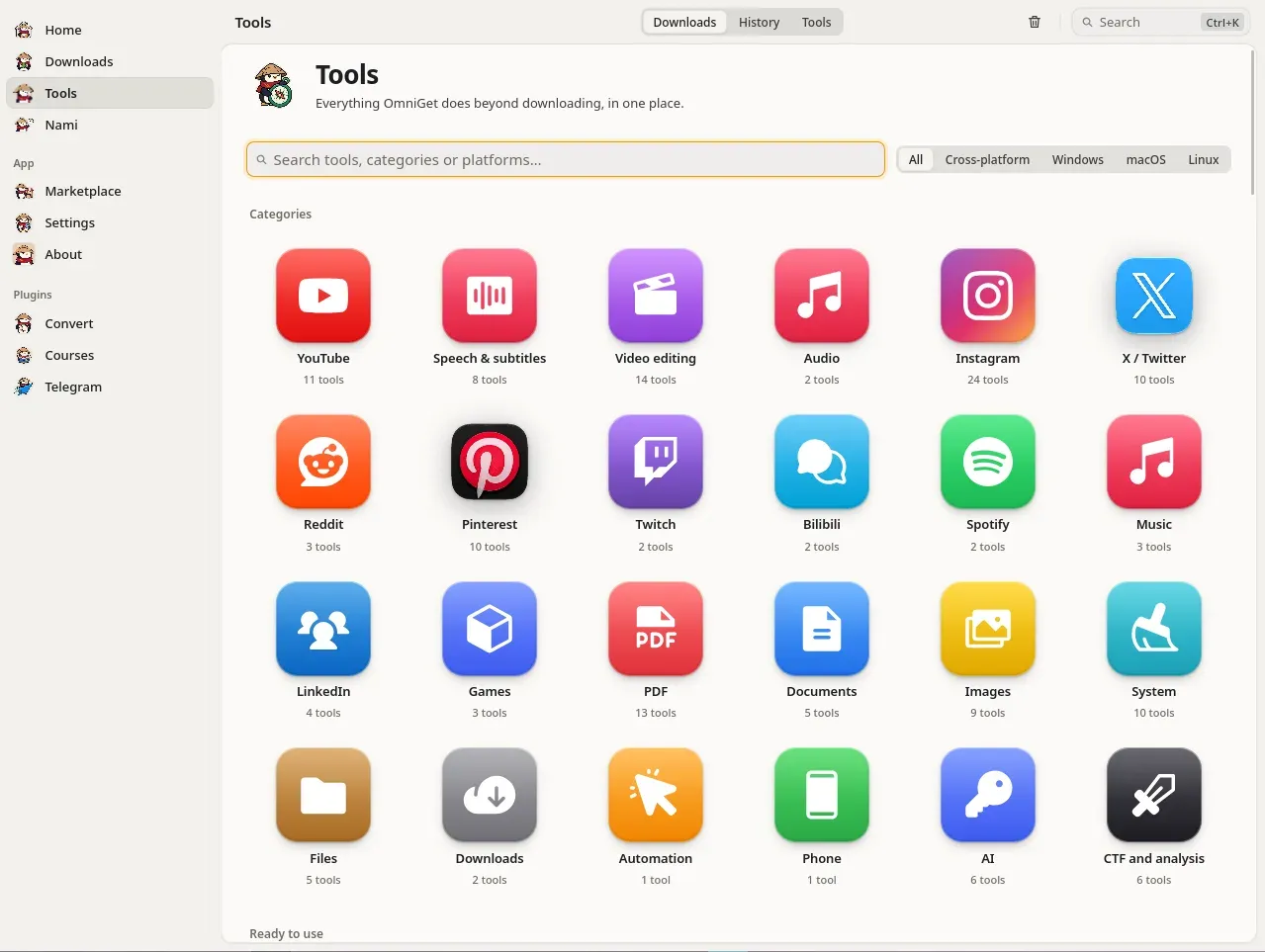
Official README screenshot of the Tools hub showing categories, tool counts and the platform filter.
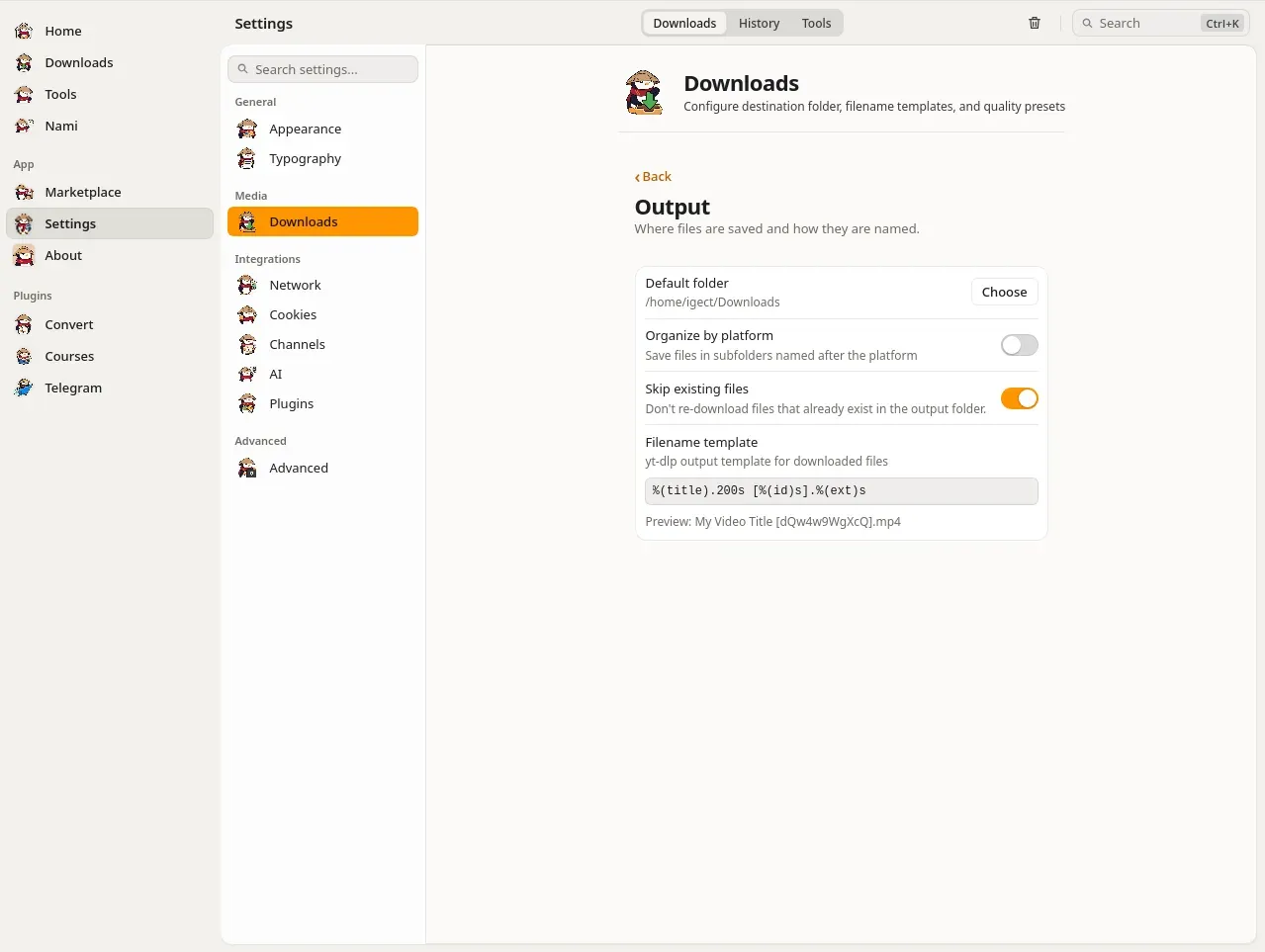
Official README screenshot of the Downloads settings, including the yt-dlp filename template.
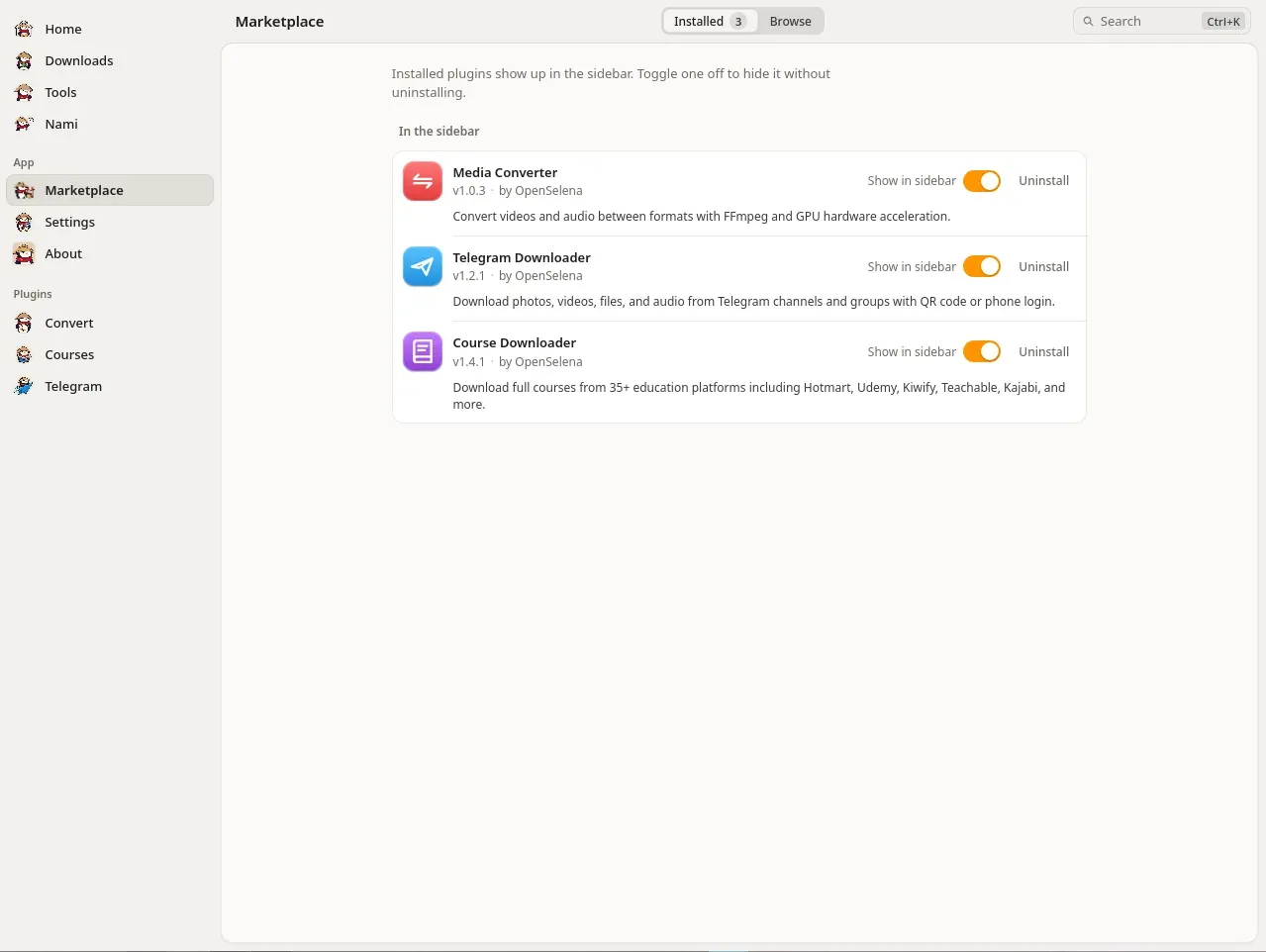
Official README screenshot of the Marketplace with the three embedded OpenSelena plugins.
Source: official OmniGet project page.
Key capabilities
- Link downloader with quality preview Pasting a link shows the title, thumbnail and available qualities before the download starts. Video can be saved as MP4, MKV or WebM, audio as MP3, M4A, Opus, FLAC or WAV, and subtitles as SRT, VTT or ASS, either embedded or as a sidecar file. Default quality, filename template, organize by platform, skip existing files, chapter splitting, speed limit, concurrent downloads and proxy are set once in Settings.
- Native extractors plus yt-dlp Courses, Instagram, X, Pinterest, Bilibili, Telegram and torrents use native extractors; other sites are passed to yt-dlp. The README lists YouTube (playlists, channels, live from start, chapters, SponsorBlock), TikTok, Reddit, Twitch, Vimeo, Bluesky, Threads and Douyin among supported video sources. Image galleries and profiles from more than 250 sites are handled through gallery-dl.
- Download queue and resume The Downloads page shows speed, phase and ETA read from the downloader. Interrupted downloads resume, rate-limited sites are retried with backoff, and connections per site adapt, with up to 16 parallel fragments for YouTube. Every job keeps the exact yt-dlp command it ran, which can be edited and retried. Rules send a given channel or host to a chosen folder and quality, and followed channels are checked in the background.
- Courses plugin The embedded Courses plugin supports learning platforms including Hotmart, Udemy, Kiwify, Rocketseat, Coursera, Domestika, Skillshare, Alura and Ebac. The README gives the count as 38 platforms, while the website lists 36. Sign-in works through an in-app webview, saved extension cookies or account credentials where available; the app lists purchases, lets the user select sections and downloads lessons and attachments. DRM-protected lectures are skipped and reported.
- Telegram plugin Sign-in uses a QR code or a phone number. The plugin browses channels and groups the account belongs to, filters by photo, video, document or audio, and saves media into
OmniGram/<channel>/folders. Release 0.15.1 added global media search, channel cloning with progress events, uploads and localhost streaming for in-app playback. - Torrents, direct files and transfers A built-in BitTorrent client based on librqbit accepts
.torrentfiles and magnet links. Direct HTTP files and HLS or DASH manifests are also supported. Person-to-person file transfer between two OmniGet installations uses a short word code; since 0.15.0 there are no hardcoded relay servers and users can add their own. - Bilibili with a signed-in account With a signed-in session the README lists 4K, HDR, Dolby Vision, Hi-Res lossless and Dolby Atmos according to the account subscription. Danmaku comments can be exported as XML, ASS or JSON, NFO files are written for Kodi and Jellyfin, and 11 URL types are recognized, including bangumi, favorites, watch later and history.
- Browser extension The extension for Chromium browsers sends supported pages to the app with one click or Alt+O, and on other sites lists MP4, HLS, DASH, WebM and audio streams found in network traffic. It forwards cookies and referer so the app can download content the user is logged into. It pairs with the app over
127.0.0.1ports 47720 to 47729 using a per-install token. Firefox is supported as a temporary add-on; Safari is not supported. - Tools section The README lists 158 tools in 25 categories, each an isolated Rust command with JSON input and output. Categories include YouTube, speech and subtitles, video editing, audio, Instagram, X, Pinterest, Reddit, Twitch, Bilibili, PDF, documents, images, system, files, AI and CTF analysis. Tools are marked ready, beta or planned, and Windows-only tools are labelled on their tiles.
- Offline speech and subtitles Transcription to subtitles uses whisper.cpp locally, with models downloaded on demand and Metal acceleration on macOS. Text to speech uses Microsoft Edge voices with a synced subtitle file. A subtitle workshop edits, translates and re-times SRT, VTT and ASS files; dubbing, voice cloning and dictation are marked beta.
- Media conversion The embedded Convert plugin runs FFmpeg conversions with GPU acceleration where available: container, codec, resolution, bitrate and compression for video and audio without an internet connection. Video tools add size-targeted compression, video to GIF, silence cutting, subtitle burn-in and stabilization.
- Study workspace According to the documentation, the Study module plays course folders with resume to the second and timestamped notes, reads PDF, EPUB, DJVU, MOBI, AZW3, FB2 and CBZ files, and provides Anki-style spaced repetition with
.apkgand CSV import. - Local MCP server Enabled under Tools, AI, MCP server, it exposes 37 tools over Streamable HTTP on
127.0.0.1behind the same per-install token as the extension. The MCP documentation provides configuration snippets for Claude Code, Claude Desktop, Cursor, VS Code, Goose and Codex. The feature is marked beta. - Claude Code plugin The
claude-plugin/folder in the repository ships a separate Claude Code plugin that works without the desktop app. Its commands include setup, fetch, transcribe, research and doctor; setup installs yt-dlp, FFmpeg andomniget-cliafter one confirmation. - AI providers Tools that use AI read the provider set in Settings, AI: OpenAI, Anthropic, or an OpenAI-compatible local endpoint such as Ollama or LM Studio. The README states that the key is stored locally and never logged. An AI spending view keeps a local ledger by day, model and task.
- Command line Each release ships
omniget-clifor Windows, macOS (Intel and Apple Silicon) and Linux. It providesinfo,download,batchandimport-cookiescommands, and 0.15.0 addedsearchandarchivefor large video datasets. - Windows installation Windows 10 and 11 builds come as an NSIS installer, a portable executable and an MSI package for IT deployments. The official winget package installs with
winget install -e --id OpenSelena.OmniGet. A file namedportable.txtnext to the executable moves settings, database, cookies, plugins, caches, yt-dlp and FFmpeg into a localdatafolder. - macOS and Linux installation MacOS 10.15 or later is supported with separate disk images for Apple Silicon and Intel, plus
brew install --cask OpenSelena/tap/omniget. Because the app is not notarized, the README documents anxattrandcodesignstep on first launch. Linux packages are.deb(amd64, arm64),.rpm(x86_64, aarch64) and AppImage with.zsyncself-updates; the installation guide notes GStreamer and libfuse2 requirements. The README states that OmniGet is not on Flathub.
Where OmniGet fits
Downloading a single video or audio track
The user copies a link from YouTube, Instagram, X, Pinterest or another supported site and pastes it into the home screen. OmniGet shows the title, thumbnail and qualities; the user picks one and presses Enter. With hotkeys enabled, Ctrl+Shift+D (Cmd+Shift+D on macOS) downloads the clipboard link in the background, and Ctrl+Shift+M saves audio only. Both shortcuts are off until enabled in Settings, Downloads, Clipboard and hotkeys.
Saving purchased course content
The user opens the Courses plugin, signs in through the in-app webview or with cookies captured by the browser extension, and sees the list of purchased courses. After selecting the sections, OmniGet downloads lessons and attachments into a folder per course, with optional continuous numbering. The README states that DRM-protected lectures are skipped and reported.
Downloading content from a logged-in browser session
The browser extension is installed from Settings, Plugins, Browser extension, loaded unpacked in a Chromium browser and paired with the app. On supported sites a click sends the page, its cookies and title to OmniGet; on other sites the extension lists detected media streams. Sessions also appear in Settings, Cookies, where they can be tested per domain or imported from a cookies.txt file. The Nami documentation describes per-platform request pacing for social profile archiving.
Archiving Telegram channels and social profiles
The Telegram plugin signs in by QR code or phone number, filters a channel or group by media type and saves individual files or whole chat archives into per-channel folders. The Nami archiver downloads posts, stories and boards from Instagram, TikTok, X and Pinterest into one folder per platform and profile, with a JSON sidecar per post and an archive file that skips items already saved.
Transcribing and converting saved media
After a download, the Tools section can transcribe audio or video to subtitles offline with whisper.cpp, translate an SRT through a configured AI provider or a LibreTranslate server, and convert or compress video with FFmpeg. PDF tools merge, split, repair and convert files, including PDF to Markdown.
Driving downloads from an AI agent or the terminal
With the MCP server enabled, an agent such as Claude Code, Cursor or VS Code can queue a URL, watch, pause, resume or cancel downloads, transcribe a file or run PDF and image tools through 37 exposed tools on localhost. Without the desktop app, omniget-cli batch links.txt -m 3 downloads a list of URLs three at a time, and the Claude Code plugin fetches and transcribes media from a prompt.
Install
winget install -e --id OpenSelena.OmniGetReviews of OmniGet
Be the first to share your experience with OmniGet.
Write a review
Loading review form…
Alternatives to OmniGet
 cobaltcobalt downloads publicly accessible media from a supplied link. Its repository includes a web frontend, an API, and documentation for running and protecting a self-hosted instance.RReClipReClip is an open-source, self-hosted media downloader that uses yt-dlp and ffmpeg to save videos as MP4 or extract MP3 audio through a browser interface.