
On this page
iThub members can now upvote the tools they rely on, once per tool per day, and those votes drive public rankings for today, this week and this month. All published tools take part. Upvotes appear on the homepage, in the directory, on every tool profile and in the member dashboard. This article explains how a vote is counted, where the rankings are, and what the numbers do and do not mean.
How daily upvotes work
Every published tool on iThub has an upvote button. Each member can give each tool one vote per day, and a vote counts toward the day it was cast.
- Days follow UTC. A voting day runs from 00:00 to 23:59:59 UTC. At 00:00 UTC a new day starts and you can upvote the same tools again. The rankings show a live countdown to that reset.
- One vote per tool per day. You can upvote as many different tools as you like, but only once each per day. A tool you use every day can receive your vote every day.
- Removing a vote. Press the button again to remove today's vote. Only today's vote is removed: votes you gave on earlier days stay counted.
- A confirmed account is required. If you are not signed in, the upvote button sends you to the login page. New members can create an account and confirm their email address through the link sent to their inbox before voting.
Where to find the rankings
Trending tools on the homepage
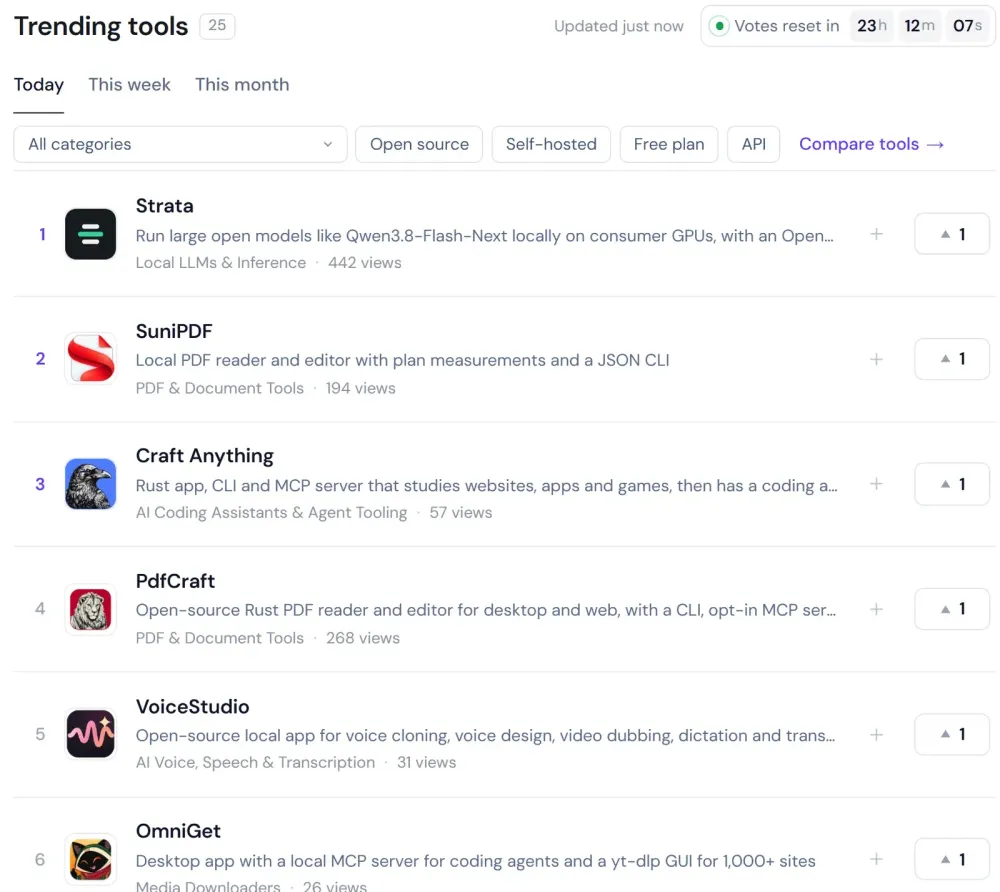
The homepage opens with a Trending tools board of 25 tools. Tabs switch between Today, This week and This month, and a countdown shows the time left until votes reset. While the page is visible, vote counts refresh about every 15 seconds, so the order can change as members vote. Filters narrow the board by category, open source, self-hosted, free plan and API.
The /best pages
The Most upvoted section collects every ranking in one place:
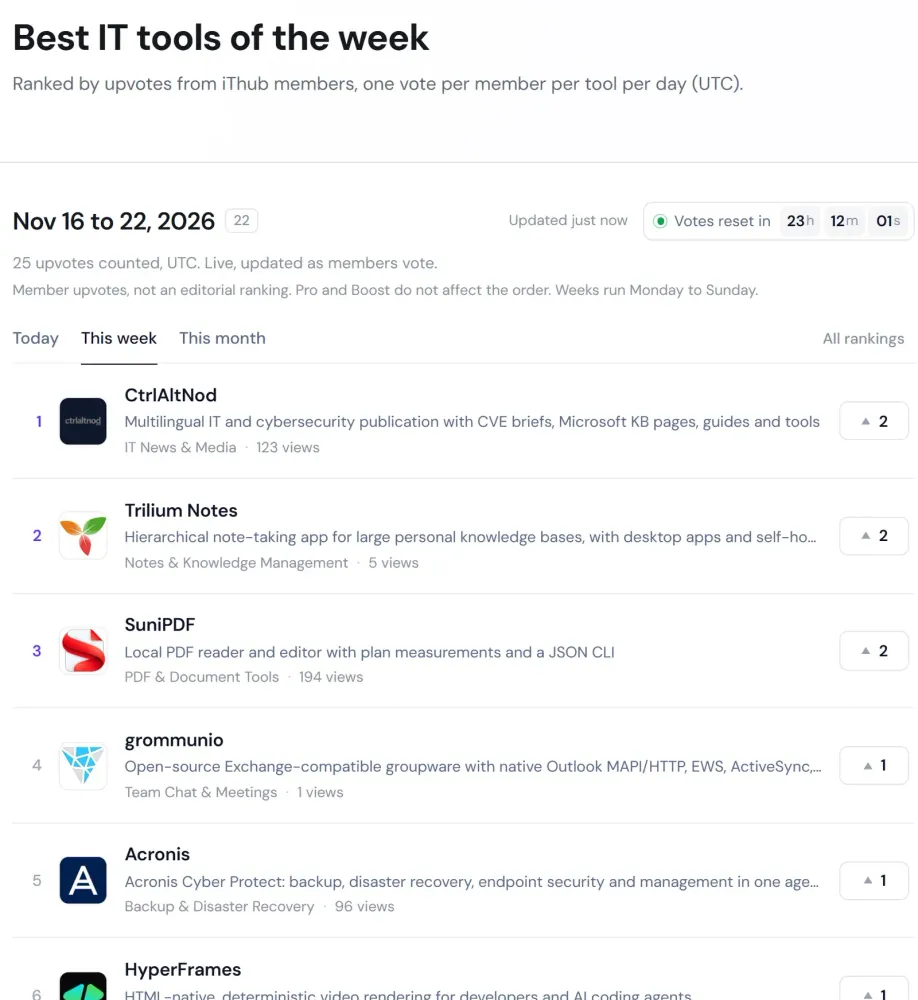
- /best/today: tools ranked by votes cast today (UTC).
- /best/week: the current week. Weeks follow the ISO calendar and run Monday to Sunday.
- /best/month: the current calendar month.
Closed periods move to archives: one page per day, per ISO week and per month. The archives start on November 16, 2026, the day daily voting launched, so the first daily archive is November 16, 2026. A week or month that began before that date starts counting on November 16.
Sorting and filtering the directory
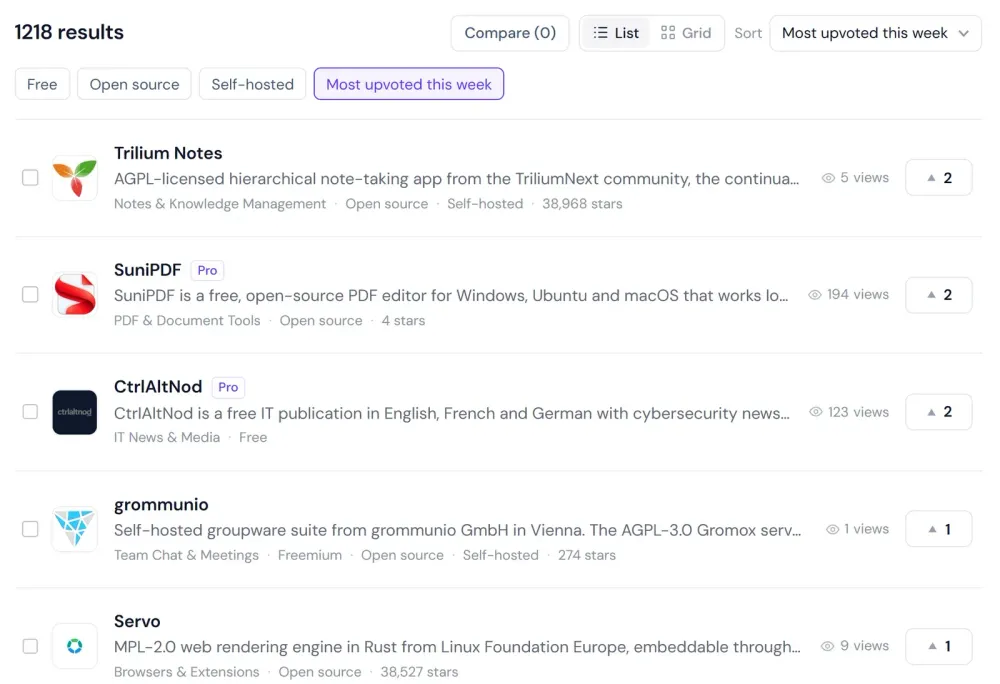
The directory sort menu has three upvote options: Most upvoted today, Most upvoted this week and Most upvoted all time. The Upvoted this week filter keeps only the tools that received at least one vote during the current week. Profile view counts are still shown on each result next to the upvote count, so you can compare attention and votes side by side.
Upvotes on tool profiles
Each tool profile has an Upvote button in its header, next to the link to the tool's website. Below the header, a stats strip summarizes the profile: total upvotes, rank this week, GitHub stars and profile views. The Strata profile is a good example of the layout.

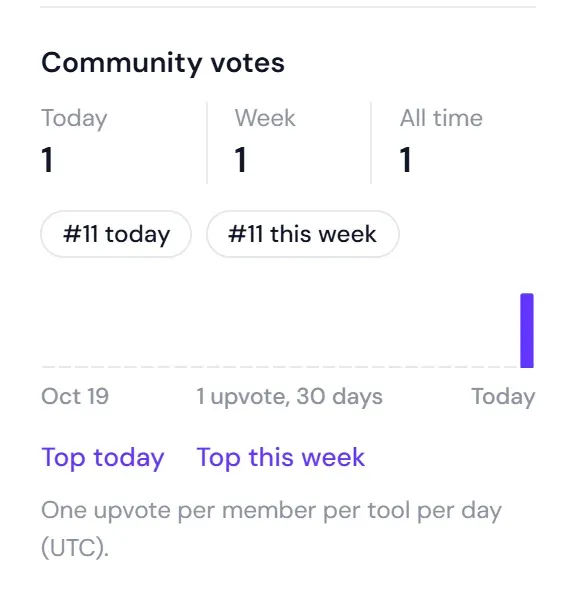
Further down, the Community votes block breaks the votes down by period: today, this week and all time. It shows the tool's rank today and this week, and a chart of daily upvotes over the last 30 days. Links lead to the top tools of the day and of the week.
Profiles also include a Similar to section that lists related tools, which helps when you want to compare a tool with its neighbours before you vote.
Your upvotes in the member dashboard
Signed-in members have a My upvotes tab in the dashboard. It shows:
- How many votes you cast today, this week and in total, and how many tools you have upvoted.
- Your current streak: the number of consecutive UTC days on which you voted.
- The tools you upvoted today, with the button to remove a vote.
- Your history for the last 30 days, grouped by UTC day.
If you own a listing, the same tab adds a Votes on your listings section. For each listing you see the votes for today, this week, this month and all time, its rank today and this week, a 30-day chart, and links to the daily, weekly and monthly rankings. The figures are aggregate only. The dashboard states it plainly: who voted is never shown, to owners or to anyone else.
The dashboard requires sign-in, so this article does not include a screenshot of it.
For makers
If you build a tool, upvotes give your users a simple way to show support, and the rankings give new visitors a reason to look at it.
- Get listed. Submit your tool. Once the listing is published, it can receive votes and appear in every ranking.
- Share the profile link. Votes are cast on the tool profile, so that is the link to share with your community, in release notes, on social media or in your project README.
- Use the share message. In the dashboard, each listing you own has a ready-made message, "Upvote [tool name] on iThub today", followed by the profile link, with a button to copy it.
- Remind people that votes are daily. Each member can vote again every UTC day, and weekly and monthly rankings add up those daily votes.
Remember that voters need a confirmed iThub account. Pro offers featured placement on iThub, but it does not change a tool's position in the rankings.
Rules and fairness
The rankings follow a few fixed rules, stated on the ranking pages themselves:
- Member upvotes, not an editorial ranking. The order reflects votes from iThub members. A high rank is not an editorial recommendation from iThub.
- Pro and Boost do not affect the order. Paid placement is shown separately and labelled as such. The /best pages state: "Member upvotes, not an editorial ranking. Pro and Boost do not affect the order."
- One vote per member per tool per day (UTC), From confirmed accounts only.
- Aggregate results only. Rankings and owner statistics show counts and positions, never the names of voters.
To see the current results, open this week's ranking or today's ranking, and add your own vote to the tools you use.
Frequently asked questions
How often can I upvote a tool on iThub?
Once per tool per day. Days follow UTC and run from 00:00 to 23:59:59 UTC. You can upvote as many different tools as you like, and you can vote for the same tool again on the next UTC day.
When do upvotes reset?
Every day at 00:00 UTC. The Trending tools board and the /best pages show a live countdown to the next reset.
Do I need an account to upvote?
Yes. Voting requires a signed-in iThub account with a confirmed email address. You can create one on the register page and confirm it through the link sent by email.
What happens when I remove an upvote?
Pressing the upvote button again removes today's vote only. Votes you gave the same tool on earlier days stay counted in the weekly, monthly and all-time totals.
Can listing owners see who upvoted their tool?
No. Owners see aggregate figures in the dashboard: vote counts, ranks and a 30-day chart. Who voted is never shown.
Do Pro or Boost listings rank higher?
No. The rankings are member upvotes, not an editorial ranking, and Pro and Boost do not affect the order.
Where can I see past rankings?
The /best section keeps archives for each closed day, ISO week (Monday to Sunday) and month, starting on November 16, 2026, the day daily voting launched.
Tools in this article
 StrataRun large open models like Qwen3.8-Flash-Next locally on consumer GPUs, with an OpenAI-compatible API
Facts link to their official sources. Product details can change after publication: report an error or read the editorial methodology.

Written by
Emanuel DE ALMEIDA
Geneva-based entrepreneur, IT consultant and creator of SuniPDF and SuniCapture. Emanuel shares practical IT, cybersecurity and software insights on iThub.