

What is Floorplan?
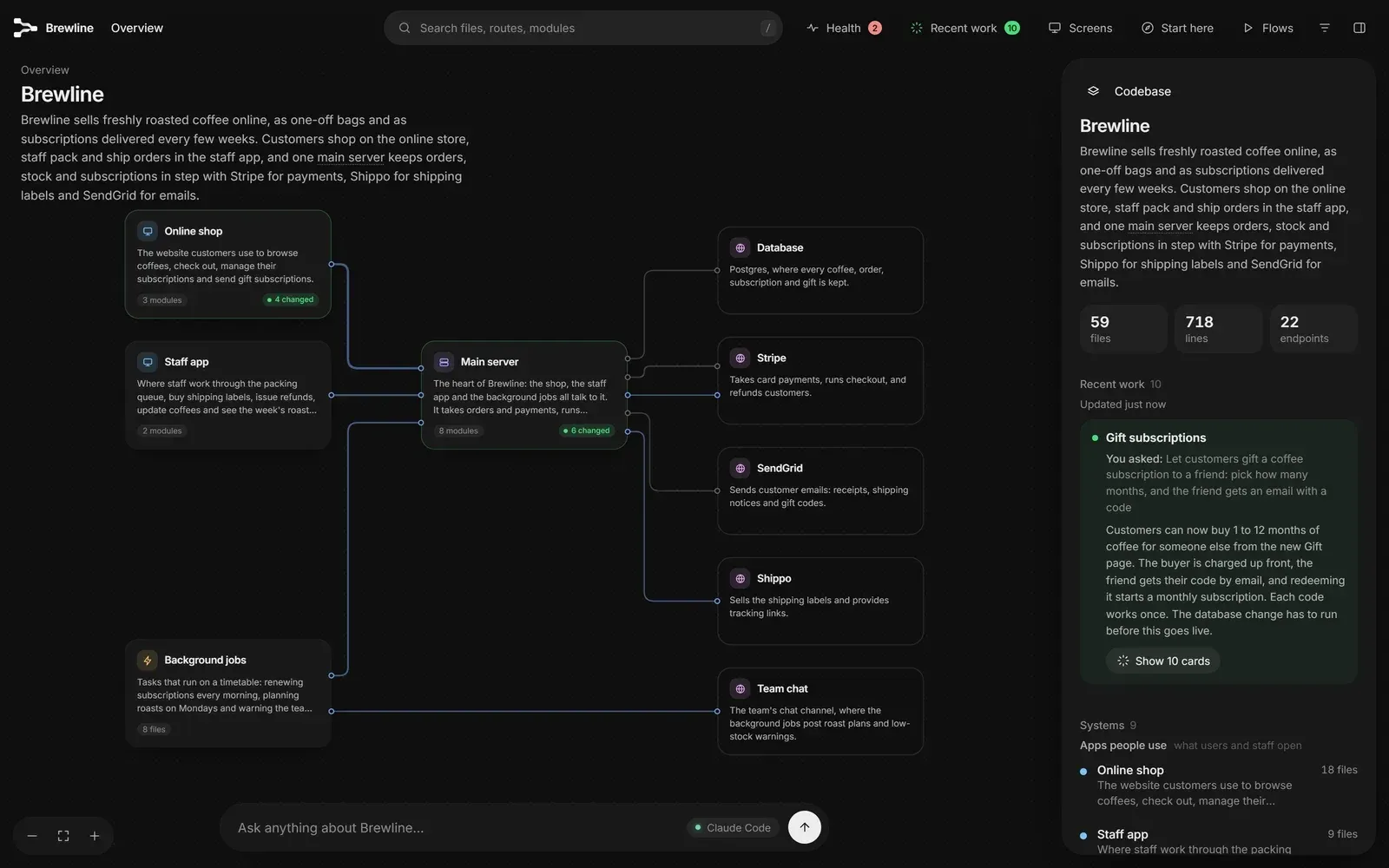
Floorplan is an MIT-licensed plugin for Claude Code and Codex that reads a codebase and draws an interactive map of it. Every part of the application, every file and every web request receives a plain-English name and description, and the connections between them are drawn as lines on a zoomable board. The project is published on GitHub under the haydenschmitty account, and the repository README describes the target user as someone who has built an app, often with AI help, and wants to see how its pieces fit together without reading the source.
The plugin is installed from the repository itself, which acts as a plugin marketplace for both hosts. In Claude Code the documented commands are claude plugin marketplace add haydenschmitty/floorplan followed by claude plugin install floorplan@floorplan; in Codex the same repository is added through the Plugins screen of the app or with codex plugin marketplace add and codex plugin add. Requirements are Node.js 18 or newer and a Claude Code or Codex sign-in. The project states that it runs on the user's existing Claude or ChatGPT plan and needs no API keys. A live demo shows a finished map of Brewline, a fictional coffee subscription app spread across four repositories.
The work is split between plain Node.js scripts and the agent session. The scripts find repositories, list files through git, parse imports, endpoints and web requests, match frontend requests to server endpoints and lay out the map. They have no dependencies and do not call a model. The agent writes three kinds of JSON files: architecture.json with the parts of the app, per-file descriptions and a recent-work record. The result is written to a floorplan/ folder in the project and opens as floorplan/index.html in the browser, served by a small local server bound to 127.0.0.1. The layout engine (elkjs 0.9.3) and the Inter and JetBrains Mono fonts are bundled, so the map works offline. The pipeline is documented in How it works.
The current release is Floorplan 0.10.0, published on November 15, 2026. It adds endpoint detection for NestJS controllers, Fastify routes declared as objects, route lists read by a dispatcher and Bun.serve routes, maps ASP.NET Core and Laravel backends with sign-in checks in the Health panel, links Swift modules and C# namespaces, and reads Shopify themes written in Liquid. Version 0.9.0 (November 14) reduced false secret alarms, recognised more Flask and FastAPI login checks and added a "What was checked" summary to Health. The changelog lists releases back to 0.1.0 on October 27, 2026.
On privacy, the project documents that the scan, the map and its server run locally, that there is no analytics or telemetry, and that the only outbound request Floorplan itself makes is an opt-in waitlist sign-up for a planned hosted edition called Floorplan Cloud. Questions asked on the map go through the user's own Claude Code CLI or Codex session with read-only tools. The plugin has no hooks, no MCP servers and no install scripts, and each release lists file fingerprints in CHECKSUMS.txt; details are in Is it safe to install?. The Health panel is described by the project as a quick automatic check, not a security audit. Similar tools listed on iThub include Archify, Understand Anything and graphify.
Key capabilities
- Zoomable map at several levels The map opens on the whole application and can be entered by double-clicking: a part, a group of files, a single file and its endpoints. Each view lists what uses the selected item and what it uses. A side panel shows file counts, line counts and endpoint counts for the codebase. Navigation, shortcuts and menus are covered in Using the map.
- Plain-English names with a developer view The agent writes a short description for every part, file and endpoint, such as "Takes card payments at checkout" instead of a library name. Technical terms are explained on hover. A filter switches the map to developer terms (Imports, HTTP, Queues) and shows each file's exports.
- Request-to-endpoint matching across repositories The scan follows imports and matches each web request in a frontend to the server endpoint that answers it, also when frontend and backend live in separate repositories opened from a common folder. It resolves router prefixes in Express, Hono, Fastify and Flask, ASP.NET Core route prefixes and Laravel route groups. Requests built through helper functions, service methods or variables are also followed.
- Broad language and framework coverage Supported languages include TypeScript, JavaScript, Python, Go, Rust, Java, Kotlin, Scala, Swift, C#, PHP and Groovy, plus Vue, Svelte and Astro files and Shopify Liquid themes. Endpoint detection covers Express, Fastify, Koa, Hono, NestJS, Next.js, Firebase Cloud Functions, Flask, FastAPI, Django, Go net/http, Gin, Echo, chi, Actix, Axum, Spring, ASP.NET Core and Laravel. Other languages receive lighter support.
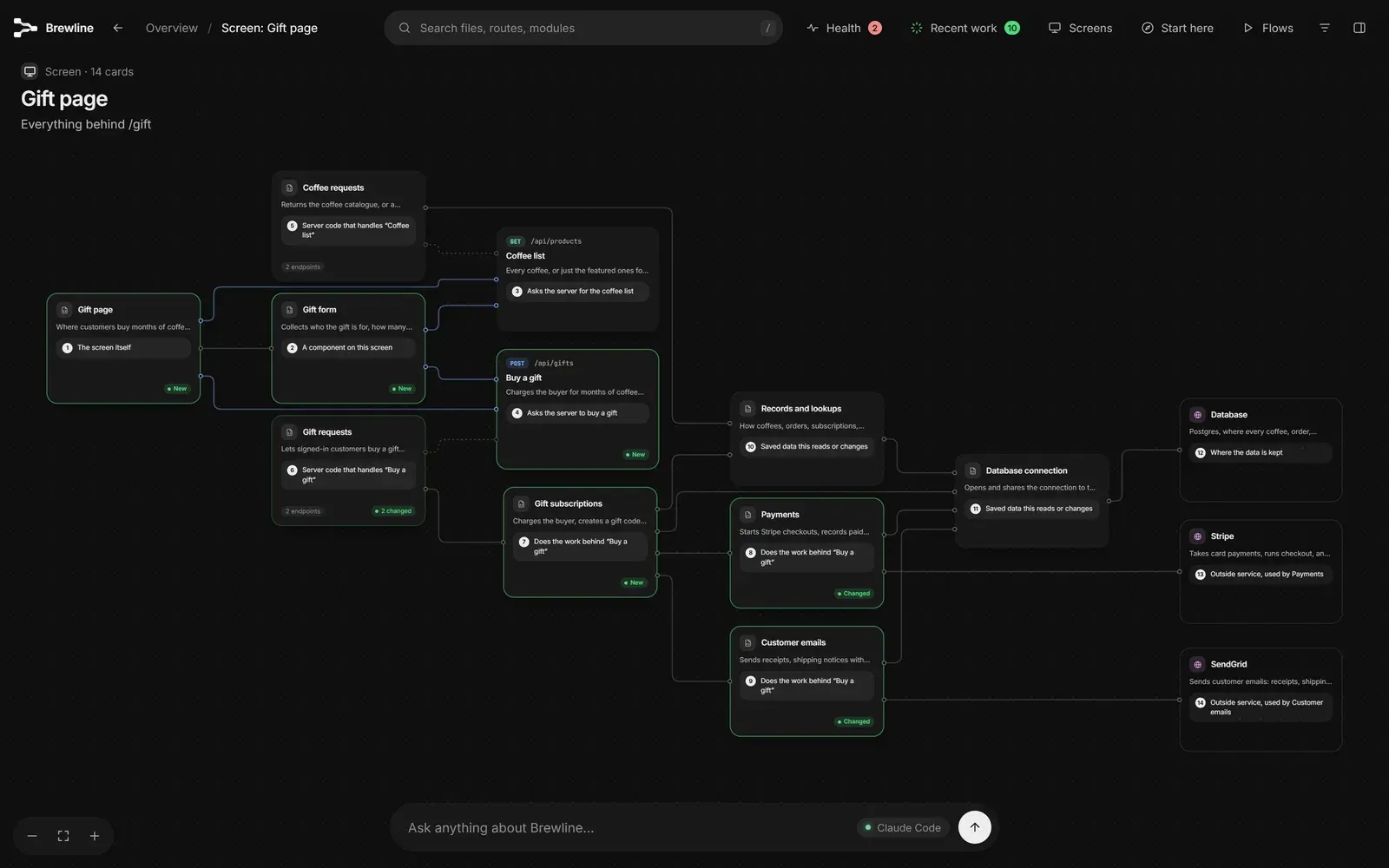
- Screens view Every page Floorplan detects appears in a Screens list, with screen detection for Next.js, React Router, Vue, SvelteKit, Remix, Nuxt, Astro, Expo, Angular, TanStack, Shopify themes and Inertia. Selecting a page shows its components, the requests it makes, the server code that answers them, the data they touch and the outside services involved.
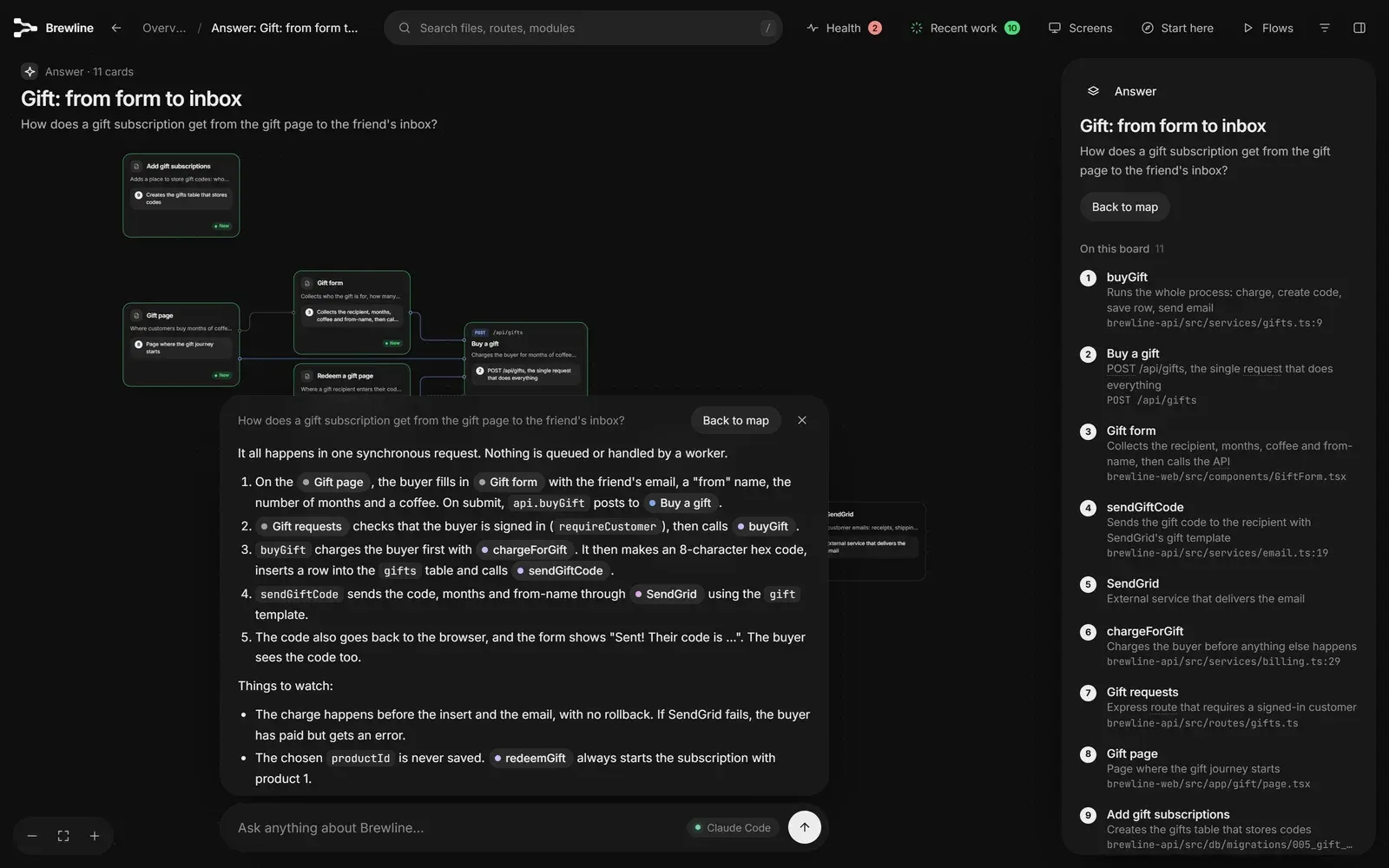
- Ask bar with answer boards A question typed into the Ask bar is answered by the Claude Code CLI or Codex running on the same computer, with read-only access to the source. The answer appears as a short text plus an answer board containing only the cards involved and, for sequences, a numbered walkthrough. Without a CLI, a Claude app session can answer from the map alone, without reading source code.
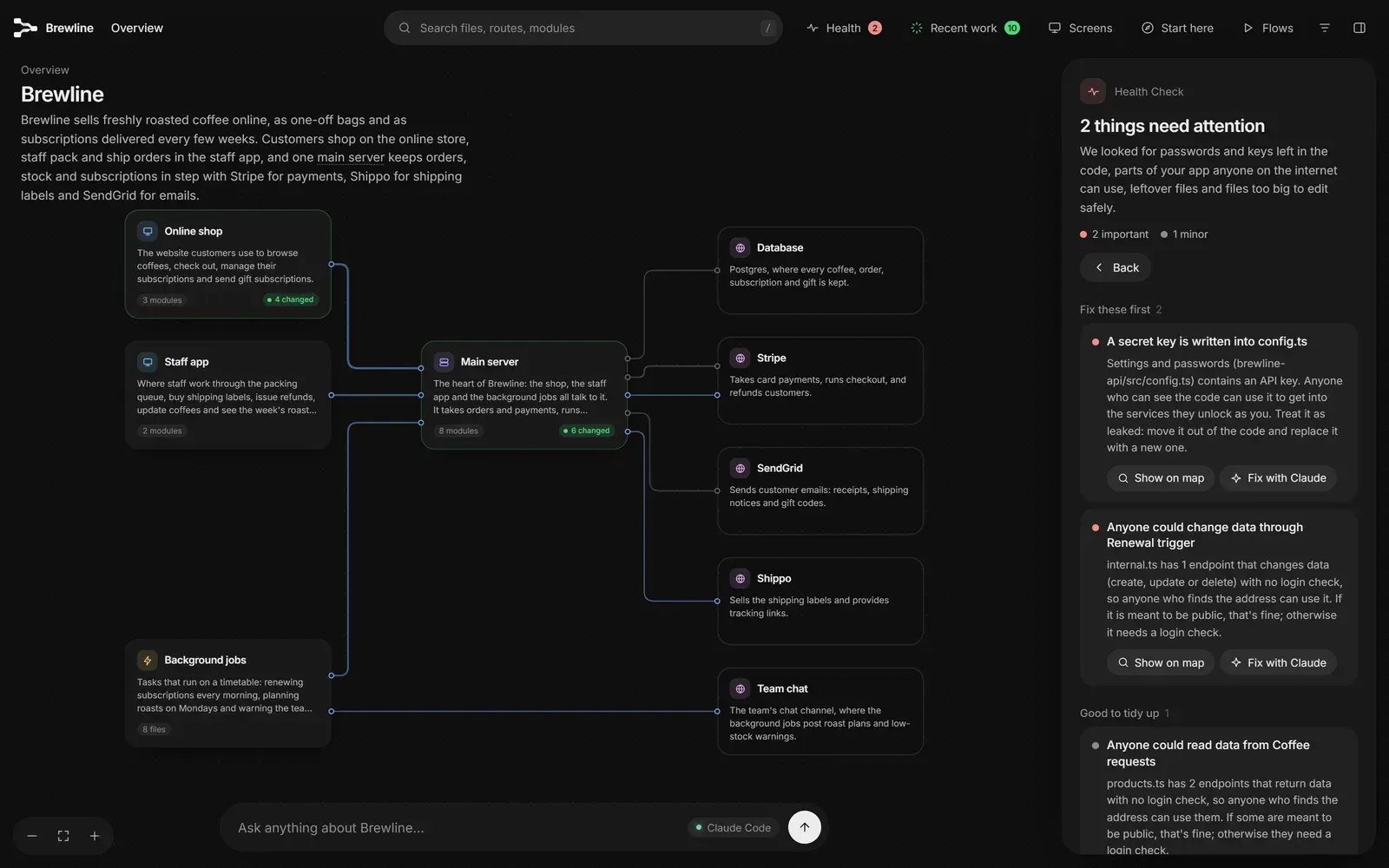
- Health check The Health panel lists keys and passwords written into code or committed .env files, secret keys exposed to the browser through variables such as
VITE_orNEXT_PUBLIC_, Supabase tables without row-level security, open Firebase rules, Stripe webhooks without signature checks, permissive CORS, endpoints without a sign-in check, unused files and files over about 1,000 lines. Each finding has Show on map and a copyable fix prompt. Secret values are never stored or shown, only their location. - What was checked summary Since 0.9.0 the Health panel states what each check looked at, such as the number of endpoints, Supabase tables, Firebase rules files, Stripe webhooks and files read for secrets. The documentation notes that a check with nothing to inspect cannot report a problem. Findings can be marked Not a problem with a reason, and the dismissal survives rebuilds.
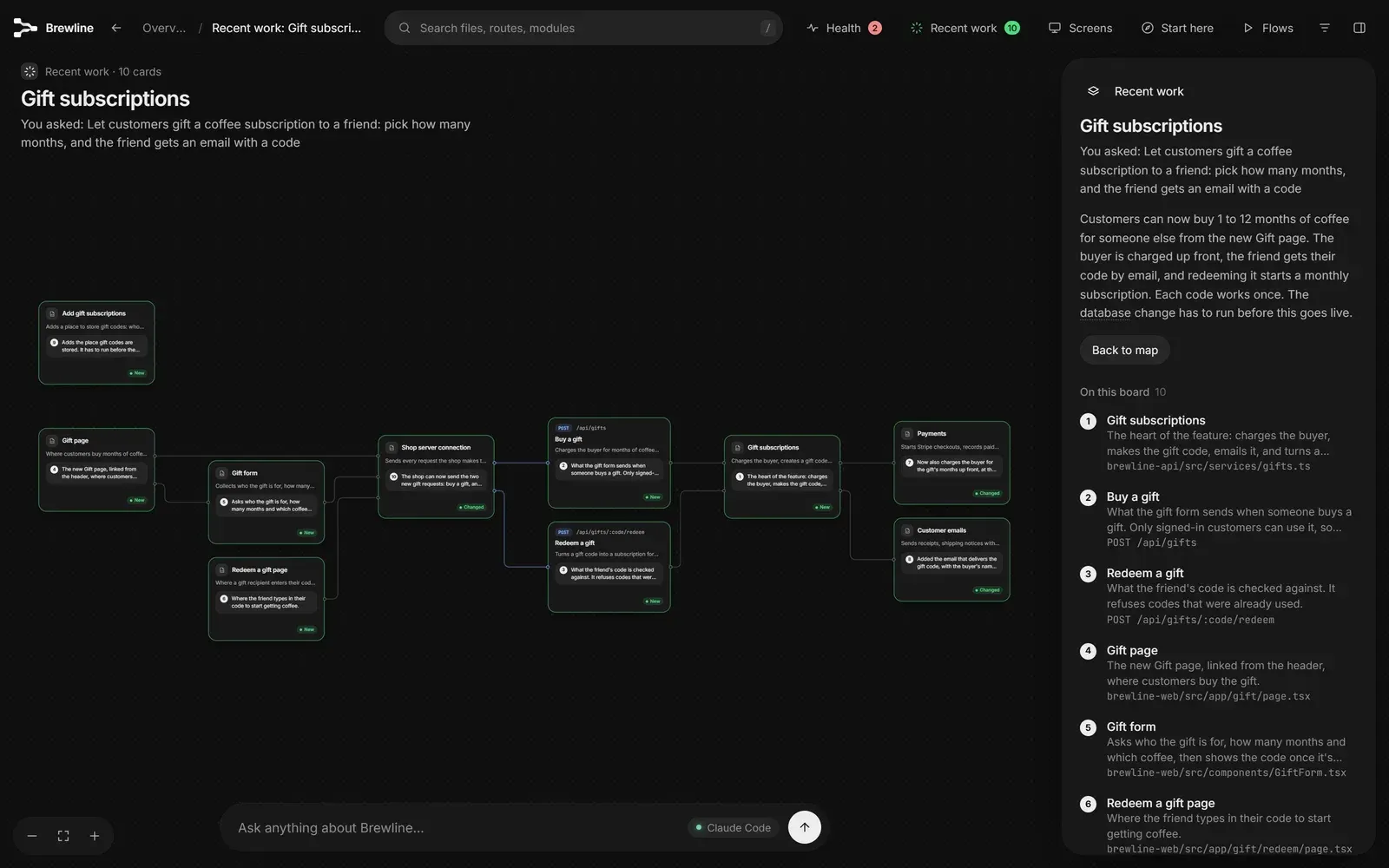
- Recent work highlighting After the agent changes code and the map is updated, the changed cards receive a green ring and a Changed or New tag, and parent parts show how many items changed. A Recent work board shows the original request, a summary of what was done and a note on every changed card.
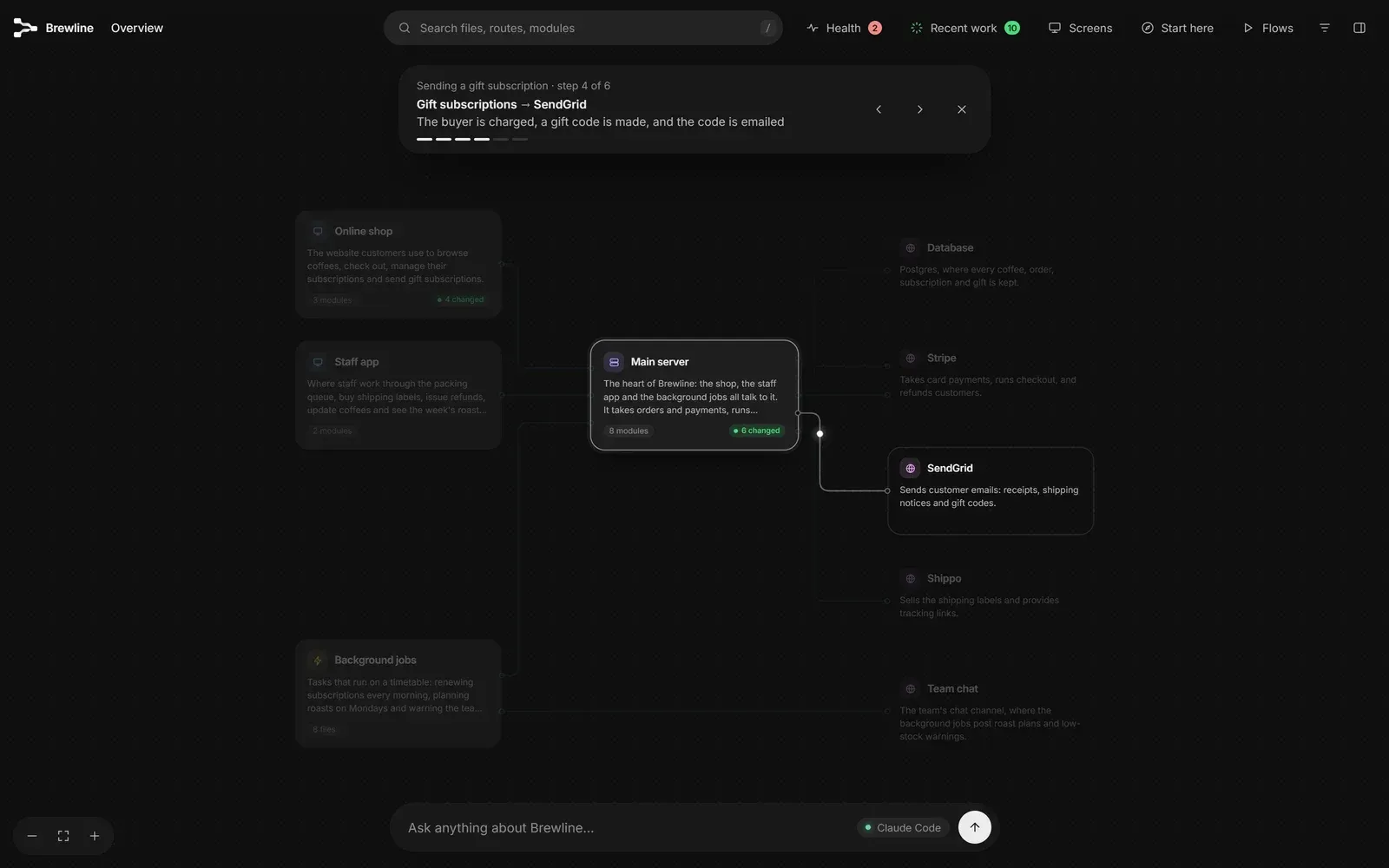
- Guided flows and Start here tour Flows are step-by-step walkthroughs of jobs such as checkout or sign-up, with narration at each stop and keyboard stepping. New flows can be requested in plain words and are traced through the code by the agent, then saved with the map. A one-minute Start here tour runs the first time a map opens.
- Incremental updates Asking the agent to update the floorplan re-scans the codebase and carries over everything that did not change, using content fingerprints, so only changed files are described again. An open map reloads itself. Names and descriptions edited by hand in
floorplan/architecture.jsonorfloorplan/descriptions/are kept across updates. - Blueprints from a PRD or spec Floorplan can plan an app that does not exist yet from a PRD, specification or description. The result is drawn with dashed cards and a Blueprint label, Health is replaced by a design review of open questions and unprotected endpoints, and each part has a Build this request. A Change mode on the Ask bar reshapes the plan, with Undo. See Plan something you haven't built yet.
- Single-file HTML export Export writes one HTML file containing the map, search, screens, tour and flows, which opens in any browser without installation. It omits the Ask bar, editor links, the folder path, git remotes and source code. Recent work and Health are off by default and can be included explicitly.
- Project footprint Floorplan writes only its own
floorplan/folder, which ignores itself in git. In Claude Code it can add, after confirmation, a short section toCLAUDE.local.md, which is placed in the clone's private ignore list. It does not modify source code,.gitignoreorCLAUDE.md; file details are in What's in your project. - Local server and page security The map's server listens on 127.0.0.1 only, issues a random token per start, rejects requests from other origins and other host names, and stops two hours after the last tab closes. Each map carries a Content-Security-Policy that allows only its own scripts by SHA-256 hash; an exported copy may contact nothing. These measures are described in Privacy and security.
- Unattended mode and JSON output With
FLOORPLAN_UNATTENDED=1or--unattended, the scripts write nothing outsidefloorplan/, start no server or browser and exit with an error on failure. The scan, build, describe, refresh, recent and status scripts accept--json, and aworkflow.jsonfile describes every step as data, so the pipeline can run in CI or with another model. See Running without an agent session. - Installation in Claude Code The repository is added as a marketplace and the plugin installed with
claude plugin install floorplan@floorplan, from the CLI or the Code tab of the desktop app. Updates useclaude plugin update floorplan@floorplanor the marketplace auto-update setting, and removal usesclaude plugin uninstall. The project recommends having the Claude Code CLI installed so the Ask bar can read the real code. - Installation in Codex In the Codex app, the repository is added under Plugins, Add a marketplace, then Floorplan is installed from the list; the Codex CLI offers
codex plugin marketplace addandcodex plugin add. A map can be requested in plain words or with$floorplan. Codex questions run in its read-only sandbox, and Codex mode writes no notes file. See Floorplan in Codex.
Where Floorplan fits
Mapping an existing application
The documented first step is to open the project in Claude Code or Codex and ask for a floorplan of the app; for a frontend and backend in separate repositories, the folder containing both is opened. The scripts scan the code, the agent names the parts and describes each file and endpoint, and the map opens with a short tour. The project states that a first map takes a few minutes for a small app and longer for large ones, and that large projects are split across parallel helpers. The Getting started guide covers the full sequence.
Following changes made by an AI agent
After a coding session, asking the agent to update the floorplan re-reads only changed files and marks the touched cards under Recent work. The board pairs the original request with a summary and a per-card note explaining how each change relates to it. The highlights can be switched off through the filters for a clean view.
Checking common configuration and access mistakes
The Health panel lists findings such as keys written into code, Supabase tables without row-level security, open Firebase rules, Stripe webhooks without signature verification and endpoints reachable without sign-in. Each finding links to the affected cards and offers a prompt, labelled Fix with Claude or Fix with Codex, naming files and lines. The project describes this as a check rather than an audit, and the "What was checked" lines state which inputs each check had.
Tracing a feature through the stack
The Screens list starts from a page and shows everything behind it, down to the database and outside services. Questions such as "where do we talk to Stripe?" or "if I change the users table, what breaks?" are answered on an answer board with the relevant cards. Guided flows show a request travelling through the app step by step and can be requested in plain words.
Sharing a map with people outside the session
Export produces one HTML file for teammates or clients who do not use Claude or Codex. The file shows structure, names and descriptions but not source code, and the Health and Recent work sections are included only when ticked. An embedding option lets a surrounding page receive "Ask about this" messages from an exported map.
Planning an app before it is built
With a PRD or specification shared in the session, Floorplan draws a blueprint of the parts, files, endpoints and screens the plan implies, marked as a plan with dashed cards. A design review lists open questions and endpoints with no access decision, and once code exists the blueprint is replaced by a map of the real system. Pipelines that run without an interactive session use the unattended mode described in the unattended guide.
Install
claude plugin marketplace add haydenschmitty/floorplan && claude plugin install floorplan@floorplanReviews of Floorplan
Be the first to share your experience with Floorplan.
Write a review
Loading review form…
Found Floorplan useful? Upvote it todayYour vote helps other IT teams find it in the daily ranking.

