

What is Formbricks?
Formbricks is an open-source survey platform and experience management (XM) suite developed by Formbricks GmbH in Kiel, Germany. The repository presents it as an open-source alternative to Qualtrics. It collects feedback from users, customers or employees through four channels: shareable link surveys, website pop-ups shown to anonymous visitors, in-app surveys for identified users, and surveys whose first question is embedded in an email. The app groups work into Ask, Analyze and Act.
Self-hosting is the main distribution route. The one-click script installs Docker, Traefik with Let's Encrypt certificates and a bundled RustFS object store on Ubuntu; a manual Docker Compose setup pulls its files from the stable branch; and an official Helm chart is published at oci://ghcr.io/formbricks/helm-charts/formbricks. Since version 6 the stack is not a single container: it runs eight long-running services, namely the web app, the Formbricks Hub API and worker, Cube, PostgreSQL, Redis or Valkey, SpiceDB and the SpiceDB operator. The self-hosting overview sizes an evaluation server at 2 vCPU, 4 GB RAM and 20 GB SSD, and a low-load server at 4 vCPU, 8 GB and 50 GB. A hosted instance runs at app.formbricks.com, and the company's GDPR page states that survey data is encrypted and stored in Germany.
The latest release is 6.1.4, published on 5 November 2026. It removes inline styles that caused Content Security Policy violations in choice and matrix questions, adds an optional SMTP_REQUIRE_TLS=1 setting to require STARTTLS, bounds collection sizes in authentication requests and restores AuthZed projection delivery after Redis interruptions. Version 6.1.0 added per-survey visibility, dark mode and Custom CSS for surveys, Qualtrics import from .qsf files, Embedded Data V2 with a shared field library, the v3 Responses API with matching MCP tools, and matrix, NPS and CSAT chart options. Version 6.0 replaced the legacy authorization evaluator with AuthZed SpiceDB, which is now a required dependency. Under the release and maintenance policy, each minor version is maintained for three months: 6.1 until 19 January 2027 and 6.0 until 21 December 2026.
The code is a TypeScript monorepo built with Turborepo, Next.js, React, Tailwind CSS, Prisma and Zod, tested with Vitest. The core is licensed under AGPLv3, so it can be self-hosted commercially and modified as long as modified versions are published under the same license. Code in apps/web/modules/ee is under a separate Enterprise license: it ships inside the same Docker images but stays locked until an Enterprise license key is added.
Some parts of the suite are deliberately narrow. Workflows and Unify Feedback are Beta and Enterprise-only. Workflows currently offer one trigger (response completed), one filter (ending card) and one action (send email), with no branching, webhooks, schedules or delays yet. AI features are optional, disabled until an organization owner or manager turns them on, and also belong to the Enterprise Edition.
Formbricks screenshots
Explore the interface. Open a screenshot to view it at full size.
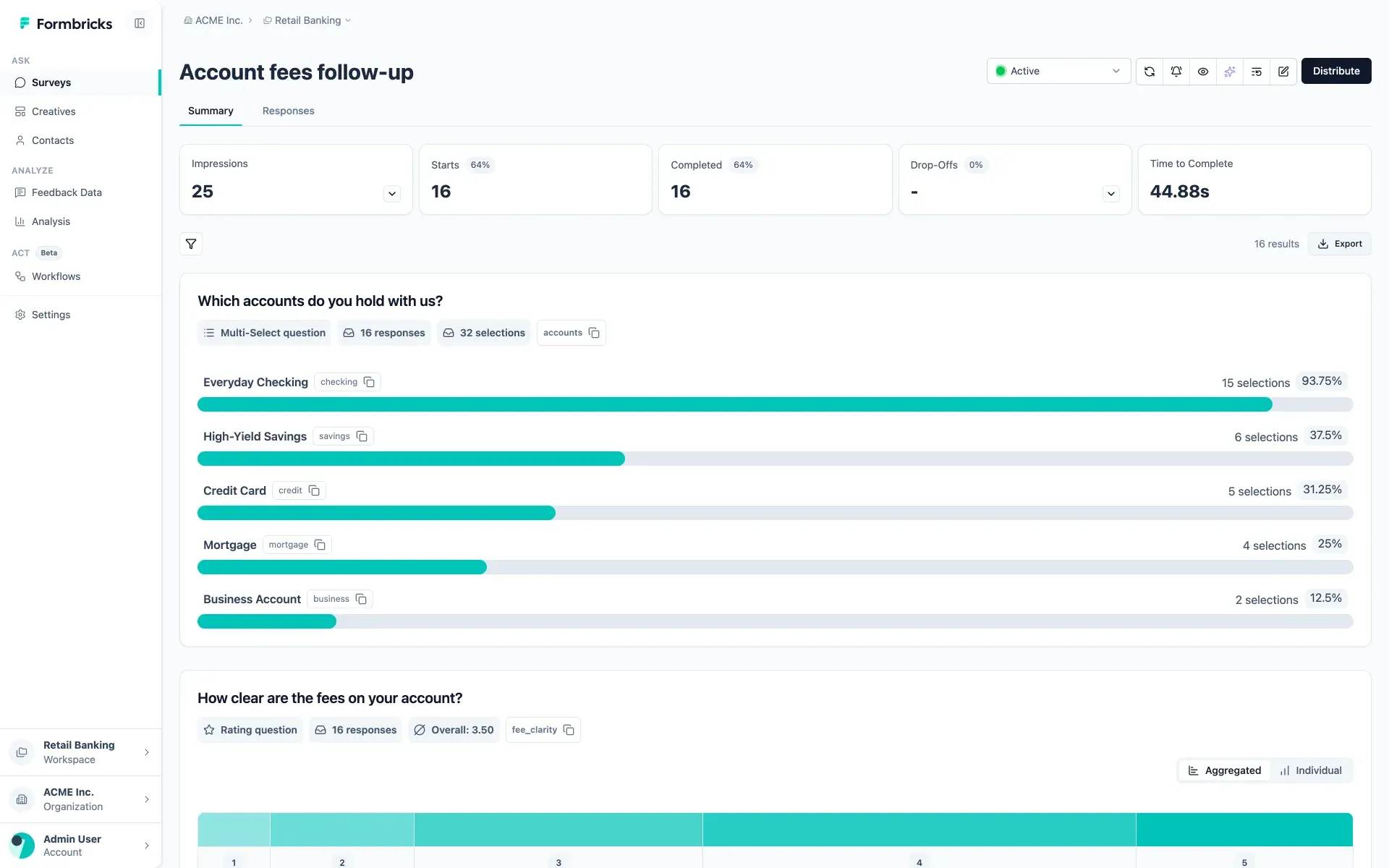
Official documentation screenshot of the Summary tab for a sample banking survey, with Ask, Analyze and Act navigation.
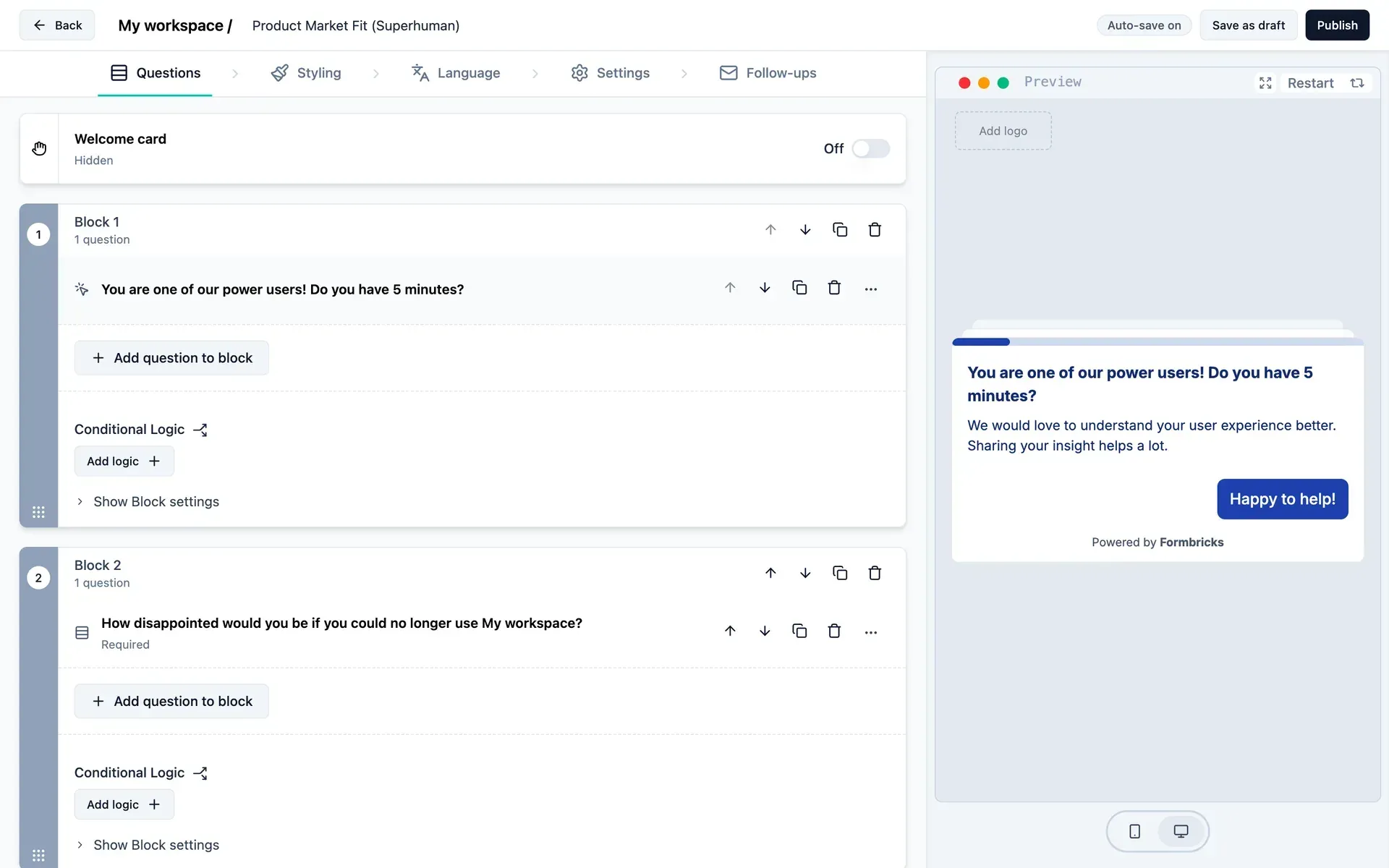
Official documentation screenshot of the block-based editor with Questions, Styling, Language, Settings and Follow-ups tabs.
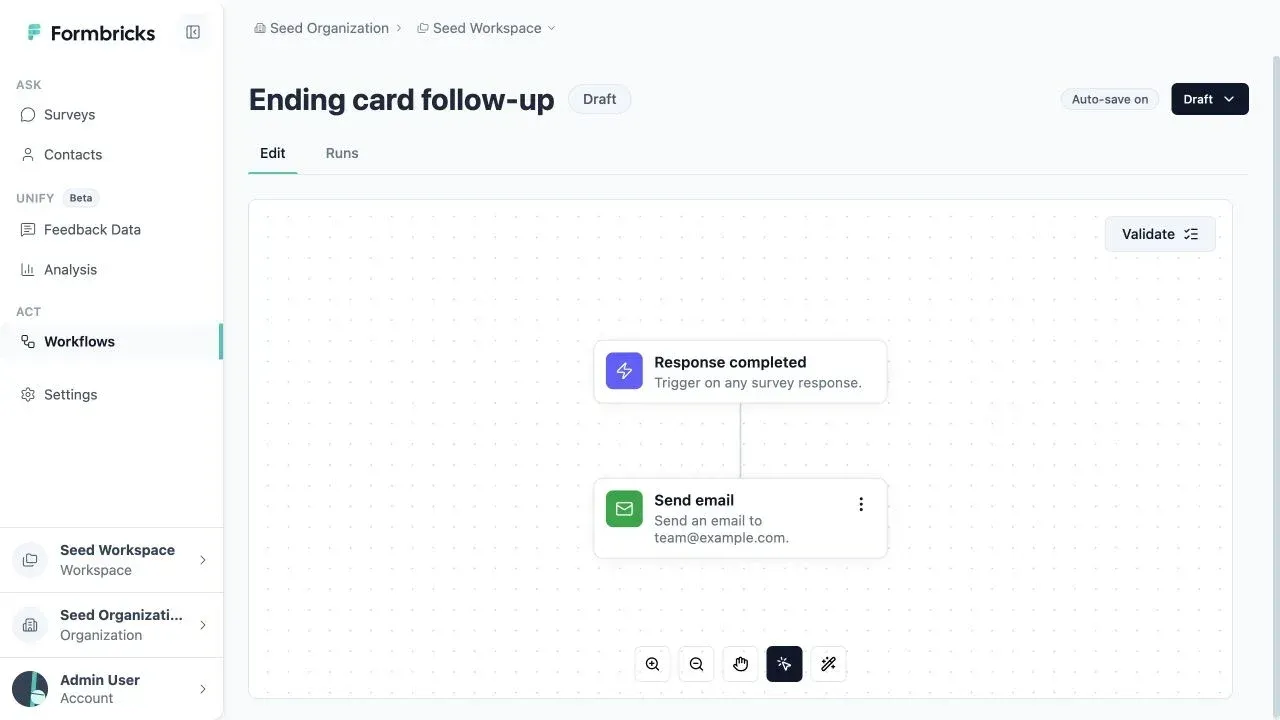
Official documentation screenshot of the Beta workflow builder with the Edit and Runs tabs.
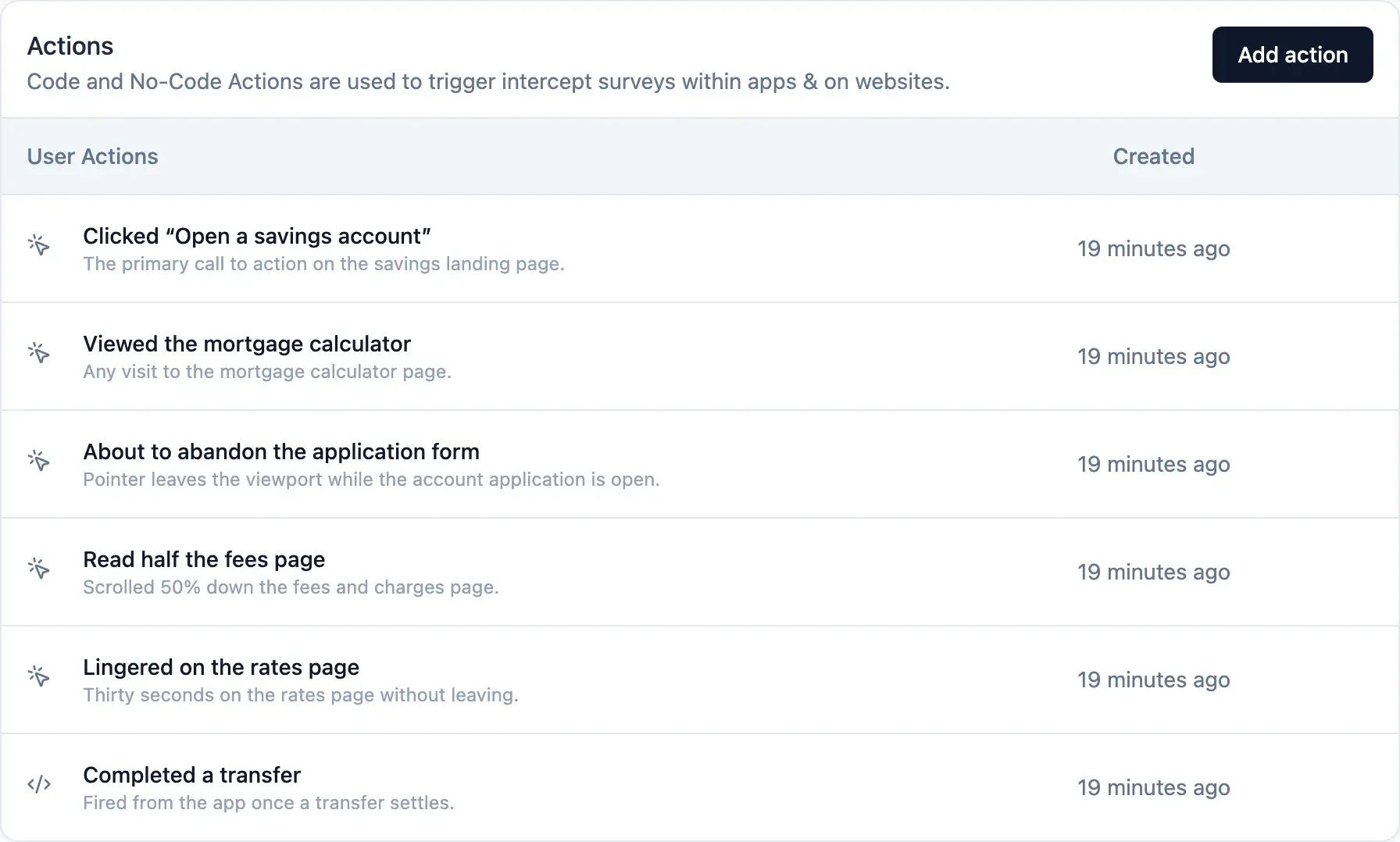
Official documentation screenshot of the actions used to trigger website and in-app surveys.
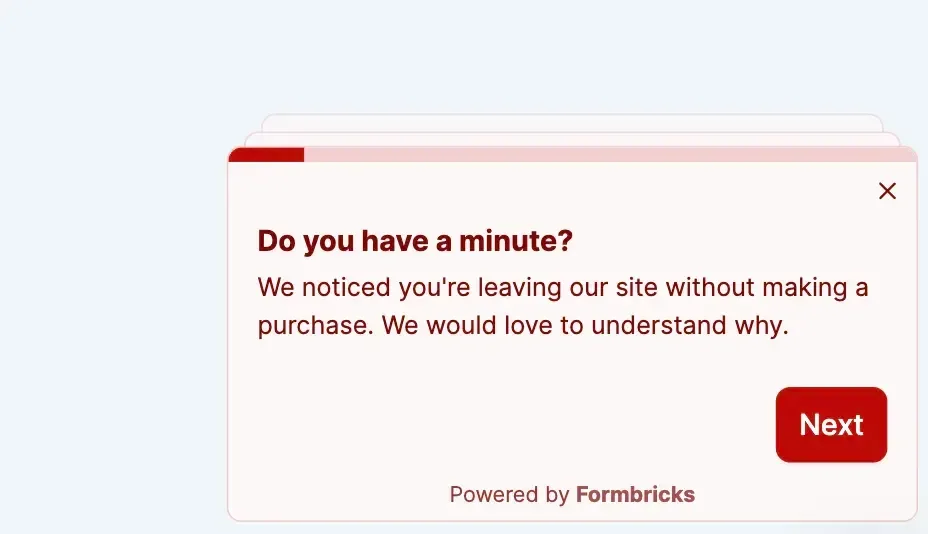
Official documentation example of a styled website survey pop-up with a progress bar.
Source: official Formbricks project page.
Key capabilities
- One-click install on Ubuntu Run
curl -fsSL https://raw.githubusercontent.com/formbricks/formbricks/stable/docker/formbricks.sh -o formbricks.sh && chmod +x formbricks.sh && ./formbricks.sh installon an Ubuntu server with SSH access, a domain whose A record points to it, and ports 80 and 443 open. The script installs Docker, Formbricks with PostgreSQL, Hub, Cube and SpiceDB, Traefik with Let's Encrypt and optional HSTS, and a bundled RustFS store for uploads. Secrets are written to./formbricks/.envwith 0600 permissions. Since 6.1.1 the app port 3000 is published on 127.0.0.1 only and traffic goes through Traefik. - Docker Compose install The Docker guide downloads
docker-compose.ymlfrom the stable branch, has you generate secrets withopenssl rand -hex 32, and starts the stack withdocker compose up -d;/healthon port 3000 confirms it is up. Requirements are Docker Engine with Compose V2, curl, openssl and a POSIX shell. S3-compatible storage is optional and only needed for file uploads. - Kubernetes Helm chart The official chart installs from
oci://ghcr.io/formbricks/helm-charts/formbricks. For production the docs suggest starting with three nodes of at least 4 vCPU and 8 GB, autoscaling to six, with PostgreSQL, Redis and object storage as managed services. Every replica count ships as 1, so nothing is highly available until you configure it. Since 6.1 the web container runs as non-root user 1001 with a read-only root filesystem. - Hosted instance Formbricks Cloud runs at app.formbricks.com and always tracks the current server release, with survey data stored in Germany according to the GDPR page. The current pricing page lists the free self-hosted Community Edition and a custom-quoted Experience Suite license; an Experience Suite run by Formbricks, in a dedicated cloud account or a Formbricks-managed EU or Saudi Arabia region, is marked as coming soon.
- Survey editor and question types Surveys are built from blocks of questions in a no-code editor with a live desktop and mobile preview, auto-save, styling, language and follow-up tabs. Question types include free text, single and multiple select, picture select, rating, NPS, CSAT, CES, ranking with an optional Other answer, matrix, date, file upload, address, contact info, consent, schedule a meeting and statement or call to action. Conditional logic, recall, variables, hidden fields, validation rules and partial responses are part of the free Community Edition.
- Link survey controls Link surveys can use single-use links, personal links per contact, PIN protection, email verification before the survey, URL prefilling, source tracking, pretty URLs and custom head scripts. Adding
offlineSupport=truestores answers in the browser's IndexedDB and syncs them when the connection returns; file uploads are not supported offline and unsynced data is discarded after 24 hours. Encrypted single-use links created before 6.1 must be re-sent after upgrading. - Website and in-app surveys The JavaScript SDK, loaded by script tag or as
@formbricks/js, shows surveys as pop-ups or in-app modals. No-code actions trigger on page views, clicks, exit intent or scroll depth, and code actions are sent from your app withformbricks.track(). Identified users can be targeted by attributes, with recontact rules, cooldown periods and display to a percentage of users. The quickstart covers setup, including Google Tag Manager. - Mobile SDKs Native SDKs exist for iOS (
FormbricksSDK), Android (com.formbricks:android), React Native (@formbricks/react-native) and Flutter (formbricks). The survey UI targets iOS 16.4 or later and Android System WebView 111 or later; older versions still open surveys but colors and layout may be off. All SDKs share one light, dark or system appearance setting. - Languages, styling and accessibility Multi-language surveys cover the full European locale matrix, including Belgian Dutch and Swiss Italian bundles added in 6.1, and open in the browser's language when it matches. Right-to-left languages mirror the widget placement. Since 6.1 surveys support dark mode and workspace or survey-level Custom CSS, and creators can set alt text on survey images. AI translation of questions is available as an Enterprise feature.
- Response summary and exports Each survey has a Summary view with impressions, starts, completions, drop-offs and time to complete, followed by per-question charts, plus a Responses table. Filters narrow the result set before export, and file-upload attachments can be downloaded as a single ZIP.
- Unify Feedback and dashboards (Enterprise, Beta) Unify Feedback normalizes survey responses, CSV uploads and API-pushed records into Feedback Records grouped under Feedback Datasets. Open-text records are enriched with sentiment, emotions and a consolidated language, and vector-based Topics and Subtopics cluster them in preview. Charts are grouped on shareable dashboards.
- Workflows (Enterprise, Beta) Workflows run on a visual canvas: a Response completed trigger, an optional ending-card filter and a Send email action that uses data from the response. Each run records its status and per-step logs. On self-hosted instances they run on the Redis-backed job runner inside the web process and need SMTP for email. Branching, webhooks, schedules, delays and loops are not available yet.
- Integrations and webhooks Documented integrations include Slack, Notion, Airtable, Google Sheets, HubSpot, Salesforce, Attio, WordPress, Zapier, Make, n8n and Activepieces. Webhooks send events such as finished responses, and since 6.1 each webhook is delivered by its own background job so one slow endpoint does not hold up the others.
- REST APIs The Client API, used by the SDKs, creates displays and responses without authentication. The Management API covers surveys, responses, contacts, contact attribute keys, action classes and webhooks with a personal API key created in settings. The v2 reference adds teams, users and roles, and OpenAPI specs are published for v2 and v3. The v3 Responses API added in 6.1 uses keyset cursors; a per-workspace survey limit (
SURVEY_WORKSPACE_LIMIT, default 10,000) returns HTTP 422 when exceeded. - MCP server for AI agents Each instance exposes an MCP server at
/api/mcp; clients such as Claude Code and Codex connect over OAuth 2.1 with dynamic client registration and PKCE, or with an API key as a fallback. Tools are grouped into read and write scopes for surveys, workflows, responses and feedback records. Calls never exceed the user's workspace role. Self-hosted instances need a public HTTPS base URL for the OAuth flow. - Roles, SSO and audit logs Authorization runs through AuthZed SpiceDB, and protected operations fail closed if it is unavailable. Organizations and member invites are part of the free edition, and 6.1 added per-survey visibility for restricting who sees a survey and its responses. Teams with access roles, OIDC SSO (Azure AD, Google, Keycloak, Okta, generic OpenID), SAML SSO, two-factor authentication and audit logs belong to the Enterprise Edition. Without a license a self-hosted organization is limited to one workspace since 6.0.
- AI features (Enterprise) AI features sit behind one organization toggle and are off by default. They cover survey translation, AI chart creation, Qualtrics import and embeddings for semantic search. The docs list Gemini 3.5 Flash on Google Cloud in Germany as the current smart-functionality model and Alibaba GTE embeddings hosted by Formbricks in Germany. Self-hosted instances can use an OpenAI-compatible endpoint or an optional Qwen and vLLM profile that needs a GPU host.
- Qualtrics import A Qualtrics .qsf export can be dropped into the New Survey menu to create a draft survey with questions, pages, languages and piped text. AI chooses the matching Formbricks question type, while question text and options are copied from the file. Survey logic is not imported: an import report lists what was skipped or changed so it can be rebuilt by hand.
Where Formbricks fits
Run NPS and CSAT inside a product
Install the JavaScript or mobile SDK, identify signed-in users and send attributes such as plan or role. Create an NPS or CSAT survey, trigger it on a code action like a completed task, and set a recontact rule and cooldown so the same user is not asked again too soon. Check that the widget status shows as connected in the app settings, that the survey appears for a test user who matches the segment, and that the Summary view records impressions and completions. Attribute-based segments need the Enterprise contact management feature.
Ask website visitors at the right moment
Add the script tag or Google Tag Manager snippet to a public site, then create no-code actions for page views, clicks on a CSS selector, scroll depth or exit intent. Use display to a percentage of visitors to limit exposure on high-traffic pages. Test in a private window, confirm the survey stops after completion, and review whether the pop-up conflicts with your consent banner or Content Security Policy, which the 6.1.4 inline-style fix addresses for choice and matrix questions.
Replace link forms for research panels
Use link surveys with personal links per contact or single-use links to keep one answer per respondent, prefill known values through URL parameters and tag the source of each link. Turn on PIN protection or email verification for restricted studies and offlineSupport=true for field work with unstable connections. Verify that file-upload questions are not used offline, export a sample of responses with hidden fields and check that single-use links issued before an upgrade still behave as expected.
Move surveys from Qualtrics
Export each survey from Qualtrics as a .qsf file after moving unused questions back into the survey flow, then import it from the New Survey menu. Read the import report for skipped questions and rebuild display and skip logic by hand, since logic is not imported. The importer depends on Enterprise AI being enabled, so test it with a trial license, compare question counts and translations against the source, and run a test response through every branch before publishing. See the migration guide.
Consolidate feedback and follow up
With an Enterprise license, create a Feedback Dataset, connect survey sources, upload CSV exports from support or review tools and push other records through the API. Enrichment adds sentiment, emotions and language, and charts on a dashboard track scores by journey stage. Add a workflow that emails the owning team when a response ends on a detractor ending card. Check that enrichment is configured with a working model, that duplicate records are not created on re-import, and that SMTP delivery works before relying on alerts.
Let an AI agent manage surveys
Point an MCP client at /api/mcp on Formbricks Cloud or your own HTTPS domain and approve the requested scopes on the consent screen. Give read-only agents surveys:read or feedbackRecords:read and grant responses:read only when the agent should see respondent data. Confirm that write calls fail for a member without write permission, revoke a test connection, and remember that feedback-record deletions cannot be undone.
Install
curl -fsSL https://raw.githubusercontent.com/formbricks/formbricks/stable/docker/formbricks.sh -o formbricks.sh && chmod +x formbricks.sh && ./formbricks.sh installReviews of Formbricks
Be the first to share your experience with Formbricks.
Write a review
Loading review form…
Alternatives to Formbricks
 CryptPadAGPL-licensed collaboration suite from XWiki that encrypts documents in the browser before they reach the server. Use a public instance such as CryptPad.fr, buy a hosted or on-premise enterprise plan, or self-host it with Node.js or Docker.
 OpenPanelOpenPanel combines web traffic metrics with product analytics: funnels, retention, profiles, session replay, revenue and AI call tracking. It is AGPL-3.0, cookieless by default and runs in an EU cloud or on your own Docker server.
 ChatwootChatwoot is an open-core customer support platform: a shared inbox for website chat, email, WhatsApp, Instagram, Telegram, SMS and voice, plus help center, contacts, reports and an AI agent. Self-host it with Docker, Helm or a Linux script, or use Chatwoot Cloud.