

What is Ming Voice?
Ming Voice is an MIT-licensed, local voice assistant that answers spoken questions out loud on the user's own GPU. It is built around Ming-3.0-audio-tiny, a speech-to-speech audio-language model from inclusionAI, and adds turn-taking, interruption handling, tools, a browser app, an always-on desktop client, phone access over the home network, a Home Assistant bridge and an OpenAI-compatible API. The project is published on GitHub by the account JMS1717; the repository was created on October 21, 2026, and versions 1.0.0 through 1.5.0 were all released that same day. The README describes the target as an assistant that can be left running at home: it hears the user, decides when they have finished, generates an answer and speaks it, with no audio leaving the machine.
The README header names AMD Radeon GPUs as the primary target and labels NVIDIA support as experimental. Supported hardware is an AMD Radeon RX 6800 or newer (RX 7000 and 9000 series and Radeon PRO cards, with the RX 7900 XTX as the development card) or an NVIDIA RTX 30 series card or newer, in both cases with at least 16 GB of VRAM and about 30 GB of free disk space for the 20 GB model and the Python environment. On cards with less than 23 GB of VRAM the model's MoE experts are switched to weight-only int8 automatically. 12 GB cards, GTX 10 and 16 series, RTX 20 series, Tesla P40 and Apple Silicon are listed as unsupported; the FAQ explains that the model code needs Triton GPU kernels from flash-linear-attention, which do not run on Apple GPUs. The model understands and speaks English and Chinese only.
Installation is script based. On x86_64 Linux a one-line install.sh installs missing packages, detects the GPU, sets up Python with PyTorch for ROCm 7.2 or CUDA 12.8 without system-wide changes, downloads the model into ~/ming-voice and adds an app menu entry. On Windows 11 the PowerShell installer install.ps1 (or Install.cmd) sets up WSL2 with Ubuntu 24.04, installs ROCm 7.2.4 for AMD cards inside WSL, prepares the environment and the model, and places a desktop shortcut. Since version 1.8.0, published on November 2, 2026, Linux hosts can also run the server with Docker Compose, using the images ghcr.io/jms1717/ming-voice:cuda and :rocm, which are also on Docker Hub. The release notes state that the CUDA image was checked on an NVIDIA card while the ROCm image builds but had not yet run on an AMD GPU inside a container. Version 1.8.0 also added MING_DATA_DIR to move the server's writable data out of the repository folder.
Earlier releases shaped the current feature set. Version 1.7.0 added a Wyoming protocol bridge so Home Assistant Assist pipelines, a Home Assistant Voice PE and other voice satellites can use Ming for speech-to-text, text-to-speech and conversation; it also switched the environment to uv's own Python with C headers and made startup fall back to int8 experts when other programs hold VRAM. Version 1.6.0 introduced native Linux support for AMD and NVIDIA with the one-line installer, Jarvis mode, broader Home Assistant control and a move from PyTorch 2.8 to 2.11. Versions 1.1.0 to 1.5.0 added the tools, the wake word, the always-on client, announcements and confirmations.
The server is written in Python. server.py handles the WebSocket audio stream, Silero VAD, Smart Turn end-of-turn detection, speculative replies with rollback, barge-in and an echo guard; engine.py runs the Thinker (the audio LLM, a 9.3B parameter Mixture-of-Experts with 2.7B active) and the Talker (Qwen2 plus a flow-matching DiT and AudioVAE). The README attributes most of the speedup over the reference implementation to fused Triton kernels, graph capture and generating the answer during the end-of-turn pause. The project's MIT license covers its own code. The model weights are not included: they are downloaded from Hugging Face, and the model card lists Ming-3.0-audio-tiny under its own MIT license. Smart Turn v3 by Pipecat is BSD-2-Clause and Silero VAD and flash-linear-attention are MIT. The project accepts donations through PayPal and has no paid edition. Similar listings on iThub include Leon, a self-hosted personal assistant with voice, and LocalAI, which serves speech and language models behind OpenAI-compatible APIs.
Ming Voice screenshots
Explore the interface. Open a screenshot to view it at full size.
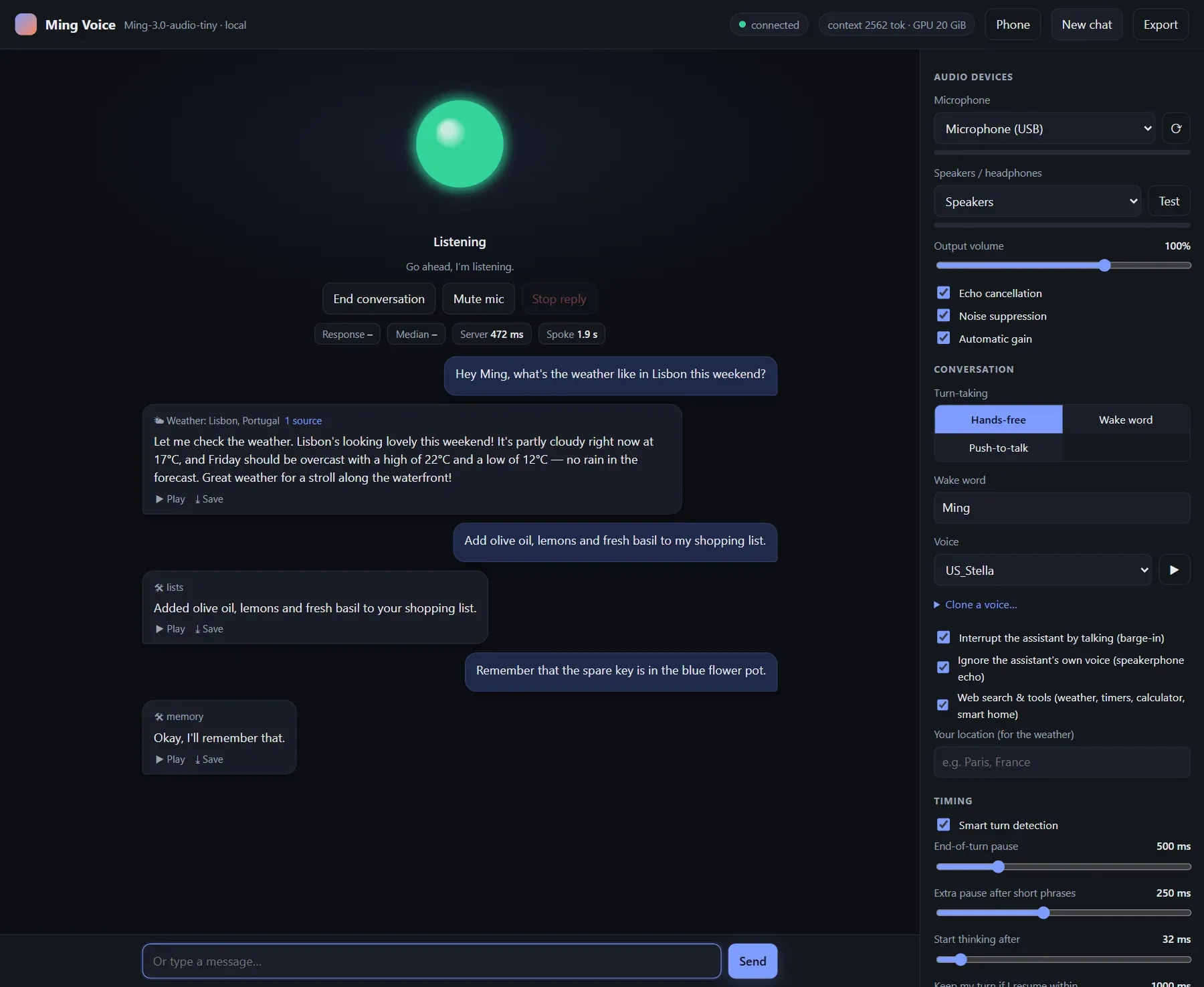
Desktop browser app: a conversation using the weather, lists and memory tools, with audio, turn-taking and timing settings on the right.
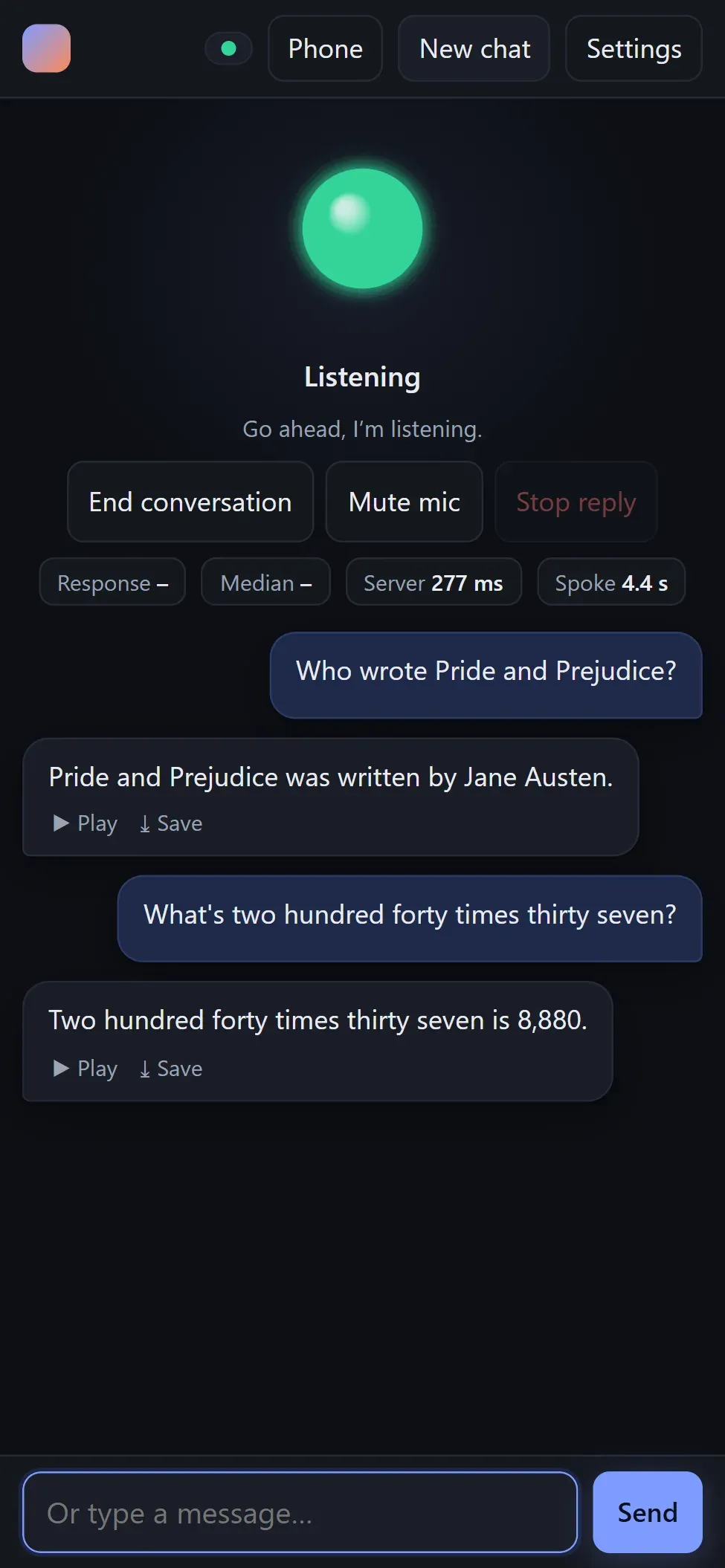
The same web app on a phone over the home network, with response timing badges and a text input.
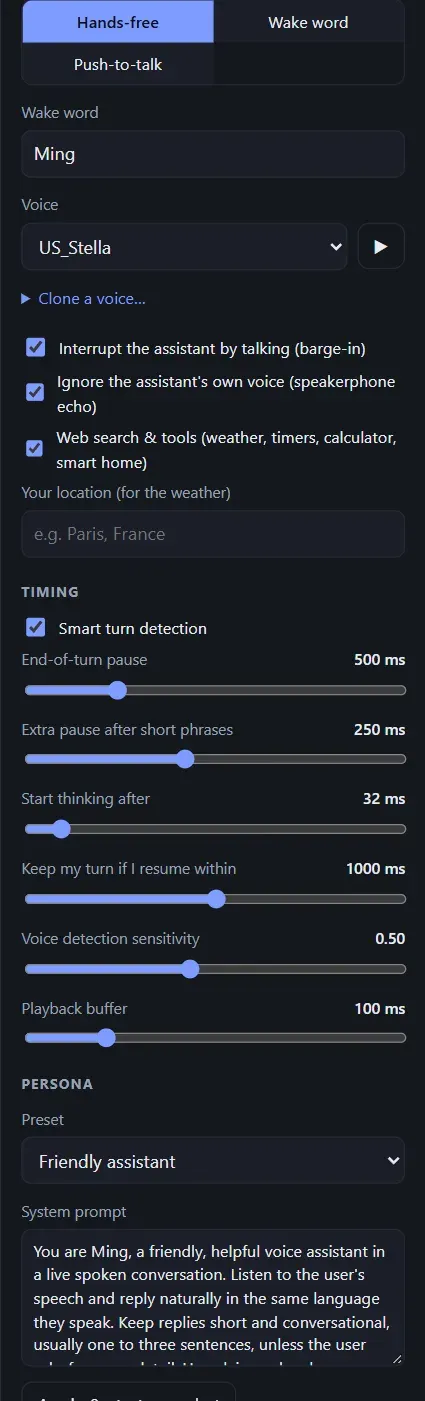
Settings panel: hands-free, wake word or push-to-talk, voice selection, timing sliders and the persona system prompt.
Source: official Ming Voice project page.
Key capabilities
- Speech-to-speech conversation The user talks and Ming Voice answers aloud, with one audio model handling listening, reasoning and speech output. The project reports a median of about 0.23 seconds from the end of the user's speech to the first sound of the answer, measured on a Radeon RX 7900 XTX, because the reply is generated during the end-of-turn pause. The same measurements list about 115 tokens per second for the Thinker, about 80 ms to the first token after a short spoken turn and a startup time of about 30 seconds.
- Smart turn detection End of turn is decided with Smart Turn v3, which judges from words and intonation whether the user has finished. When it is confident, the turn ends after a 200 ms pause; when the speaker sounds mid-sentence it waits up to 1.5 seconds. The end-of-turn pause (default 500 ms), an extra pause after short phrases, the speculative start time and the VAD sensitivity are adjustable in Settings.
- Interruption and resume The user can talk over the assistant at any time. An echo guard compares the microphone with the audio being played, so on a speakerphone the assistant stops only for the user's voice and not for its own. If the user keeps talking within one second of an answer starting, that answer is withdrawn and everything said is answered as one turn. Barge-in can be switched off for very echoey rooms.
- Hands-free, push-to-talk and wake word Three turn-taking modes are available: hands-free, push-to-talk with the Space key, and a wake word such as "Hey Ming". After each reply there is an 8 second window for follow-ups without the name. Any name can be set as the wake word, and the README notes that "Ming" is recognised best. Saying goodbye ends the conversation or puts the assistant back to sleep in wake-word mode.
- Built-in tools With Web search and tools enabled, the model decides when to call a tool: web search through DuckDuckGo or Brave Search with an optional API key, weather and a 3-day forecast from Open-Meteo, a calculator and time zones. Timers and reminders survive a restart and repeat until answered. Shopping, to-do and named lists are stored locally, and a memory tool keeps up to 40 facts that are given to the model in every conversation. Tools can be turned off for fully offline use.
- Home Assistant control Ming Voice reads the Home Assistant device, area and entity registries with a long-lived token and can control lights, plugs, media players, thermostats, locks, vacuums, car entities, scripts and scenes by name and by room. It handles follow-ups, two commands at once and scheduled actions such as turning off lights in 20 minutes. Unlocking, opening a garage door or gate and disarming an alarm require a spoken confirmation within a minute. Setting
MING_HA_DIRECT=0limits it to entities exposed to Home Assistant Assist. Details are in the Tools section of the README. - Home Assistant Assist through Wyoming Since version 1.7.0,
wyoming_bridge.pyexposes speech-to-text, text-to-speech and a conversation agent on port 10300, so Home Assistant Voice PE devices, ESPHome or Wyoming satellites and the Assist button in the Home Assistant app can use Ming. This route records until the user stops and has no interruption, so it is slower than the project's own app, and requests from several satellites take turns on the GPU. The bridge accepts only private-network addresses and can be restricted further with--allow. - Jellyfin and Hermes Agent The Jellyfin tool searches a media library and controls open Jellyfin players, continuing a series from the next unwatched episode, and starts playback only when the user asked for it. The
ask_hermestool hands larger jobs to a Hermes Agent server in the background and announces the answer when it is ready. Both are configured with small JSON files holding a URL and an API key. - Voices, cloning and Jarvis mode The project ships 7 built-in voices and can clone a voice from a 5 to 15 second recording or upload of one speaker; cloned voices are saved in a
voices/folder. A Jarvis persona preset switches to a dry-witted butler character with its own designed voice and wake word, which the README describes as an original voice made with the Talker's voice design, not a copy of anyone's. Numbers, money, ranges and units are rewritten so they are read correctly. - Phone access over the home network A small proxy serves the app over HTTPS on port 8443 with a self-signed certificate, because phone browsers allow the microphone only over HTTPS. The PC shows a QR code, the phone opens a link with an access key that is exchanged for a cookie, and the page can be added to the home screen as a web app. Only one device holds a live conversation at a time: the phone takes over and the PC client takes it back 15 seconds after the phone app is closed.
- OpenAI-compatible API The server offers
/v1/audio/speechfor text to speech in wav, mp3, flac or pcm (with first audio after about 0.12 seconds when streaming, per the README),/v1/audio/transcriptionsfor English or Chinese speech of any length,/v1/chat/completionswith text or audio input and optional spoken output, and/v1/models. OpenAI function calling is not supported, but amingrequest field lets replies use the assistant's own tools. Interactive docs run atlocalhost:8000/docs; the API section lists the parameters. - Linux installer and launcher The install.sh one-liner supports Arch, CachyOS, EndeavourOS, Manjaro, Ubuntu, Debian, Pop!_OS, Mint, Fedora, Nobara and openSUSE, and other distributions with git and curl. AMD cards need only the kernel's
amdgpudriver because PyTorch brings ROCm 7.2; NVIDIA needs the distribution's driver. The installer adds the user to therendergroup on AMD and can be rerun to skip finished steps. Theming-voicecommand starts, stops and inspects the server and offers--phone,--wyomingand--autostart. - Windows installer through WSL2 On Windows 11,
install.ps1sets up WSL2 and Ubuntu 24.04 if missing, installs ROCm 7.2.4 and the WSL GPU bridge for AMD, prepares the Python environment and the model, and adds a desktop shortcut that starts the server and opens the browser app. AMD cards need a recent Adrenalin driver with WSL support. The server window must stay open while the assistant is used, because WSL shuts its VM down when nothing is attached. - Docker images for Linux Since version 1.8.0,
docker compose --profile nvidia up -dor--profile amdstarts the server with host networking, storing the model, cloned voices, lists, memory, the saved conversation, settings files and kernel caches in aming-datavolume. The CUDA image targets RTX 30 series and newer with the NVIDIA Container Toolkit; the ROCm image targets RX 6800 and newer with only theamdgpudriver. The always-on client is not part of the container because it needs a microphone. The release notes recommend the installer rather than Docker on Windows. - Saved conversations and self-restart The conversation is saved after every turn and resumed after a restart if it is less than 30 minutes old by default (
MING_RESUME_S). When the context window fills up it is rebuilt between turns from the conversation text. WithMING_SUPERVISE=1, which the launchers set, the server restarts after a crash or an unrecoverable GPU error. Health is reported at/api/healthand logs are inserver.log.
Where Ming Voice fits
A local voice assistant on a gaming PC
A user with a supported Radeon or GeForce card runs the Linux or Windows installer, starts Ming Voice from the app menu or desktop shortcut and talks to it in the browser at localhost:8000. Questions, weather lookups, timers, lists and remembered facts are handled by voice. The FAQ notes that between turns the GPU draws about idle power with the VRAM full, and that ming-voice --stop or closing the server window frees the roughly 20 GB of VRAM for games.
Voice control for Home Assistant
With a long-lived Home Assistant token in .ha_token, the assistant sees the lights, plugs, locks, thermostats, vacuums and media players the token can access and controls them by device name and room, including follow-ups and scheduled actions. Risky actions such as unlocking a door wait for a spoken yes. Home Assistant automations can also send ming_announce events so the assistant speaks doorbell or appliance messages through the PC speakers or the open app.
Assist pipelines with Voice PE and satellites
Starting the Wyoming bridge with ming-voice --wyoming on Linux or the Home Assistant launcher on Windows, then adding the Wyoming Protocol integration in Home Assistant with the PC's address and port 10300, makes Ming available as speech-to-text, text-to-speech and conversation agent. A Voice PE or other satellite can then use any combination of these services, with commands such as turning off the lights applied to the satellite's own area. The FAQ states that the assistant itself cannot run on a Home Assistant Green, a Raspberry Pi or a NAS and needs a PC with a 16 GB GPU.
Always listening in one room
The always-on client turns a PC with a microphone and speakers into a wake-word device without a browser, with timer alarms and announcements played through the speakers. A tablet or old phone can use the web app over the LAN in wake-word mode instead. For several rooms, the README points to Home Assistant voice satellites through the Wyoming bridge, since only one device holds a live conversation at a time.
Local speech services for other apps
Developers can call the OpenAI-compatible endpoints with an OpenAI client pointed at http://localhost:8000/v1 to generate speech with built-in or cloned voices, transcribe English or Chinese audio, or chat with audio in and out. From another device the same API is reachable at https://<pc-ip>:8443/v1 with the access key from .lan_key. API chat requests run on an isolated copy of the conversation state, so a live voice session continues alongside them.
Containerised deployment on a Linux server
On a Linux host with a supported GPU and Docker, the project's Compose file starts the CUDA or ROCm image, downloads the model into a volume on first start and keeps voices, lists, memory and settings across updates with docker compose pull. Options such as phone access, the Home Assistant bridge, a Home Assistant URL and token, a Brave Search key or Jellyfin credentials are set as environment variables in docker-compose.yml, as described in the Docker section of the README.
Install
curl -fsSL https://raw.githubusercontent.com/JMS1717/ming-voice/main/install.sh | bashReviews of Ming Voice
Be the first to share your experience with Ming Voice.
Write a review
Loading review form…
Alternatives to Ming Voice
 LeonLeon is an open-source personal AI assistant that runs from source on your own Linux, macOS or Windows machine. Its 2.0 Developer Preview adds an agent loop with toolkits, layered memory, llama.cpp or cloud models and optional local voice.
 OpenWhisprMIT-licensed dictation app for macOS, Windows and Linux that types speech at the cursor, records meetings with speaker labels and keeps searchable notes. Runs Whisper, Parakeet and other models locally, or uses OpenWhispr Cloud or your own API keys.
 LocalAILocalAI is an MIT-licensed inference server that runs language, speech, image, video and vision models on CPUs or GPUs and serves them through OpenAI, Anthropic, Ollama and ElevenLabs-compatible APIs, with backends pulled on demand.