

What is Home Assistant?
Home Assistant is an open-source home automation platform that runs on hardware in the home and controls lights, climate, sensors, cameras, media players, energy meters and other devices from many vendors. The project describes its priority as local control and privacy: device communication and data processing happen on the local server where an integration allows it, with cloud services used when a manufacturer offers no local interface. The core repository dates from September 2013 and the project is now owned and governed by the Open Home Foundation, which also stewards ESPHome, Music Assistant and Piper.
Two installation methods are supported for production. Home Assistant Operating System is a minimal embedded OS with one-click updates and support for apps, the add-on software packages that run beside Home Assistant. It ships preinstalled on Home Assistant Green and is offered for Raspberry Pi 4 and 5, ODROID boards, generic x86-64 machines and virtual machines. Home Assistant Container is the Docker image ghcr.io/home-assistant/home-assistant:stable, where the owner manages the host, updates and orchestration and apps are unavailable. The May 2025 deprecation notice removed the Core and Supervised methods and 32-bit i386, armhf and armv7 systems from support with release 2025.12.
Releases ship monthly under a year.month scheme. The current release is 2026.11.0, published on November 4, 2026, with 38 new integrations and 5,827 merged pull requests from 557 contributors. Its release notes describe the HACS community store becoming a built-in Marketplace, automatic dashboard sections, the ability to exclude entities, devices, areas, floors and labels from automation targets, LoRaWAN support through ChirpStack and The Things Network, Matter 1.5 cameras and an entity naming change that builds names from device and area context.
The server is written in Python on asyncio; release 2026.11.0 declares requires-python >=3.14.2. Integrations are modular packages that create devices and entities, an event bus and state machine connect them, and automations, scripts and scenes act on that state. The web frontend is a separate project served by the core, and official companion apps exist for Android and iOS. The architecture overview documents the core, integration and frontend split for contributors.
The code is licensed under Apache-2.0 and the software is free to install. Nabu Casa sells the optional Home Assistant Cloud subscription, which provides remote access, Alexa and Google Assistant linking, speech services and offsite backups and funds the Foundation. Out of scope: Home Assistant does not replace a manufacturer's own pairing hardware or radio where none is attached, and community projects from the Marketplace are not tested or supported by the core project.
Home Assistant screenshots
Explore the interface. Open a screenshot to view it at full size.
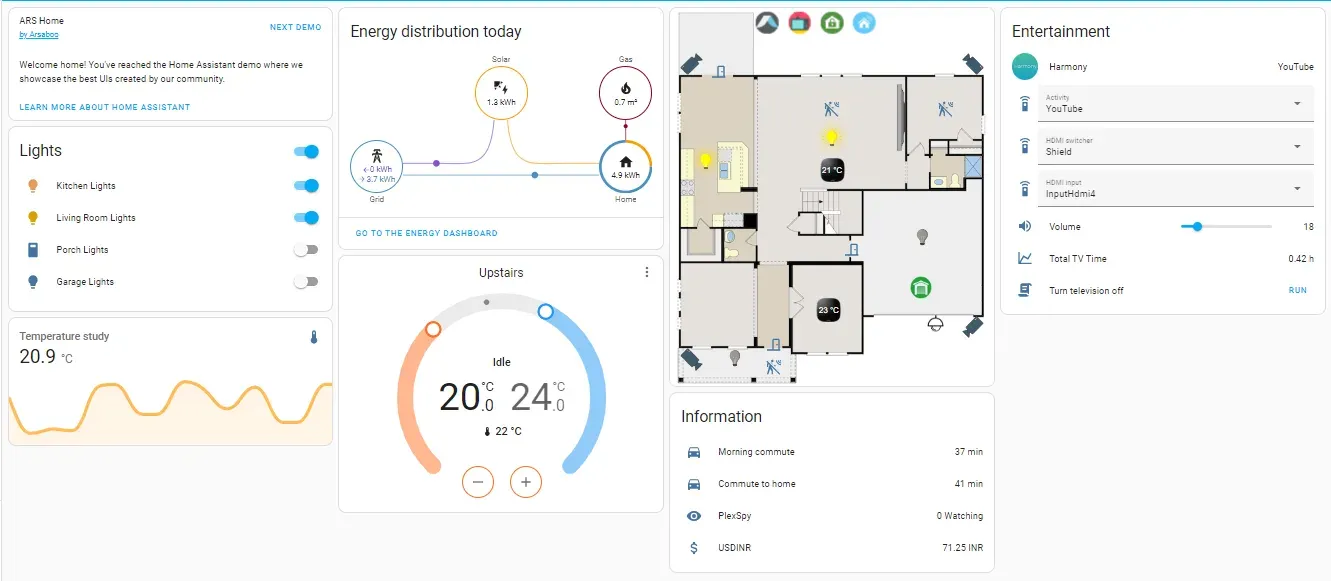
Official README screenshot of a demo dashboard combining light toggles, an energy flow card, a thermostat and a floor plan.
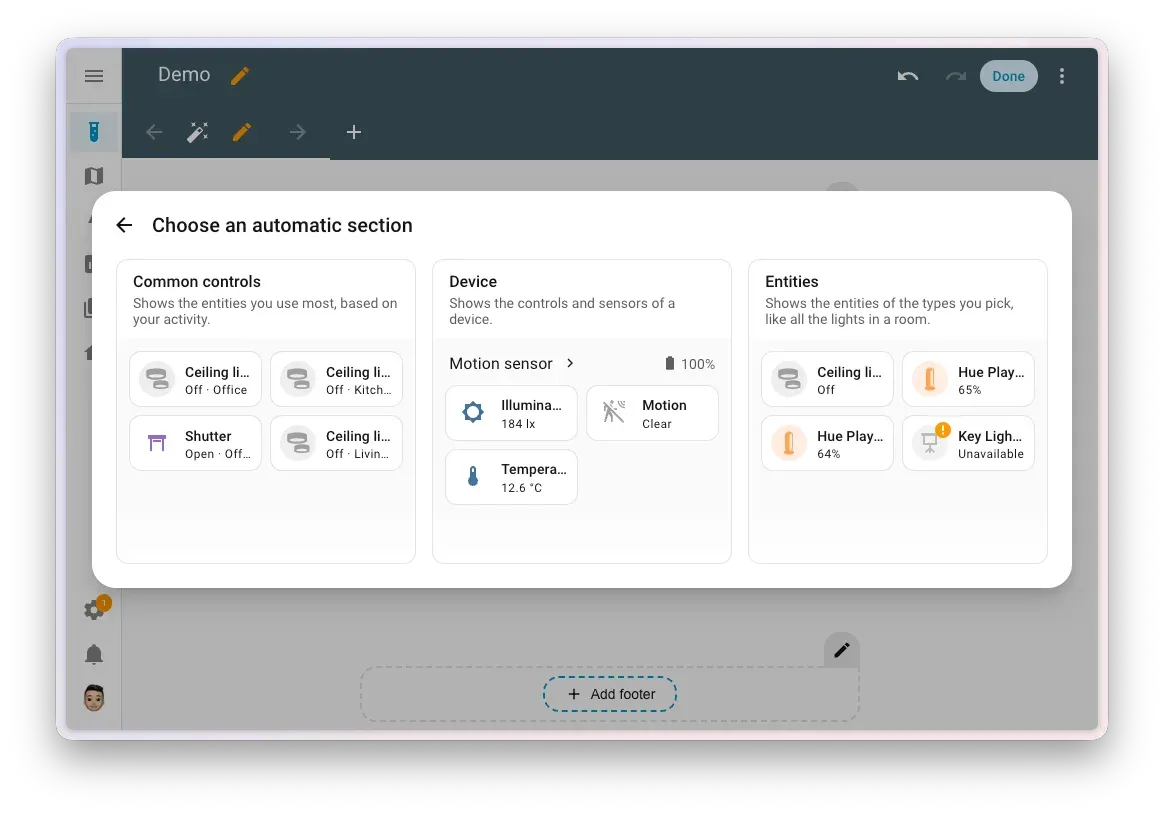
Automatic section picker added in 2026.11, from the official release notes.
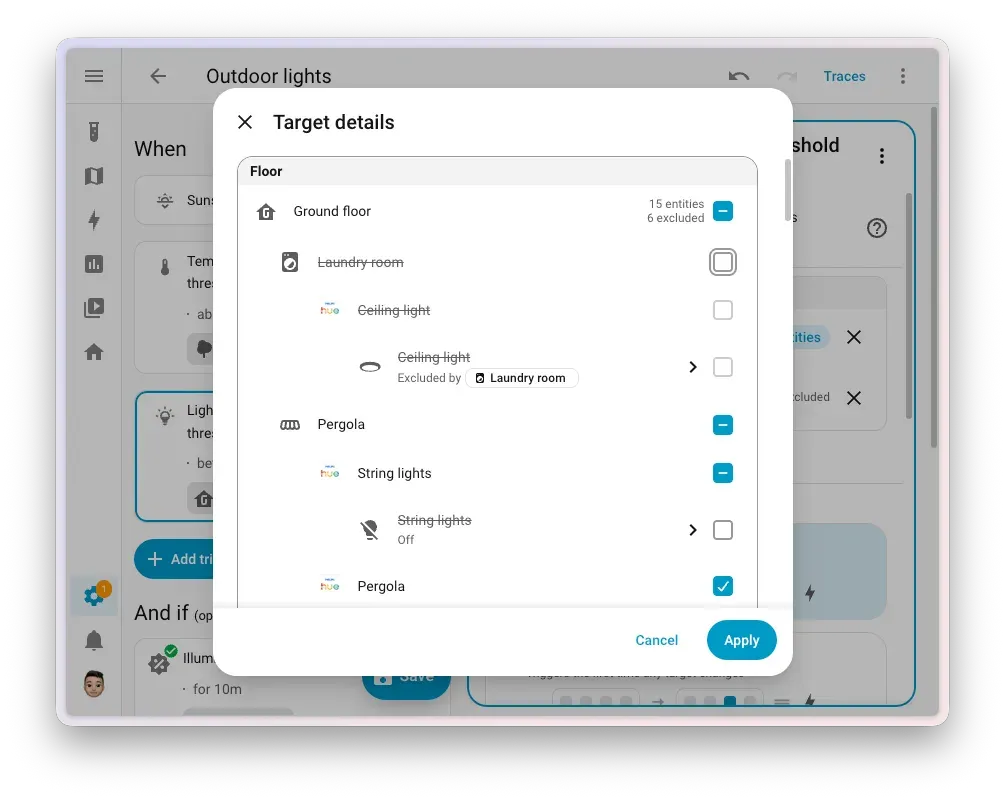
Target details in the automation editor with excluded areas and entities, from the 2026.11 release notes.
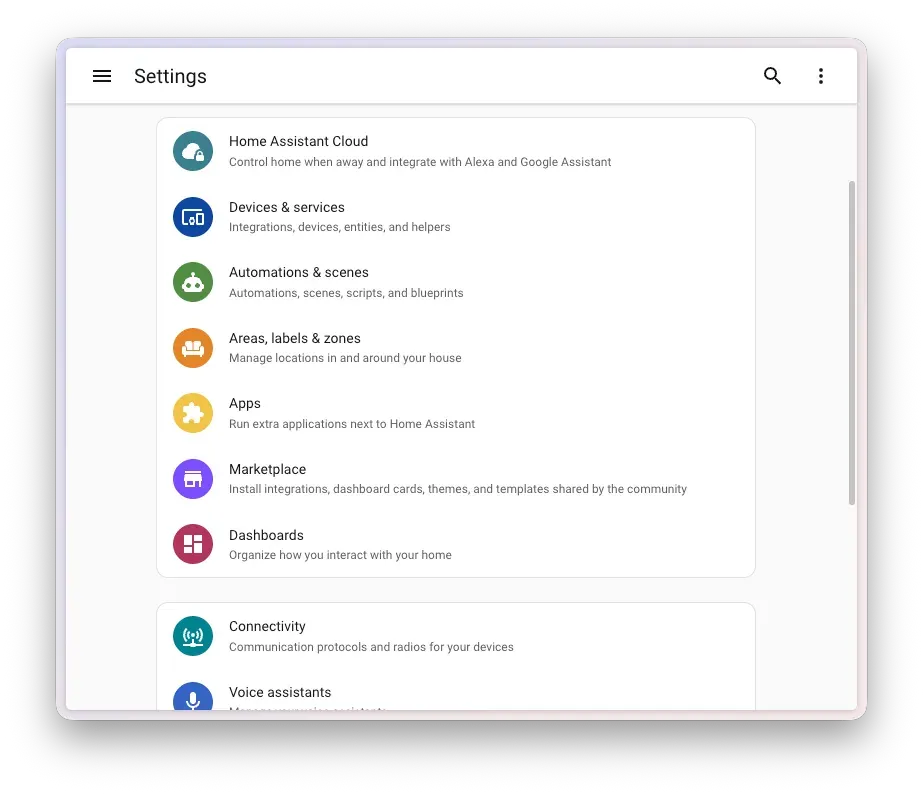
Settings menu with the new Marketplace entry next to Apps, from the 2026.11 release notes.
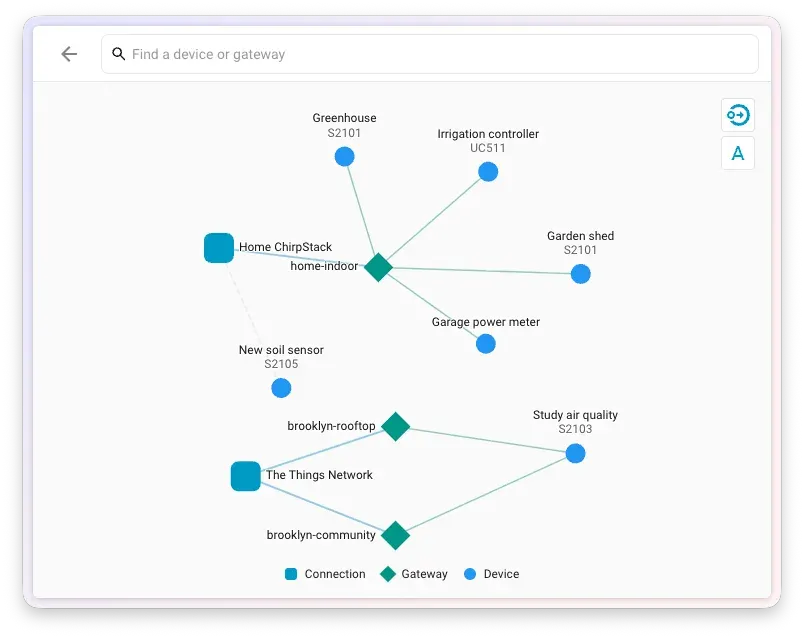
LoRaWAN network map showing connections, gateways and sensors, from the 2026.11 release notes.
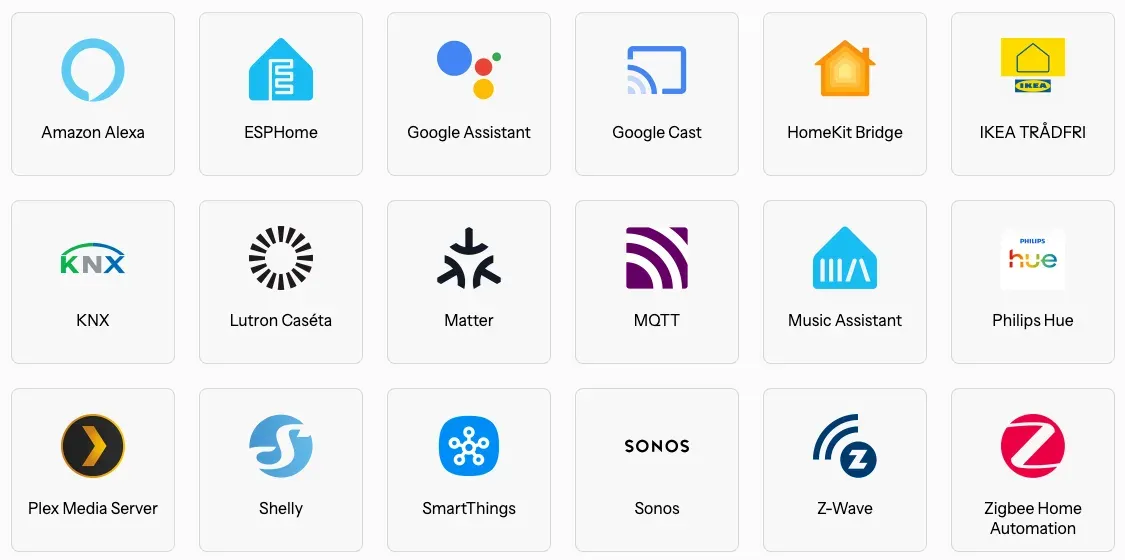
Featured integrations figure from the official README, showing protocol and vendor integrations.
Source: official Home Assistant project page.
Key capabilities
- Home Assistant Operating System The recommended method: a minimal OS image that includes the Supervisor, one-click updates and app support. It runs on Home Assistant Green (preinstalled), Home Assistant Yellow, Raspberry Pi 4 or 5 with at least 2 GB RAM, ODROID boards and x86-64 machines. Images for VirtualBox (VDI), KVM (QCOW2) and VMware (VMDK) need UEFI boot without Secure Boot and at least 2 GB RAM and 2 vCPUs. The installation page lists each target.
- Home Assistant Container on Linux Run
ghcr.io/home-assistant/home-assistant:stablewith a host folder mapped to/config, host networking and/run/dbusmounted read-only when Bluetooth is needed. Docker Engine 23.0.0 or later is required and Docker Desktop is not supported. The Linux guide recommends a 60-second stop timeout so the database closes cleanly. Apps are not available in this method, and USB radios must be passed through with--device. - Integrations for devices and services The integration catalog lists more than a thousand brands, filterable by a quality scale from Bronze to Platinum plus Internal and Legacy. Integrations range from local protocols such as Zigbee (ZHA), Z-Wave, Matter, Thread, MQTT and KNX to vendor clouds. Release 2026.11 added 38, including ChirpStack, SenseCAP, Flic, Seafile and an HP Printer integration. Quality and local or cloud operation differ per integration, so read each page before buying hardware.
- Built-in Marketplace From 2026.11, the former HACS community store is part of Home Assistant under Settings, Marketplace, on every installation type. Administrators install community integrations, dashboard cards, themes and templates without a GitHub account; installing an integration no longer needs a restart, but updates still do. Every project gets an update entity. A notice that community projects are not tested or supported by the Home Assistant project must be accepted first, and custom repositories added by link require GitHub device sign-in.
- Automations, scripts and scenes Automations combine triggers, conditions and actions in a visual editor or YAML, and scripts and scenes are reusable building blocks. Since 2026.11 a target can exclude entities, devices, areas, floors and labels; exclusions are evaluated on every run, so a light later added to an excluded area stays excluded. Traces now link to nested script runs and an Action history tab records what ran.
- Dashboards and automatic sections Dashboards are built from views, sections and cards. Release 2026.11 adds automatic sections: Common controls (entities used most), Device (controls and sensors of one device) and Entities (all entities of chosen types, for example every light in a room). An automatic section can be converted to a manual one, after which it no longer updates by itself. Sections can be copied and pasted between views and dashboards, and community sections from the Marketplace appear in the same picker.
- Entity model and naming Each device exposes entities with a state and attributes, grouped by area, floor and label. Since 2026.11 entity names are composed from the device and area, so a Temperature entity on a Thermostat device shows as Thermostat Temperature, and multi-part devices can use child devices. Entity IDs are unchanged and old names stay as voice aliases. The
friendly_nameattribute is planned for deprecation in favor of theentity_name(),device_name()andarea_name()template functions. - Assist voice control Assist accepts natural-language commands by text or speech. Speech-to-text and text-to-speech can run locally with Foundation projects such as Piper or through Home Assistant Cloud. Home Assistant Voice Preview Edition is the project's own satellite hardware. Which entities are exposed to Assist, and to Alexa or Google Assistant, is configured per entity.
- AI and MCP access controls Conversation agents and an MCP server integration can expose Home Assistant to language models. In 2026.11 an LLM API becomes available only after an administrator attaches it to a conversation agent or the MCP server, the MCP server can be restricted to read-only tools, only the user who started a conversation can continue it, and log access for AI assistants requires an administrator account.
- Energy management The Energy dashboard tracks grid import and export, solar production, batteries, gas and water from meters and sensors, and shows the distribution of energy across the home. It depends on statistics-capable sensors, so meter integrations or local measuring hardware are needed for useful numbers. Statistics ranges can be deleted to correct bad readings.
- Protocol radios and LoRaWAN Zigbee and Thread devices connect through a radio such as Connect ZBT-2, and Z-Wave through Connect ZWA-2 with Z-Wave JS, which 2026.11 requires at zwave-js-server 3.11.0 or newer. ZHA gained Zigbee Green Power for batteryless switches. A new LoRaWAN page under Settings, Connectivity shows ChirpStack or The Things Network connections, gateways and devices on a network map.
- Cameras and media Camera integrations provide live views and snapshots; Matter 1.5 cameras are supported with WebRTC from 2026.11. A Labs feature adds two-way audio for Matter and Reolink cameras and requires HTTPS. Media players, music and media sources integrate with dashboards and automations, and local internal or USB disks can now store media and backups.
- Backups and restore Automatic backups can run daily or on chosen days, with a recommended retention of the last three. Backups are encrypted by default with a key kept in a downloadable emergency kit, and restores need that key. Targets include local storage, network storage, integrations such as Synology, Google Drive and OneDrive, and Home Assistant Cloud, which keeps one backup of up to 5 GB. The backup guide covers restore during onboarding.
- REST and WebSocket APIs The REST API reads states, calls actions and fires events using long-lived access tokens, and the WebSocket API streams state changes and is used by the frontend and companion apps. Integrations themselves are Python packages; custom ones can be installed manually or through the Marketplace. Only grant tokens the access an automation actually needs.
- Companion apps Official companion apps are published for Android on Google Play and F-Droid and for iOS on the App Store, with Apple Watch, Wear OS, Android Auto, CarPlay and Meta Quest support. They provide actionable notifications and send location and device sensors directly to the user's own server for presence detection. Beta builds are distributed through TestFlight and the Google Play testing program.
- Home Assistant Cloud subscription The optional subscription from Nabu Casa costs 6.50 USD per month or 65 USD per year before tax, with a 31-day trial that needs no card details, according to the pricing page. It adds remote access without port forwarding, Alexa and Google Assistant linking, cloud speech processing, better media streaming and offsite encrypted backups. Support covers subscription features, not general Home Assistant questions.
- Frontend browser requirements The web interface is served on port 8123. Release 2026.11 requires Chrome 67, Safari 15.4 or Firefox 98 or newer, which leaves out some older iPads, iPhones, Macs before macOS Catalina and Fire tablets that are often reused as wall panels. Check existing panel devices before updating.
Where Home Assistant fits
Starting a local smart-home hub
Choose Home Assistant Green, a Raspberry Pi 4 or 5 with 2 GB RAM or more, or an x86-64 mini PC, and install Home Assistant Operating System so apps and one-click updates are available. Add a Zigbee, Thread or Z-Wave radio if those devices are planned. During onboarding, set up areas and floors first so device and entity names compose correctly. Enable multi-factor authentication for each account and give administrator rights only where needed, as the security checklist recommends.
Running it in an existing Docker host
Teams that already operate a Linux server can use Home Assistant Container with host networking and a dedicated /config volume. Pass USB radios with --device, mount /run/dbus if Bluetooth is used, and set a 60-second stop timeout. Apps are not available, so services such as an MQTT broker or Z-Wave JS server run as separate containers. Update by pulling the new image after reading the monthly release notes, especially the backward-incompatible changes section.
Building reliable automations
Write automations against areas, floors and labels rather than individual entity IDs, and use the new exclude option to leave out specific devices from a target. Test with traces: each run records the trigger, conditions and actions, and nested script runs are now linked. Check that the trigger fires from a local event when the integration supports it, so the automation keeps working during internet outages. Keep YAML automations in version control if the configuration directory is edited directly.
Tracking household energy
Connect a smart meter, a solar inverter or battery integration, and per-circuit or plug-level sensors, then configure the Energy dashboard sources. Confirm that each sensor reports long-term statistics with the right unit and state class before relying on totals. Use the statistics tools to remove ranges with faulty readings. Automations can then shift flexible loads such as water heaters or EV chargers to periods of surplus solar production.
Adding community integrations safely
Open Settings, Marketplace, accept the notice that community projects are not supported by the core team, and install only projects with an active maintainer and recent releases. Integrations install without a restart, while updates prompt one through a repair. In regions where GitHub is unreachable, a download-source option uses mirrors run by the Home Assistant China community; the release notes warn that mirror operators can see what is downloaded. Existing HACS installations migrate automatically on first start.
Planning backups and remote access
Enable automatic backups with the recommended retention and store at least one copy off the device, on network storage or Home Assistant Cloud. Save the emergency kit with the encryption key somewhere outside Home Assistant, because a restore is impossible without it. For remote access, prefer Home Assistant Cloud, a VPN or an SSH tunnel over exposing port 8123. Since 2026.11, logins from non-local addresses must match the scheme, host and port Home Assistant sees, so check reverse proxy and Tailscale setups after updating.
Install
docker run -d --name homeassistant --privileged --restart=unless-stopped -e TZ=MY_TIME_ZONE -v /PATH_TO_YOUR_CONFIG:/config -v /run/dbus:/run/dbus:ro --network=host ghcr.io/home-assistant/home-assistant:stableReviews of Home Assistant
Be the first to share your experience with Home Assistant.
Write a review
Loading review form…
Related to Home Assistant
 n8nn8n is a fair-code workflow automation platform from n8n GmbH in Berlin. It combines a node-based visual editor with JavaScript and Python code, AI agent nodes, 1500+ integrations, a REST API and an MCP server, self-hosted or on n8n Cloud.RRuViewRuView analyzes WiFi signal changes from ESP32 nodes to sense presence and motion locally, with a dashboard and APIs; pose and vital signs are unvalidated.
 CasaOSCasaOS is an Apache-2.0 personal cloud system that installs Docker apps and manages files from a web UI on Raspberry Pi, x86-64 and ARM hardware.