

What is Leon?
Leon is an open-source personal AI assistant created by Louis Grenard, who still writes most of the code, largely in his spare time. The first code dates from 2017 and the project has been public since February 2019. It began as an intent-classification assistant with trained NLP skills. The current develop branch rebuilds it around tools, context, memory and agent-style execution: Leon receives a goal, decides how to handle it, calls declared tools, records what it learned and retries when a step fails. A Node.js server hosts the runtime and serves the web interface on http://localhost:5366 by default.
There is no packaged installer or hosted service. Leon is cloned from GitHub and started with pnpm on Node.js 24 or later, and the setup scripts fetch the remaining runtimes and models. The README marks develop as the 2.0 Developer Preview and master as the legacy, more stable pre-agentic version. The GitHub releases page only holds pre-release component builds: TCP Server 2.0.0, Python Bridge 1.4.0 and Node.js Bridge 1.3.0 were published on February 19, 2026, with TCP server archives for Linux x86_64 and aarch64, macOS x86_64 and arm64, and Windows amd64. The last full core release is 1.0.0-beta.8 from May 2023, which rewrote the core in TypeScript and shipped the bridges as binaries so a Python environment is no longer needed at runtime. The develop package now reports 1.0.0-beta.10+dev.
The Road to 2.0 post from March 2026 summarises the agentic rework: layered memory, progressive context, a private diary, a proactive pulse, provider stability fixes and local models through llama.cpp. Commits from early November 2026 add memory-aware local model selection with llmfit, llama.cpp build b12182, session search over titles and content, and Markdown, math and diagram rendering in the new web app.
The repository is split into server/ (TypeScript runtime with routing, memory, context management, HTTP API and agent execution), apps/web/ (the new web app at /web-app/), apps/web-legacy/ (the old client at /), bridges/ (Node.js and Python SDKs plus toolkit runtimes), skills/ (native and agent skills) and tcp_server/ (Python 3.11 services for speech recognition, wake word and speech synthesis). Leon-native capabilities are layered as skills, actions, tools, functions and, where needed, binaries. The ARCHITECTURE.md and LEON.md context files describe this design and are generated from the current core.
Leon is distributed under the MIT license. The README states that new 2.0 documentation is not ready and that docs.getleon.ai still documents the legacy architecture (1.0.0-beta.7+dev). Out of scope today: a desktop installer (planned, according to the blog), a mobile app, Docker images for the 2.0 branch, a managed cloud edition and any paid plan. Contributor onboarding for 2.0 is gradual and runs through a form, Discord and GitHub issues.
Leon screenshots
Explore the interface. Open a screenshot to view it at full size.
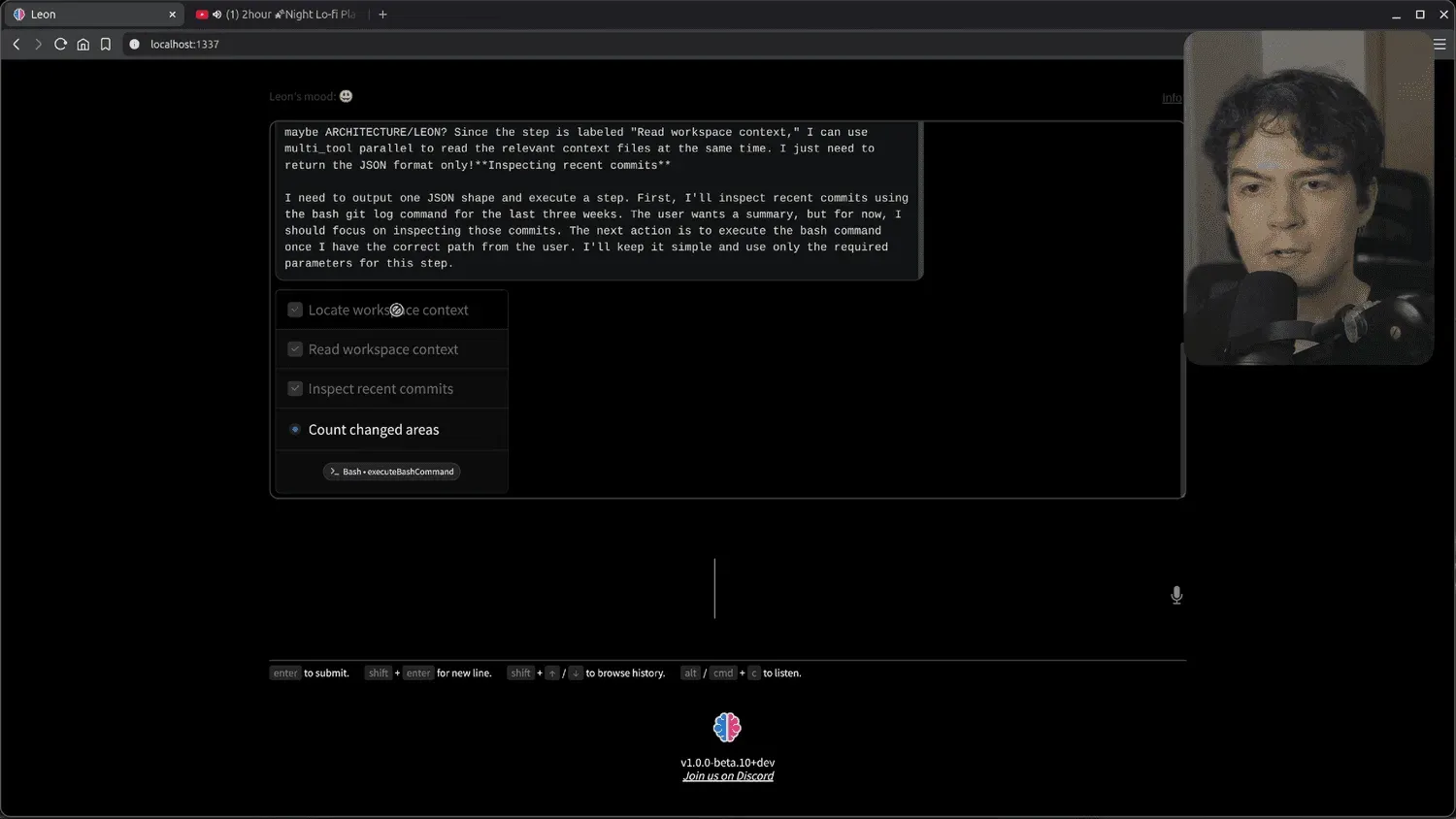
Official screenshot from the Road to 2.0 blog post: a 1.0.0-beta.10+dev build working through an agent plan, with the author's webcam overlay at the top right.
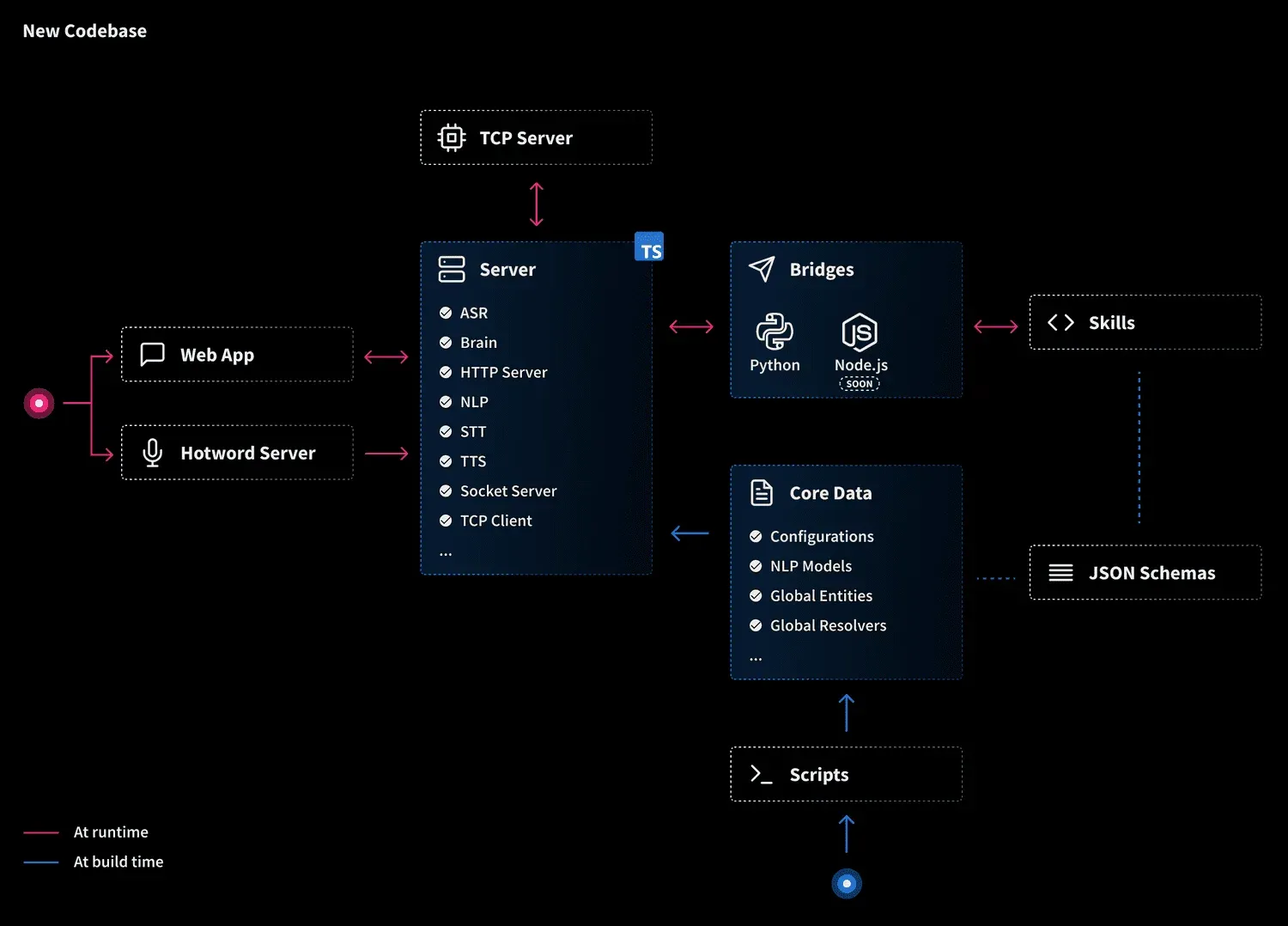
Official architecture diagram from the 1.0.0-beta.8 release post. The 2.0 core adds agent execution, memory and toolkits on top of this layout.
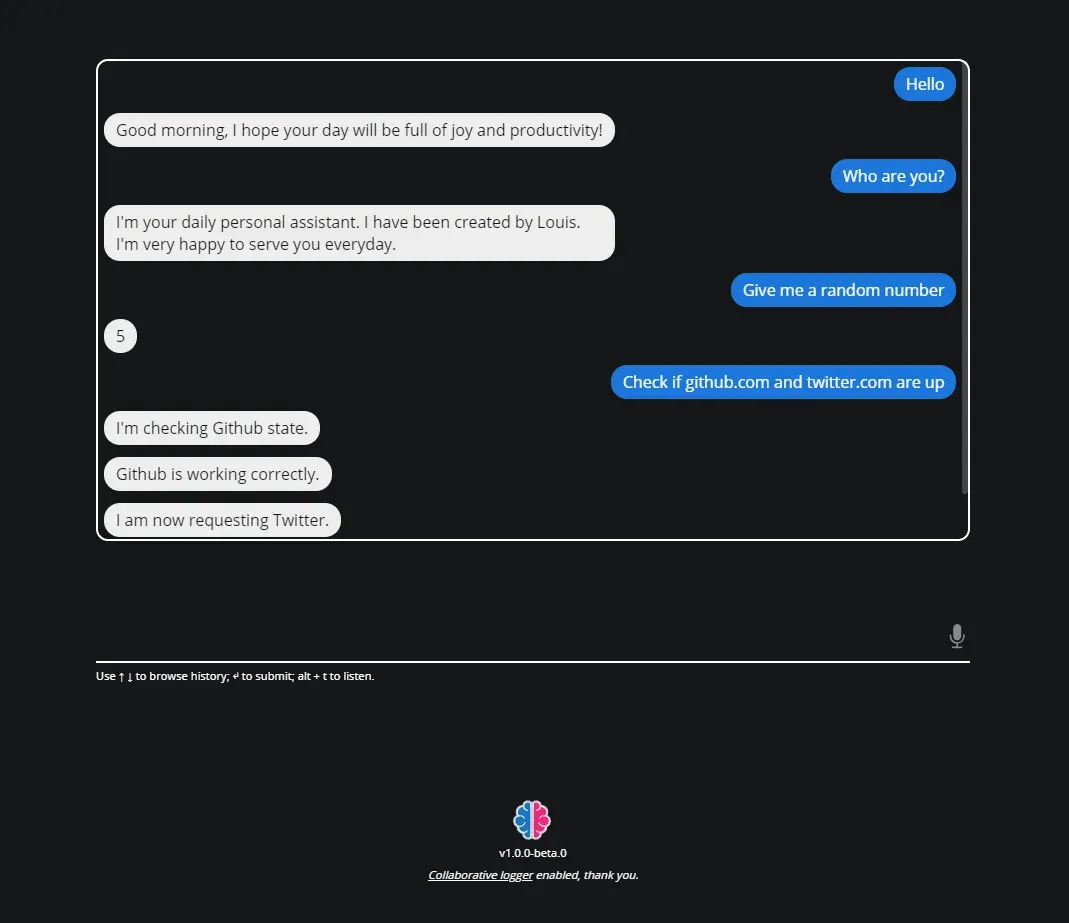
Official screenshot of the legacy web app client (v1.0.0-beta.0) from the Leon documentation. It still exists at the root path but is being replaced by the new web app.
Source: official Leon project page.
Key capabilities
- Install from source on Linux, macOS or Windows Clone the repository, install pnpm globally, run
pnpm install, thenpnpm start;pnpm run checkverifies the setup. Node.js 24 or later is required, and the project pins Node.js 24.22.1 through Volta. The post-install script prepares the Python TCP server, bridges and models, so the first install downloads a large amount of data. Steps are in the README. - Legacy branch, CLI and documentation The
masterbranch keeps the pre-agentic Leon built on NLP intent classification. The legacy docs describe the@leon-ai/clipackage (leon create birth,leon start), a Docker build and the older HTTP API. Treat those instructions as applying to the 1.0 betas, not to the 2.0 Developer Preview. - Three routing modes
agentmode is the default and runs one continuous tool-calling transcript that plans, acts, observes and recovers.controlledmode runs deterministic Leon-native skills and actions, andsmartmode picks between them per task. Agent runs are capped at 256 iterations by default throughruntime.agent_max_iterations, and profiles can also limit run time. - Native skills and agent skills Native skills ship as code with defined actions, for example weather forecast, timer, to-do list, speed test, Have I Been Pwned lookup, video summarizer, video translator and podcast generator. Agent skills are
SKILL.mdworkflows for coding, document authoring, live tutorials and media production. Theavailabilitysection of the profile config can allow-list or disable individual skills and tools. - Toolkits loaded on demand The repository defines 28 toolkits, including file system, operating system control, search web, browser use, computer use, calendar and scheduling, communication, smart home and coding. Tool schemas load progressively, so the model only sees the toolkit functions relevant to the current step. Tools declare their own settings and dependencies; an installed tool that is missing settings is reported as unavailable instead of failing silently.
- Browser and computer use The browser toolkit drives a configured browser session through the Browser Use CLI. Desktop application control uses Cua, locally or through Leon Satellite, and respects owner app preferences and platform permissions. Leon checks visual results after actions and retries ineffective attempts, but these capabilities act with your user account's rights.
- Leon Satellite for remote servers Satellite is an optional process on a user device that connects that device's enabled tools to a remote Leon server. Eligible tool calls then run on the device, and the profile config can bind tools such as computer use to a named Satellite device. Bound tools become unavailable when the device disconnects; there is no local fallback.
- Layered memory Memory is split into persistent facts and preferences, daily summaries and recent discussion context, stored as Markdown files with a SQLite index. Retrieval goes through QMD-backed search with rescue passes, and older short-term memory is compacted and pruned. A curated
OWNER.mdprofile summarises the owner separately from raw history, and explicit remember requests are written before the reply. - Context files about your environment Leon maintains runtime context files for system, activity, browser, network, workspace, habits, inventory and media, and reads them through dedicated tools before falling back to the shell. The road-to-2.0 post describes this as permission-based. The
context.disabled_filessetting turns off individual files, or all of them with["*"]. - Learned experiences After a task, verified procedures can be saved as experiences, stored per profile as
SKILL.mdfiles with a SQLite index and kept apart from built-in and owner-installed skills. Leon keeps at most 196 and retires the least recently used. Matching is local and does not need an extra model call; disable it withexperience_enabled: false. - Pulse, private diary and persona A bounded pulse queue can propose autonomous tasks from memory and context, runs at most one per tick and stops repeating matters the owner declined. A private self-model distils repeated lessons into a compact snapshot. Mood can follow time, weather and other signals, or be fixed in config. Both
pulse_enabledandprivate_diary_enableddefault to true. - Cloud and local model providers The sample config lists OpenAI, Anthropic, OpenRouter, DeepSeek, Moonshot AI, Z.AI, MiniMax, Hugging Face, Cerebras, Groq and Celeris, plus local llama.cpp and, on Linux, SGLang. Models are set as
provider/modelglobally or per mode. Agent models must support tool calling, and API keys live in the profile.envfile rather than inconfig.yml. - Local inference sizing For llama.cpp, setup uses llmfit and native allocation estimates to pick a model and precision that fit available memory with headroom. Automatic context sizing reserves 10 percent of RAM (at least 2 GiB) and device memory, and owner turns take priority over background inference. A fixed
context_sizeoverrides the automatic choice. - Offline speech stack The Python TCP server, on
127.0.0.1:5367by default, provides speech recognition with faster-whisper, wake-word detection with openWakeWord and a local speech synthesis model. Wake word, ASR and TTS are all disabled in the sample config and must be switched on undervoice. Spoken answers strip Markdown formatting. - Profiles and encrypted connections One server can serve several profiles at once, each with its own config, secrets, sessions, memory, context, skills, tools and logs. A
<profile>:<token>credential selects and authenticates the profile for Socket.IO clients, HTTP integrations and Satellite. Connected app credentials are encrypted with a per-profile key generated during setup. - Client interfaces and HTTP plugins Leon exposes a Socket.IO dialogue interface for custom clients, plus HTTP commands with server-sent event replay for browser conversations. HTTP plugins discovered from
~/.leon/http-plugins/can add integration routes. Client and plugin authentication are both disabled in the sample config and should be enabled before anything outside the local machine connects. - Turn journals and usage ledgers Each profile writes
logs/turns/journals andlogs/usage/ledgers with stage timings, token counts, cache usage and cost per turn. Large tool outputs are kept as artifacts with bounded previews, and the web app shows turn metrics and activity labels. Audit replay does not repeat model calls or memory writes. - New and legacy web apps The new web app at
/web-app/renders streaming Markdown, code, diffs, math and diagrams, shows message actions and searches previous sessions. Generated files are conversation artifacts with authenticated downloads and inline media playback. The legacy client remains at/during the transition.
Where Leon fits
Running a private assistant on a local model
Install from the develop branch, choose the llama.cpp provider during setup and let llmfit suggest a model that fits the machine. Set llm.default to a llamacpp/ model or an absolute GGUF path, keep cloud API keys empty and set telemetry_enabled to false. Then confirm in the turn logs that requests go to the local endpoint and that the chosen model handles tool calls; small models can fail at agent work even when plain chat looks fine.
Delegating multi-step work in agent mode
Give Leon a goal such as summarising recent commits in a repository and watch the plan steps it creates, the tools it selects and the observations it records. Check the final answer against the evidence it collected, since completion review relies on the same model. Use runtime.agent_max_iterations and the availability allow-lists to limit how far a task can go and which tools it may touch.
Writing a skill or tool for Leon
For predictable actions, add a native skill with defined actions that call tools through the Node.js or Python bridge SDK. For procedures, write an agent skill as a SKILL.md file. Tools declare settings, dependencies and serial or concurrent execution, and hooks can trim tool output before it reaches the model. Read the bridge code and existing skills in the repository first, because the public docs still describe the older skill format.
Running Leon on a home server with Satellite
Install the server on an always-on machine, enable client authentication with a profile token and restrict allowed_origins. Start Satellite on the laptop or desktop whose browser and applications Leon should control, then bind tools such as computer use to that device ID. Test what happens when the device goes offline: bound tools should be reported as unavailable rather than run on the server.
Adding voice control
Enable the wake word, ASR and TTS under voice with the local providers, which run faster-whisper, openWakeWord and the bundled synthesis model through the Python TCP server. Measure recognition accuracy and latency on your microphone and hardware before relying on it, and check CPU or GPU load while a local LLM is also running. Older cloud speech configurations for Google Cloud, Amazon and IBM Watson remain in the repository for the legacy stack.
Following or contributing to the 2.0 Developer Preview
Pin a commit rather than pulling develop blindly, because the branch receives many commits per day and breaking changes are expected before 2.0. Run pnpm run check and the unit tests after each update, and keep the profile directory under ~/.leon/ backed up. Contributors are onboarded gradually through the form linked in the README and the Discord server.
Install
git clone https://github.com/leon-ai/leon.git && cd leon && npm install --global pnpm@latest && pnpm install && pnpm startReviews of Leon
Be the first to share your experience with Leon.
Write a review
Loading review form…
Alternatives to Leon
 OpenClawOpenClaw is an MIT-licensed AI assistant that runs as a Gateway on your own machine or server, connects to Telegram, WhatsApp, Slack, Discord, iMessage and other channels, and keeps memory and credentials on hardware you control.
 Hermes AgentMIT-licensed agent from Nous Research that runs in a terminal, desktop app, browser or chat apps. It keeps curated memory, writes and refines its own skills, schedules jobs and works with OpenRouter, Anthropic, OpenAI, local or Nous Portal models.
 KhojOpen-source personal AI server under AGPL-3.0: semantic search and chat over PDF, Markdown, org-mode, Word and Notion content, with agents, research mode, automations and Obsidian, Emacs and web clients. Khoj Cloud closed in April 2026, so it is self-hosted.