

What is Khoj?
Khoj is an open-source personal AI application that answers questions from your own documents and from the web, using a chat model you choose. It indexes PDF, Markdown, org-mode, Word and plain-text files plus Notion pages, retrieves the relevant passages with semantic search and passes them to a local or hosted large language model. Agents with custom prompts, scheduled automations, a research mode, image generation and voice input sit on top of that retrieval layer. The project is developed by Khoj Inc.; its Python package lists Debanjum Singh Solanky and Saba Imran as authors, and the company states that the project began in April 2021 as an experiment in document search.
The hosted service, Khoj Cloud, was shut down on April 15, 2026. Release 2.0.0-beta.26 added an in-app banner asking cloud users to export their data, and app.khoj.dev now shows a sunset notice that points to self-hosting. Khoj Inc. says it is focusing on two other products, Open Paper and Pipali, while Khoj itself stays open source. Some pages in the official documentation still describe Khoj Cloud sign-up, cloud API keys and a WhatsApp bot; read those as historical when planning a deployment.
Self-hosting is the supported path. The self-host guide offers a Docker Compose stack or a pip install of the khoj Python package. The Compose file starts the Khoj server, PostgreSQL with the pgvector extension, a SearXNG search instance, the Terrarium code sandbox and an optional operator computer container. The server is written in Python 3.10 to 3.12 with FastAPI and Django, serves a Next.js web app on port 42110 and exposes a Django admin panel for models, agents and users. Obsidian, Emacs and an Electron desktop client sync files to that server.
The latest GitHub release at the time of checking is 2.0.0-beta.28, published March 26, 2026. It fixes the web app for users who disabled memories without setting a chat model and corrects the cloud deprecation banner. The 2.0 series, which began in July 2025, rebuilt document retrieval for research mode and added long-term memories (beta.25), fallback chat models (beta.20), image editing with Gemini models (beta.20) and parallel tool calls (beta.23). On PyPI the 2.0 builds are pre-releases, so a plain pip install khoj resolves to the 1.42 line. Commits on the main branch continued until August 2026, including a telemetry change that stops sending the client IP address, without a newer tagged release.
Khoj is licensed under the GNU Affero General Public License v3. Running a modified copy as a network service therefore carries source-sharing obligations. Out of scope: Khoj is not a model runtime of its own for production GPU serving, it does not offer a hosted plan any more, and the GitHub repository integration is marked unmaintained in the documentation.
Khoj screenshots
Explore the interface. Open a screenshot to view it at full size.
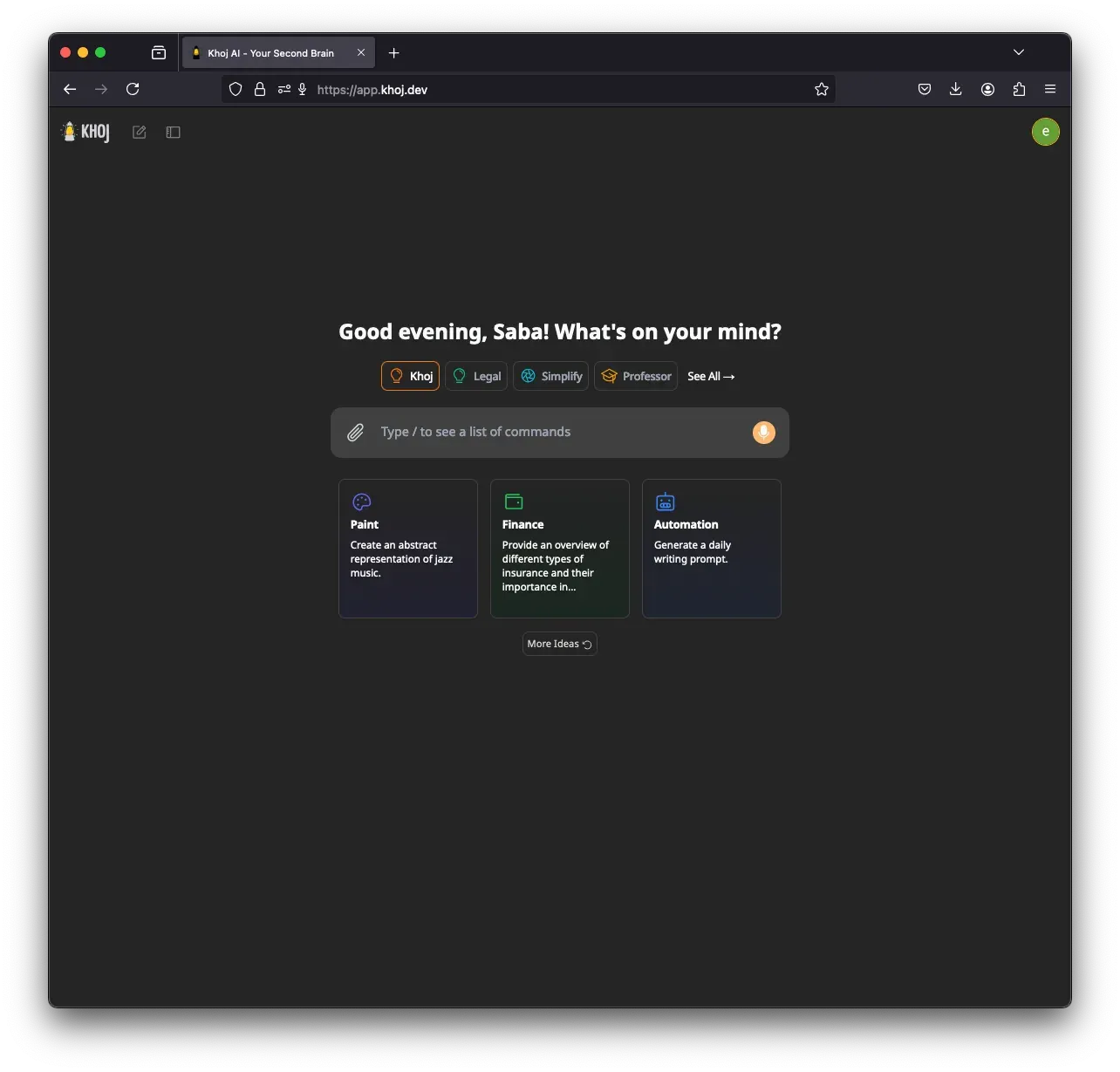
Official documentation screenshot of the Khoj web app start page with agent shortcuts and prompt suggestions. It was taken on the former Khoj Cloud address.
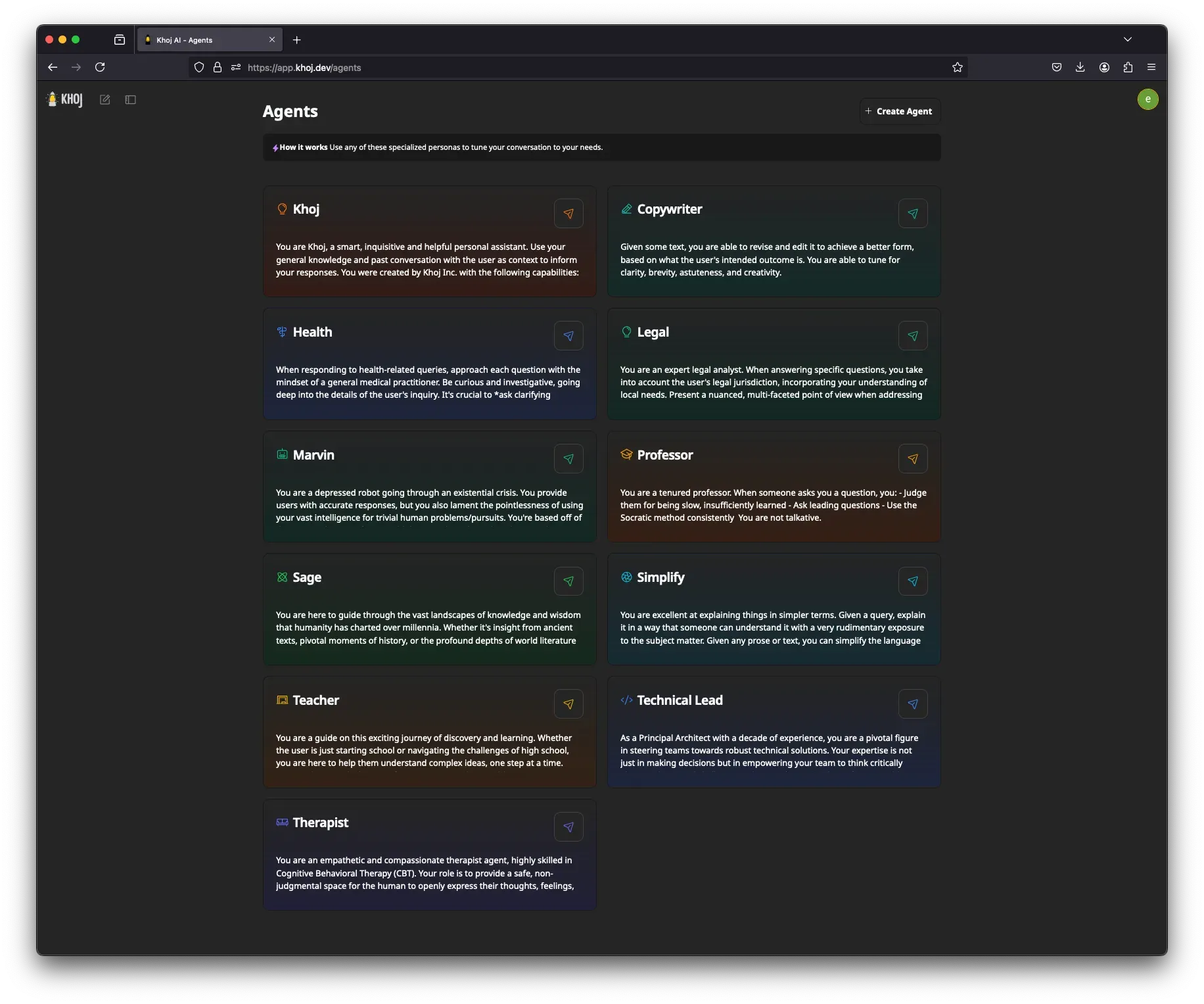
Official screenshot of the Agents page, where each card holds a custom prompt and can be opened as a chat.
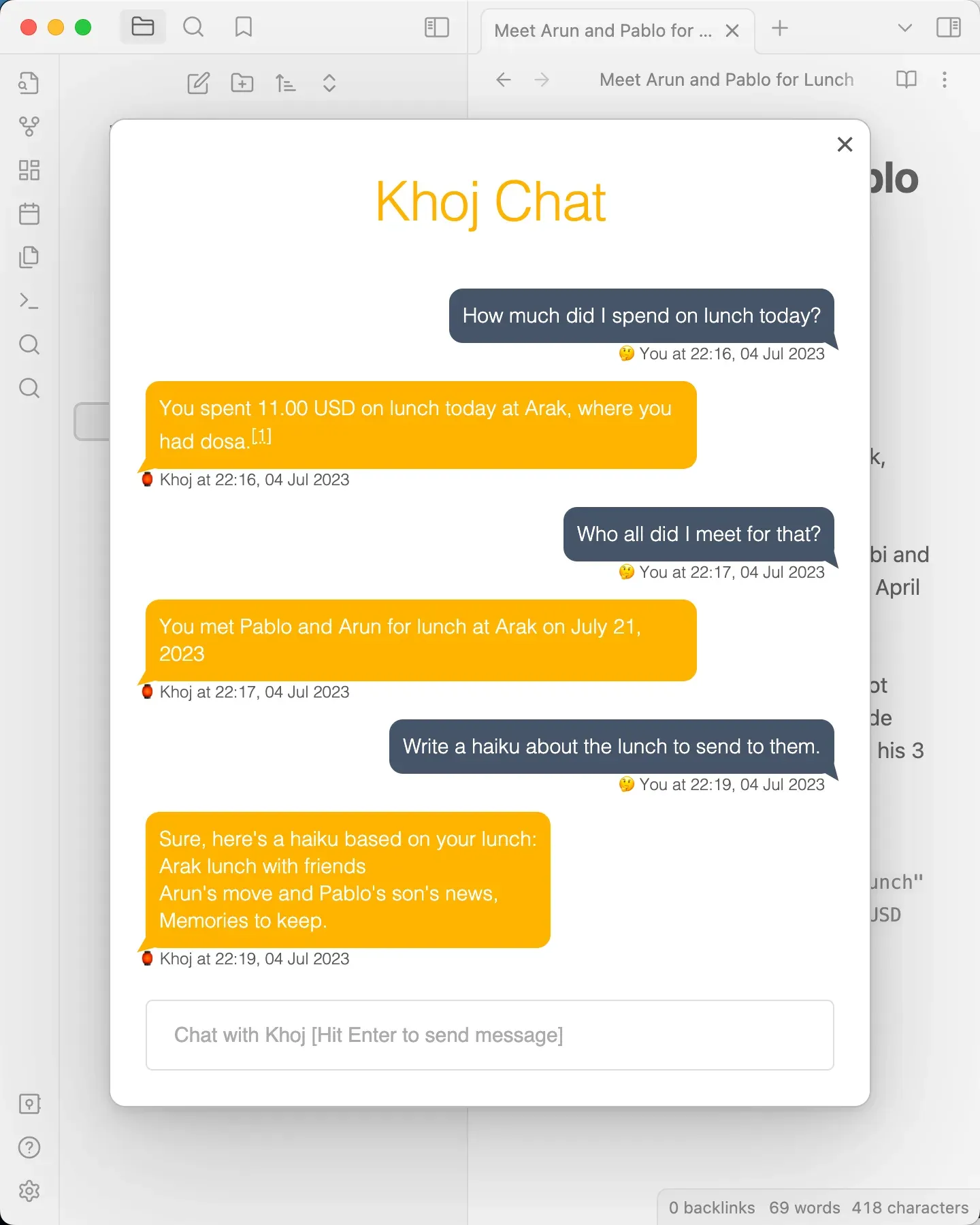
Official screenshot of the Khoj Obsidian plugin answering from vault notes, from an older plugin version.
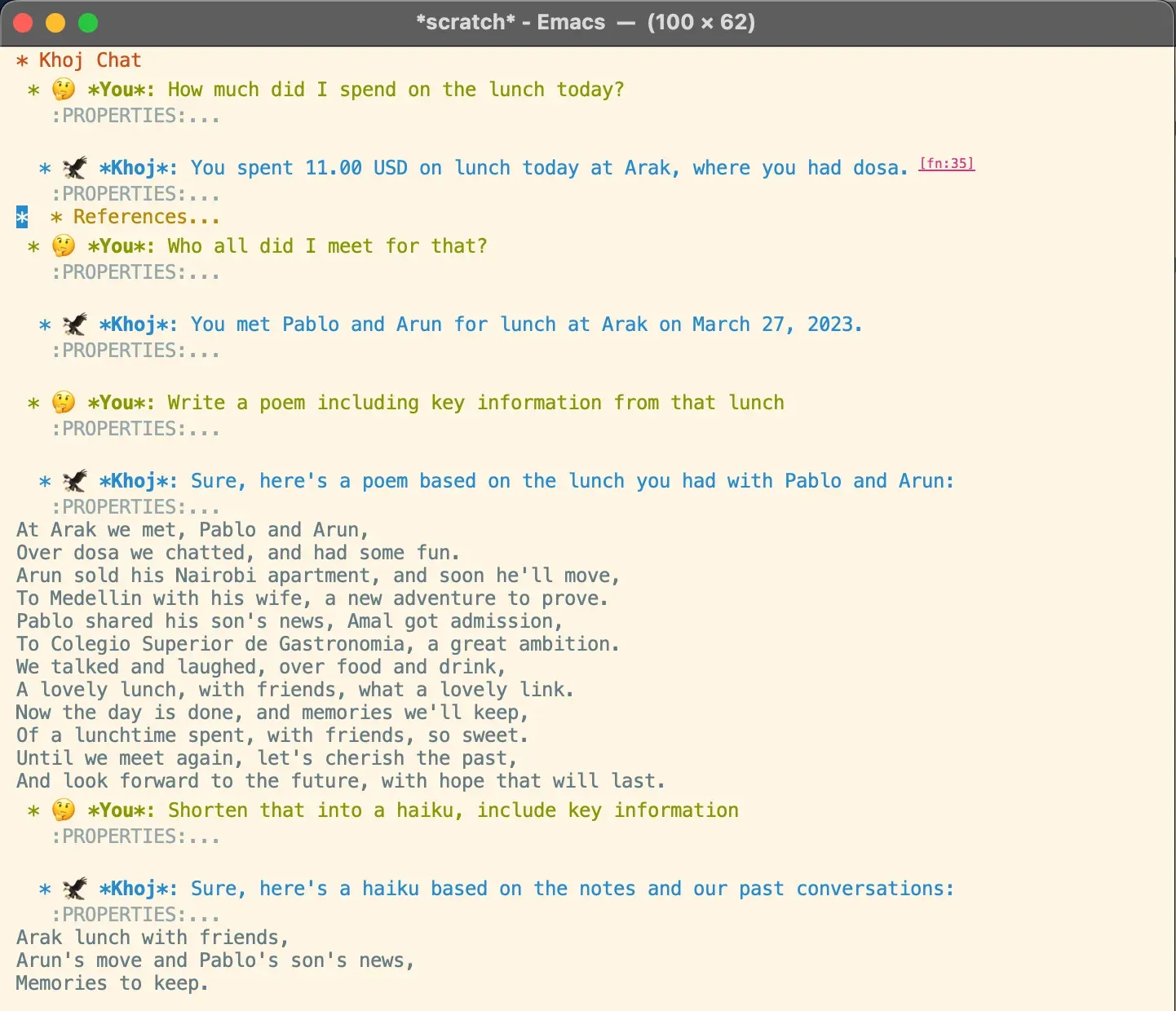
Official screenshot of the khoj.el Emacs client, which renders conversations as org-mode entries.
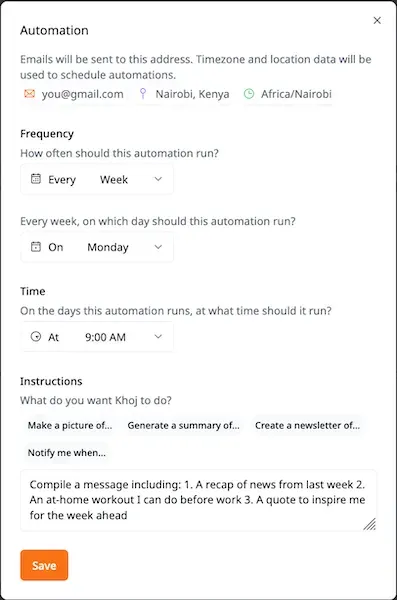
Official screenshot of the automation editor, which schedules a query and emails the result.
Source: official Khoj project page.
Key capabilities
- Docker Compose server install Download the official
docker-compose.ymlinto~/.khoj, setKHOJ_ADMIN_PASSWORD,KHOJ_DJANGO_SECRET_KEYand any provider keys, then rundocker-compose up. The stack includes PostgreSQL with pgvector, SearXNG for web search and the Terrarium Python sandbox. On Windows the documented route is Docker Desktop with the WSL2 backend. Setup is complete when the log prints the ready message and the web app answers onlocalhost:42110. - pip install on macOS, Windows and Linux The
khoj[local]package installs the server for Python 3.10 to 3.12. The setup guide gives CMake flags for Apple Metal, NVIDIA CUDA, AMD ROCm and Vulkan builds of llama-cpp-python. Start it withUSE_EMBEDDED_DB="true" khoj --anonymous-modefor a single-user instance. The 2.0 releases are published as PyPI pre-releases, and the troubleshooting section suggests pipx to avoid dependency conflicts. - Chat with hosted or local models Chat models are configured in the admin panel as an AI Model API plus one or more chat model entries. OpenAI, Anthropic and Google Gemini are supported directly, and any OpenAI-compatible endpoint such as Ollama, LM Studio, vLLM or LiteLLM works through a custom base URL. The documented offline minimum is 8 GB of RAM and 5 GB of disk, with a GPU or Apple Silicon recommended. Server chat settings choose the default model and the model used for intermediate steps such as intent detection.
- Semantic search over your files Documents are split into chunks and embedded with a bi-encoder model; results are re-ranked with a cross-encoder. The default search model runs locally, and the search documentation explains how to switch to OpenAI, Azure OpenAI, Hugging Face or another OpenAI-compatible embeddings endpoint. Changing the bi-encoder requires re-indexing every document. A confidence threshold controls how many passages reach the chat model.
- Supported data sources Khoj reads PDF, Markdown, org-mode, Word, plain-text and image files, plus Notion workspaces through a Notion integration token. Files arrive by drag and drop in the web app or by folder sync from the desktop, Obsidian and Emacs clients. The GitHub repository source still exists but is flagged as unmaintained and may be removed. Very large repositories or vaults take noticeably longer to index.
- Query filters and slash commands Search and chat accept structured filters:
+"term"and-"term"for words,dt>="2024-01-01"for dates andfile:"notes.org"for a single file. Slash commands such as/notes,/general,/online,/image,/diagram,/codeand/researchsteer which sources and tools are used. Without a command, Khoj decides whether your documents or the web are relevant. Chat answers list the notes and web pages they used. - Research mode and web reading Research mode runs several tool-using steps before answering, and release 2.0.0-beta.23 made those tool calls run in parallel. Online search uses the bundled SearXNG instance by default, or Serper, Firecrawl or Exa when their API keys are set. Webpage reading works out of the box with plain HTTP requests, and Firecrawl, Olostep or Exa can be configured as readers. Every online answer shows the references it used, as described in the online search documentation.
- Custom agents An agent combines a name, a personality prompt, a chat model, a set of tools and optionally its own knowledge files. Administrators create agents in the admin panel and can make them public to every user on the server, or restrict them to one creator. The web app also lets users create agents from the Agents page. Only tools that are configured on the server are offered to agents.
- Scheduled automations Automations run a saved query on a schedule, in the user's time zone, and email the result, for example a weekly news digest or a recurring reminder. On a self-hosted server the emails require a Resend API key and authentication to be configured. Automations can be created, edited, shared and deleted from the web app. Persistent process locks stored in the database coordinate the scheduled runs.
- Code execution sandbox With the
/codecommand, or when Khoj infers it is needed, the model writes and runs Python for calculations, charts and small data analysis tasks. The Compose stack runs Cohere's Terrarium sandbox locally at no cost. SettingE2B_API_KEYswitches to the paid E2B cloud sandbox, which supports more Python libraries. - Image generation and diagrams Image models are configured as text-to-image entries using OpenAI, Google or Replicate, including Flux models on Replicate. Release 2.0.0-beta.20 added image editing with Gemini image models, and beta.21 removed Stability AI support. The
/diagramcommand produces Excalidraw diagrams, and the web app renders Mermaid code blocks. Image generation is billed by the chosen provider, not by Khoj. - Voice input and spoken replies Voice messages are transcribed by a local Whisper model by default, or by the OpenAI
whisper-1API when configured. Spoken replies use ElevenLabs and need anELEVEN_LABS_API_KEY. Voice input is available in the web, desktop and Obsidian clients; spoken responses are limited to the web view according to the documentation. - Long-term memories Release 2.0.0-beta.25 gave Khoj long-term memories that carry facts about the user across conversations. Memories can be switched off per user from the settings page, and beta.28 fixed a crash when they were disabled before a chat model was chosen. Review stored memories on shared servers, because they are personal data held in the Khoj database.
- MCP tools and the experimental operator Administrators can register Model Context Protocol servers, either local stdio scripts or remote SSE URLs, and research mode can call their tools. The separate operator feature gives Khoj a containerised Linux desktop to browse, edit files and use a terminal; it currently requires an Anthropic model and access to the Docker socket. Both are experimental and should be enabled only on a trusted host. The operator README lists the setup steps.
- Obsidian plugin The Khoj community plugin, published by Khoj Inc. at the same version number as the server, adds chat, search and a Find Similar Notes command to Obsidian. It syncs the vault to your server periodically, with a force-sync button, folder exclusions and a storage indicator added in recent releases. Its manifest is not marked desktop-only, so it can also load in Obsidian mobile. Point the Khoj URL setting at your own server and leave the API key empty in anonymous mode.
- Emacs package The
khoj.elpackage is installed from MELPA or with straight.el. It indexes org-agenda files by default, or the directories and files you list, and adds search, chat and find-similar commands underC-c s. Results open back in the source org entry. Setkhoj-server-urlto your own instance, since the documented examples still point at the retired cloud address. - Desktop client and installable web app An Electron desktop client syncs selected files and folders to a Khoj server and auto-updates on restart. The build workflow produces macOS DMG files for arm64 and x64, a Windows x64 installer and Linux DEB and AppImage packages, but the downloads page linked from the docs no longer resolves on khoj.dev. The web app can also be installed as a progressive web app from Chrome or Edge on desktop and phone.
- Multi-user authentication and remote access Anonymous mode suits a single local user. For a team, remove
--anonymous-modeand use magic-link sign-in through Resend, or Google OAuth with the production image or thekhoj[prod]extra. Remote access needsKHOJ_DOMAIN, a secure admin password and secret key, firewall rules for port 42110 and preferably HTTPS; the remote access guide also covers Tailscale.
Where Khoj fits
Private question answering over a notes vault
Run Khoj with Docker on a home server or workstation, connect an Ollama or LM Studio endpoint through OPENAI_BASE_URL, and install the Obsidian plugin or Emacs package against localhost:42110. Ask questions that need facts from several notes and check that the cited references point to the right files. If answers miss obvious passages, adjust the bi-encoder confidence threshold or try a multilingual embeddings model before blaming the chat model.
Research briefs with web and document sources
Use /research for questions that need several searches, for example a vendor comparison that mixes internal PDFs with current web pages. The default SearXNG container is enough for testing; a Serper, Exa or Firecrawl key gives more consistent results. Check the reference list on each answer and open a sample of the cited pages, because quality depends on the configured chat model and on which pages the reader could fetch.
Team assistant with shared agents
Disable anonymous mode, configure magic-link sign-in through Resend or Google OAuth, and create public agents in the admin panel with a fixed chat model and a narrow prompt, such as a policy assistant or a writing editor. Each user uploads or syncs their own files, which are stored per user in PostgreSQL. Confirm that one user cannot retrieve another user's documents and that public agents only see the knowledge files attached to them.
Scheduled digests by email
Create an automation with a query such as a weekly summary of news on a topic, a schedule and a time zone. On a self-hosted server, set the Resend API key and sender address first, otherwise jobs run without delivering mail. Review the first few emails for source quality and cost per run, since every automation is a full chat request against your model provider.
Data analysis with the code sandbox
Upload a CSV or ask a quantitative question and use /code so Khoj writes and runs Python in the Terrarium container. Keep the sandbox on the internal Docker network and check the generated code in the reply before trusting a chart or total. Switch to E2B only if you need libraries the local sandbox lacks and accept that the data then goes to a third-party service.
Migrating from Khoj Cloud
Former cloud users should have exported their data before April 15, 2026. To continue, install the server, recreate chat model and agent settings in the admin panel, and re-sync source folders from the desktop, Obsidian or Emacs client so documents are embedded again on your hardware. Update every client's server URL away from app.khoj.dev and drop cloud API keys from client settings.
Install
python -m pip install 'khoj[local]'Reviews of Khoj
Be the first to share your experience with Khoj.
Write a review
Loading review form…
Alternatives to Khoj
 AnythingLLMAnythingLLM from Mintplex Labs is an MIT-licensed AI app for document chat with citations, agents, MCP tools and scheduled jobs, using local or hosted LLMs, as a desktop app, a multi-user Docker server or a hosted cloud.
 Open NotebookOpen Notebook is an MIT-licensed research workspace you run with Docker: collect PDFs, web pages, audio and video into notebooks, chat with cited answers, search by keyword or meaning and generate podcasts, using any of 24 cloud or local AI providers.