

What is Hexabot?
Hexabot is an AI workflow automation platform developed by Hexastack. The repository describes version 3 as an automation platform with first-class AI capabilities that combines workflows, actions, agents and conversational channels in one runtime. Workflows can be built in a visual graph editor or written as YAML, and they run behind an admin panel, a REST API and an embeddable chat widget. Earlier Hexabot 2.x releases were positioned as a chatbot and agent builder; v3 moves the product toward general workflow automation while keeping channels and an operator inbox as core concepts.
Hexabot v3 is released from the main branch and published as npm packages under the @hexabot-ai scope (agentic, types, api, cli and widget). According to the release guide, alpha and beta builds use the alpha and beta npm dist-tags, while stable versions use latest. The first stable 3.x packages appeared on npm in June 2026, after a long alpha and beta phase. The current stable version is 3.6.0, tagged v3.6.0 on November 3, 2026, and the Hexabot pricing page lists it as the latest version. The GitHub Releases page has not been updated for v3 and still shows v2.2.2 from January 2025 as its newest entry.
Version 3.6.0 redesigned workflow suspension around checkpoints and added admin approval, rejection and resumption of suspended workflow runs, together with run claims management. The same release fixed webhook handling, distinguished installed AI providers in the API, enforced type-safe event payloads and moved to Node.js 24.22 with dependency security updates. Version 3.4 replaced the earlier LlamaIndex-based RAG setup with a helper-based architecture, documented in the migration guide.
A Hexabot project is created with the official CLI (npm install -g @hexabot-ai/cli, then hexabot create and hexabot dev) and requires Node.js 24.22.1 or later. The backend is TypeScript with TypeORM; SQLite is the default for local work and PostgreSQL is the documented production database. Validation contracts are written with Zod, the workflow graph uses React Flow, and AI actions are built on the Vercel AI SDK. The deployment guide covers Docker Compose and manual Node.js deployments behind NGINX with HTTPS.
The README states that Hexabot v3 is licensed under the Fair Core License, Version 1.0, ALv2 Future License (FCL-1.0-ALv2), copyright Hexastack. The license text allows use, modification and redistribution for any purpose other than a competing commercial product or service, forbids circumventing the license key functionality, and grants each version under the Apache License 2.0 on the second anniversary of its release. Hexabot.ai describes the code as source-available. A free self-hosted Community plan runs without a license key; paid license-key plans raise user, workflow and activation limits. Similar platforms listed on iThub include Botpress, Dify and n8n.
Hexabot screenshots
Explore the interface. Open a screenshot to view it at full size.
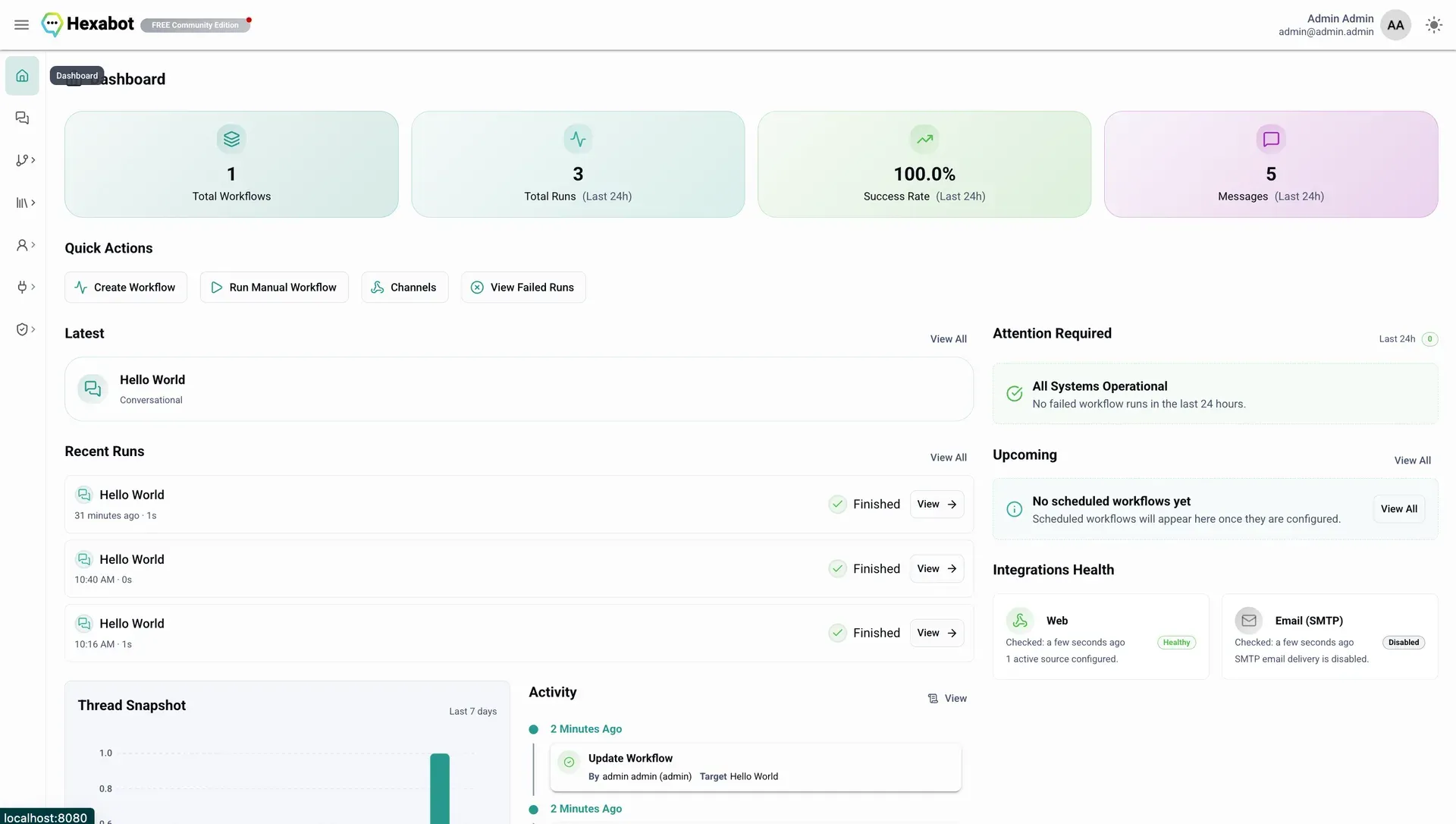
Hexabot admin dashboard from the official documentation, showing run statistics, quick actions and integration health.
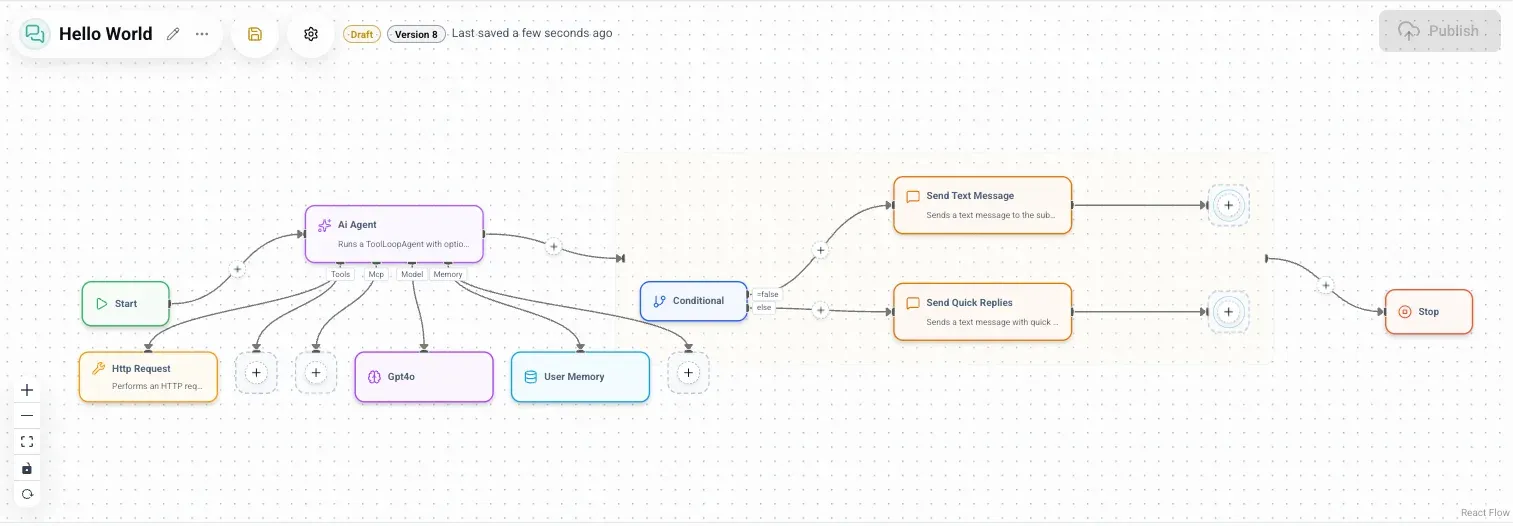
Workflow graph from the documentation: an AI Agent step with tool, model and memory bindings, then a conditional that sends a text message or quick replies.
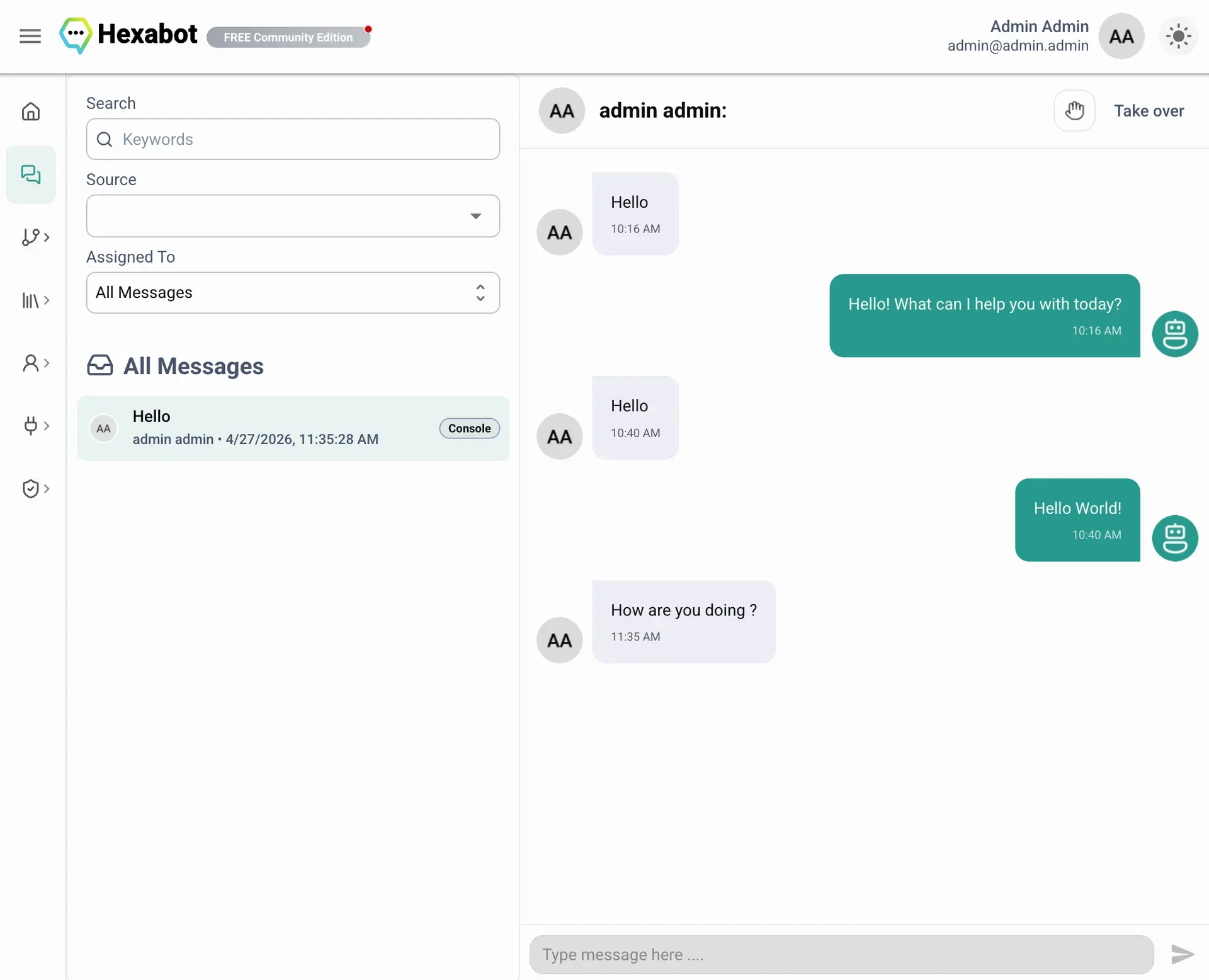
Inbox view from the documentation, with source and assignee filters and the option for an operator to take over a conversation.
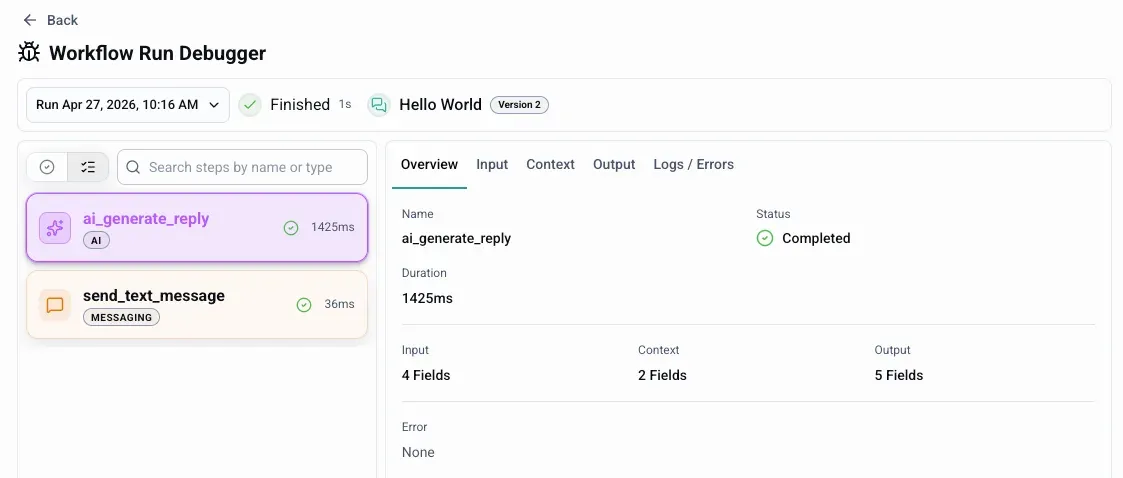
Workflow run debugger from the documentation, with per-step status, duration and tabs for input, context, output and logs.
Source: official Hexabot project page.
Key capabilities
- Three workflow types Hexabot supports conversational workflows triggered by incoming channel messages, manual workflows started on demand by an operator, an HTTP webhook or an API call, and scheduled workflows. The scheduling documentation lists intervals by second, minute, hour, day, week or month. Manual workflows can define authentication and a custom JSON input schema.
- Visual graph editor and YAML editor The workflow editor shows each workflow as a graph of steps, with a side-by-side YAML definition that can be edited directly. Workflows support conditionals, parallel branches and loops, and expressions use JSONata scopes. The YAML syntax reference describes tasks, flow and outputs, so workflow definitions can be kept in version control.
- Versions, drafts and publishing Workflows are saved as numbered versions with a draft or published state. Changes are tested as a draft and then published, and a published workflow can be unpublished from the editor toolbar. The documentation covers this lifecycle on a dedicated versions and publishing page.
- Actions with typed contracts Actions are the units of work inside a workflow: sending messages, calling HTTP services, transforming data or starting follow-up steps. Each action declares schema-validated inputs, outputs and settings written with Zod. Custom actions are TypeScript modules with metadata and an execute function, and can be packaged as npm packages for reuse across projects.
- Bindings for models, memory and tools Bindings separate reusable configuration from task logic. An AI step can have a model binding (provider, model name and credential), memory bindings, tool bindings and MCP bindings attached to it. The same binding can be referenced from several workflow steps.
- AI agent and generation actions Built-in AI actions include
ai_agentfor multi-step tool-calling runs,ai_generate_text,ai_generate_reply,ai_generate_objectandai_infer_objectfor structured output. These actions run through the Vercel AI SDK and can call tools from bound MCP servers during a run. - LLM provider coverage The provider FAQ lists more than 40 Vercel AI SDK providers, including OpenAI, Anthropic, Google Gemini, Google Vertex AI, Azure, Amazon Bedrock, Mistral, Groq, Cohere, DeepSeek, xAI, Perplexity, Together AI, Hugging Face, LiteLLM and an OpenAI-compatible option. The provider package and credentials must be configured in the project. Speech, audio and image providers such as ElevenLabs, Deepgram and Replicate are also listed.
- MCP servers Model Context Protocol servers are configured under Integrations with an HTTP transport (optional bearer credential) or a stdio transport that starts a local command on the API host. A test action reports status, latency, tool count and up to ten sampled tool names. Disabled servers remain visible in the admin panel but cannot be used by workflow runs.
- Hexabot as an MCP server for coding agents The API exposes an MCP endpoint at
/api/mcp, authenticated with a token generated on the user profile page. The coding agents guide shows configuration for Claude Code, OpenAI Codex, OpenCode and Cursor, plus two Hexabot skills (action-creatorandworkflow-writer) installed withnpx skills. - Memory Memory definitions let workflows keep state across interactions and runs, for example a user memory attached to an AI agent step. Memory is defined explicitly and integrated with the runtime, and has its own section in the admin panel.
- RAG over CMS content Workflows can be grounded in Hexabot content through a configurable RAG helper and the
retrieve_rag_contentaction. The built-in helper uses database full-text search on SQLite or PostgreSQL without an embedding provider. The installablehexabot-helper-sqlite-vectorandhexabot-helper-pgvectorpackages add semantic vector search, and custom helpers can connect other retrieval systems. Only one configured default helper answers each retrieval call. - Channel extensions Channels are installed as npm packages and configured as sources under Integrations. The channels FAQ lists WhatsApp (Meta WhatsApp Cloud API), Telegram, Discord, Slack and Facebook Messenger extensions. Webhook-based channels need a public HTTPS URL for the API, in the form
/api/webhook/<sourceId>. Custom channels can be developed for other platforms. - Website chat widget The Hexabot Live Chat Widget is a React-based embeddable widget published as
@hexabot-ai/widget. It connects to the Hexabot API for real-time conversations on a website, with customizable appearance and translations. - Inbox and human handoff The inbox lists conversations from all sources with search and filters by source and assignee. Operators can open a conversation and take over from automation. Version 3.6.0 also lets administrators approve, reject and resume suspended workflow runs.
- Workflow runs and debugger Each execution appears in a run history with status filters. The run debugger shows every step with its duration and status and tabs for input, context, output and logs or errors. A step trace and inspector help follow a failure to the exact step.
- Dashboard The dashboard shows totals for workflows, runs and success rate over the last 24 hours, messages, recent runs, failed runs needing attention, upcoming scheduled workflows and the health of integrations such as the web channel and SMTP email.
- Content, audience and localization Structured content types, content entries, a media library and a persistent menu store business data used by workflows. Subscribers can be segmented with labels and exclusive label groups. Localization manages supported languages, a default language, fallback behavior and translations of user-facing workflow text.
- Users, roles and credentials Admin users are assigned roles with permissions across the admin panel. Named credentials store secrets for integrations and bindings without exposing raw values in workflow definitions. SMTP can be configured for account confirmation and password reset emails.
- CLI and self-hosted deployment The
@hexabot-ai/clipackage providescreate,dev,start,stop,env,check,configandmigratecommands, with optional Docker-based services. Production deployment is documented with Docker Compose or a manual Node.js setup, PostgreSQL, NGINX and Certbot on a Linux server. - Plans and license keys The pricing page lists a free self-hosted Community plan with 1 user and 10 workflows and no license key, Starter at $19 per month (3 users, 25 workflows, 3 activations), Pro at $59 per month (10 users, 150 workflows, 10 activations), Unlimited at $149 per month (25 users, fair-use unlimited workflows) and a custom Enterprise plan. All plans are self-hosted; projects and integrations are not capped by plan, and Hexabot states that it does not bill by message volume or workflow executions.
Where Hexabot fits
Customer-facing assistants across messaging channels
A conversational workflow starts when a message arrives from a configured source, such as the website widget, WhatsApp, Telegram, Slack, Discord or Facebook Messenger. The workflow can call an AI agent step with a model binding and memory, send text or quick replies, branch on conditions and hand the conversation to an operator in the inbox. Hexabot's website cites multilingual service automation for Orange across website and social channels as a customer example.
Answers grounded in business content
Teams store FAQs, policies or product data as content entries and attach the retrieve_rag_content action to a workflow. The built-in full-text helper works on SQLite or PostgreSQL without sending content to an embedding provider, while the official vector helpers add semantic search. The RAG quickstart walks through a first grounded FAQ workflow.
Back-office automation triggered by webhooks or APIs
Manual workflows expose an HTTP trigger with authentication and a JSON input schema, so other systems can start a run and pass data. Steps can call external HTTP services, transform data with JSONata expressions, use AI actions for structured extraction with ai_infer_object and run branches in parallel. Runs can be inspected afterwards in the debugger.
Scheduled jobs and recurring checks
Scheduled workflows run at fixed intervals from seconds to months. The documentation describes them for recurring jobs, checks and background automations. Upcoming scheduled runs appear on the dashboard, and failed runs are listed under the attention section.
Agents with external tools through MCP
An ai_agent step can mount tools from one or more MCP servers registered under Integrations, either remote HTTP servers or local stdio commands on the API host. The agent calls those tools during the run and continues reasoning from the results. The tool list can be filtered per binding, and the server test shows which tools Hexabot discovered.
Building workflows and actions with coding agents
Developers can connect an AI coding agent such as Claude Code, Codex, OpenCode or Cursor to the Hexabot MCP endpoint and install the action-creator and workflow-writer skills. The agent can then generate custom actions and YAML workflows against a running local instance. Custom actions are tested with unit tests and packaged as npm modules, as described in the custom actions guide.
Install
npm install -g @hexabot-ai/cliReviews of Hexabot
Be the first to share your experience with Hexabot.
Write a review
Loading review form…
Alternatives to Hexabot
 BotpressBotpress is a cloud platform for building AI chat agents in a visual Studio or in TypeScript, then deploying them to web, WhatsApp, Slack, Teams and more. Its GitHub repository holds the open-source Hub integrations, SDK, CLI and API clients.
 DifyDify by LangGenius combines a visual workflow builder, knowledge pipelines, sandboxed agents, model management and app APIs. It runs as Dify Cloud or self-hosted with Docker Compose under a modified Apache 2.0 license.
 TypebotTypebot is a fair source chatbot builder: design flows from bubbles, inputs, logic and integration blocks, embed them on a site or WhatsApp number, run them over HTTP and collect answers as results. Cloud plans or self-hosting with Docker.