

What is Webstudio?
Webstudio is a visual development platform for designers, developers and agencies, built by Webstudio, Inc. and developed in the open in the webstudio-is/webstudio monorepo. The Builder runs in the browser: you lay out pages on a canvas, style elements with the full set of CSS properties, tokens and CSS variables, and connect content from external systems instead of a built-in database. Finished projects are either published to Webstudio Cloud or exported as code you host yourself. The project positions itself as an open alternative to Webflow, and it can paste Webflow elements directly.
Licensing follows an open core model. Everything in the repository is AGPL-3.0-or-later, with one exception: the optional sdk-components-animation package is proprietary and requires accepting the Webstudio, Inc. EULA. The pricing FAQ states that unmodified use is free, while modified versions must be published under the same license or covered by an enterprise license. Hosted features such as realtime collaboration and workspaces are only offered on the Cloud plans.
Distribution has three parts. The hosted Builder at webstudio.is is the main way to edit projects. The webstudio npm package is the CLI, run with npx --yes webstudio@latest on Node.js 22.12 or later, which syncs a project, builds it from deployment templates and starts the MCP server. Generated sites are React Router applications (Docker, Vercel, Netlify or Cloudflare templates) or static HTML builds. The Builder itself is a Remix 2 and Vite application with React, tRPC and PostgreSQL-backed storage in a pnpm workspace; the self-hosting guide says running your own Builder in production is possible but currently not recommended, so self-hosting normally means hosting the exported sites.
Releases are frequent and use plain version numbers. The latest is 0.310.0 (November 6, 2026), which improves Advanced styles and CSS variables, lets self-hosted Node forms reach sibling APIs and fixes MCP and screenshot diagnostics. 0.309.0 allowed project owners to use Content mode and permitted ECMAScript module asset uploads. 0.306.0 introduced the new native Form component and fixed a server-side request forgery issue in the resource loader, and 0.307.0 routed deprecated Webhook Forms through the same Form backend.
The scope is deliberately frontend only. Webstudio does not ship a full relational CMS, ecommerce, user accounts or payment handling; content comes from Resources that call your CMS, CRM or database, or from Markdown, MDX and JSON files in the Content Engine. There is also no visual workflow for defining new reusable component types, according to the introduction: Slots handle reusable project content and HTML Embed handles custom code. The original in-Builder AI assistant was discontinued in favor of Webstudio MCP, and Inception is a separate AI design product with its own credits.
Webstudio screenshots
Explore the interface. Open a screenshot to view it at full size.
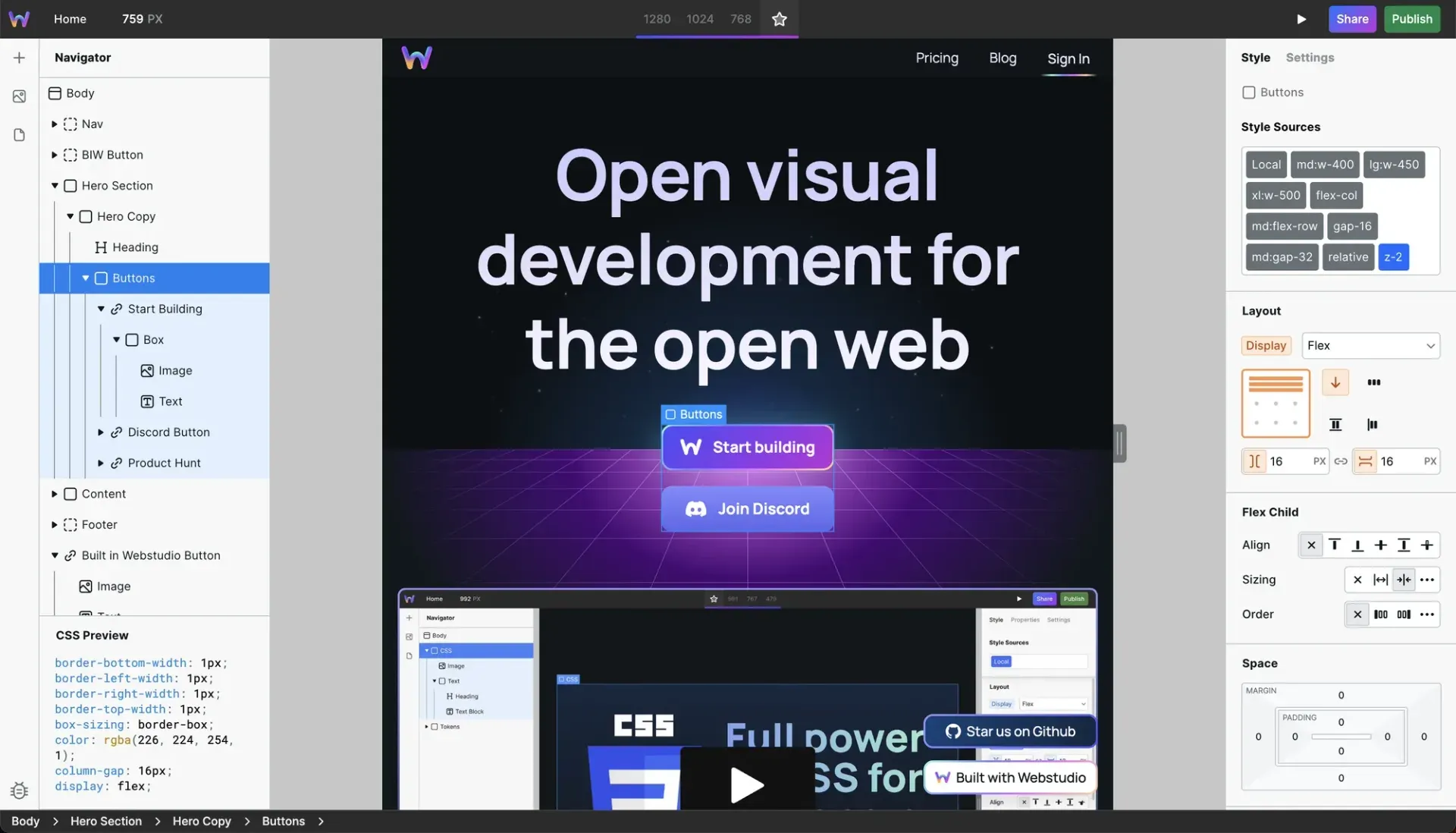
Official README screenshot of the Builder: a selected Buttons container on the canvas, its Tokens and Flex settings in the Style panel and the generated CSS in the preview pane.
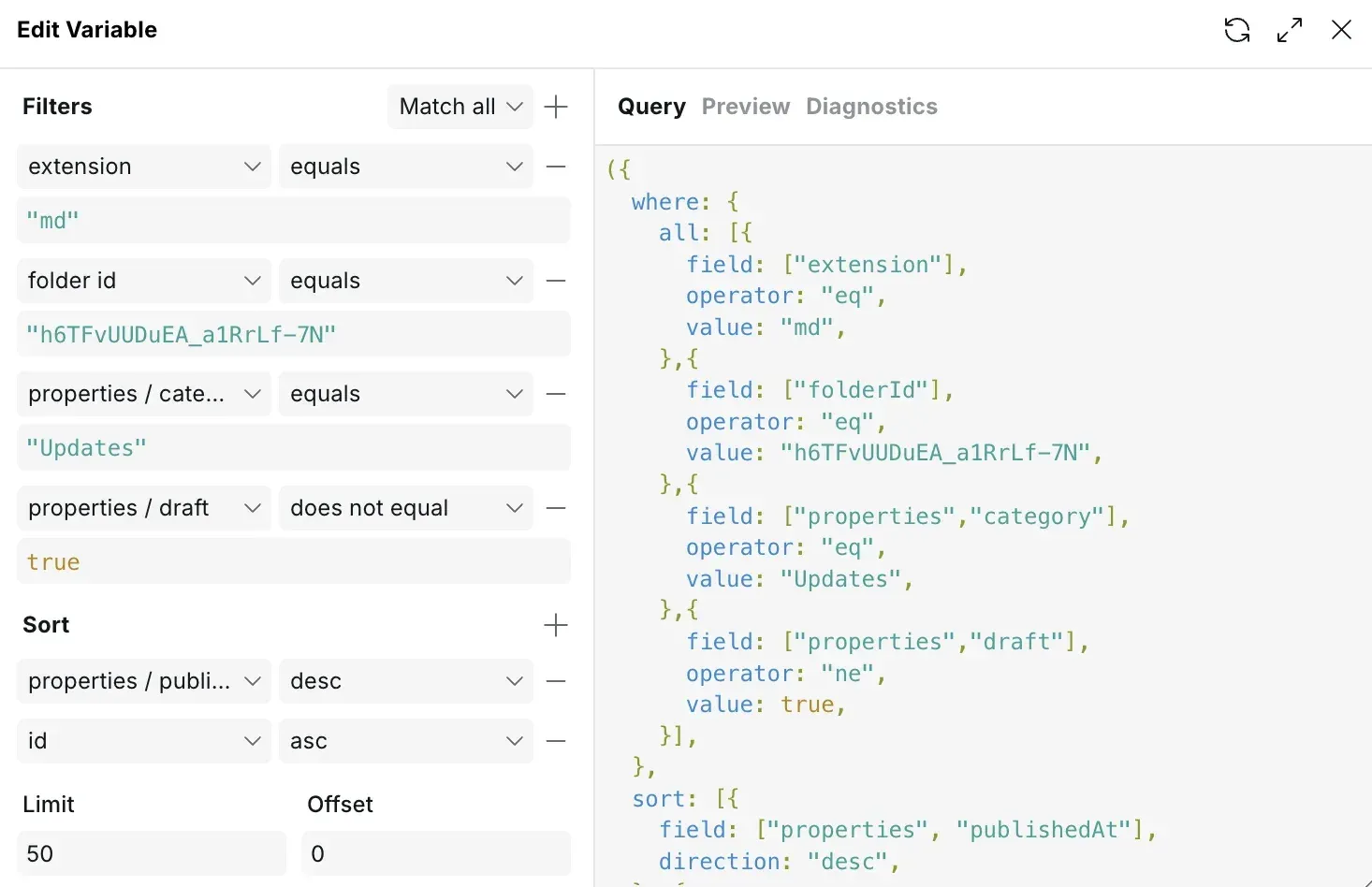
Figure from the official Content Engine docs: a collection query filtered and sorted in the visual editor, with the matching query shown on the right.
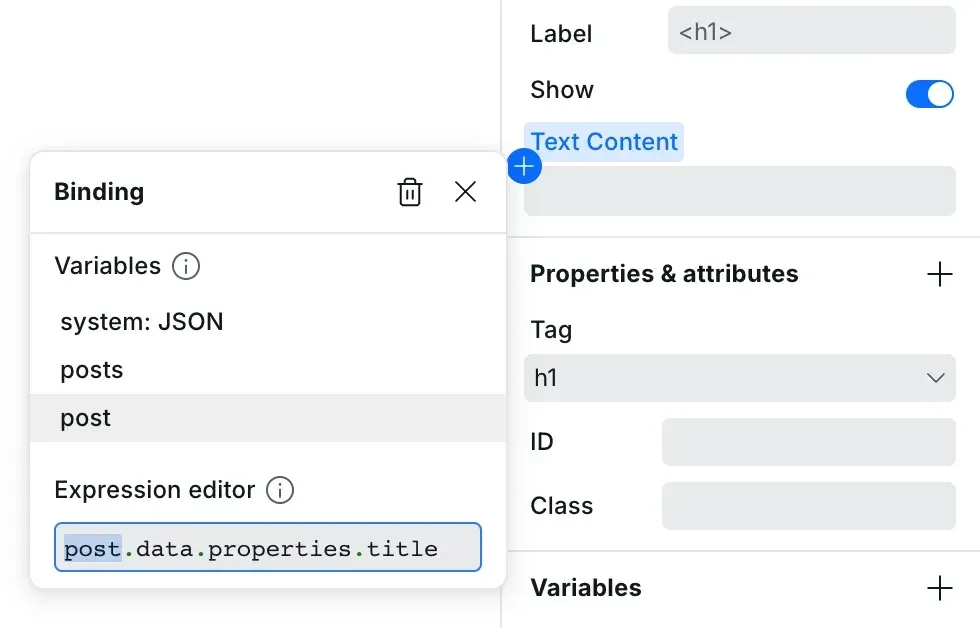
Figure from the official docs: binding a CMS field to the text content of an h1 through the Expression editor.
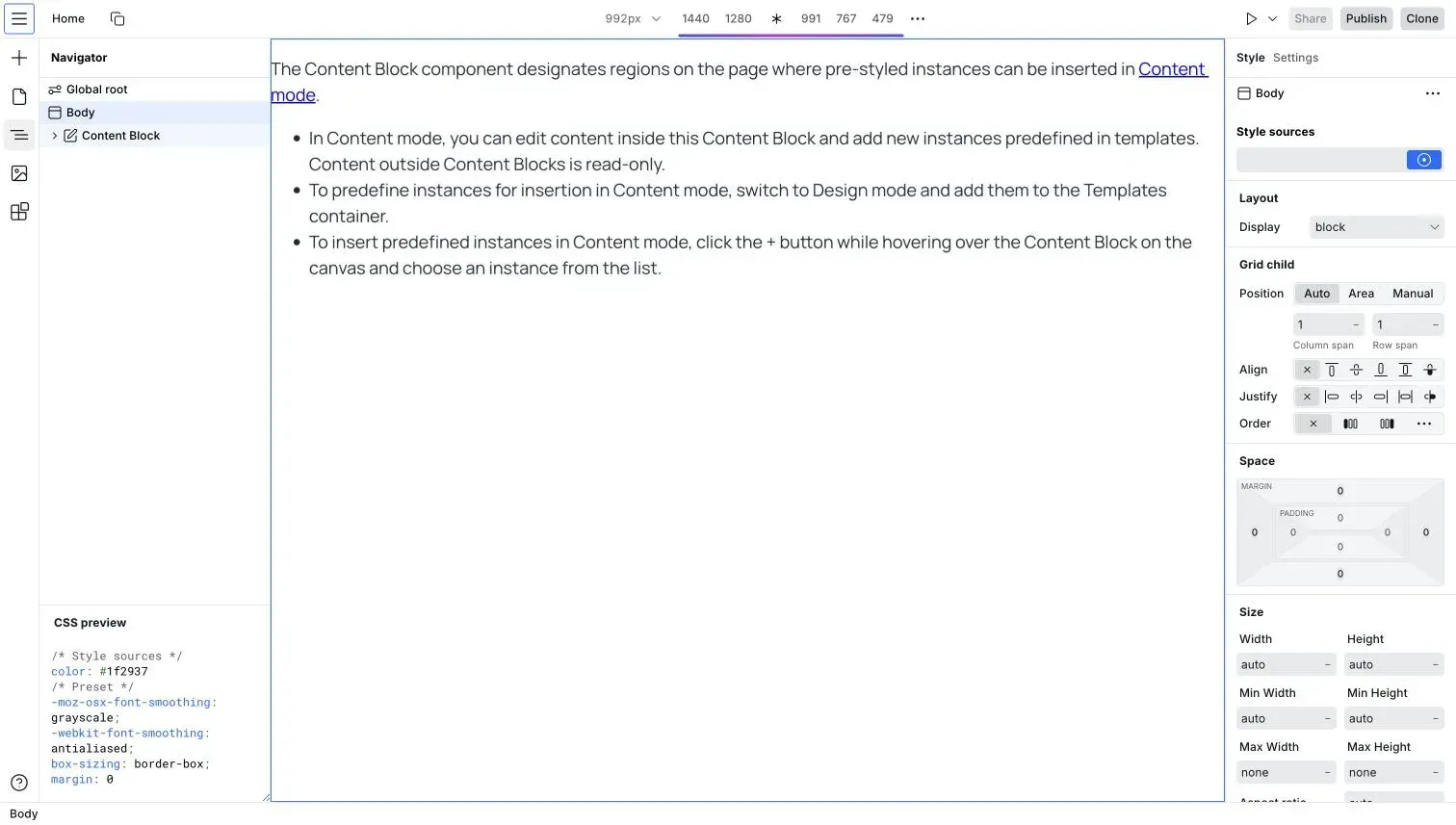
Official docs screenshot of the Builder showing a Content Block, the region where Content mode editors may edit text and insert templates.
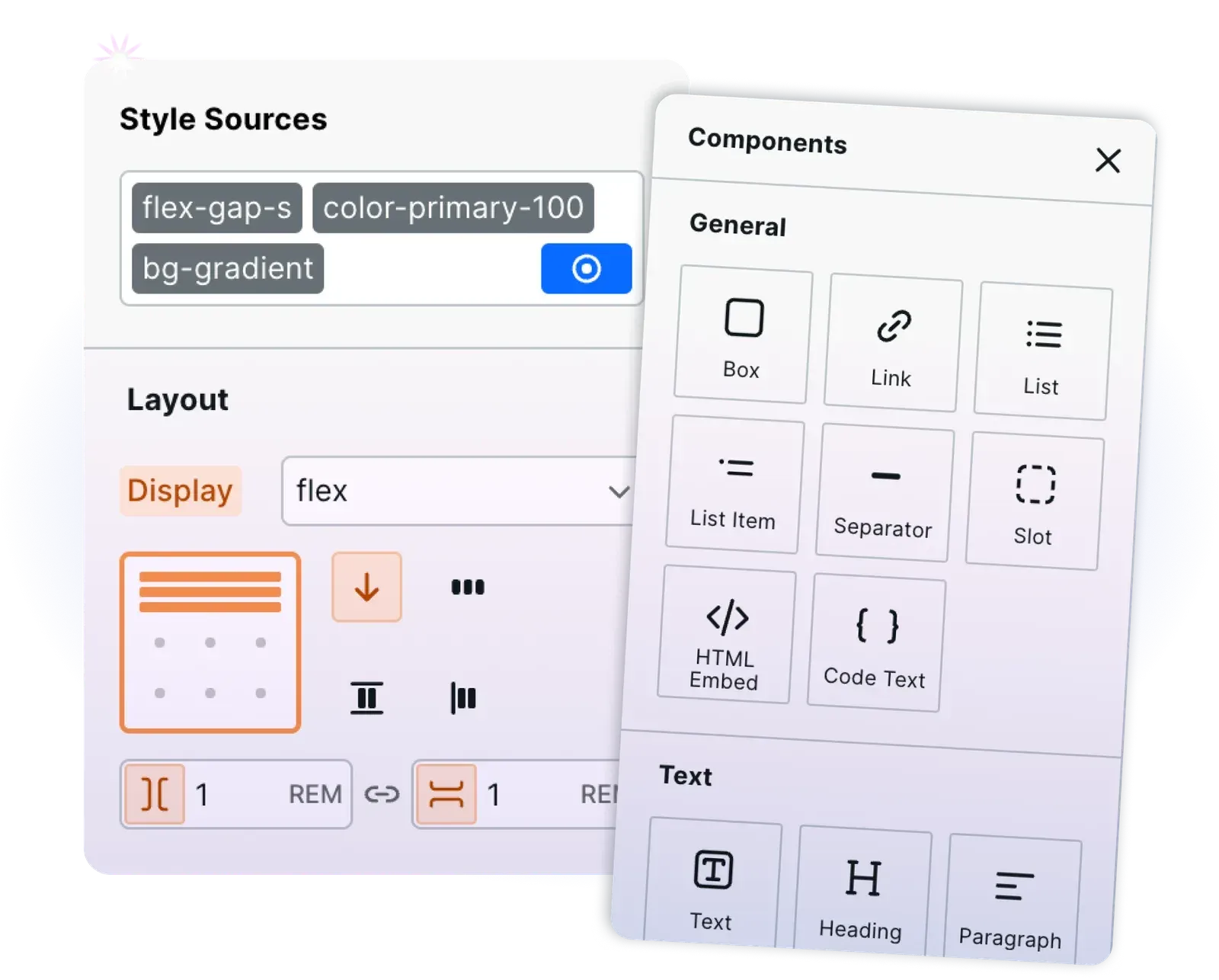
Illustration from the Webstudio website combining the Style Sources and Flex layout controls with the Components panel.
Source: official Webstudio project page.
Key capabilities
- Visual Builder with full CSS The canvas, Navigator, Style panel and CSS preview give access to every CSS property and value, custom breakpoints, states and selectors, transforms, Flexbox and Grid. Styles can live locally on one instance, in reusable Tokens or in CSS variables defined on Global Root. An Atomic CSS setting, which the docs say cuts CSS size by about 70% in many cases, can be switched off when exports should keep readable class names.
- Design tokens, CSS variables and Craft Tokens package several style declarations and can be applied like classes; CSS variables hold single values such as colors and spacing. The Craft standard describes a three-layer system of theme variables, semantic variables and composite Tokens, with naming rules such as
--foreground-primary. Craft is recommended, not enforced, and Marketplace templates follow it. - Core and Radix components Built-in components cover Element, Link, Heading, Paragraph, Image, Video, YouTube and Vimeo embeds, List, Collection, HTML Embed, Code Text, JSON-LD, XML Node and XML Time and a Head Slot. Accessible interactive pieces come from Radix UI: Accordion, Collapsible, Dialog, Navigation Menu, Popover, Radio Group, Select, Sheet, Switch, Tabs and Tooltip. New component types cannot be defined visually; HTML Embed is the escape hatch for custom code.
- Resources and dynamic pages A Resource is a variable filled by an HTTP or GraphQL request. Adding a parameter such as
/post/:slugto a page path turns it into a dynamic page, and the Address Bar lets you preview it with a real slug. Values reach components through the Expression editor, for examplepost.data.properties.title. On the Free plan these CMS features run on the staging subdomain only. - Any headless CMS The CMS guide lists Hygraph, Sanity, Strapi, Contentful, WordPress, Drupal, Directus, Hashnode, Payload, Airtable, Baserow, Notion and Flotiq as compatible, with notes on rich text. Strapi needs the CKEditor 5 field for HTML output, Payload needs a hook that saves HTML, and Notion pages cannot be used. Tutorials and templates exist for Hygraph, WordPress, Airtable, Notion, Supabase and Baserow.
- Content Engine for file-based content Markdown, MDX and JSON files stored in Assets become queryable collections with filters, sorting, limit and offset. MDX articles inside a Content Block can be edited on the canvas and saved back to the file. Documented limits are 1,000 candidate documents per query, 2,000 when resolving
$refreferences and a 500 KiB published content database, so several thousand entries or complex search still belong in an external CMS. - Content mode for clients and editors Builder modes are Design, Content and Preview, plus a Safe Mode that disables all scripts. In Content mode editors change text, links and images inside Content Blocks, insert designer-provided templates, create pages from Page templates and edit safe page settings, while dynamic paths, redirects and status codes stay locked. Share links with Content permission are a Pro feature, and publish rights are optional.
- Native Form component Since 0.306.0 the Form component submits to a generated same-origin endpoint such as
POST /__ws-form/contact, validates fields and files on the server and runs HTTP Resource actions. Recent releases added customizable progress feedback and field reset after submission. Static exports have no Form endpoint; the older Webhook Form is deprecated. - Scroll-driven animations The animation engine is built on the Web Animations API with polyfills and focuses on scroll and view triggers. Animation Group, Text Animation, Video Animation and Stagger Animation components configure axis, scroll source and insets. These components come from the proprietary animation package, and on the Free plan they only run on staging.
- Paste from Webflow, HTML, Tailwind and Markdown Copied Webflow elements arrive with structure and styles, and classes become Tokens; referenced images are uploaded to Assets. The Webflow paste table lists what does not transfer, including Collection List, Lightbox, Slider, Tabs and Webflow variables. Plain CSS, HTML with CSS, HTML with Tailwind, SVG and Markdown can also be pasted.
- SEO and page settings Each page has title, description, Open Graph image, language, indexing control and custom meta fields, with 301 and 302 redirects, a generated sitemap, a dynamic sitemap for CMS pages and a JSON-LD component for schema markup. Projects can set HTTP response headers and path patterns. The publish dialog has a Validate step that blocks publishing on broken Resource references or invalid HTML nesting.
- Assets and image optimization Uploaded images are converted to WebP or AVIF, compressed and served responsively with lazy or eager loading. Original files can be downloaded. Asset storage is 250 MB with 50 assets per project on Free and 20 GB with 1,000 assets per project on Pro and Team, and image optimization is unavailable in static exports.
- Webstudio Cloud publishing Every project gets a
wstd.iosubdomain usable as staging, which is automatically no-indexed once a custom domain is added. Custom domains need a CNAME and a TXT record, entered by hand or through Entri, and you republish after verification. Cloud sites run in isolated Cloudflare Workers with DDoS, bot mitigation, WAF and SSL listed on the pricing page. - CLI export and Docker deployment Run
npx --yes webstudio@latest, link a project with a share link that has Build access, thennpx webstudio syncdownloads it to.webstudio/data.jsonand.webstudio/assets.npx webstudio build --template dockerproduces a Node.js React Router server on port 3000;--template ssgproduces static HTML. The CLI docs also cover import between projects, publishing jobs, domain checks and audits. - Static download from the Builder Publish, Export, Destination Static builds and downloads a zip of HTML, CSS, JS and images without the CLI. Static output drops dynamic pages, redirects, status codes, client navigation, Form actions, image optimization, robots.txt and sitemap.xml, and trailing-slash behavior depends on the host. Run it locally with
npx serve .because files use absolute URLs. - Webstudio MCP for AI agents
webstudio mcpstarts a stdio MCP server against a linked project, so an agent edits the same instance tree you see in the Builder.webstudio connect claude,codex,cursororvscodewrites persistent client configuration, and--printshows it first. Tools includemeta.index, component search andinsert-fragmentwith--dry-run, and the pricing page lists MCP among Pro features. - Marketplace and templates The Marketplace inside the Builder offers page, section and integration templates from Webstudio and the community, for example a Markdown blog and CMS starters. When template tokens clash with project tokens, a dialog offers to rename, overwrite or keep the existing ones. Projects can also define their own Page templates for editors.
- Collaboration and plans Projects are shared through View, Content, Build or Admin links, where only Content and Admin links can publish, and collaborators are unlimited on every plan. Team adds workspaces, member roles and five included seats. Backups let Pro and Team restore a build from the staging or production domain.
Where Webstudio fits
Building a marketing site and handing it to a client
Design the pages in Design mode with Tokens and CSS variables, wrap editable regions in Content Blocks and add templates editors may insert. Create a share link with Content permission and decide whether the client may publish. Before handover, open the project in Content mode yourself and check that text outside Content Blocks is read-only, that images carry alt text and that Page templates cover the pages the client will add.
Front end for an existing headless CMS
Create a dynamic page such as /blog/:slug, add an HTTP or GraphQL Resource that filters by system.params.slug, and bind fields with the Expression editor. Use the Address Bar to preview real entries and set up a 404 state for missing slugs. Check the rich-text notes for your CMS in the compatibility table, and confirm that a Pro plan or an exported JavaScript build is in place, since CMS features only run on staging on Free.
A file-based blog with the Content Engine
Upload Markdown or MDX files to an Assets folder, mark it as a content collection and query it for an overview page and an article page. Choose MDX with a Content Block when editors need canvas editing, or Markdown Embed when source editing is enough and publish time matters. Measure the published content database against the 500 KiB limit and plan an external CMS before the collection grows into thousands of entries.
Migrating sections from Webflow
Copy elements or whole pages in the Webflow Designer and paste them into the Builder; classes arrive as Tokens and images are uploaded to Assets. Rebuild what does not transfer, such as Collection Lists, sliders, tabs and Lightbox, with Collection, Radix components or HTML Embed. Recreate Webflow variables as CSS variables and compare breakpoints, since global tag styles are not part of the copied data.
Self-hosting an exported site on a VPS
Link the project with the CLI, run npx webstudio sync and npx webstudio build --template docker, then build and run the image on the server and place Nginx with Let's Encrypt in front, as the VPS guide describes. Keep the generated /__ws-form routes reachable through the proxy. Rebuild after each content change and test redirects, forms and image URLs on the deployed host.
Letting an AI agent edit a project
Install Node.js 22.12 or later, link the project with a share link and start with webstudio meta.index or run webstudio connect for Claude, Codex, Cursor or VS Code. Prefer --dry-run on fragment inserts and review each change visually in the Builder. Treat the share link as a credential: keep it out of committed files, logs and screenshots, and revoke it when the agent work is finished.
Install
npx --yes webstudio@latestReviews of Webstudio
Be the first to share your experience with Webstudio.
Write a review
Loading review form…
Alternatives to Webstudio
 WebflowWebflow is a hosted website platform with a visual builder, CMS, hosting, SEO tools and REST APIs, aimed at marketing, design and engineering teams.
 FramerFramer is a website builder combining freeform visual design with a built-in CMS, animations and one-click publishing, plus the option to extend pages with custom React code components.
 Builder.ioBuilder.io is a hosted visual editor and headless CMS that lets teams build pages from their own components. The MIT-licensed repository holds the SDKs for React, Vue, Svelte, Solid, Qwik, Angular and React Native, plus examples and plugins.