

What is Baserow?
Baserow is a no-code database platform that stores structured data in PostgreSQL and presents it through spreadsheet-style tables and other views. Around those tables it adds an application builder for portals and internal tools, workflow automations, dashboards and an AI assistant named Kuma. It is developed by Baserow B.V., a fully remote company that started the project in 2019 as a side project of its founder Bram and released the first version in 2020. Source code, issues and releases are on GitHub; the project moved from GitLab, where the older merge-request history remains readable.
There are two ways to run it. The hosted service at baserow.io has a free tier and paid per-user plans. Self-hosting uses the all-in-one Docker image baserow/baserow, which bundles PostgreSQL, Redis and a Caddy reverse proxy in a single container, or the separate baserow/backend and baserow/web-frontend images for Docker Compose and Kubernetes. An official Helm chart and guides for Heroku, Render, DigitalOcean, AWS, Cloudron and Railway are listed in the official documentation.
The latest release is Baserow 2.4.1, published October 13, 2026. It removes the beta label from the Application Builder and declares it supported for production, adds Z.ai as an AI provider, allows Markdown in builder labels and help text, adds SSL/TLS on port 465 for the SMTP integration, lets AI fields output rich text and adds Helm chart values for shared ingress controllers. Version 2.4.0, released September 30, 2026, introduced the button field, field-level permissions for users and teams, instance and workspace management of AI providers (including Amazon Bedrock and xAI), a Go to node and a start-by-email trigger for automations, and resizable dashboard widgets.
The backend is Django on Python, the frontend is Vue.js, and data lives in PostgreSQL with Redis for caching and background work. The supported versions table for 2.4.1 lists Python 3.14, Node.js 24, PostgreSQL 14 or newer (15+ recommended), pgvector 0.8.1 and Redis 6.2.7 or newer, plus Docker 19.03 as the minimum for container installs.
Licensing is open core. Everything outside the premium/ and enterprise/ directories is the Baserow Open Source Edition under the MIT Expat license, and all client-side JavaScript is MIT as well. Premium and enterprise server code is under separate commercial licenses that require a paid subscription for production use, while development and testing are permitted without one. Documentation is CC BY-SA 4.0. Baserow is not a general SQL database for application developers: users work with tables through the interface and API rather than writing queries.
Baserow screenshots
Explore the interface. Open a screenshot to view it at full size.
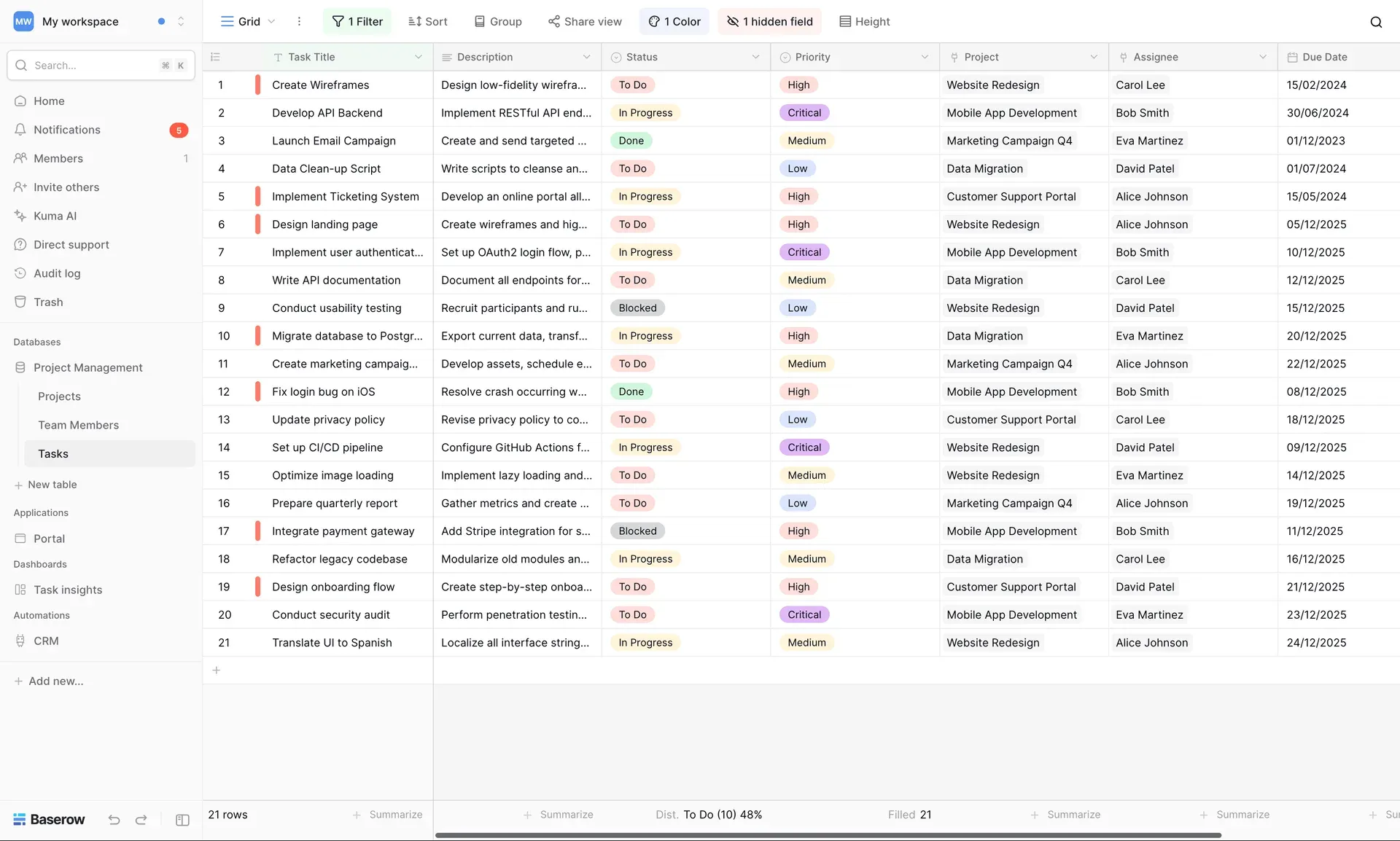
Official Baserow screenshot of a grid view with a filter, row coloring and a status distribution summary in the footer.
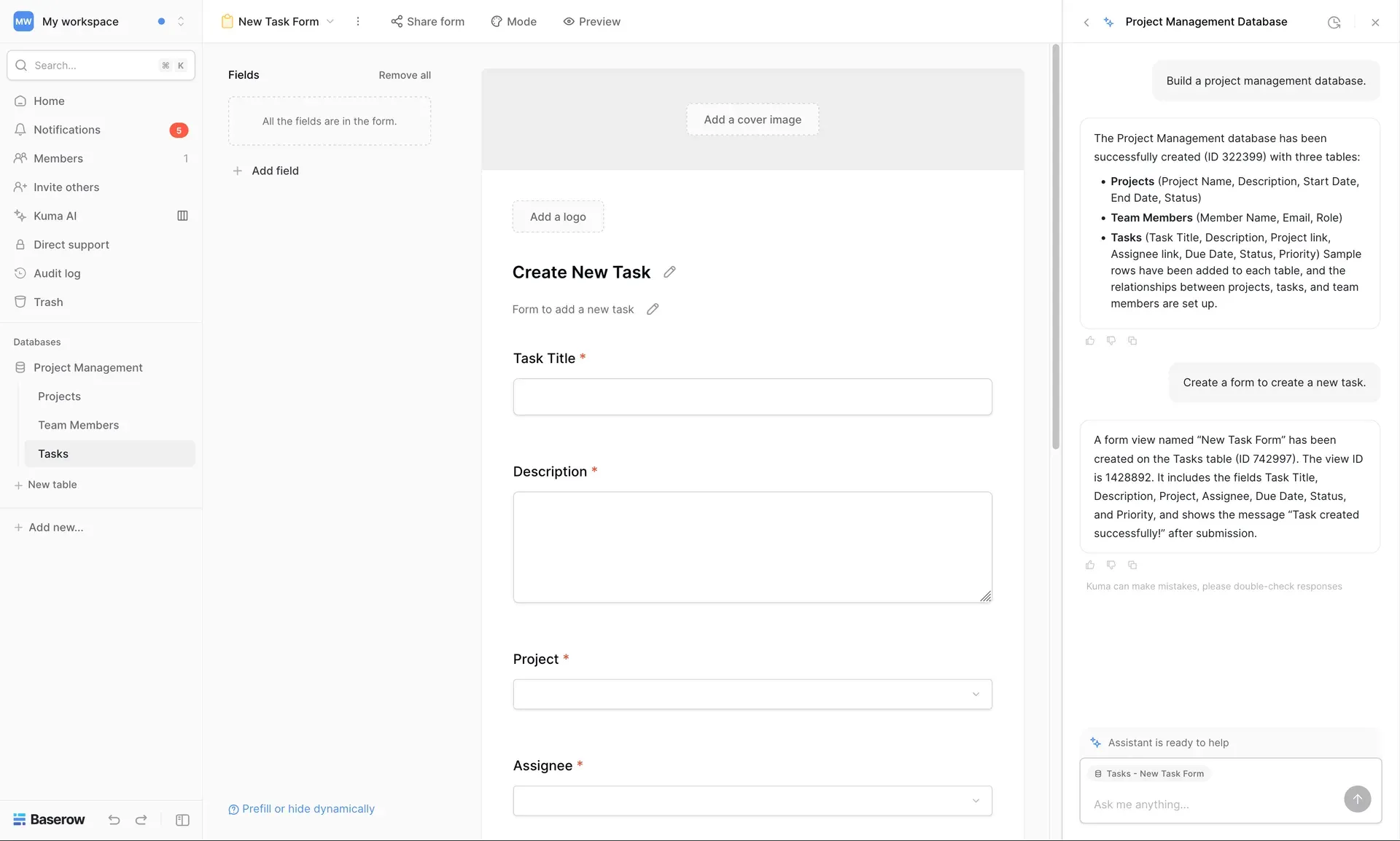
Form view built for the Tasks table, with the Kuma assistant panel describing the database and form it created.
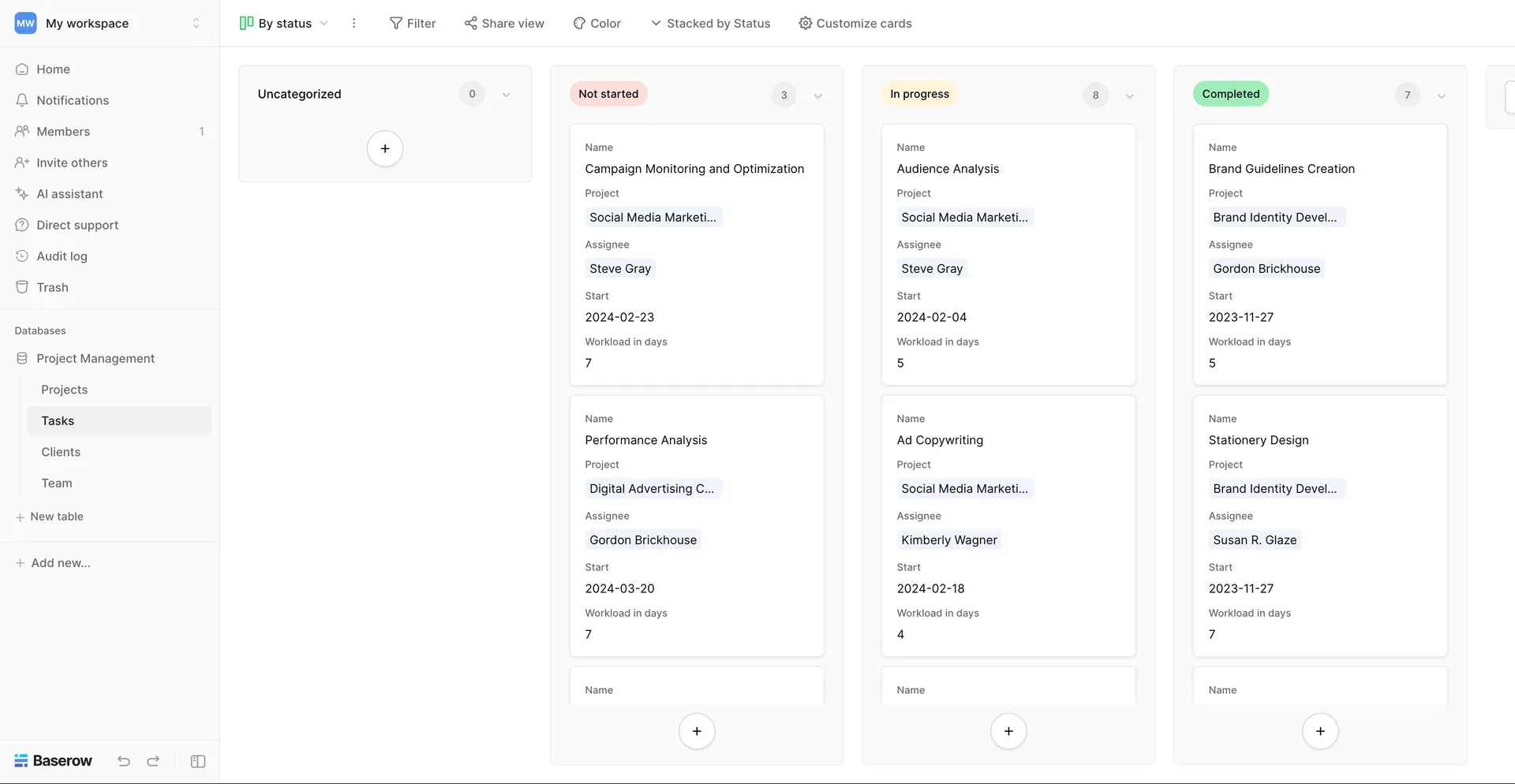
Kanban view stacked by a status field, with cards showing project, assignee, start date and workload.
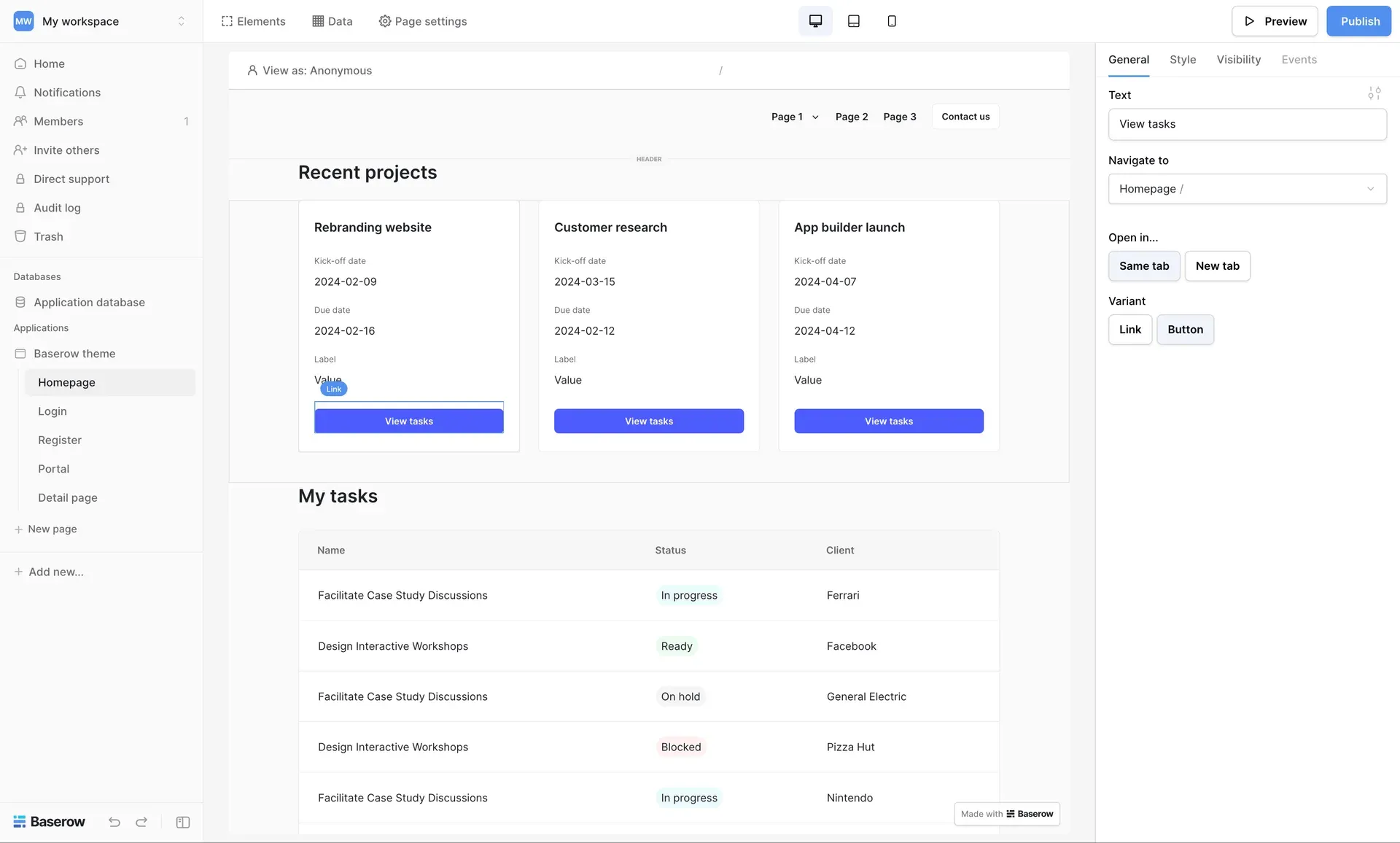
Application Builder editor with a page of project cards and a task table, and button settings in the side panel.
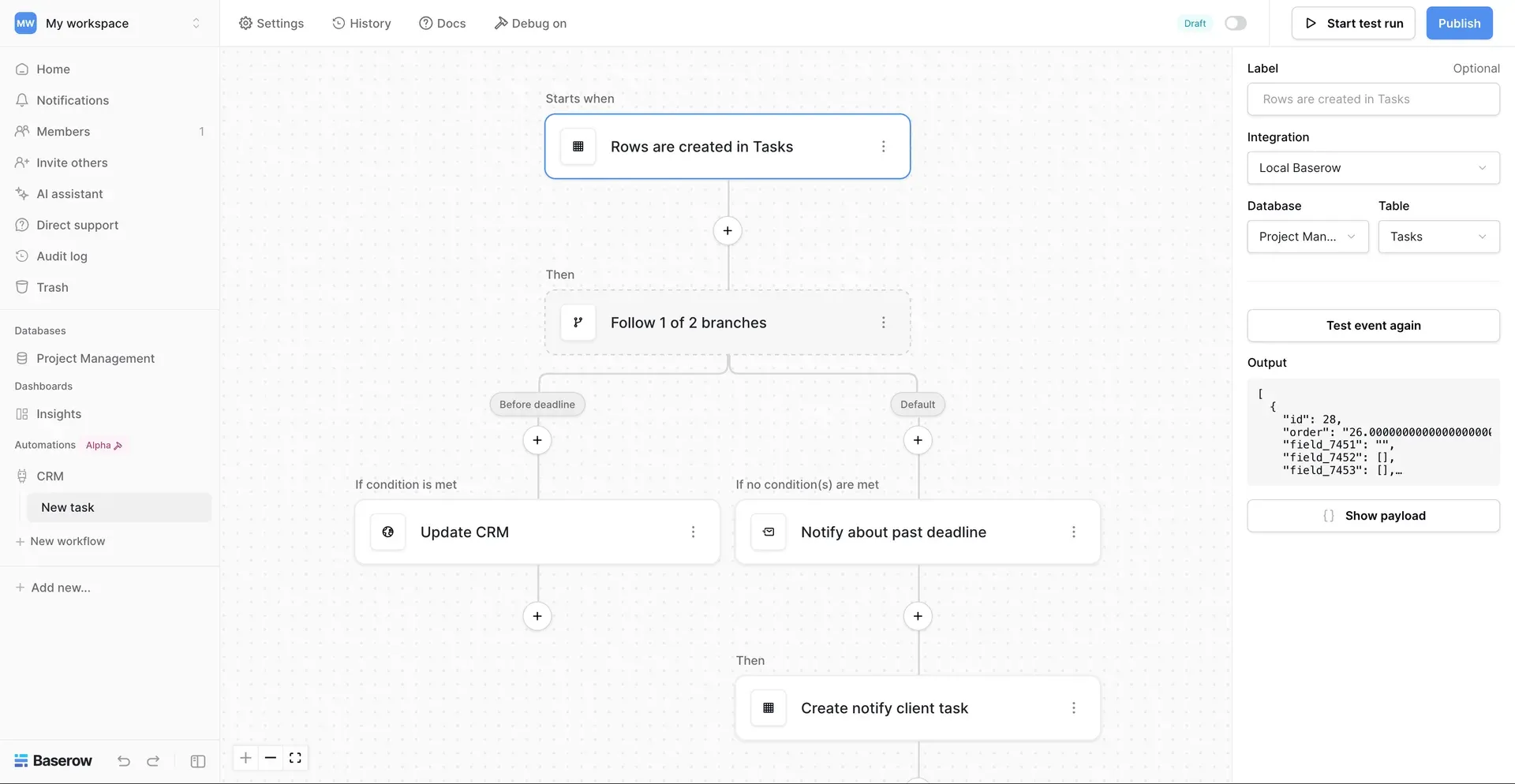
Automation editor with a row-created trigger, a two-branch condition and the trigger's sample output payload.
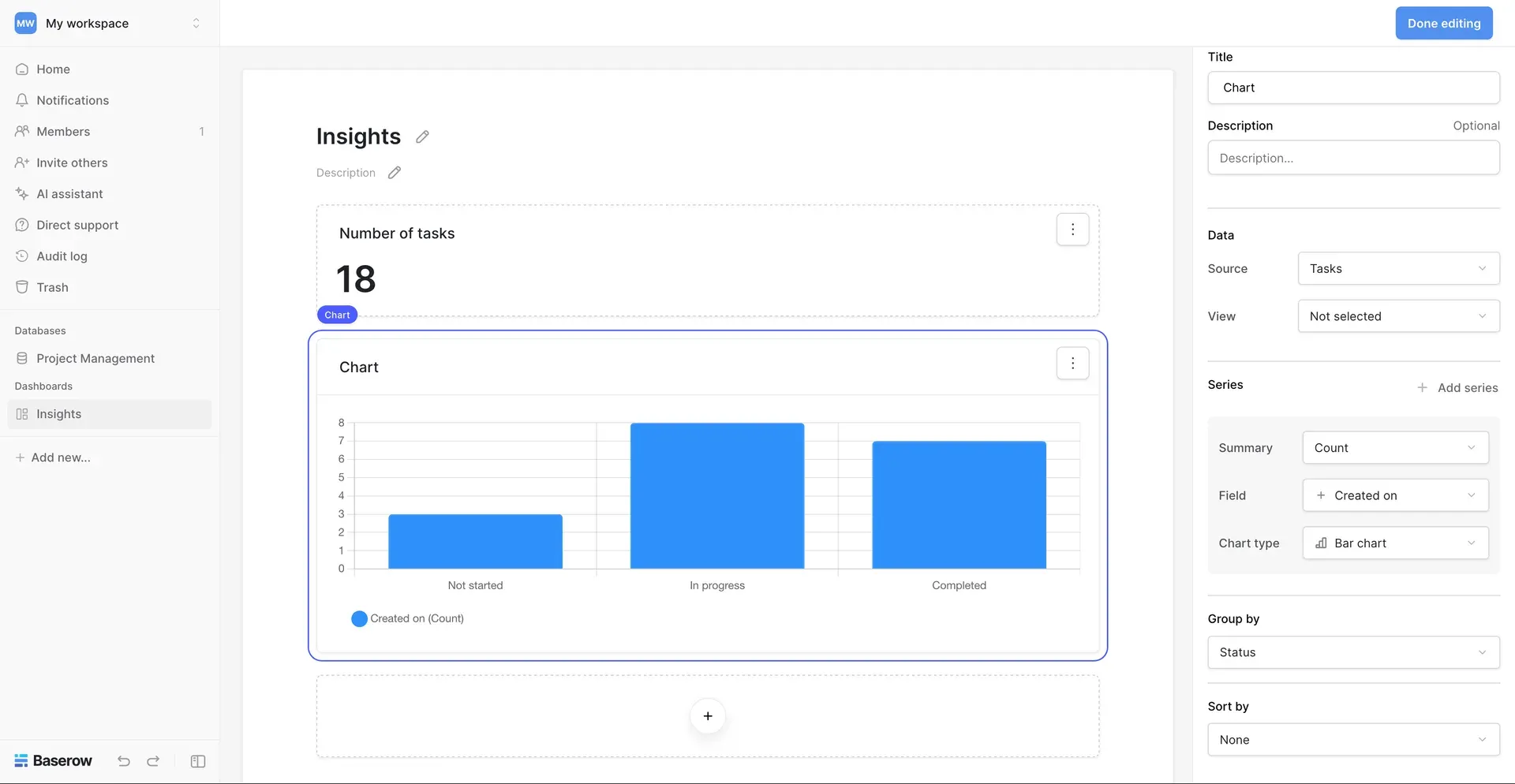
Dashboard editor with a summary number and a bar chart of tasks grouped by status.
Source: official Baserow project page.
Key capabilities
- Self-hosted install with Docker The all-in-one image starts with one
docker runcommand, exposes ports 80 and 443 and keeps PostgreSQL, Redis and Caddy data under/baserow/data. SettingBASEROW_PUBLIC_URLcontrols the address users open, andBASEROW_CADDY_ADDRESSESenables automatic HTTPS. The Docker guide warns that published Docker ports bypass ufw rules unless bound to 127.0.0.1. - External PostgreSQL and Redis Setting
DATABASE_URLorREDIS_URLdisables the internal services. Baserow recommends an external PostgreSQL for production use of the all-in-one image, so the database can be backed up and accessed by other processes. PostgreSQL 14 is the minimum, and the pgvector extension is part of the supported dependency list. - Kubernetes and Helm The official Helm chart on Artifact Hub includes PostgreSQL, Redis, MinIO for S3-compatible storage and Caddy by default. It expects Kubernetes 1.19 or newer, Helm 3 and three DNS names for the frontend, backend API and media objects. Release 2.4.1 fixed several chart rendering problems and added values for resource prefixes and catch-all ingress rules.
- Hosted cloud plans The free cloud plan includes 3,000 rows and 2 GB of storage per workspace, 2,000 monthly automation credits and the grid, form and gallery views. Premium, Advanced and Enterprise raise those limits to 50,000, 250,000 and 1,000,000 rows per workspace. The pricing page lists the hosted API at a maximum of 10 concurrent requests.
- Tables, fields and formulas Tables support more than 20 field types, including links to other tables, lookups, rollups, autonumbers, rich text, files and formulas. Release 2.4.0 added a button field that runs a sequence of actions such as opening a URL, changing rows, sending an HTTP request, email or Slack message, or starting a workflow. Formula help now shows several examples per function.
- Views Each table can have grid, gallery and form views on every plan, and kanban, calendar, timeline and survey views on paid plans. Views keep their own filters, sorts, grouping, row coloring and hidden fields. Views and forms can be shared publicly by link, and shared items can now be reported for abuse.
- Application Builder Pages are assembled from elements such as headings, tables, forms, record selectors, images and buttons, then connected to Baserow tables as data sources. Applications can authenticate their own users, use subdomains or custom domains and define mobile and tablet breakpoints. Since 2.4.1 the builder is out of beta; applications built during the beta keep working.
- Automations Workflows start from triggers such as row changes or an inbound email address and continue through branching, HTTP requests, email, Slack and AI agent nodes. Runs can be tested step by step, cancelled while running and reviewed in a paginated history. The plan comparison lists Code and Excel nodes separately from the basic nodes, and cloud usage is metered in monthly automation credits.
- Dashboards Dashboard widgets summarize table data as counts, sums and charts, grouped by a field and filtered through a view. Since 2.4.0 widgets can be arranged and resized on a grid. The pricing comparison lists custom dashboards and the graph widget as separate rows, so check which plan includes charts.
- Kuma assistant and AI fields Kuma can create databases, tables, views, forms and builder changes from natural-language requests, and the interface notes that its answers must be checked. AI fields generate cell values from prompts and can output rich text. Models come from providers configured by an admin, such as OpenAI, Anthropic, Amazon Bedrock, xAI or Z.ai, as described in the AI providers guide.
- REST API and OpenAPI schema Every table is reachable through a REST API documented in ReDoc, with a downloadable OpenAPI schema. Database tokens can be limited to specific tables and create, read, update or delete rights, and each database gets generated API documentation. Webhooks report row changes, and a WebSocket API drives real-time updates in the interface.
- Built-in MCP server The backend exposes a Model Context Protocol endpoint at
/mcpso AI clients can read and write tables in one workspace. Users choose the allowed tools per connection, and changes go through the normal action layer, so they are undoable and audit-logged. OAuth sign-in for clients is off by default and enabled withBASEROW_MCP_OAUTH_ENABLED; client setup lives in baserow-mcp. - Imports and data sync Tables can be created from CSV, Excel, XML and JSON files, and an Airtable importer now also accepts publicly shared views. Synced tables pull data from iCal feeds, PostgreSQL tables, other Baserow tables and Jira, GitLab, GitHub or HubSpot sources depending on plan. Sync history, including scheduled runs, is visible since 2.4.0.
- Permissions and governance Paid plans add role-based, field-level and view-level permissions, audit logs and single sign-on; two-factor authentication is also listed among the security features. Release 2.4.0 added field permissions for specific users and teams. Row change history is kept for 14 days on the free cloud plan and up to 180 days on higher plans.
- Backups and workspace export Self-hosted installs include
backup_baserowandrestore_baserowcommands that work against the PostgreSQL database, with a runbook that requires restoring into a fresh, empty database. Workspaces can also be exported from the cloud and imported into a self-hosted instance. Database snapshots are listed among the in-application security features. - Plugins for self-hosted instances Plugins can add field types, view types, filters, formula functions, pages and third-party integrations, and can install Python, Node and system dependencies. The plugin documentation marks them as experimental, self-hosted only and unsupported by Baserow, and advises backups before installing any plugin.
Where Baserow fits
Replacing shared spreadsheets with a relational base
Import existing CSV or Excel sheets into separate tables, then replace repeated text columns with link-to-table fields and lookups. Add single-select fields for statuses and create filtered views for each team instead of copying sheets. Check that formulas and lookups still return values after a field type change, and that row counts stay within the limits of the cloud plan or the capacity of your own PostgreSQL server.
Moving off Airtable
Use the Airtable importer with a base or, since 2.4.0, a publicly shared view. After the import, compare field types, linked records, attachments and formulas against the source, because not every Airtable feature has a direct Baserow equivalent. Rebuild Airtable automations as Baserow workflows and test them with sample rows before switching users over.
Publishing a portal or internal tool
Build pages in the Application Builder on top of existing tables, add a login page for application users and restrict data sources with filters per user. Publish to a subdomain first, then to a custom domain. Check visibility conditions as an anonymous visitor and as a logged-in user, because data sources control what reaches the browser. External app users are free up to 500 on the listed cloud plans.
Automating intake and notifications
Collect requests through a form view or a builder form, then start a workflow when rows are created. Branch on field values, send email or Slack messages and call external services with the HTTP request node. Use test runs and the workflow history to confirm each branch, and track automation credit consumption on cloud plans. Heavier integrations can also go through the documented n8n, Zapier and Make connectors.
Giving AI agents controlled table access
Create an MCP endpoint scoped to one workspace and enable only the tools an agent needs, starting with read-only tools. For hosted clients such as Claude or ChatGPT, a self-hosted instance needs a public HTTPS URL and a reverse proxy that routes /mcp and the OAuth paths to the backend, as the MCP OAuth guide explains. Review the audit log after the first sessions.
Running Baserow on your own infrastructure
Start with the all-in-one image for evaluation, then move to an external PostgreSQL and Redis or the Helm chart for production. Pin the image tag, such as baserow/baserow:2.4.1, back up the database before every upgrade and read the release notes for migration changes. Register a premium license under Admin, Licenses only when paid features are needed; the open-source edition has no row, storage or API request limits.
Install
docker run -d --name baserow -e BASEROW_PUBLIC_URL=http://localhost -v baserow_data:/baserow/data -p 80:80 -p 443:443 --restart unless-stopped baserow/baserow:2.4.1Reviews of Baserow
Be the first to share your experience with Baserow.
Write a review
Loading review form…
Alternatives to Baserow
 NocoDBNocoDB is a free, self-hostable Airtable alternative with grid, gallery, form, kanban and calendar views and Docker install options.
 BudibaseBudibase is an operations platform for building internal apps, automations and AI agents around existing databases, REST APIs and business systems. The core is GPLv3, paid features are under a Business Source License, and it runs self-hosted with Docker or Kubernetes or on Budibase Cloud.
 ToolJetToolJet is an open-source, AGPL-3.0 platform for building internal tools, admin panels and dashboards on your existing databases, APIs and SaaS systems.