

What is Builder.io?
Builder.io is a visual development platform from Builder.io, Inc. It combines a hosted Visual Editor and headless CMS, now marketed as Builder Content, with an AI code product called Builder Code (formerly Fusion). The BuilderIO/builder repository does not contain that hosted platform. It holds the open-source pieces that connect it to your own code: the rendering SDKs, usage examples, starter projects and Visual Editor plugins, all under the MIT license. Content is modeled, edited and scheduled in the Builder web app, stored by Builder, and rendered by your application through these SDKs with your own components.
The SDKs come in two generations. Gen 1 packages such as @builder.io/react and the shared @builder.io/sdk core are hand-written. Gen 2 packages (@builder.io/sdk-react, sdk-vue, sdk-svelte, sdk-solid, sdk-react-native, sdk-angular, sdk-qwik and the Next.js RSC package sdk-react-nextjs) are generated from one source written in Mitosis, Builder's component compiler. Each Gen 2 SDK ships separate browser, Node.js and edge bundles because the expression evaluator differs per runtime; on Node it runs bindings inside isolated-vm. The monorepo uses Yarn workspaces and Nx, with Playwright end-to-end fixtures that define the tested framework minimums.
Releases are cut per package with Changesets and published to npm. The latest tagged release is @builder.io/react 9.4.11 (November 5, 2026), which fixes Raw:Img dropping the block class and overriding legacy alt and title values; @builder.io/sdk 6.3.4 shipped the same day. On the Gen 2 side, the 5.3.0 line made rendering faster and stopped it mutating the content object, 5.4.0 added a BuilderScripts wrapper that emits A/B test and personalization helper scripts once per page, and 5.4.2 (with Gen 1 9.4.10) keeps the A/B assignment cookie for 30 days instead of the session. Gen 1 9.4.9 recycles the server-side isolate every 1000 evaluations to stop memory growth.
Integration follows the model described in How Builder works. Pages and sections are JSON documents whose blocks array names components and their options. Your app fetches an entry from the Content API at cdn.builder.io and passes it to a Content (Gen 2) or BuilderComponent (Gen 1) renderer. The Visual Editor loads your running site in an iframe and sends JSON patches through postMessage, so previews use your real components and styles. Hosting stays with you, on Vercel, Netlify, AWS, Google Cloud or another platform.
Several things are out of scope for the repository. The editor, content storage, analytics and AI features are a proprietary cloud service from Builder.io, Inc., and no self-hosted edition of the platform is documented. Usage limits and seats follow the pricing page, which is now organized around AI agent credits. The company states SOC 2 Type II compliance on its website; its privacy policy says data may be stored and processed in the United States and other countries.
Builder.io screenshots
Explore the interface. Open a screenshot to view it at full size.
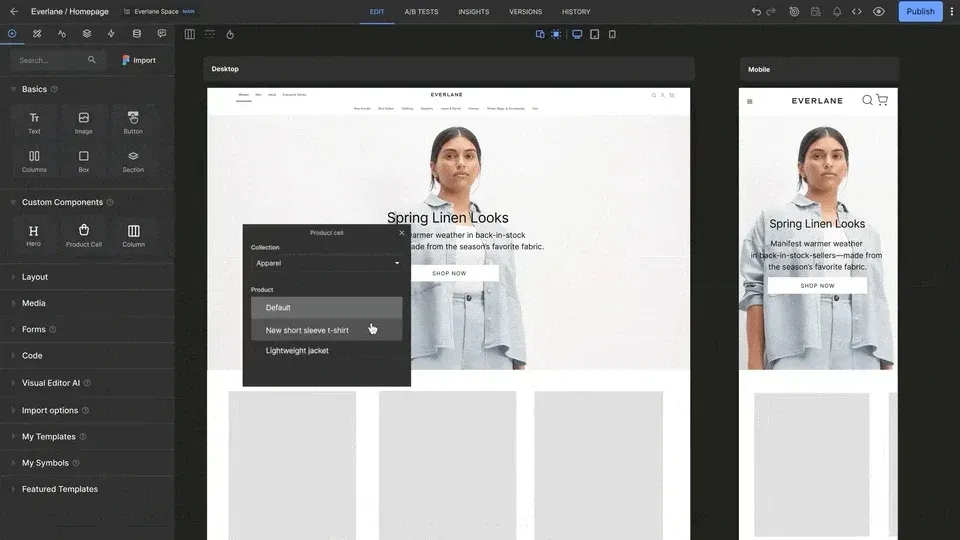
Frame from the official README animation: the Visual Editor previews a storefront at desktop and mobile widths while an editor picks a product for a registered Product cell component.
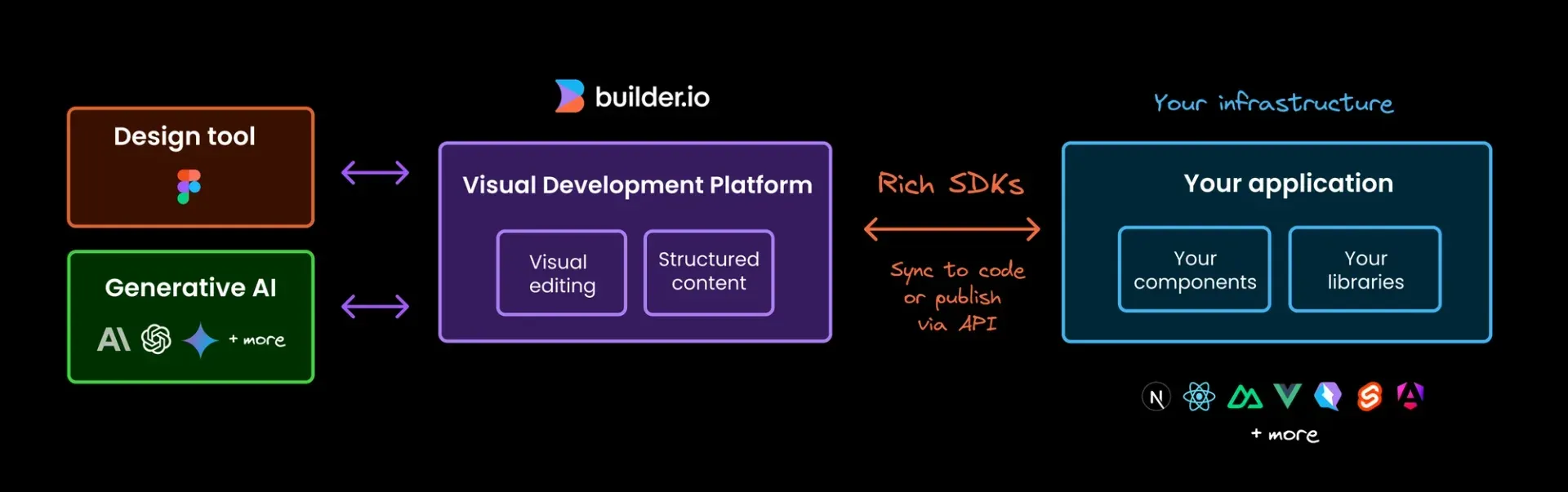
Official README diagram: design tools and AI models feed visual editing and structured content, which reach your own components via SDKs, either synced to code or published through the API.
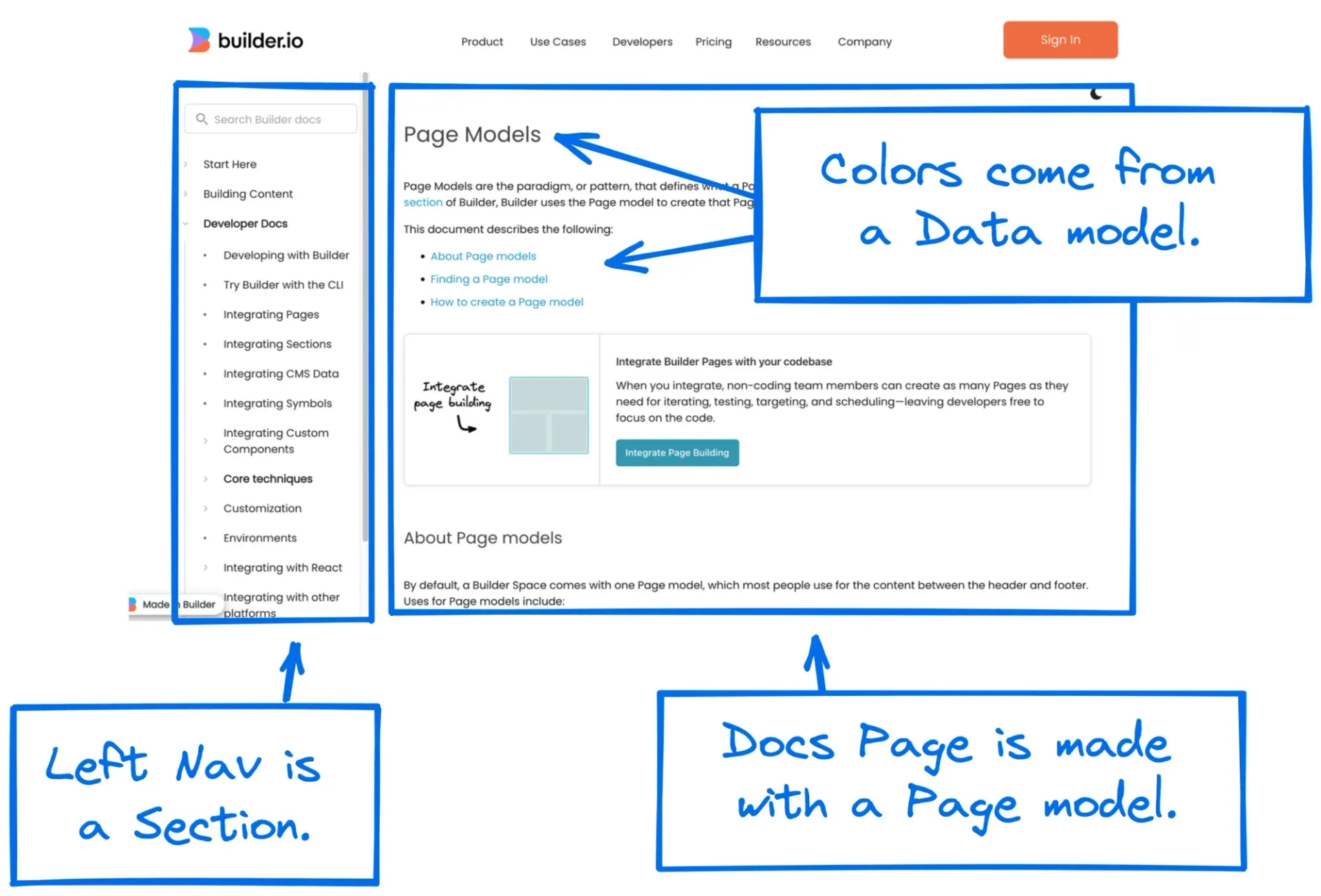
Figure from the official models documentation explaining how page, section and data models combine on one rendered page.
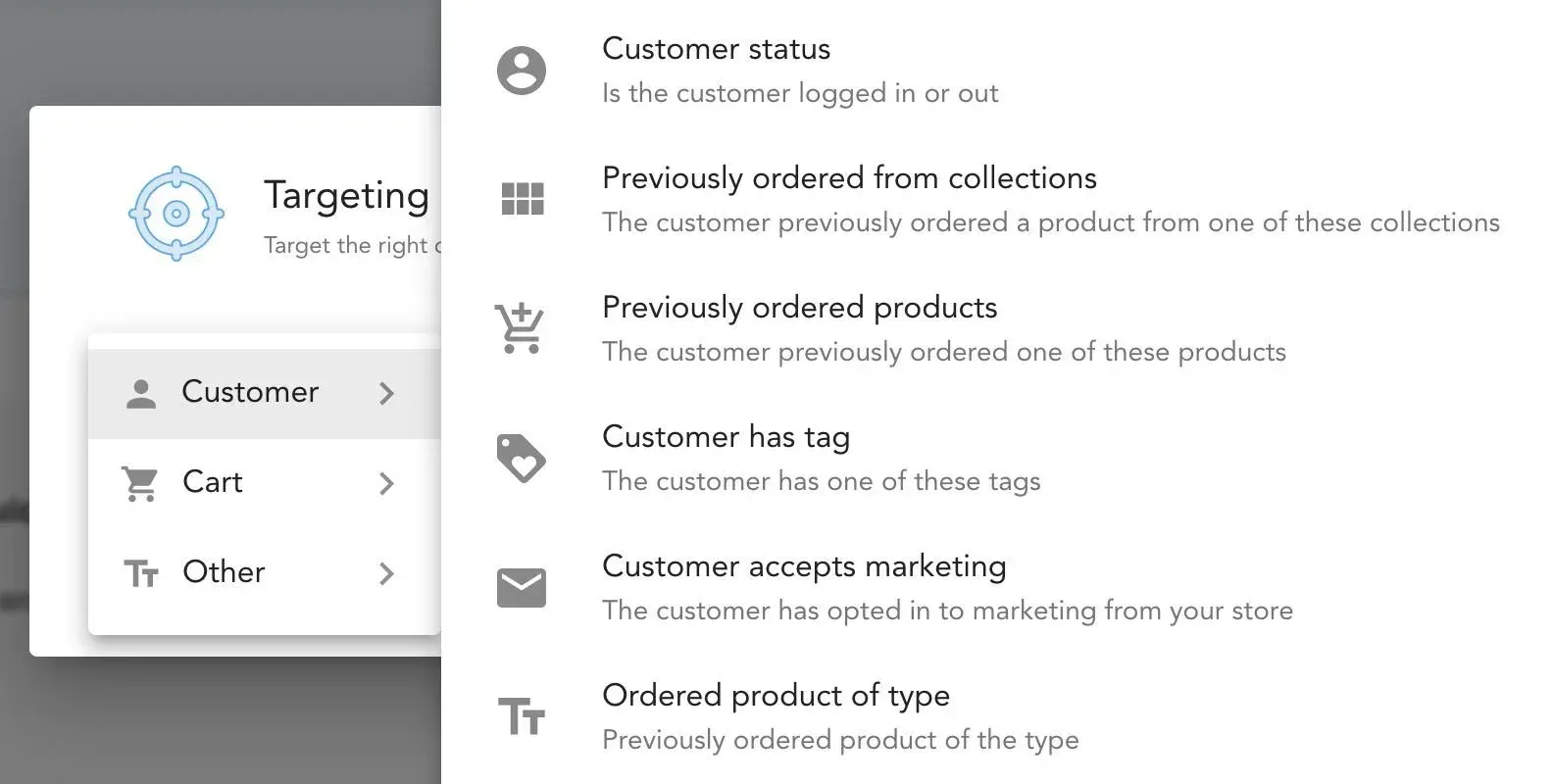
Screenshot from the official targeting documentation: commerce customer attributes available as targeting rules for an entry.
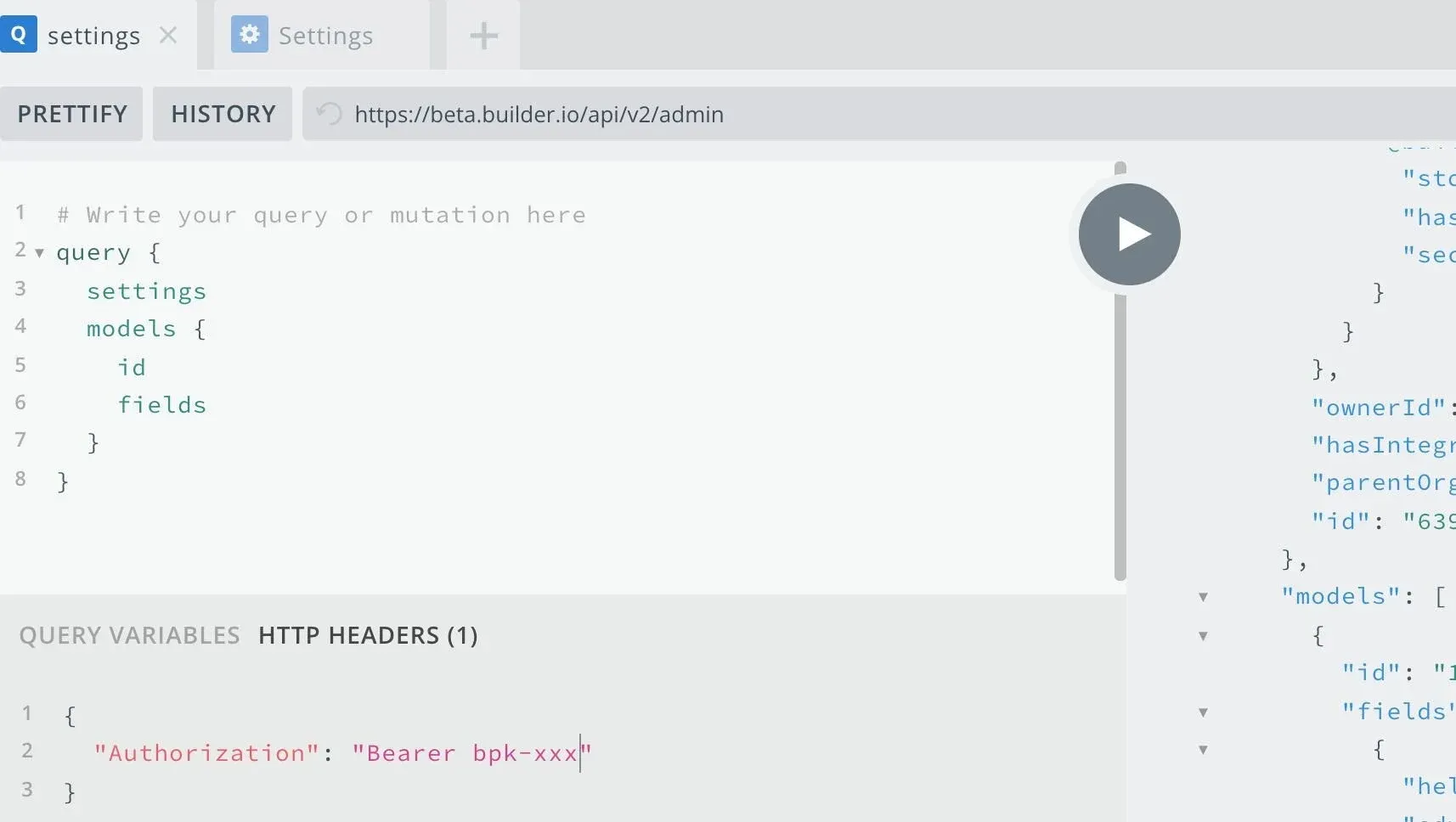
Image from the official admin-sdk README: the GraphQL Admin API explorer at builder.io/api/v2/admin with a private key in the HTTP headers.
Source: official Builder.io project page.
Key capabilities
- Install a React SDK For React, Next.js, Remix, Hydrogen and Gatsby, Builder documents
@builder.io/react(Gen 1) and@builder.io/sdk-react(Gen 2), installed from npm. The SDK comparison recommends Gen 1 for React and Gen 2 for Remix and Hydrogen. Gen 1 permits React 16.8 and later in its peer range, but the CI-tested minimum is React 18.2.0, and Next.js App Router is tested from 15.5 with React 19. - Install a Gen 2 SDK for other frameworks Vue and Nuxt use
@builder.io/sdk-vue, Svelte and SvelteKit use@builder.io/sdk-svelte, Solid uses@builder.io/sdk-solid, Qwik uses@builder.io/sdk-qwikand Angular 17 or later uses@builder.io/sdk-angular. The repository README lists tested minimums such as Vue 3.3.9, Nuxt 3.8.2, SvelteKit 2.8.3 and Angular 17.3.12. Gen 1 Angular and Gatsby packages have no end-to-end fixture. - React Native and the RSC package
@builder.io/sdk-react-nativeis tested on React Native Web with react-native 0.74.2; the repository notes that native devices are not tested.@builder.io/sdk-react-nextjsexists only for registering React Server Components and is tested on Next.js 14.2, which is no longer supported upstream. The Android folder is a sample, not a published SDK. - Project scaffolding and Devtools
npm init builder.io@latestruns an interactive setup or takes a starter name, for examplenpm init builder.io@latest nextjs my-site. The Builder Content quickstart installs@builder.io/dev-tools, adds your public API key to a generated page file and writes component registration code when you toggle components on. Webpack and Vite setups still need a manual route. - Visual Editor with your components Editors drag built-in blocks and your registered components onto a live preview of your own site loaded in an iframe. Gen 1 registers components with
Builder.registerComponent(); Gen 2 passes acustomComponentsarray toContent. Each registration declares typed inputs, which become the props the editor can change. Components-only mode can restrict editors to your registered components. - Pages, sections and data models Every space starts with a
pagemodel; section models hold reusable regions such as banners, and data models hold structured fields with no layout. Pages and sections store ablocksarray, while data entries are plain fields. Custom models can add field types, and the models guide explains when to use each. - Content API Entries are read from
https://cdn.builder.io/api/v3/content/{model}with a case-sensitiveapiKeyparameter, MongoDB-stylequeryfilters anduserAttributesfor targeting. The defaultlimitis 30 and the maximum per request is 100, withoffsetfor paging. Responses come from an edge cache with stale-while-revalidate, so a published change can briefly be served stale. - Write, GraphQL, HTML and Admin APIs The Write API creates, replaces, patches and deletes entries with a private key; a PUT deletes any property you omit, and writes trigger webhooks unless you add
triggerWebhooks=false. A GraphQL Content API and an HTML API cover other delivery needs. The@builder.io/admin-sdkpackage wraps the GraphQL Admin API for models and space settings. - Targeting and scheduling Entries carry targeting rules such as URL path, device or locale, and the SDK passes matching
userAttributeswhen it fetches content. Commerce plugins add customer and cart attributes. Models can enable scheduling so entries publish and expire at set times, and the Content API offersexcludeExpiredto drop expired entries. - A/B tests and insights Pages, sections and data entries can be split into variations with a traffic ratio, tracked in a
builder.tests.<id>cookie that now persists for 30 days. Visitors with tracking disabled always get the control, as do search engines. The Insights tab shows conversion data and a click heatmap; heatmaps depend on event tracking, which the HTML API does not send automatically. - Symbols and design tokens Symbols are reusable block groups that can be edited once and reused across entries; the Content API can inline them with
enrich=trueup to four levels deep. Design tokens let you expose your own colors, spacing and fonts in the editor instead of free-form values, keeping edits within the design system. - Localization Locales are registered in Builder and content is supplied per field (inline localization) or as whole entries per locale. Gen 2 SDKs accept a
localeand resolve localized values without mutating content since 5.3.0. The localization docs name Crowdin, Phrase and Smartling as translation integrations, and the repository includes Smartling and Phrase plugins. - Plugins and commerce integrations The
pluginsfolder contains editor plugins published under@builder.ioon npm, including Shopify, BigCommerce, commercetools, Salesforce Commerce, Swell, VTEX, Magento 2, Contentful, Contentstack, Kontent.ai, Algolia, Cloudinary and Smartling. Plugins add custom field types, data connectors or app panels to the editor. Custom plugins use the documented plugin API. - Figma and Chrome import The Builder Figma plugin imports frames into a Content space or sends them to a Code space for code generation. It requires a Figma seat and edit access to the file. A Chrome extension can copy layouts from an existing website at several screen sizes into a Builder entry.
- Builder Code (AI product) Builder Code connects a Git repository (GitHub, GitLab and Bitbucket on all plans; Azure DevOps and enterprise Git on Enterprise) and edits it through AI agents and the Visual Editor. A local repository connects with
npx "@builder.io/dev-tools@latest" launch; the docs list React, Vue, Svelte and Angular as supported and require network access to*.builder.ioand Firebase hosts. This product is separate from the MIT SDKs and uses plan credits. - CLI for space import and export
npm install -g @builder.io/cliprovides an experimentalbuildercommand.builder importdownloads a self-contained clone of a space (with new IDs) to the file system using a private key, andbuilder createbuilds a new space from that directory.builder integrateadds a catch-all page route to a Next.js project. - Tracking and consent controls The SDKs set
builderSessionIdandbuilderVisitorIdcookies for analytics and record impressions, clicks and heatmap positions. Tracking is turned off withbuilder.canTrack = false(Gen 1),canTrack={false}onContent(Gen 2) orwindow.builderNoTrackfor the HTML API. Builder says IP addresses are masked before storage. - Examples and starters The repository includes more than 35 example apps, including Next.js App Router and Pages Router, Vue, Svelte, Remix, Qwik, Angular, Gatsby, Astro with Solid, React Native, Swift, TanStack Start, Storybook and a headless Shopify store. They show page building, section building, localization and on-demand ISR with real SDK calls.
Where Builder.io fits
Letting marketers build landing pages on a Next.js site
Install the SDK, add a catch-all route that fetches the page model with userAttributes.urlPath set to the request path, and render the result with your header and footer around it. Register the components editors may use and set a preview URL for the model. Check that unpublished paths return a 404, that static generation or ISR revalidates after a publish, and that the SDK version matches the router you use. The page integration guide covers each framework.
Editable sections inside a coded page
Keep the page in code and fetch a section model, such as an announcement bar or hero, for a specific slot. Target sections by URL path or attributes so one entry can appear on many pages. Verify what renders when no entry matches, and that a slow Content API response does not block the rest of the page.
Structured content for an existing frontend
Use data models for blog posts, navigation or product copy, query them with fetchEntries() or the REST endpoint, and render them with your own templates. Use fields or omit to shrink payloads and enrich to resolve references. Plan pagination around the 100-entry request limit and decide whether webhooks or cachebust at build time handle freshness.
Running an A/B test on a campaign page
Create variations on a published entry, set the traffic split and define the conversion event your app reports with track() or the SDK. If pages render several Content components, wrap them in BuilderScripts on Gen 2 5.4.0 or later so the test helper scripts are emitted once. Confirm that the consent banner switches canTrack correctly and that cached HTML does not pin every visitor to one variation.
Localizing content across markets
Register locales in the space, choose inline field localization for shared layouts or separate entries where markets need different structures, and pass the visitor locale to the SDK. Connect a translation plugin if translators work in Smartling, Phrase or Crowdin. Test fallback behavior for missing translations and confirm that cached content for one locale is never served to another.
Migrating or backing up a space
Use builder import from the CLI to export models and content to the file system, keep the directory in version control or storage you control, and recreate it with builder create in a test space. Since the clone receives new IDs, check references and symbols afterwards. For scripted changes, use the Write API with webhooks disabled to avoid loops.
Install
npm init builder.io@latestReviews of Builder.io
Be the first to share your experience with Builder.io.
Write a review
Loading review form…
Alternatives to Builder.io
 WebflowWebflow is a hosted website platform with a visual builder, CMS, hosting, SEO tools and REST APIs, aimed at marketing, design and engineering teams.
 Payload CMSOpen-source, code-first CMS and application framework for Next.js and TypeScript. One config generates an admin panel, REST and GraphQL APIs, auth and access control on MongoDB, Postgres or SQLite.
 StrapiStrapi is an MIT-licensed headless CMS in JavaScript and TypeScript with a visual Content-Type Builder, generated REST and GraphQL APIs, i18n, roles and plugins, self-hosted on Node.js or on Strapi Cloud, with paid Growth and Enterprise features.