

What is Codync?
Codync is a free, open-source application for delegating work to the coding agents installed on your own computer. Claude Code, Codex, Cursor, Gemini CLI, GitHub Copilot, OpenCode, Pi, Grok Build, Hermes Agent and other agents from the Agent Client Protocol registry become persistent, named bots that you message from an iPhone, a desktop window or a terminal. Each bot has its own agent, project folder, standing instructions and approval policy. Codync ships no model of its own and never calls a provider's API with your login: the agent CLIs already signed in on the computer do the work under your existing Claude, ChatGPT or other plan. The project is developed by GitHub user leepokai and is presented on the official website as a personal project, with no company named.
The architecture has three layers. codync-host is a Rust daemon for macOS, Windows and Linux that speaks ACP to each agent, stores transcripts in SQLite under ~/.codync and serves clients over loopback HTTP and server-sent events on 127.0.0.1:19222. Clients are a native SwiftUI iPhone app, one Electron desktop app for macOS, Windows and Linux, and a terminal UI started with codync-host tui. Remote phones reach the host directly on the same network or over Tailscale, or through an end-to-end encrypted Cloudflare relay; push notifications pass through a separate APNs relay that only sees sealed text.
Distribution covers a macOS DMG for Apple Silicon and Intel, a Homebrew cask and formula, a per-user Windows x64 installer (an ARM64 installer is also attached to releases), Linux AppImage, DEB and tar.gz packages, a curl install script for macOS and Linux servers, and the App Store iPhone app. A native Kotlin Android client exists in the repository and is offered through a Google Play test sign-up on the website. The Mac app is signed and notarized; the Windows installer is not code-signed yet, and the project has applied for free signing through SignPath Foundation.
The release recorded for this profile is 2.40.3, published November 6, 2026, which fixes an iPhone launch crash on some iOS 27.2 betas. Release 2.40.0 lets a bot keep a dev server or watch build running apart from its agent and lets each computer choose which agents appear in Usage. Release 2.39.0 added a message queue while a bot works and Italian; 2.38.0 added Brazilian Portuguese and Russian, an analytics consent prompt in the Windows installer and codync-host cloud --leave. Releases 2.41.0 and 2.41.1 followed on November 7 and make every app usable without an account, pairing by QR code over Wi-Fi or Tailscale. The project began in March 2026 as a Claude Code monitor for macOS and iPhone.
The code is licensed under Apache 2.0; versions up to 2.11.0 were MIT. The license does not cover the Codync name, logo or the hosted Codync Cloud, which is free for personal use on your own computers; hosted, resold or multi-tenant services must run their own relay, as stated in TRADEMARK.md. Out of scope: Codync does not sandbox agents, does not provide models, and does not make an agent's actions safer than the permission mode you choose for it.
Codync screenshots
Explore the interface. Open a screenshot to view it at full size.
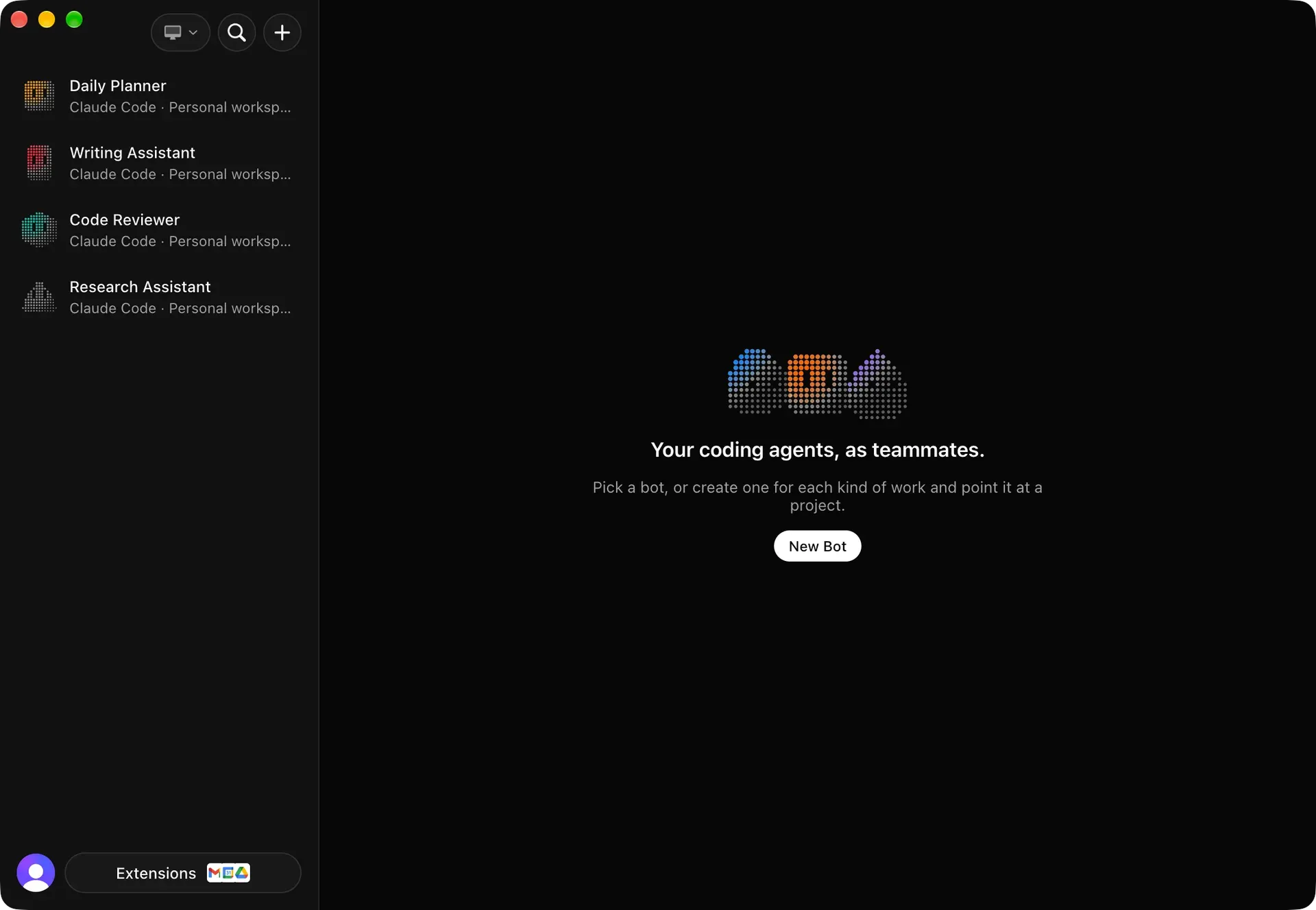
Official repository screenshot of the macOS desktop app: Daily Planner, Writing Assistant, Code Reviewer and Research Assistant bots, each on Claude Code.
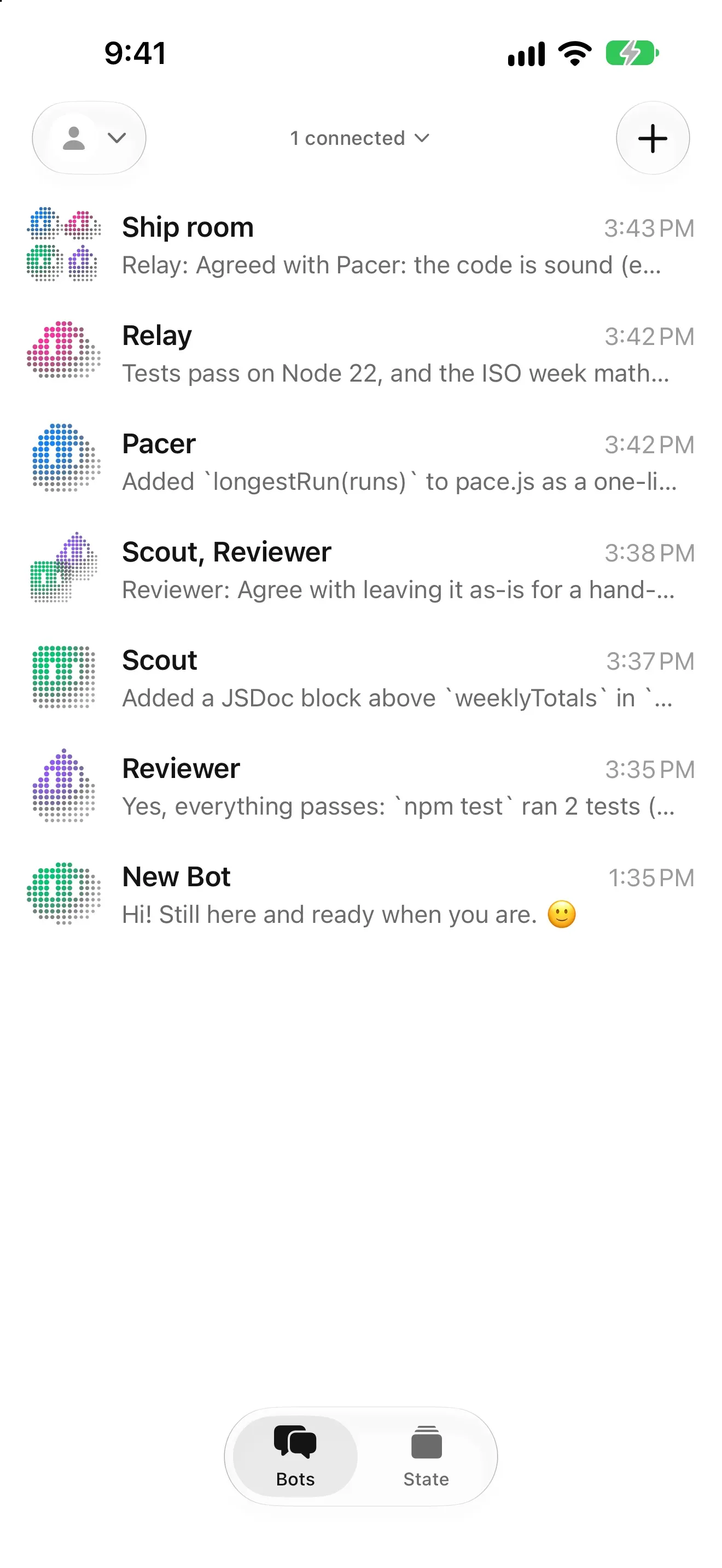
Official App Store screenshot: the iPhone roster with the Ship room group chat and the Relay, Pacer, Scout and Reviewer bots.
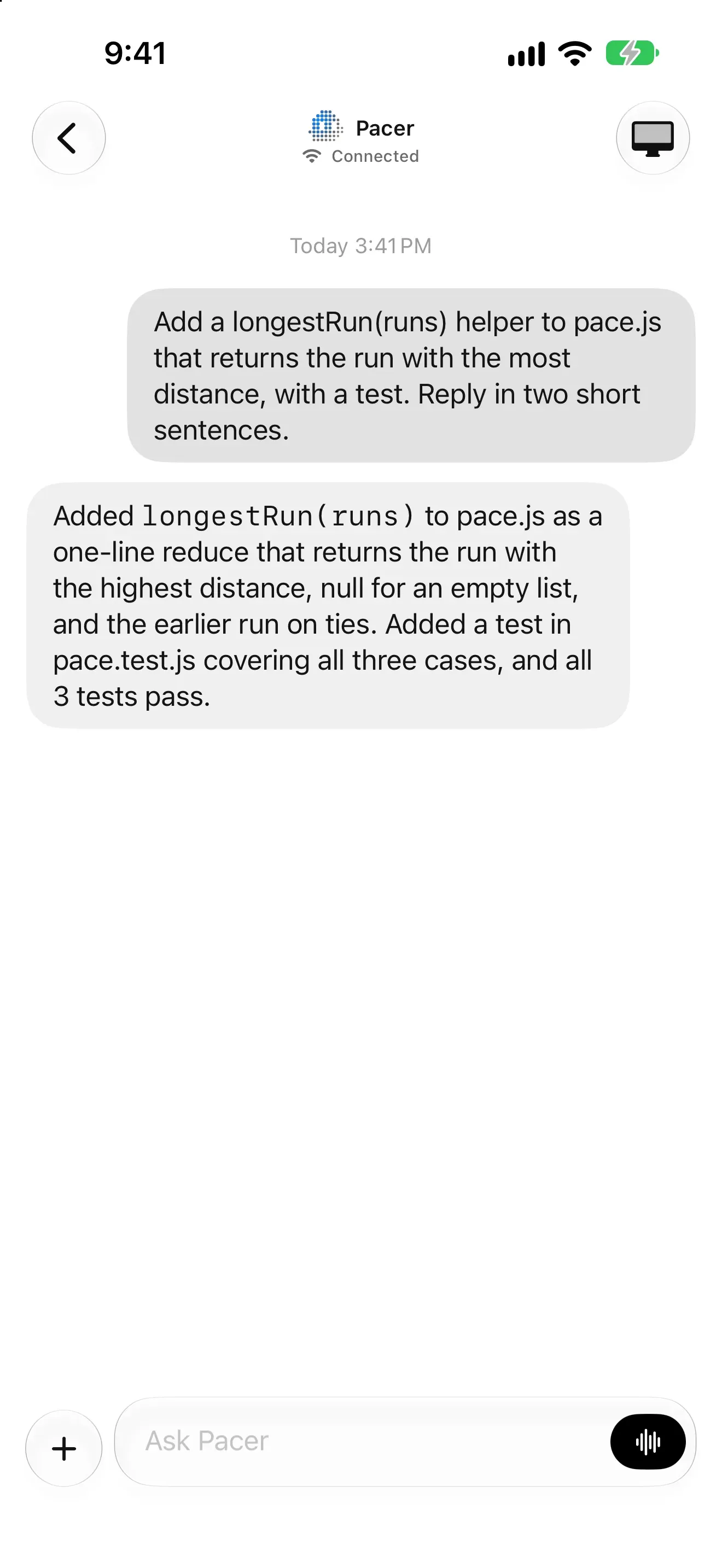
Official App Store screenshot of a bot chat: a request to add a helper with a test, and the bot's final reply.
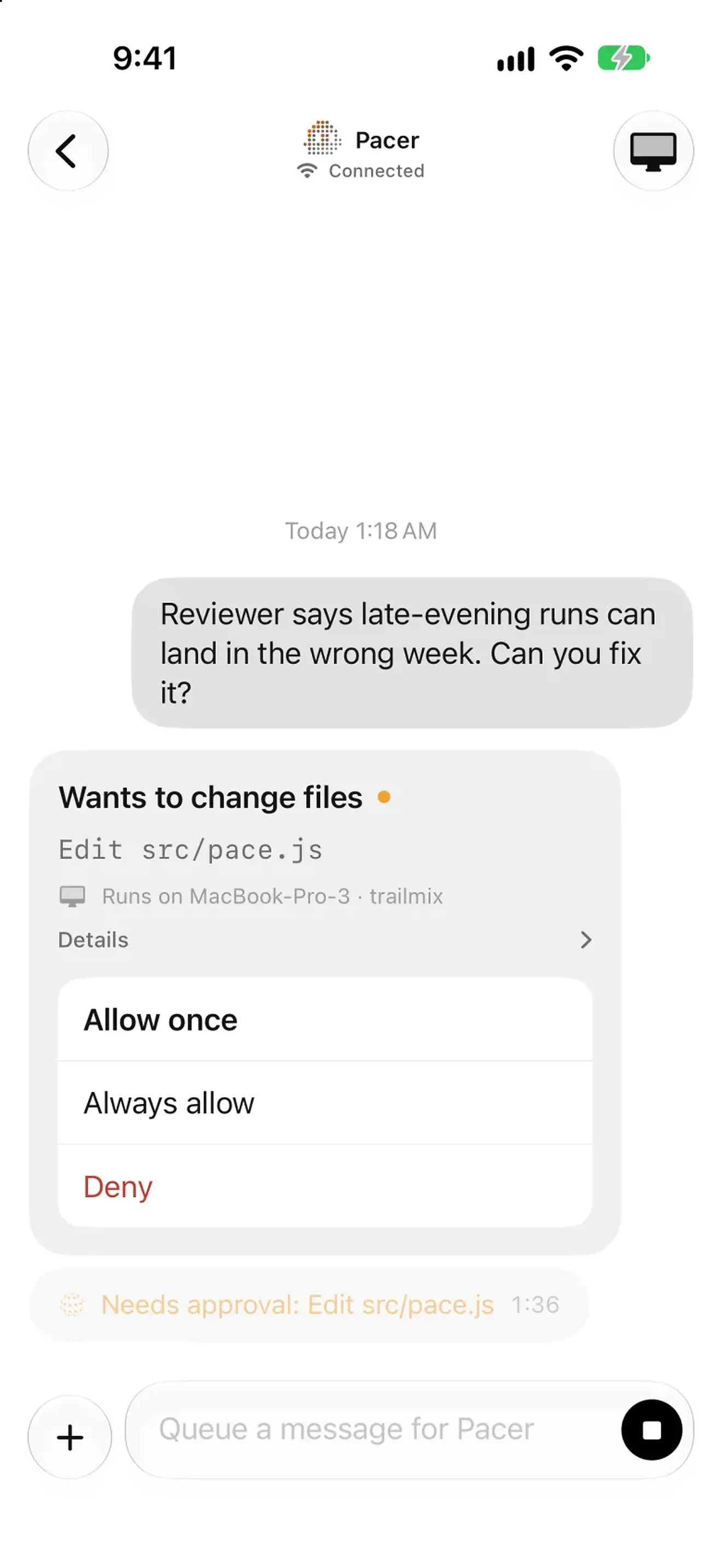
Official App Store screenshot of an approval card for a file edit, naming the computer and project it runs on.
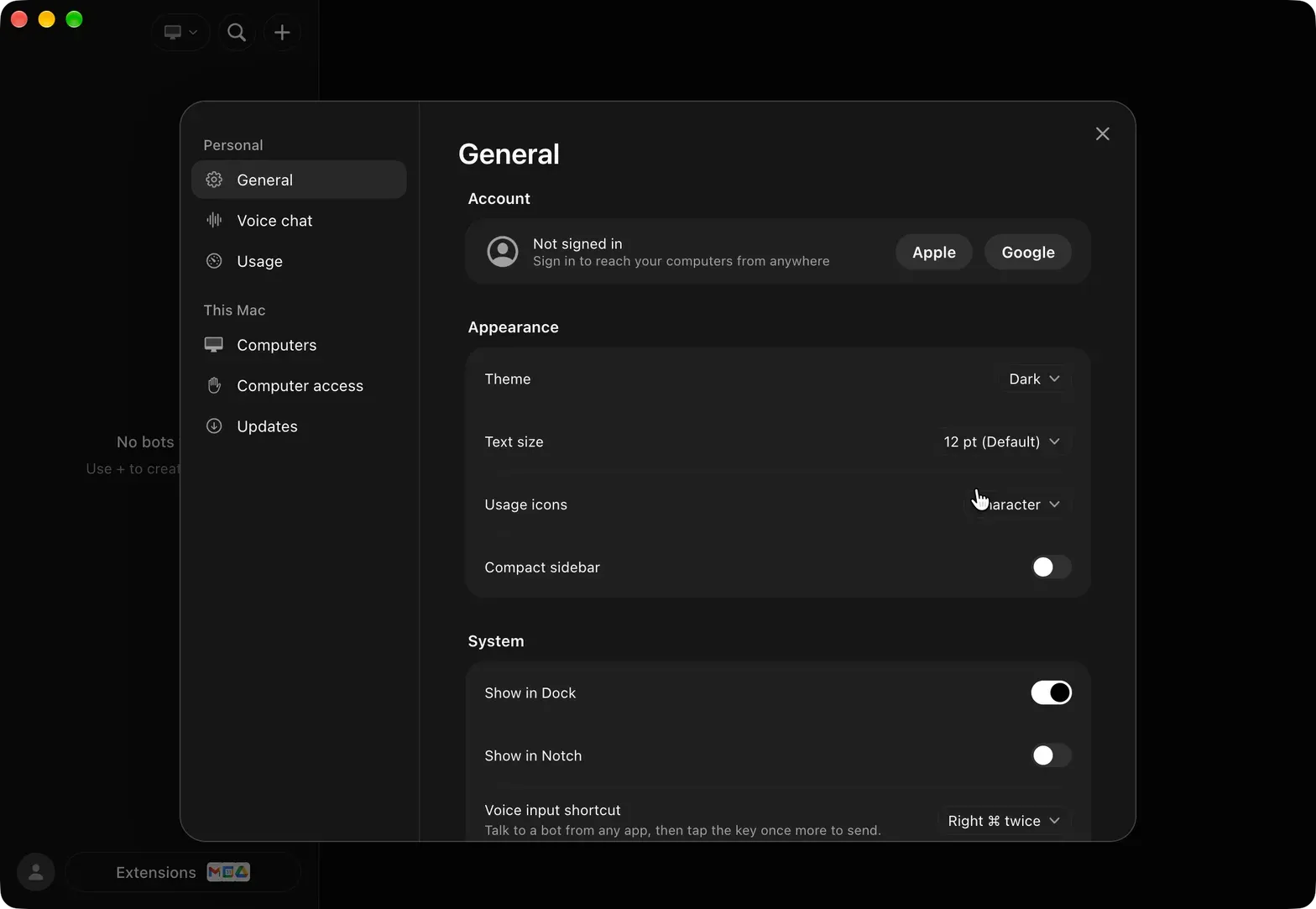
Official release screenshot from version 2.23.0: desktop settings with Apple and Google sign-in, theme, text size and Dock options.
Source: official Codync project page.
Key capabilities
- Download for macOS A DMG for Apple Silicon and Intel Macs, or
brew install --cask leepokai/codync/codync; both install the same signed and notarized app. The README lists macOS 14 or later. On first launch the app installs the host as a launchd background service and lives in the menu bar, with Pair iPhone showing the pairing QR code. Packages and SHA256 files are on the latest release page. - Download for Windows A per-user x64 installer that starts the host at sign-in through the Run registry key; an ARM64 installer is also attached to releases. The installer is not code-signed yet, so SmartScreen asks for confirmation once. Remote screen, on-device speech and the Claude Code status line hook are not available on Windows. Since 2.38.0 the installer asks before sharing usage analytics.
- Download for Linux and servers The curl script installs the host, plus the desktop AppImage when a graphical session is present;
--host-onlyskips the app. Manual options are AppImage, DEB or tar.gz for x86_64 and arm64, orbrew install leepokai/codync/codync-host. AppImages need FUSE 2, and on Linux the desktop app does not bundle the host. The Linux server guide covers systemd user services andloginctl enable-linger. - iPhone app A native SwiftUI client from the App Store, free, requiring iOS 26 or later according to the getting-started guide. It shows the bot roster, chats, approval cards, push notifications, a Live Activity and home screen widgets for bots and usage. Because App Review delays iPhone releases, the host holds back an update that needs a newer iPhone app until that version is live.
- Persistent bots A bot combines a name, a character avatar, standing instructions, an agent backend, a project folder and a permission policy, with one persistent chat. The agent sessions underneath are resumed or restarted as needed. Permission modes are Auto (the default, where the agent asks about what it cannot decide safely), Manual and Approve automatically.
- Agent detection through ACP The host rebuilds PATH from your login shell plus Homebrew, nvm, bun, volta, asdf, mise and pnpm locations, finds installed agents and prefers their native ACP mode. Registry agents that are not installed are fetched on first use through npx, uvx or a checksummed binary. Claude Code, Codex and Pi run through ACP adapters fetched by npx, so they need Node.js.
- Group chats and bot collaboration A group holds several bots; each message starts a room turn where mentioned bots reply one at a time in their own sessions, for up to 3 rounds. A built-in
teamMCP server lets one bot ask another for a review, and each recipient keeps its own agent, folder and approvals. See the group chat documentation. - Approval cards and full trace The chat shows your messages, each turn's final reply, approval cards and notices. Tool calls, diffs, plans and reasoning are one tap away in Full conversation. Approvals offer Allow once, Always allow or Deny, and a running bot's row shows its current activity.
- Routines and webhooks Routines run a bot on a schedule (hourly to five-field cron, in a chosen time zone), once, at an interval or when an authenticated webhook arrives, with GitHub deliveries recognized. Each run starts a fresh session, times out after 1 hour by default (adjustable up to 24 hours), and runs only while the computer is awake. Public webhook bodies are capped at 64 KB and are readable by the relay; details are in the routines guide.
- Per-bot memory Each bot keeps a
MEMORY.mdof one-line facts plus topic notes as plain Markdown in~/.codync/bots/<bot id>/bot-memory/. Built-in memory tools work the same with every agent, and writes containing hidden characters, keys, passwords or card numbers are rejected. Removed facts stay in history for 30 days. The memory documentation lists size limits. - Connectors and skills Connectors are MCP servers added from the official MCP Registry, as custom commands or hosted URLs, or through Composio. Secrets are encrypted in the local database with a key from Keychain, Credential Manager or a Secret Service keyring, and 1Password
op://references are supported. Skills are folders with aSKILL.md. Credentials do not sync between computers. - Dev servers Since 2.40.0 a bot can keep a dev server or watch build running under Codync rather than under its agent, so it survives agent restarts. Every app lists the bot's servers with port, address, logs and restart or stop controls, but only a bot can start a new one. Under Ask the command needs approval first.
- Remote screen and computer use The iPhone can view and control the computer over WebRTC with hardware H.264, and bots can drive the screen through the built-in
computertool. Remote screen is not available on Windows and needs a graphical session on Linux. When no direct path exists, video goes through a Cloudflare TURN relay that cannot see the content. - Voice calls and dictation Talk to a bot hands-free from the iPhone and hear replies read aloud, with on-device speech recognition. Since 2.39.0 calls report recognition failures and end after three rapid failures. The macOS desktop app adds a global voice input shortcut.
- Usage limits The host reads each agent's plan limits locally without a model call and shows them in the apps, widgets and the macOS menu bar. Since 2.40.0 each computer chooses and orders the agents shown; agents nobody runs are not started and their logins are not read.
codync-host installwraps an existing Claude Code status line to collect live limits. - Command line and scripting The
codync-hostbinary handles install, pairing, status, device access and revocation, token rotation and relay settings.codync-host send --bot <name> --wait --jsonsends a message from a script and returns the reply as JSON with exit codes 0 to 4, never approving requests on its own.codync-host importbrings bots in from another app's export file. - Remote access options Phones connect directly on Wi-Fi, over Tailscale, through your own HTTPS reverse proxy that forwards only
/channel, through the free Codync relay with an account, or through a self-run private relay limited to 32 computers. Pairing codes are single-use and expire after 10 minutes; account access requests need a 6-digit code confirmed on the computer. The remote access guide lists each mode. - Languages Each device can follow the system language or choose English, Simplified or Traditional Chinese, Japanese, Korean, French, German, Spanish, Brazilian Portuguese, Russian or Italian, on the desktop, iPhone, Android and terminal clients. Unsupported system languages fall back to English. The release notes state that the Italian catalog began as a machine translation and has not been reviewed by a native speaker.
Where Codync fits
Delegating coding work from a phone
Install the host on the computer that already has Claude Code or Codex signed in, pair the iPhone by scanning the QR code from Pair iPhone or codync-host pair, and create one bot per project folder. Keep the permission mode on Auto so file edits and commands arrive as approval cards. Check that a notification reaches the phone when a bot finishes or needs approval, and that the approval card names the file and computer you expect. The getting-started guide covers each platform.
Running a review loop between agents
Create an implementing bot on one agent and a reviewer bot on another, for example Claude Code and Codex, then put both in a group chat or ask the first bot to request a review through the built-in team server. Each bot keeps its own folder and approvals, so confirm that the reviewer has read access to the right project and cannot approve its own edits. Group turns stop after 3 rounds, which limits runaway back-and-forth.
Operating a headless Linux build server
On a VPS or home server, run the install script with --host-only as the user who owns the agent logins, then codync-host install from a real login session and enable lingering so the service survives SSH logout. Keep port 19222 closed and connect over Tailscale, the relay or SSH with the terminal UI. Without an unlocked Secret Service keyring, saving connector secrets fails and new bots start with no connectors, so plan for that before relying on MCP tools.
Scheduling recurring maintenance
Give a bot a routine on a weekday schedule or a GitHub webhook, for example to triage new pull requests or summarize failing tests. Write the routine instructions so they stand alone, because each run starts without chat history. Set the timeout deliberately, remember that missed runs are not replayed while the computer sleeps, and treat public webhook URLs as readable by the Codync relay.
Scripting a bot from CI or a shell
Call codync-host send --bot reviewer --wait --json with the request text or --file, then branch on the exit code and the status field. Pending approvals pause the 1800-second default timeout rather than auto-approving, so a script can wait on a human decision. Group chats cannot be waited on, and duplicate bot names require an ID.
Checking agent plan usage across machines
Open the Usage screen to see each computer's agent limits, when they reset and how much is used, without spending a model call. Choose which agents appear per computer; the order and selection are shared by every app. Compare the figures with the provider's own dashboard before using them for capacity decisions.
Install
curl -fsSL https://raw.githubusercontent.com/leepokai/Codync/main/packaging/install.sh | shReviews of Codync
Be the first to share your experience with Codync.
Write a review
Loading review form…
Alternatives to Codync
 HappyHappy is an MIT-licensed harness that runs Claude Code, Codex, Grok, Gemini and ACP agents on the subscriptions you already have, with durable local sessions, an OS sandbox, Git worktrees and end-to-end encrypted iOS and Android apps.
 PaseoPaseo is an Apache-2.0 agentic development environment. A local daemon runs the agent CLIs you already use, each task in its own Git worktree, with editor, terminals, diffs and a browser, and clients for macOS, Windows, Linux, iOS, Android, web and CLI.
 OmnaraOmnara is an Apache 2.0 platform for running AI agents as a service: a Go control plane with a REST API, TypeScript SDK and CLI, durable state in Postgres, approvals, MCP tools and machines from sandboxes or your own hosts. Self-host it or use Omnara Cloud.