

What is Omnara?
Omnara is an open-source managed agent platform made by Omnara, a company backed by Y Combinator. It covers the same job as hosted services such as Claude Managed Agents or the OpenAI Agents API: an application or a team launches an agent through an API, the platform runs the agent loop, calls a model, executes tools on a machine and streams events back. The whole control plane is published under the Apache 2.0 license, works with any compatible model endpoint and can run on your own infrastructure. The project describes itself in its GitHub repository and on omnara.com.
There are two ways to use it. Omnara Cloud at app.omnara.com gives each new project a managed model provider and a pool of managed sandboxes, so a YAML agent config runs immediately. Self-hosting starts from the repository with Docker Compose and the app profile, which brings up the web console, API, workers, maintenance service and a one-shot migration job against Postgres, Redis, S3-compatible blob storage and a shared memory filesystem. The API, CLI, SDK and config format are the same in both cases. A third option, deployment and management in your own cloud account or on premises, is offered by the vendor as an Enterprise service.
The repository publishes two release lines with matching numbers: canonical container images for web, API, worker, maintenance and migrations through GitHub Container Registry (the cluster release), and omnarad daemon binaries for macOS 13 or later and Linux on amd64 and arm64 with a SHA256SUMS file. Version 0.2.20, released on November 10, 2026, lets a signing secret be created from the webhook dialog, lets GitHub bots resolve pull request review threads, records one model.call event and metrics per provider attempt, and shows whose credits ran out before retrying with output the remaining credits allow. Version 0.2.18 (November 9, 2026) added filtering of listed agents by activity state in the API, a CLI command that waits until an agent reaches an activity state, project get and rename, get-by-id for config resources, recovery of custom tool calls, project webhook management and metrics for machine pool provider calls, and it passes Slack thread files, tables and forwards to the agent. Version 0.2.19 was published the same day from the same commit without separate notes. Version 0.2.17 (November 4, 2026) added agent status as GitHub checks on pull requests. The changelog for October 29, 2026 added E2B and Superserve sandboxes, Git credentials scoped to chosen repositories, configs passed at launch time, webhooks per project, profile or agent, and per-account API rate limits.
The backend is written in Go, the dashboard and SDK in TypeScript, and the REST surface is defined in an OpenAPI file in the repository. Every step of every agent is stored in Postgres as an event log, which is what lets any stateless worker resume an agent after a crash. Machines run the small omnarad daemon, which connects outbound to the control plane, so agents can run commands on a laptop, VM or container without inbound ports or SSH keys. The architecture page lists each process and store.
Omnara is not an agent framework that you import into your own code, nor a single-machine coding assistant. It hosts agents that you define in config and call over an API. Similar projects: Agno, Letta and OpenHands. It does not train or host models itself in the open-source edition; you bring provider keys or a self-hosted endpoint. The security policy states that, until a stable release exists, fixes are applied to the latest version on main.
Omnara screenshots
Explore the interface. Open a screenshot to view it at full size.
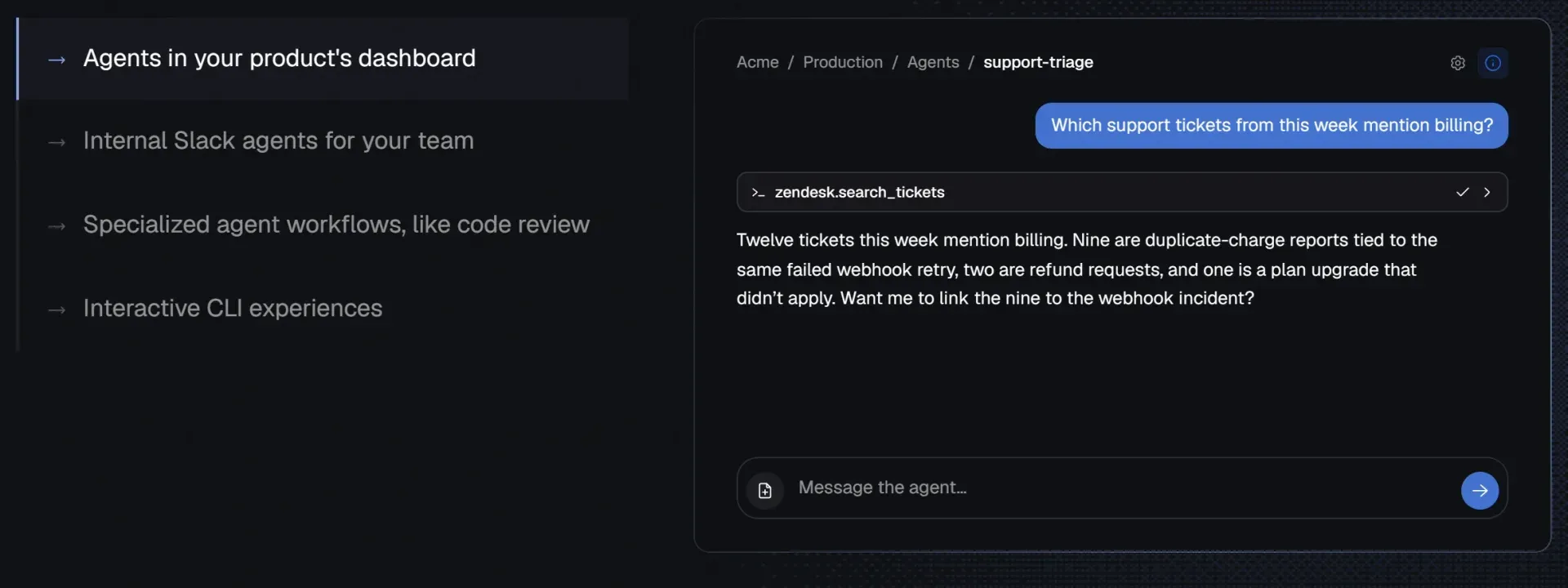
Product illustration from the omnara.com homepage: an agent embedded in a product dashboard calls a Zendesk tool and summarizes the result. Sample data, not a live deployment.
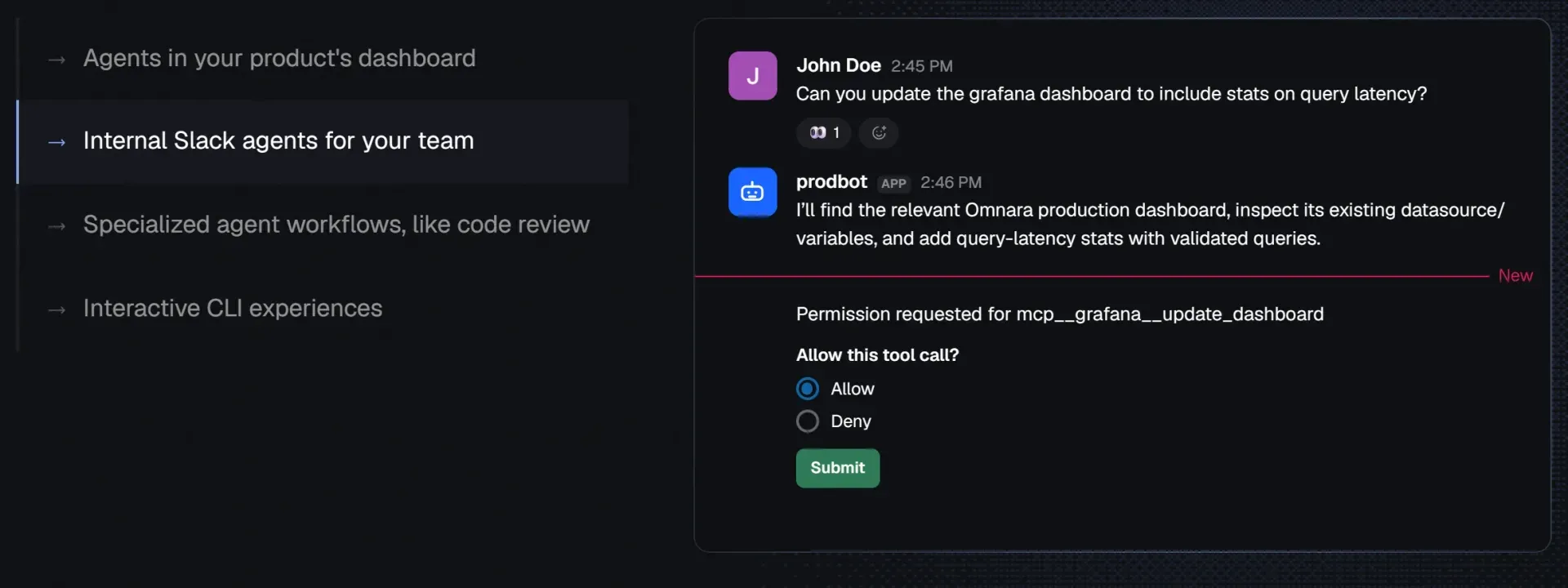
Homepage illustration of an internal Slack agent: the bot proposes a Grafana dashboard change and waits for a person to allow or deny the MCP tool call.
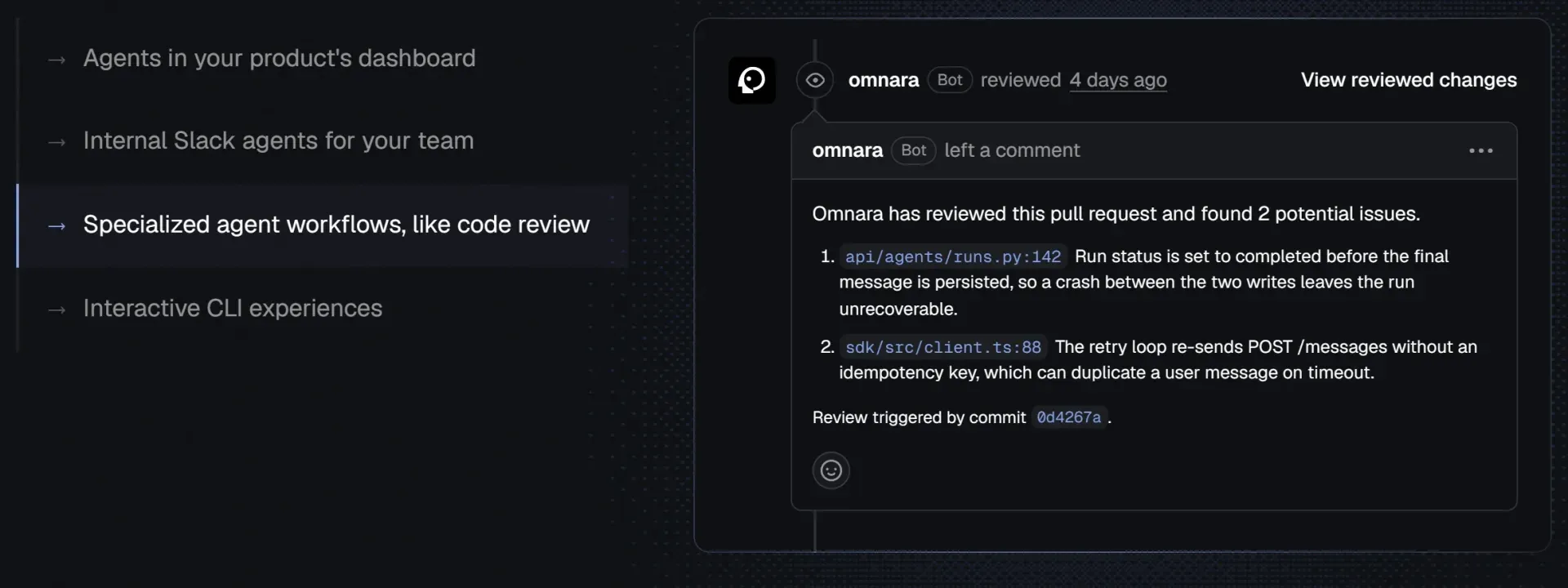
Homepage illustration of a code review agent: the Omnara bot comments on a pull request with two findings tied to specific files and a triggering commit.
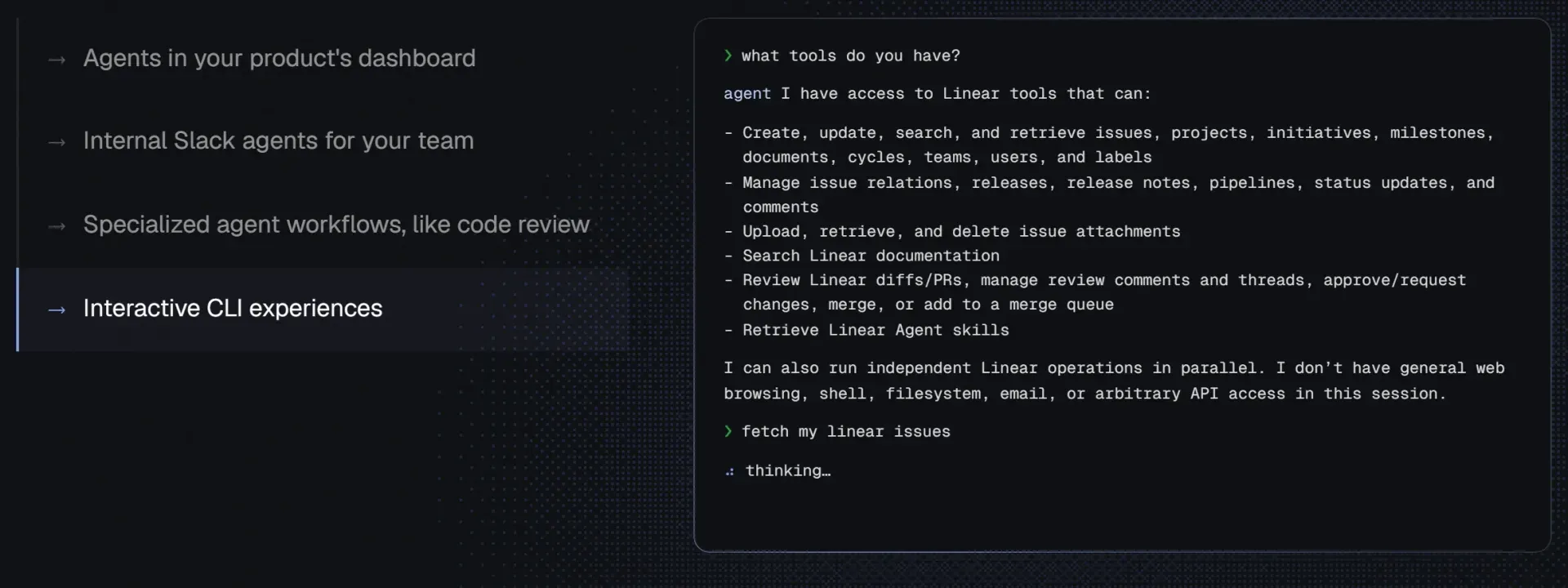
Homepage illustration of an interactive CLI agent: asked which tools it has, the agent lists its Linear operations and states that it has no shell or web access in that session.
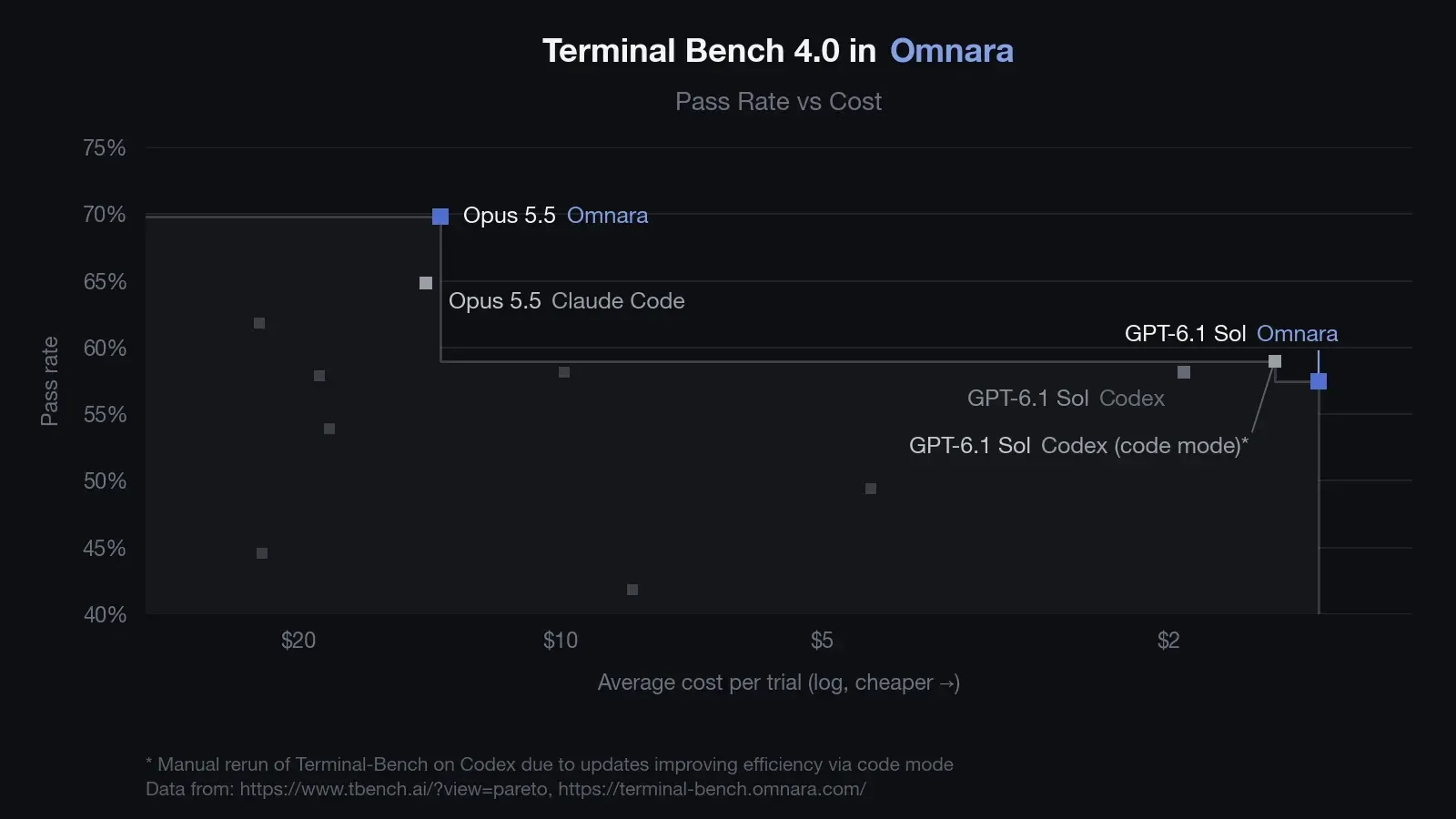
Figure from the Omnara blog post on Terminal-Bench 4.0, published November 2, 2026. These are the vendor's own benchmark results, not an independent measurement.
Source: official Omnara project page.
Key capabilities
- Self-hosted control plane with Docker Compose The repository includes
compose.yamlwith anappprofile. Running it with published release images starts the console on port 8000; adding--buildbuilds from source. Local defaults print email verification links in the API logs and use built-in encryption keys, and the self-hosting deployment guide describes production setup with your own keys and a public URL. Docker with Compose is the only stated requirement for this path. - Omnara Cloud The hosted service at app.omnara.com includes a managed OpenRouter model provider and a default sandbox pool for each new project. It has no platform fee: you can bring your own model keys and machines for free, or pay as you go for Omnara-managed models at provider token rates and for managed machines at $0.0414 per GiB of memory per hour online plus $0.20016 per GiB per 30 days retained. The pricing page now states that credits for Omnara-managed models and machines carry a 5% service fee. Idle managed machines sleep automatically and pause runtime charges. Sign-in happens in the browser, and the first CLI command opens it automatically.
- Agent configs in YAML or JSON An agent is described by a versioned config with instructions, a model, tools, MCP servers, skills, memory stores, subagents and machine sources. Configs can be stored as profiles or passed directly at launch. Agents launched from Slack, Discord or GitHub use the same configs and can be edited like any other agent.
- Any compatible model Omnara works with endpoints that speak OpenAI Responses, OpenAI Chat Completions or Anthropic Messages. Documented providers include OpenAI, Anthropic, OpenRouter, Amazon Bedrock, LiteLLM and Ollama, plus models you host yourself. Provider credentials are stored as organization secrets and shared with projects explicitly.
- Machines through the omnarad daemon A machine is any environment where an agent runs tools such as
run_command. The daemon installs under~/.omnaradas a systemd or launchd user service on macOS and Linux, amd64 and arm64, and updates itself. It dials out over HTTPS and WebSocket, so no inbound port is opened. Windows hosts are not listed as supported daemon targets. - Sandbox pools from twelve providers Pools create disposable machines on demand from Agent37, Arker, Blaxel, boxd, CreateOS, Daytona, E2B, Freestyle, Modal, Superserve, Tenki or Unikraft Cloud. Machines are created at launch or mid-conversation and deleted when released or after an idle period. On a self-hosted instance, sandboxes need the deployment to be reachable at a public URL.
- Durable execution Each model response and tool result is saved to Postgres in a transaction before the next step. Workers hold renewable leases; if a worker crashes, another one usually resumes the agent within 60 to 90 seconds. Model calls are retried up to eight times for rate limits and outages, while external tool calls that were cut off are not rerun: the agent is told the outcome is unknown. The failure handling page lists every case.
- Built-in, MCP and custom tools Built-in tools cover shell commands, files, web search and fetch, process management and asking a person a question. MCP servers are exposed as
mcp__server__tooland default to asking for approval. Custom tools are executed by your own backend through the API and wait in Postgres until you post a result. - Per-tool permissions Every tool has one of three modes:
always_allow,always_askoralways_deny. Analways_askcall pauses inawaiting_permissionuntil a person approves or denies it from the dashboard, the API, Slack or Discord. The platform enforces the mode; changing it requires a new config version applied to the agent. - Skills, memory stores and subagents Skills package instructions and files that an agent loads on demand. Memory stores are file collections that persist between conversations and can be shared between agents with read or read-write access. An agent can start subagents with a fresh context, check their progress and send new instructions; each subagent is a full agent you can inspect.
- Slack, Discord and GitHub integrations Mentioning the bot in Slack or Discord starts an agent in a thread, where it replies, asks questions and requests approvals. On GitHub an agent can start when a pull request opens or someone mentions it, then read the diff, comment and submit reviews; version 0.2.17 reports agent status as GitHub checks, and version 0.2.20 lets GitHub bots resolve review threads. Git credentials can be limited to chosen repositories or made read-only.
- REST API, event streaming and webhooks The REST API is defined in an OpenAPI file and covers launches, input, approvals, machines, secrets and configuration. Events stream over server-sent events, or arrive as webhooks attached to a project, profile or single agent; since version 0.2.20 a signing secret can be created from the webhook dialog. Listed agents can be filtered by activity state (version 0.2.18). Omnara Cloud applies rate limits of 100,000 reads and 50,000 writes per hour per account, returning
429withRetry-After. See the API overview. - TypeScript SDK and CLI The
@omnara/sdknpm package creates configs, launches agents and opens event streams from Node.js code. TheomnaraCLI, run withnpxon Node.js 22 or newer, manages agents, profiles, machines, model providers, secrets, skills and cron triggers, and can chat with an agent in the terminal. Since version 0.2.18 it can wait until an agent reaches a given activity state. Both target Cloud or a self-hosted API URL. - MCP server for coding agents Claude Code, Codex, Cursor or another MCP client with OAuth support can connect to
https://app.omnara.com/mcpto launch and manage Omnara agents. Sign-in happens in the browser, so no token is pasted. The server is listed in the MCP Registry ascom.omnara/omnara, and a setup skill at omnara.com/SKILL.md walks a coding agent through configuration. - Schedules and live config changes Cron triggers with time zones can message an existing agent, launch a new one from a profile or start a new Slack or Discord thread. A running agent's model, tools, permissions or instructions can be changed through the API; the change applies at its next model call without restarting the conversation.
- Organizations, roles and secrets One deployment serves many organizations, each with members, projects, secrets, model providers and machines. Organization and project roles apply to users and API keys. Machines and pools are organization resources that projects can use only through explicit grants, which are checked when a config is created and again at launch.
- Example agents The
examples/folder contains deployable agents, each anagent.yamlwith aSKILL.md: a Slack coding agent that opens pull requests, a PR review agent, an SRE agent, a browser agent, a PostHog analytics agent, Reddit, X and LinkedIn signal digests and a video generation agent. Code samples cover a CLI chat app, custom tools over webhooks and a SharePoint filesystem mount. - Operations and observability Workers and services expose health and metrics listeners, and the configuration reference documents worker capacity, claim concurrency, drain timeouts and webhook concurrency. Metrics such as claim deferrals and execution-state mismatches are documented as alert candidates. Version 0.2.18 added machine pool provider calls to HTTP client metrics, and version 0.2.20 records one
model.callevent and metric per provider attempt. Production upgrades run the release's migrate image directly against the Postgres writer before the API and workers start.
Where Omnara fits
Adding an agent to your own product
A project holds the model provider key as a secret and an agent config that names the model, tools and machine source. A backend calls the REST API or the TypeScript SDK to launch an agent per user or task and relays the event stream to its interface. Each tool carries its own permission mode, custom tool calls are identified by tool-call ID, and finished responses remain readable from the event log after a stream disconnects.
Running a team agent in Slack or Discord
The integration is connected to a project and attached to a profile. Team members mention the bot to start an agent in a thread, answer its questions and approve always_ask tool calls in the channel. Since version 0.2.18 files, tables and forwarded messages in a Slack thread are passed to the agent. The integrations documentation describes how provider credentials and handlers are scoped.
Automated pull request review and fixes
With the GitHub integration installed, the PR review and Slack coding examples start an agent when a pull request opens or someone mentions it. The agent works against a checkout on a machine, comments and submits reviews, reports its status as a GitHub check (from release 0.2.17) and can resolve review threads (from release 0.2.20). Git credentials can be limited to chosen repositories and set to read-only, and pushing code requires an integration setting that allows it.
Running agents on your own hardware
omnarad installs on a build server, a GPU host or a laptop with access to internal networks; the machine is then granted to a project and referenced by machine_name. The daemon dials out, so no inbound port is opened. A machine reports online and executable states, and when a host goes offline the agent is told after 30 seconds that the machine is unreachable and can wait or move to another machine.
Scheduled reporting and monitoring agents
A cron trigger with a time zone messages an agent or launches one from a profile on a fixed schedule. The repository examples include a PostHog analytics agent that compares yesterday with the 7-day average and signal agents that summarize posts from the last 24 hours. Results can go to a Slack thread, a webhook or the dashboard.
Self-hosting for data control
The documented path starts with Docker Compose on one host and moves to managed Postgres, Redis, an S3-compatible bucket and a shared filesystem for memory. The deployment docs cover setting OMNARA_PUBLIC_URL on every backend service, replacing the development encryption keys, running the migrate image before each upgrade and backing up the memory directory together with Postgres. The configuration reference lists every variable with its default.
Install
git clone https://github.com/omnara-ai/omnara.git && cd omnara && docker compose -f compose.yaml --profile app up -dReviews of Omnara
Be the first to share your experience with Omnara.
Write a review
Loading review form…
Alternatives to Omnara
 LettaLetta Code is an open-source stateful agent harness whose agents keep memory and identity over time, used from a CLI, a browser or messaging apps.
 OpenHandsOpenHands Agent Canvas is an MIT-licensed control center for coding agents. It runs the OpenHands agent or ACP agents such as Claude Code and Codex on local, Docker, VM, Kubernetes or cloud backends, with scheduled and event-driven automations.