

What is xyOps?
xyOps is a self-hosted platform for job scheduling, visual workflow automation, server monitoring, alerting and incident response, published by PixlCore LLC under the BSD 3-Clause license. The repository describes it as the next generation of Cronicle: it is built by Joseph Huckaby, the creator of Cronicle, and carries that scheduler's job and plugin concepts forward into a new architecture. The documentation summarises it as a job scheduler, workflow engine and server monitoring platform with a built-in web UI and REST API.
An installation has two roles. The conductor runs the web interface, API, scheduler and database. xySat (xyOps Satellite) is the worker agent installed on the servers where jobs run and metrics are collected; it is available for Linux, macOS, Windows and Docker, ships as a self-contained package and, unlike Cronicle workers, does not need Node.js. Workers always open an outbound WebSocket to the conductor on port 5522 (HTTP and ws) or 5523 (HTTPS and wss). Several conductors can form a cluster with failover when they share external storage, as described in the self-hosting guide.
The conductor is a Node.js application built on the pixl-server framework. The default single-conductor setup stores structured data in SQLite and files on the local filesystem; the storage guide lists Redis or PostgreSQL for JSON data plus S3 or an S3-compatible service such as MinIO or RustFS for files as the configurations for production and multi-conductor deployments. Distribution is a container image at ghcr.io/pixlcore/xyops, an official installer script for Linux, macOS and other POSIX systems, and release tarballs on GitHub.
The project states that the complete application, including SSO, secrets, buckets, high availability and air-gapped operation, is in the public BSD-licensed source, that there is no separate commercial build or license key, and that the application sends no telemetry to PixlCore or any other service. Paid Professional and Enterprise plans are support subscriptions and do not unlock features, per the pricing section. A longevity pledge commits the project to remaining under an OSI-approved license. The contributing guide states that feature pull requests are not accepted.
The first public releases (v0.9.x) appeared in December 2025 and v1.1.0 followed in September 2026. The latest release at the time of writing is v1.1.16, published November 11, 2026, which adds plugin-based hybrid SSO with local login, an optional maximum queue wait time, a see_all_users privilege and user visibility restricted by category and group access. Earlier 1.1.x releases added per-extension configuration editors (v1.1.15), a Preserve Severity workflow result policy (v1.1.13) and a list of active extensions on the System page (v1.1.12). The project marks release v1.1.14 as an accidental release not to be installed.
xyOps screenshots
Explore the interface. Open a screenshot to view it at full size.
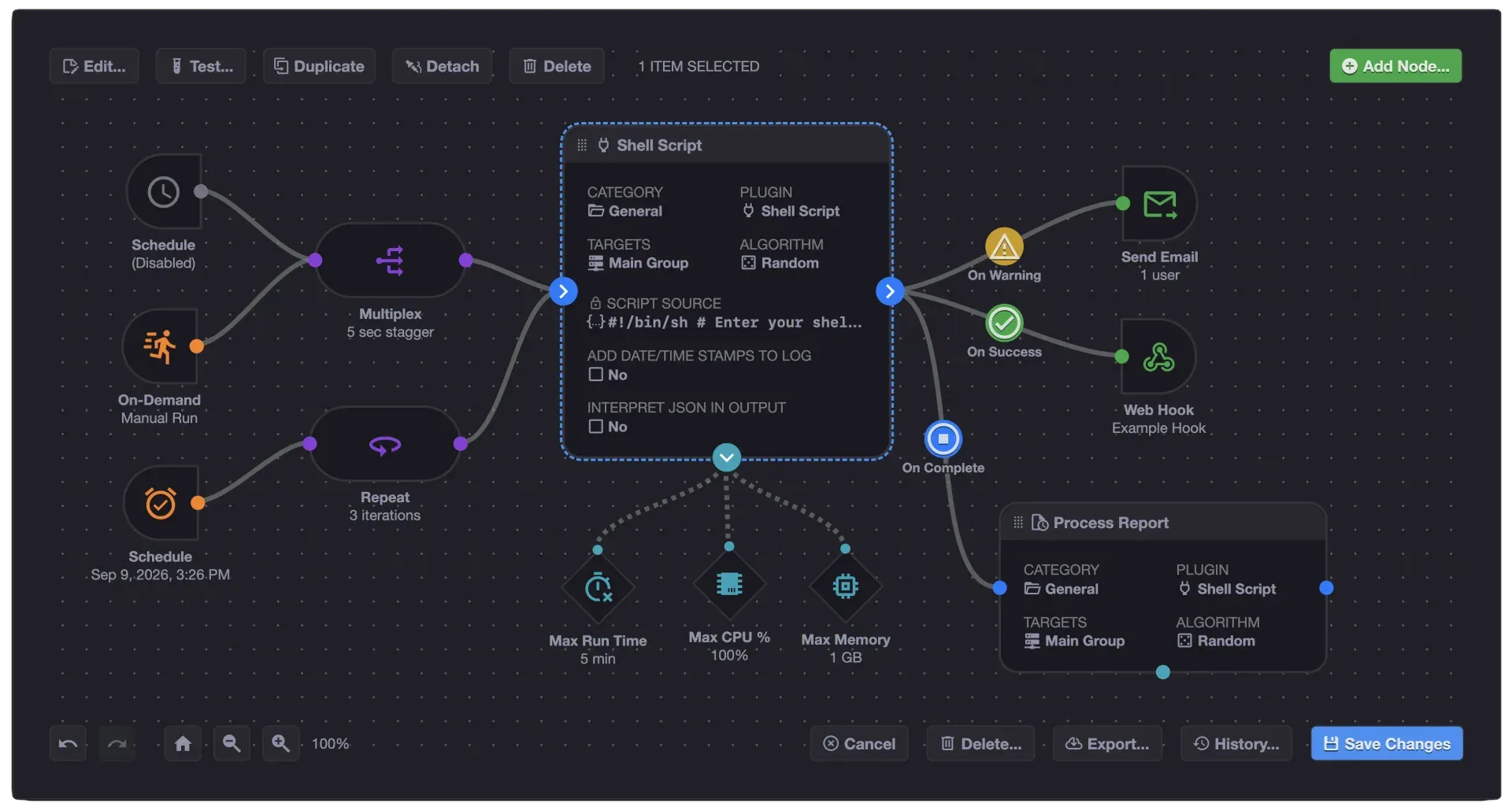
Official screenshot of the visual workflow editor, from xyops.io.
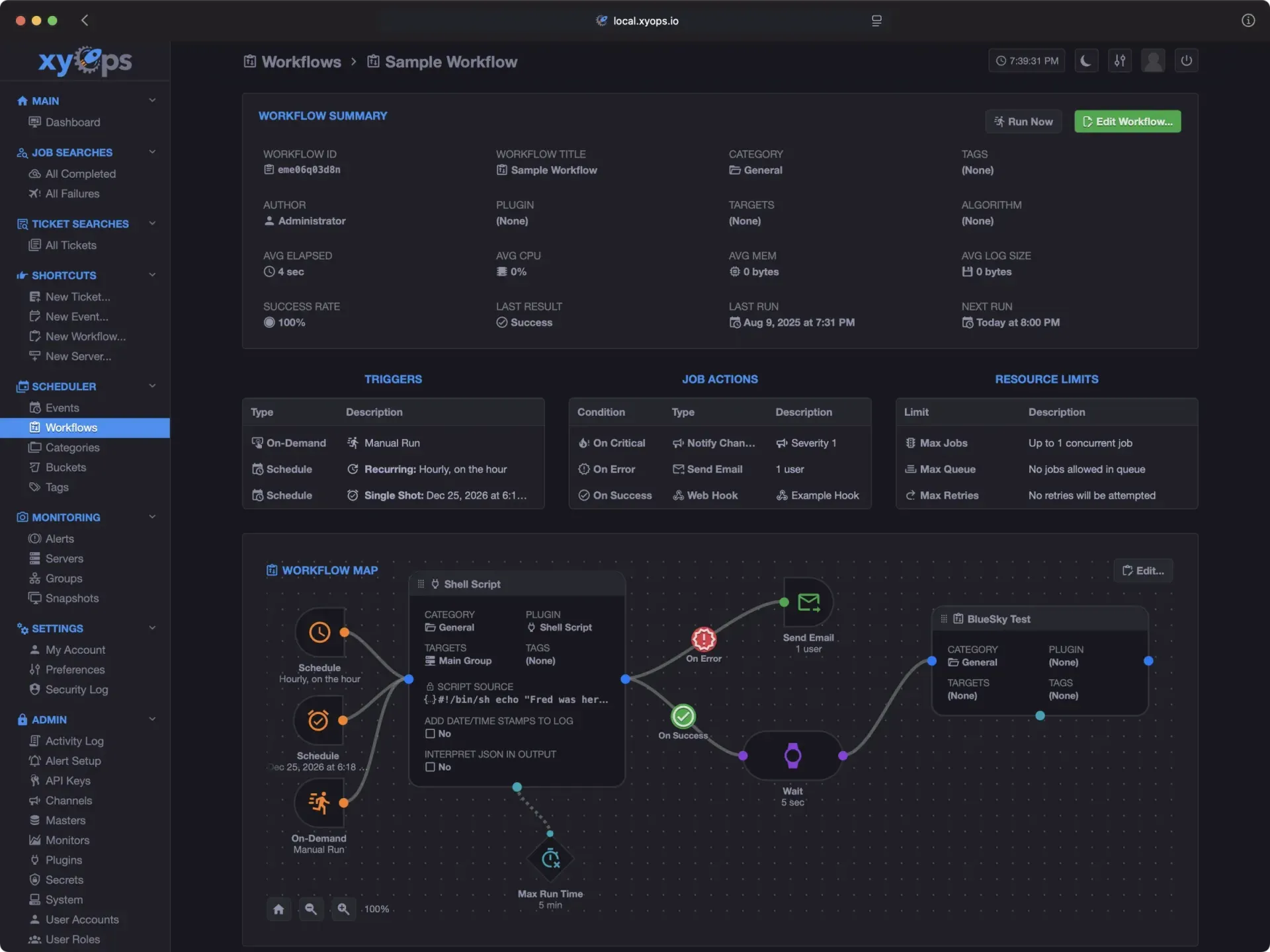
Official screenshot of a sample workflow page with the application sidebar, from xyops.io.
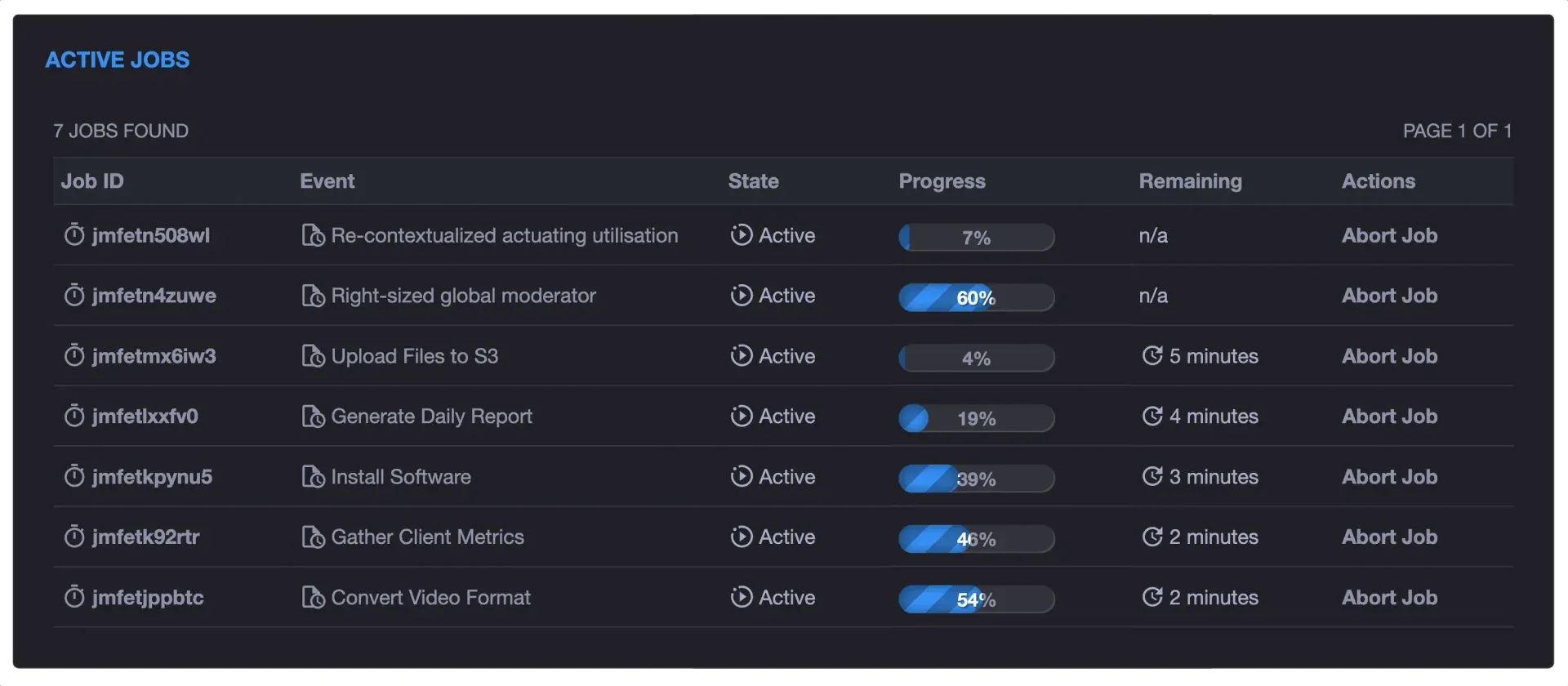
Official screenshot of the Active Jobs list with sample job names.
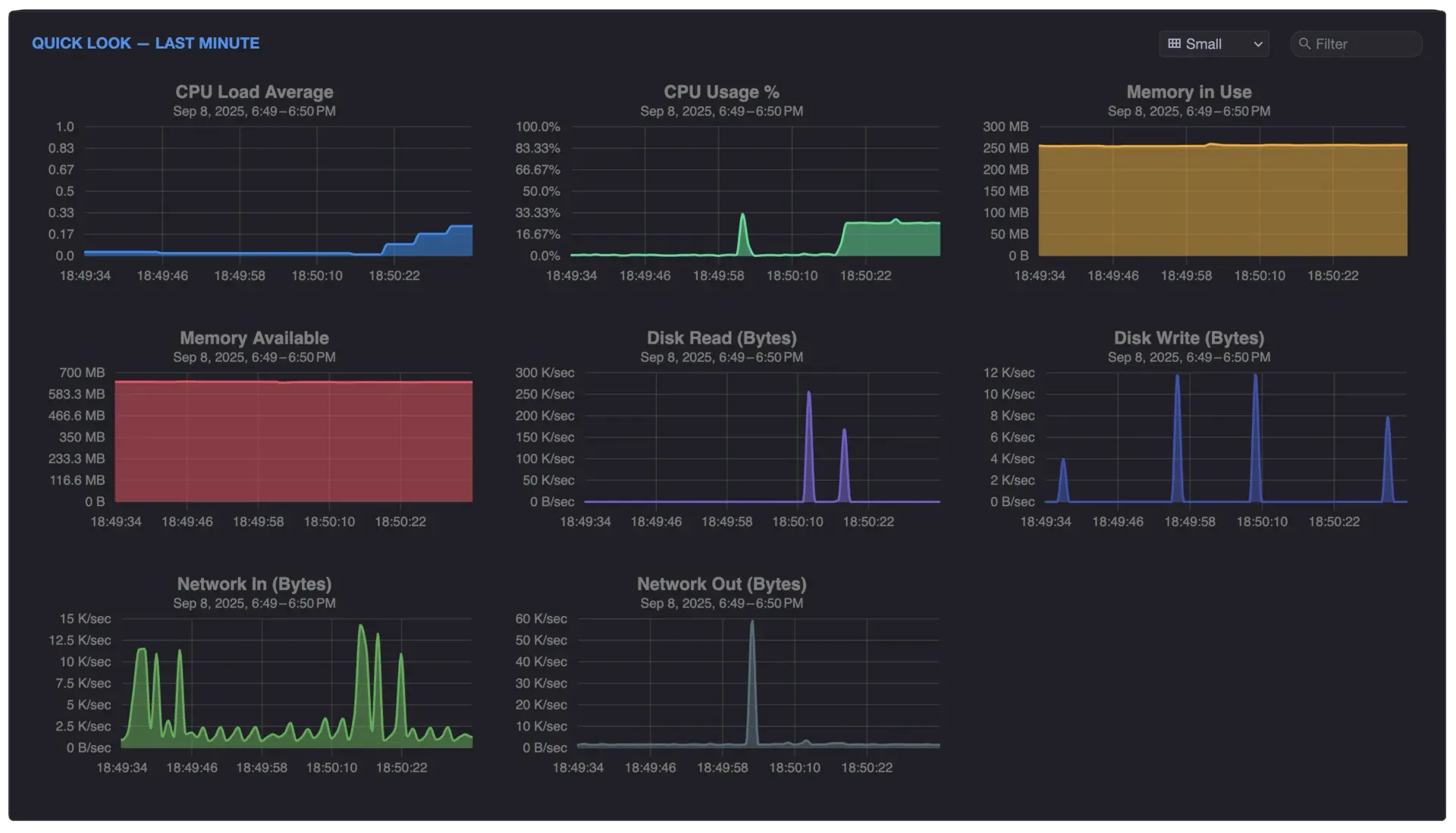
Official screenshot of the per-second Quick Look monitoring charts for one server.
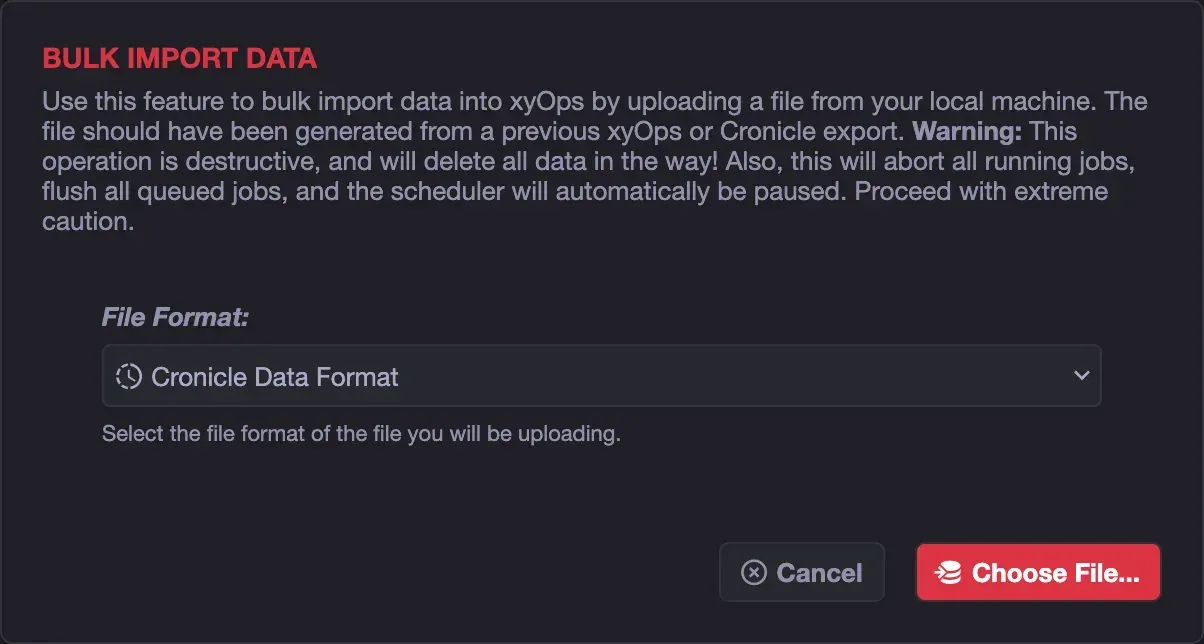
Official screenshot of the Cronicle data import dialog.
Source: official xyOps project page.
Key capabilities
- Event scheduling with triggers Events define what to run, where and when. Triggers include schedules with timezones, intervals, single shot, manual run, magic link URLs, startup, catch-up, every Nth, range, blackout windows, delay and second-level precision, plus trigger plugins. The scheduler runs on the conductor once per minute, with optional sub-minute precision. See the triggers reference.
- Fleet targeting A job can run on one server, a server group or the whole fleet. Server groups provide logical sets for targeting and group-level default alert actions. The workflow Multiplex controller runs the same job on many servers with optional staggering.
- Visual workflow editor Workflows are graphs of trigger, event, job, action, limit, controller and note nodes connected by wires. Controllers include Split (fan-out over a list), Join, Repeat, Multiplex, Decision and Wait. Nodes run in parallel by default, governed by attached resource limits, and data passes between nodes. Details are in the workflow guide.
- Limits, queues and retries Self-imposed limits cap run time, output size, CPU and memory, and control concurrent jobs, queue size and retries. Release v1.1.16 adds an optional maximum queue wait time. Limits can also be attached visually to workflow nodes.
- Plugins in any language Event plugins are command-line executables that read job data as JSON on STDIN and report progress and results as JSON on STDOUT, launched by xySat on the target server. Built-in event plugins are Shell, HTTP Request, Test, Fire Web Hook and Docker. Other types are action, trigger and monitor plugins. See the plugin documentation.
- Docker Plugin Runs custom scripts inside a Docker container, one new container per job, deleted afterwards by default. Any image can be used; the default is the xyOps Shell Image based on Debian 12.
- Plugin Marketplace and extensions The Plugin Marketplace lists community and official plugins. System extensions add application features; recent 1.1.x releases added extension listings and per-extension configuration editors on the System page.
- Server monitoring and metrics XySat streams server data to the conductor. Monitors track one numeric metric each, evaluated once per minute and stored at hourly, daily, monthly and yearly resolutions; stock monitors ship with xyOps and custom ones can be defined with expressions. QuickMon adds per-second CPU, memory, disk and network samples and can be disabled at large scale. See monitors.
- Alerts Alert definitions are expressions evaluated every minute on the conductor against each server's latest data. On fire and on clear, actions can send email, notify a channel, run a job, create a ticket, fire a web hook, run a plugin or take a snapshot. Optional toggles stop new jobs on the affected server or abort its running jobs. See the alerts guide.
- Snapshots A snapshot freezes a server or group state: CPU, memory, load, the full process list, network connections, disks, monitor values, the last 60 seconds of per-second samples, and the IDs of active jobs and alerts. By default every new alert captures a snapshot through the universal alert actions.
- Tickets Tickets track issues, releases, changes and incidents with comments, files and an audit trail. They can be created manually, through the API, by job actions or by alert actions, and events or jobs can be run directly from a ticket.
- Secrets and buckets Secrets are encrypted vaults of named variables, stored encrypted at rest and delivered to jobs as environment variables or to web hooks through templates. Buckets are durable JSON and file storage for sharing data and artifacts between jobs and workflows.
- Users, roles and SSO Accounts have roles, privileges and resource restrictions by category and group. Single Sign-On is included in the open-source application; the SSO guide covers external identity providers, with a dedicated guide for Tailscale. v1.1.16 adds plugin-based hybrid SSO alongside local login.
- REST API and API keys All functions are exposed through JSON endpoints at
/api/app/NAME/v1. API keys act as application accounts with their own privileges and are passed in anX-API-Keyheader; keys in query strings are disabled by default. See the API reference. - xyCLI and MCP server XyCLI, installed with
npm install -g @pixlcore/xycli, launches jobs and workflows, follows live output, shows server health and syncs automation definitions with local files. It includes a Model Context Protocol server over STDIO or HTTP with an optional read-only mode; the MCP Server extension exposes it at/mcpon the conductor. - Docker installation A disposable trial runs the
ghcr.io/pixlcore/xyopsimage with a local xySat worker on port 5522 and the default admin account; the container and its data are removed when stopped. The self-hosting guide then describes a persistent single-conductor container, TLS, reverse proxies, external storage and multi-conductor setups with Nginx. - Manual install with Node.js and npm On Linux, macOS and other POSIX systems the conductor needs the current Node.js LTS, npm and compiler tools for native modules. The official installer is piped to Node as root and installs into
/opt/xyops;npm run bootregisters a systemd service on Linux. Specific releases can be installed from GitHub tarballs withnpm installand a build step. - Air-gapped mode and Cronicle migration Air-gapped mode restricts outbound requests to whitelisted ranges and supports offline xySat packages. For Cronicle users, the importer reads Cronicle data exports, a plugin compatibility mode accepts Cronicle-style JSON output, and optional white-labeling restores the Cronicle name and logo; see the migration guide.
Where xyOps fits
Replacing scattered cron jobs
Scripts that run from crontab on individual hosts become events with schedule or interval triggers, targeted at a server or group where xySat is installed. Each run produces a job with live logs, progress, CPU and memory statistics and a result, and job actions such as email, web hooks or tickets react to success, warning or failure. The Shell Plugin runs existing shell code without using the plugin API.
Multi-step operational workflows
The workflow editor chains reusable events and one-off job nodes with Split, Join, Decision, Repeat and Wait controllers, for example fanning a file list out to parallel sub-jobs and joining the results. Limit nodes cap concurrency, run time and memory per node, and workflow data and user parameters pass between steps. Multi-job nodes can be replayed, as documented in the workflow guide.
Monitoring a server fleet
Installing xySat on each server adds it to the fleet view with per-server and per-group graphs, process lists and network connections. Custom monitors read values from server data or monitor plugins, and alert expressions such as a sustained load average threshold fire actions per server. The servers documentation covers adding workers.
Incident response with captured context
When an alert fires, the default universal action captures a snapshot of the server, and further actions can open a ticket, notify a channel or run a remediation job. The alert can also block new jobs on that server or abort running ones. The project website describes the path from the alert to its snapshot and the causing process as two clicks.
Migrating from Cronicle
The migration guide has worker servers added to xyOps first, because Cronicle events target servers by hostname. A Cronicle data export is then imported from the System page; the import is destructive, aborts running jobs and pauses the scheduler. Compatibility mode lets existing Cronicle plugins run, and multiplexed events can be converted into workflows, per the Cronicle chapter. The website states xyOps is a separate application with a migration path, not a drop-in upgrade.
Automation from code, CI and AI assistants
External systems start events through the REST API, magic link URLs or web hooks, using API keys with scoped privileges. xyCLI syncs event and workflow definitions with files that can be kept in Git, and its MCP server lets compatible AI assistants inspect failed jobs, run workflows, search alerts and create tickets within the API key's permissions. Other listings in related categories include n8n, Temporal, Hatchet, Zabbix and OneUptime.
Install
curl -fsSL https://raw.githubusercontent.com/pixlcore/xyops/main/bin/install.js | sudo nodeReviews of xyOps
Be the first to share your experience with xyOps.
Write a review
Loading review form…
Alternatives to xyOps
 n8nn8n is a fair-code workflow automation platform from n8n GmbH in Berlin. It combines a node-based visual editor with JavaScript and Python code, AI agent nodes, 1500+ integrations, a REST API and an MCP server, self-hosted or on n8n Cloud.
 TemporalTemporal runs application logic as durable Workflows and Activities written with SDKs in Go, Java, Python, TypeScript, .NET, PHP, Ruby or Rust. The MIT-licensed server is self-hosted or used as the usage-priced Temporal Cloud.
 HatchetHatchet queues and runs background tasks, DAG workflows and durable tasks written with SDKs for Python, TypeScript, Go and Ruby. It adds retries, concurrency, rate limits, cron and a dashboard, self-hosted on PostgreSQL or as Hatchet Cloud.