

What is ClassroomIO?
ClassroomIO is a learning platform that its makers now position as a customer training platform for software companies. An organization builds courses from lessons and exercises, publishes them on a branded academy with its own subdomain or custom domain, enrolls students and tracks progress, submissions, certificates and compliance status. The README names three uses: customer education, partner training for resellers and implementation partners, and employee onboarding with compliance programs. The project was created by Rotimi Best, and the repository's commit history goes back to December 2020; it began as an open-source teaching platform for bootcamps before moving toward customer education.
There are two ways to run it. ClassroomIO Cloud at app.classroomio.com is the managed service with a Free plan, a paid Early Adopter plan and Enterprise. Self-hosting runs the same code: the self-hosting guide covers plain Docker with a lifecycle script, a DigitalOcean VPS with Caddy, Railway, Coolify and Dokploy. The images are published on Docker Hub as classroomio/api, classroomio/dashboard and classroomio/jobs, pinned through one CIO_VERSION variable.
The current pinned release is v1.0.0, tagged on July 7, 2026 and published as matching Docker image tags; the previous release line was 0.3.2 in March 2026. The project does not publish GitHub release notes, and the repository CHANGELOG stops in 2024. Ongoing changes are announced in the weekly product changelog instead: October 2026 brought webhooks, a reusable media library, video uploads through MCP, lessons outside sections, shared live session recordings and Italian, after course templates, academy-wide language settings and API coverage for cohorts and certificates in September. The latest image tag follows every merge to main, so a self-hosted instance only matches the cloud if it tracks that rolling tag.
The stack is a pnpm monorepo in TypeScript. The dashboard is a SvelteKit application that renders pages server-side and proxies browser calls; the API uses Hono with Better Auth and runs database migrations on boot; a BullMQ jobs worker handles video processing with ffmpeg, Whisper transcription, AI course generation, email and maintenance. PostgreSQL 16 holds all state, Redis 7 carries queues and caching, and SeaweedFS provides S3-compatible storage that can be swapped for AWS S3 or Cloudflare R2. The architecture page documents the seven services and their startup order.
The code is licensed under AGPL-3.0 as open core. Courses, students, uploads, video, AI features, communities and certificates work without a key, while single sign-on, token authentication and a no-tracking mode require a paid LICENSE_KEY that is validated against the vendor's license server. Some things are out of scope: there is no native mobile app, no SCORM or LMS course importer (the help center says other platforms' content has to be rebuilt by hand), live classes rely on an external meeting tool such as Zoom or Google Meet, and AI grading of submissions is not currently offered.
ClassroomIO screenshots
Explore the interface. Open a screenshot to view it at full size.
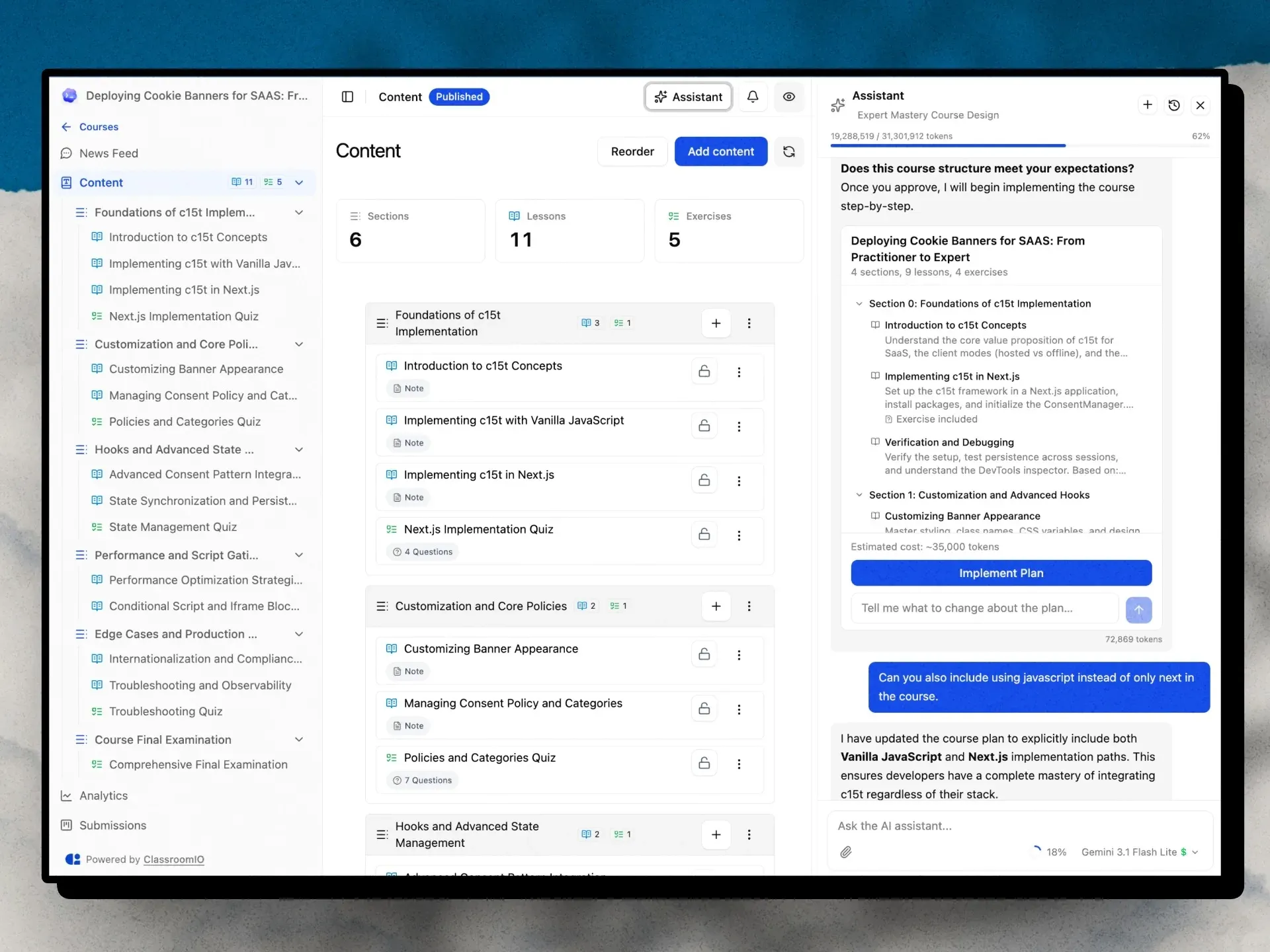
Official product image of a course outline with the AI Assistant showing a plan, token estimate and Implement Plan button.
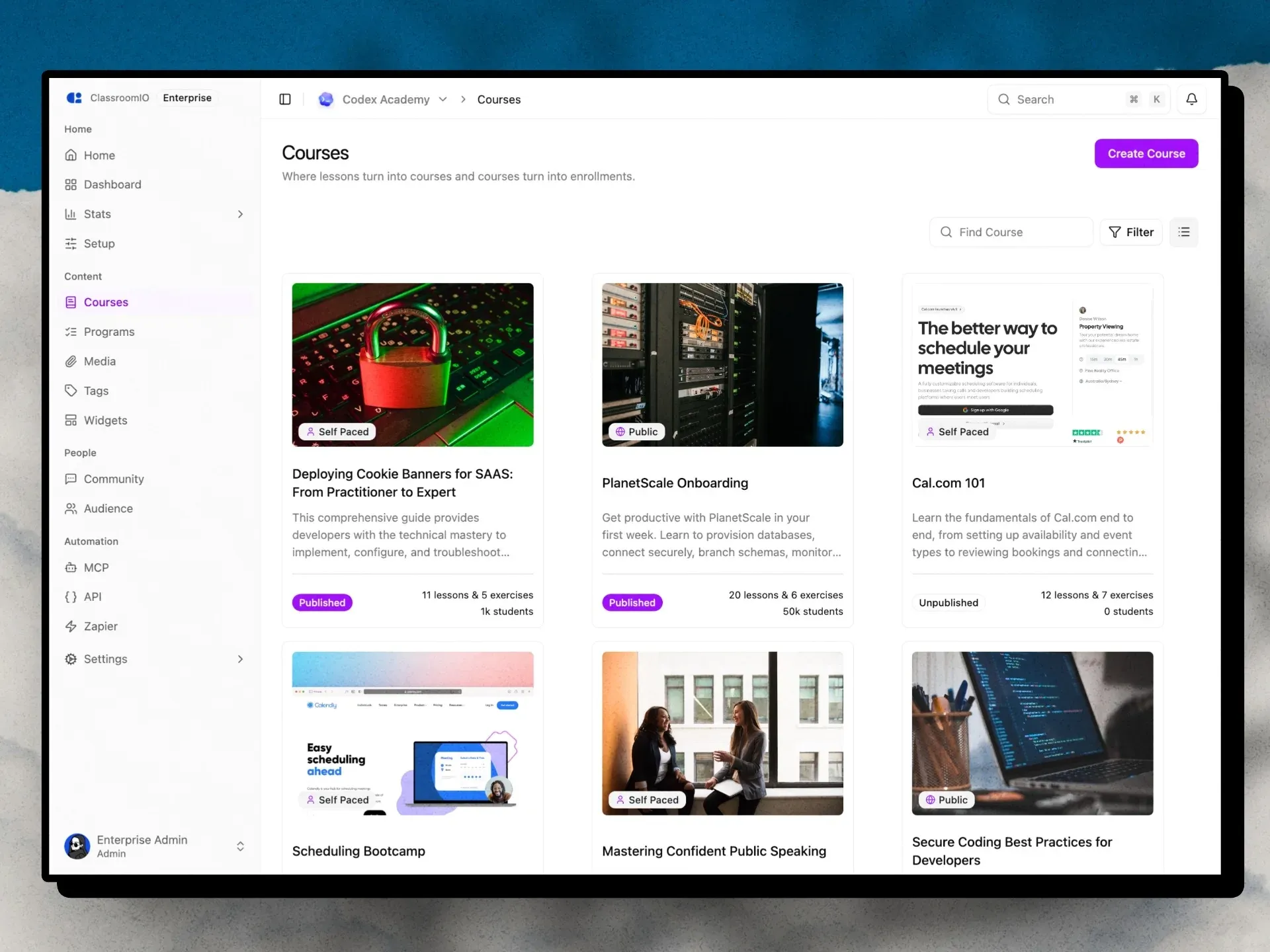
Official image of the organization Courses page on an Enterprise demo academy, with the MCP, API and Zapier automation entries in the sidebar.
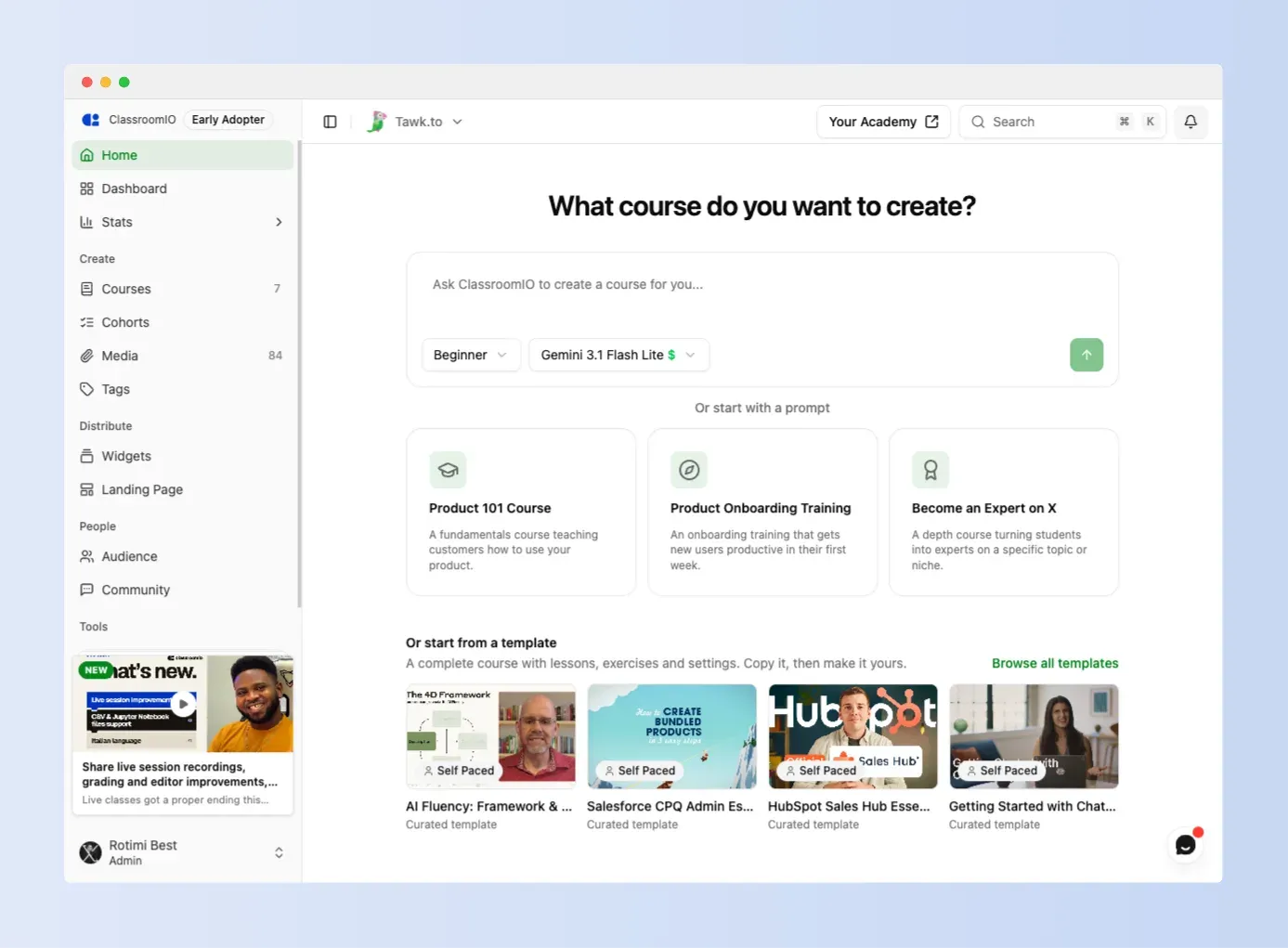
The admin Home page from the README, where a prompt, a suggestion or a curated template starts a new course.
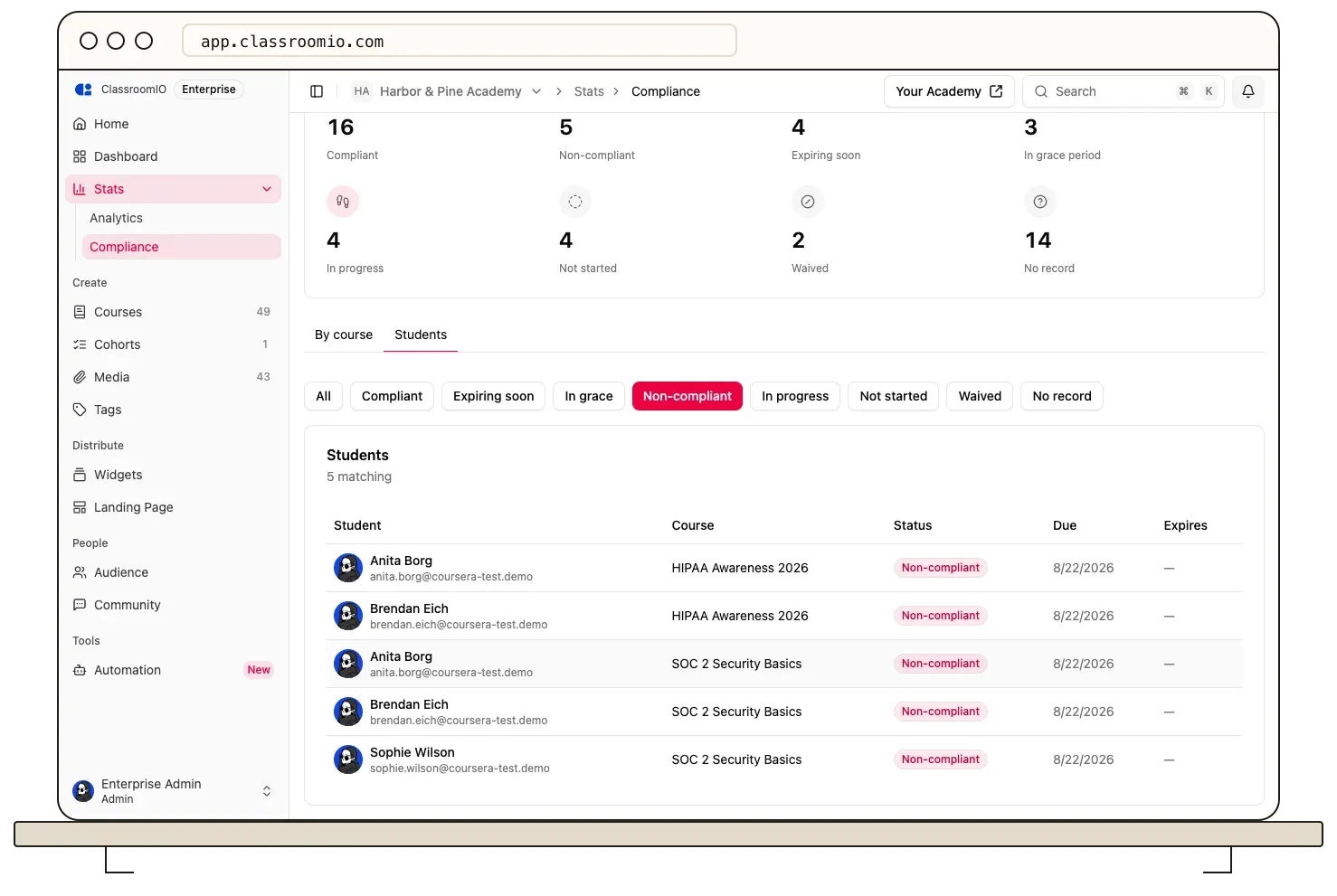
Help center screenshot of the organization compliance report filtered to non-compliant students.
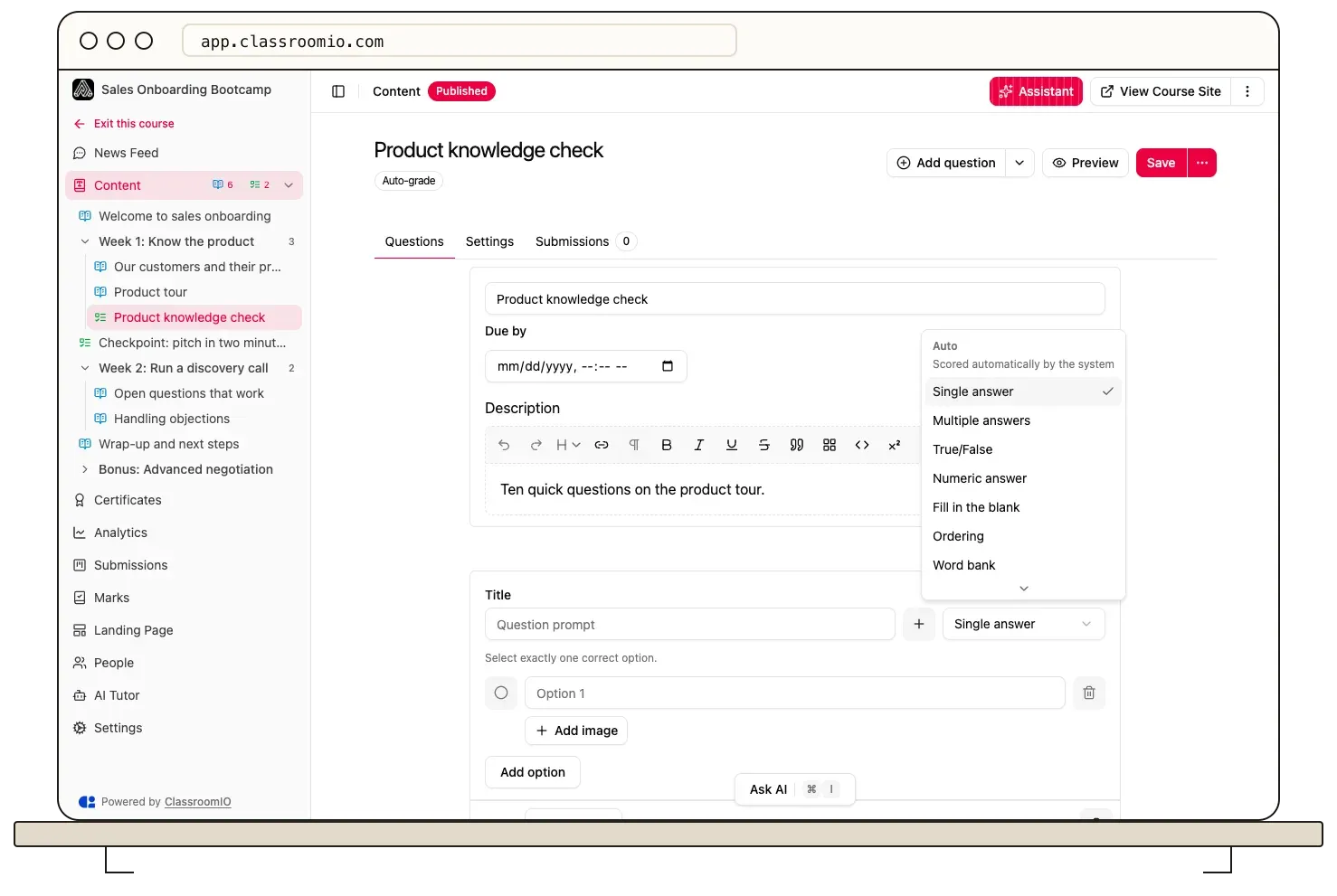
Help center screenshot of an auto-graded exercise with the question type picker listing single answer, true or false, ordering and word bank.
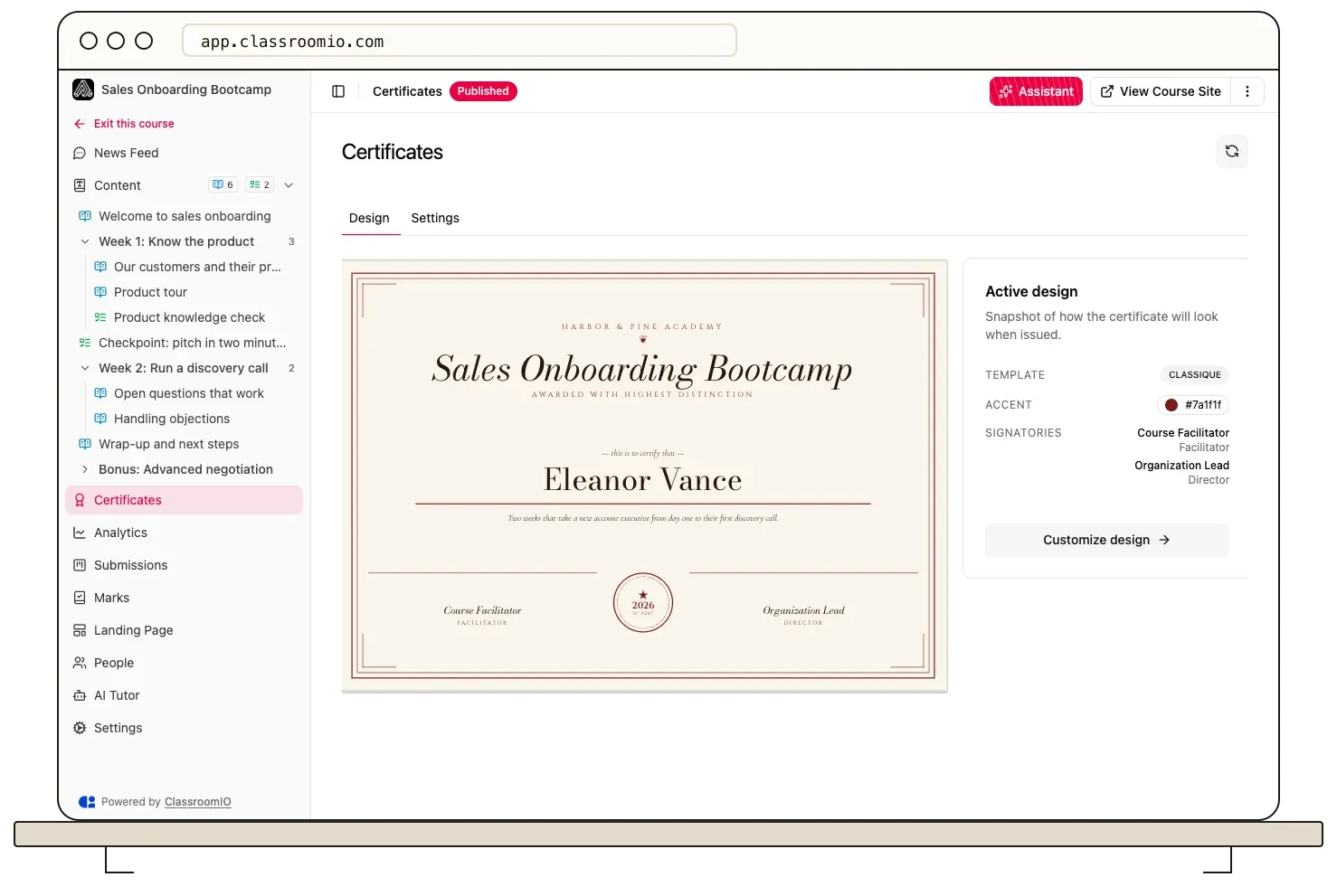
Help center screenshot of a course certificate design with template, accent color and signatory settings.
Source: official ClassroomIO project page.
Key capabilities
- Docker self-hosting with one script Download
classroomio.shfrom the website, run it and choose Install: it fetches the compose file, creates.env, generatesBETTER_AUTH_SECRET,PRIVATE_SERVER_KEYand storage credentials, then pulls the images and starts the stack. The same script starts, stops, restarts, upgrades, follows logs and backs up, and every menu option is also a subcommand for cron. The Docker guide asks only forCIO_VERSION,DASHBOARD_ORIGIN, a Postgres password and SMTP settings in production. - Other deployment targets Documented paths cover a DigitalOcean or other Ubuntu VPS with Caddy for HTTPS, a Railway template, and Docker Compose resources on Coolify and Dokploy. Every path runs the same seven services. Server requirements are 2 vCPU, 4 GB RAM and 20 GB disk plus uploads as a minimum, with 4 vCPU and 8 GB RAM recommended because video transcodes spike memory; a 1 GB server cannot run the stack, and building images from source needs about 8 GB RAM.
- Cloud plans The pricing page lists Basic (called Free in the dashboard) at $0 with 20 students, unlimited courses, MCP access and 500,000 AI credits per month; Early Adopter at $35 per month or $350 per year with 10,000 students, 3 million AI credits, video uploads, certificates, custom branding, a custom domain and limited API access; and Enterprise on request with unlimited students, up to four organizations, 15 million AI credits, SSO and unlimited API requests. Extra AI credits cost $5 per 2 million tokens.
- Four course types Self Paced courses suit enrolled students on their own schedule with free or sequential progression. Live Class courses attach sessions to lessons, Compliance courses add deadlines and renewal cycles, and Public courses let visitors open unlocked lessons and auto-graded exercises without an account. The course types guide warns that switching an existing course to Public requires removing questions that need manual grading.
- Lessons, media and templates Lessons combine a rich-text note with math support and callouts, videos, slide embeds and PDF or Word documents. Videos can come from YouTube, Vimeo, Google Drive, an embed link, the reusable media library or a direct upload on paid plans; only uploaded video supports watch-based completion tracking. Courses can be cloned, saved as templates and started from a template, with optional updates pushed from the template later.
- Exercises and grading Auto-graded question types are single answer, multiple answers, true or false, numeric, fill in the blank, ordering, word bank and star rating. Paragraph, short answer, file upload, links, video recording and thumbs responses go to instructor review. File upload, ordering, links, star rating and video recording require a paid plan on the cloud, and tutors grade submissions manually with scores and feedback.
- Compliance training A compliance course gives each assigned student a cycle with a due date and, after completion, a validity period that triggers a new cycle when it ends. Statuses run from Not started and In progress to Compliant, Expiring soon, In grace period, Non-compliant and Waived. An organization-wide compliance report shows every assigned student across courses, and webhooks fire when a status changes or a requirement is waived.
- Cohorts, communities and live sessions Cohorts group learners with their own members, courses, invites, goals and newsfeed. Courses can carry a Q and A community, announcements and comments. Live sessions take a join link, date, time and timezone; enrolled students get a calendar invite, reminders 24 hours and 1 hour before, and a Join session button in their LMS home.
- Certificates Course certificates use a template with an accent color, signatories and eligibility rules, and every required lesson and exercise must be complete before one is issued. Certificates need the Early Adopter plan or higher on the cloud. A
course.certificate.issuedwebhook and certificate reports let other systems record the result. - AI course assistant and AI Tutor An admin describes a course on the Home page, picks a level and a model, reviews the proposed plan and lets the assistant build sections, lessons and exercises. Learners get an Ask AI tutor that can summarize lessons and answer questions within limits set per course or organization. On self-hosted instances AI stays off until an OpenAI, Google or Anthropic key is set, and
PUBLIC_IS_AI_ENABLED=falsehides all AI controls. - Hosted MCP server Clients connect to
https://mcp.classroomio.com, or to/mcpon a self-hosted dashboard, and sign in with OAuth as a workspace admin. The MCP documentation covers Claude, ChatGPT, Claude Code, Codex, Cursor, VS Code, Gemini CLI and others. Requests are limited per minute for reads, writes and publishes: 30, 10 and 1 per app on Free, up to 180, 60 and 10 on Enterprise, with no plan limits on self-hosted instances. - REST API The public API at
https://api.classroomio.com/public-api/v1covers audience, team, courses with sections, lessons, exercises, members, submissions and certificates, cohorts, analytics and media uploads. Organization keys start withcio_api_, act as the admin who created them and are limited to 100 requests per minute with standard rate-limit headers. API keys need Early Adopter or Enterprise on the cloud and an Enterprise license on self-hosted instances. - Webhooks Twenty-five event types cover invites, enrollments, completions, certificates, submissions, progress, compliance, members, publishing, cohorts, live sessions and payment requests. Deliveries are signed with HMAC SHA-256 in both ClassroomIO and Standard Webhooks headers, must answer within 10 seconds, are retried up to 3 times and are kept for 30 days for redelivery. The webhook reference shares the API plan requirement.
- OAuth for integrations and token auth Third-party platforms can register an OAuth client and act on a workspace with PKCE and scoped access such as
course:readorcohort:write. Token auth signs users in from your own application with a short-lived JWT carryingsub,email,iatandexp, and provisions the account on first login. Token auth is an Enterprise feature. - Single sign-on (Enterprise) SSO uses OIDC with documented setups for Google Workspace, Okta and Auth0, each requiring the
openid,emailandprofilescopes. Without a license, the SSO and token-auth APIs return403 FEATURE_REQUIRES_LICENSEand their settings stay hidden. SAML-only identity providers are not supported. - Branded academy, analytics and languages Each organization gets a public academy with a landing page, course catalog and embeddable course widgets on a subdomain or custom domain. Analytics show landing views, unique visitors, course page views, enrollments, funnels, geography and learner progress. The dashboard ships in 12 languages, from English, German and French to Hindi, Turkish and Vietnamese, and one language can be enforced across an organization including student emails.
- Storage and upload limits Uploads go to three buckets (
videos,documentsand a public-readmedia) on the bundled SeaweedFS or an external S3 or R2 service. Default limits are 5 MB for documents and images, 800 MB for lesson videos and 2 MB for student assignment files, each adjustable withUPLOAD_MAX_*_MBvariables on both the API and the dashboard. - Backups and upgrades
./classroomio.sh backupwrites a gzippedpg_dumpand an archive of the storage volume into./backups/; external S3 buckets need their own backup.upgradetakes that backup first, then pulls the images for the pinned version, and a rollback means setting the previousCIO_VERSIONand upgrading again. Deployments that predate Cohorts need a one-time data migration script.
Where ClassroomIO fits
Onboarding customers of a SaaS product
Create an organization, brand the academy and connect a custom domain (Early Adopter or higher on the cloud). Start a course from a prompt or a template, review every generated lesson and answer key, then publish it with self-enrollment or a shareable invite link. Use token auth or SSO when customers should arrive already signed in from your product, and send course.completed webhooks to your CRM so customer success teams see who finished onboarding. Check that the course behaves as expected for a test student, not only for an admin.
Running recurring compliance training
Create a Compliance course, set the completion deadline, passing requirements and validity period before assigning students, then watch the organization compliance report. The compliance guide explains how a new cycle starts when validity ends. Confirm that optional items use the None completion rule, that waived students are intended, and that the compliance.record.status_changed event reaches whatever system keeps your audit records.
Enabling resellers and implementation partners
Group each partner into a cohort, assign the relevant courses and track progress per cohort. On the Enterprise plan, separate organizations (up to four per account) can keep partner programs apart from customer academies. Certificates with signatories give partners proof of completion; verify the eligibility rules so a certificate is only issued once every required lesson and exercise is done.
Self-hosting for data control
Provision a server with 8 GB RAM, run classroomio.sh, pin CIO_VERSION=1.0.0, set an https:// DASHBOARD_ORIGIN and configure SMTP, because login silently fails over plain HTTP and signup, resets and invites all need email. Decide whether uploads stay on the bundled SeaweedFS or go to S3 or R2, schedule ./classroomio.sh backup with an off-host copy, and test a restore before production. Remember that a self-hosted instance serves a single organization.
Authoring courses from an AI client
Connect Claude, ChatGPT, Cursor or Claude Code to the hosted MCP server as a workspace admin, ask the client to list courses to confirm the connection, then request a course draft and review it before publishing. The server does not extract PDFs or write content on its own; the client prepares the material. Deleting a section also deletes its lessons and exercises, so read the access and limits page before approving changes to live courses.
Syncing learning data into other systems
Generate a cio_api_ key under Automation, store it server-side and page through courses, members, submissions and analytics with limit up to 100. Add a webhook endpoint for real-time events, verify the HMAC signature and use X-Cio-Event-Id as an idempotency key because delivery is at least once. Watch the 100 requests per minute budget and handle 429 responses with the Retry-After header.
Install
curl -fsSLO https://classroomio.com/classroomio.sh && chmod +x classroomio.sh && ./classroomio.sh installReviews of ClassroomIO
Be the first to share your experience with ClassroomIO.
Write a review
Loading review form…
Alternatives to ClassroomIO
 LearnHouseLearnHouse is an AGPL-3.0 learning platform with a block course editor, assignments, Judge0 code exercises, boards and AI features. Self-host it with a Docker-based CLI or use LearnHouse Cloud; SSO, SCORM, LTI and payments need Enterprise.
 DocmostDocmost is an AGPL-3.0 wiki and documentation platform for teams, deployed with Docker, PostgreSQL and Redis on your own servers. Business and Enterprise license keys add SSO, AI search, MCP, the API, Bases and audit features.
 PeerTubePeerTube is Framasoft's AGPL-3.0 video hosting server. Each instance runs its own catalogue, users and moderation, federates with other instances and Mastodon over ActivityPub, and offloads viewer traffic with WebRTC peer-to-peer.