

What is LearnHouse?
LearnHouse is an open-source learning platform for building and running online courses. Teachers assemble courses from chapters and activities in a block editor, and learners follow them in a course player with progress tracking, assignments, discussions and certificates. The same instance can also host podcasts, communities, real-time collaborative boards and AI-generated interactive playgrounds. The project is published by LearnHouse, Inc., which its privacy policy describes as incorporated in Delaware, United States. Its author and maintainer is Badr B. (GitHub user swve), and the GitHub repository was created in May 2022.
There are two ways to run it. LearnHouse Cloud is the managed service, with plans from Free to Enterprise. Self-hosting uses the official CLI, published on npm as learnhouse: npx learnhouse@latest setup starts a wizard that writes docker-compose.yml, .env, learnhouse.config.json and an nginx or Caddy configuration, then pulls and starts the stack. Releases ship as a single container image, ghcr.io/learnhouse/app. The cloud versus self-hosting comparison lists who handles updates, backups, SSL and monitoring in each case.
The current release is LearnHouse 1.4.3, published October 25, 2026. It adds a command palette, keyboard shortcuts, lesson search, site search, keyboard navigation for catalog, lesson, course and community pages, and course import from other learning management systems, with an upload-size check before the request body is read. Version 1.4.0, released October 11, indexed all course content for AI search and was a hardening round: API token rights, CSRF checks, request body caps, limits on unauthenticated collaboration connections and stricter access checks across organizations. The CLI is versioned separately; CLI 1.6.0 (October 30) added a --dir option, an update-check opt-out, pinned third-party images and safer backup and restore.
The architecture is a monorepo of four applications. The web app uses Next.js, React, Tailwind CSS and the Tiptap editor. The API is a FastAPI service with SQLModel and Alembic migrations, and it also runs background jobs such as AI indexing, HLS video transcoding and AI captions. A Hocuspocus and Yjs WebSocket server handles real-time editing of courses and boards, and the CLI is a Node.js tool. PostgreSQL 16 with the pgvector extension stores application data and embeddings, and Redis provides caching, sessions, rate limiting and the job queue.
The core platform is licensed under AGPL-3.0. Enterprise features (single sign-on, LTI 1.3, SCORM, payments, analytics, audit logs, live sessions, Messages, multiple organizations and the admin dashboard) fall under a separate Enterprise Edition license; they ship in the Enterprise images and turn on only with a valid license key. Some things are outside the product: the pricing page lists a mobile app as planned, H5P content is embedded from an external host rather than hosted, and code exercises need a separate Judge0 instance.
LearnHouse screenshots
Explore the interface. Open a screenshot to view it at full size.
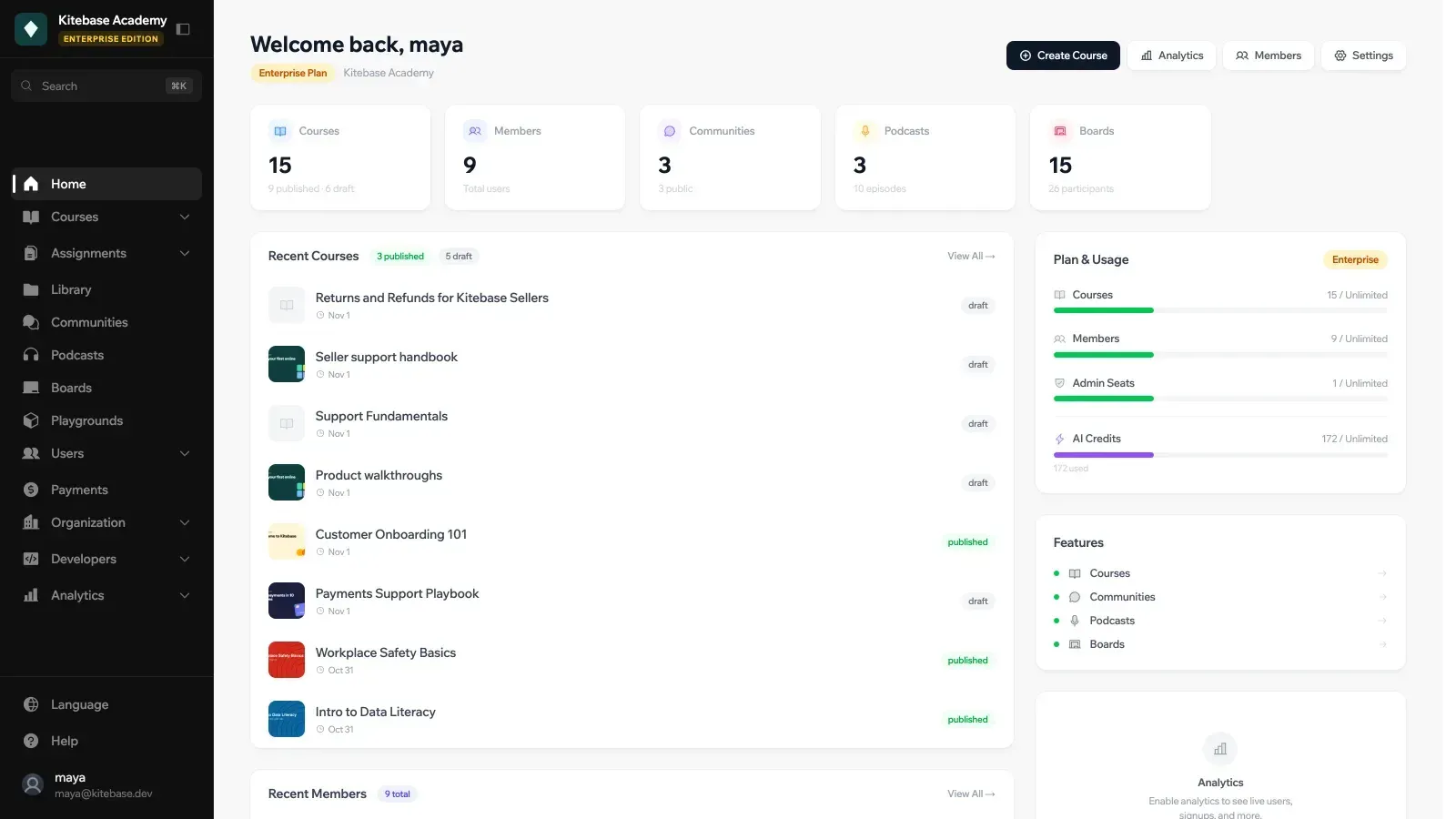
Official documentation screenshot of the organization dashboard home on an Enterprise Edition demo organization.
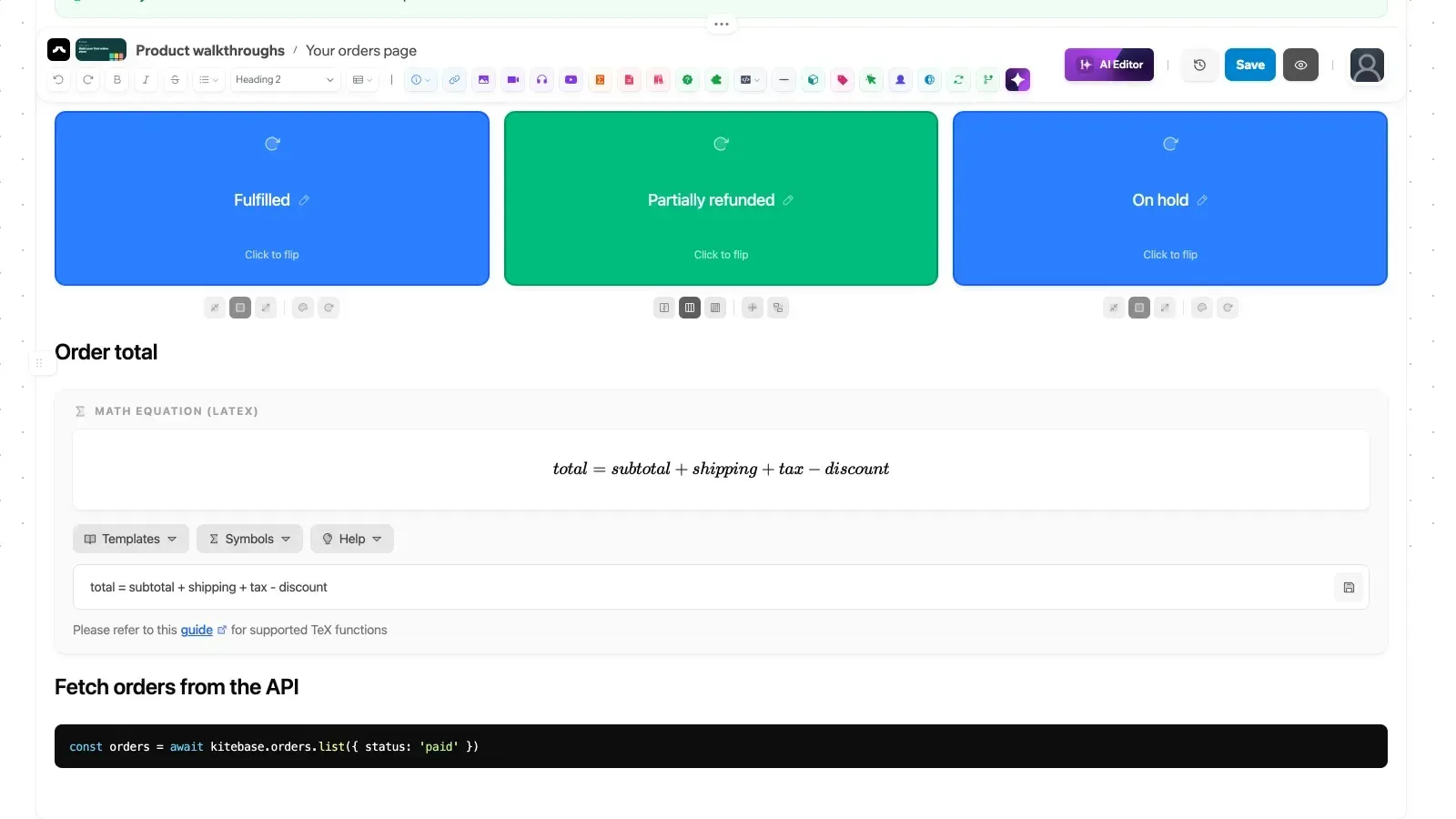
The block editor showing flipcards, a LaTeX equation with its template and symbol pickers, and a code snippet.
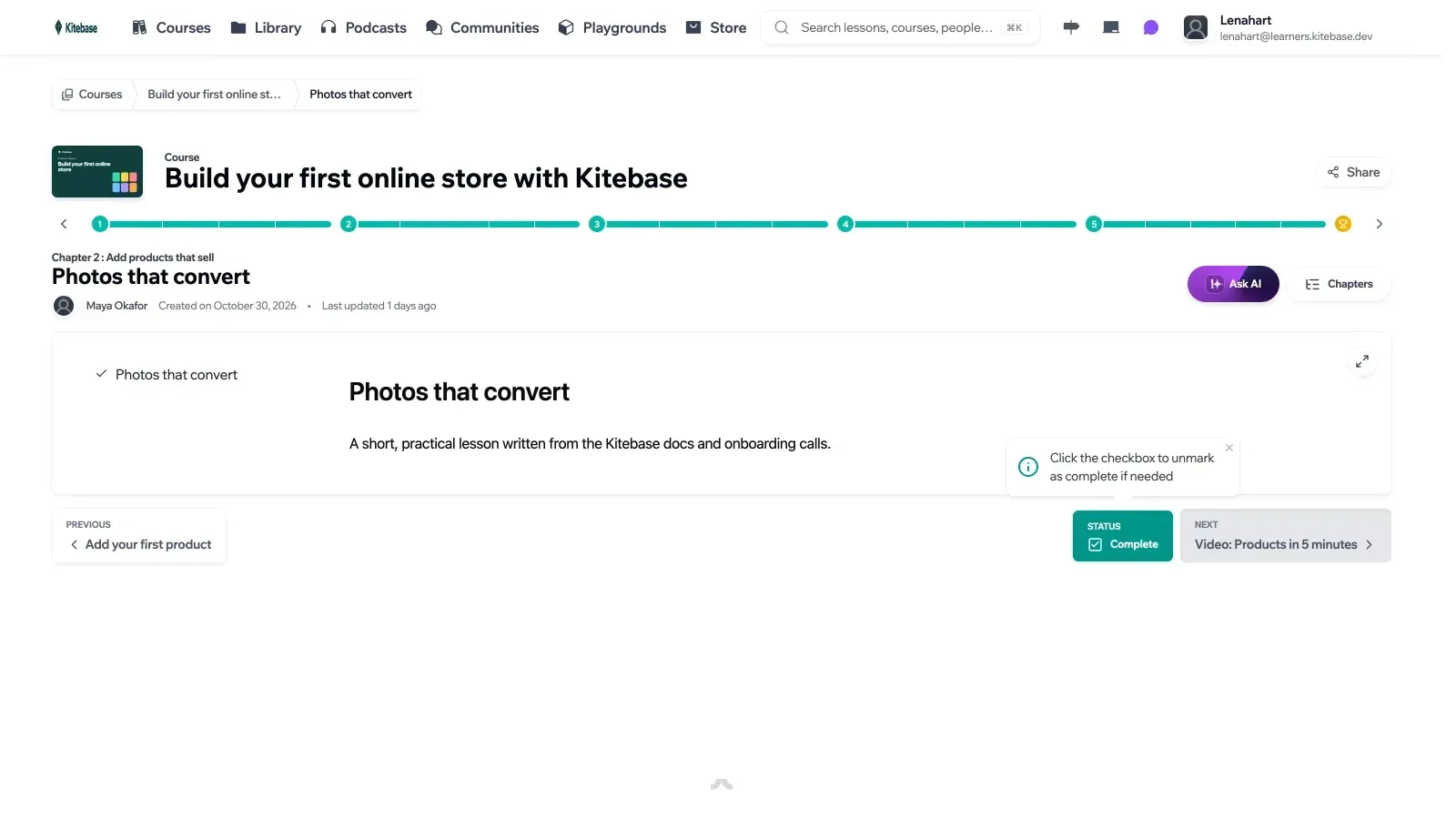
A learner's lesson page with chapter progress, the Ask AI button and previous and next navigation.
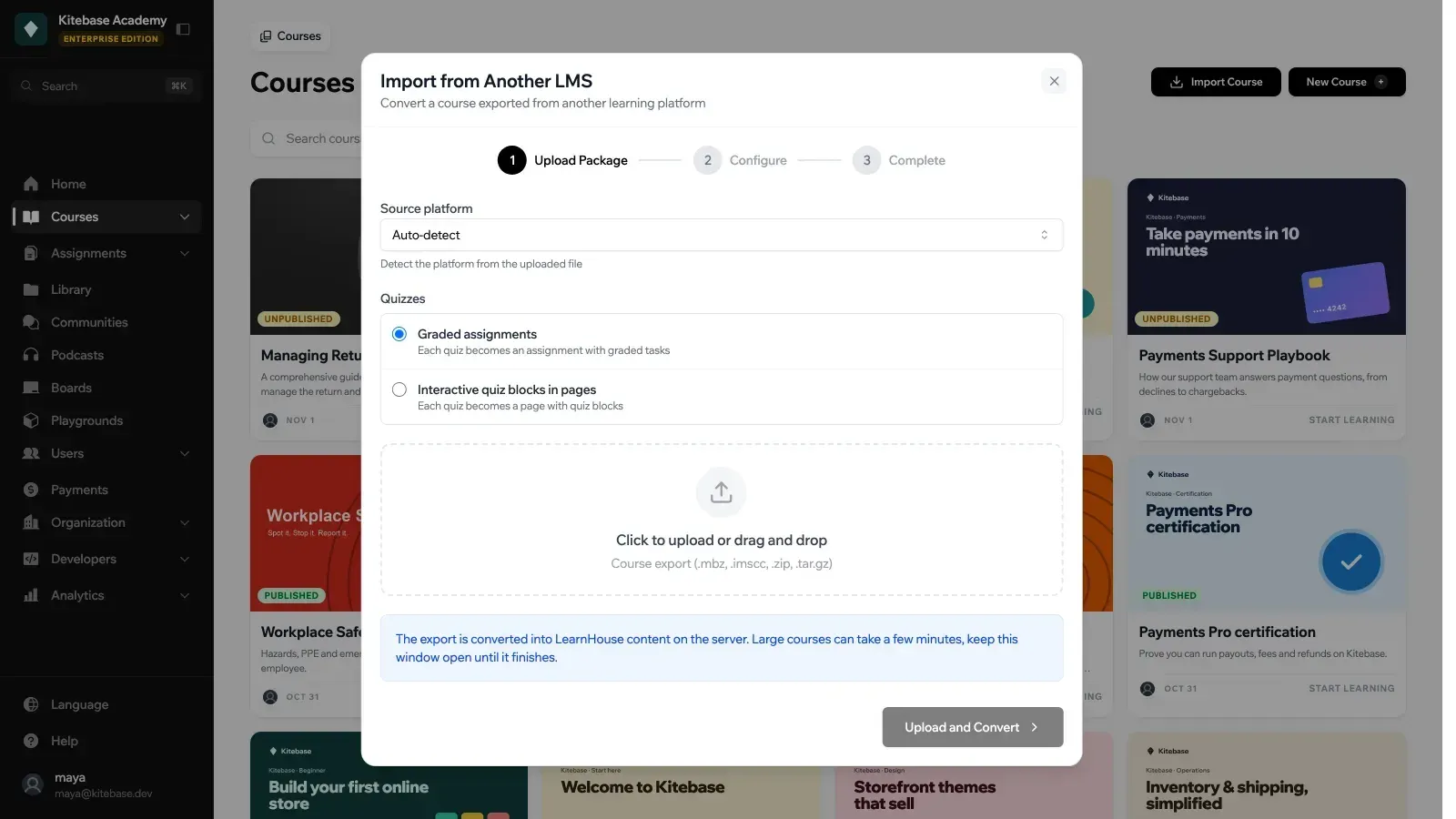
The LMS import dialog accepting .mbz, .imscc, .zip and .tar.gz exports, with a choice of graded assignments or quiz blocks.
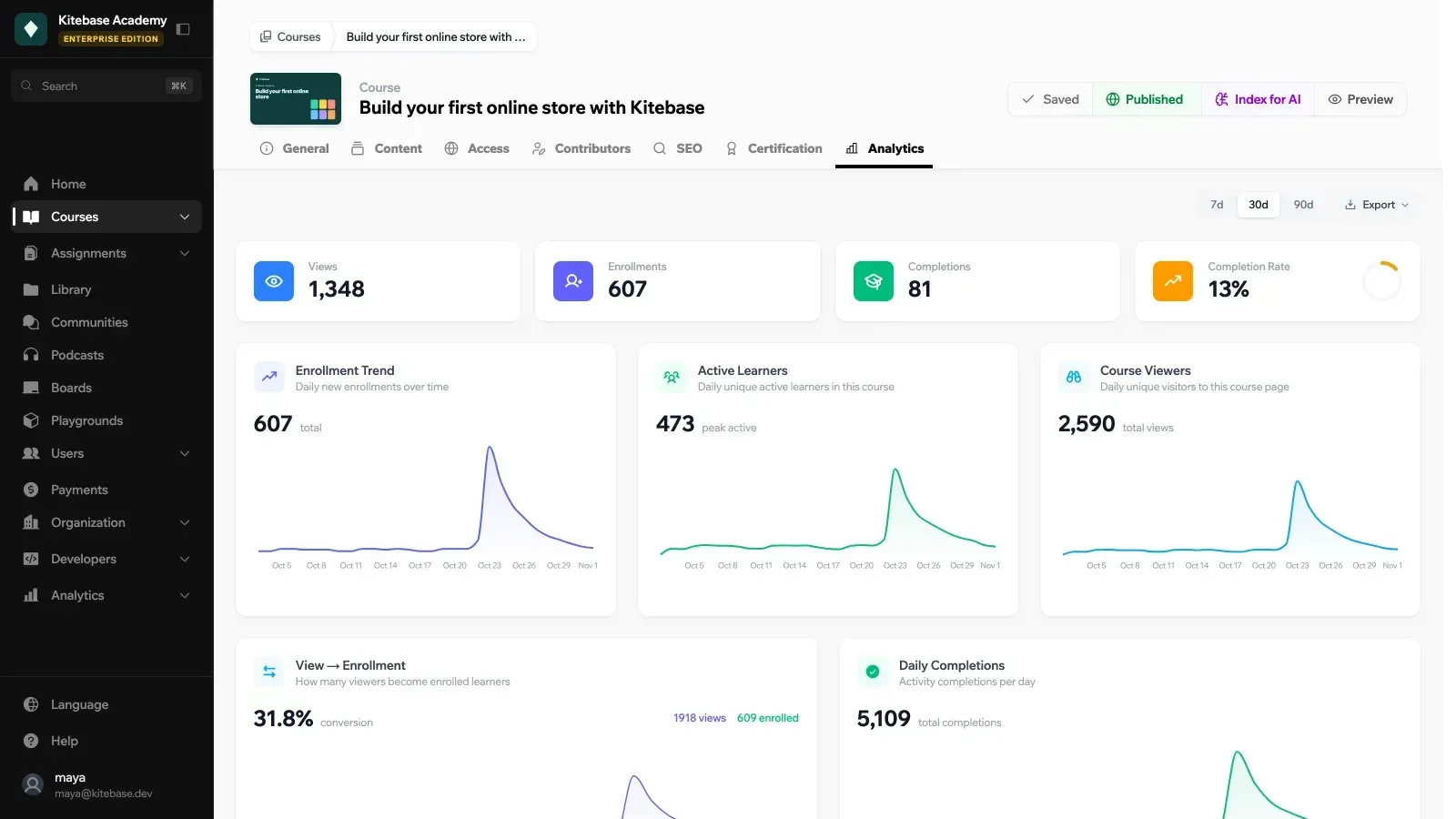
Course analytics, an Enterprise Edition feature, with 30-day enrollment, active learner and viewer trends.
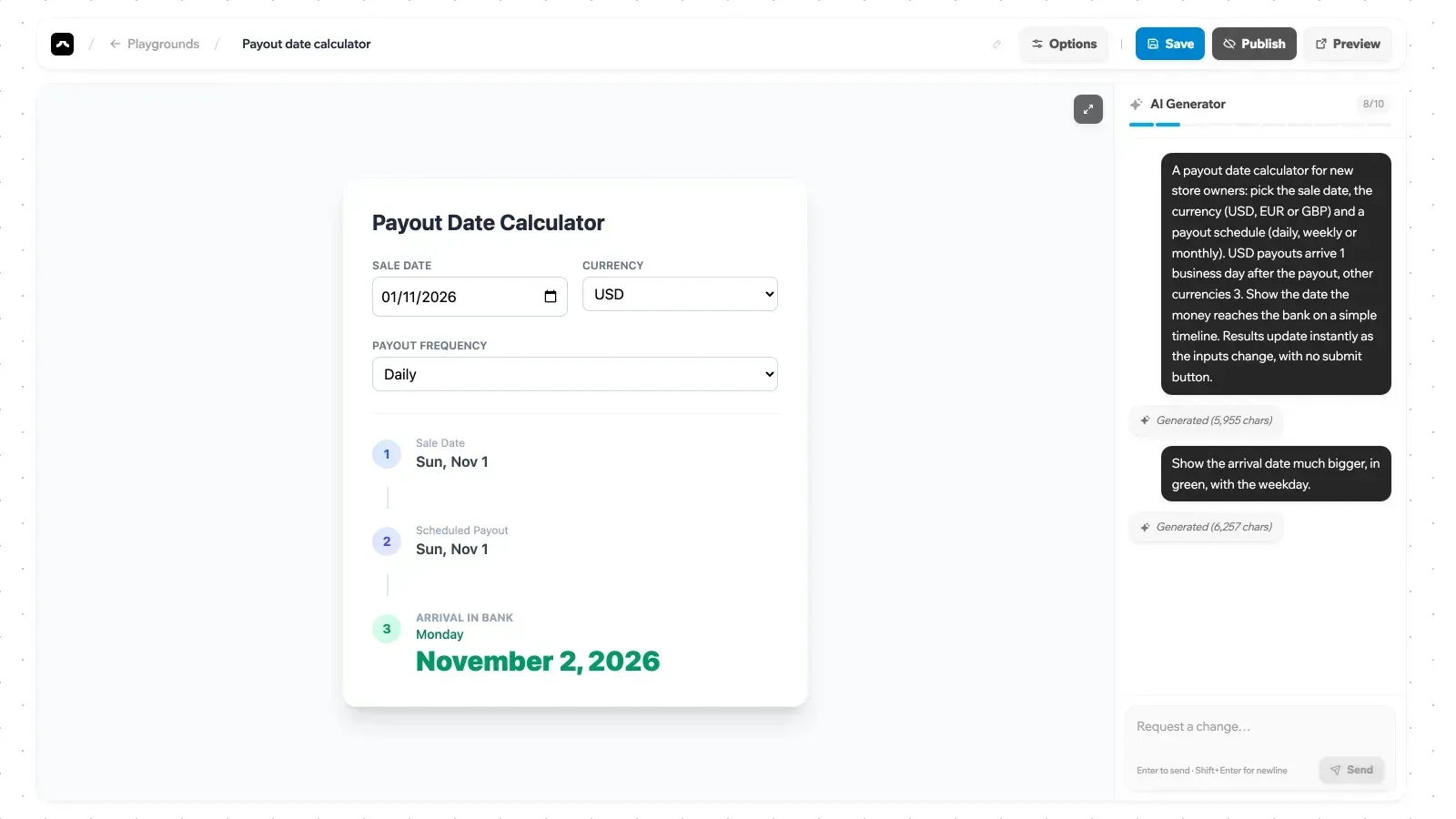
The playground editor, where the AI Generator panel builds an interactive page from a written description.
Source: official LearnHouse project page.
Key capabilities
- Self-hosting with the LearnHouse CLI Run
npx learnhouse@latest setup, or the one-line installers for macOS and Linux (shell) and Windows (PowerShell), which install Docker and Node.js when missing. The wizard asks for the edition (Community or Enterprise), the stable or dev channel, the domain and HTTPS mode, whether PostgreSQL and Redis run in Docker or externally, the first admin account and optional AI, email, S3 and Google sign-in settings. A--ciflag runs the same setup without prompts. The requirements are Docker Engine, the Compose v2 plugin and Node.js 22 or newer, with 2 GB RAM, 10 GB disk and one CPU core as the minimum and Linux recommended for production. - LearnHouse Cloud plans The managed service includes a CDN, automatic updates, backups, monitoring and email support. The documented plans are Free (1 course, 10 members, 1 admin seat, 20 AI credits, with a LearnHouse watermark), Personal, Personal Family, Standard (200 members, 2 admin seats), Pro (500 members, 10 admin seats) and Enterprise. The pricing page lists paid plans from $49 per month, shows a $1 per active user figure on Standard and Pro, and quotes Enterprise and agency plans on request.
- Courses, chapters and activities A course holds chapters, and each chapter holds activities such as editor pages, videos, PDF documents and assignments, with SCORM packages in the Enterprise Edition. Drip content can release chapters over time, and learning paths group several courses with completion rules.
- Block-based course editor Typing
/opens the block menu: headings, lists and code; images, MP4 or WebM video, inline PDF and MP3, WAV, OGG or M4A audio; LaTeX equations, flipcards and flashcard grids, web previews, callouts and branching scenarios. The Quiz block gives instant feedback but its answers are neither graded nor stored; graded quizzes belong in assignments. Real-time co-editing runs through the collaboration server, and page edits are versioned. - Code exercises with real execution The Code Playground block and the Code task in assignments run learner code through Judge0 in 30 languages, from Python 3 and Java to SQL against an uploaded SQLite file. Teachers set starter code, locked lines, fill-in blanks, test cases, hints and a solution that unlocks after a set number of attempts. Limits include 50 test cases per run, 60 runs per learner per minute and 64 KB of source. Self-hosted instances must point
LEARNHOUSE_JUDGE0_API_URLat a Judge0 server, and API tokens cannot run code. - Assignments and grading Assignments combine graded tasks, including quizzes, file submissions and code tasks, with due dates, teacher grading and feedback. Each assignment has an Analytics tab with class average, median, pass rate and on-time rate. Imported quizzes from other systems can become graded assignments with auto-graded tasks.
- Import from another LMS The importer converts Moodle 1.9 to 5.2 backups (
.mbz), Canvas and IMS Common Cartridge 1.0 to 1.3 exports, Blackboard Learn and D2L Brightspace packages and Open edX course exports. Chapters, pages, media, PDFs, videos, glossaries and quizzes are mapped to native LearnHouse content, and a report lists skipped items such as discussions or LTI tools. Imported courses start private and unpublished, and the import is available from the dashboard, the CLI or the API. - SCORM packages (Enterprise) SCORM 1.2 and 2004 packages from tools such as Articulate Storyline, Adobe Captivate or iSpring can be added as activities or imported as a new course. Default limits are 5 GB per package, 2 GB per file, 25 GB uncompressed and 50,000 files, adjustable through environment variables on self-hosted instances. Completion, success status, score, session time and suspend data are tracked so learners can resume.
- LTI 1.3 tool (Enterprise) Moodle, Canvas, Open edX, Sakai, ILIAS, Chamilo, OpenOLAT and other LTI 1.3 platforms can launch LearnHouse content with single sign-in. Deep Linking lets teachers pick courses, activities or assignments from inside their LMS, Assignment and Grade Services sends progress and grades to the LMS gradebook, and Names and Role Provisioning pulls class lists.
- Provider-agnostic AI AI features are off by default and use Pydantic AI with one provider setting: Google Gemini, OpenAI, Anthropic, DeepSeek, Moonshot, Mistral, OpenRouter, AWS Bedrock or a local Ollama server, plus any OpenAI-compatible endpoint through a custom base URL. Course content is embedded into pgvector so the learner assistant can answer from it. The setup wizard only asks for a Gemini key; other providers are configured in
.envas described in the AI setup guide. - MCP server for AI apps The API exposes a Model Context Protocol endpoint at
/mcpfor Claude, ChatGPT, Cursor, VS Code and Claude Code. Users choose read only, read and edit, or administer access per organization, and the app acts with that user's role. New content starts as staff-only drafts, while deleting, publishing and permission changes wait for approval. - Playgrounds, Magic Blocks and boards Playgrounds are standalone interactive web pages that AI writes from a description, optionally using a course as context; each generation costs 3 AI credits, an editing session allows up to 10, and a playground can be downloaded as one HTML file. Magic Blocks place similar generated elements inside a lesson. Boards are real-time whiteboards with notes, frames, task lists, timers and reactions.
- Communities, podcasts and certificates Communities provide discussion spaces that can be linked to a course, and podcasts publish audio episodes that can also be embedded in lessons. Course and learning-path certificates carry a unique credential ID and a public verification page. On LearnHouse Cloud, certifications require the Pro plan.
- Payments (Enterprise or Standard plan) Products can sell courses, communities, podcasts, boards, playgrounds or bundles. Stripe Checkout works through a connected Standard or Express account, while Gumroad, Paddle, Lemon Squeezy or any other checkout can grant access through the API. The dashboard tracks revenue, customers, subscriptions and Stripe promotion codes, and access can be granted, revoked or exported to CSV.
- Users, roles and sign-in Members sign in with email and password, a 15-minute magic link or Google, and can enable two-factor authentication. User groups restrict access to courses and other content, and custom roles are available on Pro and above in the cloud. Single sign-on through WorkOS (SAML and OIDC) or any OpenID Connect provider is an Enterprise feature.
- REST API, webhooks and automations The FastAPI service exposes
/api/v1/with an OpenAPI document at/openapi.jsonand a generated API reference. Scripts can use 8-hour JWT sessions or organization-scoped API tokens prefixedlh_, available on every self-hosted instance and on Pro in the cloud. Signed webhooks with retries, delivery logs and SSRF protection push events such as course completion, and Zapier REST hooks exist although the Zapier directory app is not live yet. - Analytics and multiple organizations (Enterprise) Dashboard, course and learner analytics are stored in the instance's own database with per-organization retention settings, and show views, enrollments, completions and conversion. The open source edition serves one organization; the Enterprise Edition hosts many on subdomains or custom domains with
LEARNHOUSE_TENANCY=multi, and every query is scoped to an organization. - Backups, updates and diagnostics
npx learnhouse backupwrites an archive with apg_dump, the.envfile and uploaded content, and runs unattended under cron;restorereplaces the database in a single transaction.updatetakes a pre-upgrade dump, runs Alembic migrations with the new image before starting it and accepts--tofor a specific version.doctorchecks containers, ports, DNS, disk space and recent errors. Backups only cover the CLI-managed database and filesystem storage, not S3 or external databases.
Where LearnHouse fits
Moving courses off Moodle, Canvas or Open edX
Export a course backup without user data, choose Import Course and then Another LMS, and let the platform auto-detect the format. Decide whether quizzes become graded assignments or ungraded quiz blocks before uploading. Read the conversion report for skipped items such as forums or LTI tools, then check question types, embedded media and chapter order in the private, unpublished copy. The migration guide lists what each source item becomes; the recommended Moodle backup excludes user data, so learner records and grades do not move with the course.
Running a self-hosted academy with data residency rules
Install on a Linux server with the CLI, keep PostgreSQL in Docker or point it at a managed database, and choose filesystem or S3-compatible storage such as MinIO for uploads. Confirm that ports 80 and 443 are reachable if the wizard's automatic SSL is used. Schedule npx learnhouse backup with cron and copy archives off the host, because they contain every secret in .env. Test a restore and an update --to on a staging copy before the first production upgrade.
Teaching programming with auto-graded exercises
Deploy a Judge0 server, set LEARNHOUSE_JUDGE0_API_URL, and add Code Playground blocks for practice or Code tasks in assignments for graded work. Write test cases with stdin input and expected output, use locked lines to protect scaffolding, and set the attempts needed before the solution unlocks. Check the 10-second default time limit and the per-minute run limits against a full class working at once, since Judge0 capacity is your own.
Selling courses and memberships
On LearnHouse Cloud this needs the Standard plan or higher; self-hosted instances need an Enterprise license. Create products that bundle courses, communities or podcasts, connect Stripe through Standard or Express mode, or keep an existing checkout and grant access through the API after payment. Test refunds and access revocation in Stripe test mode and confirm that sold content stays locked for non-buyers before launch.
Plugging into an institution's existing LMS
With an Enterprise license, register LearnHouse as an LTI 1.3 tool in Moodle, Canvas or another platform using Dynamic Registration. Teachers then add courses or assignments through Deep Linking, and progress and grades flow to the LMS gradebook. Verify that a grade changed in the LMS is kept, that roster sync creates the expected accounts and that LMS sections map to the intended user groups.
Drafting course material from an AI assistant
Connect Claude, ChatGPT, Cursor or Claude Code to the /mcp endpoint described in the AI apps guide, grant read and edit access, and ask for an outline, a lesson rewrite or a quiz. Everything the app creates stays a staff-only draft until a person publishes it. Review AI credit use on the organization's Usage tab, and on self-hosted instances confirm which provider receives course text before enabling indexing.
Install
npx learnhouse@latest setupReviews of LearnHouse
Be the first to share your experience with LearnHouse.
Write a review
Loading review form…
Related to LearnHouse
 GhostGhost is an open source publishing platform for building a website, sending email newsletters and selling paid memberships, self-hosted or on Ghost(Pro).
 DocmostDocmost is an AGPL-3.0 wiki and documentation platform for teams, deployed with Docker, PostgreSQL and Redis on your own servers. Business and Enterprise license keys add SSO, AI search, MCP, the API, Bases and audit features.
 PeerTubePeerTube is Framasoft's AGPL-3.0 video hosting server. Each instance runs its own catalogue, users and moderation, federates with other instances and Mastodon over ActivityPub, and offloads viewer traffic with WebRTC peer-to-peer.