
What is TruffleHog?
TruffleHog is an open-source command-line tool for finding leaked credentials, published by Truffle Security Co., which describes itself as the company behind TruffleHog. In the project's terms, a secret is a credential that one machine uses to authenticate to another, such as an API key, a database password or a private encryption key. The README describes four functions: discovery of secrets in Git, chats, wikis, logs, API testing platforms, object stores and filesystems; classification of over 800 secret types; validation, in which TruffleHog logs in with a classified secret to confirm whether it is live; and analysis, in which it sends further requests for some 20 commonly leaked credential types to learn who created a key, what it can access and with which permissions.
Version 3, first released on April 4, 2022, is a complete rewrite in Go. It added more than 700 credential detectors with active verification against their APIs, native scanning of GitHub, GitLab, Docker, filesystems, S3, Google Cloud Storage, CircleCI and Travis CI, private key verification through Truffle Security's Driftwood technology, scanning of binaries and documents, and support for a GitHub Action and a pre-commit hook. Since v3.0 the code is licensed under AGPL-3.0; the earlier work remains available under GPL 2.0 in the repository history, and the v2 branch no longer accepts contributions. New contributions require a completed contributor licence agreement.
Each release ships archives for Linux, macOS and Windows on amd64 and arm64, together with a checksums file signed with cosign. An official installation script fetches a release and can verify that signature, and container images are published as trufflesecurity/trufflehog on Docker Hub and ghcr.io/trufflesecurity/trufflehog for linux/amd64 and linux/arm64. The README also lists Homebrew and go install from source; the module declares Go 1.26. Its Go packages can be imported as a library, but the README states that the project is in heavy development and that no guarantees are made on the stability of the public APIs.
The latest release is v3.99.9, published November 12, 2026. Its notes list dependency updates flagged as security fixes for go-jose, golang.org/x/net and golang.org/x/crypto, a fix for Git diff scans at shallow clone boundaries, corrected retries and paging for GitHub GraphQL comment scans, a new Serval API key detector and per-source debug logging cleanups across the Postman, GCS, Jenkins, CircleCI, Travis CI, Hugging Face, Elasticsearch and Syslog sources. Earlier 3.99 releases added a per-source debug option that hides sensitive data in debug logs (3.99.4) and an xAI analyzer with detectors for Fireworks AI and Infisical service tokens (3.99.7).
Truffle Security also sells TruffleHog Enterprise, which its website describes as built on the open-source project and aimed at continuous secrets scanning across code, SaaS, CI/CD and cloud. The pricing page lists the open-source edition as free and Enterprise as contact-us, without published prices; Enterprise adds 20+ integrations such as Slack, Jira, Confluence, Microsoft Teams and SharePoint, on-premises or cloud scanning, a dashboard, alerting, SAML 2.0 or OAuth 2.0 single sign-on, role-based access control and the Analyze and Forager add-ons. The README states that enterprise revenue funds open-source work. For storing secrets rather than finding leaked ones, this directory lists OpenBao and Keyshade.
TruffleHog screenshots
Explore the interface. Open a screenshot to view it at full size.
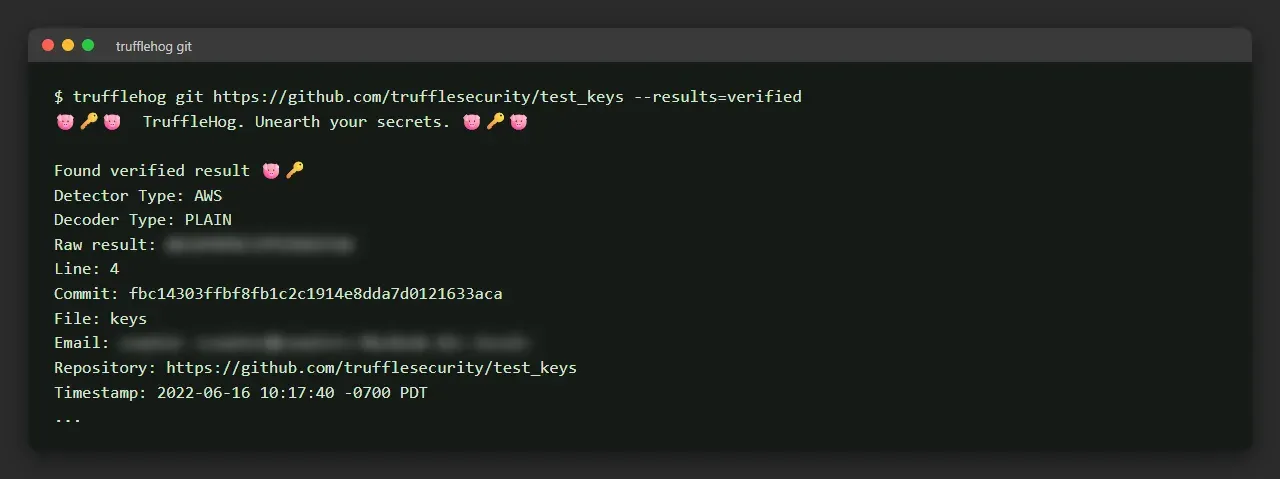
Quick start command and expected output, text copied verbatim from the TruffleHog README and rendered in a terminal-style frame; the key and author email are blurred.
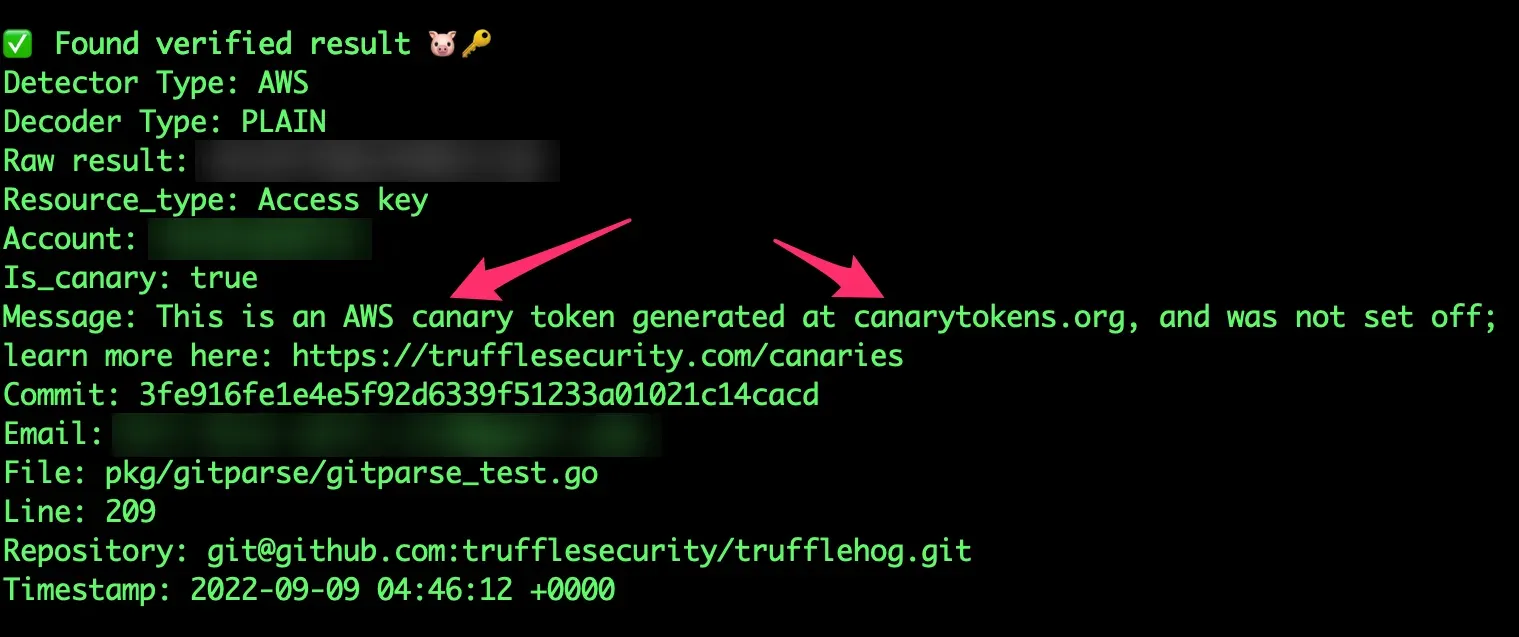
Official README screenshot of TruffleHog flagging an AWS canary token; the key, account number and author email are blurred.
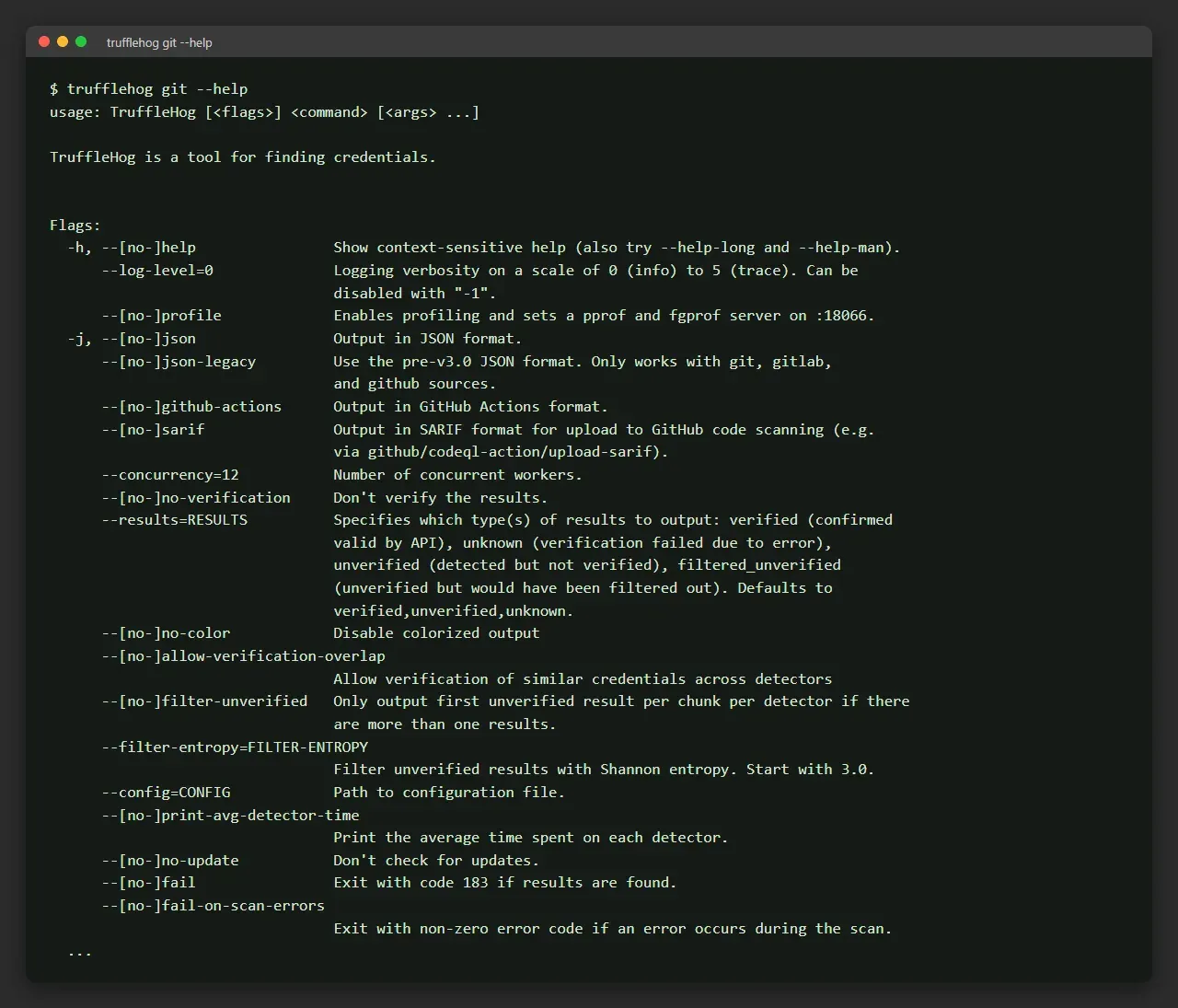
Excerpt of the trufflehog git --help output, text copied verbatim from the README usage section and rendered in a terminal-style frame.
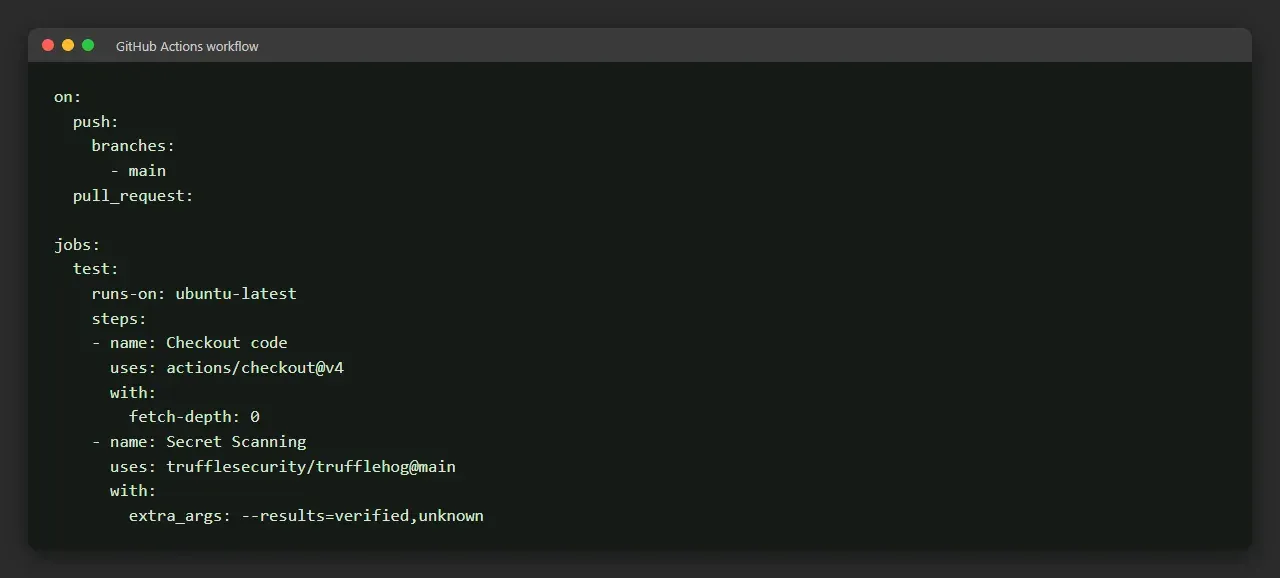
General usage workflow for the TruffleHog GitHub Action, copied verbatim from the README and rendered in a terminal-style frame.
Source: official TruffleHog project page.
Key capabilities
- Release binaries for Linux, macOS and Windows The releases page provides tar.gz archives for linux, darwin and windows on amd64 and arm64; each contains the binary, LICENSE, README and a generated man page. The v3.99.9 archives range from about 30 MB (Linux arm64) to about 80 MB (macOS amd64), and the Linux builds are compressed with UPX during the release build.
- Signed checksums and installation script Every artifact is covered by a checksums file whose signature and certificate are published alongside it, so
cosign verify-blobfollowed bysha256sum -cconfirms a download. The official installation script, scripts/install.sh piped from GitHub into sh, installs into the directory given with-b, accepts-vto perform this cosign check and takes a release tag to install a specific version. - Docker images Multi-architecture images for amd64 and arm64 are pushed to Docker Hub and GitHub Container Registry with version and latest tags. The README examples mount the current directory to /pwd, with separate commands for Unix shells, Windows Command Prompt and PowerShell, and a
--platform linux/arm64variant for Apple Silicon Macs. - Detectors for 800+ secret types Each detector extracts candidate secrets, typically with a regular expression, and verifies them against the target API, typically over HTTP. The detector guide states that high rates of false positives are not accepted.
--include-detectorsand--exclude-detectorsselect detectors by name, ID or range, and the website keeps a detector list. - Verification and result statuses Results are reported as verified (confirmed valid by an API call, such as AWS GetCallerIdentity), unverified (detected but not confirmed) or unknown (verification failed because of an error).
--resultsselects which statuses to print,--no-verificationturns checks off, and--verifierpoints verification at custom endpoints. For private keys, a verified result means the key worked for SSH or SSL authentication, and JWTs signed with public-key cryptography can be checked when the public key is obtainable. - Git, GitHub and GitLab sources The git subcommand scans remote URLs, SSH remotes and local repositories, which are cloned to a temporary directory first to guard against malicious Git configs (CVE-2025-41390);
--clone-pathand--trust-local-git-configchange that behaviour. The github subcommand scans repositories or whole organisations, can skip archived repositories and include issue and pull request comments, and uses--tokento lift unauthenticated rate limits. The gitlab subcommand requires a token. - Hidden and deleted GitHub commits
trufflehog github-experimental --object-discoveryenumerates deleted and hidden commits reachable through cross fork object references and scans them. The feature is labelled alpha, enumeration takes between 20 minutes and a few hours depending on repository size, and state files are kept under $HOME/.trufflehog unless--delete-cached-datais set. - Cloud storage The s3 subcommand scans buckets with local credentials, instance metadata or one or more assumed IAM roles. Include and exclude prefixes and extension filters are applied to object keys before download, and include prefixes also limit listing. The gcs subcommand scans Google Cloud Storage buckets of the project given with
--project-id. - Containers, files, archives and stdin The docker subcommand scans images from a registry, the local Docker daemon or a saved tarball, and accepts several
--imageflags. filesystem scans files and directories, and stdin reads piped data, such as an object streamed from S3 and decompressed on the fly. Archives are unpacked within limits set by--archive-max-size,--archive-max-depthand--archive-timeout, and binaries or archives can be skipped entirely. - CI, collaboration and data platform sources Further subcommands cover CircleCI and Travis CI with API tokens, Jenkins servers, Postman workspaces, collections and environments, Elasticsearch clusters (username and password, service token, or Elastic Cloud ID with API key), syslog, and Hugging Face models, datasets, spaces and buckets including discussion and pull request comments. multi-scan runs several sources defined in a configuration file concurrently.
- Output formats Results print in a readable text format by default, or as JSON with
--json, in the pre-v3 JSON layout with--json-legacy, in GitHub Actions format, or as SARIF with--sarif. SARIF output can be uploaded to GitHub code scanning; the README notes that it is buffered in memory for the whole scan, unlike the streamed formats. - Exit codes and CI scans With
--fail, TruffleHog exits with code 183 when results are found; 0 means no errors and no results, and 1 means an error occurred.--fail-on-scan-errorsturns scan errors into a non-zero exit. For pull request checks,--since-commitnames the base branch and--branchthe branch under review, and the README includes a GitLab CI job that installs TruffleHog with the script and scans merge requests. - GitHub Action
trufflesecurity/trufflehog@mainruns as a composite action with inputs for path, base, head, extra_args, version and image, and by default pulls ghcr.io/trufflesecurity/trufflehog. In the default setup it scans only the commits in a push or pull request; the README shows how to scan a whole branch and how to calculate a shallow clone depth. It statically detects tokens from canarytokens.org. - Pre-commit hooks The pre-commit guide covers a global hook through Git's core.hooksPath, the pre-commit framework and Husky, with native and Docker variants. Setting
TRUFFLEHOG_PRE_COMMIT=1applies pre-commit settings automatically; the manual alternative runstrufflehog git file://. --since-commit HEAD --results=verified,unknown --fail. - Configuration and custom detectors A YAML file passed with
--configdefines sources for multi-scan and custom regex detectors for any subcommand, withdebug: trueavailable per source. Custom detectors (alpha) need at least one regular expression and keyword, can filter by entropy, regex and excluded words, and can send matches to a webhook, where a 200 OK response marks a result as verified. Without a verify section, matches are reported as unverified. - Ignoring and filtering findings A
trufflehog:ignorecomment on a line suppresses its result in sources that support line numbers, and--no-ignore-tagreports those results again.--filter-entropyfilters unverified results by Shannon entropy,--filter-unverifiedkeeps only the first unverified result per chunk and detector, and a verification cache avoids repeated checks. - Credential analysis
trufflehog analyzeruns a deeper analysis of a credential to show its permissions and the resources it can access, for the roughly 20 credential types the README names as most commonly leaked. Truffle Security sells separate Analyze for SaaS and Cloud add-ons for Enterprise customers.
Where TruffleHog fits
Scanning a repository's history for live credentials
The quick start runs trufflehog git against a repository URL with --results=verified, which walks the commit history and prints only credentials that the matching provider accepted. Each result names the detector, decoder, commit, file, line, author and timestamp, and --json adds structured metadata such as the AWS account for AWS keys. Truffle Security's test_keys repository is the target in these examples.
Checking pull requests in CI
In GitHub Actions, the project's action scans the commits of each push or pull request, and extra_args passes options such as --results=verified,unknown. On other CI systems, --since-commit and --branch limit a git scan to the changes under review, and --fail returns exit code 183 when anything is found. Findings can also be written as SARIF and uploaded to GitHub code scanning, where they appear on pull request diffs and in the Security tab.
Stopping secrets before a commit
As a pre-commit hook, TruffleHog runs before a commit is completed, with the stated aim of keeping credentials from leaving the developer's computer. The project documents a global hook for every repository through core.hooksPath, a pre-commit framework entry and a Husky setup, with native and Docker variants.
Auditing a GitHub organisation
trufflehog github --org scans every repository of an organisation, with --exclude-archived, --issue-comments and --pr-comments to adjust coverage and a personal access token for higher rate limits. The experimental object discovery mode extends a repository scan to deleted and hidden commits that remain reachable on GitHub, a case Truffle Security describes in its research on cross fork object references.
Reviewing cloud storage and container images
For AWS, one scan can assume several IAM roles and cover every bucket each role can list, while prefix and extension filters keep archives, media or vendored code out of the download. The docker subcommand scans images from registries, the local daemon or exported tarballs, and the gcs subcommand covers Google Cloud Storage projects. Piping data into trufflehog stdin handles sources without a dedicated subcommand.
Understanding what a leaked key can reach
After a verified finding, trufflehog analyze queries the provider for the identity behind the key, the resources it can access and its permissions on them, for the supported credential types. Results from canarytokens.org keys are flagged as canaries in the output, and a trufflehog:ignore comment marks a known value so that later scans skip it.
Install
curl -sSfL https://raw.githubusercontent.com/trufflesecurity/trufflehog/main/scripts/install.sh | sh -s -- -b /usr/local/binReviews of TruffleHog
Be the first to share your experience with TruffleHog.
Write a review
Loading review form…
Related to TruffleHog
 OpenBaoOpenBao is an open source secrets manager, a fork of Vault managed by the Linux Foundation's OpenSSF, for storing secrets, certificates and keys.
 NucleiNuclei is an MIT-licensed command-line vulnerability scanner from ProjectDiscovery. YAML templates describe each check across HTTP, DNS, network, SSL, headless, file, JavaScript and code protocols, for CI pipelines and bulk scans.